Category Archives: How to Fix

WSS connection server error

Error:

1. The error prompt for SSL certificate rejection is different between Firefox and chrome

(1) Chrome error: websocket connection failed: error in connection establishment: Net:: err_ CERT_ AUTHORITY_ INVALID

(2) an error is reported in Firefox: it is unable to create a wss://www.wss.com/ Connection to the server.

2. Although the error prompts for SSL certificate rejection are different between Firefox and chrome, the solution steps are exactly the same.


code:

1 var ws = new WebSocket("wss://www.wss.com");


Cause of the problem:

Because the certificate is self signed, the CA of the certificate must not exist in the root storage area of the operating system. Naturally, the operating system will not recognize you, and the natural browser will not recognize you, that is, the self signed certificate is not trusted.


Solution:

1. Open a new tab page in Firefox or chrome.

2. Visit your websocket server domain name: https://www.wss.com (change the WSS request to an HTTPS request with the same domain name and port number).

3. You will find the browser alarm: “your connection is not private connection…”.

Don’t panic, look down and click “advanced”.

5. Continue to click “continue to” www.wss.com (unsafe) “.

6. The page will prompt “400 bad request…”, don’t worry. This is due to using HTTP protocol to access WSS service. Don’t worry. You can solve the prompt error here.


Reprinted from: http://www.blogdaren.com/post-2456.html?from=singlemessage

Reproduced in: https://www.cnblogs.com/XuYuFan/p/10917909.html
New version of grafana add data source error!

Premise:

There are no errors in the data source URL configured by grafana.


Phenomenon:

1) After upgrading grafana, it is found that the original configured open face data source is invalid, and HTTP error not found is always prompted.

2) After installing the new version of grafana, we found that ZABBIX data source configuration always reported an error, could not connect to given URL.


handle:

1) Re install the version under grafana 5.4.

2) Check the configuration of ZABBIX user name and password.


The specific reasons and how to configure them above grafana 5.4 have not been studied yet.

Reproduced in: https://www.cnblogs.com/whych/p/10793709.html

Keyerror: “year not in index”

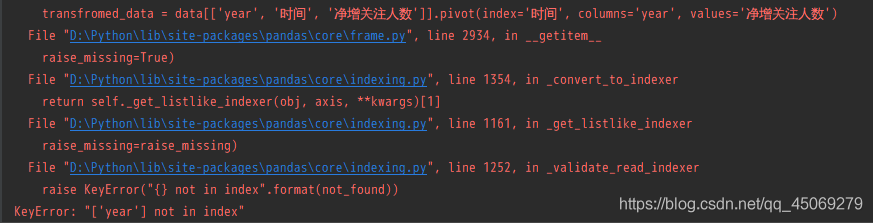
During learning, when writing Python code, the following error was reported: “keyerror” [‘year ‘] not in index “.

Problem description

When learning data visualization, the pandas package is called, and the code runs with an error. The error prompt is as follows

KeyError: "['year'] not in index"

Key error: ‘[‘year’] is not in index ‘

problem analysis

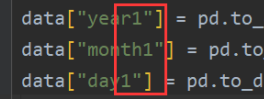
Check the code and find that the front and the back are inconsistent, and there are some problems when you write your own code

Solution
delete “1” and solve the problem

OK, keep learning.

Spring boot problem 1: error reporting life processing instructions for building a spring boot project

Operating environment

System: Windows 10

jdk:1.7

Development tool: Eclipse 4.6

Springboot version: 1.5.3
version

Build tool: Maven
0

Problems and their background

At the beginning of learning to build a spring boot project, the problems encountered.

After creating a new Maven project, add the pom.xml The file reported an error when adding the parent node (the content is as follows).

<parent>
<groupId> org.springframework.boot&lt ;/groupId>
<artifactId>spring-boot-starter-parent</artifactId>
<version>1.4.2.RELEASE</version>
</parent>

The error information is as follows:

Error parsing lifecycle processing instructions

terms of settlement

According to the search results, two ideas are found

1. It is said that there is a problem with this version of eclipse, and the Maven plug-in needs to be updated.

2. It is said that there is a dependency conflict. You can clear the Maven warehouse and update it again.

The first method was tried, but it didn’t solve the problem. So we tried the second method to clear all the dependencies under. M2/repository/in the user’s home directory. Then, in eclipse, right-click the project — & gt; Maven — & gt; update project. After waiting for the update to complete, the error disappears automatically.

Error picture information:

Hive SQL syntax error and corresponding solutions

Hive SQL syntax is different from the frequently used MySQL syntax. SQL written according to the habit of writing MySQL often reports errors, and it is difficult to see the cause of the problem. Therefore, this paper records the phenomenon of the problem and the solution

If you don’t find any problem with the alias: select from error ‘> select from error = 4200* From a) treror: error while compiling statement: failed: semanticexception [error 10025]: expression not in group by key ID (state = 42000, code = 10025)
cause: fields in the select statement but not in the group by statement will cause the error
solution: change the select id, name from a group by name to select collect_ Set (ID), name from a group by NameError: error while compiling statement: failed: semanticexception [error 10004]: Line 1:13 invalid table alias or column reference ‘ID’:
cause: the corresponding field in the subquery statement has changed, such as using a function or renaming
solution: select id, name from (select collect)_ Set (ID), name from a group by name) t “is changed to” select id, name from (select collect)_ Set (ID) id, name from a group by name) t or select t.id, name from (select collect)_ Set (ID), name from a group by name) tproblem: unable to query data after hive multiple SQL unions
cause: the data after union is saved in HDFS to multiple new directories under the table directory
solution: add configuration (which can be directly input on the CLI command line) set mapred.input.dir .recursive=true;
Or use a select statement to package multiple union statements and then execute hsql on tez to report an error. Out of memory
needs to adjust the size of the container
set hive.tez.container .size=4096;
set hive.tez.java . opts = – xmx3072m; hive does not query subdirectories recursively by default, so when creating a table, if there are subdirectories in the specified directory, it will report ERROR:not a file
You can perform the following four configurations in hive cli to enable recursive access to subdirectories in the callback. Instead of recursive query, all the data under the directory will be loaded in. Therefore, when the subdirectories are very deep or there are many subdirectories, the speed will be very slow.
set hive.input.dir .recursive=true; 
set hive.mapred.supports .subdirectories=true; 
set hive.supports.subdirectories=true ; 
set mapred.input.dir .recursive=true;

Solution of running error reporting attributeerror: ‘rectangle’ object has no property ‘normalized’

Have a problem

When running the code, the following error prompt appears:

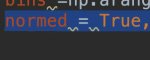
AttributeError:'Rectangle' object has no property 'normed'

resolvent

The reason is that the library has been updated and there is no such attribute. Delete the normal in the code (no error, but it seems that it can’t be drawn)

Replace the normal attribute in the code with density , and add an attribute stacked = true .


Thank you for your comments.

Syntax error: unexpected token in uni app project compilation

Syntax error: unexpected token in uni app project compilation

Contents of articles

Syntax error: unexpected token error content error reason solution for uni app project compilation

Error content

Originally, it could run well. When it was pulled down and then run to wechat applet, it would report an error, but the web side could run normally~

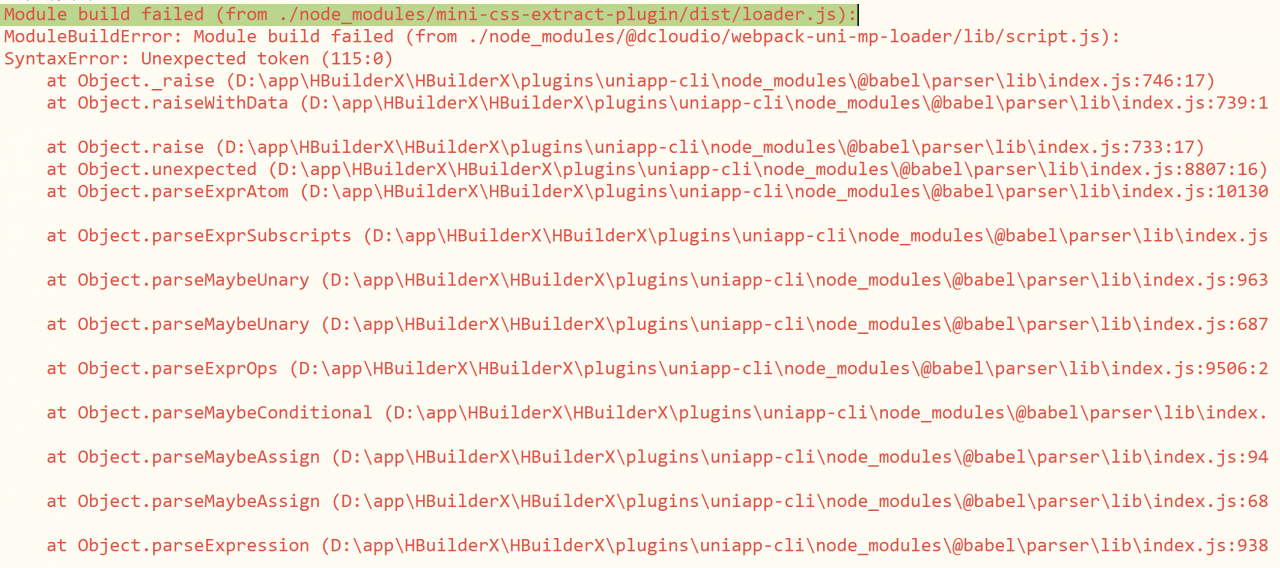
Module build failed (from ./node_ modules/mini-css-extract-plugin/dist/ loader.js ):

The details are as follows:

Cause of error

None of the solutions found in the search work.

After a careful examination of the code, it is found that the & lt; script & gt; tag appears twice in a newly modified Vue file. The new one is used to describe the style,

Solution

The problem is solved by merging the content in the new & lt; script & gt; into the & lt; style & gt; tag

Note that there can only be three top-level tags in uni app!!

The root of the problem is that the team didn't communicate well, so there was a problem.. But uni app really has a lot of holes!!!!

Prompt error: rpmdb open failed using yum

On the CentOS system, an error is reported when using the yum command to install the package

rpmdb: Thread/process 6539/140448388269824 failed: Thread died in Berkeley DB library
error: db3 error(-30974) from dbenv->failchk: DB_RUNRECOVERY: Fatal error, run database recovery
error: cannot open Packages index using db3 -  (-30974)
error: cannot open Packages database in /var/lib/rpm
CRITICAL:yum.main:

The reason is that the RPM database is damaged

Restore to normal after rebuilding the database:

cd /var/lib/rpm/
for i in `ls | grep 'db.'`;do mv $i $i.bak;done
rpm --rebuilddb
yum clean all


Error loading password’s fault file (MySQL for Excel)

Recently, error loading password’s fault file is always reported when opening excel, which is puzzling. However, xlsx file can still be opened, and I didn’t care about it.

However, it is not enough to import xlsx file as data.

Then, after carefully reading the error information, we found that it was MySQL for Excel. What the hell?How did excel get into MySQL.

So find out what’s wrong with MySQL, and then go online.

Finally, I found that when MySQL was installed, there was a component named MySQL for Excel.

Since there is a problem with MySQL for Excel and it can’t be used now, it’s time to unload it.

So, open MySQL installer, check MySQL for Excel (pay attention not to check other, otherwise it’s not good to unload MySQL), and choose Remove. It’s really a good thing.

OK, open excel and never report this error again

mysql error 1062

Duplicate entry ‘1’ for key ‘PRIMARY’

Error reason: primary key conflict, primary key value is unique
solution: the value of ‘primary’ primary key cannot be the same

Example:

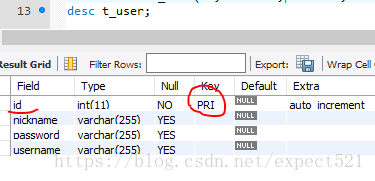
1. View the table structure

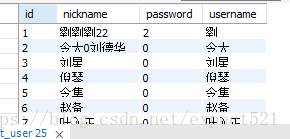
2. View data

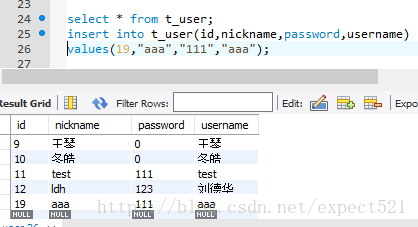
3. Add data, add id = 1, and an error will be reported, because ID is the primary key with uniqueness

Solution: if the value of ID is modified, the addition is successful