Category Archives: How to Fix

Error: SaveRasterFile failed: IDLnaMetadata Error:naGetMetadata-GetMetadataJob failed

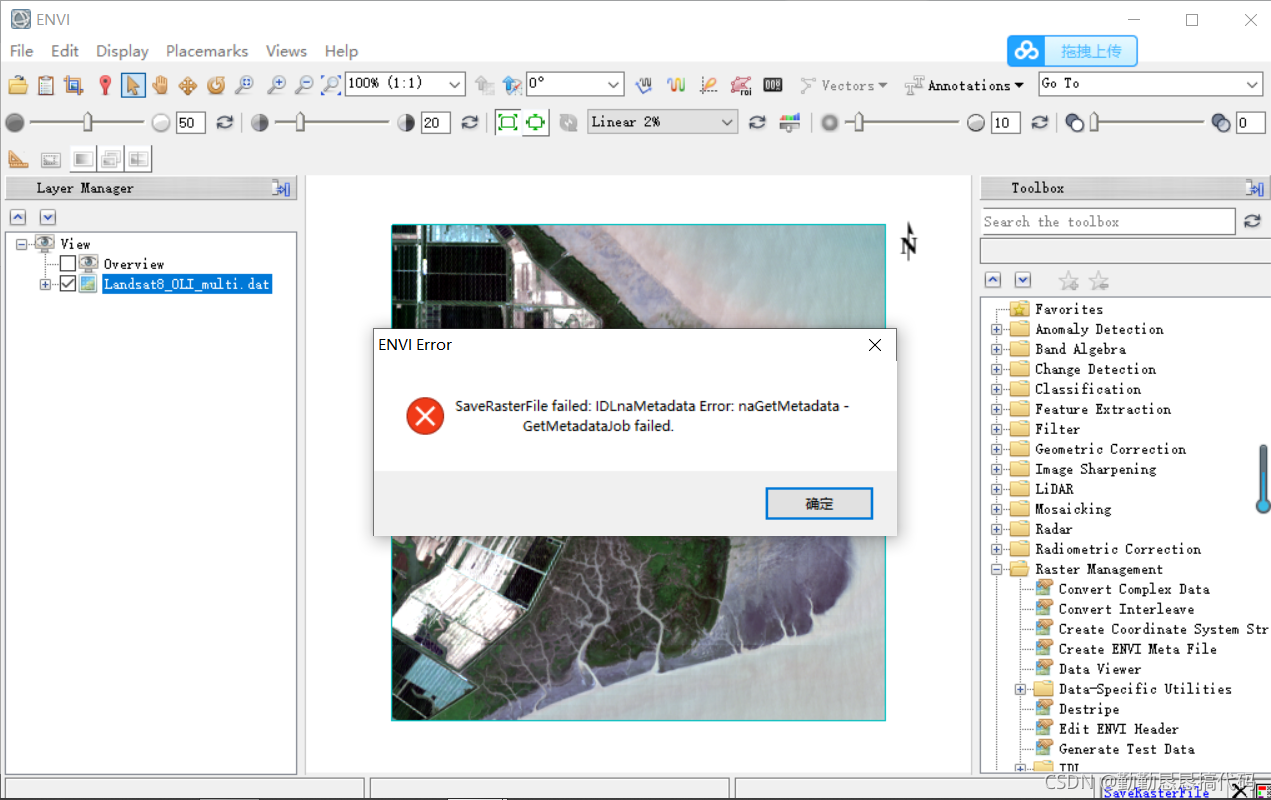
Today, during the image test in envi, I wanted to back up (save) the image, but the following error was reported
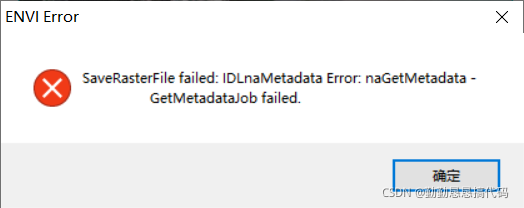
saverasterfile failed: idlnametadata error: nagetmetadata getmetadatajob failed


the reason is that Chinese cannot appear in the storage path, otherwise an error will be reported

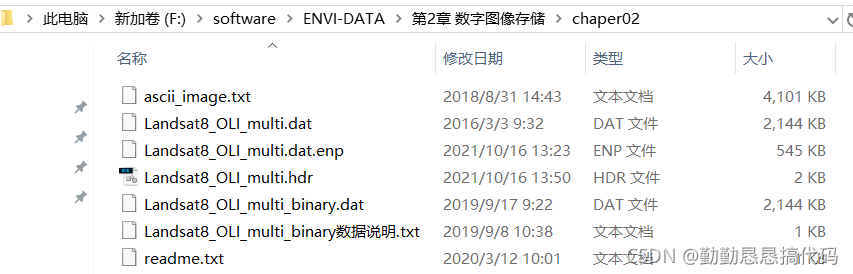
When exporting to raster data, envi needs to read the metadata in the input file. If there is Chinese in the path, it will be unable to read and this error will be reported. At this time, you can change the storage path
the path where I read the image happens to have Chinese files, so I want to change it to English

Error c2375: “wsacleanup”: redefine; Different links, etc

Error c2375: “wsacleanup”: redefine; Different links, etc

Solution

Solution

By default, windows. H will contain Winsock. H. When you include Winsock 2. H, it will conflict. Therefore, before including windows. H, you need to define a macro to remove Winsock. H

Scheme 1
in #include & lt; windows.h> Add #define Win32 to the previous line_ LEAN_ AND_ Mean// remove some uncommon
scheme 2
Project attribute – C/C + + – preprocessor – preprocessor definition
manually add a macro:
Win32_ LEAN_ AND_ MEAN;

[shell] sh executes the script and reports an error syntax error: “(” unexpected “)

Question:

The SH script contains the contents of array initialization

$ str="123 456 789"
$ array=($str)
$ echo ${array[2]}

SH executing the script will report an error  Syntax error: "(" unexpected

reason:

Other common Linux distributions, although many point sh to bash

The SH command on Debian/Ubuntu points to dash instead of bash by default

And because dash is lighter than bash, it only supports basic shell functions,  

It does not include the array initialization just now, so it can not be recognized. Syntx error is directly reported

solve:

  The solution is to use it directly   bash test. Sh , or ./test. Sh , these two ways to execute the script.


When executing sh./xxx.sh, the solution of “syntax error:” (“unexpected”) appears

  Yesterday, the system identification part of virtualmin was updated to enable it to support one click installation and optimization under Debian system. The code was almost modified. Reinstall the VPS into Debian. Execute the code through sh./virtualmin.sh and report “syntax error:” (“unexpected”) Error. It’s OK to execute through bash./virtualmin.sh. After searching the syntax for several times, there’s no problem. Later, find the cause of the problem on the Internet:
        The code is correct for standard bash, because Ubuntu/Debian uses dash instead of traditional bash in order to speed up startup. Dash is making trouble. The solution is to cancel dash.

solve:

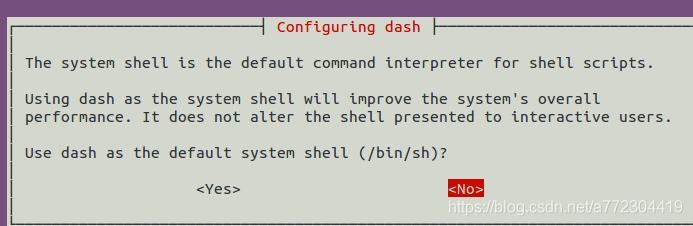
1) sudo dpkg-reconfigure dash         Select no from the options and it’s done!

2) Execute dpkg reconfigure dash under root and select No

zxl@ubuntu :~/package$ su
Password:
root@ubuntu :/home/zxl/package# dpkg-reconfigure dash

python multiprocessing.pool NameError: name is not defined

Question

The paper code encountered a problem similar to the following. After some efforts, it can be regarded as solving this problem.

# import torch
# # print(torch.__version__)
# # print(torch.cuda.is_available())
import multiprocessing
cores = multiprocessing.cpu_count() // 2
def b(xs):

    t = temp_num[xs[0]] * 2
    return t
def a():
    global temp_num
    temp_num = [4, 5, 6]
    pool = multiprocessing.Pool(cores)
    xs = range(3)
    batch_result = pool.map(b,xs)
    print(batch_result)
def main():
    a()
if __name__ == '__main__':
    main()

Error:

solve

import multiprocessing
cores = multiprocessing.cpu_count() // 2
def b(x):
    xs = x[0]
    temp_num = x[1]
    t = temp_num[xs] * 2
    return t
def a():
    global temp_num
    temp_num = [4, 5, 6]
    pool = multiprocessing.Pool(cores)
    xs = range(3)

    z =zip(xs,[temp_num] * 3)
    result = pool.map(b,z)
    print(result)
def main():
    a()

if __name__ == '__main__':

    main()

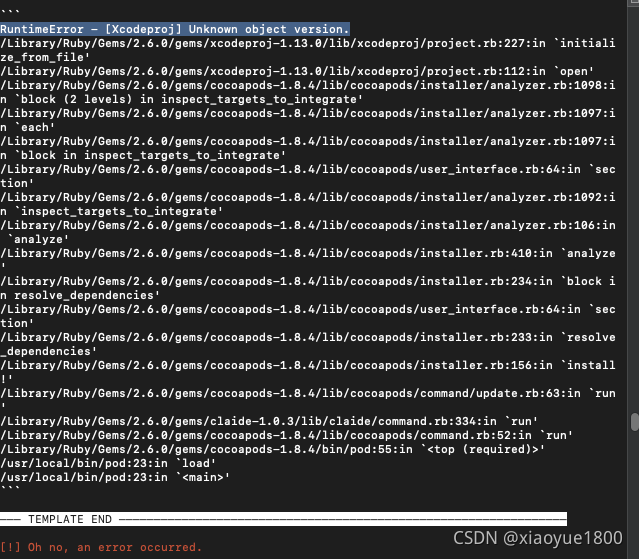
RuntimeError – [Xcodeproj] Unknown object version.

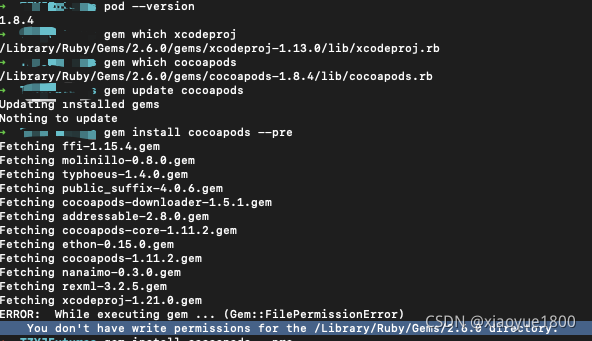
After xcode13 is upgraded, if a new project is built, pod install will report an error, as shown in the figure:

Reason: This is because the local version of Xcode does not match the version of cocoapods. You need to update cocoapods
solution:

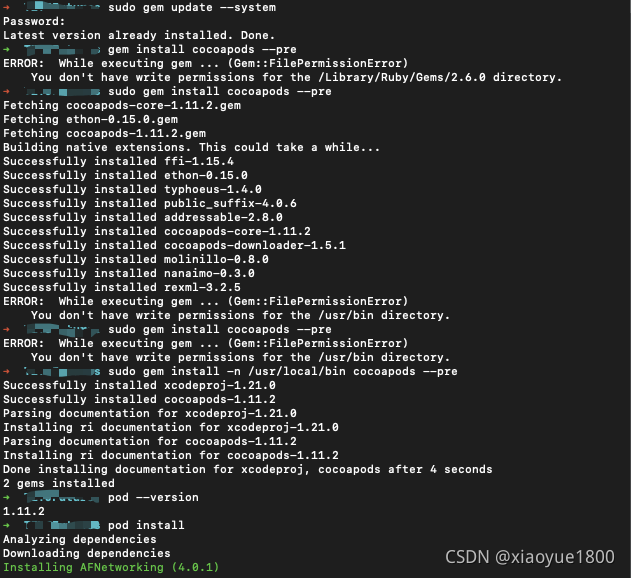
Refer to the solution provided on the Internet and input the command at the terminal  $ gem install cocoapods --pre  

Error will be reported:     You don’t have write permissions for the /Library/Ruby/Gems/2.6.0 directory.

  Solution: input in the terminal     sudo gem install -n /usr/local/bin cocoapods –pre

It can be used normally in pod install


PHP Fatal error: Uncaught Error: Class ‘\Elasticsearch\Serializers\SmartSerializer‘ not found in /h

  Class file exists, but prompt cannot load “elasticsearch \ serializers \ smartserializer”

PHP Fatal error:  Uncaught Error: Class '\Elasticsearch\Serializers\SmartSerializer' not found in /home/wwwroot/es-task/vendor/elasticsearch/src/Elasticsearch/ClientBuilder.php:488

Find classes that are not loaded directly. Use require_ Once “class name path”;

Error response from daemon: OCI runtime exec failed: exec failed: container_linux.go:345:

        An error was reported when using docker to enter the specified container today. The screenshot of the error is as follows:

        After careful verification, the command is correct, but it can’t get into the container. After checking the data, it is realized that there is a problem with the docker. It can be understood in combination with the error report:

Error response from daemon: OCI runtime exec failed: exec failed: container_linux.go:345: starting container process caused "exec: \"/bin/bash\": stat /bin/bash: no such file or directory": unknown

        The above is complete error reporting information, of which the key information is as follows:

"/bin/bash\": stat /bin/bash: no such file or directory": unknown

        That is, there is no directory/bin/bash, so an error will be reported when you want to enter the container according to the initial command.

        You can enter by using the following command. The screenshot is as follows:

docker exec -it mqtt /bin/sh

      Perfect solution, record notes!


Import error, failed to import the debug version of PYD

Today, I used swig to encapsulate the underlying C + + library. After the result was encapsulated, release was OK. However, in the debug mode, the import failed all the time, indicating that the module could not be found. Why did I fail when I had PYD?

After troubleshooting, PYD in the original debug mode must be added_ d

The result is to add_ D is solved; For example_ Somelib.pyd should be_ someLib_ d. PYD, so Python can import.

Modify cmakelists.txt to ensure that it is added in debug mode_ d

set(CMAKE_DEBUG_POSTFIX _d)
set_target_properties(${target_name} PROPERTIES DEBUG_POSTFIX ${CMAKE_DEBUG_POSTFIX})

Ubuntu18.04 x11vnc failed, report error opening logfile: /var/log/x11vnc.log

Ubuntu 18.04 x11vnc startup failed with error. Opening logfile:/var/log/x11vnc.log

Premise summary error reporting solution

Premise summary

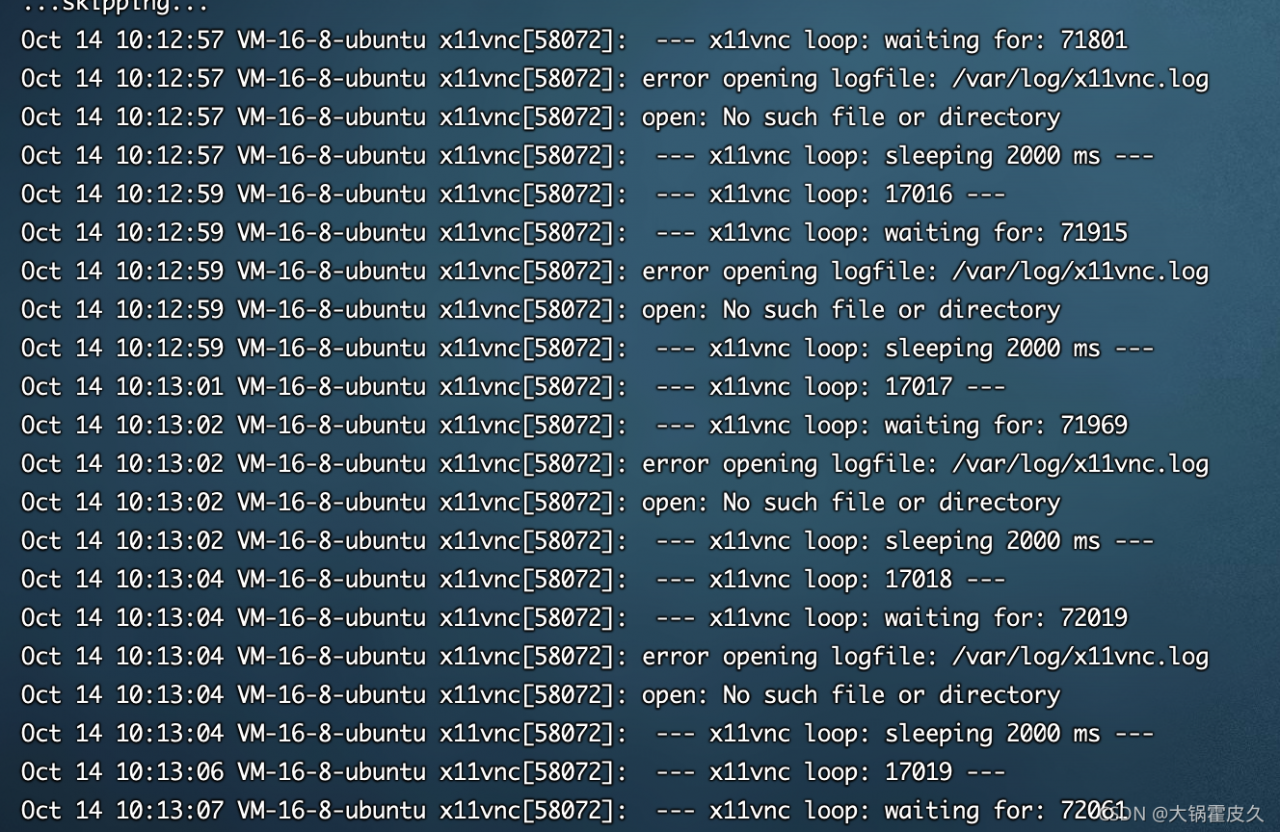
X11vnc was previously installed in Ubuntu 18.04, but it was not connected through VNC view recently. After logging in with SSH, an error was found according to journalctl -u x11vnc

after creating /var/log/x11vnc. Log , view x11vnc.log

report errors

root@VM-16-8-ubuntu:/home/ubuntu# cat /var/log/x11vnc.log | head -n 1000
14/10/2021 10:30:02 passing arg to libvncserver: -rfbauth
14/10/2021 10:30:02 passing arg to libvncserver: /etc/x11vnc.pass
14/10/2021 10:30:02 passing arg to libvncserver: -rfbport
14/10/2021 10:30:02 passing arg to libvncserver: 5900
14/10/2021 10:30:02 x11vnc version: 0.9.13 lastmod: 2011-08-10  pid: 96503
xauth:  unable to generate an authority file name
14/10/2021 10:30:02 -auth guess: using 'XAUTHORITY=/var/run/lightdm/root/:0' for disp='unset'
14/10/2021 10:30:02 XOpenDisplay("") failed.
14/10/2021 10:30:02 Trying again with XAUTHLOCALHOSTNAME=localhost ...
14/10/2021 10:30:02 
14/10/2021 10:30:02 *** XOpenDisplay failed. No -display or DISPLAY.
14/10/2021 10:30:02 *** Trying ":0" in 4 seconds.  Press Ctrl-C to abort.
14/10/2021 10:30:02 *** 1 2 3 4 
14/10/2021 10:30:06 *** XOpenDisplay of ":0" successful.
14/10/2021 10:30:06 
14/10/2021 10:30:06 Using X display :0
14/10/2021 10:30:06 rootwin: 0x2a0 reswin: 0xe00001 dpy: 0xc6786c40
14/10/2021 10:30:06 
14/10/2021 10:30:06 ------------------ USEFUL INFORMATION ------------------
14/10/2021 10:30:06 
14/10/2021 10:30:06 Wireframing: -wireframe mode is in effect for window moves.
14/10/2021 10:30:06   If this yields undesired behavior (poor response, painting
14/10/2021 10:30:06   errors, etc) it may be disabled:
14/10/2021 10:30:06    - use '-nowf' to disable wireframing completely.
14/10/2021 10:30:06    - use '-nowcr' to disable the Copy Rectangle after the
14/10/2021 10:30:06      moved window is released in the new position.
14/10/2021 10:30:06   Also see the -help entry for tuning parameters.
14/10/2021 10:30:06   You can press 3 Alt_L's (Left "Alt" key) in a row to 
14/10/2021 10:30:06   repaint the screen, also see the -fixscreen option for
14/10/2021 10:30:06   periodic repaints.
14/10/2021 10:30:06 
14/10/2021 10:30:06 XFIXES available on display, resetting cursor mode
14/10/2021 10:30:06   to: '-cursor most'.
14/10/2021 10:30:06   to disable this behavior use: '-cursor arrow'
14/10/2021 10:30:06   or '-noxfixes'.
14/10/2021 10:30:06 using XFIXES for cursor drawing.
14/10/2021 10:30:06 GrabServer control via XTEST.
14/10/2021 10:30:06 
14/10/2021 10:30:06 Scroll Detection: -scrollcopyrect mode is in effect to
14/10/2021 10:30:06   use RECORD extension to try to detect scrolling windows
14/10/2021 10:30:06   (induced by either user keystroke or mouse input).
14/10/2021 10:30:06   If this yields undesired behavior (poor response, painting
14/10/2021 10:30:06   errors, etc) it may be disabled via: '-noscr'
14/10/2021 10:30:06   Also see the -help entry for tuning parameters.
14/10/2021 10:30:06   You can press 3 Alt_L's (Left "Alt" key) in a row to 
14/10/2021 10:30:06   repaint the screen, also see the -fixscreen option for
14/10/2021 10:30:06   periodic repaints.
14/10/2021 10:30:06 
14/10/2021 10:30:06 XKEYBOARD: number of keysyms per keycode 7 is greater
14/10/2021 10:30:06   than 4 and 51 keysyms are mapped above 4.
14/10/2021 10:30:06   Automatically switching to -xkb mode.
14/10/2021 10:30:06   If this makes the key mapping worse you can
14/10/2021 10:30:06   disable it with the "-noxkb" option.
14/10/2021 10:30:06   Also, remember "-remap DEAD" for accenting characters.
14/10/2021 10:30:06 
14/10/2021 10:30:06 X FBPM extension not supported.
14/10/2021 10:30:06 X display is capable of DPMS.
14/10/2021 10:30:06 --------------------------------------------------------
14/10/2021 10:30:06 
14/10/2021 10:30:06 Default visual ID: 0x21
14/10/2021 10:30:06 Read initial data from X display into framebuffer.
14/10/2021 10:30:06 initialize_screen: fb_depth/fb_bpp/fb_Bpl 24/32/4096
14/10/2021 10:30:06 
14/10/2021 10:30:06 X display :0 is 32bpp depth=24 true color
14/10/2021 10:30:06 
14/10/2021 10:30:06 Listening for VNC connections on TCP port 5900
14/10/2021 10:30:06 Listening for VNC connections on TCP6 port 5900
14/10/2021 10:30:06 listen6: bind: Address already in use
14/10/2021 10:30:06 Not listening on IPv6 interface.
14/10/2021 10:30:06 
14/10/2021 10:30:06 Xinerama is present and active (e.g. multi-head).
14/10/2021 10:30:06 Xinerama: number of sub-screens: 1
14/10/2021 10:30:06 Xinerama: no blackouts needed (only one sub-screen)
14/10/2021 10:30:06 
14/10/2021 10:30:06 fb read rate: 927 MB/sec
14/10/2021 10:30:06 fast read: reset -wait  ms to: 10
14/10/2021 10:30:06 fast read: reset -defer ms to: 10
14/10/2021 10:30:06 The X server says there are 10 mouse buttons.
14/10/2021 10:30:06 screen setup finished.
14/10/2021 10:30:06 

The VNC desktop is:      VM-16-8-ubuntu:0

******************************************************************************
Have you tried the x11vnc '-ncache' VNC client-side pixel caching feature yet?

The scheme stores pixel data offscreen on the VNC viewer side for faster
retrieval.  It should work with any VNC viewer.  Try it by running:

    x11vnc -ncache 10 ...

One can also add -ncache_cr for smooth 'copyrect' window motion.
More info: http://www.karlrunge.com/x11vnc/faq.html#faq-client-caching

Solution

    after executing x11vnc - ncache 10 according to the error message prompted, 5900 can be monitored normally. At this time, you can connect normally through VNC viewer, but you cannot access it through the original password. View the path to read the password in /lib/SYSTEMd/system/x11vnc. Service . Reset password sudo x11vnc - storepasswd/etc/x11vnc. Pass after restarting x11vnc systemctl restart x11vnc , you can log in with the new password successfully
    `

IMG tag onerror event resolves infinite loop error reporting

Problem Description:

problem: the SRC picture in img tag failed to load, and a fragment icon will appear in the original picture position, which is very unpleasant. How to be more beautiful


Cause analysis:

because the reverse display resource cannot be found or the path does not exist, it will be processed according to the IMG default processing method


Solution:

1. Find a default picture to replace

2. Trigger with onerror event

3. The oneror event is triggered repeatedly

<img src="url" onerror= "this.οnerrοr='';this.src='static/images/nop.svg'">

Can be solved

Matlab 2018a cracked the licensing error: – 8523

Matlab 2018a cracked the licensing error: – 8523

The online cracking method is described as follows: after installation, the license_ Copy standalone.lic to the license folder of MATLAB folder; Then copy netapi32.dll to bin \ win64 folder of MATLAB folder and overwrite it.

After this operation, the program will report 8523 error, and some people on the Internet say the method is OK, others say no, but they can’t find a fundamental solution. I installed it under win10 and reported the same error. After the personal test, the following methods are effective:

1. Run bin \ win64 \ activate_ Matlab.exe, select license_ Standard.lic file registration (this step may be omitted)

2. Do not open the program from the desktop shortcut. Run bin \ matlab.exe in the installation directory to open it. If the problem is solved, you can also resend this file and overwrite it with the desktop shortcut. The original file path is OK, but I haven’t studied why not.