Category Archives: How to Fix

Error = 2, no such file or director is prompted in the lower left corner of the MAC pycharm running file

Background:
System: MAC system
problem: Python runs the python project provided by others, but the file in the project exists, but it prompts that there is no such file
specific error:
error: cannot run program “/ users/Bob/pychamprojects/untitled/venv/bin/Python” (in directory “/ users/Bob/desktop/1”): error = 2, no such file or director

Solution:
delete the hidden. Idea file under the project, restart pycharm and run it again

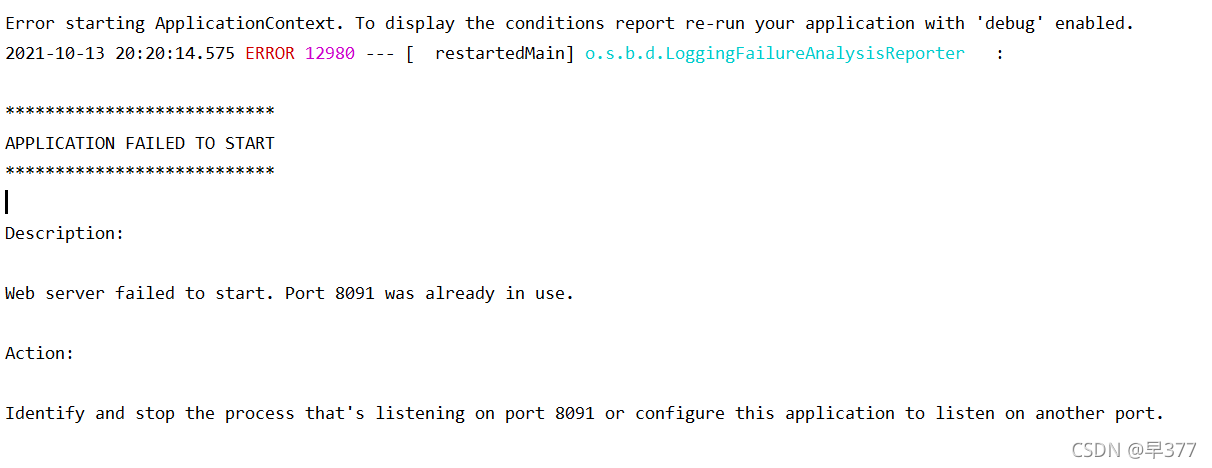
Error starting ApplicationContext. To display the conditions report re-run your application with

This error message may appear when opening Java programs in idea. Generally, it is reminded   Server startup failed. Port XXXX is already in use.

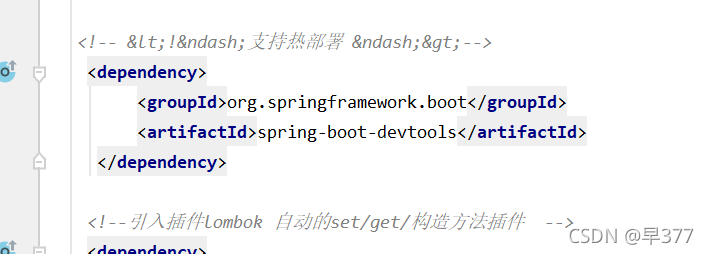
  Go and see your POM file at this time

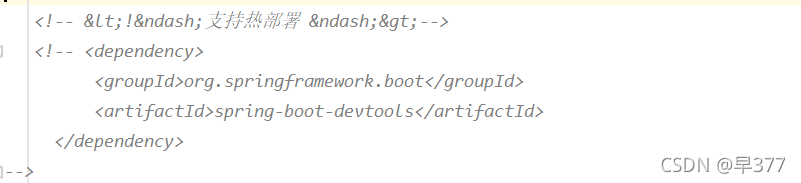
Comment out the dependency of hot deployment!!!!


  OK! Remember to refresh Maven after commenting

Start successful   

[salesforce] prompt error deploying or retrieving source when vscode pulls the code

Prompt error deploying or retrieving source when vscode pulls the code

When sfdx: retrieve this source from org is executed, the following information is prompted:

Error deploying or retrieving source: The file or directory that you tried to deploy or retrieve isn’t in a package directory that’s specified in your sfdx-project.json file. Add this location to your “packageDirectories” value

resolvent

Open the sfdx project. JSON configuration file (in the root directory or Ctrl + P search)

Add the following elements to the "packagedirectories" attribute array of the configuration file:

    {
      "path": "XXX",
      "default": false
    }

Note that path is the directory (root directory) where the file you want to pull is located. For example, the root directory of your file is called “functional”, and XXX here will fill in functional .

Save after adding, and then pull the file again.

Error (12153): Can‘t elaborate top-level user hierarchy

This error message appears when quartus is integrating
find the corresponding code:

from the sensitive list, the register in the always block is asynchronously reset, so during synthesis, the reset end of the register must only be connected with the reset signal, but the code is connected with the synchronization signal other than the reset signal
modification method:
1. Change to synchronization

always@(posedge clk) begin
	if(!rst_n || first_tu_flag) begin
		...
	end

2. Standard writing

always@(posedge clk or negedge rst_n) begin
	if(!rst_n) begin
		...
	end
	else if(first_tu_flag) begin
		...
	end

Easynvr operation log reports an error. Fatal error: concurrent map read and map write troubleshooting

As we all know, most of our products are compiled in go language. In the case of concurrency, read-only is thread safe, and read-write is thread unsafe.

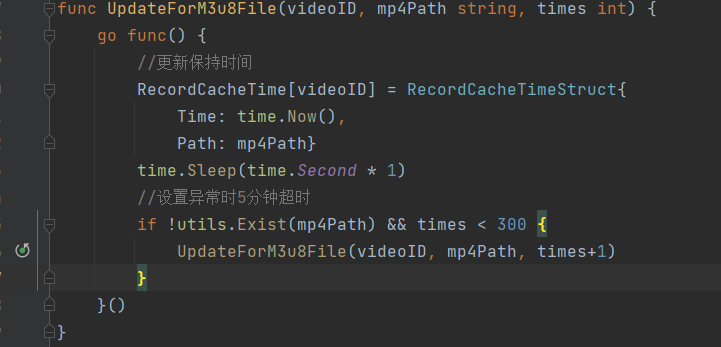
Recently, in the easynvr site of a project, we checked the log and found the error message: fatal error: concurrent map read and map write. The error message shows that there are concurrent map reads and writes, that is, two concurrent functions are used to read and write the map continuously, resulting in race problems.

Find the code and find that concurrent read/write is used in the code:

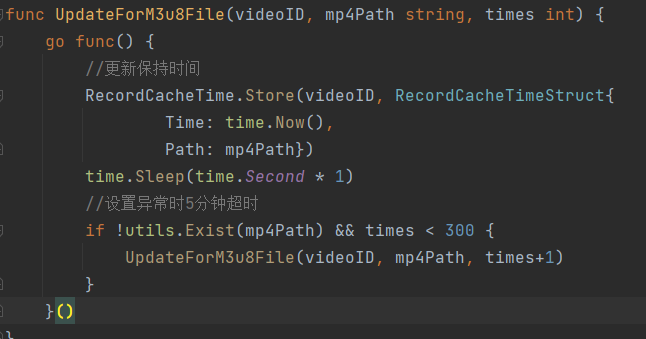
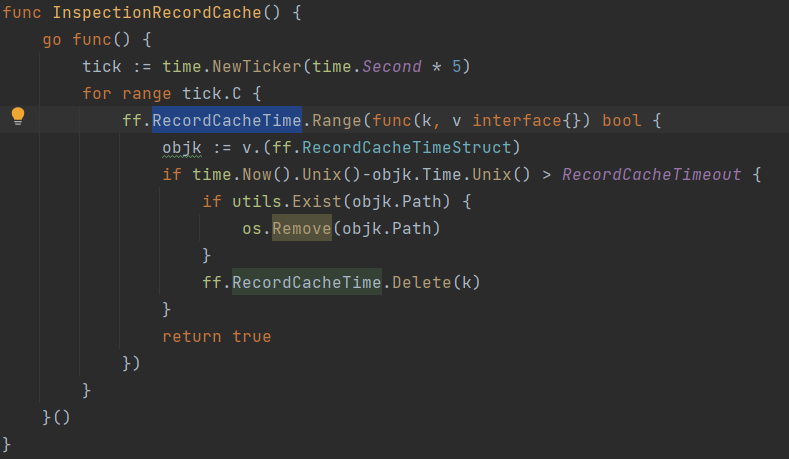
The code needs to be modified here. Below, we replace the built-in map type with the concurrency safe sync.map.

Write reference codes concurrently as follows:

The concurrent read reference code is as follows:

Add: for concurrency problems that are not easy to find, you can use the – race parameter for concurrency detection:

func main() {
	a := 1
	go func() {
		a = 2
	}()
	a = 3
	fmt.Println(a)

	time.Sleep(time.Second * 1)
}

Solve the problem of error loading MySQL DB module. Encountered during Django project

Solve the problem of error loading MySQL DB module encountered during Django project

Python version 3.9 was used when creating the Django project. The MySQL database was successfully introduced in the process of doing the project, but later the python version was reduced to 3.7, so this error was reported when re running the system

Problem causes and solutions:
the package used by Django to connect to MySQL in Python 3 is pymysql, so the first step is to install pymysql:

pip install pymysql

Installation does not mean that it is OK. It also needs to be installed in the project__ init__. Add the following code to the. Py file:

import pymysql
pymysql.install_as_MySQLdb()


Qxcbcconnection: xcb error: 148 error while ROS is running rviz

reason:

Because VNC is used to remotely control the lower computer, rviz is a graphics plug-in developed based on OpenGL. Theoretical screen parameters (the tis’ screen) need to be used. Using VNC will lead to incorrect screen parameter values, resulting in rviz errors.

resolvent:

1) Connect the display in the lower computer, and then turn on rviz on the PC enabled with VNC to temporarily solve the problem.

2) Use SSH instead of VNC to control the lower computer remotely. Pay attention to closing the VNC process running in the background, otherwise the core dump problem will occur when running rviz. In addition, due to the impact of network speed, there may be a stuck problem.

Server check fail, please check server 192.168.11.13 ,port 9848 is available , error ={}

Nacos is started on 192.168.11.13, and the access is normal
the local server is started on 192.168.11.11, and the startup log reports an error
server check fail, please check server 192.168.11.13, port 9848 is available, error = {}

2021-10-09 17:33:16.178 ERROR 21512 --- [           main] c.a.n.c.remote.client.grpc.GrpcClient    : Server check fail, please check server 192.168.11.13 ,port 9848 is available , error ={}

java.util.concurrent.TimeoutException: Waited 3000 milliseconds (plus 731800 nanoseconds delay) for com.alibaba.nacos.shaded.io.grpc.stub.ClientCalls$GrpcFuture@157ec23b[status=PENDING, info=[GrpcFuture{clientCall={delegate={delegate=ClientCallImpl{method=MethodDescriptor{fullMethodName=Request/request, type=UNARY, idempotent=false, safe=false, sampledToLocalTracing=true, requestMarshaller=com.alibaba.nacos.shaded.io.grpc.protobuf.lite.ProtoLiteUtils$MessageMarshaller@60d6fdd4, responseMarshaller=com.alibaba.nacos.shaded.io.grpc.protobuf.lite.ProtoLiteUtils$MessageMarshaller@66f28a1f, schemaDescriptor=com.alibaba.nacos.api.grpc.auto.RequestGrpc$RequestMethodDescriptorSupplier@60a19573}}}}}]]
	at com.alibaba.nacos.shaded.com.google.common.util.concurrent.AbstractFuture.get(AbstractFuture.java:508)
	at com.alibaba.nacos.common.remote.client.grpc.GrpcClient.serverCheck(GrpcClient.java:146)
	at com.alibaba.nacos.common.remote.client.grpc.GrpcClient.connectToServer(GrpcClient.java:268)
	at com.alibaba.nacos.common.remote.client.RpcClient.start(RpcClient.java:395)
	at com.alibaba.nacos.client.config.impl.ClientWorker$ConfigRpcTransportClient.ensureRpcClient(ClientWorker.java:924)
	at com.alibaba.nacos.client.config.impl.ClientWorker$ConfigRpcTransportClient.getOneRunningClient(ClientWorker.java:1087)
	at com.alibaba.nacos.client.config.impl.ClientWorker$ConfigRpcTransportClient.queryConfig(ClientWorker.java:979)
	at com.alibaba.nacos.client.config.impl.ClientWorker.getServerConfig(ClientWorker.java:407)
	at com.alibaba.nacos.client.config.NacosConfigService.getConfigInner(NacosConfigService.java:166)
	at com.alibaba.nacos.client.config.NacosConfigService.getConfig(NacosConfigService.java:94)
	at com.alibaba.cloud.nacos.client.NacosPropertySourceBuilder.loadNacosData(NacosPropertySourceBuilder.java:85)
	at com.alibaba.cloud.nacos.client.NacosPropertySourceBuilder.build(NacosPropertySourceBuilder.java:73)
	at com.alibaba.cloud.nacos.client.NacosPropertySourceLocator.loadNacosPropertySource(NacosPropertySourceLocator.java:199)
	at com.alibaba.cloud.nacos.client.NacosPropertySourceLocator.loadNacosDataIfPresent(NacosPropertySourceLocator.java:186)
	at com.alibaba.cloud.nacos.client.NacosPropertySourceLocator.loadNacosConfiguration(NacosPropertySourceLocator.java:158)
	at com.alibaba.cloud.nacos.client.NacosPropertySourceLocator.loadSharedConfiguration(NacosPropertySourceLocator.java:116)
	at com.alibaba.cloud.nacos.client.NacosPropertySourceLocator.locate(NacosPropertySourceLocator.java:101)
	at org.springframework.cloud.bootstrap.config.PropertySourceLocator.locateCollection(PropertySourceLocator.java:52)
	at org.springframework.cloud.bootstrap.config.PropertySourceLocator.locateCollection(PropertySourceLocator.java:47)
	at org.springframework.cloud.bootstrap.config.PropertySourceBootstrapConfiguration.initialize(PropertySourceBootstrapConfiguration.java:98)
	at org.springframework.boot.SpringApplication.applyInitializers(SpringApplication.java:623)
	at org.springframework.boot.SpringApplication.prepareContext(SpringApplication.java:367)
	at org.springframework.boot.SpringApplication.run(SpringApplication.java:311)
	at org.springframework.boot.builder.SpringApplicationBuilder.run(SpringApplicationBuilder.java:140)
	at org.springblade.core.launch.BladeApplication.run(BladeApplication.java:50)
	at com.ht.bms.custom.CustomApplication.main(CustomApplication.java:31)

Although an error is reported, the service can be started normally. The problem is that when the local server calls other services registered in Nacos, it cannot be called after timeout

But other colleagues started the service on their computer and reported no error.

The problem has been solved:
check whether the Nacos server 8848884998489849 is open to these ports. If the docker is started, the ports need to be exposed.
when the ports are exposed and open, there are still problems. I modified the configuration of the idea. The problem is solved:
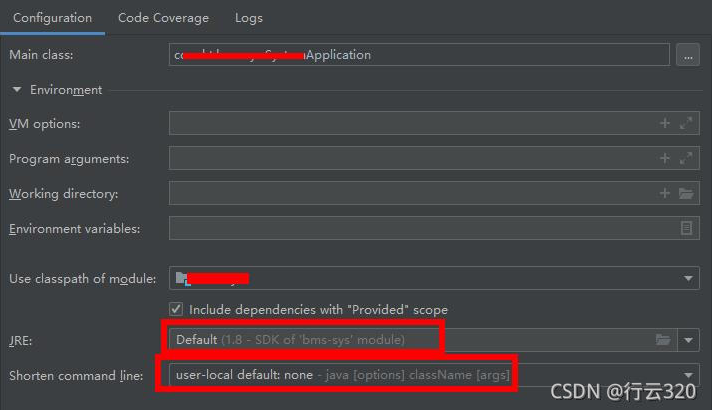
configuration before modification:
After modification:
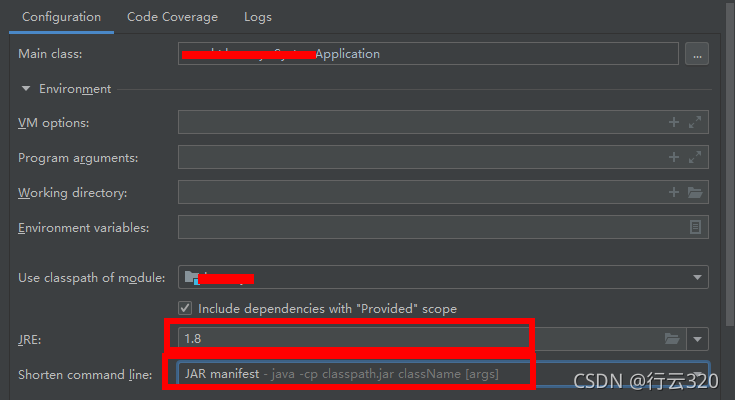
the JRE is changed to the JRE installed locally instead of the JRE provided by idea
in addition, the short command line is also modified

The error is not reported when restarting. It is normal, but the configuration is changed back, and the error is still not reported when restarting. It is strange
it may be due to the cache
have a nice work!
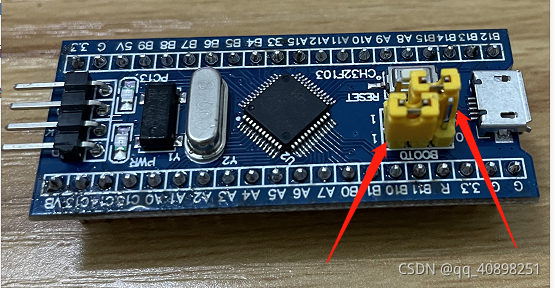
Solution to ch32f103c8 burning prompt internal command error

Material: ch32f103c8 minimum system board, keil5.27

Phenomenon: burning prompt internal command error

Solution: connect boot0 and boot1 to the jumper cap as shown in the figure below

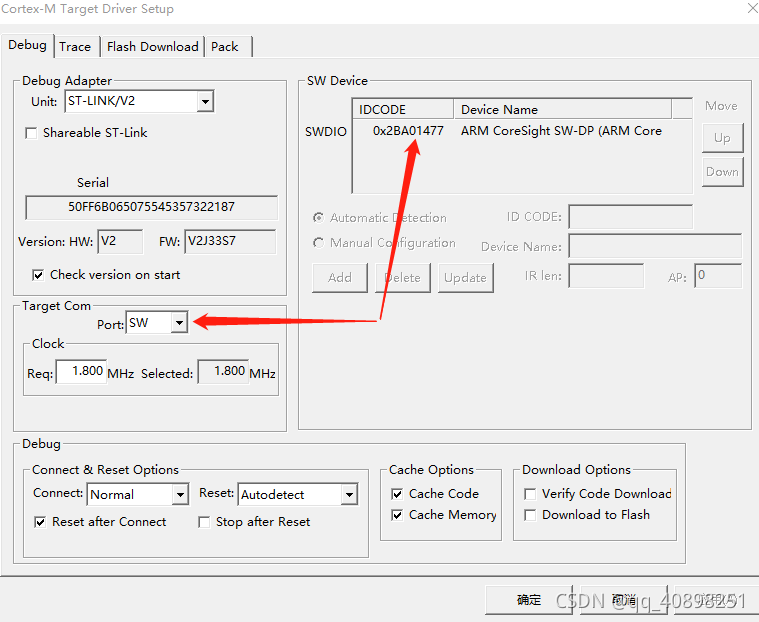
Then click keil’s debug – & gt; Setting, select SWD in the connection port to see if the serial number similar to that in the figure below appears in the SWD service serial port (you can burn when it appears)