Today, I tried to run wsa (Windows subsystem for Android) with win11. I found that I had to turn on Hyper-V to run. Then I found that the virtual machine VMware could not run. So I turned off Hyper-V and finally opened the virtual machine, but the network could not be connected (NAT mode is OK, but bridge mode is not)

after searching on the Internet, I changed this and that, Still No.
I fumbled and succeeded.
here is my solution:
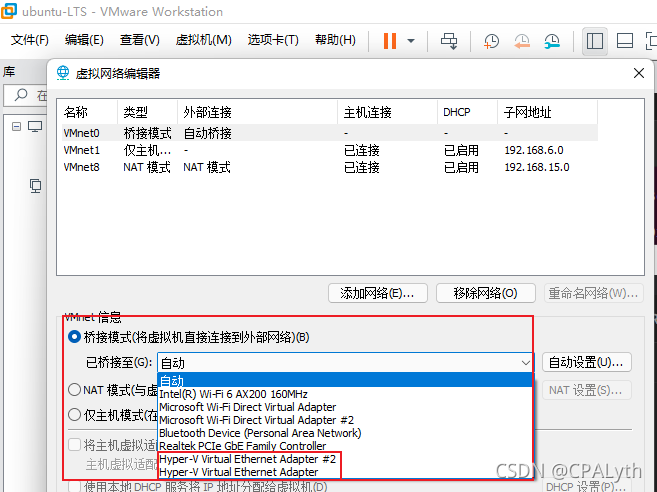
No, as long as you have opened Hyper-V, there will be more of these two below. The default is automatic. It will give priority to these two, so we need to cancel these two checks
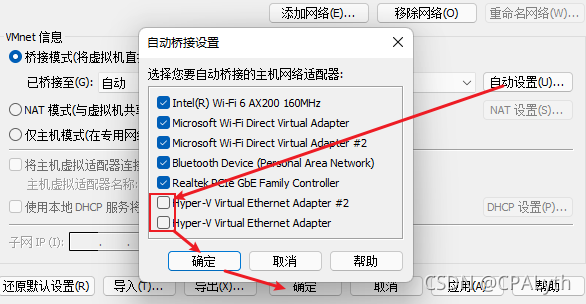
OK, and then enter the Ubuntu virtual machine, It is found that the network has returned to normal.

it took an afternoon to solve it. I hope I can help my friends in the future
Author Archives: Robins
Failed to resolve async component default: ChunkLoadError: Loading chunk 7 failed
Vue project, it says that vue-router.esm.js suddenly reports an error? 8c4f: 16 [Vue router] failed to resolve async component default: chunkloaderror: loading chunk 7 failed. I really can’t find anything wrong,

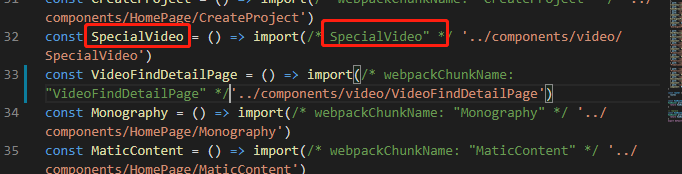
through the prompt, it’s said that there was a routing error. I reinstalled less according to what I wrote on the Internet, but it didn’t work. Later, I inadvertently changed the name of the lazy load of the route a little, What’s going on? I still haven’t found it. If you have the same problem, you can try to change the wrong route name. In the following figure/*specialvideo*/change the name and store it. The error disappears. I don’t know why
Gradle sync failed: Sync failed: reason unknown
99% of the probability is the problem of Android SDK
C: \ XX \ appdata \ local \ Google \ androidstudio2020.3 \ log
analyze the log of the studio and find it
com.android.tools.idea.gradle.project.sync.idea.issues.SdkPlatformNotFoundException: Module: 'libzxing' platform 'android-28' not found.
Just download another android-28 SDK
Prompt IPA processing failed when exporting IOS adhoc
Prompt IPA processing failed when IOS adhoc
View the log of standard to view errors
View standard’s log
The log contains a large string of simulator information, so directly search the x86 keyword, and then check which framework is included, and then CD go in. Remember to enter the framework and remove i386 and x86_ 64。
lipo -info xxxx
Remove command:
lipo -remove i386 xxxx -o xxxx
lipo -remove x86_64 xxxx -o xxxx
View errors
Before, I was misled by the Internet. I had to search all the "x86" keywords, and then search out Ruby (universal. X86_64) , thinking about viewing or updating with lipo , which wasted a lot of time and failed… Finally, homebrew
 is also updated
Finally, I tried to search error , and found that framework was included in bundle of tent , and finally it was OK to remove it
IPA processing failed will be prompted when IOS ad hoc , the framework in tencetopen is attached with x86 , after removal, you can check the keywords of failed or error in your log.
Mon 08
03:00
06:00
09:00
12:00
03:00
06:00
09:00
Tue 09
Remove all SDK schemas
Update relevant environment
IOS tasks
IOS diagram functionality to mermaid
Follow up interest can be focused on the following column or official account number [Python2048].
"Android - the world of hackers"
"difficult and miscellaneous bugs - no language"

Author: Altman Superman dujinyang
Source: CSDN
Original text: https://dujinyang.blog.csdn.net/
Copyright notice: This is the original article of blogger Du Jinyang. Please attach the blog link for reprint!
[Solved] Failed to load response data: no data found for resource with given identifier
Failed to load response data:no data found for resource with given identifier
Failed to load the response data. No data was found for the ID
request stateless code, indicating that no resources were requested to the background
Solution: set the timeout of the front-end request to be longer
NFS startup error: restart failed [How to Solve]
NFS startup error restart failed
Restart failed

Search for solutions
The reason is/etc/exports. A folder was previously set as a shared directory, and then the folder was deleted. Therefore, an error will occur when the NFS service is started.
The nonexistent folder needs to be deleted
Find out how to solve it
Use the VI editor to enter/etc/exports
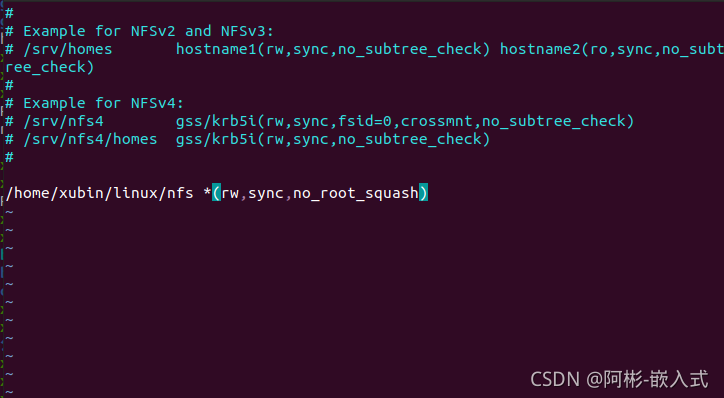
find out whether the corresponding file paths exist in/etc/exports one by one
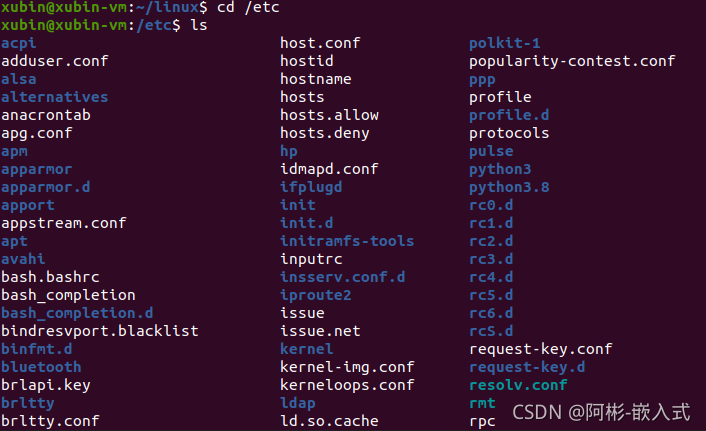
check and find that there is no exports folder, only the exports file
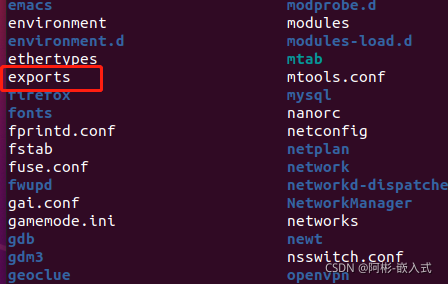
so use vi to enter the/etc/exports file, delete all
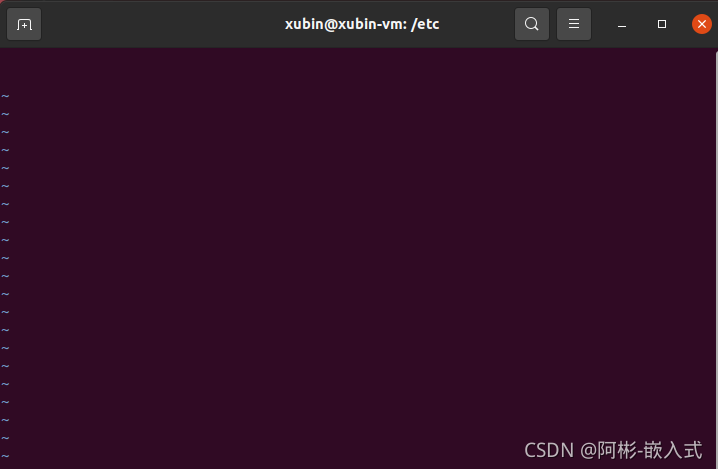
save and exit, Restart NFS successfully

How to Solve Error: failed to load response
reason:
Because the back-end does not write cross-domain-related information to the header, the front-end cannot load data.
analysis:
1. First, check whether there are cross-domain-related configurations in the project, and then find out whether there are configurations.
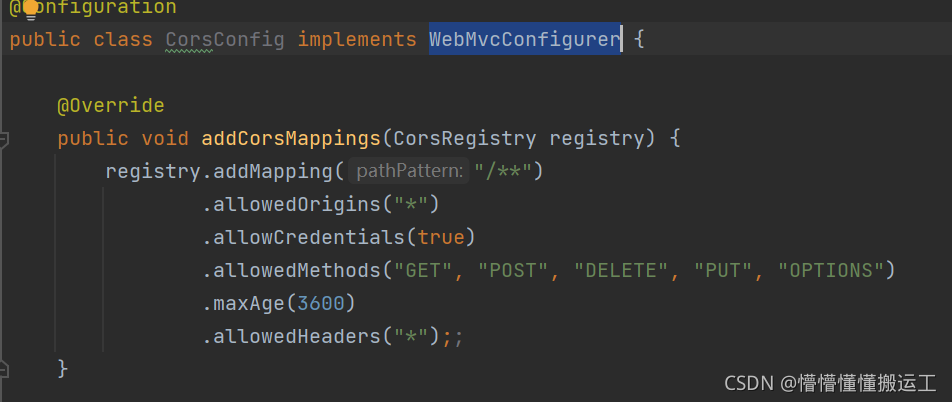
2. This should be added only when the controller is executed.
3. Because our project has built an interceptor to intercept the token parsing into user-related information, because if there is no token expiration, the interceptor will throw an exception. When returning, cross-domain-related things will not be added. So the front end cannot be loaded.
Solution:
Add response and related cross domain information to the interceptor

In addition, you need to know the execution sequence of interceptors and filters
* ** -> Filter -> Interceptor -> ControllerAdvice -> Aspect -> Controller
[Solved] Odoo Cannot log in error after the Database is Recovered
Many odoo users have encountered the problem that the backed up database cannot be restored
You can self-check in the following ways
1. Is the odoo version correct? Different versions of odoo cannot be restored directly, for example, odoo13 cannot be restored directly to odoo15
2. Whether the database version is correct, postgres may have problems when it is backward compatible. It is recommended to migrate to the same version.
3. Whether the code is migrated correctly, inconsistent codes on both sides will also cause an error, which is common in the conf file without specifying the code location.
If you confirm that the above content is correct, you can try the following methods
1. Add -d database name -i base when starting odoo through the command line, this method is to select the database to force the update of the base module; because all odoo modules are dependent on this, the mandatory update will be all the modules installed in the database after the base Will be upgraded.
2. Enter postgres, enter the following command
su postgres; # Switch postgres users
psql; # Enter the postgres command line
\c; database name # specify database instance
DELETE FROM ir_attachment WHERE url LIKE '/web/content/%'; # Delete the front-end files cached in the data table
Generally, most problems can be solved through the above two steps.
[Solved] Rocketmq Root Account Startup Error: Permission denied
Specific information
Modify the JVM size in/bin/runserver.sh and/bin/runbroker.sh to 256M
and then command nohup sh bin/mqnamesrv &, check nohup.Out and find the error permission denied . I checked on the Internet and said that non root users cannot use ports below 1000, but what does this have to do with my rocketmq.
// error
java.net.SocketException: Permission denied
        at sun.nio.ch.Net.bind0(Native Method)
        at sun.nio.ch.Net.bind(Net.java:461)
        at sun.nio.ch.Net.bind(Net.java:453)
        at sun.nio.ch.ServerSocketChannelImpl.bind(ServerSocketChannelImpl.java:222)
        at io.netty.channel.socket.nio.NioServerSocketChannel.doBind(NioServerSocketChannel.java:127)
        at io.netty.channel.AbstractChannel$AbstractUnsafe.bind(AbstractChannel.java:501)
        at io.netty.channel.DefaultChannelPipeline$HeadContext.bind(DefaultChannelPipeline.java:1218)
        at io.netty.channel.AbstractChannelHandlerContext.invokeBind(AbstractChannelHandlerContext.java:506)
        at io.netty.channel.AbstractChannelHandlerContext.bind(AbstractChannelHandlerContext.java:491)
        at io.netty.channel.DefaultChannelPipeline.bind(DefaultChannelPipeline.java:965)
        at io.netty.channel.AbstractChannel.bind(AbstractChannel.java:210)
        at io.netty.bootstrap.AbstractBootstrap$2.run(AbstractBootstrap.java:353)
        at io.netty.util.concurrent.SingleThreadEventExecutor.runAllTasks(SingleThreadEventExecutor.java:408)
        at io.netty.channel.nio.NioEventLoop.run(NioEventLoop.java:455)
        at io.netty.util.concurrent.SingleThreadEventExecutor$2.run(SingleThreadEventExecutor.java:140)
        at java.lang.Thread.run(Thread.java:748)
Error reason
The reason for the error is that the Hyper-V function (Windows subsystem) is enabled on the computer and some ports are disabled. Specific view
Windows CMD enter the following command
netsh interface ipv4 show excludedportrange protocol=tcp
//After querying, there will be the following unavailable port range, including 9876, which makes the port unavailable, instead of the common non root account unable to use ports below 1000
 Protocol tcp port exclusion range
 Start port End port
   1064        1163
   1364        1463
   1464        1563
   1564        1663
   2501        2600
   2801        2900
   2901        3000
   3001        3100
   5357        5357
   7639        7738
   7739        7838
   9834        9933
  10034       10133
  10241       10340
  10341       10440
  10441       10540
  10541       10640
  12066       12165
  12166       12265
  50000       50059
  Managed port exclusion.
Other Solution:
Modify the port used by rocketmq to port 9950
Project directory: /software/rocketmq
Create a namesrv.properties file in the /conf directory
The content is listenPort=9950
server startup script start-server.sh
nohup sh /software/rocketmq/bin/mqnamesrv -c /software/rocketmq/conf/namesrv.properties &> ./server.log 2>&1
broker startup script start-broker.sh
nohup sh /software/rocketmq/bin/mqbroker -n localhost:9950 &> ./broker.log 2>&1
Oracle monitoring error tns-01189 [How to Solve]
[oracle@hellow ~]$ lsnrctl start
LSNRCTL for Linux: Version 12.1.0.2.0 – Production on 04-Nov-2021 15:30:14
Copyright © 1991, 2014, Oracle. All rights reserved.
TNS-01106: Listener using listener name LISTENER has already been started
– The ps command did not find the listening process
[root@sh ~]# ps -ef | grep -i tns
root 36 2 0 Jan26 ?00:00:00 [netns]
root 14995 14824 0 15:30 pts/1 00:00:00 grep -i tns
– Check the listening status, error reported; TNS-01189
[oracle@sh ~]$ lsnrctl status
LSNRCTL for Linux: Version 12.1.0.2.0 – Production on 4-NOV-2021 15:57:39
Copyright © 1991, 2014, Oracle. All rights reserved.
Connecting to (DESCRIPTION=(ADDRESS=(PROTOCOL=TCP)(HOST=hello)(PORT=1521)))
TNS-01189: The listener could not authenticate the user
– There are basically 2 reasons for this problem,
1, the ip and hostname in /etc/hosts file are not the same
2, the listener.ora listener host is not the current host.
After checking, the listener.ora listener host is incorrectly filled in
LISTENER =
(DESCRIPTION_LIST =
(DESCRIPTION =
(ADDRESS = (PROTOCOL = TCP)(HOST = hellow)(PORT = 1521))
)
(DESCRIPTION =
(ADDRESS = (PROTOCOL = IPC)(KEY = EXTPROC1521))
)
)
After changing to the current host name, restart the listener to resume normal.
[Solved] Redis Error: Unexpected exception while processing command
1. Background
Redis has been running for a long time, and an error is reported one day as follows:
2. Phenomenon
org.redisson.client.RedisException: Unexpected exception while processing command
at org.redisson.command.CommandAsyncService.convertException(CommandAsyncService.java:338)
at org.redisson.command.CommandAsyncService.get(CommandAsyncService.java:140)
at org.redisson.RedissonObject.get(RedissonObject.java:90)
at org.redisson.RedissonBucket.set(RedissonBucket.java:131)
3. Solution
Restart the Java application!
What exactly caused it,
You can only guess the link pool of the redis client. Due to network and other reasons, the redis client has not responded for a long time and collapsed!
perfect
[Solved] Mybatis-Plus Error: Invalid bound statement (not found)
Mybatis plus reports an error: invalid bound statement (not found)
After integrating mybatis plus in the spring boot project, it is found that the user-defined query method will report an error: “invalid bound statement (not found): * * *.” your method “, which means that your user-defined method cannot be found in the XML file. Various methods are tried and the problem is finally solved. This problem exists in the following situations:
1. Mapper file and XML file cannot correspond
1. Check whether mapper file and XML file names are consistent
UserMapper and UserMapper.xml
2. Check whether the attribute configuration of namespace in the XML file corresponds to the corresponding mapper file
<mapper namespace="com.*.*.mapper.UserMapper">
3. Check whether the method binding ID in the XML file is consistent
Mapper:
    List<User> getUserList();
xml:
    <select id="getUserList" resultType="com.*.*.entity.User">
        SELECT * FROM user
    </select>
2. The XML file is placed in the resources directory at different levels and is not packaged into the target
By default, all will be packaged. Check whether the property of not packaging is configured in the POM file, and modify it
Note: this configuration is to package the resources directory and check the differences
	<build>
        <!-- Pack the files in the resources directory -->
        <resources>
            <resource>
                <directory>src/main/resources</directory>
                <includes>
                    <include>**/*.*</include>
                </includes>
            </resource>
        </resources>
     </build>
(focus on configuration, which is also my problem) third, the XML file is placed in the resources directory at different levels and has been packaged into the target, but the corresponding method cannot be found
It is thought that after packaging, you can match according to the name. Finally, it is found that even if the XML file is packaged, it still belongs to a different level from mapper, so check whether the mybatis plus configuration matching the location of the XML file is missing
mybatis-plus.mapper-locations = classpath:mapping/*.xml
# The "mapping" in this configuration corresponds to the name of the directory where your xml is located