Solutioin:
Add android.injected.testOnly=false in gradle.properties files
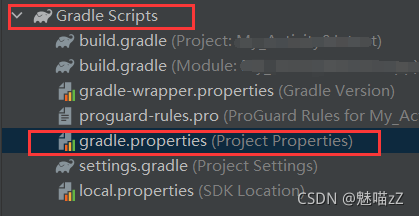
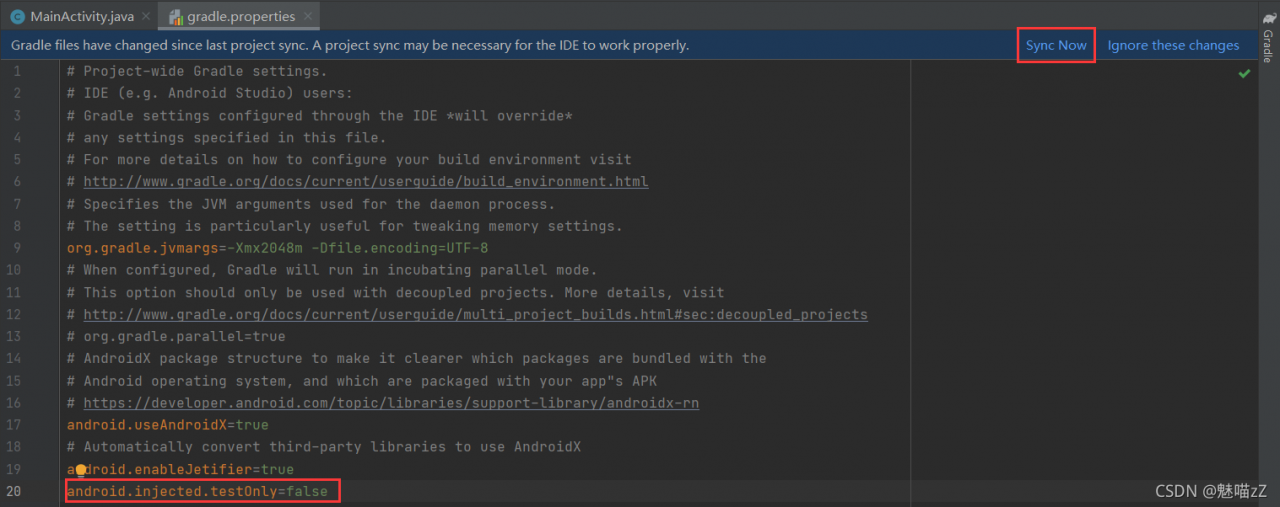
Solutioin:
Add android.injected.testOnly=false in gradle.properties files
conda report errorCollecting package metadata
Error detailed
Collecting package metadata (current_repodata.json): failed
CondaHTTPError: HTTP 000 CONNECTION FAILED for urlhttps://repo.anaconda.com/pkgs/main/win-64/current_repodata.json Elapsed: –
An HTTP error occurred when trying to retrieve this URL.
HTTP errors are often intermittent,
If your current network hashttps://www.anaconda.com Blocked, please file a support request with your network engineering team.
‘https://repo.anaconda.com/pkgs/main/win-64’
Solution:
Put the C:\ProgramData\Anaconda3\Library\bin directory under the
(or install in its disk, ProgramData folder is hidden by default status)
libcrypto-1_1-x64.*
libssl-1_1-x64.*
A total of four files
Copy and paste them into the C:\ProgramData\Anaconda3\DLLs directory to solve the problem.
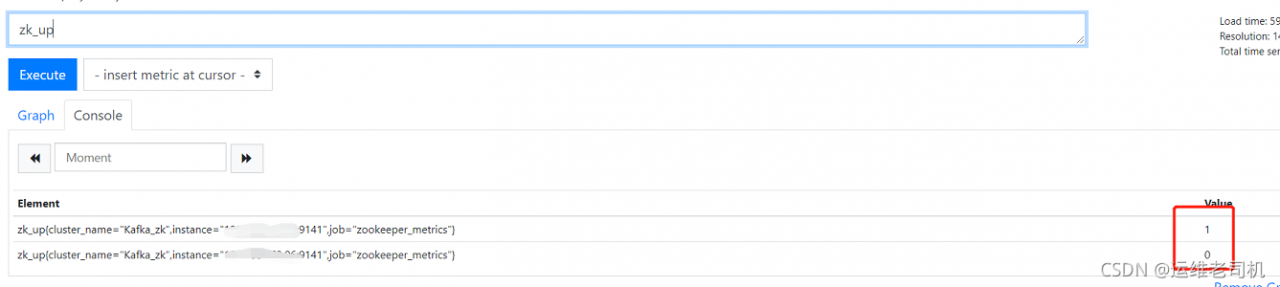
Problem Description: two machines, one zookeeper_ Data can be found when the exporter is started normally, and the other one can be started normally, and then no data can be detected.
note: check through Prometheus ZK_ The exporter is alive, but the data of the machine reporting an error cannot be found
Error log: erro [0014] unable to open connection to zookeeper error = “dial TCP: lookup localhost on 8.8.8.8:53: no such host”
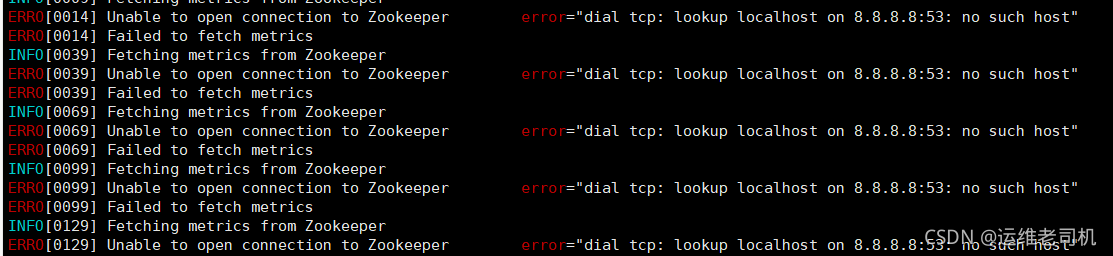
resolvent:
It’s a DNS problem, so check the/etc/resolv.conf file of the machine that reports an error and compare it with the file of the machine that does not report an error. If it is found that there is an inconsistency, change it to the constant one, and then solve the problem

Log in to Prometheus to view ZK_ Up data
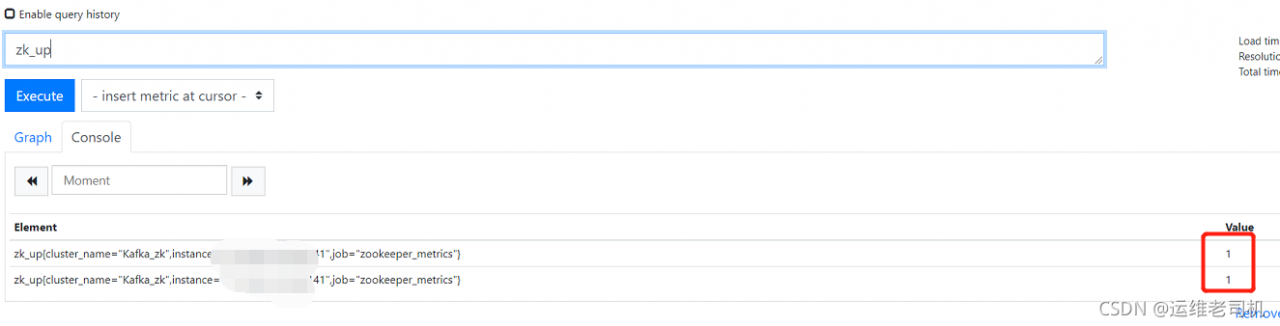
Then the problem is solved
Phenomenon
Previously, a middleware was started with k8s cluster, which internally relies on ES for data storage. Looking at the log, we found that ES reported an error "too many open files
Solution:
Enter the container and execute ulimit - a to view the file handle limit of the current user. If it is found that it meets the requirements, the problem may only occur on the host machine. Execute cat/etc/sysctl.Conf to view the handle count configuration, as follows:
[root@test-node-01 ~]# cat /etc/sysctl.conf
vm.max_map_count=262144
fs.file-max=65536
65536 is much smaller than 104857 with log errors. The next step is to modify the number of handles of the host. There are two ways to modify: one is to modify the file of a single process, and the other is to modify the system configuration
Modify the number of file handles of a single process
to view the number of file handles that a process can open, you can use cat/proc/<pid>/Limits view. To dynamically modify the limits of a process, you can use the prlimit command. The specific usage is: prlimit -- PID ${PID} -- nofile = 102400:102400 the number of files can be defined by yourself.
for my es container, you can execute PS - EF | grep elasticsearch to find the PID of the ES process, My process PID is 23571 . Execute prlimit -- PID 23571 -- nofile = 104857 to modify the number of file handles of the 23571 process to 104857 modify the system configuration
modify the fs.file-max parameter under the/etc/sysctl.conf file, and execute the sysctl - P command to take effect, or modify the /etc/security/limits.conf configuration file
cat  /etc/security/limits.conf
*                soft    nproc          655350
*                hard    nproc          655350
*                soft    nofile         655350
*                hard    nofile         655350
How much should this value be set
priority (open file descriptors):
soft limit & lthard limit < kernel< the limit caused by the data structure used to achieve the maximum number of file descriptors
in fact, there is no specific limit on this value, but if the allocated value is too large, it will affect the system performance, so it should be balanced according to the specific application/etc/security/limits.conf is the limit on the number of handles at the user level, and /etc/sysctl. Conf is the kernel parameter at the system level
In this case, you need to add the following configuration in the pom.xml file
 <build>
    <resources>
        <resource>
            <directory>src/main/resources</directory>
            <includes>
                <include>**/*.properties</include>
                <include>**/*.xml</include>
            </includes>
            <filtering>true</filtering>
        </resource>

        <resource>
            <directory>src/main/java</directory>
            <includes>
                <include>**/*.properties</include>
                <include>**/*.xml</include>
            </includes>
            <filtering>true</filtering>
        </resource>
    </resources>
</build>
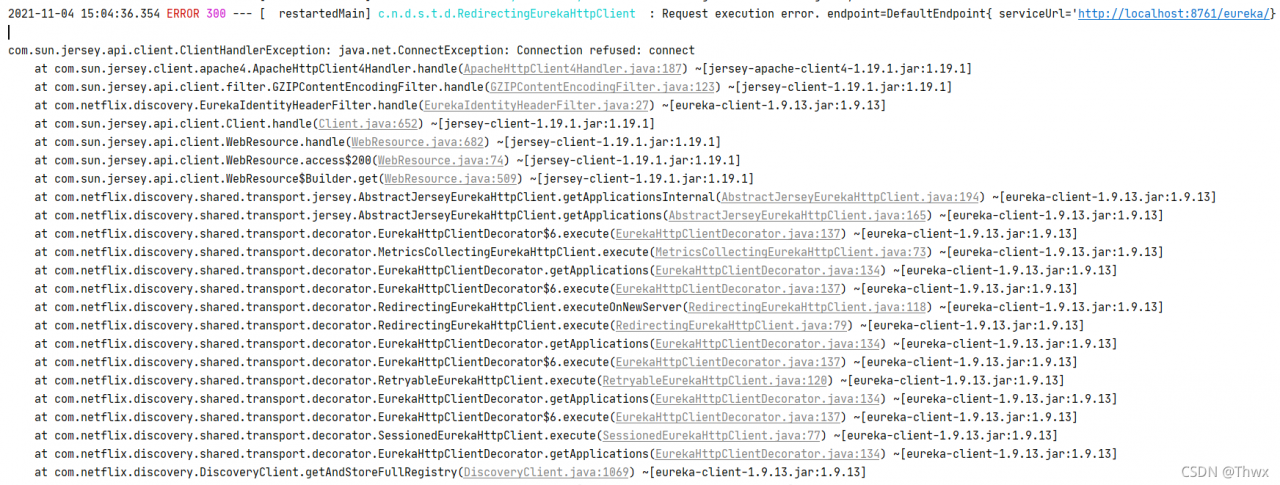
Add the following to the application.yml configuration file:
eureka:
  client:
    register-with-eureka: false
fetch-registry: falseProblem phenomenon
When a system is deployed on weblogic12.2.1.3, it reports an error “IllegalStateException zip file closed”. When it is deployed on weblogic12.2.1.2, it does not report an error and can be accessed normally.
Problem analysis
You can find the clear reason on the official website through the error report. The main reason is a bug in Weblogic. Because the application jar file is closed silently due to inactivity, because the jarfile class implements the autoclosable interface, and jarurlhandler does not handle this exception at present, this error is reported. Therefore, it is repaired through patch 27774698. The repair principle is to add a catch block to handle exceptions, And reopen the jar file when there is an IllegalStateException.
In addition, the official suggestion is to apply this patch only when reporting this error. It is not necessary to apply this patch to every system.
Problem continuation
The above problems are solved by patching 27774698, and the deployment application reports an error error creating bean with name ‘wsrmsafregistrationservice’. After that, you can see that spring is initializing bean and wsrmsafregistrationservice in the log, but its full class name is com.oracle.webservices.impl.wls.wsrmsafregistrationservice, which is used internally, @ inject @ named (“safserverservice”), private SAFServerService safServerService; Therefore, when spring does autowire automatic link, it scans the classes inside Weblogic. This scanning should not occur. Therefore, spring autowire filter should be added to the code to avoid scanning the classes inside Weblogic. For the specific adding method, see the official website link doc ID 2397321.1.
Problem handling
The problem of “IllegalStateException zip file closed” is solved by patching 27774698. After the application code is changed and the spring autowire filter is added, the application is successfully deployed and can be accessed normally. This problem is solved!
kex_exchange_identification: Connection closed by remote host
Connection closed by 140.82.121.3 port 22
fatal: Could not read from remote repository.

Please make sure you have the correct access rights
and the repository exists.
It is suddenly found that git cannot operate, and an error is reported, as shown in the figure above.
Thought the SSH key failed?Check it. It’s corresponding.
Testing
$ ssh -T [email protected]
The result is still

Internet search method:
Test port 443 can be successful
$ ssh -T -p 443 [email protected]

Referring to the online method, the solution is as follows:
Locate git’s config file /etc/ssh/ssh_ Config and edit
$ vi /etc/ssh/ssh_ config
If you don’t have permission, use sudo
Add the following code at the end and save
Host github.com
User git
Hostname ssh.github.com
PreferredAuthentications publickey
IdentityFile ~/.ssh/id_rsa
Port 443
success!

Then you can operate git normally!
Group by must be added to the hive query SQL, otherwise the column col in the selection list is invalid because it is not included in the aggregate function or group by clause.
Generally speaking, count , round should be regarded as aggregate functions without group by
however, hive does not consider the use of round as an aggregate function. The fields used should be added to group by, and the fields used in round should be added to group by
otherwise, an error is reported invalid column reference
Solution to the error of ODBC driver in windows installation of Postgres database
Installing postgressql driver on Windows reports an error “the specified module cannot be found”
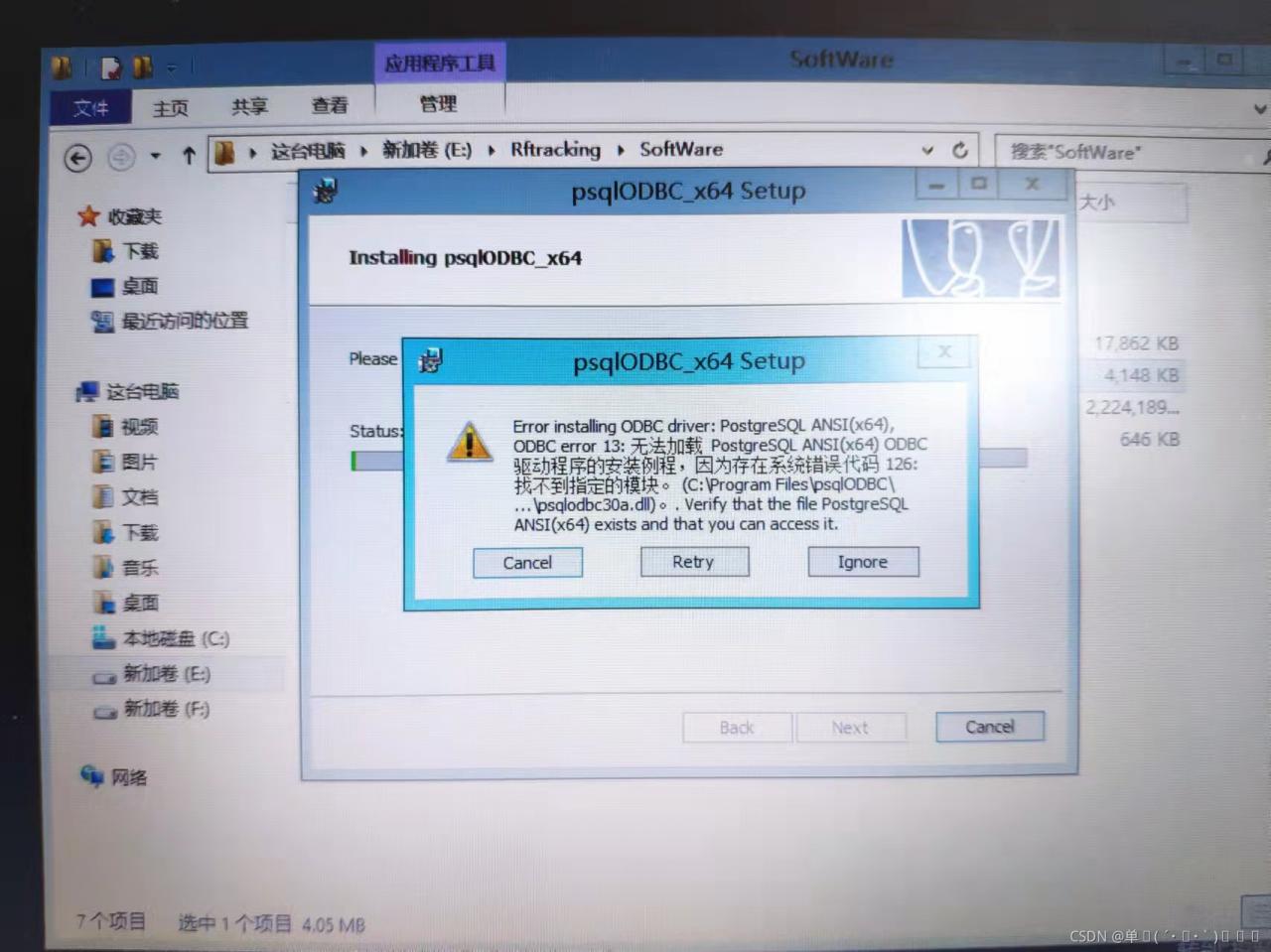
terms of settlement
Find another system of the same version, which can install the modified drive computer normally. Paste the contents of the two folders in the windows folder of drive C into the system that cannot be installed
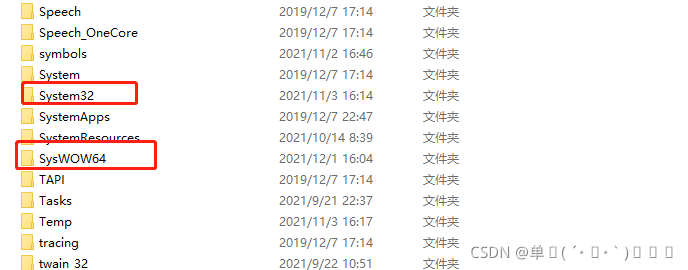
copy the two folders in the above figure to the problem computer. Select duplicate files, ignore them, and do not select replacement, so as not to affect the use of the system

An error is reported here
After correction:

Record the error reporting problem
An error is reported at the end of JDBC programming:
Exception in thread “main“ java.sql.SQLException: Unknown initial character set index ‘255‘ received
resolvent:
When establishing a connection between JDBC and the database, add the following after the URL:
?useUnicode=true&characterEncoding=utf-8
As shown in the figure: 
Add reason:
Mysql database uses GBK coding, while the project database uses UTF-8 coding.