[Solved] Saving to Database Error: pymysql.err.DataError: (1366, “Incorrect string value…

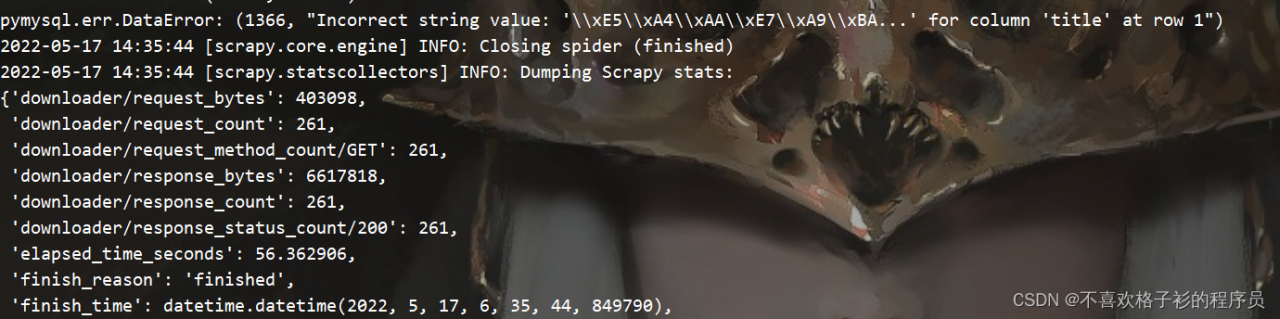
DataError : (1366, “Valeur incorrecte : ‘\xE5\\xA4\xAA\xE7\\xA9\xBA…'”) for column ‘title’ at row 1″), vérifiez l’état de l’exécution en arrière-plan, les données ont été extraites, déterminez donc le problème de ce type de rapport d’erreur, ce type de problème est généralement un problème de codage.

Returning to the database creation command interface, I found that utf8 was not added during creation. Returning to the database creation interface and adding charset = utf8 again, there is no problem

[Solved] VUE Error: listen EADDRNOTAVAIL: address not available

VUE Error: listen EADDRNOTAVAIL: address not available

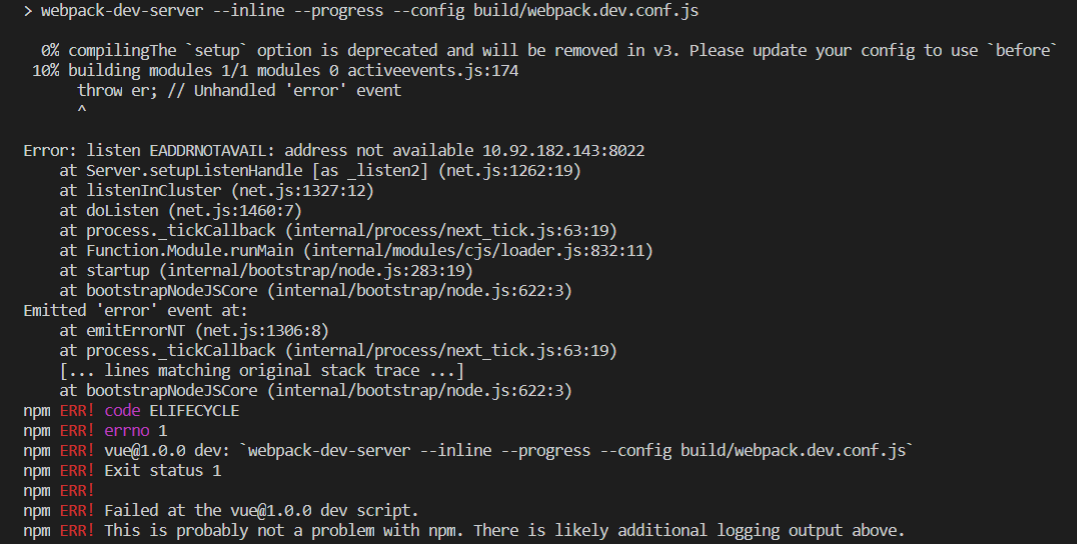
vue Project npm run dev Error: Error: listen EADDRNOTAVAIL: address not available …

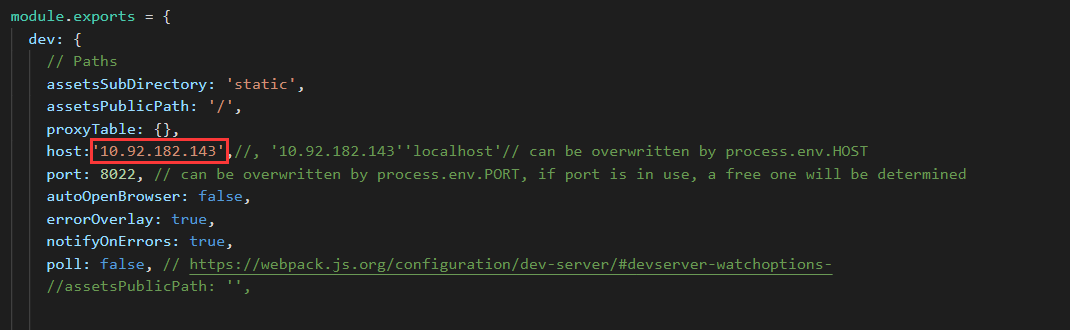
Cause: the configured IP address is incorrect.

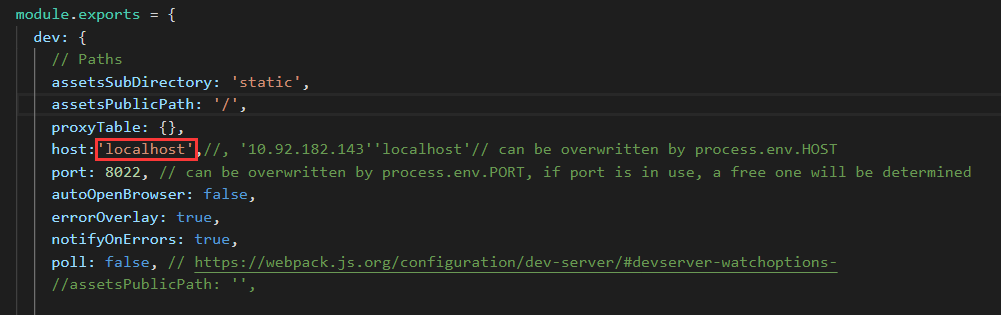
Solution: open the config folder and find index.js file, modify the value of host to localhost , as shown in the following figure

[Solved] ValueError: Error when checking input: expected conv2d_input to have 4 dimensions

Error Messages:

ValueError: Error when checking input: expected conv2d_input to have 4 dimensions, but got array with shape (150, 150, 3)
Codes:

image = mpimg.imread("./ima/b.jpg")
image = image/255
classe = model.predict(image, batch_size=1)

Reason:
the input format is incorrect
solution:
standardize the dataset

Specific solutions:

image = mpimg.imread("./ima/b.jpg")
image = image.reshape(image.shape(1,150,150,3)/255
classe = model.predict(image, batch_size=1)

[Solved] error getting credentials – err: exit status GDBus.Error:org.freedesktop.DBus.Error.ServiceU

Scene

When using docker-compose to build the environment, the following error messages appear

error getting credentials - err: exit status 1, out: GDBus.Error:org.freedesktop.DBus.Error.ServiceUnknown: The name org.freedesktop.secrets was not provided by any .service files

Solution:

sudo apt install gnupg2 pass

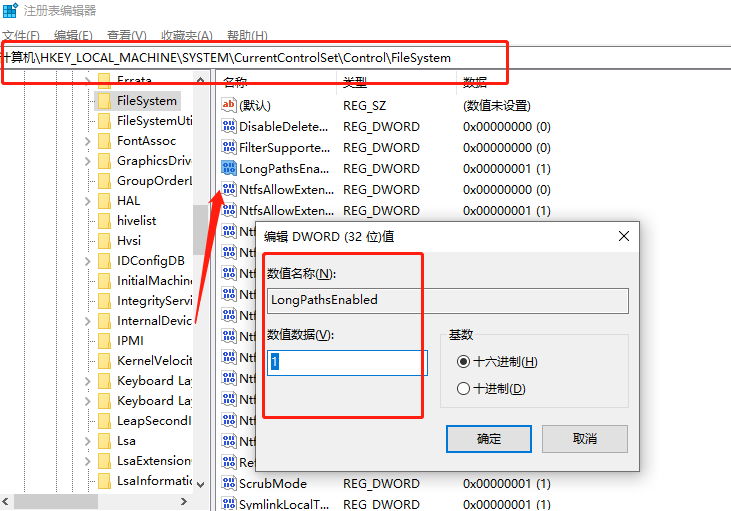
[Solved] This error might have occurred since this system does not have Windows Long Path support enabled.

This error might have occurred since this system does not have Windows Long Path support enabled.

pip install rife_ncnn_vulkan_python
WARNING: Ignoring invalid distribution -ip (d:\python3.8\lib\site-packages)
Collecting rife_ncnn_vulkan_python
Using cached rife-ncnn-vulkan-python-1.1.2.post3.tar.gz (21.5 MB)
ERROR: Could not install packages due to an OSError: [Errno 2] No such file or directory: ‘C:\Users\Administrator\AppData\Local\Temp\pip-install-ti2fh5nq\rife-ncnn-vulkan-python_464f213e18974938aa0e4a998e825356\rife_ncnn_vulkan_python/rife-ncnn-vulkan/src/ncnn/glslang/Test/baseResults/spv.WorkgroupMemoryExplicitLayout.MixBlockNonBlock_Errors.comp.out’
HINT: This error might have occurred since this system does not have Windows Long Path support enabled. You can find information on how to enable this at https://pip.pypa.io/warnings/enable-long-paths


Solution:

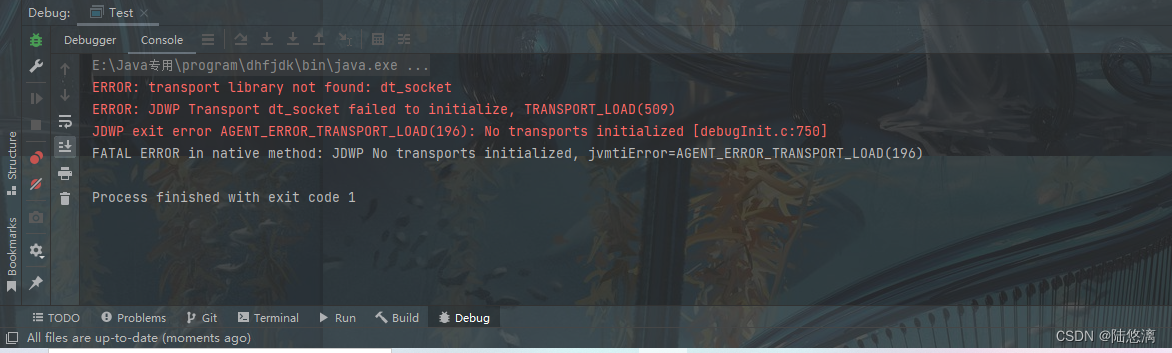
[Solved] IDEA Debug Error: JDWP No transports initialized, jvmtiError=AGENT_ERROR_TRANSPORT_LOAD(196)

IDEA Error:

ERROR: transport library not found: dt_socket
ERROR: JDWP Transport dt_socket failed to initialize, TRANSPORT_LOAD(509)
JDWP exit error AGENT_ERROR_TRANSPORT_LOAD(196): No transports initialized [debugInit.c:750]
FATAL ERROR in native method: JDWP No transports initialized, jvmtiError=AGENT_ERROR_TRANSPORT_LOAD(196)


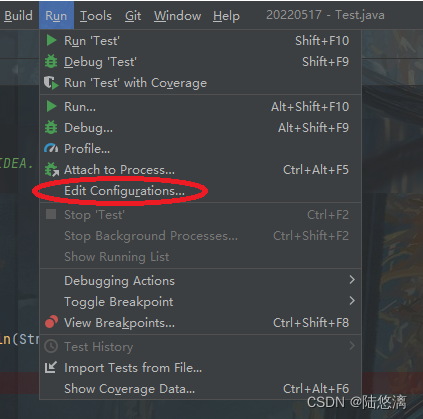
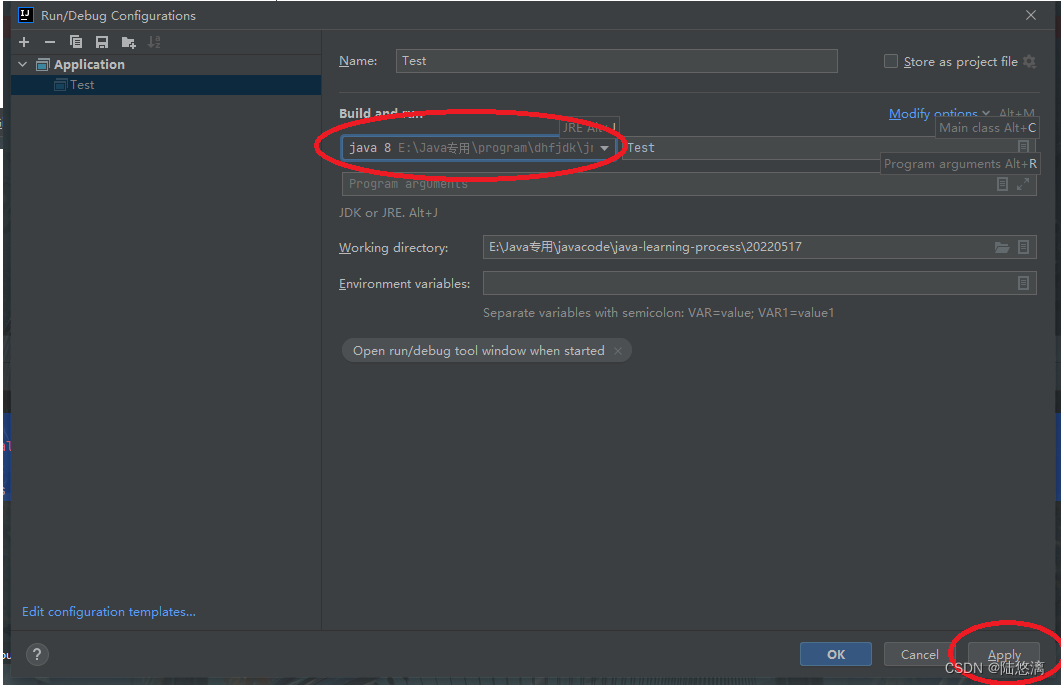
Reason: IDEA’s jre configuration is inconsistent with the Project Structure configuration, resulting in the failure to start javaw
Solution:


[Solved] RuntimeError: Cannot clone object <keras.wrappers.scikit_learn.KerasClassifier object…

Today, I debugged the code and found this error. The complete contents are as follows:

RuntimeError: Cannot clone object < keras. wrappers. scikit_ learn. KerasClassifier object at 0x000003A783733F33>, as the constructor either does not set or modifies parameter layers

No error is reported when the code is found. It is normal

The code is then investigated:

from keras.wrappers.scikit_learn import KerasRegressor

Change to:

from tensorflow.keras.wrappers.scikit_learn import KerasRegressor

Problem solved!

OSError: [WinError 1455] The page file is too small to complete the operation. Error loading…

Complete error oserror: [winerror 1455] the page file is too small to complete the operation. Error loading “C:\ProgramData\Anaconda3\lib\site-packages\torch\lib\shm.dll” or one of its dependencies.

Scenario: Running the reid-strong-baseline model

Reason: The model is too large, and the system allocated paging memory is too small to train

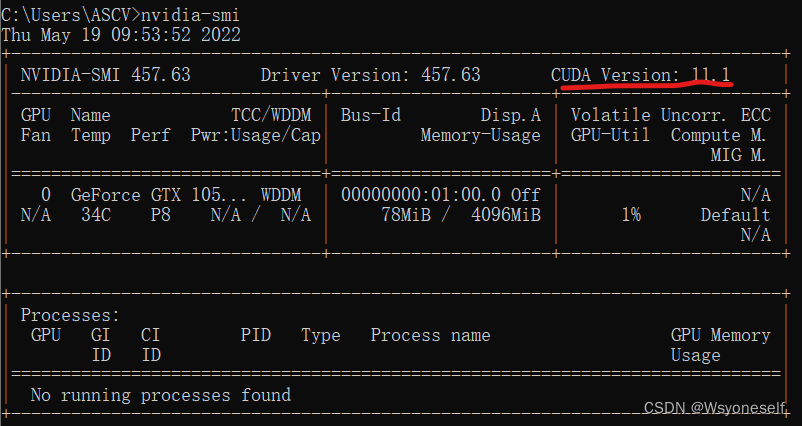
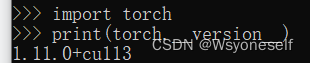
Environment: windows10, cuda version: 11.1, pytorch version: 1.11.0+cu113

(1) Query your CUDA version:

nvidia-smi

(2) Query your own version of pytorch

import torch
print(torch.__version__)

Solution: Right-click Properties->Advanced System Settings->Advanced->Settings->Advanced->Programs->Change->Uncheck “Automatically manage…” (Define initial size and maximum size) (set here according to the actual available space, as large as possible) -> click “Settings” -> OK -> reboot

If the error is still reported after reboot, the possible reasons are: (1) the custom size is still too small (for example, I set 10G at the beginning, but still reported an error, and subsequently modified to 100G (100000M) to run successfully) (2) the batch_size is too large, you can adjust the size appropriately (for example, reduce 64 to 16)

[Solved] mosquitto log Error: SSL routines:SSL3_READ_BYTES:tlsv1 alert decrypt error

Problem description

The following errors occurred in the TLS/SSL of mosquitto during the test today, indicating that the error occurred in the TLS version:
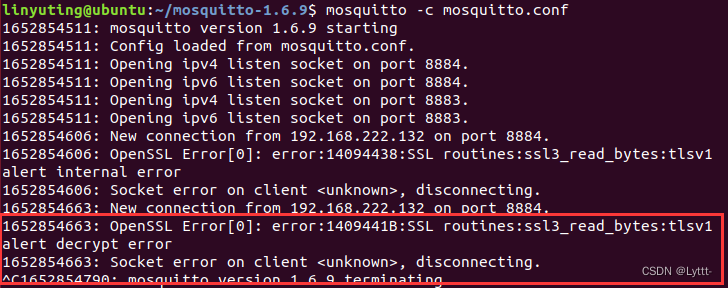
I know that the default tls version of mosquitto_pub and mosquitto_sub is tlsv1.2, however, the version of openssl in my virtual machine is 1.1.1, and the tls_version tlsv1.1 is configured in mosquitto.conf (one-way authentication is configured here, two-way authentication is also (here the configuration is one-way authentication, two-way authentication is also applicable), so there will be tls version error.

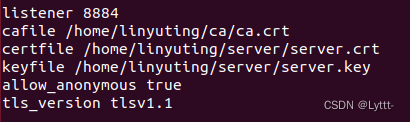
Solution:

For C programs of mosquitto library
Use the API mosquitto_tls_set() before attaching mosquitto_tls_opts_set(), this API can set the corresponding tls version of the client, note that the tls version defaults to tlsv1.2.

The code is as follows:

int    rc = -1;

rc = mosquitto_tls_opts_set(mosq, 1, "tlsv1.1", NULL);
if( rc != MOSQ_ERR_SUCCESS )
{
    printf("mosquitto_tls_opts_set failure.\n");
    exit(1);
}

rc = mosquitto_tls_set(mosq, CAFILE, CAPATH, CERTFILE, KEYFILE, NULL);
if( rc != MOSQ_ERR_SUCCESS )
{
    printf("mosquitto_tls_set failure.\n");
    exit(1);
}

On the mosquitto command line

The following is the test of one-way authentication (in case of two-way authentication, add the certificate and key by yourself)

mosquitto_ pub -h 192.168.222.130 -p 8884 -t “hello” -m “hi sub” –tls-version tlsv1. 1 –cafile ./ ca/ca.crt

mosquitto_ sub -h 192.168.222.130 -p 8884 -t “hello” –tls-version tlsv1. 1 –cafile ./ ca/ca.crt

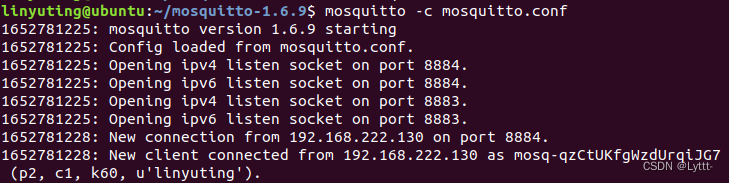
If the problem is solved successfully, it can be connected normally:
[Solved] vpython: AttributeError: ‘box‘ object has no attribute ‘idx‘

vpython : AttributeError: ‘box‘ object has no attribute ‘idx‘

Problem description

1. Problem Description:

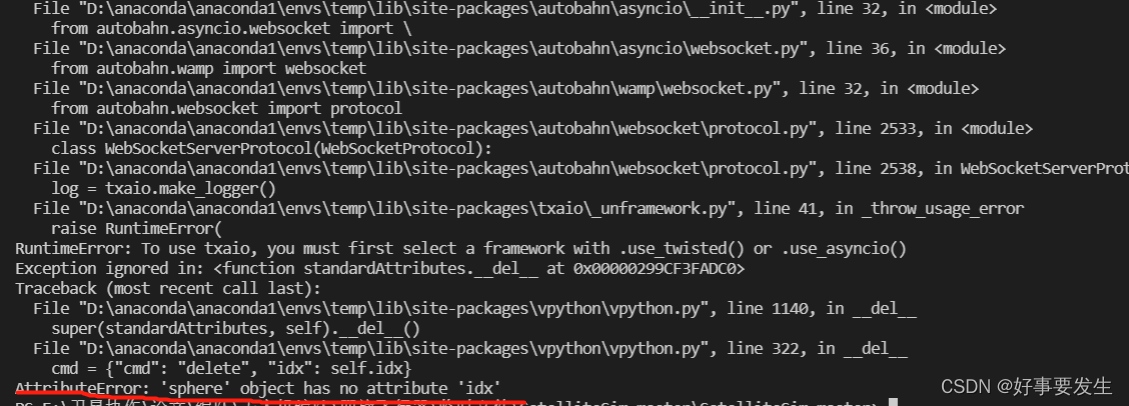
After importing the VPython library, the errors reported after using the sphere class or box class in the VPython library are as follows:

the main error statement is the underlined part: attributeerror: 'box' object has no attribute 'IDX' (changing box to sphere is the same).

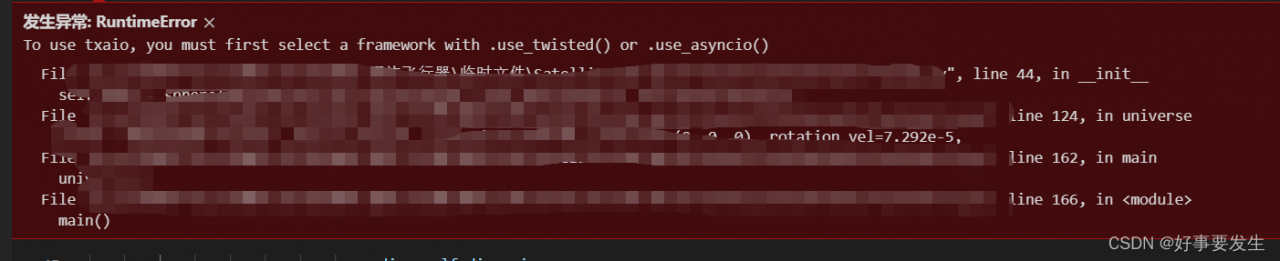
After debugging, it is found that the specific errors are as follows:

2. Solution

  1. Make sure vpython is installed
  2. Check the third-party libraries of the project environment for the packages autobahn and txaio, e.g. mine are autobahn version is 22.4.2, txaio version is 22.2.1.
  3. Lower the version of audobahn. If I lower the version to 22.3.2

Success!!!!!!!