Java POI Operate Excel error NullPointException
Solutions
row = sheet.getRow(rowIndex);
if (row == null) {
row = sheet.createRow(rowIndex);
}

A row that has not been used is null, and is created when it is null.Java POI Operate Excel error NullPointException
Solutions
row = sheet.getRow(rowIndex);
if (row == null) {
row = sheet.createRow(rowIndex);
}
A row that has not been used is null, and is created when it is null.When sharing on wechat H5, I found that Android was ok, and IOS kept reporting config:fail
Later, it was found that noncestr and timestamp must not be int values. If the int returned in the background needs to be converted into a string
 wx.config({
        debug: false, // Enable debug mode, the return value of all api calls will be alerted out in the client side, if you want to see the incoming parameters, you can open it in the pc side, the parameter information will be typed out by log, only when the pc side will be printed.
        appId: '*******', // required, the unique identifier of the public number
        timestamp: res.timestamp + '', // required, the timestamp of the signature generation
        nonceStr: res.nonceStr + '', // required, the random string to generate the signature
        signature: res.signature, // mandatory, signature
        jsApiList: ['updateAppMessageShareData', 'hideMenuItems'] // required, the list of JS interfaces to be used
})LaTeX error: \Url Error ->\url used in a moving argument.
Error Messages:
\Url Error ->\url used in a moving argument.
Causes and Solutions
To use \url{…} in footnotes, images, table titles, etc. and other commands, you need to use \protect before.
For example:
\thanks{
  I would thank to Xovee Xu (\url{https://xovee.cn/})
}%

// or

\caption{
  Please refer to \url{https://xovee.cn/}
}
Change to
\thanks{
  I would thank to Xovee Xu (\protect\url{https://xovee.cn/}).
}%

// or

\caption{
  Please refer to \protect\url{https://xovee.cn/}.
}There are several different errors in the process of installing prophet. Record them
1) Error: ModuleNotFoundError: No module named ‘pystan’
Please install pystan before installing prophet
2) Error: command ‘x86_64-apple-darwin13.4.0-clang’ failed with exit status 254
To execute the following two sentences on the command line
export CC=gcc
export CXX=g++
3) Error: command ‘x86_64-apple-darwin13.4.0-clang’ failed with exit status 1
export CXX=clang[resolved]
java.lang.IllegalAccessError: class org.springframework.data.redis.core.$ Proxy237 cannot access its superinterface org.springframework.data.redis.core.RedisConnectionUtils$RedisConnectionProxy
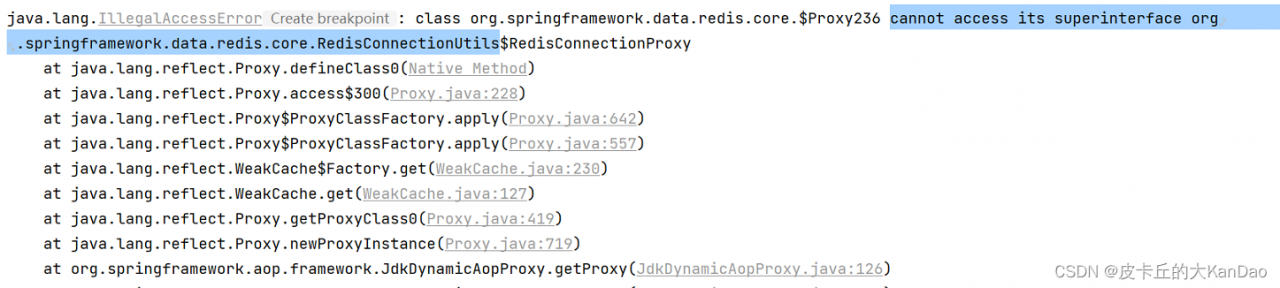
In the serviceImpl class operation redis reported the above error, after investigation found that the cause is in the (with write operation [@Transactional (readOnly = false)]) transaction method of operation redis, in the readOnly = true transaction method can be operated normally
ps: other versions of redis do not know if there is also this situation for the time being
solution: the operation of redis to get @Transactional (readOnly = false) method outside the operation can be
Errors are reported as follows: error 1920 Service VMware horizon view composer (SVID) failed to start Verify that you have sufficient privileges to start system services
Solution:
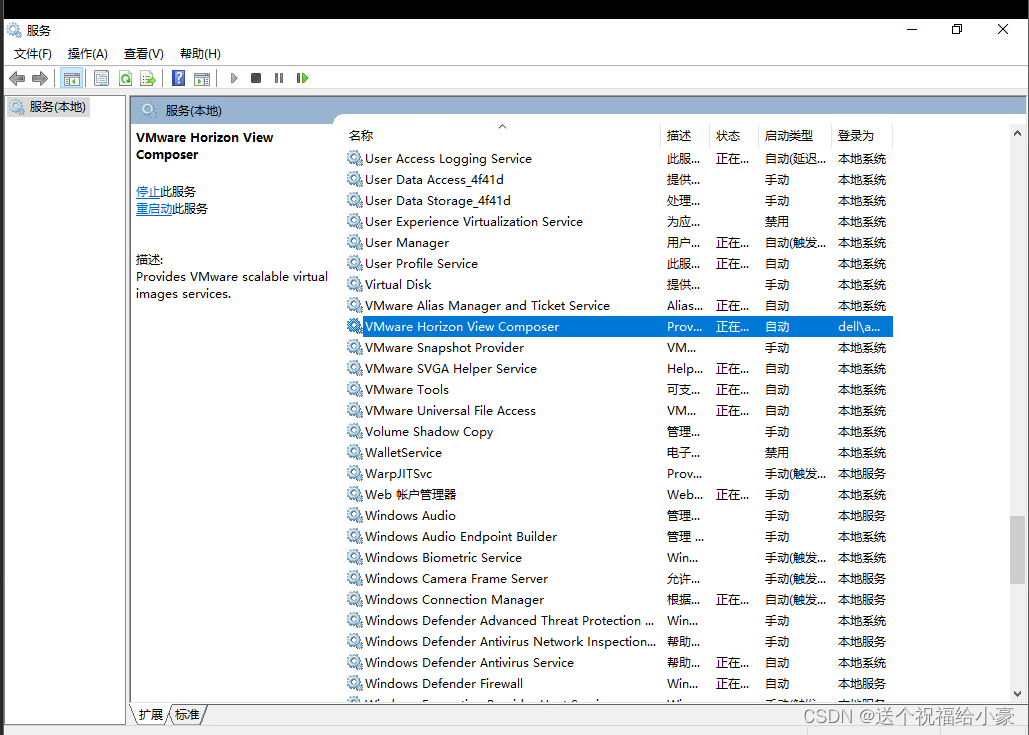
click start – > Search for services – > Locate VMware horizon view composer – > Right click Properties – > Click “login” to log in with the domain administrator account, save it, and reinstall it.
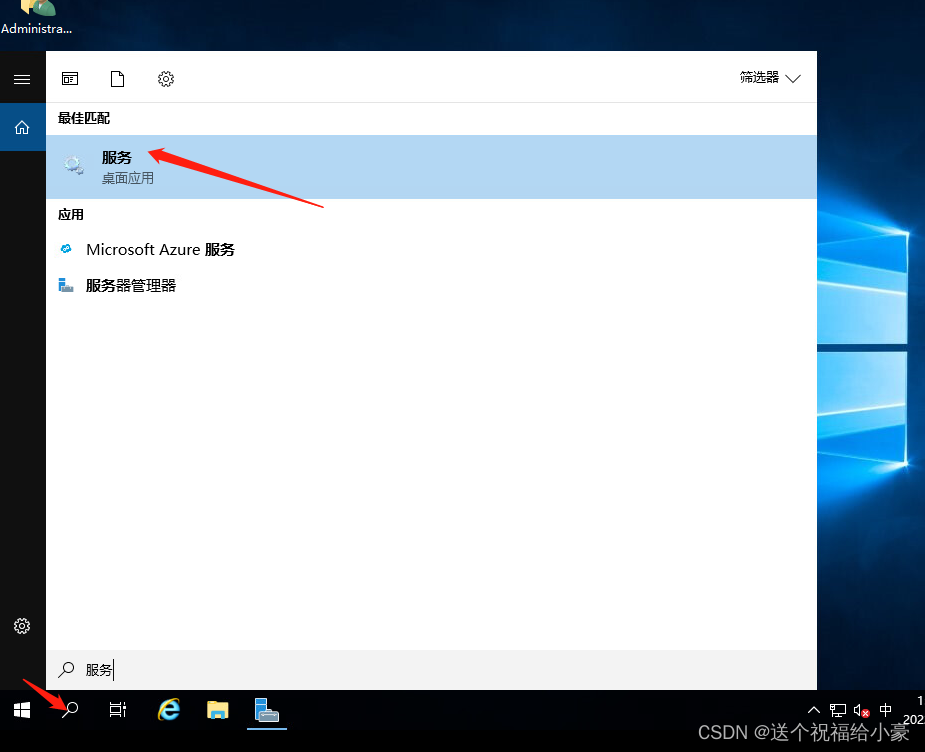
Select VMware horizon view composer and right-click properties
Log in as a domain administrator account in the login options
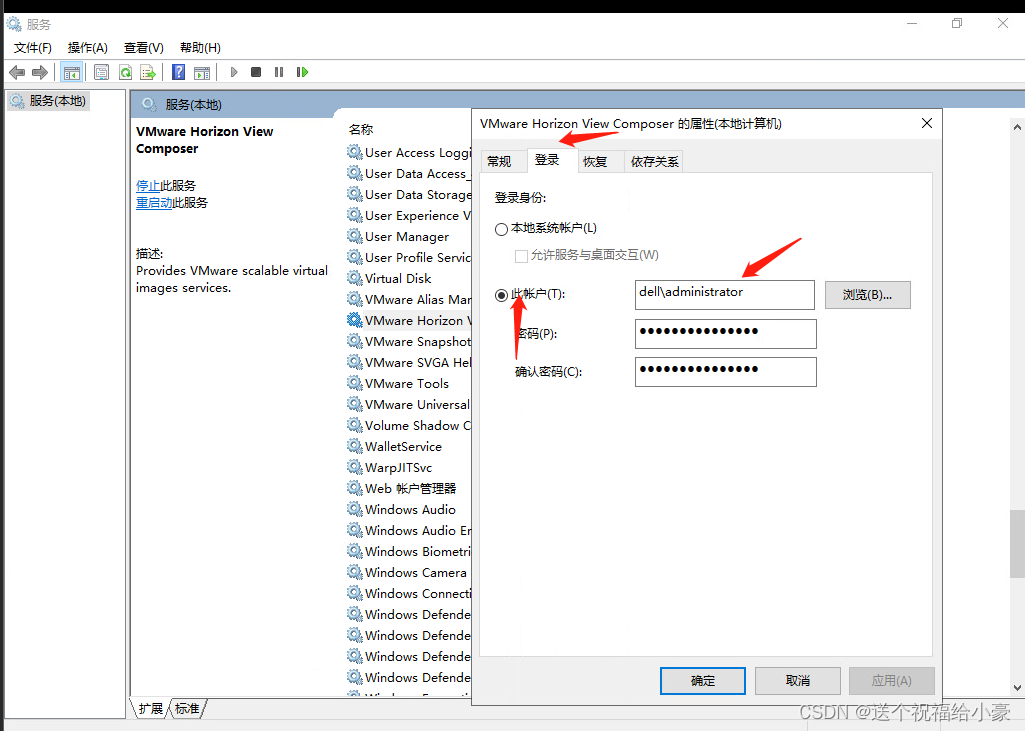
click OK and apply to return to reinstall.
Questions
When: NPM install @sentry/cli -g is executed as root, an error is reported:
npm ERR! Error: EACCES: permission denied, mkdir '/root/.npm/sentry-cli'
Cause
npm does not support running as root for security reasons. Even if you run it as root, npm will automatically redirect to a user named nobody, who has almost no privileges. In this case, if there are operations in the script that require permissions, such as writing files (especially to /root/.node-gyp), it will crash.
To avoid this, either follow the npm rules and create a privileged user specifically for running npm, or add the –unsafe-perm argument so that it doesn’t switch to nobody and runs as whatever user it is, even if it’s root.
Solution
Add parameter after executing command: –unsafe-perm
npm install --unsafe-perm @sentry/cli -gGerrit reports an error: permission denied solution
Foreword solution
Foreword
When using the Gerrit clone code, you will find an error. The error message is probably: permission denied (publickey)

openssh has abandoned RSA encryption keys since version 8.8 for security reasons
openssh thinks that RSA cracking costs too little, so it is disabled if there is a risk
you can use the command:
ssh -v [git server]
Check the openssh version number of the Gerrit server.
if it is ≥ 8.8, you can use this method.
Solution
Enter the machine SSH directory,
create a new config file without suffix:
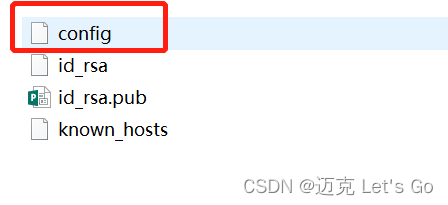
The content is:
Host gerrit's IP or domain name
HostName gerrit's IP or domain name
User Gerrit's user name (e.g. zhangsan)
PubkeyAcceptedKeyTypes +ssh-rsa
IdentityFile ~/.ssh/id_rsa
Port 29418 (Gerrit port)
Once configured, the clone is OK. Generally, there is no problem.
1. Error reporting details
fail to open MySQL connection: [CDC:ErrMySQLConnectionError]Error 1298: Unknown or incorrect time zone: 'Asia/Shanghai'
2. Troubleshooting
# Login tidb and check the time zone
show variables like '%time_zone%';
+------------------+---------------+
| Variable_name    | Value         |
+------------------+---------------+
| system_time_zone | Asia/Shanghai |
| time_zone        | SYSTEM        |
+------------------+---------------+
# login mysql and check the time zone
show variables like '%time_zone%';
+------------------+--------+
| Variable_name    | Value  |
+------------------+--------+
| system_time_zone | CST    |
| time_zone        | SYSTEM |
+------------------+--------+
It can be found that the time zone of the upstream tidb is North America/USA, while the time zone of the downstream MySQL is CST
3. Solution
Method 1: load the time zone
mysql_tzinfo_to_sql /usr/share/zoneinfo | mysql -u root mysql -p
Method 2: write sink to upstream and downstream time zones
cdc cli changefeed create --sink-uri="mysql://user:password@mysql_ip:mysql_port/?time-zone=CST" --pd=http://pd_ip:pd_portError while launching program:
Memory write error at 0x100000. APB Memory access port is disabled
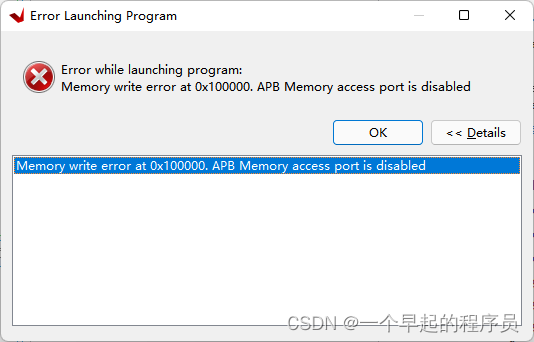
This error occurs because the DDR model is not selected correctly. Just check the DDR model.
One is the data width of DDR. If it is a single chip, it is generally 16 bits, and two chips are generally 32 bits.
In these two days, the service has been reporting when calling Baidu’s addressing and positioning interface and reverse address resolution:
file_get_contents(): SSL operation failed with code 1. OpenSSL Error messages:
error:14094410:SSL routines:ssl3_read_bytes:sslv3 alert handshake failure
The query results of the interface are affected, and finally the curl call problem is solved:
$ch = curl_init();
curl_setopt($ch, CURLOPT_URL, $url);
curl_setopt($ch, CURLOPT_HTTPHEADER, $header);
curl_setopt($ch, CURLOPT_FAILONERROR, false);
curl_setopt($ch, CURLOPT_RETURNTRANSFER, true);
curl_setopt($ch, CURLOPT_SSL_VERIFYPEER, false);
curl_setopt($ch, CURLOPT_SSL_VERIFYHOST, false);
curl_setopt($ch, CURLOPT_SSLVERSION, 4);
$reponse = curl_exec($ch);
CURLOPT_SSLVERSION Fetch value and meaning
CURL_SSLVERSION_TLSv1_2 requires php version >= 5.5.19
TLS 1.1 and TLS 1.2 are supported since OpenSSL 1.0.1
CURL_SSLVERSION_DEFAULT (0)
CURL_SSLVERSION_TLSv1 (1),
CURL_SSLVERSION_SSLv2 (2),
CURL_SSLVERSION_SSLv3 (3),
CURL_SSLVERSION_TLSv1_0 (4),
CURL_SSLVERSION_TLSv1_1 (5),
CURL_SSLVERSION_TLSv1_2 (6).When running the Manipulator Simulation in MATLAB visual servo toolbox, the following problems are encountered: error in port widths or dimensions. ‘ Output Port 1’ of ‘sl_ arm_ ibvs/camera’ is a [28×1] matrix.
The problem is caused by the wrong input vector dimension at the red circle dimension in the figure below.
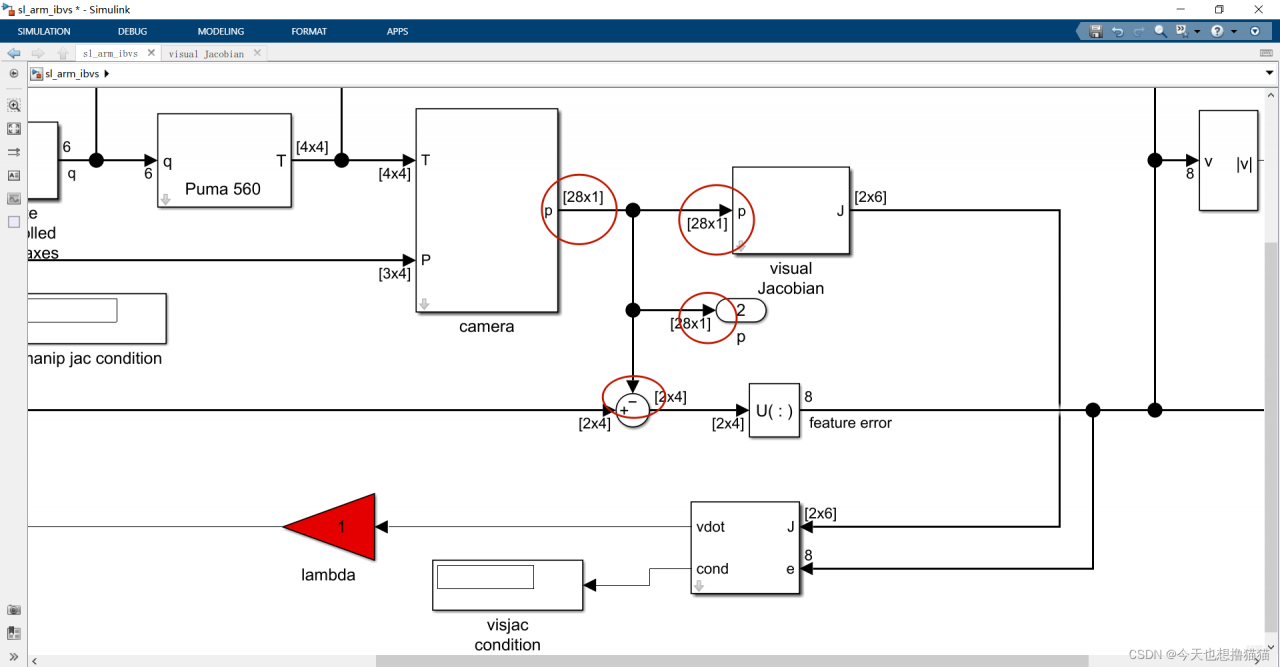
Here the p for the camera pixel coordinate system under the coordinate value, should be 2 * 4 vectors.
Solution: The new version of Machine Vision Toolbox for MATLAB toolbox lacks the module “slcamera.m”, open the camera module in simulate.
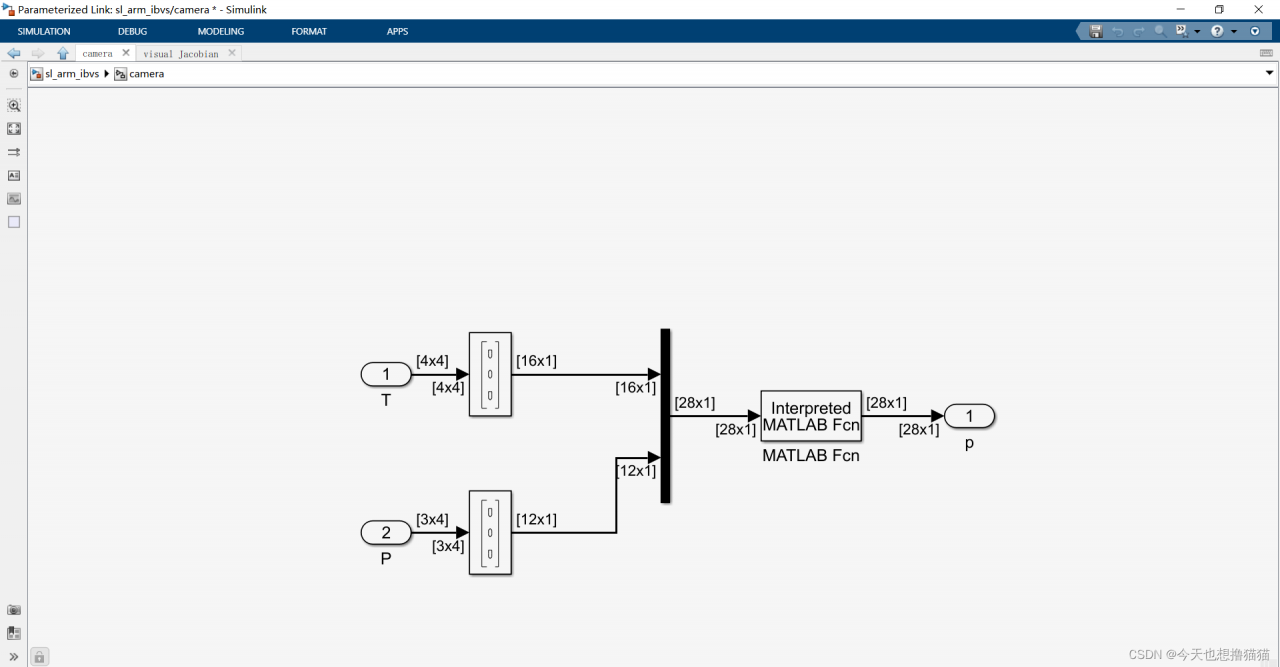
Double click the MATLAB FCN module, and you will be prompted that “slcamera” cannot be found. Select new:
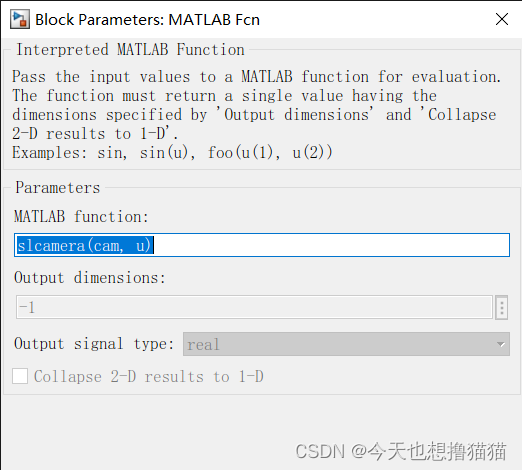
Type the following code:
function p = slcamera(cam, u)
    %if all(u == 0)
     if (u(1:16,:)==0)
        % Simulink is probing for the dimensions
        np = (length(u)-16)/3;
        p = zeros(2, np);
    else
        p = zeros(2, 4);
        P = reshape(u(17:end), 3, []);
        Tcam = reshape(u(1:16), 4, 4);
        p = cam.plot(P, 'pose', Tcam, 'drawnow');

    end
Run simulate again, you can see the error report and disappear, then you should encounter the following error.
Error in ‘sl_arm_ibvs/camera/MATLAB Fcn’. Evaluation of expression resulted in an invalid output.
Only finite double vector or matrix outputs are supported
I am also working on a solution for this error, so please stay tuned.