Category Archives: How to Fix

Several problems caused by device encryption

Description: ora-12541tns no monitor program + velvet software icon turns black

Problem Description:                 

         After Oracle is unloaded and reloaded, ora-12541tns no monitor program will not appear for the time being, and then the problem of restarting the computer appears again — the problem solved from the perspective of Oracle (this problem will appear again in a few days after it is solved through other operations — the above error occurs when opening PL/SQL developer software.)

         At the same time, the tinder software icon turns black or the tinder software installation pop-up cannot be installed in the encrypted directory (prompt: when the tinder is installed in other disks other than disk C.).

        At this point, the big probability is due to the problem of device encryption.

resolvent:

        Turn off device encryption settings.

Process (simple operation, just two steps)

1. Window + Q output “device encryption”( The window key icon is similar to the key of the window where the window is turned on. It is generally located near FN in the lower left corner.)

2. Select close( It will take some time)

         I was puzzled by this problem for a period of time. During this period, I solved it through online methods. I even uninstalled Oracle and then reloaded it. At that time, it was solved and there was no problem. However, the problem will still appear later, which is more annoying.

         Later, I found out the problem. The problem is quite special and the solution is also quite special. I would like to share it with those who encounter similar and partial problems. Finally, I hope I can help you solve the problem.


To solve the problem that deep in 20.2 system cannot save and transform the format of typora, and provide an effective installation method of typora

Background: deep in 20.2 system app store can only edit files after downloading typora, but can’t save files and convert file formats (such as exporting PDF, word, etc.) without any error prompt, just can’t convert.

Cause analysis: the typora downloaded from the deep in app store comes with its own pandoc plug-in, so there is no problem that there is no pandoc; The deepin version of TA is 20.0, but it can be used normally. I use the command line to run typora for operation, and there is no error related to file conversion or saving. Subjective conjecture is that the latest version of deepin is incompatible with the app store’s typora version.

resolvent:

Uninstall the app store, and download and install it from the official website https://www.typora.io/ (just use the operation method of Linux system on the official website)

Actual operation:

The following is the official website installation operation and possible errors, I give my own solution:

1. Get the key

wget -qO – https://typora.io/linux/public-key.asc | sudo apt-key add –

2. Add the repository of typora

sudo add-apt-repository ‘deb https://typora.io/linux ./’
sudo apt-get update

in this step, you may report an error of “unable to find the repository command”

Try some methods on the network is not feasible, so directly add violence!

    use the VIM command to edit the configuration file of apt get installation( The directory is/etc/apt/source. List)

      Press’ I ‘to enter edit mode and add: DEB https://typora.io/linux . /,
      then press ESC + “: WQ” to save and exit

        then execute sudo apt get update to update the configuration file

        3. Install typora

        sudo apt-get install typora

Invalidstorage.notfound when uploading video in alicloud VOD

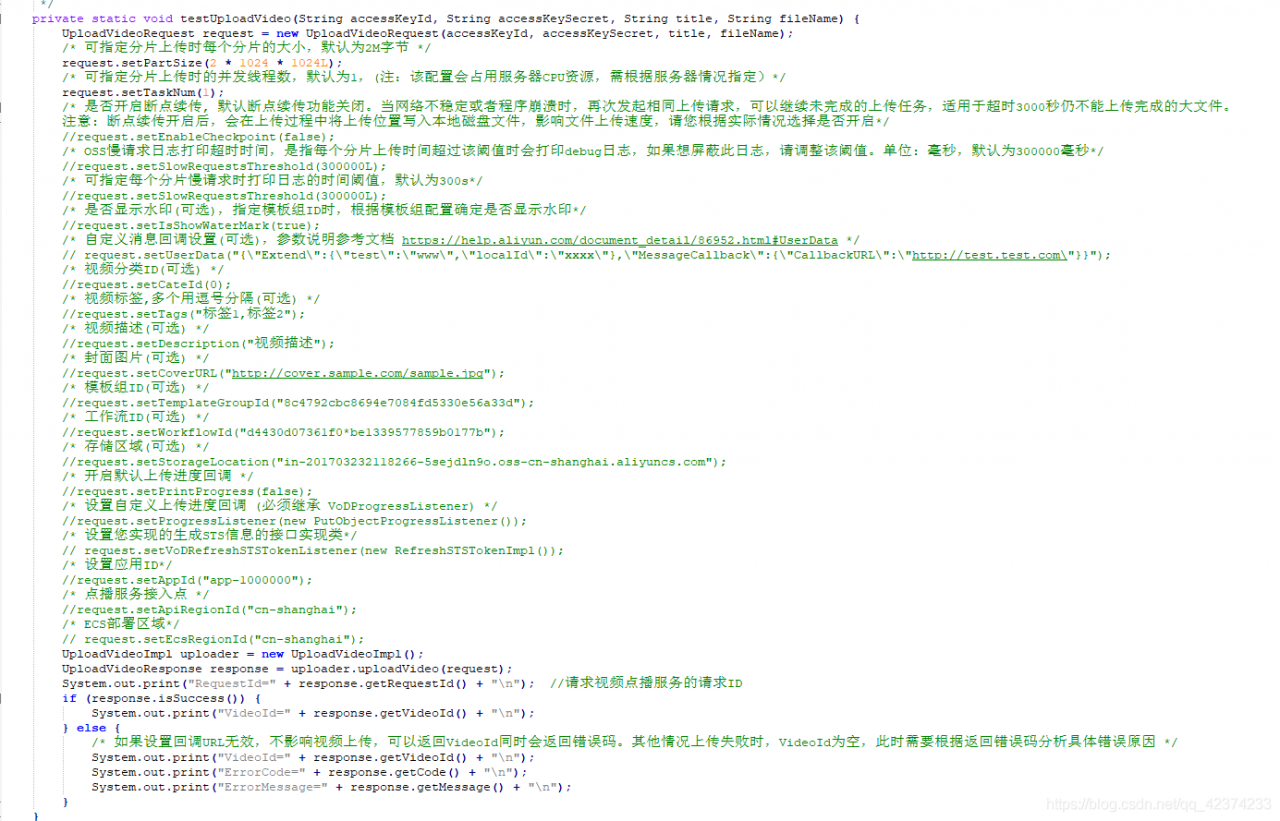
Use Java SDK to upload video files according to official documents

  In the end, it will report an error

InvalidStorage.NotFound
The StorageLocation does not exist.  

View the cause of the error in the official document

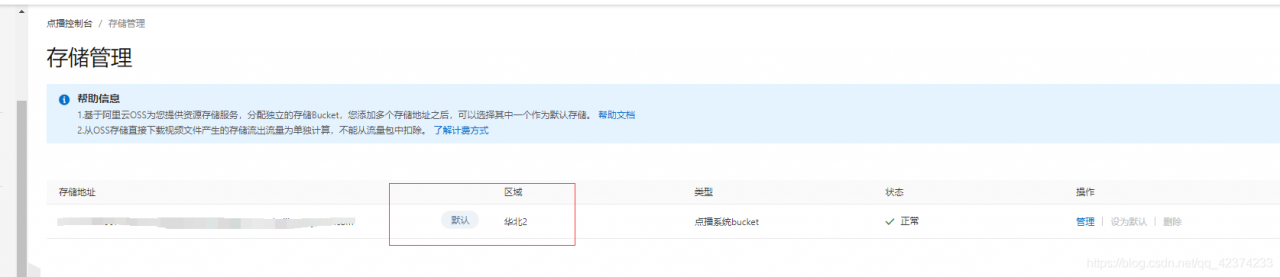
If the set storage address does not exist, log in to the on demand console and select configuration management  & gt;   Media asset management and allocation  & gt;   Storage management   Check and confirm in.

  But I will still report an error after setting the default storage address (the default code is Shanghai)

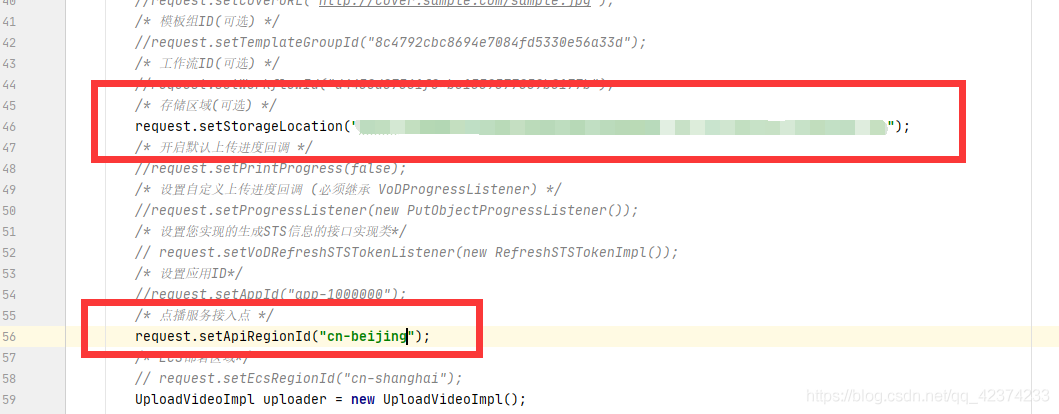
The solution here is

Manually set in the code and then upload it

The above code is the local upload video, other ways of streaming and other solutions are the same.

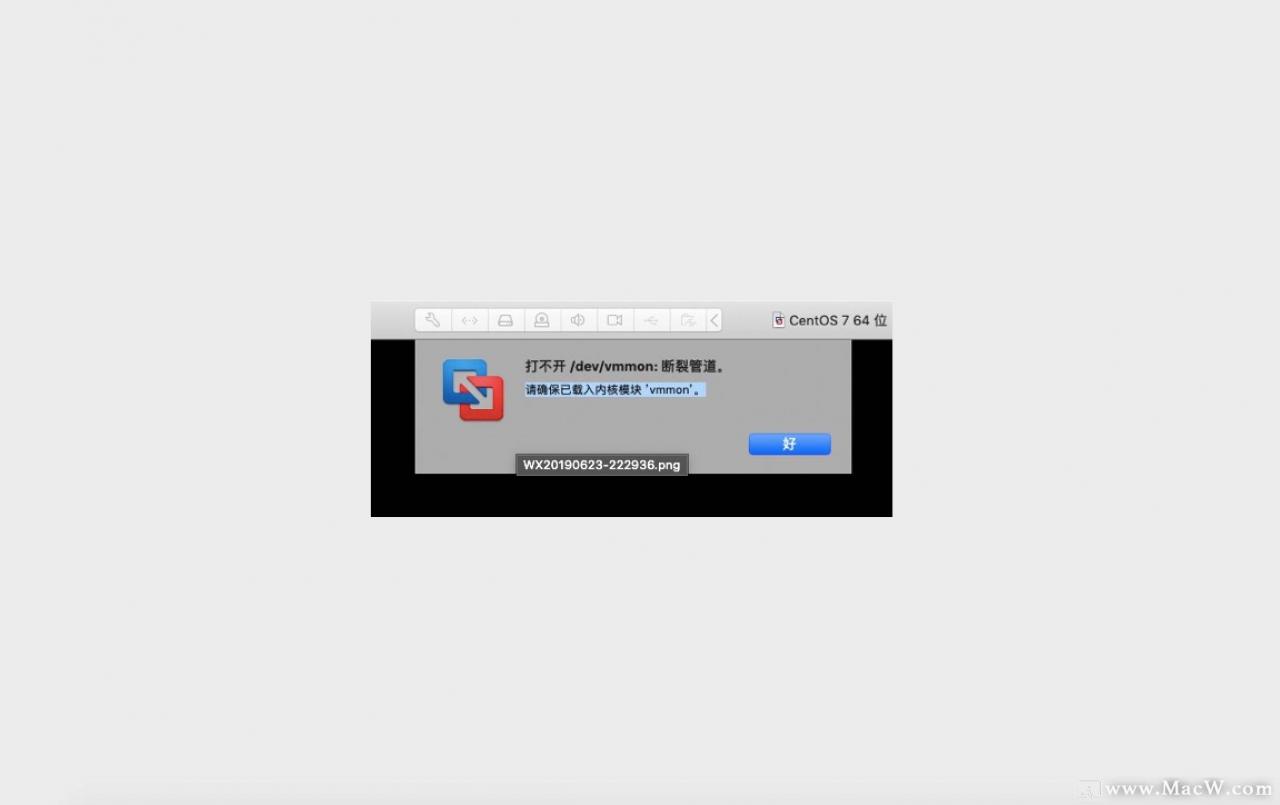
How to solve the problem of “unable to open / dev / vmmon: broken pipeline” when running VMware virtual machine?

When using VMware fusion to install virtual machine system on MAC, sometimes it will prompt “can’t open/dev/vmmon: fracture pipeline”, which is caused by the system blocking some plug-ins of virtual machine

resolvent

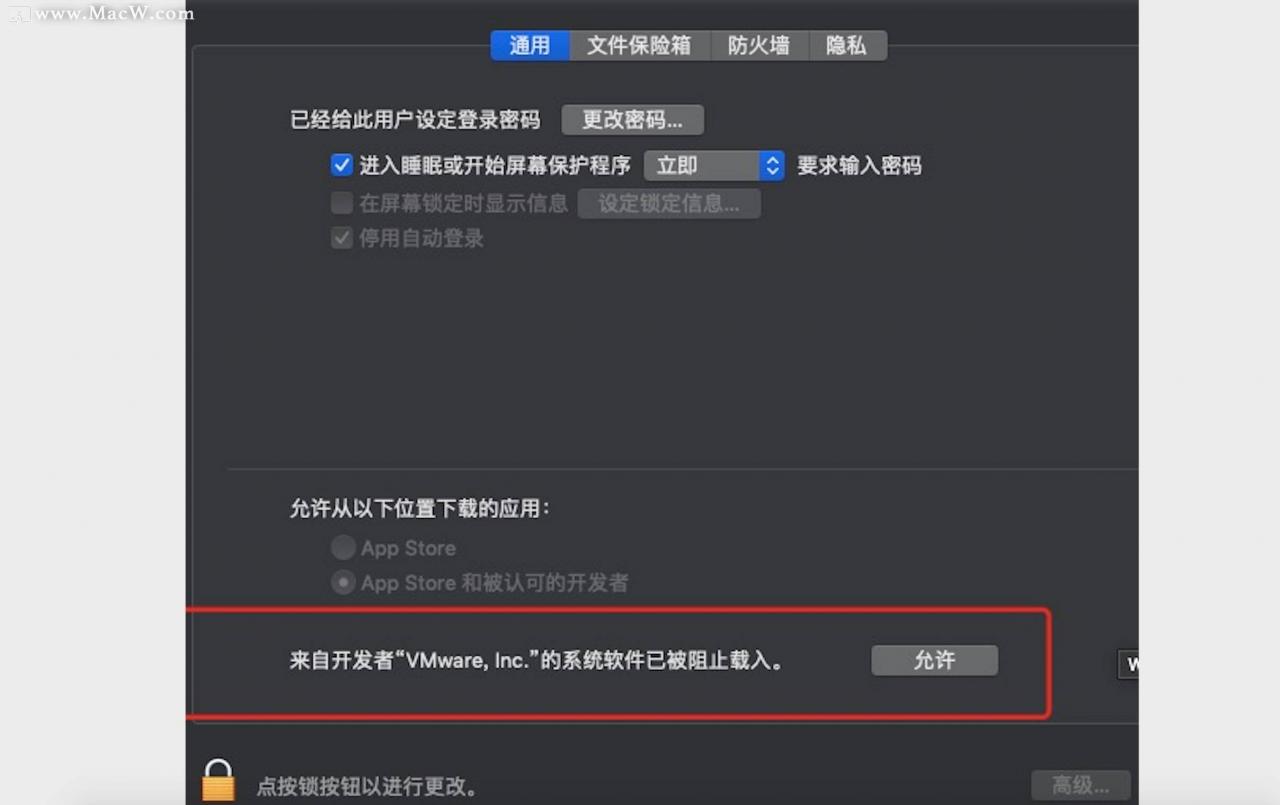
Open system preferences – & gt【 Security and privacy] – & gt【 General], there will be a prompt that the plug-in will block. Click allow; Or modify the system security settings to any source

Solve the problem that Gabor can’t start itself after the server is restarted

Questions

When the server deployed with Gabor restarts, it may appear that Gabor can’t follow the system to start itself

Solution

Now assume that the location of the installation directory of Gabor is/usr/local/Gabor. After the installation of Gabor, the docker-compose.yml configuration file will be generated in this directory. You can use docker compose to operate this file to control the startup and shutdown of Gabor.

Next, write a system D service that starts from Gabor, named Gabor. Service (placed in the/etc/system/system directory)

[Unit]
Description=harbor
After=docker.service systemd-networkd.service systemd-resolved.service
Requires=docker.service
Documentation=http://github.com/vmware/harbor

[Service]
Type=simple
Restart=on-failure
RestartSec=5
ExecStart=/usr/local/bin/docker-compose -f  /usr/local/harbor/docker-compose.yml up
ExecStop=/usr/local/bin/docker-compose -f  /usr/local/harbor/docker-compose.yml down

[Install]
WantedBy=multi-user.target

After writing, use systemctl enable harbor.service to set the boot time. Then restart the server for testing.

AVD FFmpeg avcodec_ A solution of open2 returning – 1 (operation not permitted)

I’m working on Android hard decoding recently. Various attempts have been made on the compatible implementation of soft decoding and hard decoding. Later, I suddenly found that it was unable to decode normally, and even failed to open codec appeared.

Use RET = avcodec_ Open2 (CTX, codec, nullptr) the return value is – 1, and the error message is “operation not permitted”. It’s a headache for me. For Android development, permissions, alas AVStream* st = pFormatCtx->streams[streamIdx]; codec_context_ = avcodec_alloc_context3(pCodec); if (!codec_context_) { AVLOGE("Failed to allocate the codec context."); return -1; } if (avcodec_parameters_to_context(codec_context_, st->codecpar) < 0) { AVLOGE("Failed to copy codec parameters to decoder context."); return -1; } if (enable_hw_decode_) { if (codec_context_->codec_id == AV_CODEC_ID_H264) { pCodec = avcodec_find_decoder_by_name("h264_mediacodec"); if (pCodec) { avcodec_free_context(&codec_context_); codec_context_ = avcodec_alloc_context3(pCodec); using_hw_decode_ = true; } } } int ret = 0; if ((ret = avcodec_open2(codec_context_, pCodec, nullptr)) < 0) { AVLOGE("Failed to open codec. ret = %d, %s", ret, PAVUtils::get_error_string(ret)); return -1; }

Because it was copied once at first, but later, if hard decoding was used, the coder was selected again. As a result, the newly applied avcodec context failed to copy the operation parameters from stream to context. When I was using_ hw_ decode_ = Add avcodec before true _ parameters_ to_ context(codec_ context_, st-> codecpar); and it will work normally
it's strange why the relevant parameters are not copied, instead of returning invalid_ Par returns no instead_ What about permit?

You set the variable “no_check_targets“ here and it was unused before it went out of scope.

I haven’t compiled a new version of CEF for a long time. Recently, chrome mentioned that there is a 23% performance improvement in version 91 https://blog.chromium.org/2021/05/chrome-is-faster-in-m91.html Is there such a big improvement?So I want to have a try. As a matter of course, I used my own script to compile. As a result, I encountered a “wonderful” problem. Here is a brief record.

When compiling CEF 4472 (chromium 91) with auto git.py, an error is suddenly reported after the script finishes executing CEF patch apply

Generating CEF project files...
Creating D:\google\cef_new\chromium\src\out\Debug_GN_x86 directory.
ERROR at //.gn:65:20: Assignment had no effect.
no_check_targets = [
                   ^
You set the variable "no_check_targets" here and it was unused before it went
out of scope.
Traceback (most recent call last):
  File "D:\google\cef_new\chromium\src\cef\tools\gclient_hook.py", line 146, in <module>
    RunAction(src_dir, cmd)
  File "D:\google\cef_new\chromium\src\cef\tools\gclient_util.py", line 35, in RunAction
    gclient_utils.CheckCallAndFilter(
  File "D:\google\cef_new\depot_tools\gclient_utils.py", line 673, in CheckCallAndFilter
    raise subprocess2.CalledProcessError(
subprocess2.CalledProcessError: Command 'gn gen out\\Debug_GN_x86 --ide=vs2019 --sln=cef --filters=//cef/*' returned non-zero exit status 1 in D:\google\cef_new\chromium\src
Traceback (most recent call last):
  File "D:\google\cef_new\automate-git.py", line 1462, in <module>
    run('%s %s' % (python_exe, tool), cef_src_dir, depot_tools_dir)
  File "D:\google\cef_new\automate-git.py", line 69, in run
    return subprocess.check_call(
  File "C:\Python39\lib\subprocess.py", line 373, in check_call
    raise CalledProcessError(retcode, cmd)
subprocess.CalledProcessError: Command '['D:\\google\\cef_new\\depot_tools\\python3.bat', 'D:\\google\\cef_new\\chromium\\src\\cef\\tools\\gclient_hook.py']' returned non-zero exit status 1.

No is defined in chromium. Src. GN_ check_ Targets, but not used. At first, I thought it was my own depot_ Tools version is wrong (I have many depots on my machine_ Tools), and then switch the various branches, commit or not. So, it’s better to add some logs in the python script to see what’s going on.

Through the above error prompt, an error is reported when executing GN Gen , and then through reading CEF/tools/gclient_ hook.py、gclient_ Util.py, to Depot_ In this file, the main function looks for the GN executable file in these two locations:

gclient_ paths.GetPrimarySolutionPath()gclient_ paths.GetBuildtoolsPlatformBinaryPath()

I made up these two paths in gn.py. The first result is:

D:\google\cef_new\chromium\src\third_party\gn\gn.exe

Take a look, third_ There is no GN or gn.exe under Party, so we will use the second method to get the path. The second result is:

D:\Electron\electron\src\buildtools\win\gn.exe

Hey, hey, hey?How did you get under electron?So that's the problem.

The next troubleshooting is relatively simple. Check the implementation of getbuildtools platform binarypath (located in depot)_ Gclient in tools folder_ Paths. Py), the original path is controlled by an environment variable chromium_ BUILDTOOLS_ Path (see function getbuildtoolspath ), and then check the windows system environment variables. I really don't know when there is such an environment variable. I can't remember. Was it manually added when I compiled the electron source code a few months ago
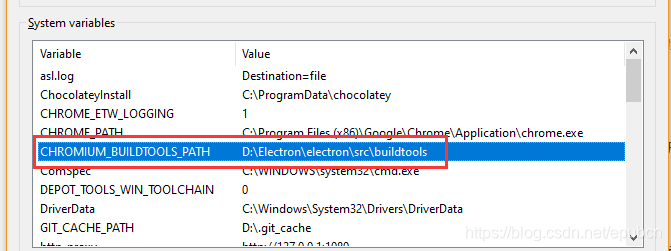
up to now, we have finally come to the conclusion that we have deleted chromium_ BUILDTOOLS_ Path, recompile. Under normal circumstances, the GN to be used should be located under - chromium - SRC - buildtools - win \ . All right, call it a day~


Pychar reported an error. Unable to set the python SDK in Python 3.8. This SDK appears to be invalid.

Problem Description:

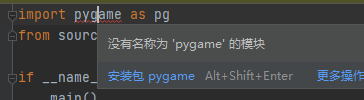
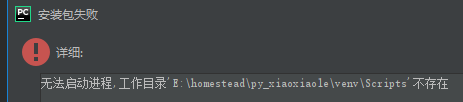
After switching a new project, the installation of pyGame package fails and prompts that you cannot
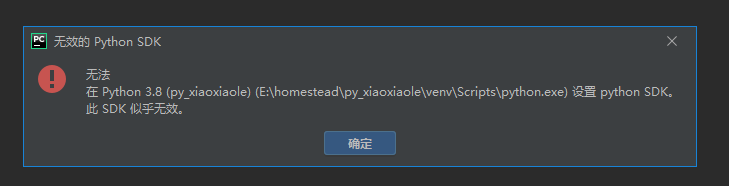
install pyGame in Python 3.8 (py)_ xiaoxiaole) (E:\homestead\py_ Xiaoxiaole/venv/scripts/python. Exe) to set up the python SDK
this SDK appears to be invalid.


Solution:

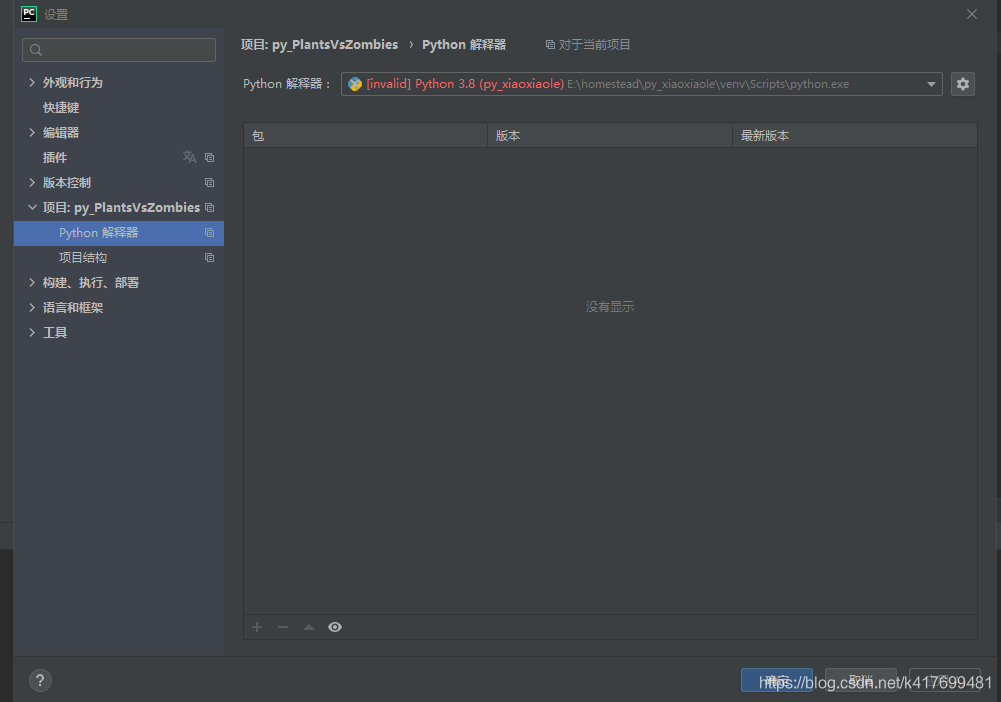
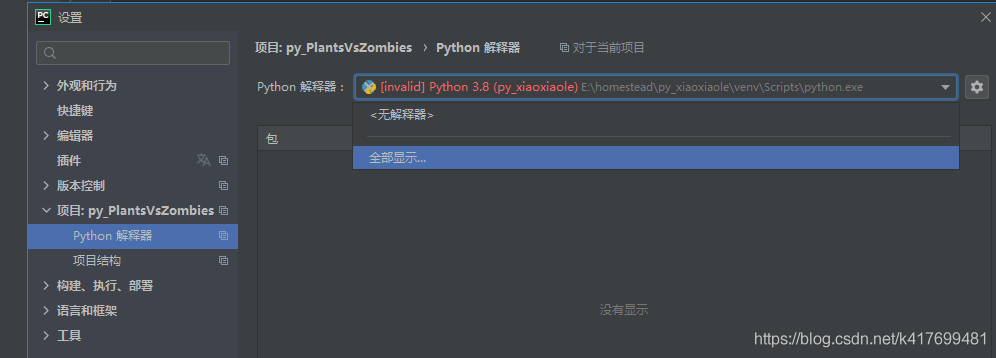
py_ Xiaoxiaole this project has just been deleted. I don’t know why this interpreter is selected by default first set up the Python interpreter

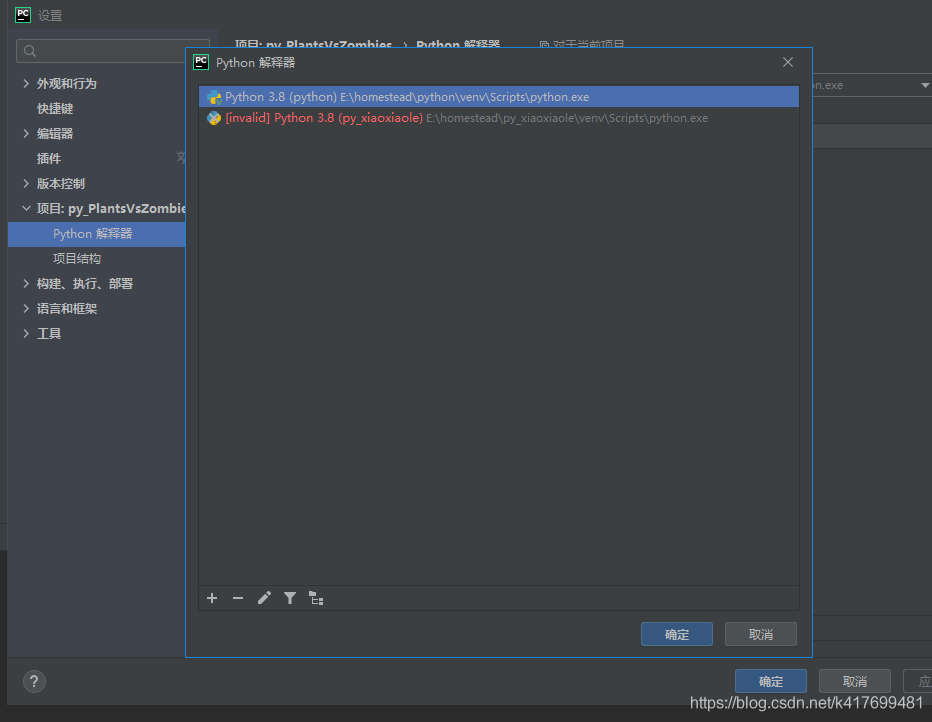
Select all to display
select the above Python SDK. If it is not available, a new one can be added

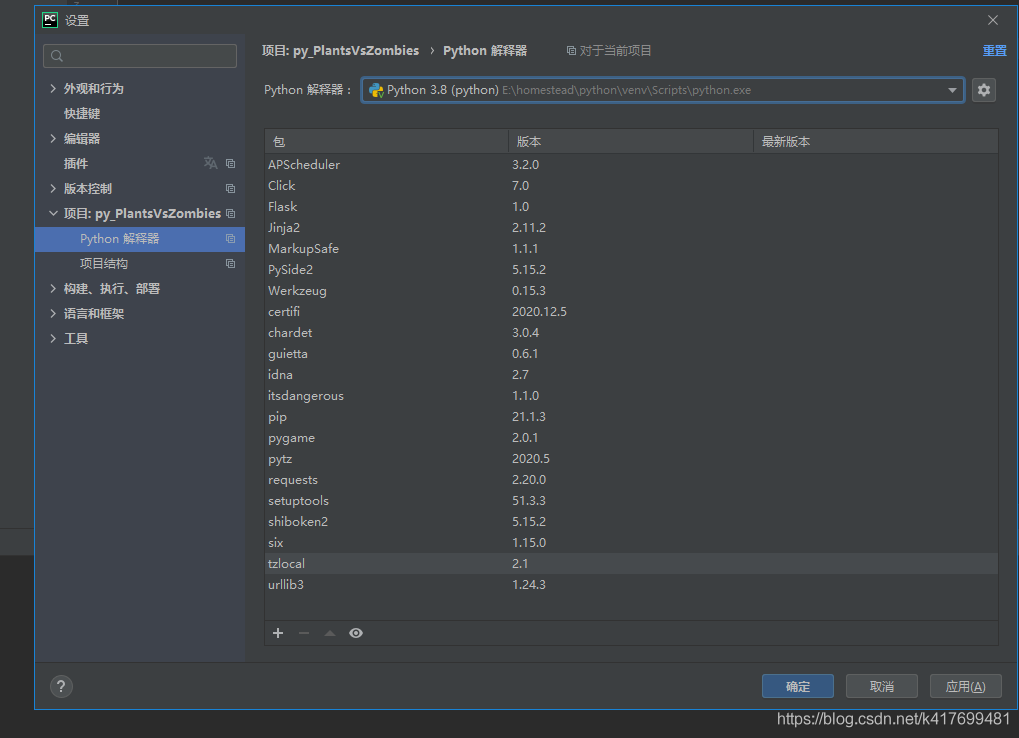
when there is an available Python SDK

the pyGame package is successfully installed again and the invalid Python SDK is deleted.

Running trust error reporting linker ‘link. Exe’ not found on Windows

Running trust error reporting linker link.exe not found on Windows

Because on the windows platform, the trust compiler needs the vs C + + compiler. The error usually occurs when using rust C main.rs, because visual studio or C + + build tools are not installed on windows

I download visual studio 2017, install the C + + workload, pro test passed!

Official download address:
https://visualstudio.microsoft.com/zh-hans/downloads/