Category Archives: How to Fix

Cannot resolve plugin org.springframework .boot:xxx

   During development, sometimes when you open a project to install a dependency, or create a new springboot project to install some dependencies, the following errors appear inexplicably:

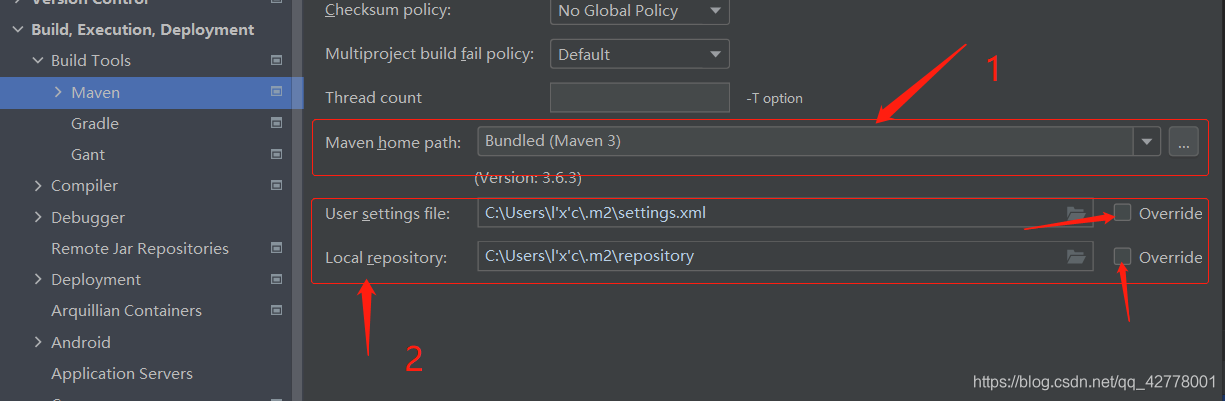
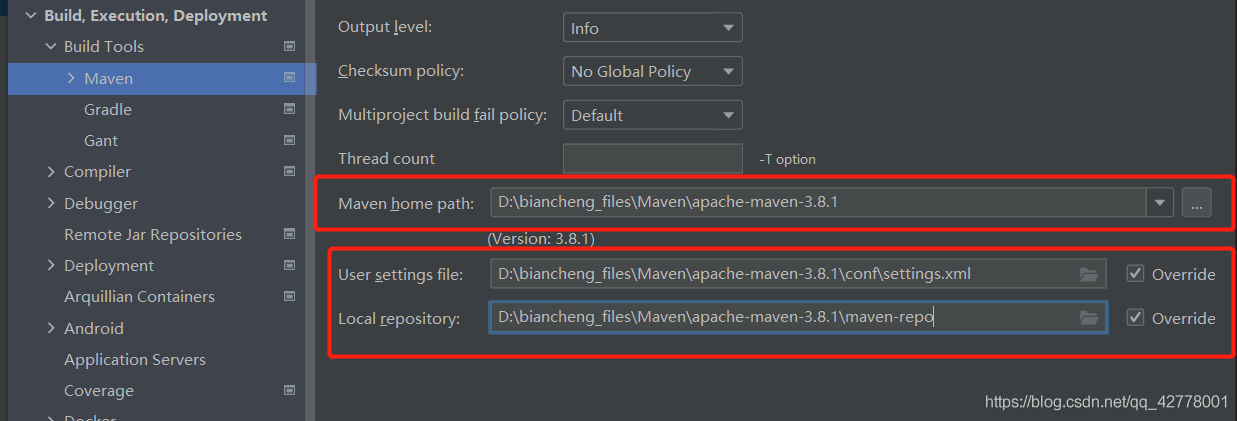
First check whether there is a problem with the network. If the network is normal, 99% of the problems occur in the Maven configuration of the idea. Open it   settings   -& gt; Find the location of the screenshot below and modify the following two places:

Maven home path: the installation directory of Maven
user setttings file:   Maven installation directory – & gt; conf -> Setting.xml file path
local repository: This is a customized Maven local repository after downloading Maven. Mine is in the Maven installation directory.

   After these three settings are completed, click apply, OK and refresh.


Error reporting – the project directly introduces the error reporting and solution of. SCSS file

   in recent projects, SCSS has been directly used, and it is found that an error is reported. Up to now, I don’t know the cause, but I probably know that it is node, but the solution has been found. Let’s share:

1、 Error reporting

./src/components/alert_tip/alert_tip.scss (./node_modules/css-loader??ref--6-oneOf-5-1!./node_modules/postcss-loader/src??postcss!./node_modules/sass-loader/lib/loader.js!./src/components/alert_tip/alert_tip.scss)
Error: ENOENT: no such file or directory, scandir 'C:\Users\Administrator\Desktop\xxx\xxx\xxx\xxx\xxx-elm\node_modules\node-sass\vendor'

2、 Solution

  just run the following code directly:

	npm rebuild node-sass

hope to help you

(error when importing database): MySQL 2006-mysql server has gone away

Method 1 (verified to be correct):

Find the my.ini configuration file in the installation directory and add the following code:

max_allowed_packet=500M

wait_timeout=288000

interactive_timeout = 288000

The three parameters are annotated as follows:

max_ allowed_ Packet is the largest packet allowed by mysql, that is, the request you send;

wait_ Timeout is the maximum waiting time. You can customize this value. However, if the time is too short, a MySQL server has gone away #2006 error will appear after the timeout.

max_ allowed_ The packet parameter is used to control the maximum length of its communication buffer

Method 2 (online extract is not verified temporarily):

Open tools in the menu of Navicat, select server monitor, then select in the left column, and click variable in the right column to find max_ allowed_ Packet and increase its value.

In the Chinese version: in the menu, tools – & gt; Server monitoring – & gt; Tick in front of the database list on the left – & gt; Find Max in the variable on the right_ allowed_ Packet, increase the value, such as 999999999

MySQL settings are case insensitive:

MySQL under Linux is case sensitive by default. You can make MySQL case insensitive by the following settings:
1. Log in with root and modify/etc/my.cnf
2. Under the [mysqld] node, add a line: lower_ case_ table_ Names = 1
3. Restart MySQL;

Where lower_ case_ table_ The name = 1 Parameter defaults to 1 in windows and 0 in UNIX. Therefore, the problem will not be encountered in windows. Once it reaches Linux, the cause of the problem will occur (especially when MySQL names the table with uppercase letters, but when querying with uppercase letters, there will be an error that cannot be found, which is really puzzling)

View the maximum length of the communication buffer:

show global variables like ‘max_ allowed_ packet’;

The default maximum is 1m. You can modify the maximum length of the communication buffer to 16m:

set global max_ allowed_ packet=1024102416;

Query again:

Next, import again. Import succeeded!

Note: the modification is only valid for the current. If MySQL is restarted, it will still restore the original size. If you want to take effect permanently, you can modify the configuration file and add or modify the configuration in my.ini (under Windows) or my.cnf (under Linux):

max_ allowed_ packet = 16M

Restart MySQL service

<info> peer_manager_handler: Connection security failed

During the development of Nordic 52810, after the softdevice is re written, when nrfconnect for Mobile Connect is used, the connection fails, and the mobile phone displays peer removed pairing information. Device side log information:

< info> peer_ manager_ handler: Connection security failed: role: Peripheral, conn_ handle: 0x0, procedure: Encryption, error: 4102

Solution: in the Bluetooth settings of the mobile phone, find the device to be connected, select “ignore this device”, and re connect with nrfconnect. Success!

ModuleNotFoundError: No module named ‘ahocorasick‘ [100% Work Method]

ModuleNotFoundError: No module named ‘ahocorasick‘,
Install:

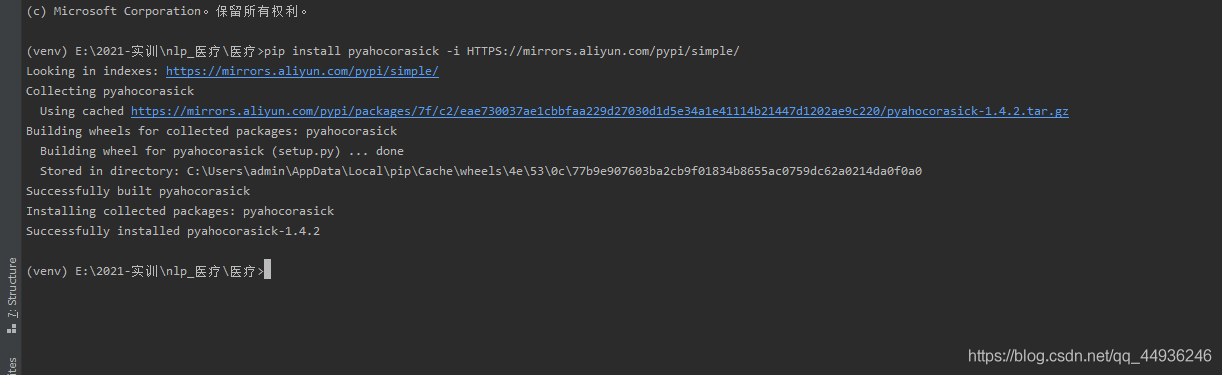
pip install pyahocorasick -i HTTPS://mirrors.aliyun.com/pypi/simple/

The following are the errors I encountered during installation:
error: Microsoft Visual C + + 14.0 is required. Get it with "Microsoft Visual C + + build tools,
Microsoft Visual C + + 14.0 needs to be installed

Recently, I was engaged in the knowledge mapping of natural language processing
but when building the system, I used a AC automaton word filtering , which is to remove sensitive words, such as

these sensitive words, which need to be replaced by some implied words or symbols such as * *. There are many ways to do this

- 1, AC automata
- 2, DFA filtering algorithm
- 3, replace filtering
- 4, regular expression filtering
for AC automata filtering, you need to use ahocorasick this library, now pyahocorasick

pip install pyahocorasick -i HTTPS://mirrors.aliyun.com/pypi/simple/

However, when installing pyahocorasick, it reported an error
that we need to install it

This is recommended to you error: Microsoft Visual C + + 14.0 is required. Get it with “Microsoft Visual C + + build tools, pro test 100% installation
it is offline installation, there will be no damage to the installation package;

The following is my successful installation of pyahocorasick:

[Solved] jQuery Error: Uncaught TypeError: this.attr is not a function

$(".answer").on("click", function () {
  console.log(this) 
  console.log(this.attr("class")) //error this.attr is not a function
});

JQ calls the method with JQ object. Method name (xxx)

$(".answer").on("click", function () {
  console.log($(this)) 
  console.log($(this).attr("class")) 
});

If the callback function is of the following form

()=>{
....
}

It should be written as

$(".answer").on("click", (el)=>{
  console.log($(el.target)) 
  console.log($(el.target).attr("class")) 
});

Note: DOM object obj is converted to JQ object — & gt$( obj)

Ubuntu 20.04: How to create shortcut startup mode in IntelliJ idea

(1) First, install IntelliJ idea
(2) then CD to the desktop directory
(3) enter touch idea.desktop
(4) enter sudo VI idea.desktop

[Desktop Entry]
Name=IntelliJ IDEA
Comment=IntelliJ IDEA
Exec=/usr/local/ideaIU/bin/idea.sh //This is in the IDEA directory of your own installation
Icon=/usr/local/ideaIU/bin/idea.png //This is in the IDEA directory of your own installation
Terminal=false
Type=Application
Categories=Developer;

After quitting,
Enter sudo Chmod + X idea. Desktop
and the idea. Desktop file will appear on the desktop. Right click and click allow to start

Go compiles the EXE executable to remove the CMD window at run time

         Recently, I started to contact go language again and wrote an EXE executable program. However, such a console window will appear every time I execute it, and there is no content yet. It’s not elegant, of course.

We can solve this problem by setting compilation parameters in go build

go build -ldflags "-s -w -H=windowsgui"

-s Omit the symbol table and debug information
-w Omit the DWARF symbol table Omit the DWARF symbol table
-H windowsgui does not print messages to the console (On Windows, -H windowsgui writes a "GUI binary" instead of a "console binary."), so there is no cmd window

In this way, the EXE program generated by go compilation can run in the background.

The problem of cursor skipping in wangeditor

Problem description

When using wangeditor, input content, and press enter to switch to the next line, the cursor cuts over and automatically jumps back.

Cause of the problem

After encapsulating a component, the onchange event of wangeditor will be triggered every time the content passed in from the parent is used. In the onchange event, the modified value is assigned to the parent component by passing the child to the parent. After the value of the parent component changes, the value of the child component wangeditor will also be modified. Therefore, the cursor always jumps to the last. At this point, there is another problem of concurrency, that is, it is invalid after the undo and resume click.

Solution

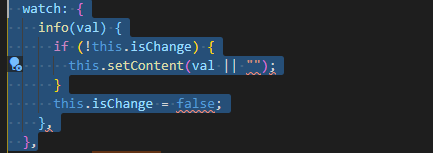
When the child component watch listens to the value passed in by the parent component, it adds judgment to ensure that the input content is zero and the assignment will not be triggered

Instead of using the official recommended catchdata, the child component uses the method of passing the value to the parent component (that is, $emit) to synchronize the value to the parent component, so as to ensure that the value of the parent component is consistent with the content of the rich text when saving

if it can help you, please use your little hand to like it
thank you.

The solution of no space left on device always appears when using TF’s debug tool (tfdbg)

The first time you use tensorflow’s debug tool, but when you use it for the second time, there is always a shortage of space, which can be solved through the following steps.

  df -h

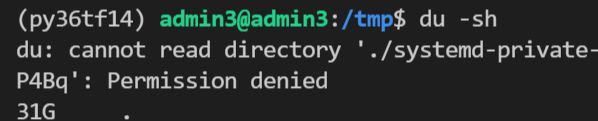
Find that the root directory is full, then go to the root directory and check the occupied directory  

  du –max-depth=1 -h

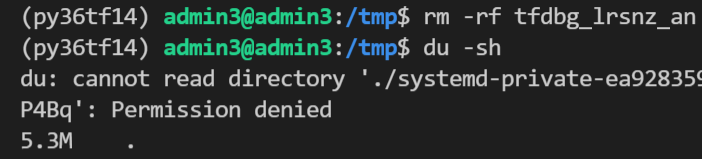
  It is found that TMP directory takes up a lot of space


Sure enough, when you go to TMP, you find files related to tfdbg. Just delete them  。


The solution of white screen crash when loading QML

1 reference link

qt – Rectangle element is not displayed – Stack Overflow

(122 messages) when QML starts on the development board, a white screen appears (two loading modes of QML)_ xi__ Q’s column CSDN blog

(122 messages) about the solution to the problem that the stackview cannot be displayed (white screen) on the target machine (customized Ubuntu) when QML is migrated from Ubuntu development_ Changsha red fat network technology (original name: Red Imitation workshop) – CSDN blog

2 best practices

main.cpp

#include <QGuiApplication>
#include <QQuickView>

int main(int argc, char *argv[])
{
    QGuiApplication app(argc, argv);

    QQuickView engine(QUrl(QStringLiteral("qrc:/main.qml")));
    engine.show();

    return app.exec();
}

Master.qml

import QtQuick 2.0

Rectangle {
    width: 100
    height: 100
    color: "red"
}