Record it! After half a month of internship, when I changed the bug today (an interface for modifying personal information), it was obviously changed, and the test environment was running smoothly. When I opened the test environment demonstration, I click submit to modify and report an error network error as shown in the following figure

I opened F12 to view the request, and found that the status was CORS error. My first feeling was that there was a cross domain problem, but I should not, Just opened the console and reported an error, as shown in the figure below:
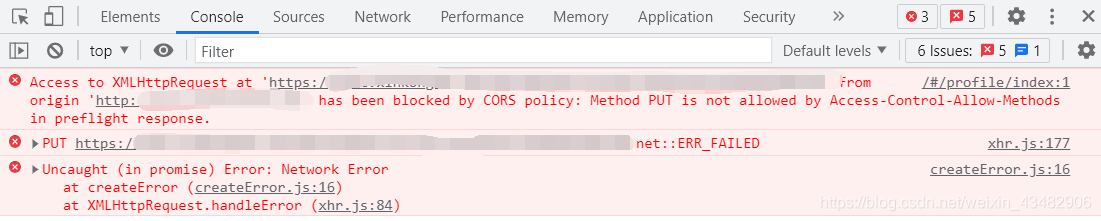
I still feel that it is cross domain, but it should not be cross domain ~
finally, I found that the top left corner of the browser is as shown in the figure
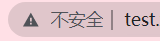
remember that the company’s domain name has a certificate, is it because there is no s, so I changed the address bar HTTP to HTTPS, The problem is solved ~
then the cross domain reason should be that http//: test.xxx.com visited the interface of HTTPS: test.xxx.com, while the domain name allowed to cross domain in the background is http//: test.xxx.com https://test.xxx.com , which leads to cross domain ~
lack of talent and learning, misunderstanding and mistakes, please give us some advice in the comments area~
Category Archives: How to Fix
Python TypeError: not all arguments converted during string formatting [Solved]
For example:
 strs=(1,2,3,4)  #Create a collection
 strs
 (1, 2, 3,4)
 >>> print 'strs= %s ' % strs
 Traceback (most recent call last):
   File "<pyshell#43>", line 1, in <module>
     print 'strs= %s ' % str
 TypeError: not all arguments converted during string formatting
Reason: the 1% operator can only be used directly for string (‘123 ‘). If it is a list ([1,2,3]) or tuple, it needs to match operators one by one.
To put it bluntly, it’s written in parentheses with commas (STRs,)
Solution:
print 'strs= %s' % (strs,)
strs= (1, 2, 3,4)
or
print 'strs= %s,%s,%s,%s' % sstr
strs= 1,2,3,4
# simple explanation
the% before and after explanation does not correspond to the number of parameters after explanation, such as
File "<pyshell#37>", line 1, in <module>
print '%f meters is the same as &f km' % (meters, kilometers)
TypeError: not all arguments converted during string formatting
There are two parameters of miles and kilometer in the back, only one% F in the front, and one & amp; with wrong print;, The former is inconsistent with the latter; If you change it to
print '%f miles is the same as %f km' % (miles, kilometers)That’s all
When installing software in Ubuntu, it prompts: E: You don’t have enough free space in /var/cache/apt/archives/.
There is not enough free space in/var/cache/apt/Archives /. The tips are as follows:
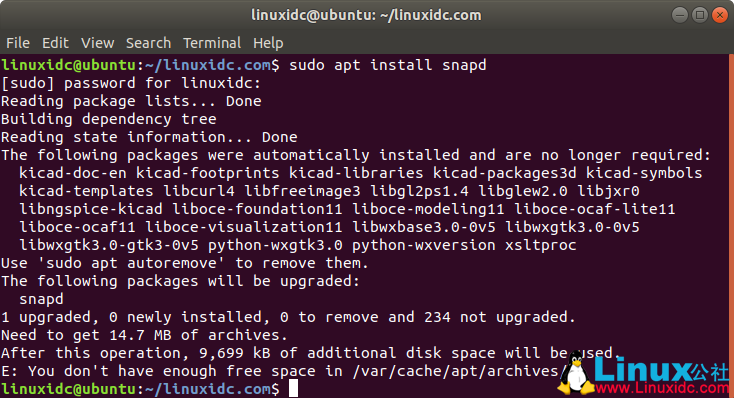
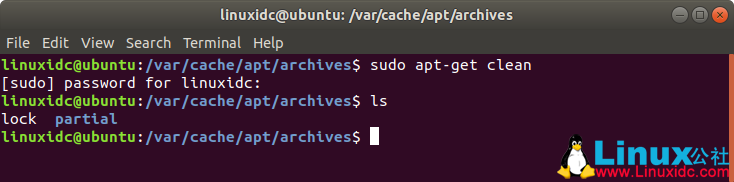
/The files in var/cache/apt/Archives folder are the installation files downloaded when using sudo apt get install appName. These files can be cleaned up. If you are short of system space, you can think of cleaning up from here to get space. The files under my computer are as follows:
linuxidc@ubuntu :~/linuxidc.com$ cd /var/cache/apt/archives
linuxidc@ubuntu :/var/cache/apt/archives$ ls
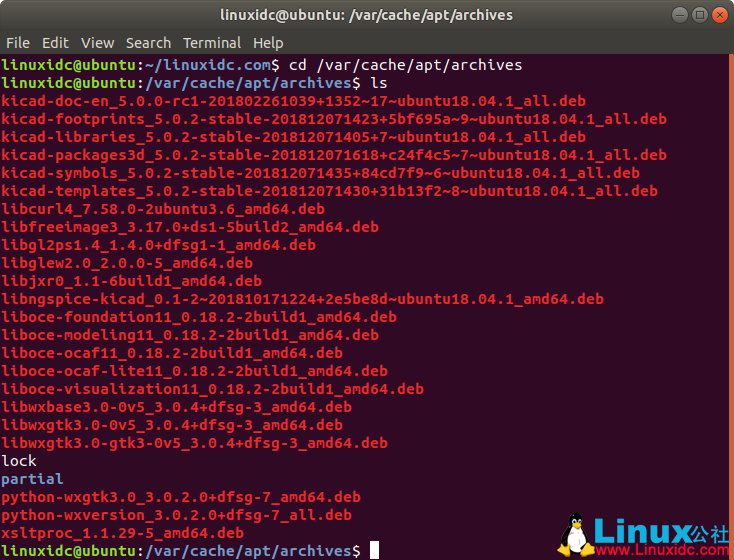
The cleaning method is simple:
linuxidc@ubuntu :/var/cache/apt/archives$ sudo apt-get clean
[sudo] password for linuxidc:
When you look again, *. DEB file does not exist
Not allowed to bind to service Intent [How to Solve]
<service android:name=".RecentTaskService"
    android:permission="xxx.xxx.xxx"
    android:exported="true">
    <intent-filter>
        <action android:name="xxx.xxx.xxx" />
    </intent-filter>
</service>
The bound service needs to set the attribute exported = true in the node;
If permission is set for the bound service, you need to declare permission when binding the service
<permission android:name="xxx.xxx.xxx" />
<uses-permission android:name="xxx.xxx.xxx" />
Gson Parsing exceptions: Use JsonReader.setLenient(true) to accept malformed JSON at line 1 column 1 path $
First, check whether your retrofit configuration is correct and resolve the exception
.addconverterfactory (gsonconverterfactory. Create()) is modified here to the gson’s
Retrofit retrofit = new Retrofit.Builder()
        .baseUrl(HTTP_URL)
        .client(getOkHttpClient())
        .addConverterFactory(GsonConverterFactory.create())
        //Replace the converter, the return value is directly String, easy to parse the same field of different types of json data yourself
        .addCallAdapterFactory(RxJava2CallAdapterFactory.create())
        .build();
If this position is like this, report an error
Check whether your API path is correct, and see if there is a missing ‘/’ or something
MalformedJsonException:Use JsonReader.setLenient(true) to accept malformed JSON at line 3 colum
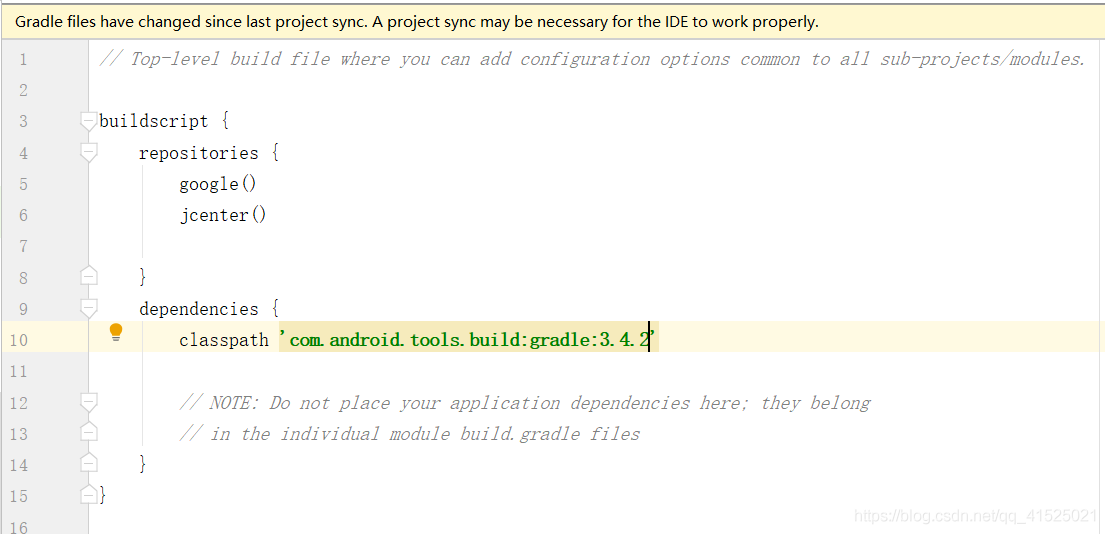
Reason: gradle version 3.5.0 is not compatible with gson
Solution: change the classpatch in buid.gradle file to version 3.4.2
Apache service can’t be started under xampp, reporting port occupancy class error [error] Apache will not start without the configured ports free!
When xampp is opened for the first time under Windows environment to start Apache service, there may be an error
12:19:49  [Apache] 	Problem detected!
12:19:49  [Apache] 	Port 443 in use by ""D:\Program Files (x86)\VMware\VMware Workstation\vmware-hostd.exe" -u "C:\ProgramData\VMware\hostd\config.xml"" with PID 6084!
12:19:49  [Apache] 	Apache WILL NOT start without the configured ports free!
12:19:49  [Apache] 	You need to uninstall/disable/reconfigure the blocking application
12:19:49  [Apache] 	or reconfigure Apache and the Control Panel to listen on a different port
It is easy to see from the error prompt that port 443 is occupied by VMware related services. The solutions are as follows:
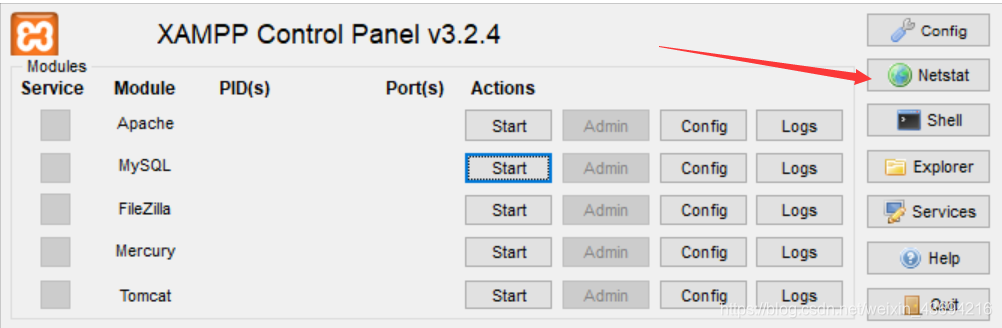
1. Open the xampp control panel and click netStart
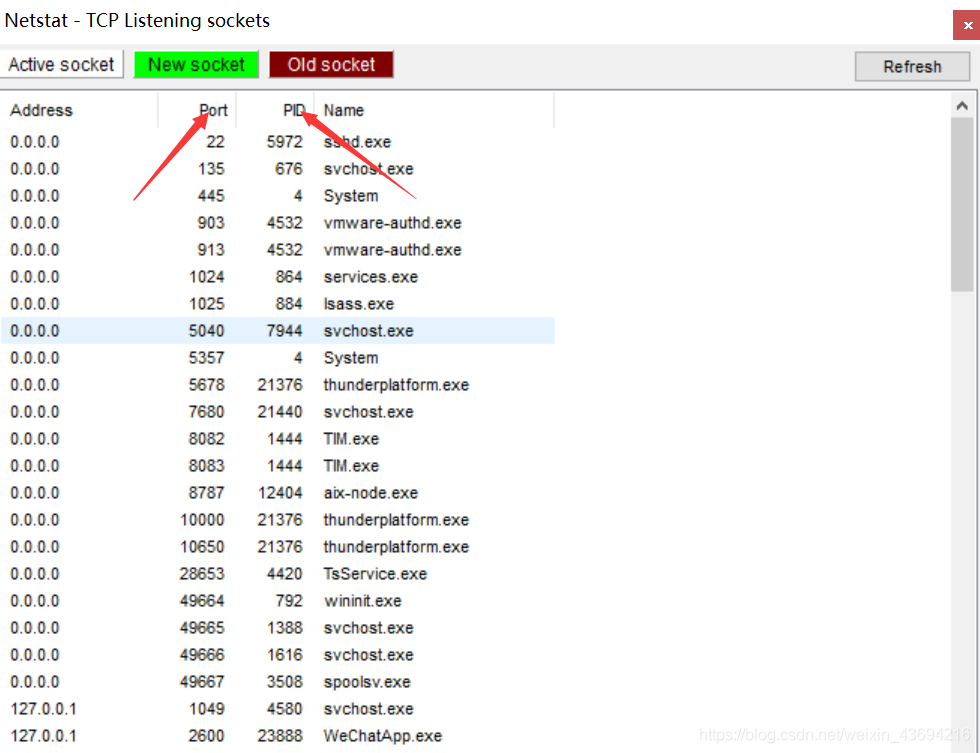
2. Find the service using port 443 in netStart and remember its PID
3. Open Task Manager and enter resource monitor
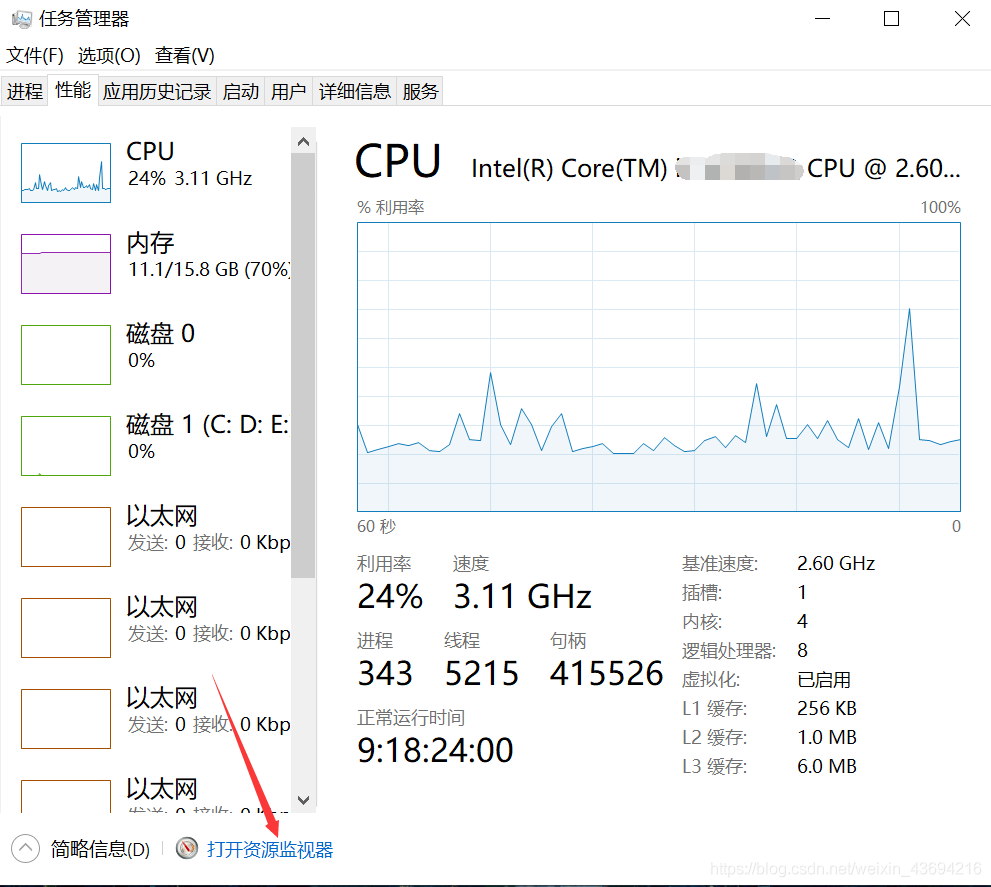
4. Find the service corresponding to the PID remembered before and shut it down
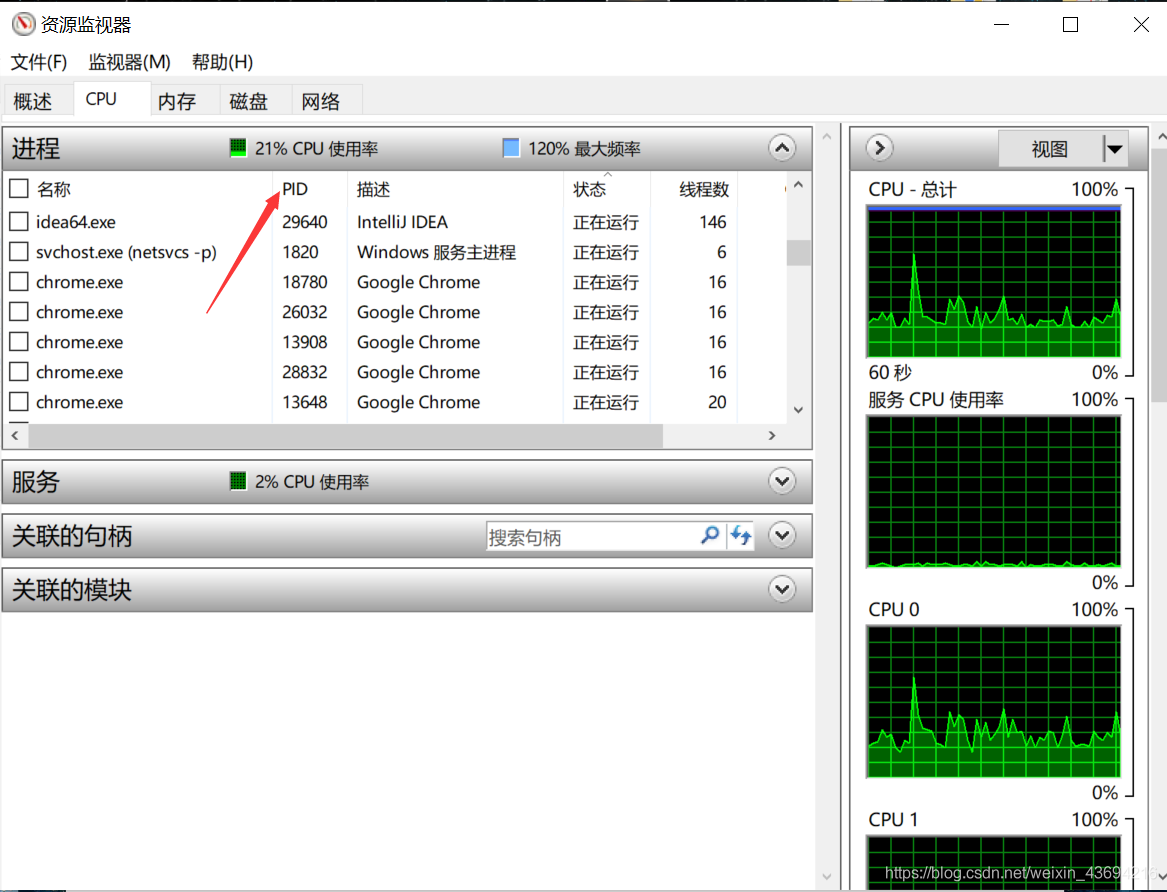
5. Restart the Apache service in xampp
Note: this method can also be used to solve other similar problems that the related services cannot be started because the port is occupied
error: ‘memcpy’ was not declared in this scope
|
Recently, I have to do something about real-time transmission. After doing it, I found it hard to find and install He thought he could install it smoothly. He was very depressed when he installed it. Make always reported me wrong make This step is a problem. sdh_ pocket_ reader.cpp:208: error: ‘memcpy’ was not declared in this scope I don’t know if there are many people who can’t install it because of this situation, but I will make the same mistake. In fact, the solution is very easy. Just add the header file string. H to the program, that is, include & lt; string.h> The same way. After the modification, the L is successfully installed in make and make install. |
Solution to the error of automapper installation in vs2012 nuget
When vs2012 installs automapper under. Net 4.0, the following error will be reported:
‘automapper’ already has a dependency defined for ‘standard. Library’.
‘AutoMapper’ already has a dependency defined for ‘Standard.Library’.
It is found that the nuget Version (version 2.83 of vs2012) is lower, and the standard. Library framework is not supported.
There are two solutions
Method 1
nuget 2.12 supports the. Net standard framework used by automapper 5.0.1 nuget package, so nuget needs to be upgraded to nuget 2.12 or above
PM & gt; Install-Package AutoMapper -Version 4.1.1
Installing ‘AutoMapper 4.1.1’.
Successfully installed ‘AutoMapper 4.1.1’.
reference resources:
http://majing.io/questions/557
Reproduced in: https://www.cnblogs.com/yanglang/p/7065049.html
In IE6, “RES / C”: windows, system32, shdoclc. DLL, HTTP 403. HTM “.
In IE6, “res:// c://windows.system32.shdoclc.dll HTTP”_ 403.htm& http://.. (specific path) “is wrong. The reason is that my path in the background is “./admin/other directory”.
Where admin is in the root directory. In IE6, because “/” represents the root directory, another path will be added in front of the actual path.
Therefore, if the admin is already in the root directory and IE6, you only need to remove “/” and it can solve the problem.
This problem will lead to the following errors: 403 Forbidden, access forbidden, etc.
Reproduced in: https://www.cnblogs.com/gowhy/archive/2011/07/05/2097924.html
EnvironmentError:mysql config not found
MySQL for Python Library in Python is equivalent to the jdbc driver corresponding to MySQL in Java
1. Install MySQL first
sudo apt-get install mysql-server
2. Install MySQL Python
Download mysql-python-1.2.3.tar.gz (see the attachment) and unzip it to the specified directory.
Compile and configure MySQL Python in the decompressed mysql-python-1.2.3 directory
python setup.py build
At this time, the system reports an error: environmenterror: MySQL_ config not found
Obviously there is no mysql_ Configure this file
Execute find/- name MySQL_ Config, there is no data, indicating that there is no MySQL in the system_ Configure this file
Someone on the Internet explained that MySQL installed with apt get does not have mysql_ Config is the name of this file
Solution:
(1) Ubuntu next
Execute sudo apt get install libmysqld dev
(2) Fedora next
Execute sudo Yum install Python devel
If it appears: my_ Config. H: without that file or directory, execute: sudo Yum install MySQL devel
Note: Yum is also written in Python, and/usr/bin/Python is called by default. This is the python that comes with the system itself. You can install it in/usr/local/bin/python, so you’d better not uninstall the python that comes with the system. The python you download doesn’t have the yum module.
Execute at this time find/-name mysql_ Config found this file under/usr/bin /
Then modify the site.cfg file in the mysql-python-1.2.3 directory
Remove MySQL_ Config = XXX and change to MySQL_ config=/usr/bin/mysql_ Config (in MySQL)_ The directory on the machine where the config file is located shall prevail.)
Execute the following command to compile and install successfully:
python setup.py build
python setup.py install
http://zhoujianghai.iteye.com/blog/1520666
[solved] win10 + office2016 error: library not registered, HResult: 0x8002801d
Sad today
{0} cannot cast a COM object of type ‘Microsoft. Office. Interop. Word. Applicationclass’ to interface type’ Microsoft. Office. Interop. Word_ Application”。 This operation failed because the queryinterface call to the COM component of the interface with IID “{00020970-0000-0000-c000-000000000046}” failed with the following error: the library is not registered( Exception from HResult: 0x8002801d (type_ E_ LIBNOTREGISTERED))。”}
My situation
1. Win10 + 64 bit
2. Re installed office2016, but previously uninstalled the professional version of office2016 and WPS
solve
Re install WPS, it’s OK.
Cause of error
WPS component conflicts with office component. This thing {00020970-0000-0000-c000-000000000046} may be related to WPS, and then I didn’t uninstall it completely. After the WPS is re installed, it will register the component, so no error will be reported.
reference resources
Thank you very much for your inspiration:
C # importing excel2010 has the problem of DLL loading failure or unregistered class library, 0x8002801d or 0x80029c4a
And, if you are not sure about the root cause of the error, you can try step by step:
failed to retrieve the component with CLSID {000209ff-0000-0000-c000-000000000046} in the com class factory, because of the following error: 80070005 denied access
there are four methods listed in this article. Of course, the simplest and most crude method is the last resort, which is to reload the system.