Author Archives: Robins

[Solved] Keil5 Error: error 65: access violation at 0x08040000 : no ‘execute/read‘ permission

1. Situation

When using keil5, build is no problem, but it is stuck in the systeminit() function during simulation debugging. It is not stuck in the loop, but can’t get in.

2. Solution

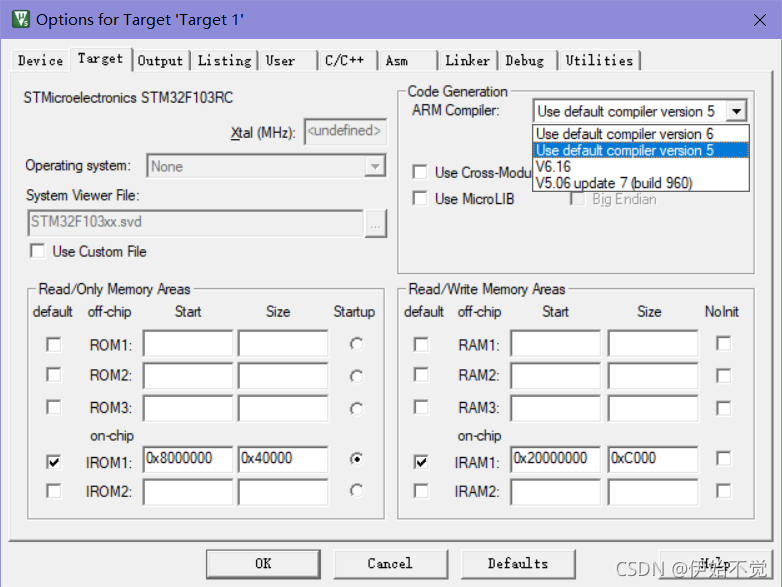
It may be the problem of version mismatch. Click the magic wand to enter the target interface, and select version 5 in the arm complier. Maybe the problem may be solved

How to Solve Docker Run Error: standard_init_linux.go:219: exec user process caused: exec format error

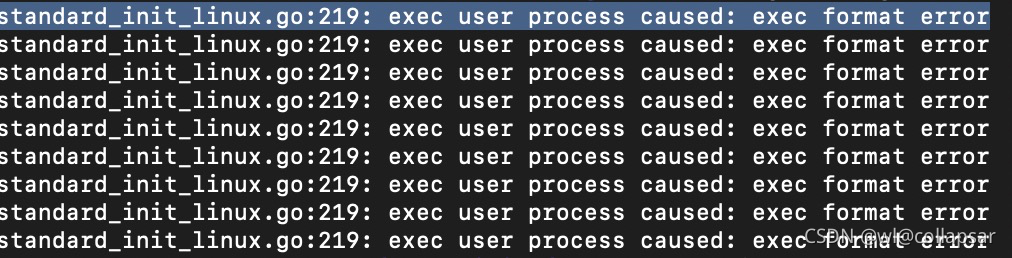
Use MAC M1 build image to run on Linux and report standard_ init_ linux.go:219: exec user process caused: exec format error

The main reason for this problem is that golang compilation cannot cross platform, that is, different systems or different CPU cores will cause this error. The golang code compiled under Linux arm cannot be run under Linux x86; Similarly, the image of a project with golang code cannot cross platform. The solution is very simple. When building, add the — platform Linux/AMD64 parameter

docker build --platform linux/amd64 -t tag .

SQL editor and reconnect [an exception when MySQL (workbench) updates data] [error code: 1175]

Abnormal conditions:

  Error Code: 1175.
You are using safe update mode and you tried to update a table without a WHERE that uses a KEY column.To disable safe mode, toggle the option in Preferences -> SQL Editor -> Query Editor and reconnect.

When using the secure update mode, the update statement must use a keyword column attribute to limit the scope of the update. If you do not use keyword columns to limit the scope or update all records, you cannot use safe update mode.

The solution is to execute the following statement to set it to non secure update mode.

#Non-secure mode
SET SQL_SAFE_UPDATES=0;
#secure mode
SET SQL_SAFE_UPDATES=1;

[Solved] hiveonspark:Execution Error, return code 30041 from org.apache.hadoop.hive.ql.exec.spark.SparkTask

Problem Description:
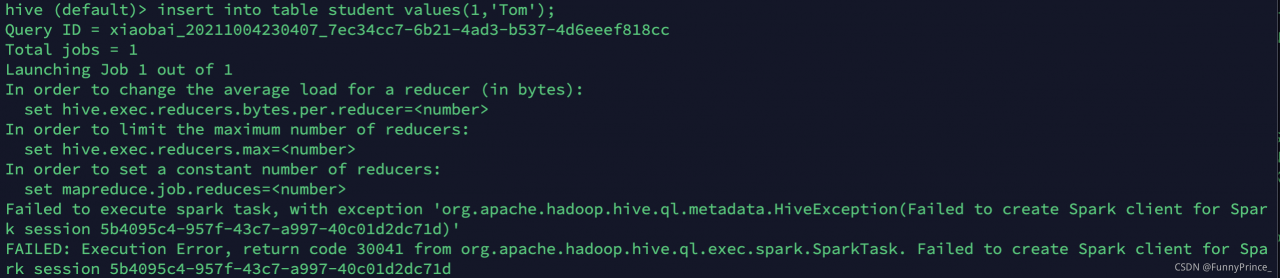
when deploying hive on spark, the test reports an error, and the table creation operation is successful, but the following error occurs when inserting insert:

Failed to execute spark task, with exception ‘org.apache.hadoop.hive.ql.metadata.HiveException(Failed to create Spark client for Spark session 2df0eb9a-15b4-4d81-aea1-24b12094bf44)’
FAILED: Execution Error, return code 30041 from org.apache.hadoop.hive.ql.exec.spark.SparkTask. Failed to create Spark client for Spark session 2df0eb9a-15b4-4d81-aea1-24b12094bf44

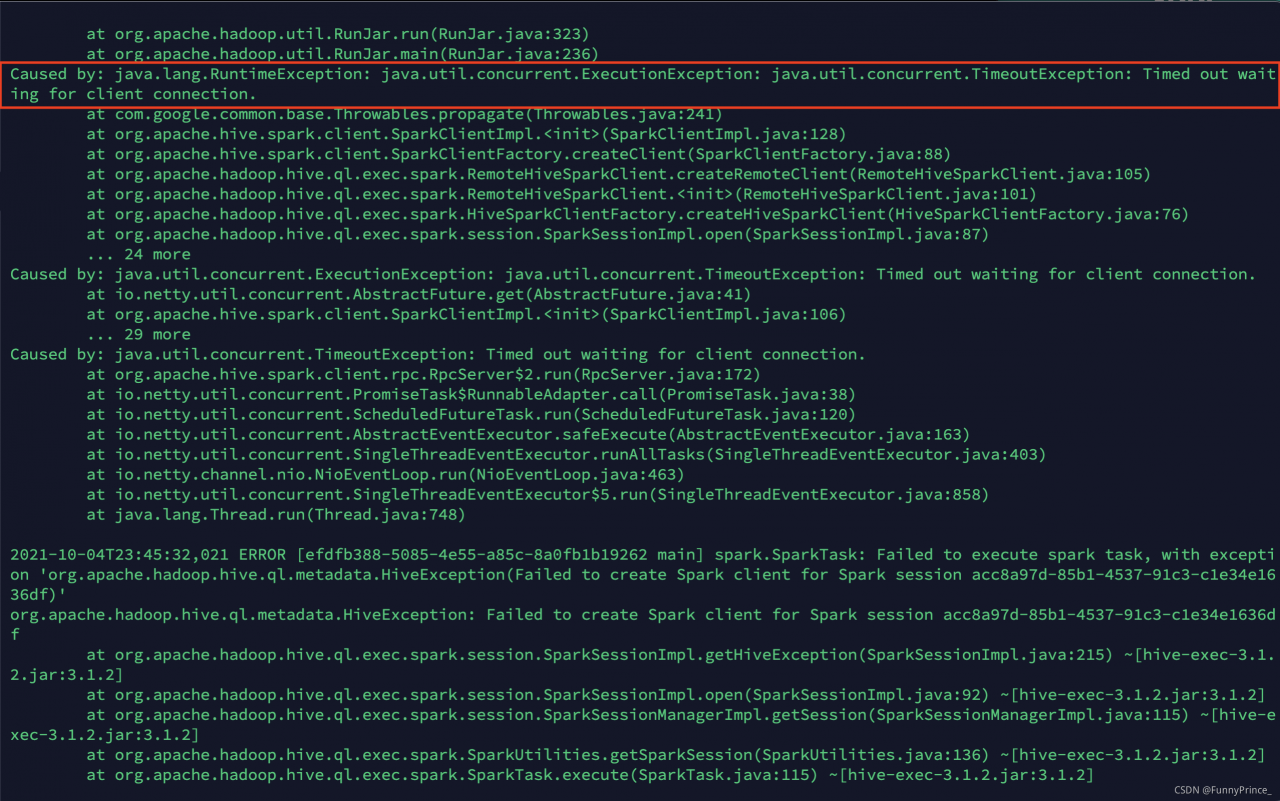
View the hive log according to the required time in the/TMP/Xiaobai path:

cause analysis
prompt timed out waiting for client connection. Indicates that the connection time between hive and spark has timed out

Solution
1). Change the spark-env.sh.template file in/opt/module/spark/conf/directory to spark env. Sh , and then add the content export spark_ DIST_ CLASSPATH=$(hadoop classpath)
2). Change hive-site.xml in/opt/module/hive/conf directory to modify the connection time between hive and spark

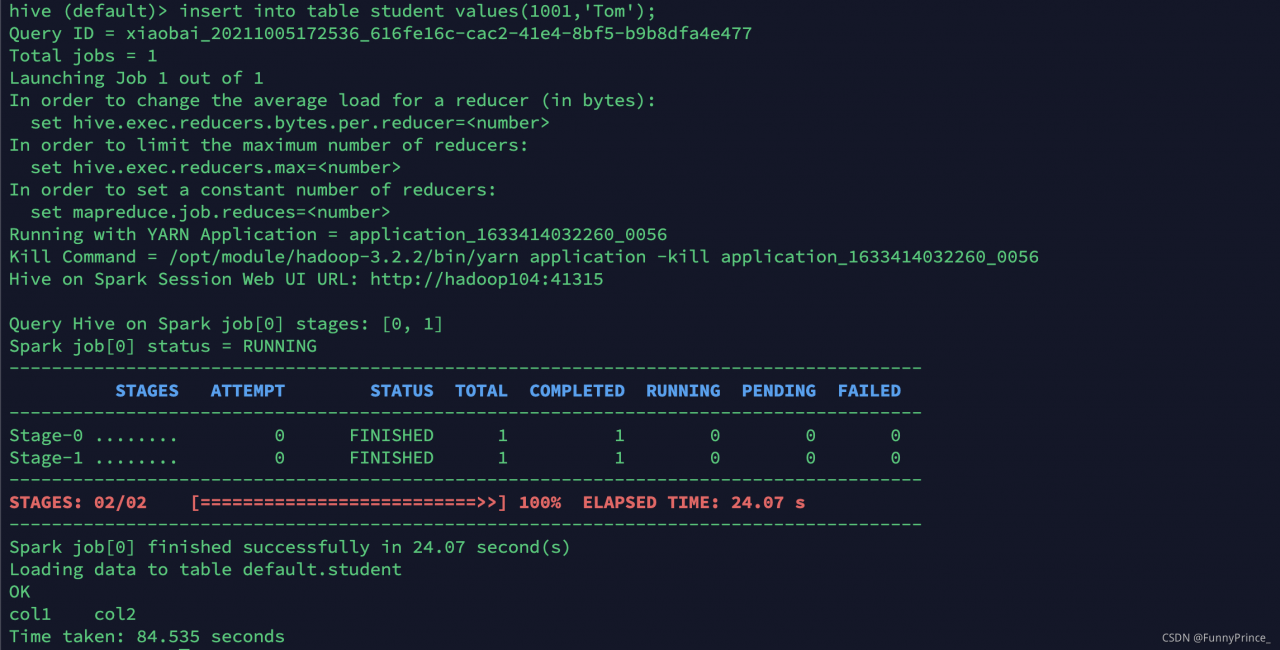
execute the insert statement again. Success! Cry with joy

I made a mistake last night. I checked it all night and didn’t solve it. As a result, I solved it today.

Aliyunshield occupies port 80 error: Error starting userland proxy: listen tcp 0.0.0.0:80: bind: address already in use

Error starting userland proxy: listen TCP 0.0.0.0:80: bind: address already in use
today, it was found that port 80 was occupied on Ali’s server. The advantages are inexplicable. An investigation found that the process aliyundun occupied the port

tcp          100.100.100.200:80      TIME_WAIT   -                   
tcp          100.100.30.25:80        ESTABLISHED 1472/AliYunDun      
tcp          100.100.100.200:80      TIME_WAIT   -          

Displaying with kill is not allowed

[root@lingg ~]# kill 1472
-bash: kill: (1472) - Disallowed operations
[root@lingg ~]# kill -9 1472
-bash: kill: (1472) - Disallowed operations

Then I found the solution online as follows

sudo fuser -k 80/tcp

```bash
[root@lingg ~]# sudo fuser -k 80/tcp
80/tcp:               1267  1272  1273  1274

Done!

C++ Primer Program in VsCode error: no match for call to ‘(std::__cxx11::string…)

In the original file, total. Isbn() = = trans. Isbn() will report an error in vscode, “unable to match the call error”
compile. CPP: 12:37: error: no match for call to ‘(STD:: _cxx11:: String
{aka STD:: _cxx11:: basic_string}) ()’
if (total. Isbn() = = trans. Isbn())
solution: remove the brackets after. Isbn() and change the primitive sentence to

if (total.isbn==trans.isbn)

The reason is that ISBN should be a parameter value rather than a method, or it may be caused by my environment. It is for reference only.

#include <iostream>

#include"Sales_item.h"
int main(){
   Sales_item total;
   if (std::cin>>total)
   {Sales_item trans;
   while (std::cin>>trans)
   {
       if (total.isbn()==trans.isbn())
            total+=trans;
        else
        {
       std::cout<<total<<std::endl;
       total=trans;
        }
   
     
   }
   
    std::cout<<total<<std::endl;
   }
   else{
       std::cerr<<"NO Data?!"<<std::endl;
       return -1;
   }
   return 0;
    
}

Bulk Update Error: #Cause: java.sql.SQLSyntaxErrorException: You have an error in your SQL syntax; check the m

Error:
mybatis plus foreach batch insert is OK. Change it to update and keep reporting errors. It is OK to copy the SQL and execute it separately.
reason:
the insert statement supports batch and can be written in one statement:

INSERT INTO table_name (column1,column2,column3,...) VALUES (value1,value2,value3,...), (value1,value2,value3,...), (value1,value2,value3,...), (value1,value2,value3,...), (value1,value2,value3,...),(value1,value2,value3,...);

Update does not support batch. There are multiple statements corresponding to cyclic batch

update table set c1=v1;
update table set c1=v2;
update table set c1=v3;
.
.
.
update table set c1=v...;

Mybatis does not support executing multiple statements (multiple semicolons) by default
solution:
add the allowmultiqueries = true parameter to the database connection

Allowmultiqueries = true function:
1. You can carry semicolons after SQL statements to realize multi statement execution
2. You can execute batch processing and issue multiple SQL statements at the same time
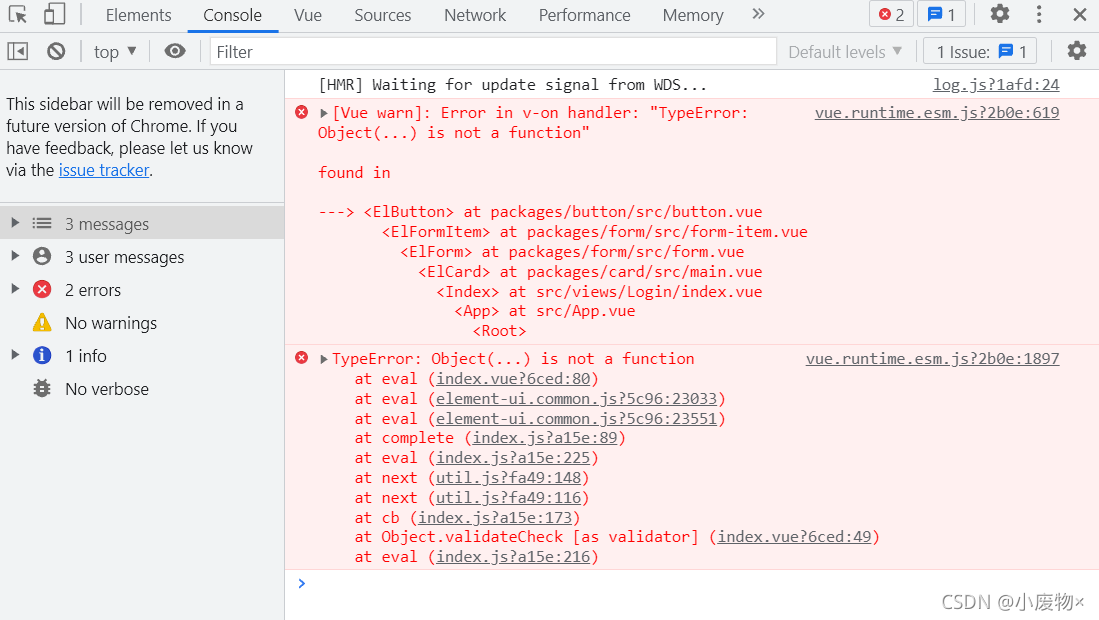
[Vue warn]: Error in v-on handler: “TypeError: Object(…) is not a function“

The record appears in Vue
[Vue warn]: error in v-on handler: "typeerror: object (...) is not a function"

when referencing an external file, it is only partially referenced, so it was originally referenced in a deconstruction mode. I forgot to add
{}

// Wrong
import loginAPI from '@/api'

// Right
import { loginAPI } from '@/api'

How to Solve JAR pack error: Error resolving template [/userInfo], template might not exist or might not be accessib

This error did not appear when I was running in idea, but it appeared after I typed the project into a jar package and executed the jar package. This error means that the template page cannot be found, but the template page actually exists in my project. The solution to this error is to skip the template page in the controller without starting with “/”.

Example

@Controller
public class userController {

    @Autowired
    private userServiceImpl userService;

    @RequestMapping("/userInfo/{nickname}")
    public Object showBlog(@PathVariable("nickname") String nickname,
                           Model model, HttpServletRequest request){

        User userInfo = userService.getUserInfo(nickname);
        model.addAttribute("userInfo",userInfo);
        return "userInfo";
    }
}

Tensorflow Run Error or the interface is stuck or report error: Could not create cudnn handle: CUDNN_STATUS_INTERNAL_ERROR

When running the more complex deep learning model of tessorflow, it is easy to get stuck in the interface
if it is a single graphics card (there is f at the end of the CPU model), you can install OpenGL and restart it before running the code
if course not create cudnn handle: cudnn appears_STATUS_INTERNAL_Error is reported, which is caused by insufficient video memory. Add

#Used to limit the use of video memory
config = tf.compat.v1.ConfigProto(gpu_options=tf.compat.v1.GPUOptions(allow_growth=True))
sess = tf.compat.v1.Session(config=config)
###############

The problem can be solved

[Solved] Error: ER_HOST_NOT_PRIVILEGED: Host ‘x.x.x.x‘ is not allowed to connect to this MySQL server

Problem Description:

Use nodejs to connect to the MySQL database of ECs and execute the JS file. The error is as follows:

Error: ER_HOST_NOT_PRIVILEGED: Host 'x.x.x.x' is not allowed to connect to this MySQL server
{
  code: 'ER_HOST_NOT_PRIVILEGED',
  errno: 1130,
  sqlMessage: "Host 'x.x.x.x' is not allowed to connect to this MySQL server",
  sqlState: undefined,
  fatal: true
}

Solution:

This is caused by MySQL configuration that does not support remote connection. You need to connect to the server for the following configuration (log in to the root account):

mysql -u root -p
use mysql;
select host from user where user='root';
update user set host = '%' where user ='root';
// If Host = '%', it means that all IPs have connection privileges, which should be set according to the IPs of the production environment
flush privileges;