Author Archives: Robins

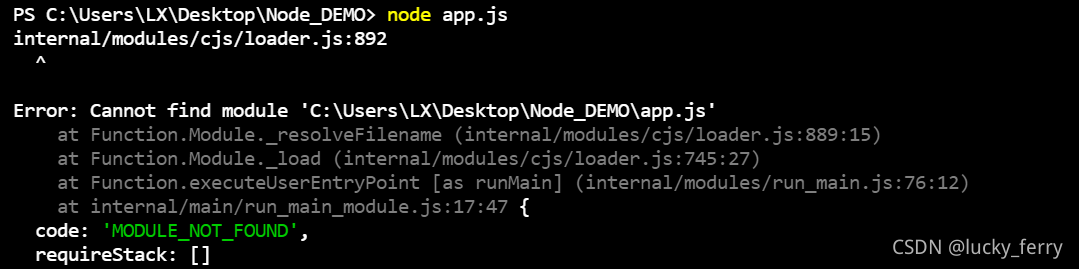
[Solved] internal/modules/cjs/loader.js:892 ^Error: Cannot find module ‘C:\Users\LX\Desktop\Node_DEMO\a

When I first started learning node.js, I reported an error at the beginning and my mentality collapsed

———————————————————————————–

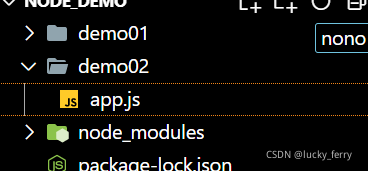
I create a folder node on my desktop_ Demo, my xx.js file is in node_ demo> demo2> app.js

In vscode, I directly Ctrl + ` (backquote) to open the terminal, but the following error occurs

Look at the path carefully and find that it is wrong. My app.js should be in demo2. Maybe this shortcut does not open the target file….

Therefore, click JS file in the left directory, right-click and select open to open it in the integration terminal~~

Successful problem solving is tiring~~~~

Error command failed when creating vue-cli4 project: Yarn

Error reported when creating Vue item: error command failed: Yarn

Solution 1: Win + R enter CMD to enter the command line interface

Enter command

npm install -g yarn

After success, the problem can be solved by re creating vue-cli4 project.

Solution 2:

Enter C:/users/administrator/in the windows environment

There is a file. Vuerc


Open this file to display

{
  "useTaobaoRegistry": true,
  "packageManager": "yarn"
}

Just manually change the configuration content yarn to NPM to change the package manager when the project is created

Solution 3:

Delete the. Vuerc file. When you create a Vue project for the first time, you will be prompted to select the configuration, and then select NPM
 

RuntimeError: Expected hidden[0] size (x, x, x), got(x, x, x)

Start with the above figure:
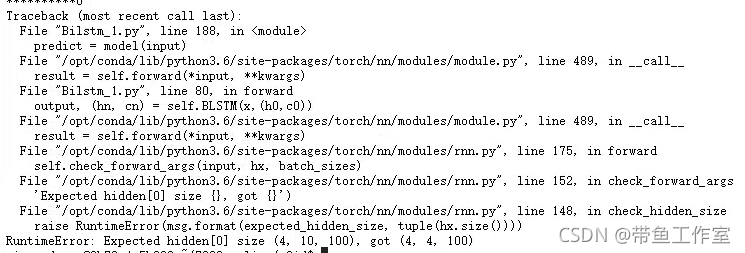
The above figure shows the problem when training the bilstm network.

Problem Description: define the initial weights H0 and C0 of bilstm network and input them to the network as the initial weight of bilstm, which is realized by the following code

output, (hn, cn) = self.bilstm(input, (h0, c0))

  The network structure is as follows:

self.bilstm = nn.LSTM(
            input_size=self.input_size,
            hidden_size=self.hidden_size,
            num_layers=self.num_layers,
            bidirectional=True,
            bias=True,
            dropout=config.drop_out
        )

The dimension of initial weight is defined as   H0 and C0 are initialized. The dimension is:

**h_0** of shape `(num_layers * num_directions, batch, hidden_size)`
**c_0** of shape `(num_layers * num_directions, batch, hidden_size)`

In bilstm network, the parameters are defined as follows:

num_layers: 2

num_directions: 2

batch: 4

seq_len: 10

input_size: 300

hidden_size: 100 

Then according to the definition in the official documents    H0, C0 dimensions should be: (2 * 2, 4100) = (4, 4100)

However, according to the error screenshot at the beginning of the article, the dimension of the initial weight of the hidden layer should be (4, 10100), which makes me doubt whether the dimension specified in the official document is correct.

Obviously, the official documents cannot be wrong, and the hidden state dimensions when using blstm, RNN and bigru in the past are the same as those specified by the official, so I don’t know where to start.

Therefore, we re examined the network structure and found that an important parameter, batch, was missing_ First, let’s take a look at all the parameters required by bilstm:

Args:
        input_size: The number of expected features in the input `x`
        hidden_size: The number of features in the hidden state `h`
        num_layers: Number of recurrent layers. E.g., setting ``num_layers=2``
            would mean stacking two LSTMs together to form a `stacked LSTM`,
            with the second LSTM taking in outputs of the first LSTM and
            computing the final results. Default: 1
        bias: If ``False``, then the layer does not use bias weights `b_ih` and `b_hh`.
            Default: ``True``
        batch_first: If ``True``, then the input and output tensors are provided
            as (batch, seq, feature). Default: ``False``
        dropout: If non-zero, introduces a `Dropout` layer on the outputs of each
            LSTM layer except the last layer, with dropout probability equal to
            :attr:`dropout`. Default: 0
        bidirectional: If ``True``, becomes a bidirectional LSTM. Default: ``False``

batch_ The first parameter can make the dimension batch in the first dimension during training, that is, the input data dimension is

(batch size, SEQ len, embedding dim), if not added   batch_ First = true, the dimension is

(seq len,batch size,embedding dim)

Because there was no break at noon, I vaguely forgot to add this important parameter, resulting in an error: the initial weight dimension is incorrect, and I can add it   batch_ Run smoothly after first = true.

The modified network structure is as follows:

self.bilstm = nn.LSTM(
            input_size=self.input_size,
            hidden_size=self.hidden_size,
            num_layers=self.num_layers,
            batch_first=True,
            bidirectional=True,
            bias=True,
            dropout=config.drop_out
        )


Extension: when we use RNN and its variant network, if we want to add the initial weight, the dimension must be the officially specified dimension, i.e

(num_layers * num_directions, batch, hidden_size)

At the same time, be sure to set batch_ First = true. The official document does not specify when batch is set_ When first = true, the dimensions of H0, C0, HN and CN are (num_layers * num_directions, batch, hidden_size), so be careful!

At the same time, check whether batch is set when the dimensions of HN and CN are incorrect_ First parameter, RNN and its variant networks are applicable to this method!
errorCode:9015,errorMsg:cn.bmob.v3.util.BmobContentProvider.updateProvider(BmobContentProvider.java:

About the 9015 null pointer in the bmob backend cloud service platform, I checked it online. The reason is very simple, that is, it does not operate according to the official documents. Although the data can still be transmitted normally, it is still annoying to open the app with a prompt pop-up window.

Solution:

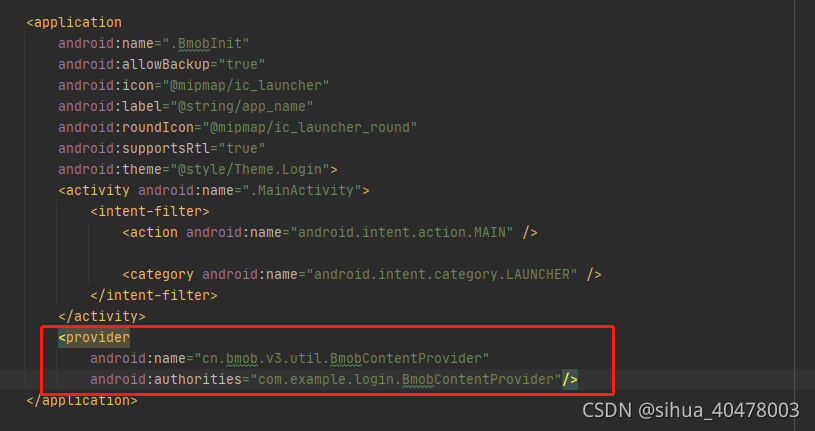
Directly open androidmanifest.xml and add two lines of code

        <provider
            android:name="cn.bmob.v3.util.BmobContentProvider"
            android:authorities="com.example.login.BmobContentProvider"/>

If I can help you, just give me a favor!!!   Thank you from the majority of hard pressed programmers!

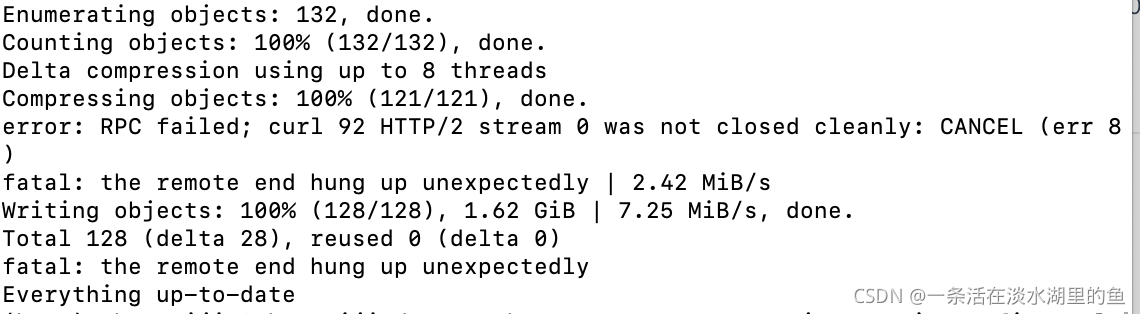
error: RPC failed; curl 92 HTTP/2 stream 0 was not closed cleanly: CANCEL (err 8)

When uploading code to GitHub using git, the following error occurs:

It is true that there is a large amount of code uploaded at one time, and then expand the post buffer according to the scheme provided on the Internet, but it has no effect here. Maybe the buffer is not large enough, HHH. You can try this plan first.

git config http.postBuffer 524288000

Then, if it has not been solved, try the following scheme. We can see that the error message refers to http/2, so the solution is to switch back to http1 upload. After uploading, switch back to http2.

$ git config --global http.version HTTP/1.1
After it push was ok and I have changed HTTP version to 2 again:
$ git config --global http.version HTTP/2

However, things were always so bad, so I tried to switch to SSH connection.

git remote set-url origin [email protected]:{username}/{repository name}.git

However

Looking at this line of red and yellow characters, I knew early in the morning that the file was too large, but the above methods didn’t work here. Fortunately, GIT LFS was mentioned in the error prompt. OK, Download git LFS.

For Mac users:

brew install git-lfs

  Then, under the project directory, execute:

git lfs install

Then, use git LFS to track the format of the large file you want to upload. What I upload here is in Bin format, so execute:

git lfs track "*.bin"

Then make sure  . Gitattributes tracked to

git add .gitattributes

Then upload it

Kvm internal error: process exited :cannot set up guest memory ‘pc.ram‘:Cannot allocate memory

An error message indicates that the memory is insufficient and cannot be allocated. Check that the physical machine memory is used normally. After modifying the virtual machine memory, an error message is still reported when starting

report errors:

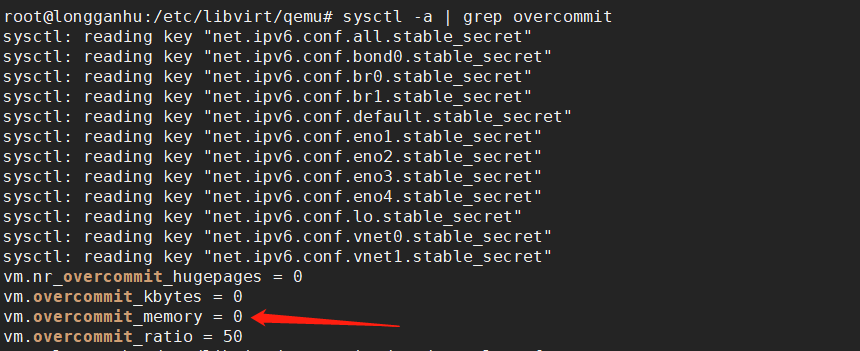
At this time, you need to see how much memory the host can allocate

sysctl -a | grep overcommit

Kernel parameter overcommit_ memory  

It is   Memory allocation strategy

Optional values: 0, 1, 2
0 indicates that the kernel will check whether there is enough available memory for processes to use; If there is enough available memory, the memory application is allowed; Otherwise, the memory request fails and the error is returned to the application process
1 indicates that the kernel is allowed to allocate all physical memory regardless of the current memory state
2 indicates that the kernel allows to allocate more memory than the sum of all physical memory and swap space

What are overcommit and oom

     Linux replies “yes” to most requests for memory so that it can run more and larger programs. Because after applying for memory, memory will not be used immediately. This technology is called overcommit. When Linux finds that there is insufficient memory, an oom killer (OOM = out of memory) occurs. It will choose to kill some processes (user state processes, not kernel threads) to free memory.

     When oom killer happens, which processes will Linux choose to kill?The function to select a process is oom_ Badness function (in mm/oom_kill. C), which calculates the number of points (0 ~ 1000) for each process. The higher the number of points, the more likely the process is to be killed. The number of points per process is the same as oom_ score_ Adj related, and OOM_ score_ Adj can be set (- 1000 min, 1000 max).

resolvent:

      Simply follow the prompts (set vm.overcommit_memory to 1):

      There are three ways to modify kernel parameters, but with root permission:

    (1) Edit/etc/sysctl.conf to vm.overcommit_ Memory = 1, then sysctl – P makes the configuration file effective

  (2)sysctl vm.overcommit_ memory=1

  (3)echo 1 >/proc/sys/vm/overcommit_ memory

RuntimeError: Input type (torch.FloatTensor) and weight type (torch.cuda.FloatTensor) should be the

RuntimeError: Input type (torch.FloatTensor) and weight type (torch.cuda.FloatTensor) should be the same

This problem occurs because the tensor of the input model is loaded in the CPU, while the model is loaded on CUDA.

Solution: load the input tensor into CUDA or load the model into CPU

device = torch.device("cuda" if torch.cuda.is_available() else "cpu")

model = model.to(device)
img = img.to(device)

output = model(img)

Or:

model = model.cuda()
img = img.cuda()