Author Archives: Robins

[Solved] AttributeError: ‘_IncompatibleKeys’ object has no attribute

The error code is as follows:

# Error code!
model = model.load_state_dict(state_dict_var)
out = model(input)

There are some problems on the Internet because the saved model uses state_ DCIT() to load, or vice versa.

The error here is different from the above because xxx.load_state_Dict() does not require a return value to receive.

Amend to read as follows:

# Correct code!
model.load_state_dict(state_dict_var)
out = model(input)

I hope it will help more people.

Error: can’t access JTAG chain problem solving method

Burn the program into the FPGA chip with USB blaster, and the prompt is “error: can’t access JTAG chain”, and then the test JTAG chain still prompts this problem. After looking for the information on the Internet, I summarized the reasons for the prompt of “can’t access JTAG chain” when downloading. The common reasons are as follows:

(1) The selected FPGA model is inconsistent with the hardware;

(2) The communication between the parallel port and the download line is faulty or the download line is broken;

(3) Poor contact between download cable and JTAG socket;

(4) The JTAG port of the download line and the board is connected reversely;

(5) FPGA burned;

(6) Power supply problems;

(7) There is a problem with the schematic design;

(8) The large pad at the bottom of the FPGA chip is not grounded.
my problem is 4.
I’m ashamed. In fact, try the opposite and find the position of the first JTAG pin (small semicircle).

USB blaster user manual

ERROR Error: Cannot find module ‘../../uni-cli-sharedlib/tags‘

ERROR    Error:   Cannot   find   module  ‘../../ uni-cli-sharedlib/tags’

Recently, I ran the SVN project and reported an error. I tried many methods and various commands on the Internet

The last one found is that the NPM and node versions are incompatible

My node is 16.13.0

NPM is 8.13.1

The two versions are incompatible

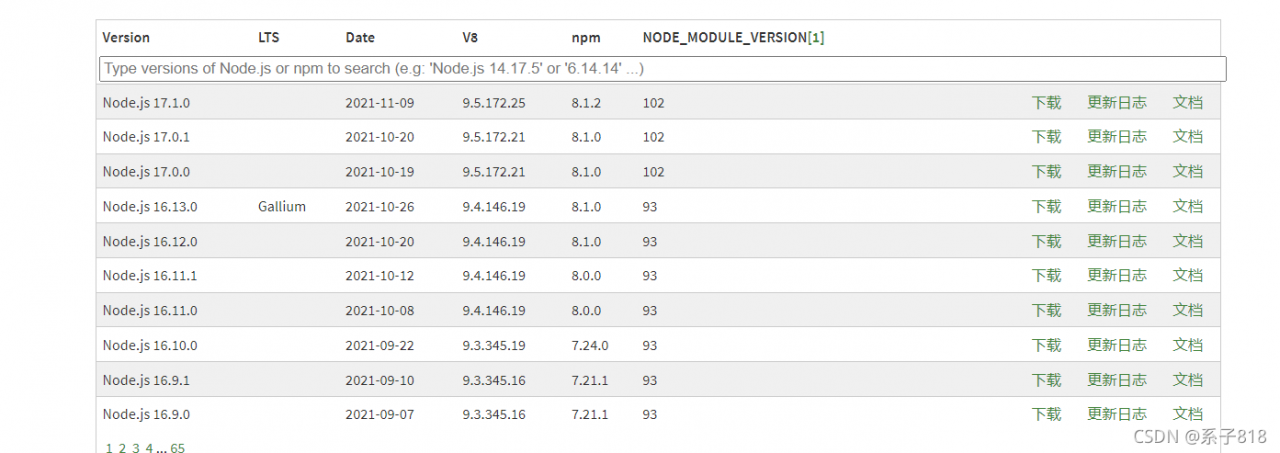
The NPM version corresponding to node16.13.0 is 8.1.0

It can be solved by matching the version with this figure  

ERROR command failed: npm install –loglevel error vue-cli-plugin-cube-ui -D

Execute the command at the vscode terminal: Vue add cube UI reports an error   Command failed: NPM install — loglevel error Vue cli plugin cube UI – d the solution is as follows:

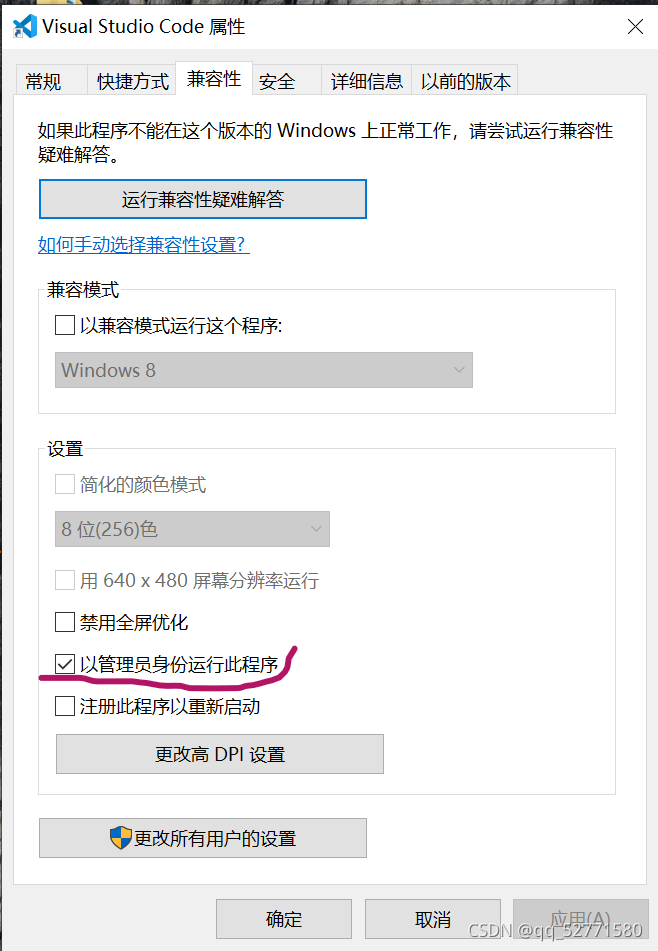
Exit vscode – & gt; Right click the visual studio code icon – & gt; Click Properties – & gt; Click compatibility – & gt; Check the “run this program as administrator” option – & gt; Click OK


/usr/lib/deepin-wine/wine: error while loading shared libraries: libwine.so.1

After deepin wine is installed, the following errors occur when installing other applications:

 / usr/lib/deepin-wine/wine: error while loading shared libraries: libwine.so.1: cannot open shared object file: No such file or directory

There was a problem with the link and you need to re link:

ln -sf /usr/lib/i386-linux-gnu/deepin-wine/libwine.so.1.0 /usr/lib/i386-linux-gnu/deepin-wine/libwine.so.1

https://github.com/wszqkzqk/deepin-wine-ubuntu

How to Solve Error: spawn xxxx ENOENT

Error explanation:   This error indicates that no such directory exists, which generally means that the global variable of command XXX is not set
The full name of enoent is error no entry, and there is no error in the entity directory;

Example: scaffold occurs when NPM installation directory is used, and spawn git enoent error occurs

Solution: it means that Git is not installed or the GIT environment variable is not set. Add “C:\program files\git\bin” in the path of the environment variable. The path is adjusted according to your git installation directory

The error problem of loading autoware maptool function package by utiny is solved

The error problem of loading autoware maptool function package by utiny is solved

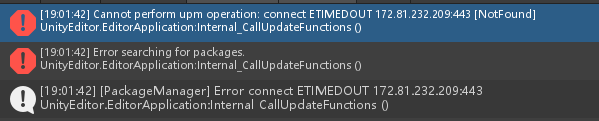
Cannot perform upm operation: connect ETIMEDOUT 172.81.232.209:443 [NotFound]
UnityEditor.EditorApplication:Internal_ CallUpdateFunctions ()

After referring to many online tutorials, I tried to modify DNS, delete Josn files for many times, and even downloaded different versions of unity. I tried all afternoon
finally, I thought that since it was a network problem, I referred to the method of ROS installation
connected to the mobile hotspot, and it was OK

Resolve – keyerror encountered while installing tensorflow GPU: ‘tensorflow’ error


1. Error content

the error is as follows (example):

ERROR: Exception:
Traceback (most recent call last):
  File "/home/guest/anaconda3/envs/tf_1.8/lib/python3.6/site-packages/pip/_vendor/resolvelib/resolvers.py", line 171, in _merge_into_criterion
    crit = self.state.criteria[name]
KeyError: 'numpy'

During handling of the above exception, another exception occurred:

Traceback (most recent call last):
  File "/home/guest/anaconda3/envs/tf_1.8/lib/python3.6/site-packages/pip/_vendor/urllib3/response.py", line 438, in _error_catcher
    yield
  File "/home/guest/anaconda3/envs/tf_1.8/lib/python3.6/site-packages/pip/_vendor/urllib3/response.py", line 519, in read
    data = self._fp.read(amt) if not fp_closed else b""
  File "/home/guest/anaconda3/envs/tf_1.8/lib/python3.6/site-packages/pip/_vendor/cachecontrol/filewrapper.py", line 62, in read
    data = self.__fp.read(amt)
  File "/home/guest/anaconda3/envs/tf_1.8/lib/python3.6/http/client.py", line 463, in read
    n = self.readinto(b)
  File "/home/guest/anaconda3/envs/tf_1.8/lib/python3.6/http/client.py", line 507, in readinto
    n = self.fp.readinto(b)
  File "/home/guest/anaconda3/envs/tf_1.8/lib/python3.6/socket.py", line 586, in readinto
    return self._sock.recv_into(b)
  File "/home/guest/anaconda3/envs/tf_1.8/lib/python3.6/ssl.py", line 1012, in recv_into
    return self.read(nbytes, buffer)
  File "/home/guest/anaconda3/envs/tf_1.8/lib/python3.6/ssl.py", line 874, in read
    return self._sslobj.read(len, buffer)
  File "/home/guest/anaconda3/envs/tf_1.8/lib/python3.6/ssl.py", line 631, in read
    v = self._sslobj.read(len, buffer)
socket.timeout: The read operation timed out

During handling of the above exception, another exception occurred:

Traceback (most recent call last):
  File "/home/guest/anaconda3/envs/tf_1.8/lib/python3.6/site-packages/pip/_internal/cli/base_command.py", line 189, in _main
    status = self.run(options, args)
  File "/home/guest/anaconda3/envs/tf_1.8/lib/python3.6/site-packages/pip/_internal/cli/req_command.py", line 178, in wrapper
    return func(self, options, args)
  File "/home/guest/anaconda3/envs/tf_1.8/lib/python3.6/site-packages/pip/_internal/commands/install.py", line 317, in run
    reqs, check_supported_wheels=not options.target_dir
  File "/home/guest/anaconda3/envs/tf_1.8/lib/python3.6/site-packages/pip/_internal/resolution/resolvelib/resolver.py", line 122, in resolve
    requirements, max_rounds=try_to_avoid_resolution_too_deep,
  File "/home/guest/anaconda3/envs/tf_1.8/lib/python3.6/site-packages/pip/_vendor/resolvelib/resolvers.py", line 453, in resolve
    state = resolution.resolve(requirements, max_rounds=max_rounds)
  File "/home/guest/anaconda3/envs/tf_1.8/lib/python3.6/site-packages/pip/_vendor/resolvelib/resolvers.py", line 347, in resolve
    failure_causes = self._attempt_to_pin_criterion(name, criterion)
  File "/home/guest/anaconda3/envs/tf_1.8/lib/python3.6/site-packages/pip/_vendor/resolvelib/resolvers.py", line 207, in _attempt_to_pin_criterion
    criteria = self._get_criteria_to_update(candidate)
  File "/home/guest/anaconda3/envs/tf_1.8/lib/python3.6/site-packages/pip/_vendor/resolvelib/resolvers.py", line 199, in _get_criteria_to_update
    name, crit = self._merge_into_criterion(r, parent=candidate)
  File "/home/guest/anaconda3/envs/tf_1.8/lib/python3.6/site-packages/pip/_vendor/resolvelib/resolvers.py", line 173, in _merge_into_criterion

2. Solutions

the input code is as follows:

pip install tensorflow-gpu==1.8.0 --default-timeout=10000 --upgrade

Summary

accumulate more in peacetime and make fewer mistakes in wartime! It’s over
Error: write EPROTO 1593982200:error:100000f7:SSL routines:OPENSSL_internal

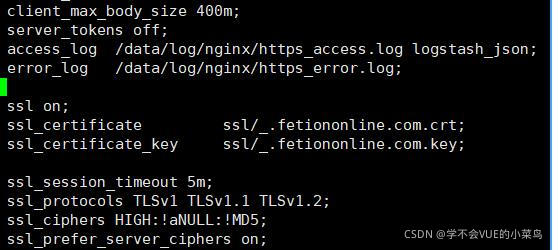
The probability is a nginx configuration problem. If the request is sent incorrectly, an SSL exception will be reported. The following is my configuration. The problem has been solved. If the certificate cannot be loaded, try to write the certificate path to the root directory.


ssl on;
        ssl_certificate         ssl/_.fetiononline.com.crt;
        ssl_certificate_key     ssl/_.fetiononline.com.key;
            
        ssl_session_timeout 5m;
        ssl_protocols TLSv1 TLSv1.1 TLSv1.2;
        ssl_ciphers HIGH:!aNULL:!MD5;
        ssl_prefer_server_ciphers on;

[Solved] Error d8021: invalid numeric parameter “/wno CPP” cython_bbox

Windows system, compiling Python_ Bbox, compile parameters:

from setuptools import setup, find_packages, Extension

import numpy as np

ext_modules = [
    Extension(
        "cython_bbox",
        ["utils/cython_bbox.pyx"],
        extra_compile_args=["-Wno-cpp", "-Wno-unused-function"],
        include_dirs=[np.get_include()],
    )
]

report errors:

Error d8021: invalid numeric parameter “/wno CPP”

Error d8021: invalid numeric parameter “/wno unused function”

Solution:

from setuptools import setup, find_packages, Extension

import numpy as np


ext_modules = [
    Extension(
        "cython_bbox",
        ["utils/cython_bbox.pyx"],
        extra_compile_args=["-std=c++14"],
        include_dirs=[np.get_include()],
    )
]

Or:

        extra_compile_args=["-std=c99"],

Then compile OK: