Author Archives: Robins

Error: timeout of 5000ms exceeded error is always reported during post request

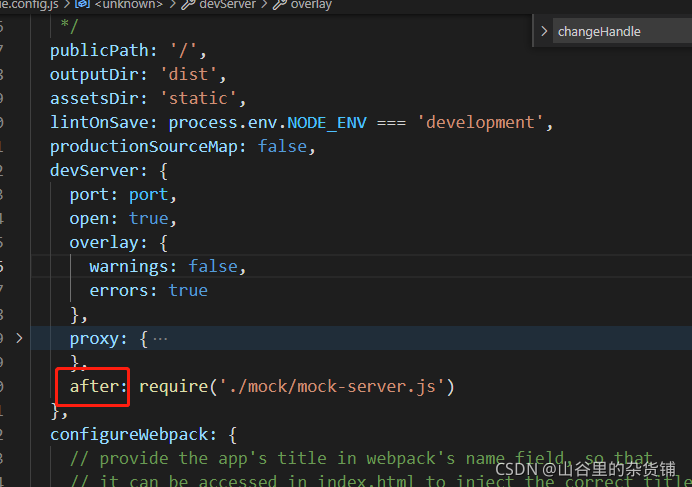
The error: timeout of 5000ms exceeded error is always reported in the post request, but there is no problem with the get request. The front-end uses the Vue element admin framework.

terms of settlement:

//Use before for mock data and after for back-end interface. Otherwise, it will request a failure message with a timeout of 5000ms or delete it directly


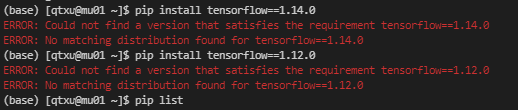
ERROR: Could not find a version that satisfies the requirement tensorfolw==1.14

ERROR: Could not find a version that satisfies the requirement tensorfolw==1.14

After configuring the Linux environment, an error “error: could not find a version that satisfies the requirement tensorflow = = 1.14” appears when installing tensorflow

Error

Check the reason. It is found that the installed version of acaconda is too high, so the matching version of tensorflow cannot be found
the original version of Anaconda was Anaconda 3-5.3.0

terms of settlement

Reduce Anaconda version 3-5.3.0 to Anaconda version 3-5.2.0 to install tensorflow = = 1.14.0 .

installation command

wget https://repo.anaconda.com/archive/Anaconda3-5.2.0-Linux-x86_64.sh

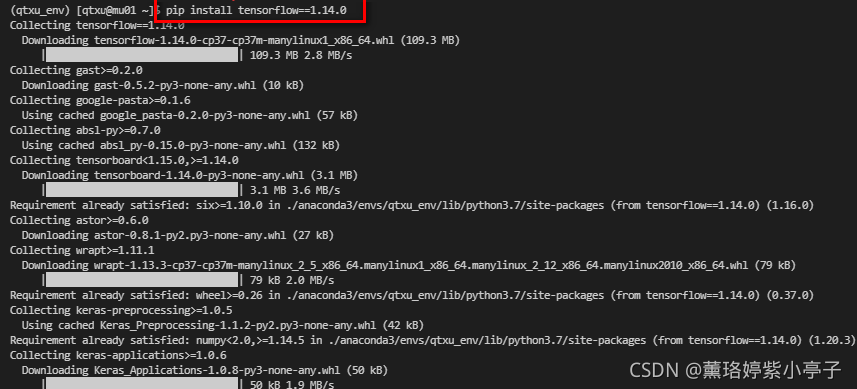
If it is shown in the figure below, anaconda3-5.2.0 is successfully installed

Install tensorfolw = = 1.14.0

Failed to register observatory port with mDNS with error

An error is reported when Fletter runs IOS real machine: failed to register observation port with mDNS with error

Errors are reported as follows

[VERBOSE-2:FlutterObservatoryPublisher.mm(101)] Failed to register observatory port with mDNS with error -65555.
[VERBOSE-2:FlutterObservatoryPublisher.mm(103)] On iOS 14+, local network broadcast in apps need to be declared in the app's Info.plist. Debug and profile Flutter apps and modules host VM services on the local network to support debugging features such as hot reload and DevTools. To make your Flutter app or module attachable and debuggable, add a '_dartobservatory._tcp' value to the 'NSBonjourServices' key in your Info.plist for the Debug/Profile configurations.

Solution: (refer to the official link document above)

On iOS 14 and higher, enable the Dart multicast DNS service in the Debug version of your app to add debugging functionalities such as hot-reload and DevTools via flutter attach.

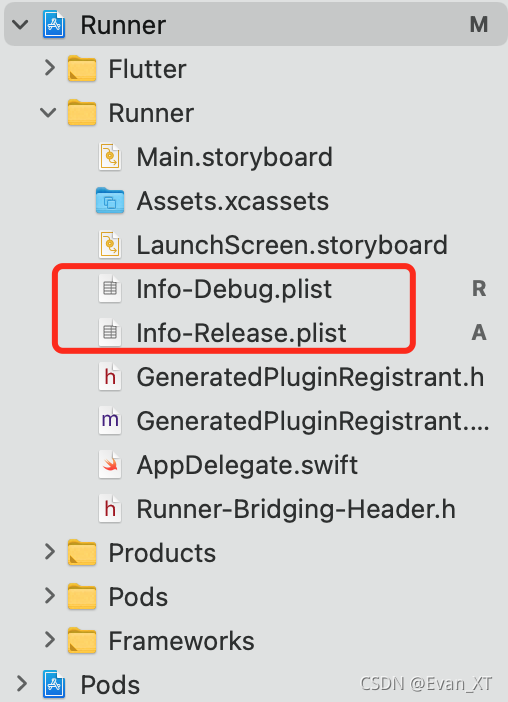
1. Rename the application’s info.plist to info-debug.plist. Make a copy called info-release.plist and add it to the Xcode project
2. In info-debug.plist, add the key nsbonjourservices and set the value to_ dartobservatory._ tcp
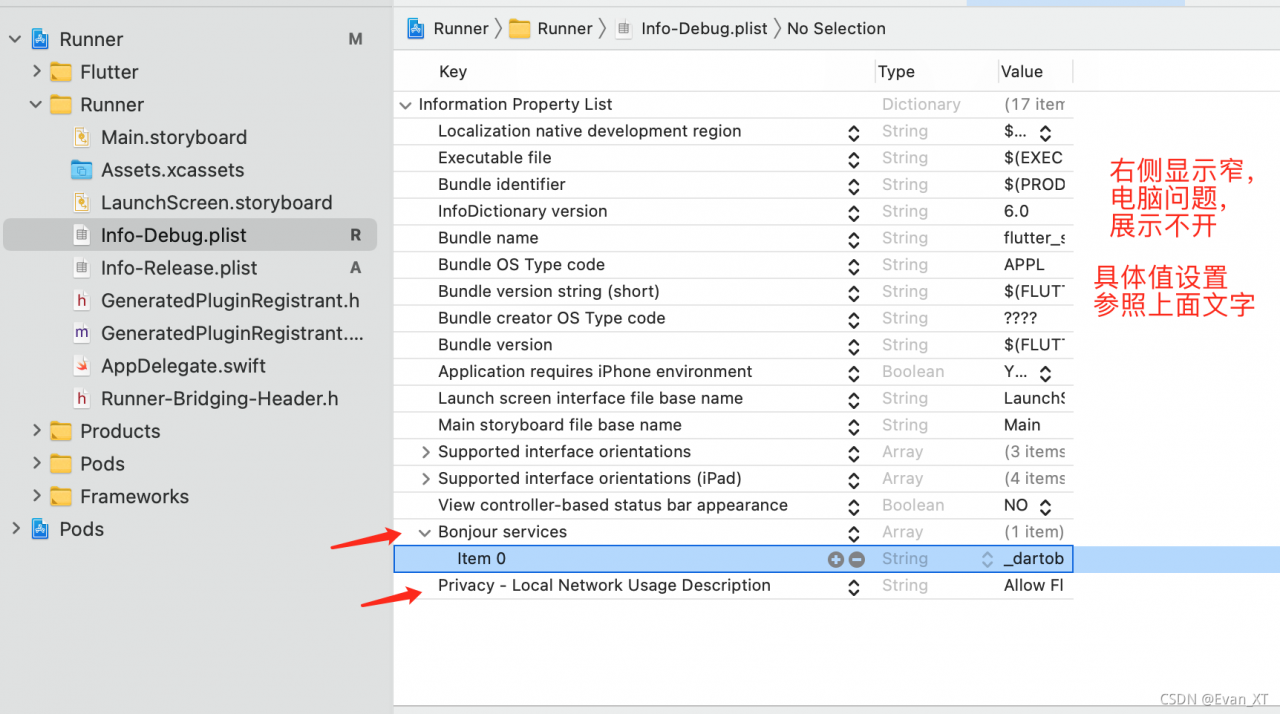
(optional) add the key nslocalnetworkusagedescription to the text of the desired custom permissions dialog box. (Note: ‘allow shutter tools on your computer to connect and debug your application. This prompt will not appear on release builds.’)

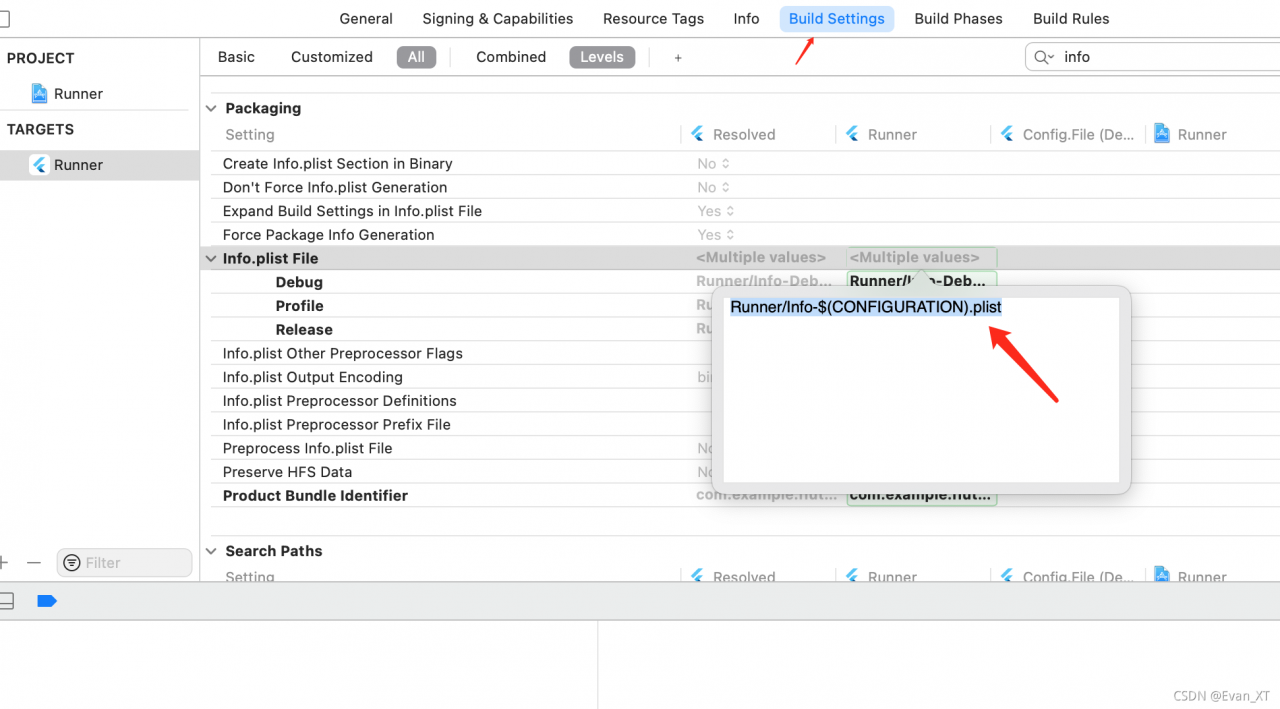
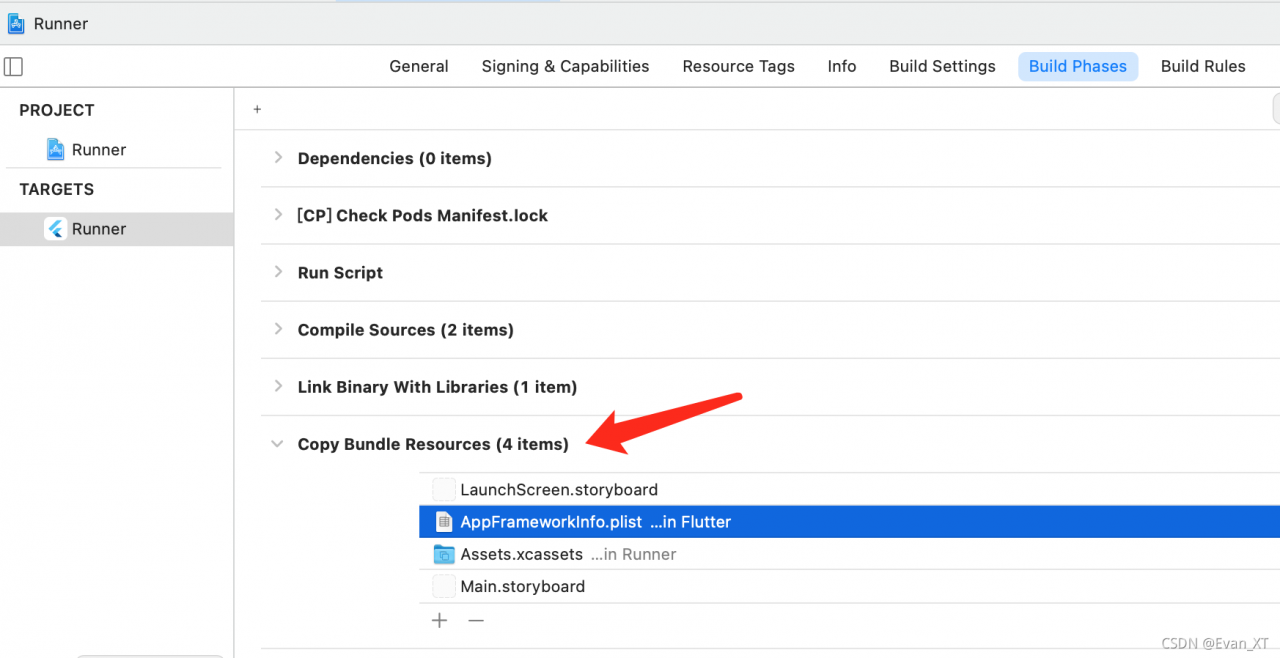
3. In target’s build settings, modify the info.plist file path path/to/info.plist to path/to/Info – $(configuration). Plist.
4. In target’s – & gt; Build Settings > Build Phases > Copy bundle resources build phase. If info-release.plist is deleted (I have deleted it in the figure below)
reference resources

Viewpoint: Tran: 2009 ch: 0 error: – 1073446906

When the c# OPC client accesses the OPC server, there are errors in OPC writing
these errors are the errors I have experienced. Record them

environment

PLC: S7-200 PC access smart
DLL: register and reference opcdaauto.dll
Language: c#
implementation function: read and write PLC through OPC

System error

Tran:2009 CH:0 Error:-1073446906

resolvent

PLC forgot to power on, just power on 😂

The problem of recipe terminated with error. Retry building the project. Occurs when vscode configures latex

{
    // Latex workshop
    "latex-workshop.latex.tools": [
          {
            "name": "latexmk",
            "command": "latexmk",
            "args": [
            "-synctex=1",
            "-interaction=nonstopmode",
            "-file-line-error",
            "-pdf",
            "%DOC%"
            ]
          },
          {
            "name": "xelatex",
            "command": "xelatex",
            "args": [
            "-synctex=1",
            "-interaction=nonstopmode",
            "-file-line-error",
            "%DOC%"
              ]
          },          
          {
            "name": "pdflatex",
            "command": "pdflatex",
            "args": [
            "-synctex=1",
            "-interaction=nonstopmode",
            "-file-line-error",
            "%DOC%"
            ]
          },
          {
            "name": "bibtex",
            "command": "bibtex",
            "args": [
            "%DOCFILE%"
            ]
          }
        ],
    "latex-workshop.latex.recipes": [
          {
            "name": "xelatex",
            "tools": [
            "xelatex"
                        ]
                  },
          {
            "name": "latexmk",
            "tools": [
            "latexmk"
                        ]
          },

          {
            "name": "pdflatex -> bibtex -> pdflatex*2",
            "tools": [
            "pdflatex",
            "bibtex",
            "pdflatex",
            "pdflatex"
                        ]
          }
        ],
    "latex-workshop.view.pdf.viewer": "tab",
    "latex-workshop.latex.clean.enabled": true,
    "latex-workshop.latex.clean.fileTypes": [
        "*.aux",
        "*.bbl",
        "*.blg",
        "*.idx",
        "*.ind",
        "*.lof",
        "*.lot",
        "*.out",
        "*.toc",
        "*.acn",
        "*.acr",
        "*.alg",
        "*.glg",
        "*.glo",
        "*.gls",
        "*.ist",
        "*.fls",
        "*.log",
        "*.fdb_latexmk"
      ],

}

[Solved] AttributeError: module ‘logging‘ has no attribute ‘Handler‘

Traceback (most recent call last):
  File "/home/odoo/python-dev/python_interview_exercise/python_libs/0-pandas.py", line 3, in <module>
    import numpy
  File "/home/odoo/.local/lib/python3.6/site-packages/numpy/__init__.py", line 223, in <module>
    from .testing import Tester
  File "/home/odoo/.local/lib/python3.6/site-packages/numpy/testing/__init__.py", line 8, in <module>
    from unittest import TestCase
  File "/usr/lib/python3.6/unittest/__init__.py", line 59, in <module>
    from .case import (TestCase, FunctionTestCase, SkipTest, skip, skipIf,
  File "/usr/lib/python3.6/unittest/case.py", line 278, in <module>
    class _CapturingHandler(logging.Handler):
AttributeError: module 'logging' has no attribute 'Handler'

Solution:
the file name is logging.py and renamed to another name, such as demo_logging.py

Error:java.io.FileNotFoundException: Path is not a file [How to Solve]

Hadoop (daily error) counts words. Error: java.io.filenotfoundexception: path is not a file:

My solution:

Generally, the jar package source code is not written well. You can check your source code. The problem I have is that the data path is not set well, so HDFS cannot find the file. Before modification:

after modification: must be the absolute path of the data file in Hadoop!! After modification, I run successfully! Hope to help you!
Parse error in ubantu/Linux system [How to Solve]

Parse error in ubantu/Linux system

This problem took me some time. In order to avoid forgetting to post a blog in the future

Phenomenon:

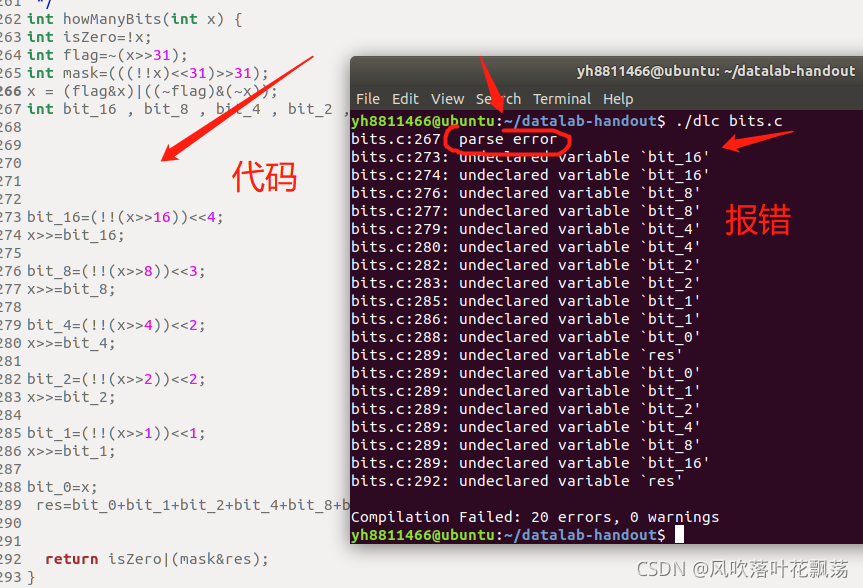
The execution code and error reporting contents are as follows:

reason:

This is because the standard supported by the Linux gcc compiler is different from the current C89 standard. This C standard requires that the declaration of variables in a block be placed in front of all non declarative statements.

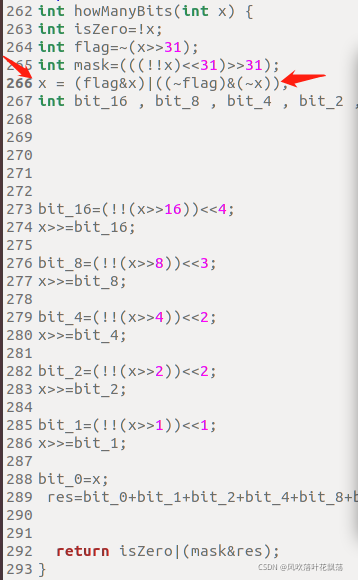
We can see that on line 266, a definition statement is placed before the declaration statement, so an error is reported

Solution:

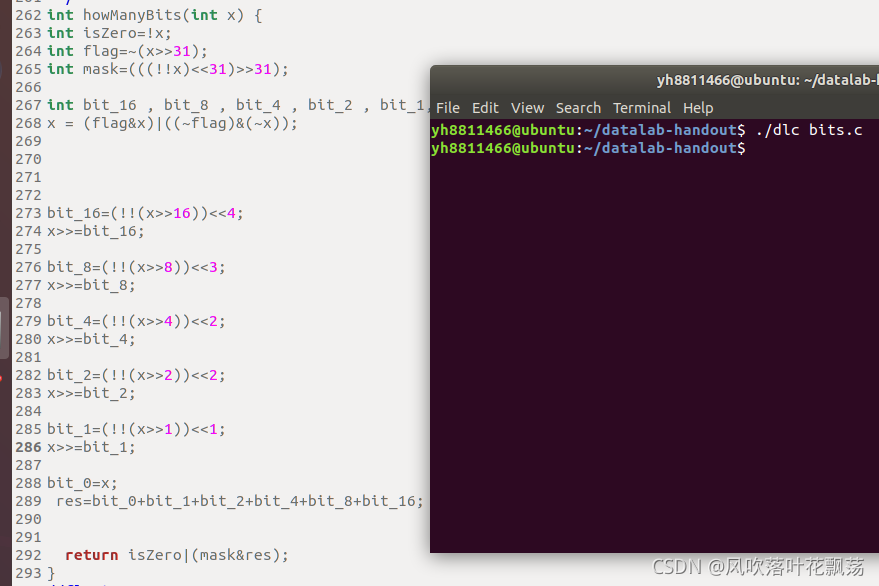
Put 266 this non declarative statement under all declarative statements
as shown in the following figure:

the compilation succeeded without error, and the problem was solved successfully

[Solved] Redis executes the monitor command error: noauth authentication required

After redis is connected, a (error) noauth authentication required. error is returned after executing the monitor command

[root@m214 src]# ./redis-cli -p 6412
127.0.0.1:6412> monitor
(error) NOAUTH Authentication required.

The reason is that you did not log in with password authentication

Solution:
view the redis configuration file to see the corresponding pass.

# Generated by CONFIG REWRITE
masterauth "2651080c6814a4a9d62da69a12f962b6"
requirepass "2651080c6814a4a9d62da69a12f962b6"

Then, after logging in with redis cli, execute the command auth + password, and then execute the monitor command

[root@m214 src]# ./redis-cli -p 6412
127.0.0.1:6412> auth 2651080c6814a4a9d62da69a12f962b6
OK
127.0.0.1:6412> monitor
OK