When installing MySQL on Linux system, error: failed dependencies error occurs when installing services
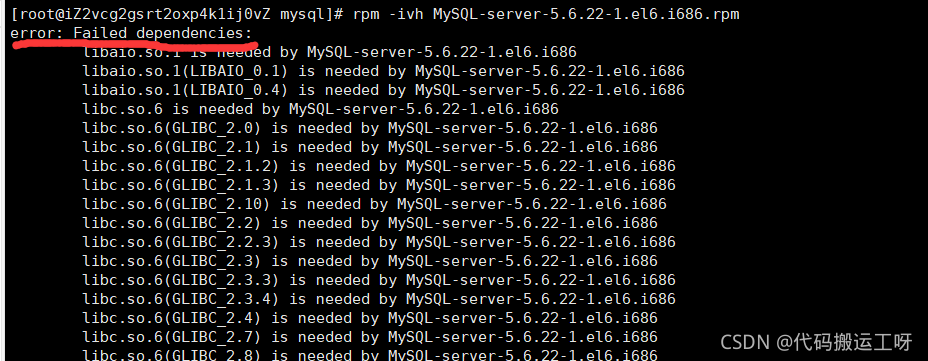
I inquired about the solution on the Internet. There are so many dependencies that need to be installed. It is suggested to download them again. Personally, I think it is a waste of time. Another solution is to add -- nodeps -- force , which is successfully solved


after the installation is completed, an error occurs again when starting the MySQL service

unfortunately, to run 32-bit programs on a 64 bit system, you need to install the 32-bit lib library. Or download a 64 bit version.
Author Archives: Robins
How to Solve MYSQL into outfile Error13
Error 13 is always reported when writing files. There is no problem viewing directory permissions. Finally, find the following solutions
Write files under Linxu
If you want to use the read and write functions, you must meet the following requirements
The current user is the root user
secure_file_priv is empty, or the folder to be written is just a specific folder of secure_file_priv
The folder where the shell is written must have 777 permissions, otherwise the writing will fail
File size, must be less than max_allowd_packet to
meet the above requirements in order to be written normally
Edit the file/etc/my.cof
Add
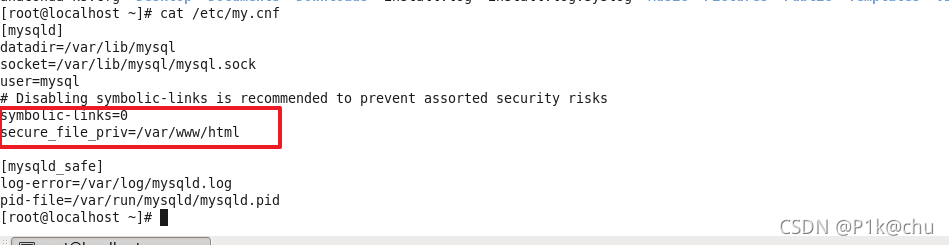 under [mysqld]
secure_file_priv =/var/www/html
MySQL view
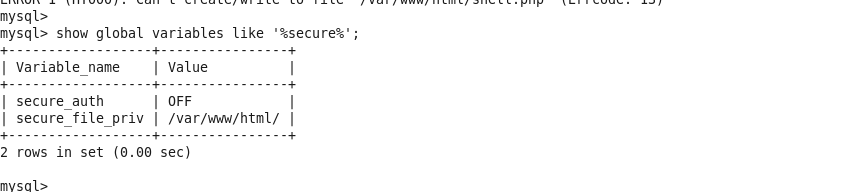
and then
chmod 777 /var/www/html
Finally, restart the database

error starting container: API error (404): network fabric_test not found“
1. The fabric version used is v2.2.4. Test the test network
2. Problem description
When calling the basic chain code, the following error messages are found:
error: Endorsement failure during invoke. Response: status: 500 message: “error in simulation: failed to execute transaction 75a77550b68a7476882e7a512fa0dd4f0accd90e9f1db7e5193c914dd91bb285: could not launch chaincode basic_ 1.0:3cfcf67978d6b3f7c5e0375660c995b21db19c4330946079afc3925ad7306881: error starting container: error starting container: API error (404): network fabric_ test not found”
This fabric_test has different results according to different versions.
the essence is that the name of the started fabric network is wrong, which is inconsistent with the configuration in our. Yaml file and the docker compose
3. The solution is as follows:
Premise: after I have finished the./network up createChannel and the chain code, the chain code will come up. Do not do the following instructions directly after down!!!!!
3.1 first, we execute the following commands:
docker network ls
The display result is

3.2 open the test network/docker/docker-compose-test-net.yaml file
see
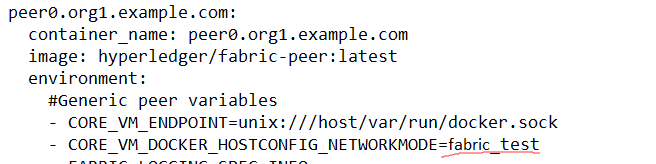
you can find that the name here is incorrect and you need to modify it to the docker displayed by docker network ls_ test。
note that in this file
CORE_ VM_ DOCKER_ HOSTCONFIG_ NETWORKMODE=fabric_ Test
there are two places, so we need to change two places.
After modification, it can be called successfully.
QT error: – LGL not found [How to Solve]
QT error: – LGL not found
This is because QT cannot find the OpenGL dynamic link library (LIBGL.So). OpenGL is installed by default in most Linux distributions, including Ubuntu, CentOS, etc. if the link library cannot be found, the path is generally wrong.
Solution
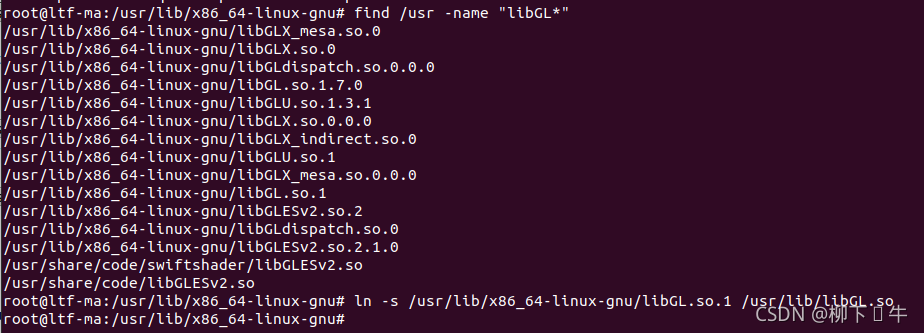
1. Use root to find the path of “LIBGL.So” file. Use find/usr - name "LIBGL *" to find
2. The search result is that the version number is added to the suffix of the OpenGL link library provided with the Linux distribution, such as LIBGL.So.1.2.0, LIBGL.So.1.3.1, etc., but the OpenGL link library found by QT in the link phase does not have the version number. So we need to create a link for the OpenGL link library in the/usr/lib/directory and remove the version number
3. Just create a soft connection with ln - s
RuntimeError: cuda runtime error (801) : operation not supported at ..
error message
THCudaCheck FAIL file=..\torch/csrc/THCudaChgeneck FAeric/StoragITHL Cuefile=Sha.da.\rCinhtoregcch.k cpp /csrcline=24F/gAI9 errL file=oe..\tor=nr801 : eoric/Stopch/ceration not susrcpporte/gend
eric/StorageSharing.cpp rageSharing.cpp line=249 error=801 : operation not supported
line=249 error=801 : operation not supported
Traceback (most recent call last):
Traceback (most recent call last):
  File "D:\Miniconda3\envs\dl\lib\multiprocessing\queues.py", line 236, in _feed
    obj = _ForkingPickler.dumps(obj)
  File "D:\Miniconda3\envs\dl\lib\multiprocessing\reduction.py", line 51, in dumps
    cls(buf, protocol).dump(obj)
  File "D:\Miniconda3\envs\dl\lib\multiprocessing\queues.py", line 236, in _feed
    obj = _ForkingPickler.dumps(obj)
  File "D:\Miniconda3\envs\dl\lib\site-packages\torch\multiprocessing\reductions.py", line 247, in reduce_tensor
    event_sync_required) = storage._share_cuda_()
  File "D:\Miniconda3\envs\dl\lib\multiprocessing\reduction.py", line 51, in dumps
    cls(buf, protocol).dump(obj)
Traceback (most recent call last):
  File "D:\Miniconda3\envs\dl\lib\site-packages\torch\multiprocessing\reductions.py", line 247, in reduce_tensor
    event_sync_required) = storage._share_cuda_()
RuntimeError: cuda runtime error (801) : operation not supported at ..\torch/csrc/generic/StorageSharing.cpp:249
RuntimeError: cuda runtime error (801) : operation not supported at ..\torch/csrc/generic/StorageSharing.cpp:249
reason
https://github.com/fastai/fastbook/issues/85
Since pytorch multiprocessing does not work on windows, set the num of dataloaders_ workers=0
error MSB8011: Failed to register output [How to Solve]
error MSB8011: Failed to register output. Please try enabling Per-user Redirection or register the component from a command prompt with elevated permissions.
Cause of formation: in versions above win7, only administrator privileges can run regsvr32.exe program, that is, only administrator privileges can register controls or DLLs.
Solution:
1. When running vs, right-click to run with administrator privileges. Do not open vs directly.
2. Engineering – > Propertier–> Linker–> General–> Register Output–> NO。
device no response, device descriptor read/64, error -71
Recently, I was porting rtl8723du to rk356x, and I encountered some problems in this process. Today, I recorded the problem as described in the title. This problem was recognized by the kernel when I plugged the WiFi module into the USB host, but the connection was unsuccessful. I checked a lot of data. It seems that I talked about the current signal. Now I record the problem I encountered, hoping to help more people
plug the module into the USB and use the dmesg command to view the cache information:
[  406.785107] usb 5-1: new high-speed USB device number 2 using xhci-hcd
[  406.908835] usb 5-1: device descriptor read/64, error -71
[  407.142008] usb 5-1: device descriptor read/64, error -71
[  407.371775] usb 5-1: new high-speed USB device number 3 using xhci-hcd
[  407.495321] usb 5-1: device descriptor read/64, error -71
[  407.725472] usb 5-1: device descriptor read/64, error -71
[  407.832210] usb usb5-port1: attempt power cycle
[  408.235232] usb 5-1: new high-speed USB device number 4 using xhci-hcd
[  408.235581] usb 5-1: Device not responding to setup address.
[  408.442000] usb 5-1: Device not responding to setup address.
[  408.648596] usb 5-1: device not accepting address 4, error -71
[  408.771923] usb 5-1: new high-speed USB device number 5 using xhci-hcd
[  408.772241] usb 5-1: Device not responding to setup address.
[  408.978858] usb 5-1: Device not responding to setup address.
[  409.185336] usb 5-1: device not accepting address 5, error -71
[  409.185559] usb usb5-port1: unable to enumerate USB device
First of all, I tried many online solutions. The general methods are:
echo Y > /sys/module/usbcore/parameters/old_scheme_first
perhaps
echo -1 > /sys/module/usbcore/parameters/autosuspend
I tried these methods, but they didn’t work in the end. But I directly inserted a hub on the board to transfer it out, and then inserted the module into the hub. At this time, the kernel can normally recognize the rtl8723du module
cache information displayed by dmesg after normal recognition:
[ 1862.348148] usb 5-1: new high-speed USB device number 11 using xhci-hcd
[ 1862.365237] usb 5-1: New USB device found, idVendor=1a40, idProduct=0101, bcdDevice= 1.11
[ 1862.365269] usb 5-1: New USB device strings: Mfr=0, Product=1, SerialNumber=0
[ 1862.365281] usb 5-1: Product: USB 2.0 Hub
[ 1862.403229] hub 5-1:1.0: USB hub found
[ 1862.403327] hub 5-1:1.0: 4 ports detected
[ 1862.784974] usb 5-1.2: new high-speed USB device number 12 using xhci-hcd
[ 1862.803946] usb 5-1.2: New USB device found, idVendor=0bda, idProduct=d723, bcdDevice= 2.00
[ 1862.804023] usb 5-1.2: New USB device strings: Mfr=1, Product=2, SerialNumber=3
[ 1862.804055] usb 5-1.2: Product: 802.11n WLAN Adapter
[ 1862.804084] usb 5-1.2: Manufacturer: Realtek
[ 1862.804109] usb 5-1.2: SerialNumber: 00e04c000001
[ 1862.888575] RTW:
[ 1862.888575] usb_endpoint_descriptor(0):
[ 1862.888660] RTW: bLength=7
[ 1862.888684] RTW: bDescriptorType=5
[ 1862.888705] RTW: bEndpointAddress=84
[ 1862.888725] RTW: wMaxPacketSize=512
[ 1862.888744] RTW: bInterval=0
[ 1862.888764] RTW: RT_usb_endpoint_is_bulk_in = 4
[ 1862.888784] RTW:
[ 1862.888784] usb_endpoint_descriptor(1):
[ 1862.888807] RTW: bLength=7
[ 1862.888825] RTW: bDescriptorType=5
[ 1862.888876] RTW: bEndpointAddress=5
[ 1862.888901] RTW: wMaxPacketSize=512
[ 1862.888935] RTW: bInterval=0
[ 1862.888975] RTW: RT_usb_endpoint_is_bulk_out = 5
[ 1862.889009] RTW:
[ 1862.889009] usb_endpoint_descriptor(2):
[ 1862.889046] RTW: bLength=7
[ 1862.889066] RTW: bDescriptorType=5
[ 1862.889085] RTW: bEndpointAddress=6
[ 1862.889104] RTW: wMaxPacketSize=512
[ 1862.889135] RTW: bInterval=0
[ 1862.889172] RTW: RT_usb_endpoint_is_bulk_out = 6
[ 1862.889205] RTW:
[ 1862.889205] usb_endpoint_descriptor(3):
[ 1862.889241] RTW: bLength=7
[ 1862.889278] RTW: bDescriptorType=5
[ 1862.889311] RTW: bEndpointAddress=87
[ 1862.889344] RTW: wMaxPacketSize=64
[ 1862.889364] RTW: bInterval=3
[ 1862.889383] RTW: RT_usb_endpoint_is_int_in = 7, Interval = 3
[ 1862.889419] RTW:
[ 1862.889419] usb_endpoint_descriptor(4):
[ 1862.889455] RTW: bLength=7
[ 1862.889491] RTW: bDescriptorType=5
[ 1862.889525] RTW: bEndpointAddress=8
[ 1862.889559] RTW: wMaxPacketSize=512
[ 1862.889591] RTW: bInterval=0
[ 1862.889625] RTW: RT_usb_endpoint_is_bulk_out = 8
[ 1862.889646] RTW:
[ 1862.889646] usb_endpoint_descriptor(5):
[ 1862.889670] RTW: bLength=7
[ 1862.889701] RTW: bDescriptorType=5
[ 1862.889737] RTW: bEndpointAddress=9
[ 1862.889772] RTW: wMaxPacketSize=512
[ 1862.889806] RTW: bInterval=0
[ 1862.889839] RTW: RT_usb_endpoint_is_bulk_out = 9
[ 1862.889873] RTW: nr_endpoint=6, in_num=2, out_num=4
[ 1862.889873]
[ 1862.889910] RTW: USB_SPEED_HIGH
[ 1862.889937] RTW: CHIP TYPE: RTL8723DU
[ 1862.890090] RTW: loadparam, Select P2P interface: iface_id:1
[ 1862.890593] RTW: Chip Version Info: CHIP_8723D_T4_1T1R_RomVer(0)
[ 1862.890640] RTW: USB NumInPipe(2), NumOutPipe(4/4)
[ 1862.890809] RTW: EEPROM type is E-FUSE
[ 1862.891165] RTW: Boot from EFUSE, Autoload OK !
[ 1862.891663] RTW: hal_EfuseSwitchToBank: Efuse switch bank to 0
[ 1862.981769] RTW: hal_ReadEFuse_WiFi: data end at address=0x86
[ 1862.982020] RTW: HW EFUSE
......
Resolution of internal server error problem in diango project
Resolution of internal server error problem in diango project
Project scenario:
Django project
using uwsgi deployment
internal server error is found after packaging and running
Problem Description:
internal server error appears on the website of the project. Check the log and find no Python application found
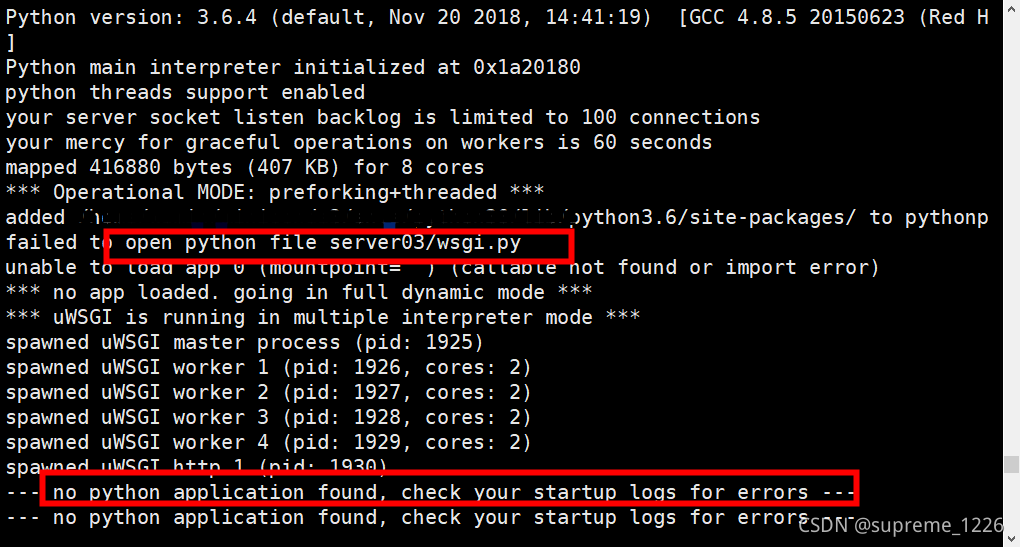
Solution:
Delete uwsgi_ Log restart uwsgi open the uwsgi log file and constantly try to modify it. Open the uwsgi log to check the problem
Cause analysis:
the existing problems are as follows:
- when using pyinstaller to package, do not add – F. the packaged files are still run in the original directory
Solution:
- put the packaged files in the original directory. Do not use pyinstaller – F manage.spec when running the packaged application
use pyinstaller manage.spec; Make sure that the python path of the project directory in uwsgi.ini is correct
git error:invalid path [How to Solve]
Pull handover branch code and error found git error: invalid path xxx or error: unable to create file
-
git statusLook at the code that needs to be processedgit reset–hard To a previous stable versiongit clean-df Clear uncommitted files
The file that caused the error was found in the git history
error: unable to create file keycloak-10.0.2/F:\workspace\electric\sedt-webfront\keycloak-10.0.2\standalone\log\server.log: Invalid argument- Who submits the file and who deletes the file
git pullRe-pull the file
Reason: There is a difference between the file path created by Mac and Windows, which causes the file path created cannot be generated in Windows. Delete the file to solve the problem
AttributeError: Can‘t get attribute ‘SPPF‘ on <module ‘models.common‘ from ‘H:\\yolov5-5.0\\models\\
import warnings
class SPPF(nn.Module):
    # Spatial Pyramid Pooling - Fast (SPPF) layer for YOLOv5 by Glenn Jocher
    def __init__(self, c1, c2, k=5):  # equivalent to SPP(k=(5, 9, 13))
        super().__init__()
        c_ = c1 // 2  # hidden channels
        self.cv1 = Conv(c1, c_, 1, 1)
        self.cv2 = Conv(c_ * 4, c2, 1, 1)
        self.m = nn.MaxPool2d(kernel_size=k, stride=1, padding=k // 2)

    def forward(self, x):
        x = self.cv1(x)
        with warnings.catch_warnings():
            warnings.simplefilter('ignore')  # suppress torch 1.9.0 max_pool2d() warning
            y1 = self.m(x)
            y2 = self.m(y1)
            return self.cv2(torch.cat([x, y1, y2, self.m(y2)], 1))
Modified in moudle commom.py
After matlab2018a is successfully installed, a licensing error appears when it is opened: – 8523
Article catalog
1. Problem description 2. Problem solving
1. Problem description
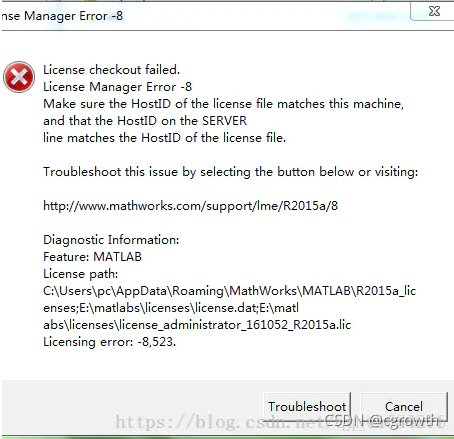
After matlab 2018a is successfully installed, a licensing error appears when it is opened: – 8523:
2. Problem solving
Delete the shortcut of MATLAB automatically created on the desktop, find .../bin/win64/matlab.exe , and then right-click 'to run' as an administrator, otherwise an error will be reported. Right click this file and send the shortcut to the desktop, so that the desktop can open MATLAB.
2021-11-08 error: could not convert ‘{0}‘ from ‘<brace-enclosed initializer list>‘ to
could not convert ‘{0}’ from ‘《brace-enclosed initializer list>’ to
C + + program, using the usual initialization list today, actually reported an error
struct sales {
    char bookNo;
    unsigned units_sold = 0;
    double revenue = 0.0;
};

int main() {
    sales a = {0};
    // print(cout, a);
}
error message
cpp_primer.cc:62:17: error: could not convert '{0}' from '<brace-enclosed initializer list>' to 'sales'
   62 |     sales a = {0};
      |                 ^
      |                 |
      |                 <brace-enclosed initializer list>
The problem is that the initial value is defined in the structure. At this time, the initialization list cannot be used
Change the structure to
struct sales {
    char bookNo;
    unsigned units_sold;
    double revenue;
};
That’s it
Summary
There are two initialization methods:
- when defining a structure, the initial value is given to initialize the list assignment
The above two methods are mutually exclusive, and only one can be selected
reference material https://qa.1r1g.com/sf/ask/2644377641/