Author Archives: Robins

Modify the tomcat configuration in docker, causing javaagent to report agent library failed to init instrument

A project in the Docker Tomcat container needs to modify the JavaAgent parameter, which was modified previously as follows
In the catalina.sh file, add the JAVA_OPTS parameter as follows
Export JAVA_OPTS = “$JAVA_OPTS – javaagent:/aspectjweaver – 1.8.13. Jar”
Restart the container, error, jar cannot be found
After checking, the JavaAgent parameter should be followed by a full path. Relative paths cannot be used.
 
To:
Export JAVA_OPTS = “$JAVA_OPTS – javaagent:/usr/local/tomcat/bin/aspectjweaver – 1.8.13. Jar”

 

Hbase Native memory allocation (mmap) failed to map xxx bytes for committing reserved memory

New start test environment Hbase error, error log as follows

#
# There is insufficient memory for the Java Runtime Environment to continue.
# Native memory allocation (mmap) failed to map 31715688448 bytes for committing reserved memory.
# An error report file with more information is saved as:
# /opt/cm-5.13.0/run/cloudera-scm-agent/process/521-hbase-REGIONSERVER/hs_err_pid132687.log

View the Hbase RegionServer configuration

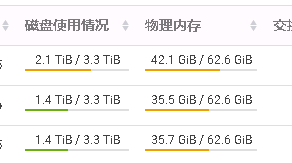
See 31G allocated and check server memory usage

Spotting a huge shortage of memory that could be allocated to RegionServer and causing problems, RegionServer freed it or resized its configuration, restarted the service and got it back on.  

tortoiseSVN cleanup failed

When we were using tortoiseSVN to update, we had to prompt about cleanup, and when we had to do it, it happened, “Run the WC DB work queue” blahblah. The solution is as follows:
I. Install SQlitE3
Download url: https://www.sqlite.org/download.html.
download Precompiled Binaries for Windows sqlite-dll-win32-x86-xxx.zip and sqlite-tools-win32-x86-xxx.zip. The version is not determined because it will be updated. After downloading, create a new folder “C:\sqlite” under the C disk, put sqlite3. Def and SQlite3. DLL extracted from SQLite-DLL-Win32-x86-XXx. zip into the newly created folder, and put SQlite3. Exe extracted from SQlite-tools-win32-x86-XXx.zip into the newly created folder.
opens ** “edit system environment variable”. In the environment variable **, add “C:\sqlite” to the Path of the system variable.
win + R open “run window”, type “CMD” to open the command line, type “sqlite3”, you should see SQLite version, so that you are installed.

C:\> Sqlite3
SQLite version 3.29.0 2019-07-10 17:03
Enter “. Help “for usage> Connected to a in-memory database.
Use”. Open FILENAME “to reopen on a persistent database.

2. Clean wC.DB files
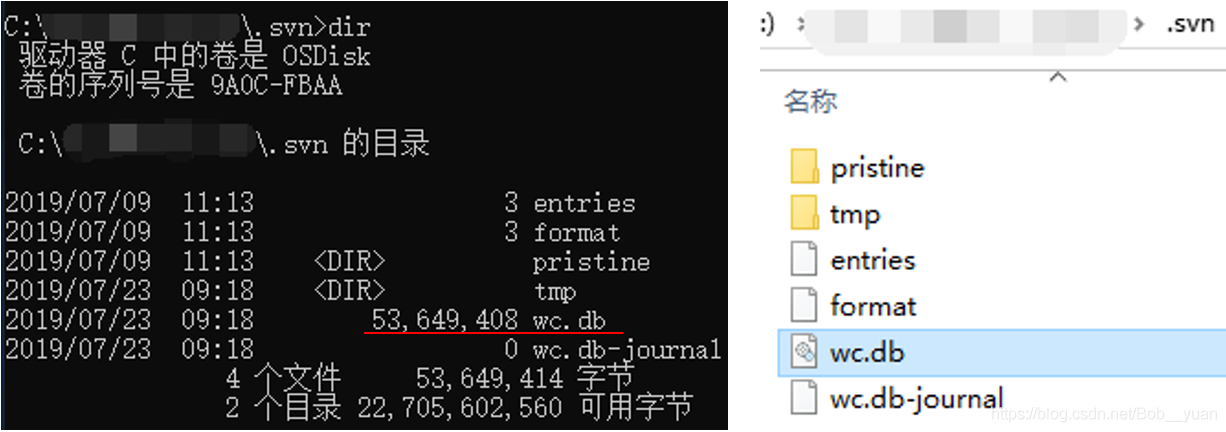
Switch to the “.svn “folder in the same directory as the cleanup folder (if not, select the hidden item in” View “at the top of the folder window) and type” dir “to view the files in the folder. There is a wC.db file and you can see it by opening the folder, but wC.db is binary.

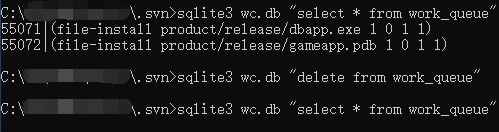
Use “sqlite3 WC.db “select * from work_queue” to view the content of wC.db, then use “sqlite3 WC.db “delete from work_queue” to clear the content, and then check again to make sure it’s done.

3. Cleanup
Cleanup is now ready.

hdfs 192.168.2.19:9000 failed on connection exception: java.net.ConnectException:Connection refused

HDFS connection failed:
Common causes of errors may be:
1. Hadoop is not started (not all started). Hadoop is normally started including the following services. If the services are not all started, you can check the log

 
2. Installation of pseudo-distributed mode; localhost or 127.0.0.1 is used in the configuration file; at this time, the real ID should be changed, including core-site.xml, Mapred-site.xml, Slaves,
Masters, after modifying IP, the dataNode may fail to start,
Set DFS. Data.dir in the HDFs-site.xml profile:
& lt; property>
& lt; name> dfs.data.dir< /name>
& lt; value> /data/hdfs/data< /value>
& lt; /property>  
Delete all files in the folder in Hadoop and restart Hadoop

Camtasia error :video codec open failed

Open Camtasia9.0 and click record. Click the red record button in the upper left corner to adjust the recording area. When clicking the ammonium button of “REC”, a dialog box popped up, indicating “Error occurred in Recorder: Video Codec Open Failed”.
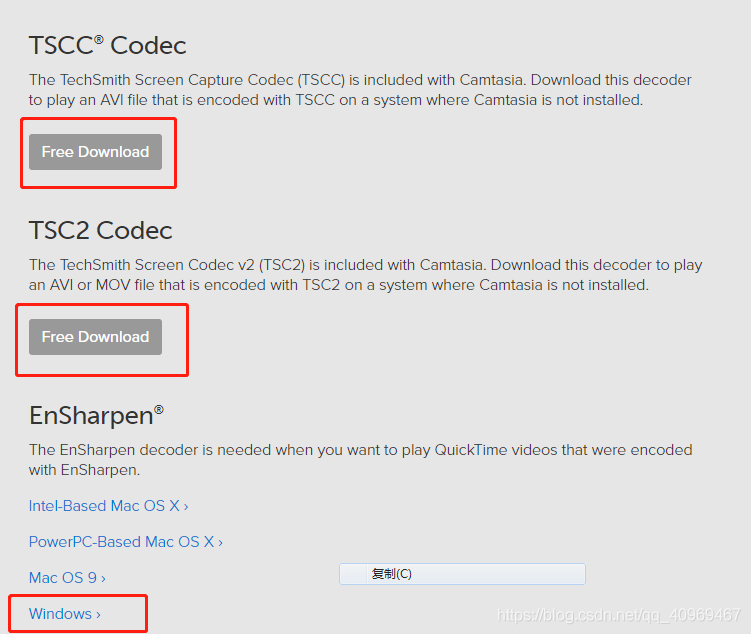
After a reason to find the final solution, just download three decoder installation on the official website can be. Share this with others who are experiencing these problems.
Website: https://www.techsmith.com/codecs.html

Express error: Failed to lookup view “error” in views directory processing

Express framework installs EJS templates by modifying them in app.js

app.set('views', path.join(__dirname, 'views/'));
app.engine('.html', require('ejs').renderFile);
app.set('view engine', 'html');

template for ejs, suffix to HTML after individual pages open tip Failed to lookup the view “error” in views directory error, found behind the template in a parameter is not passed so there is an error, but because the views directory under the lack of the error file resulting in this error, the solution is below the template directory to create a error file is used to output error information.

Form Compile Issues: (FRM-18108: Failed to load the following objects)

Form compilation problem (FRM-18108: Failed to load the following objects.)


frm-18108: Failed to load the following objects.
Source Module:APPSTAND
Source Object: STANDARD_PC_AND_VA
Source Module:APPSTAND
Source Object: STANDARD_TOOLBAR
Source Module:APPSTAND
Source Object: STANDARD_CALENDAR
Compiling package specification APP_CUSTOM…
No compilation errors.

Cause:
as a result of non-import of APPSTAND.
Resolution:
CD $AU_TOP/forms/US/ — must compile in this directory, . In this way can FRMCMP find APPSTAND FMB file
frmcmp_batch Module = $CUX_TOP/forms/US/CUXORDENT FMB Userid = apps/apps the Module_Type = FORM output_file = $CUX_TOP/forms/US/CUXORDENT FMX [@ more @]

From “ITPUB blog” link: http://blog.itpub.net/394664/viewspace-1057829/, if you want to reprint, please indicate the source, otherwise will be investigated for legal responsibility.

Reproduced in: http://blog.itpub.net/394664/viewspace-1057829/

Notes on using Reaver in Kali 2.0

1. At first
Use this command airmon-ng start wlan0 to get started. Note that in Kali 2.0 you no longer turn on mon0, but wlan0mon, so do not confuse this with the version of Kali 1.x
2. The command of Kali 1.x is invalid
In Kali 2.0, you must manually turn on the network card listening mode, so you need to manually turn on the listening mode after executing the above

ifconfig wlan0mon down
iwconfig wlan0mon mode monitor
ifconfig wlan0monp up

3. Pixiewps blessing
In Reaver 1.5.2, the -K 1 parameter was used to integrate PIxiewps, which greatly accelerated the speed of PIN enumerations, and the Dust Attack was used to increase the crack speed of affected chips from dozens of hours to a few seconds
4. Possible problems
Ray
here I will not repeat paste, I just put up the problems and errors, if encountered, go to the original address above looking for, thank the author of this article!
WPS transaction failed (code: 0x02)
0x02 and 0x03 mixed error
WPS transaction failed (code: 0x02) 0x04)
long warning
long warning Receive timeout
I have a problem 4, but at the beginning I can carry out PIN operation, after dozens of times of PIN, unable to Associate, I do not know whether it triggered the router’s security mechanism

How to Fix VMware Taking ownership of this virtual machine failed

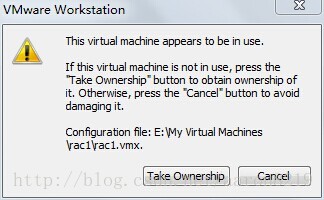
Today I used VMWare by mistake. When I logged in Windows 2003 Server, I needed to press Ctrl+Alt+Delete, and then I accidentally clicked where I went (I didn’t see it myself!!). , causing virtual machine deadlock. The following figure appears when the virtual machine is running:

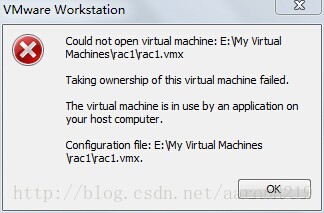
After clicking Take Ownership, the following figure appears:

Google searched the fault, and it turned out to be the virtual machine deadlock caused by the system Crash:
When I clicked on the lock button (which had replaced VMWare Fusion’s normal “play” button), I got an error message sea-voyage “The virtual machine appears to be in use” :

Seeing as how I was not using The VM (… At least to the best of my knowledge), I clicked on “Take Ownership”, and got an error message that said “Taking Ownership of this virtual machine failed” :
What to do?I started googling for the error messages to see if I could find a resource or VMWare support document that described how to troubleshoot them, But to my surprise it took me awhile and some digging to find something. I helped myself, which in essence picked up VMWare’s lock files on the virtual machine.
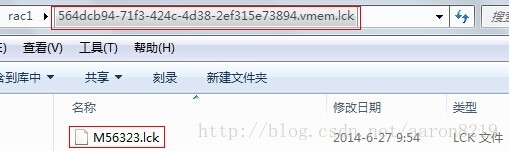
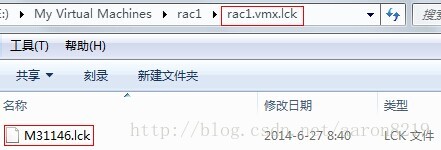
In fact, every time the virtual machine is started, a.lCK folder is automatically generated, which can be found from the creation time of the mXXx.lCK file, which is the moment the virtual machine is started


After deleting all.lCK folders in the virtual machine, double-click the VMX file to run the virtual machine again. The problem is solved

git clone Error: “server certificate verification failed. CAfile: /etc/ssl/certs/ca-certificates.crt CRLf…

I can use ssh by cloning the project, but it doesn’t work when I clone the project with https. it displays the following message error.

server certificate verification failed. cafile: /etc/ssl/certs/ca-certificates.crt CRLfile: none

HR Solutions :

Open the terminal and run the following command:

export GIT_SSL_NO_VERIFY=1

Chrome console reports Failed to load resource: net::ERR_BLOCKED_BY_CLIENT one of the solutions

Problem description: Some of this image failed to appear when your local project was opened on Chrome, but Chrome can access the image via the path. The console Failed to load resource: net::ERR_BLOCKED_BY_CLIENT error
Possible cause: self – installed AD plugin blocks related image

Solution: Set the whitelist for the current project page
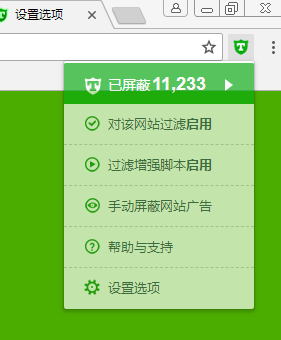
Take the “AD Terminator” as an example:
1. Open the “AD Terminator” setting option

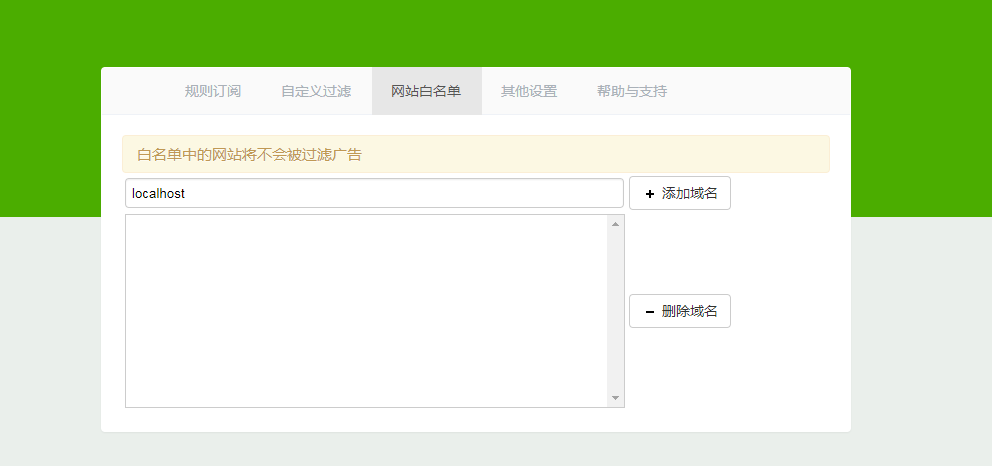
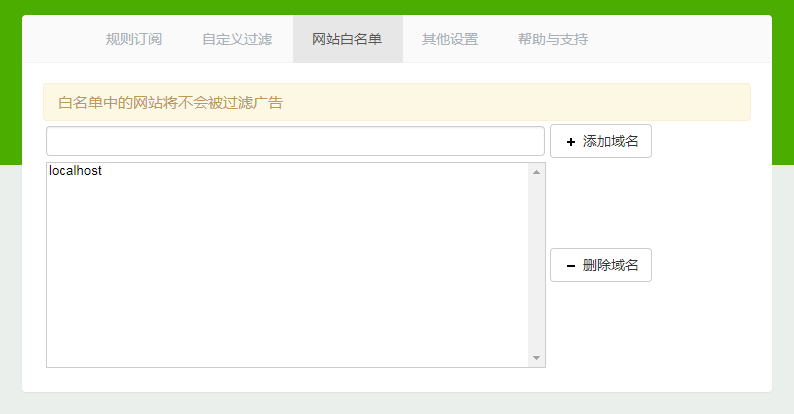
2. Enter the “Website Whitelist” and add the project domain name. If it is a local project, call localhost directly, as shown in the figure below

3, “Enter” key

Ok. The end.