Category Archives: How to Fix

How to Fix:java.lang.NoClassDefFoundError: Failed resolution of: Lorg/apache/http/client/methods/HttpPost

on Android 9.0/p phone, flash back, the error information is as follows:

java.lang.NoClassDefFoundError: Failed resolution of: Lorg/apache/http/client/methods/HttpPost;

this is a bug in GooglePlay Services that you can fix by :

solution :

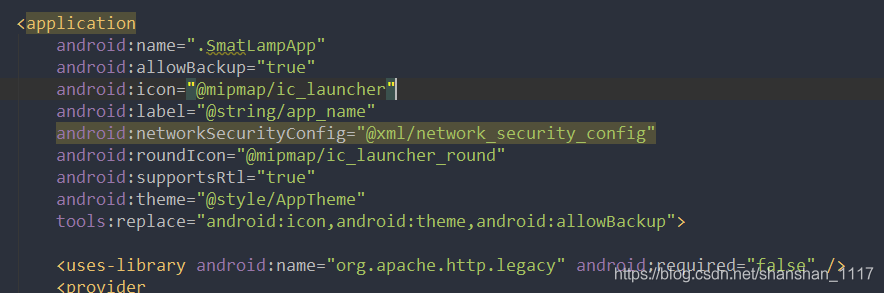
Add :

to the application tag of the manifest file, androidmanifest.xml

<uses-library android:name="org.apache.http.legacy" android:required="false" />

as follows:

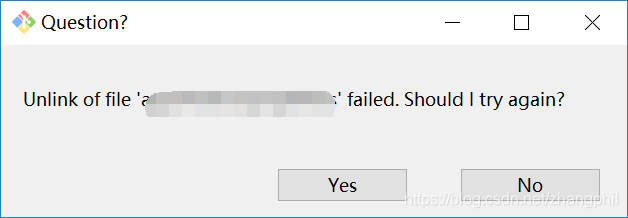
Git error: unlink of file ‘xxx’ failed.Should I try again?

git error: Unlink of ‘XXX’ failed.Should I try again?

as shown in the figure:

occurs when git switches code branches, indicating that a file has been modified and needs to be committed, but there is no modification.

because git maintenance management code is used by other programs, such as IDE (Android Studio, etc.). The solution is to close the program IDE or use the application of the program code.

Tensorflow error in Windows: failed call to cuinit: CUDA_ ERROR_ UNKNOWN

    • environment
    • Linux this problem
    • is mispositioned
            • 0. Do you have the correct cuda and cudnn versions installed?
            • 1. Do you have cudnn and where?Where are the DLL files such as CUDNN64_7.DLL in the compressed package (the number changes after different versions)?2. Did you add the folder containing cudnn64_7.dll (the number changes after different versions) to the environment variable path?

environment

    系统:window10 *64
    显卡:gtx970
    python环境:3.5.4
    tensorflow:1.8.0
    cuda:cuda9.0
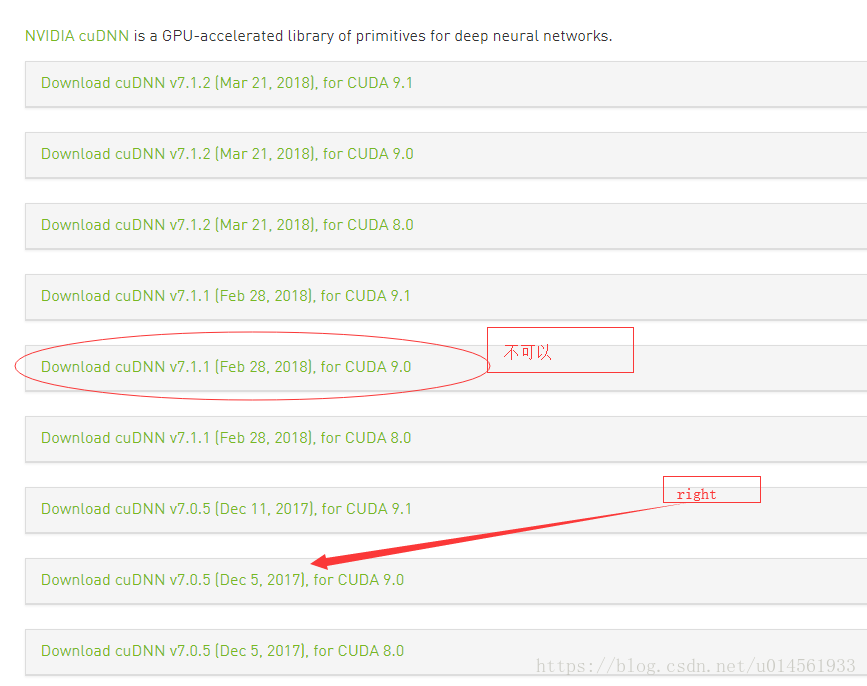
    cudnn:cuDNN v7.1.1 (Feb 28, 2018), for CUDA 9.0

this problem in Linux

in addition to the cause mentioned in this article, the following may also refer to reference:
http://kawahara.ca/tensorflow-failed-call-to-cuinit-cuda_error_unknown/

is mispositioned

0. Have you installed the correct cuda and cudnn versions to match?

as of 2018.5.4 the installation tutorial of tensorflow official website is cuda9.0+cudnn7.0+ the latest tensorflow (1.8.0)
must strictly match the three versions (tf version with 1.7 and 1.6 although no problem was found)
official website original words:

if one of your packages is different from the above version, change to the specified version. In particular, the cuDNN version must match exactly : if cudnn64_7.dll cannot be found, TensorFlow will not load. To use different versions of cuDNN, you must build from source code.

if you use cuda9.1 you may encounter problems, either in win or Linux, as the latest version of tf is compiled against cuda9.0. Based on cuda9.1 tf under Linux build can see my articles at https://blog.csdn.net/u014561933/article/details/79995536.

if you don’t use cudnn7.0 like I do you’ll get the error I mentioned in the title, although I’m using cudnn7.1 for version 9.0. The website says matches exactly :

if this is your problem, just reinstall and restart.

1. Do you have cudnn installed and where?Where are the DLL files such as CUDNN64_7.DLL in the compressed package (the number changes after different versions)?

you need to make sure that all the files in the cudnn package like bin, include, lib/x64 are copied to the corresponding files in cuda.

2. Did you add the folder containing cudnn64_7.dll (the number changes after different versions) to the environment variable path?

is generally in cuda/bin, this directory will be added automatically in Windows installation, Linux requires manual operation.

VIM e667: fsync failed error

I don’t know much about other situations, so let’s talk about the solutions for the situations I have encountered.

if you modify /proc folder, because files in /proc are not actual files, they’re an interface to lower-levels of the operating system. https://askubuntu.com/questions/167819/im-getting-fsync-failed-error-why)

therefore, directly use the echo command, through the shell to write in to succeed.

Ubuntu cannot access USB device, failed to create a proxy device for the USB device

Ubuntu cannot access the USB device, Failed to create a proxy device for the USB device

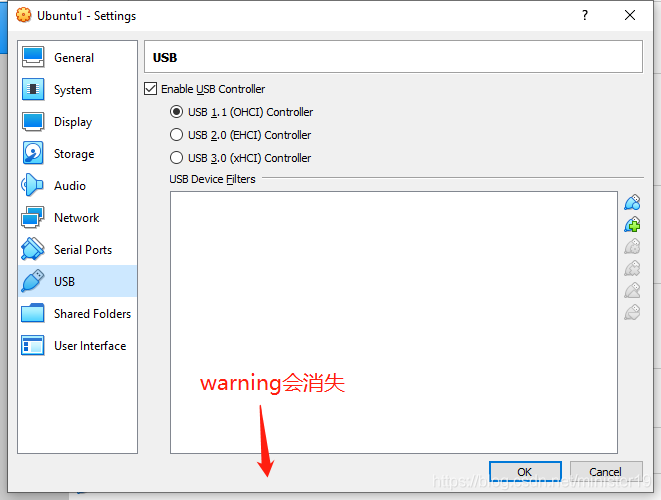
method one: trying to install VirtualBox Extension Pack, address: https://www.virtualbox.org/wiki/Downloads. The WARNING in USB setting will disappear. Also: All warnings of Virtual Box should be alert and try to handle, or the OS inside the sandbox will be buggy.


method failed, try: https://superuser.com/questions/1136607/virtualbox-usb-capture-issue-windows-7-host-guest

Remote: http basic: access denied, fatal: authentication failed for error resolution: wrong password

encountered a problem with git denied, fatal: remote: HTTP Basic: Access denied, fatal: Authentication failed for.

searches for a number of solutions that don’t work, including deleting credentials and retyping the git account name password.

later, I tried to log in git with the git password I filled in when I clone git, but the result gave an error, saying that the password was incorrect.

then I analyzed and found that the git drop code gave an error, because when I was creating git, I did not notice that the capital lock was opened. The password I entered was A123456, but I thought it was A123456. Then when logging into git account, I chose “remember account name and password” and did not enter it manually. Then, the Git password I entered when Git Clone pulled the code was a123456.

this caused me to fail to pull the code, and I never found the problem. The question puzzled me for two days. (I only noticed this when I had a brainwave and chose to enter my password manually to log into Git accounts.)

therefore, if all other possibilities have been ruled out, check your git account and password to see if they are correct.

, I hope that helps you.

On curl: (2) failed initialization

was originally created because curl could not access HTTPS and the network said it was necessary to recompile and install curl

I will download..

./configure

make

make install

results in

curl: (2) Failed Initialization

okay, I’m on my knees.

all over the world looking for reasons…

find this

It means that the curl binary is picking up the system curl library. While it was linked at compile time to the correct library, at run-time it’s picking up the incorrect library, which seems to be a pretty typical reason for this error happening.

so confure is mainly used with –disable-shared

and then make…

is OK…

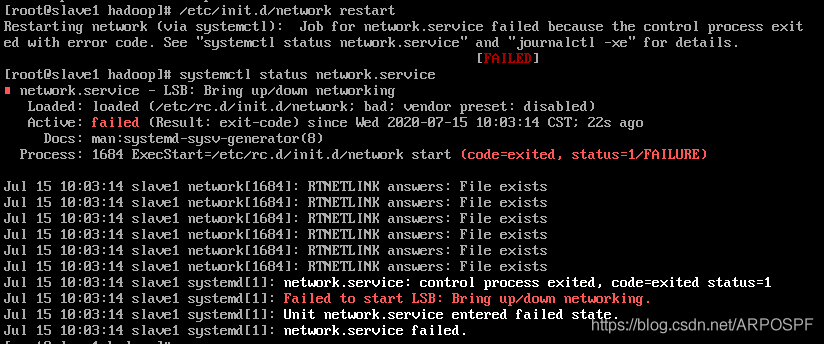
【Q&A】Failed to start LSB: Bring up/down networking

Failed to start LSB: Bring up/down networking

because the *. VMSS file was deleted, after restarting the virtual machine, I found that I could not make a remote connection through SSH. Then I tried to restart the network card service, and the result was abnormal, as shown below:


baidu circle, is to modify the MAC address, but after the change does not have any use, finally Google solved.
facts prove that baidu is a gray goods! Solution: disable NetworkManager

  1. systemctl stop NetworkManager
  2. systemctl disable NetworkManager
    then restart the network service and network can be connected normally!

[solution] MAC: stack error: ` gyp ‘failed with exit code:1

[20200730 update]
at the bottom is the previous answer. I found this problem was not so simple, because searching gypfailed with exit code:1 was not specific enough, look at the error reported, in fact, it could be more detailed. Separator before the following is a solution, this solution can only solve the file node - gyp/lib/configure. Js: 305:16 fault, if it is the problem on the bottom of the reference solution. If not, take a closer look at your problem, and sometimes you'll find that another problem is the following:

ERROR:root:code for hash md5 was not found.
Traceback (most recent call last):
  File "/usr/local/Cellar/python@2/2.7.15/Frameworks/Python.framework/Versions/2.7/lib/python2.7/hashlib.py", line 147, in <module>
...
ValueError: unsupported hash type md5
ERROR:root:code for hash sha1 was not found.
...
ValueError: unsupported hash type sha224
ERROR:root:code for hash sha256 was not found
...
  File "/usr/local/lib/node_modules/npm/node_modules/node-gyp/gyp/pylib/gyp/xcodeproj_file.py", line 152, in <module>
    _new_sha1 = hashlib.sha1
AttributeError: 'module' object has no attribute 'sha1'
gyp ERR! configure error
gyp ERR! stack Error: `gyp` failed with exit code: 1
gyp ERR! stack     at ChildProcess.onCpExit (/usr/local/lib/node_modules/npm/node_modules/node-gyp/lib/configure.js:345:16)
gyp ERR! stack     at ChildProcess.emit (events.js:189:13)
gyp ERR! stack     at Process.ChildProcess._handle.onexit (internal/child_process.js:248:12)
gyp ERR! System Darwin 19.5.0
gyp ERR! command "/usr/local/bin/node" "/usr/local/lib/node_modules/npm/node_modules/node-gyp/bin/node-gyp.js" "rebuild"
gyp ERR! cwd /Users/eric/Desktop/admin-web/node_modules/watchpack-chokidar2/node_modules/fsevents
gyp ERR! node -v v10.15.3
gyp ERR! node-gyp -v v3.8.0
gyp ERR! not ok

look at this problem, mainly is the /usr/local/Cellar/python @ 2/2.7.15/Frameworks/python framework Versions/2.7/lib/python2.7/hashlib. Py this file was wrong, and wrong is md5 and sha1 encryption methods, such as didn't find it. So the file problem, should be caused by our computer environment, the computer is certain that a library in addition to the problem, resulting in the execution of this file and encryption related libraries or methods are suspended. So when searching, you can search MAC ERROR:root:code for hash md5 was not found or something like that, and search on bing.com international version, so that if there are related questions on StackOverflow, you can see them directly. Sure enough, there's a problem here, the same thing that we had, and the main reason is that the openssl on our computer is not working. Maybe it's because we've installed multiple versions of Python, or maybe we've installed some software that comes with OpensSL that conflicts with the computer's own. So that's this guy. So, we need to respecify that.

# 先看看是什么版本,我的是1.0.2o_1
ls /usr/local/Cellar/openssl
# 指定切换到这个版本
brew switch openssl 1.0.2o_1
# 输出以下这样的就成功了
Cleaning /usr/local/Cellar/openssl/1.0.2o_1
Opt link created for /usr/local/Cellar/openssl/1.0.2o_1

1. Problem description

NPM installation error, all kinds of online uninstall and reinstall node-gyp methods have been tried to no use, but can not find the root of the problem:

gyp ERR! stack Error: `gyp` failed with exit code: 1
gyp ERR! stack     at ChildProcess.onCpExit (/usr/local/lib/node_modules/npm/node_modules/node-gyp/lib/configure.js:305:16)
gyp ERR! stack     at emitTwo (events.js:106:13)
gyp ERR! stack     at ChildProcess.emit (events.js:191:7)
gyp ERR! stack     at Process.ChildProcess._handle.onexit (internal/child_process.js:215:12)
gyp ERR! System Darwin 16.0.0
gyp ERR! command "/usr/local/Cellar/node/8.1.3/bin/node" "/usr/local/lib/node_modules/npm/node_modules/node-gyp/bin/node-gyp.js" "rebuild"
gyp ERR! cwd /Users/project/node_modules/ckmeans
gyp ERR! node -v vxx
gyp ERR! node-gyp -v vxxx
gyp ERR! not ok 

2, cause guess

gyp is a compilation tool, similar to the makefile command, it is mainly used to compile C++, node integrated it, called node-gyp0.

NPM is the source code for , NPM install is pull the source code in native compilation, after this time because inevitably, the source code used in other languages, such as C or C + +, compile time, so you need to other language compiler tools such as node - gyp , but the fact is that these compile tools in different systems is dependent on different system compiler tools, For example, on the MAC, this node-gyp actually relies on the compilation tools provided by xcode, so that's the problem I ran into. It's a xcode tool. Except for the problem, the tool management of xcode is xcode-select, which needs to be reset or installed or reset.

3. Solution

for the specific solution, see an issue of schnerd/d3-scale-cluster:

# 要不要sudo看自己当前用户是不是有sudo权限
$ [sudo] xcode-select --install
xcode-select: error: command line tools are already installed, 
use "Software Update" to install updates

# 提示已经安装的话,就重置
[sudo] xcode-select --reset

problem solved.

Windows 7 system update failed – WindowsUpdate_ 800B0100

1 problem description

updated IE to IE11 these days, and the system automatically detected an important update: the cumulative security update (KB3003057) for Internet Explorer 11 for Windows 7 based on the x64 system.

now that it’s detected, and it’s a security update, install it directly (although I usually use Chrome). As a result, the update failed multiple times, with error code 8024000B. After getting the help online, the update prompt was: “WindowsUpdate_800B0100” “WindowsUpdate_dt000” failed to install Updates.

2 solution

for a long time, finally found a solution:

  1. enter the C:\Windows\SoftwareDistribution\Download folder
  2. to delete all files

oh, you can reinstall the update.

3 problems in depth

for Windows Update error 800B0100, indicates that a required file was corrupted or missing during the Update process. In retrospect, I did have a forced shutdown during the update stage, and I guess it was during that time that The file was corrupted.

Microsoft’s website has a detailed description of the problem: Windows Update error 800B0100, and then provides a system Update ready tool to resolve the Update problem.

Failed to execute / bin / bash: resource temporarily unavailable

[[email protected] config]# su-mform
Last login: Mon 08:05 CST 2018 on PTS /4
su: failed to execute /bin/bash: Resource temporarily unavailable
[[email protected] config] #
[[email protected] config] #
[[email protected] config] # egrep – v $| “^ ^ #”/etc/security/limits. D/20 – nproc. Conf
* soft Nproc 4096
root soft nproc unlimited
root
[[email protected] config]# su-mform
Last login: Mon 16:16:25 CST 2018 on PTS /4
su: Failed to execute /bin/bash: Resource questions have no further use
[[email protected] config]#
[[email protected] config]#

[[email protected] config] #

# will default value instead of 4096 8192

[[email protected] config] # vim/etc/security/limits. D/20 – nproc. Conf
[[email protected] config] # egrep – v $| “^ ^ #”/etc/security/limits. D/20 – nproc. Conf
* soft nproc 8192
root soft nproc unlimited
[[email protected] config]# su-mform
Last login: Mon 16 14:16:49 CST 2018 on PTS /4
[[email protected] ~]$id
uid=1002(mform) gid=1003(mform) groups=1003(mform)