Category Archives: How to Fix

Notes on using Reaver in Kali 2.0

1. At first
Use this command airmon-ng start wlan0 to get started. Note that in Kali 2.0 you no longer turn on mon0, but wlan0mon, so do not confuse this with the version of Kali 1.x
2. The command of Kali 1.x is invalid
In Kali 2.0, you must manually turn on the network card listening mode, so you need to manually turn on the listening mode after executing the above

ifconfig wlan0mon down
iwconfig wlan0mon mode monitor
ifconfig wlan0monp up

3. Pixiewps blessing
In Reaver 1.5.2, the -K 1 parameter was used to integrate PIxiewps, which greatly accelerated the speed of PIN enumerations, and the Dust Attack was used to increase the crack speed of affected chips from dozens of hours to a few seconds
4. Possible problems
Ray
here I will not repeat paste, I just put up the problems and errors, if encountered, go to the original address above looking for, thank the author of this article!
WPS transaction failed (code: 0x02)
0x02 and 0x03 mixed error
WPS transaction failed (code: 0x02) 0x04)
long warning
long warning Receive timeout
I have a problem 4, but at the beginning I can carry out PIN operation, after dozens of times of PIN, unable to Associate, I do not know whether it triggered the router’s security mechanism

How to Fix VMware Taking ownership of this virtual machine failed

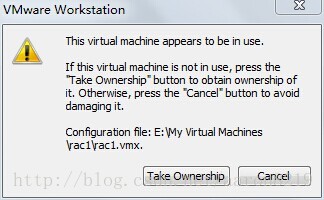
Today I used VMWare by mistake. When I logged in Windows 2003 Server, I needed to press Ctrl+Alt+Delete, and then I accidentally clicked where I went (I didn’t see it myself!!). , causing virtual machine deadlock. The following figure appears when the virtual machine is running:

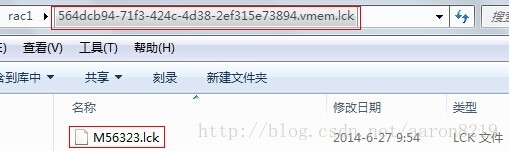
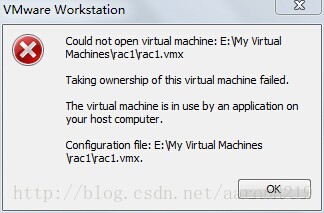
After clicking Take Ownership, the following figure appears:

Google searched the fault, and it turned out to be the virtual machine deadlock caused by the system Crash:
When I clicked on the lock button (which had replaced VMWare Fusion’s normal “play” button), I got an error message sea-voyage “The virtual machine appears to be in use” :

Seeing as how I was not using The VM (… At least to the best of my knowledge), I clicked on “Take Ownership”, and got an error message that said “Taking Ownership of this virtual machine failed” :
What to do?I started googling for the error messages to see if I could find a resource or VMWare support document that described how to troubleshoot them, But to my surprise it took me awhile and some digging to find something. I helped myself, which in essence picked up VMWare’s lock files on the virtual machine.
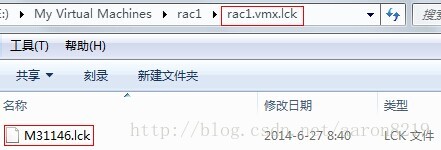
In fact, every time the virtual machine is started, a.lCK folder is automatically generated, which can be found from the creation time of the mXXx.lCK file, which is the moment the virtual machine is started


After deleting all.lCK folders in the virtual machine, double-click the VMX file to run the virtual machine again. The problem is solved

git clone Error: “server certificate verification failed. CAfile: /etc/ssl/certs/ca-certificates.crt CRLf…

I can use ssh by cloning the project, but it doesn’t work when I clone the project with https. it displays the following message error.

server certificate verification failed. cafile: /etc/ssl/certs/ca-certificates.crt CRLfile: none

HR Solutions :

Open the terminal and run the following command:

export GIT_SSL_NO_VERIFY=1

Chrome console reports Failed to load resource: net::ERR_BLOCKED_BY_CLIENT one of the solutions

Problem description: Some of this image failed to appear when your local project was opened on Chrome, but Chrome can access the image via the path. The console Failed to load resource: net::ERR_BLOCKED_BY_CLIENT error
Possible cause: self – installed AD plugin blocks related image

Solution: Set the whitelist for the current project page
Take the “AD Terminator” as an example:
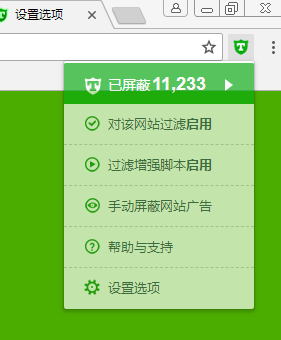
1. Open the “AD Terminator” setting option

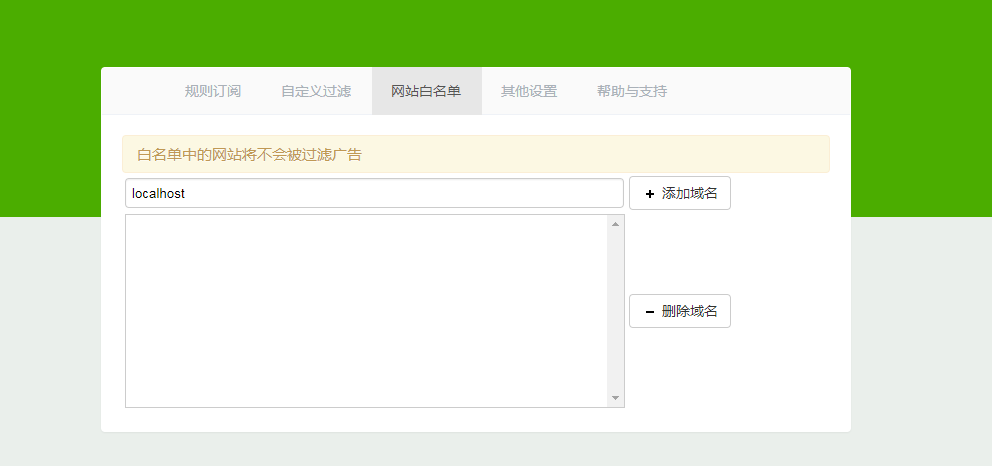
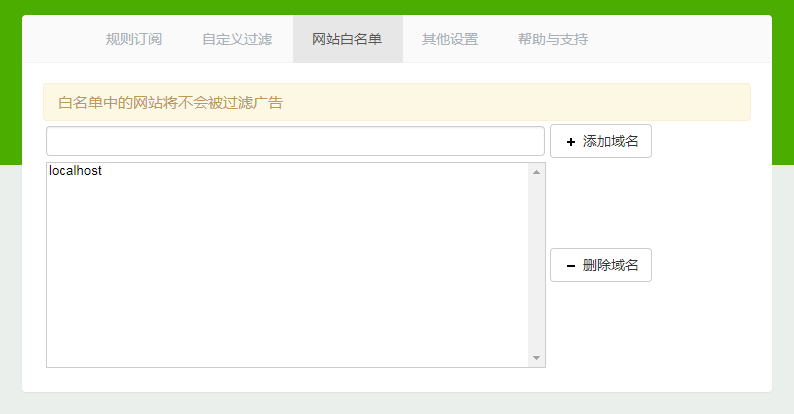
2. Enter the “Website Whitelist” and add the project domain name. If it is a local project, call localhost directly, as shown in the figure below

3, “Enter” key

Ok. The end.

[SSL: CERTIFICATE_VERIFY_FAILED] Certificate Verify Failed (_ssl.C:579)

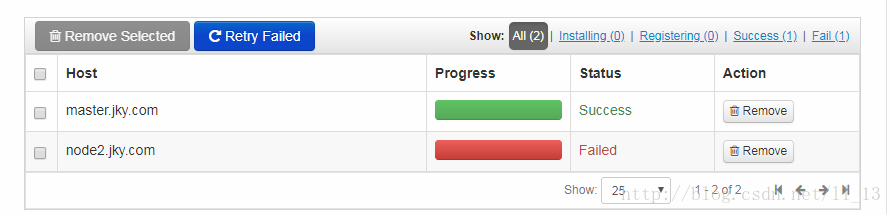
Problems have been encountered during HDP installation. Both Failed at first. Internet search, said that the OpenSSL version is too old to update, update after the problem is resolved, but their CentOS7 tried to update, but it is already the latest version. The final version of the problem was python2.7.5. See the error code for online answers.
==========================
Creating target directory...
==========================

Command start time 2018-02-27 09:30:03

Connection to node2.jky.com closed.
SSH command execution finished
host=node2.jky.com, exitcode=0
Command end time 2018-02-27 09:30:03

==========================
Copying ambari sudo script...
==========================

Command start time 2018-02-27 09:30:03

scp /var/lib/ambari-server/ambari-sudo.sh
host=node2.jky.com, exitcode=0
Command end time 2018-02-27 09:30:03

==========================
Copying common functions script...
==========================

Command start time 2018-02-27 09:30:03

scp /usr/lib/python2.6/site-packages/ambari_commons
host=node2.jky.com, exitcode=0
Command end time 2018-02-27 09:30:04

==========================
Copying OS type check script...
==========================

Command start time 2018-02-27 09:30:04

scp /usr/lib/python2.6/site-packages/ambari_server/os_check_type.py
host=node2.jky.com, exitcode=0
Command end time 2018-02-27 09:30:04

==========================
Running OS type check...
==========================

Command start time 2018-02-27 09:30:04
Cluster primary/cluster OS family is redhat7 and local/current OS family is redhat7

Connection to node2.jky.com closed.
SSH command execution finished
host=node2.jky.com, exitcode=0
Command end time 2018-02-27 09:30:04

==========================
Checking 'sudo' package on remote host...
==========================

Command start time 2018-02-27 09:30:04

Connection to node2.jky.com closed.
SSH command execution finished
host=node2.jky.com, exitcode=0
Command end time 2018-02-27 09:30:05

==========================
Copying repo file to 'tmp' folder...
==========================

Command start time 2018-02-27 09:30:05

scp /etc/yum.repos.d/ambari.repo
host=node2.jky.com, exitcode=0
Command end time 2018-02-27 09:30:05

==========================
Moving file to repo dir...
==========================

Command start time 2018-02-27 09:30:05

Connection to node2.jky.com closed.
SSH command execution finished
host=node2.jky.com, exitcode=0
Command end time 2018-02-27 09:30:05

==========================
Changing permissions for ambari.repo...
==========================

Command start time 2018-02-27 09:30:05

Connection to node2.jky.com closed.
SSH command execution finished
host=node2.jky.com, exitcode=0
Command end time 2018-02-27 09:30:06

==========================
Copying setup script file...
==========================

Command start time 2018-02-27 09:30:06

scp /usr/lib/python2.6/site-packages/ambari_server/setupAgent.py
host=node2.jky.com, exitcode=0
Command end time 2018-02-27 09:30:06

==========================
Running setup agent script...
==========================

Command start time 2018-02-27 09:30:06
('WARNING 2018-02-27 09:30:14,621 NetUtil.py:116 - Server at https://master.jky.com:8440 is not reachable, sleeping for 10 seconds...
INFO 2018-02-27 09:30:14,621 HeartbeatHandlers.py:115 - Stop event received
INFO 2018-02-27 09:30:14,621 NetUtil.py:122 - Stop event received
INFO 2018-02-27 09:30:14,621 ExitHelper.py:53 - Performing cleanup before exiting...
INFO 2018-02-27 09:30:14,621 ExitHelper.py:67 - Cleanup finished, exiting with code:0
INFO 2018-02-27 09:30:16,903 main.py:223 - Agent died gracefully, exiting.
INFO 2018-02-27 09:30:16,904 ExitHelper.py:53 - Performing cleanup before exiting...
INFO 2018-02-27 09:30:17,196 main.py:90 - loglevel=logging.INFO
INFO 2018-02-27 09:30:17,197 main.py:90 - loglevel=logging.INFO
INFO 2018-02-27 09:30:17,198 DataCleaner.py:39 - Data cleanup thread started
INFO 2018-02-27 09:30:17,199 DataCleaner.py:120 - Data cleanup started
INFO 2018-02-27 09:30:17,199 DataCleaner.py:122 - Data cleanup finished
INFO 2018-02-27 09:30:17,252 PingPortListener.py:50 - Ping port listener started on port: 8670
INFO 2018-02-27 09:30:17,254 main.py:349 - Connecting to Ambari server at https://master.jky.com:8440 (192.168.201.13)
INFO 2018-02-27 09:30:17,254 NetUtil.py:62 - Connecting to https://master.jky.com:8440/ca
ERROR 2018-02-27 09:30:17,314 NetUtil.py:88 - [SSL: CERTIFICATE_VERIFY_FAILED] certificate verify failed (_ssl.c:579)
ERROR 2018-02-27 09:30:17,314 NetUtil.py:89 - SSLError: Failed to connect. Please check openssl library versions. 
Refer to: https://bugzilla.redhat.com/show_bug.cgi?id=1022468 for more details.
WARNING 2018-02-27 09:30:17,315 NetUtil.py:116 - Server at https://master.jky.com:8440 is not reachable, sleeping for 10 seconds...
', None)
('WARNING 2018-02-27 09:30:14,621 NetUtil.py:116 - Server at https://master.jky.com:8440 is not reachable, sleeping for 10 seconds...
INFO 2018-02-27 09:30:14,621 HeartbeatHandlers.py:115 - Stop event received
INFO 2018-02-27 09:30:14,621 NetUtil.py:122 - Stop event received
INFO 2018-02-27 09:30:14,621 ExitHelper.py:53 - Performing cleanup before exiting...
INFO 2018-02-27 09:30:14,621 ExitHelper.py:67 - Cleanup finished, exiting with code:0
INFO 2018-02-27 09:30:16,903 main.py:223 - Agent died gracefully, exiting.
INFO 2018-02-27 09:30:16,904 ExitHelper.py:53 - Performing cleanup before exiting...
INFO 2018-02-27 09:30:17,196 main.py:90 - loglevel=logging.INFO
INFO 2018-02-27 09:30:17,197 main.py:90 - loglevel=logging.INFO
INFO 2018-02-27 09:30:17,198 DataCleaner.py:39 - Data cleanup thread started
INFO 2018-02-27 09:30:17,199 DataCleaner.py:120 - Data cleanup started
INFO 2018-02-27 09:30:17,199 DataCleaner.py:122 - Data cleanup finished
INFO 2018-02-27 09:30:17,252 PingPortListener.py:50 - Ping port listener started on port: 8670
INFO 2018-02-27 09:30:17,254 main.py:349 - Connecting to Ambari server at https://master.jky.com:8440 (192.168.201.13)
INFO 2018-02-27 09:30:17,254 NetUtil.py:62 - Connecting to https://master.jky.com:8440/ca
ERROR 2018-02-27 09:30:17,314 NetUtil.py:88 - [SSL: CERTIFICATE_VERIFY_FAILED] certificate verify failed (_ssl.c:579)
ERROR 2018-02-27 09:30:17,314 NetUtil.py:89 - SSLError: Failed to connect. Please check openssl library versions. 
Refer to: https://bugzilla.redhat.com/show_bug.cgi?id=1022468 for more details.
WARNING 2018-02-27 09:30:17,315 NetUtil.py:116 - Server at https://master.jky.com:8440 is not reachable, sleeping for 10 seconds...
', None)

Connection to node2.jky.com closed.
SSH command execution finished
host=node2.jky.com, exitcode=0
Command end time 2018-02-27 09:30:19

Registering with the server...
Registration with the server failed.

原因:
这是由于较新的Python 2.7.5版本中的一个缺陷造成的,该缺陷会导致无论证书状态如何,证书验证都失败。
(这是由于Python 2.7.5的新版本中存在缺陷,导致无论证书状态如何,证书验证都失败)。

解决步骤:
注意:作为一种解决方案,我们强烈建议Python不要更新到比Python -2.7.5-48.el*更新的版本。x86_64(或者降级到那个版本,如果更新的话)。

你可以通过python -V或python -c ‘import sys来验证你的版本;print(sys.version)’或yum列表安装了|grep python。您需要确认主要版本是2.7.5,构建版本是2017年2月或更早,完整版本是2.7.5-48或更早。
或者,如果您希望保持在较新的版本上,您可以禁用Python中的证书验证:

sed -i 's/verify=platform_default/verify=disable/' /etc/python/cert-verification.cfg

** I solved the problem with this command. You only need to enter this command on both nodes. The screenshot of this article is only executed on the first node, so the second node fails again
(Note: As a solution, we strongly recommend it
Don’t
Update Python to a newer version (or downgrade to it, if updated) than Python-2.7.5-48. el *.x86_64.
You can import sys via Python-v or Python-C ‘; Print (sys.version) ‘or install yum list | grep python. You need to confirm that the primary version is 2.7.5, the version is February 2017 or earlier, and the full version is 2.7.5-48 or earlier.
Or, if you want to keep it in the new version, you can disable certificate validation in Python 🙂
* Through Python-V, I can only check that my Python version is 2.7.5, but I don’t know whether it is 2.7.5-48 or not. Therefore, I can’t reduce the version to 2.7.5-48 according to others’ solution and disable certificate verification intelligently. Hopefully, there is a way to fix the problem by changing the Python version

Problem solving resources:
1.https://interset.zendesk.com/hc/en-us/articles/115011874548–SSL-CERTIFICATE-VERIFY-FAILED-certificate-verify-failed-ssl-c-579-
2.https://community.hortonworks.com/questions/120861/ambari-agent-ssl-certificate-verify-failed-certifi.html
Start react-native after updating Xcode11 and report an error: Unknown argument type ‘_attribute_’ in method -[RCTAppState getCurren

The article directories
Preface Question 1: If a non-Xcode is used to start RN project error description is solved

Problem 2: After starting the RN project, enter the RN page to report an error description and solve it

preface
When you update Xcode11, you’ll find that when you start the previous React – Native project, you’ll report an error. But the previous code is already online, so there should be no logic problems. After investigation, there are two main problems.
Question 1: If you start an RN project with a non-Xcode, an error is reported
describe
Normally, like when I started react- Native in Webstorm, it was a two-step process.

> npm start

> react-native run-ios
info Found Xcode project XXX.xcodeproj
CoreData: annotation:  Failed to load optimized model at path '/Applications/Xcode.app/Contents/Applications/Instruments.app/Contents/Frameworks/InstrumentsPackaging.framework/Versions/A/Resources/XRPackageModel.momd/XRPackageModel 9.0.omo'
error Could not find iPhone X simulator. Run CLI with --verbose flag for more details.

Before all start good, how to report a mistake now?
To solve
After Xcode11 is updated, only iPhone 8/iPhone 8 Plus/iPhone 11/iPhone 11 Pro/iPhone 11 Pro Max are installed in the emulator by default.
And react – native, the address of the configuration file
/node_modules/@ the react - native - community/cli - platform - ios/build/commands/runIOS/runIOS js 359 rows, you can see the configuration is as follows:

options: [{
    command: '--simulator [string]',
    description: 'Explicitly set simulator to use. Optionally include iOS version between' + 'parenthesis at the end to match an exact version: "iPhone 6 (10.0)"',
    default: 'iPhone X'
  }

The default launch entry for iPhone X no longer exists. So we need to manually specify the type of emulator that exists in Xcode11 at startup.

react-native run-ios --simulator="iPhone 8" # 非全面屏
react-native run-ios --simulator="iPhone 11 Pro" # 全面屏

Problem 2: An error was reported when I entered the RN page after starting the RN project
describe
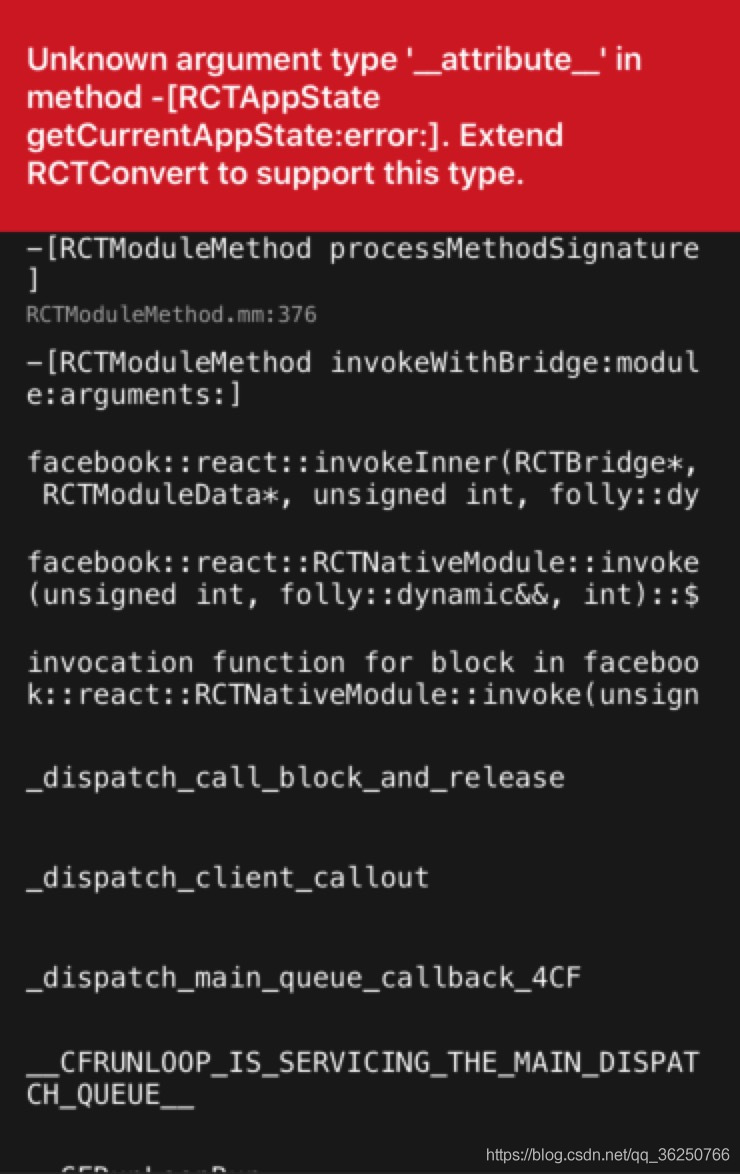
In the RN project created in Xcode10, the whole program was good. But after update to Xcode11 runtime, the simulator can rise, but when enter the page of RN, but tip error: Unknown argument type '_attribute_ method in - [RCTAppState getCurrentAppState: error:]. The Extend RCTConvert to support this type .

This problem is caused by the Xcode11 update.
To solve
Open the /node_modules/react - native/react/Base/RCTModuleMethod. Mm file.
Then revise the rctparseprint section and add a new evaluation condition RCTReadString(input, "___ __te__ (((unused__) __)) ||

// 修改后的结果如下
static BOOL RCTParseUnused(const char **input)
{
  return RCTReadString(input, "__unused") ||
         RCTReadString(input, "__attribute__((__unused__))") ||
         RCTReadString(input, "__attribute__((unused))");
}

Then restart the project and see if we can get back to the React - Native project page as usual.

Insufficient space in the root directory causes the state of the managed server to become FAILED_NOT_RESTARTABLE

The tester did a stress test on the SOA Suite system last night and came in this morning and found

The system cannot be accessed. The Console can also log in, but Managed Server cannot open. The state finally becomes FAILED_NOT_RESTARTABLE.

Just a few warnings and notifications, when you restart AdminServer, it turns out that AdminServer process is starting, but the console can’t log in, and the log screen doesn’t work

When it came time to check the OS system problem, dF-H checked the Linux system and found that/space utilization was 100%, suddenly realized that it should be its problem, went in and found that a directory/TMP space occupied 93%, du-sh/TMP was 21G, a total of only 26G. Resolutely deleted about 18G of TMP (specific TMP file or the following directory can’t understand what). Open AdminServer again, and the log on the screen goes smoothly, so it’s comfortable…

from ITPUB blog tolywang’s blog, source link: lack of space in the root directory caused the Managed Server state to become FAILED_NOT_RESTARTABLE, please contact the original blogger if you want to reprint.

MYSQL login error: mysqladmin: connect to server at’localhost’ failed

1. Mysql login error

mysqladmin: connect to server at ‘localhost’ failed
error: ‘Access denied for user ‘root’@’localhost’ (using password:

use service mysqld stop
mysqld_safe — skip-gran-tables &
enter mysql-uroot-p enter
> use mysql;
> update user set password=PASSWORD(“newpass”)where user=”root”;
change password to newpassord
> flush privileges; Update permission
> Quit out
service mysqld restart
mysql – uroot – p a new password to enter

= = = = = = = = = = = = = = = = = = = = = = = = = = = = = = = = = = = = = = = = = = = = = = = = = = = = = = = = = = =
2, forget the local root login password
solving process:
1, edit /etc/my.cnf
to [mysqld] configuration part to add a line
skate-grant-tables

; 2. Restart mysql
[root@localhost etc]# service mysqld restart
Shutting down mysql. [OK
Starting MySQL. [OK]

Welcome to
[root@localhost ~]# mysql-uroot-p MySQL
Enter password:
Enter

Welcome to

Commands end with the MySQL Monitor. or \g.
Your MySQL connection id is 1
Server version: 5.1.47-log Source distribution
Copyright (c) 2000, 2010, Oracle and/or its affiliates. All rights reserved.
This software comes with ABSOLUTELY NO WARRANTY. This is free software,
and you are welcome to modify and redistribute it under the GPL v2 license

Type ‘help; ‘ or ‘\h’ for help. Type ‘\c’ to clear the current input statement.

mysql> show databases;
+ — — — — — — — — — — — — — — — — — — — — +
| Database |
+ — — — — — — — — — — — — — — — — — — — — +
| information_schema |
| mysql |
| test |
+ — — — — — — — — — — — — — — — — — — — — +
3 rows in the set

execute the following statement
mysql> update user set password=password(“mysql”) where user=’root’;
Query OK, 4 rows affected (0.00 SEC)
rows matched: 4 Changed: 4 Warnings: 0

mysql> flush privileges;
Query OK, 0 rows affected (0.00 SEC)

4, delete the added “skip-gran-tables” row from /etc/my.cnf file, and restart mysql;
can log in normally with the new password;

= = = = = = = = = = = = = = = = = = = = = = = = = = = = = = = = = = = = = = = = = = = = = = = = =
Skip-grant-tables, a very useful mysql startup parameter, is described. As the name implies, you don’t start The grant-tables authorization table when mysql starts. What’s the use?Of course, it is useful to forget the administrator password. Operation method:

1, kill the original mysql:

rcmysqld stop

or:

service mysqld stop

or:

kill TERM mysqld
2. Start mysql with command line parameters:

/usr/bin/mysqld_safe – skip – grant – tables & amp;
3. Modify the administrator password:

use mysql;

update user set password=password(‘yournewpasswordhere’) where user=’root’;

flush privileges;

the exit;
4. Kill mysql, restart mysql

【ipfs-api】npm ERR! JSON.parse package.json must be actual JSON, not just JavaScript.

Reasons for this problem:
I used NPM install –save-dev IPFS-API to download IPFS-API first. When using this command to download, IPFS-API is listed in devDependencies separately. Later, when using NPM install –save IPFS-API to reinstall, one comma is missing in removing devDependencies.

npm ERR! code EJSONPARSE
npm ERR! file D:\contract\ipfs\go-ipfs\ipfs-http-demo\package.json
npm ERR! JSON.parse Failed to parse json
npm ERR! JSON.parse Unexpected token } in JSON at position 749 while parsing near '...version"
npm ERR! JSON.parse     ]
npm ERR! JSON.parse   },
npm ERR! JSON.parse }
npm ERR! JSON.parse '
npm ERR! JSON.parse Failed to parse package.json data.
npm ERR! JSON.parse package.json must be actual JSON, not just JavaScript.

npm ERR! A complete log of this run can be found in:
npm ERR!     C:\Users\lenovo\AppData\Roaming\npm-cache\_logs\2020-08-17T11_01_41_124Z-debug.log

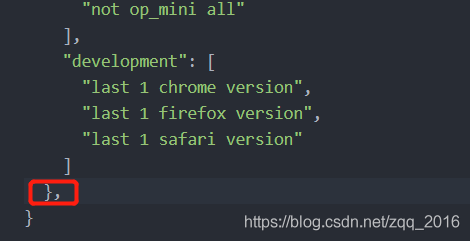
The package. Json figure is as follows:

Just delete the bottom comma.

Eclipse reports Failed to load the JNI shared library jvm.dll error solution

This error Failed to load the JNI Shared library jvm.dll for two possible reasons:
reason 1: the jvm.dll file does not exist
solution: copy a jvm.dll file from elsewhere.
reason 2: the Eclipse version number is inconsistent with the JDK version number
solution: either use 64 bits for both Eclipse and JDK versions, or use 32 bits for both. Remember not a 32 bit, a 64 bit. Note: the occurrence probability of general cause 1 is very low, and in most cases it is cause 2.

Samba shared server cannot be accessed and the path cannot be found

The Path cannot be found because the Samba Shared server is inaccessible
First blog post: P
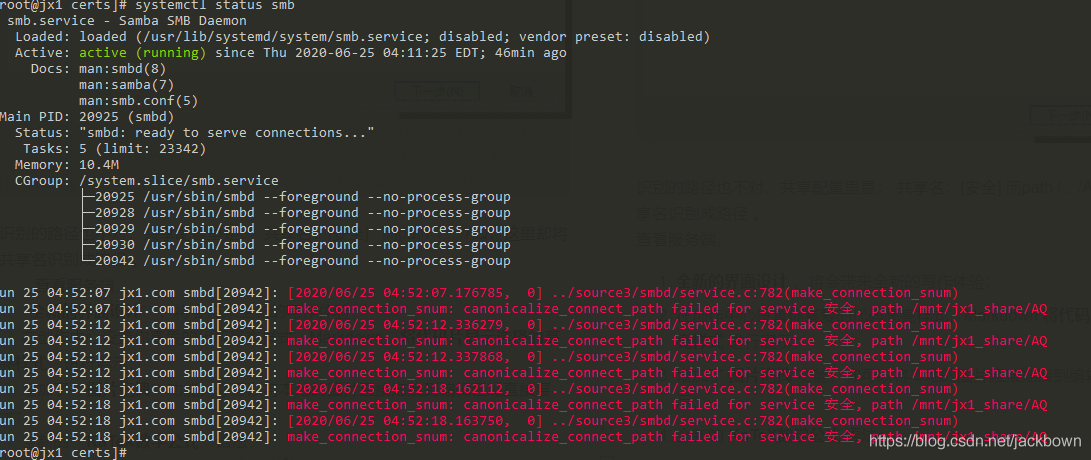
Windows access can only go to the root directory, opening the Shared subdirectory indicates that the path could not be found, spelling error may occur, and the server appears “make_connection_SNum: canonicalize_connect_Path Fail…”
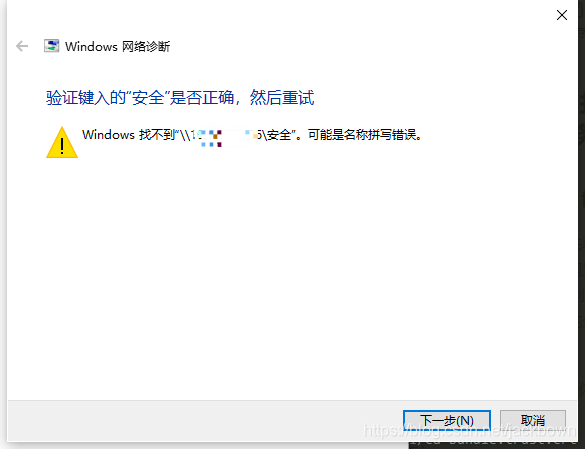
As an amateur, recently tried to built a Shared server, using the virtual machine to do the test before, run successfully, permissions can be implemented, the day before yesterday with a spare industrial control server, reinstall the Samba server, configuration files, and access configuration is copied, is unable to access, the same Windows, access to the original virtual machine SMB, completely normal, and access to the physical machine SMB, input \ IP address, a successful connection, input user name and password, is normal to list the Shared directory, but want to get into Shared subdirectory, have been tip don’t have access to:

recognized the wrong path, the Shared configuration is: share name: [security] and path /… /AQ, which identifies the Shared name as a path.
looks at the server and prompts “make_connection_snum: canonicalize_connect_path fails for service security, path/MNT /jx1_share/AQ”, the same is true for logging.