Category Archives: How to Fix

java.net.SocketException: Broken pipe (Write failed)

Springboot accessing Redis reports this error:

org.springframework.dao.InvalidDataAccessApiUsageException: DENIED Redis is running in protected mode because protected mode is enabled, no bind address was specified, no authentication password is requested to clients. In this mode connections are only accepted from the loopback interface. If you want to connect from external computers to Redis you may adopt one of the following solutions: 1) Just disable protected mode sending the command 'CONFIG SET protected-mode no' from the loopback interface by connecting to Redis from the same host the server is running, however MAKE SURE Redis is not publicly accessible from internet if you do so. Use CONFIG REWRITE to make this change permanent. 2) Alternatively you can just disable the protected mode by editing the Redis configuration file, and setting the protected mode option to 'no', and then restarting the server. 3) If you started the server manually just for testing, restart it with the '--protected-mode no' option. 4) Setup a bind address or an authentication password. NOTE: You only need to do one of the above things in order for the server to start accepting connections from the outside.; nested exception is redis.clients.jedis.exceptions.JedisDataException: DENIED Redis is running in protected mode because protected mode is enabled, no bind address was specified, no authentication password is requested to clients. In this mode connections are only accepted from the loopback interface. If you want to connect from external computers to Redis you may adopt one of the following solutions: 1) Just disable protected mode sending the command 'CONFIG SET protected-mode no' from the loopback interface by connecting to Redis from the same host the server is running, however MAKE SURE Redis is not publicly accessible from internet if you do so. Use CONFIG REWRITE to make this change permanent. 2) Alternatively you can just disable the protected mode by editing the Redis configuration file, and setting the protected mode option to 'no', and then restarting the server. 3) If you started the server manually just for testing, restart it with the '--protected-mode no' option. 4) Setup a bind address or an authentication password. NOTE: You only need to do one of the above things in order for the server to start accepting connections from the outside.
   at org.springframework.data.redis.connection.jedis.JedisExceptionConverter.convert(JedisExceptionConverter.java:64)
   at org.springframework.data.redis.connection.jedis.JedisExceptionConverter.convert(JedisExceptionConverter.java:41)
   at org.springframework.data.redis.PassThroughExceptionTranslationStrategy.translate(PassThroughExceptionTranslationStrategy.java:44)
   at org.springframework.data.redis.FallbackExceptionTranslationStrategy.translate(FallbackExceptionTranslationStrategy.java:42)
   at org.springframework.data.redis.connection.jedis.JedisConnection.convertJedisAccessException(JedisConnection.java:181)
   at org.springframework.data.redis.connection.jedis.JedisKeyCommands.keys(JedisKeyCommands.java:143)
   at org.springframework.data.redis.connection.DefaultedRedisConnection.keys(DefaultedRedisConnection.java:75)
   at org.springframework.data.redis.core.RedisTemplate.lambda$keys$10(RedisTemplate.java:840)
   at org.springframework.data.redis.core.RedisTemplate.execute(RedisTemplate.java:224)
   at org.springframework.data.redis.core.RedisTemplate.execute(RedisTemplate.java:184)
   at org.springframework.data.redis.core.RedisTemplate.keys(RedisTemplate.java:840)
   at com.boss.sysuser.bs.impl.UserRedisServiceImpl.getKeys(UserRedisServiceImpl.java:68)
   at com.boss.sysuser.bs.impl.UserRedisServiceImpl.removeByKey(UserRedisServiceImpl.java:84)
   at com.boss.sysuser.bs.impl.UserCacheService.cacheUser(UserCacheService.java:32)
   at com.boss.sysuser.listener.ApplicationContextListener.onApplicationEvent(ApplicationContextListener.java:26)
   at com.boss.sysuser.listener.ApplicationContextListener.onApplicationEvent(ApplicationContextListener.java:1)
   at org.springframework.context.event.SimpleApplicationEventMulticaster.doInvokeListener(SimpleApplicationEventMulticaster.java:172)
   at org.springframework.context.event.SimpleApplicationEventMulticaster.invokeListener(SimpleApplicationEventMulticaster.java:165)
   at org.springframework.context.event.SimpleApplicationEventMulticaster.multicastEvent(SimpleApplicationEventMulticaster.java:139)
   at org.springframework.context.support.AbstractApplicationContext.publishEvent(AbstractApplicationContext.java:400)
   at org.springframework.context.support.AbstractApplicationContext.publishEvent(AbstractApplicationContext.java:354)
   at org.springframework.boot.context.event.EventPublishingRunListener.running(EventPublishingRunListener.java:103)
   at org.springframework.boot.SpringApplicationRunListeners.running(SpringApplicationRunListeners.java:78)
   at org.springframework.boot.SpringApplication.run(SpringApplication.java:323)
   at org.springframework.boot.SpringApplication.run(SpringApplication.java:1242)
   at org.springframework.boot.SpringApplication.run(SpringApplication.java:1230)
   at com.boss.UserserviceApplication.main(UserserviceApplication.java:17)
   at sun.reflect.NativeMethodAccessorImpl.invoke0(Native Method)
   at sun.reflect.NativeMethodAccessorImpl.invoke(NativeMethodAccessorImpl.java:62)
   at sun.reflect.DelegatingMethodAccessorImpl.invoke(DelegatingMethodAccessorImpl.java:43)
   at java.lang.reflect.Method.invoke(Method.java:498)
   at org.springframework.boot.loader.MainMethodRunner.run(MainMethodRunner.java:48)
   at org.springframework.boot.loader.Launcher.launch(Launcher.java:87)
   at org.springframework.boot.loader.Launcher.launch(Launcher.java:50)
   at org.springframework.boot.loader.JarLauncher.main(JarLauncher.java:51)
Caused by: redis.clients.jedis.exceptions.JedisDataException: DENIED Redis is running in protected mode because protected mode is enabled, no bind address was specified, no authentication password is requested to clients. In this mode connections are only accepted from the loopback interface. If you want to connect from external computers to Redis you may adopt one of the following solutions: 1) Just disable protected mode sending the command 'CONFIG SET protected-mode no' from the loopback interface by connecting to Redis from the same host the server is running, however MAKE SURE Redis is not publicly accessible from internet if you do so. Use CONFIG REWRITE to make this change permanent. 2) Alternatively you can just disable the protected mode by editing the Redis configuration file, and setting the protected mode option to 'no', and then restarting the server. 3) If you started the server manually just for testing, restart it with the '--protected-mode no' option. 4) Setup a bind address or an authentication password. NOTE: You only need to do one of the above things in order for the server to start accepting connections from the outside.
   at redis.clients.jedis.Protocol.processError(Protocol.java:127)
   at redis.clients.jedis.Protocol.process(Protocol.java:161)
   at redis.clients.jedis.Protocol.read(Protocol.java:215)
   at redis.clients.jedis.Connection.readProtocolWithCheckingBroken(Connection.java:340)
   at redis.clients.jedis.Connection.getBinaryMultiBulkReply(Connection.java:276)
   at redis.clients.jedis.BinaryJedis.keys(BinaryJedis.java:357)
   at org.springframework.data.redis.connection.jedis.JedisKeyCommands.keys(JedisKeyCommands.java:141)
   ... 29 more                                                                                                            畃rex妯$虫ヨredis涓
2020-03-11 14:09:18.953  INFO [userservice,,,] 17736 --- [           main] com.boss.sysuser.bs.IUserRedisService    : 鏍规                        key,?
ュprex : userorg#
org.springframework.data.redis.RedisConnectionFailureException: java.net.SocketException: Broken pipe (Write failed); nested exception is redis.clients.jedis.exceptions.JedisConnectionException: java.net.SocketException: Broken pipe (Write failed)
   at org.springframework.data.redis.connection.jedis.JedisExceptionConverter.convert(JedisExceptionConverter.java:67)
   at org.springframework.data.redis.connection.jedis.JedisExceptionConverter.convert(JedisExceptionConverter.java:41)
   at org.springframework.data.redis.PassThroughExceptionTranslationStrategy.translate(PassThroughExceptionTranslationStrategy.java:44)
   at org.springframework.data.redis.FallbackExceptionTranslationStrategy.translate(FallbackExceptionTranslationStrategy.java:42)
   at org.springframework.data.redis.connection.jedis.JedisConnection.convertJedisAccessException(JedisConnection.java:181)
   at org.springframework.data.redis.connection.jedis.JedisKeyCommands.keys(JedisKeyCommands.java:143)
   at org.springframework.data.redis.connection.DefaultedRedisConnection.keys(DefaultedRedisConnection.java:75)
   at org.springframework.data.redis.core.RedisTemplate.lambda$keys$10(RedisTemplate.java:840)
   at org.springframework.data.redis.core.RedisTemplate.execute(RedisTemplate.java:224)
   at org.springframework.data.redis.core.RedisTemplate.execute(RedisTemplate.java:184)
   at org.springframework.data.redis.core.RedisTemplate.keys(RedisTemplate.java:840)
   at com.boss.sysuser.bs.impl.UserRedisServiceImpl.getKeys(UserRedisServiceImpl.java:68)
   at com.boss.sysuser.bs.impl.UserRedisServiceImpl.removeByKey(UserRedisServiceImpl.java:84)
   at com.boss.sysuser.bs.impl.UserMgrBusinessImpl.initOrgCache(UserMgrBusinessImpl.java:85)
   at com.boss.sysuser.bs.impl.UserMgrBusinessImpl$$FastClassBySpringCGLIB$$7621e1f2.invoke(<generated>)
   at org.springframework.cglib.proxy.MethodProxy.invoke(MethodProxy.java:204)
   at org.springframework.aop.framework.CglibAopProxy$DynamicAdvisedInterceptor.intercept(CglibAopProxy.java:684)
   at com.boss.sysuser.bs.impl.UserMgrBusinessImpl$$EnhancerBySpringCGLIB$$d05c5f2c.initOrgCache(<generated>)
   at com.boss.sysuser.listener.ApplicationContextListener.onApplicationEvent(ApplicationContextListener.java:27)
   at com.boss.sysuser.listener.ApplicationContextListener.onApplicationEvent(ApplicationContextListener.java:1)
   at org.springframework.context.event.SimpleApplicationEventMulticaster.doInvokeListener(SimpleApplicationEventMulticaster.java:172)
   at org.springframework.context.event.SimpleApplicationEventMulticaster.invokeListener(SimpleApplicationEventMulticaster.java:165)
   at org.springframework.context.event.SimpleApplicationEventMulticaster.multicastEvent(SimpleApplicationEventMulticaster.java:139)
   at org.springframework.context.support.AbstractApplicationContext.publishEvent(AbstractApplicationContext.java:400)
   at org.springframework.context.support.AbstractApplicationContext.publishEvent(AbstractApplicationContext.java:354)
   at org.springframework.boot.context.event.EventPublishingRunListener.running(EventPublishingRunListener.java:103)
   at org.springframework.boot.SpringApplicationRunListeners.running(SpringApplicationRunListeners.java:78)
   at org.springframework.boot.SpringApplication.run(SpringApplication.java:323)
   at org.springframework.boot.SpringApplication.run(SpringApplication.java:1242)
   at org.springframework.boot.SpringApplication.run(SpringApplication.java:1230)
   at com.boss.UserserviceApplication.main(UserserviceApplication.java:17)
   at sun.reflect.NativeMethodAccessorImpl.invoke0(Native Method)
   at sun.reflect.NativeMethodAccessorImpl.invoke(NativeMethodAccessorImpl.java:62)
   at sun.reflect.DelegatingMethodAccessorImpl.invoke(DelegatingMethodAccessorImpl.java:43)
   at java.lang.reflect.Method.invoke(Method.java:498)
   at org.springframework.boot.loader.MainMethodRunner.run(MainMethodRunner.java:48)
   at org.springframework.boot.loader.Launcher.launch(Launcher.java:87)
   at org.springframework.boot.loader.Launcher.launch(Launcher.java:50)
   at org.springframework.boot.loader.JarLauncher.main(JarLauncher.java:51)
Caused by: redis.clients.jedis.exceptions.JedisConnectionException: java.net.SocketException: Broken pipe (Write failed)
   at redis.clients.jedis.Connection.flush(Connection.java:334)
   at redis.clients.jedis.Connection.getBinaryMultiBulkReply(Connection.java:274)
   at redis.clients.jedis.BinaryJedis.keys(BinaryJedis.java:357)
   at org.springframework.data.redis.connection.jedis.JedisKeyCommands.keys(JedisKeyCommands.java:141)
   ... 33 more
Caused by: java.net.SocketException: Broken pipe (Write failed)
   at java.net.SocketOutputStream.socketWrite0(Native Method)
   at java.net.SocketOutputStream.socketWrite(SocketOutputStream.java:111)
   at java.net.SocketOutputStream.write(SocketOutputStream.java:155)
   at redis.clients.util.RedisOutputStream.flushBuffer(RedisOutputStream.java:52)
   at redis.clients.util.RedisOutputStream.flush(RedisOutputStream.java:216)
   at redis.clients.jedis.Connection.flush(Connection.java:331)
   ... 36 more

The timeout parameter of the configuration file is set to 0. Meanwhile, testOnReturn, testWhileIdle and testOnBorrow are configured to be true. However, when I tried, I failed to solve the problem.

1) Just disable protected mode sending the command 'CONFIG SET protected-mode no' from the loopback interface by connecting to Redis from the same host the server is running, however MAKE SURE Redis is not publicly accessible from internet if you do so. Use CONFIG REWRITE to make this change permanent. 2) Alternatively you can just disable the protected mode by editing the Redis configuration file, and setting the protected mode option to 'no', and then restarting the server. 3) If you started the server manually just for testing, restart it with the '--protected-mode no' option. 4) Setup a bind address or an authentication password. NOTE: You only need to do one of the above things in order for the server to start accepting connections from the outside.

Redis has given three solutions: SET protected-mode no
New protected-mode configuration after Redis3.2, default is yes, that is, on. The effect of protected-mode setting to different values is as follows:
At this point, the external network can directly access
. To enable the protected protection-mode, configure the bind IP or set the access password.
The developer has been using Redis 3.0 and this time redIS 5.0.7 is used on the server
Set the protected-mode in the configuration file to no problem resolution. It seems that you should read the error log carefully when you encounter problems
License Error: “Failed to Open the TCP Port Number in the License” Ultimate Solution

Why is it called the ultimate solution?Not to boast, this list is more complete than the current Synopsys, Cadence, support documentation, and FLEXnet’s help documentation.

these moves most of the eda vendor’s engineers are not plenary, the true conclusion is not nonsense. This thing toss about for a long time, spent a lot of energy, let me blow brag, ha ha.

in addition, if the following problems are excluded and the license is reported incorrectly, do not suspect that the list is incomplete, 99% of the time it may be that one of the steps is not done completely. Get a new check.

is limited to the legal license, crack is a weird problem, not to be discussed

start of text:

1, ensure that the LMGRD process has been completely killed;

# killall LMGRD

2, make sure the tool processes in the license, like synopsys SNPSLMD, cadence CDSLMD, are also completely killed

# killall XXXX

above two steps than lmdown-c license.lic insurance, also can be used cross-over

3, check whether the license port is used, if this is the case, you can temporarily change the port to try to start it once, if it is successful to explain the problem, follow the steps below to change back to the actual use of port

# netstat -pan | grep port_number

gets the process that is using the port, kill it, if not, wait for the port to be released, which may take a few minutes.

4, make sure the TCP protocol is started

can ping the host name view, can ping no problem

5, make sure the firewall does not block this port or turn off iptables

#service iptables stop

6, view seLinux or close

#setenforce 0

7, check /etc/hosts to make sure you have this line

127.0.0.1 localhost

8, check to see if Telnet hostname can pass, if it can’t login, then change by the following way

1 & gt; Install Telnet, Telnet-Server, xinetd
2 & gt; Modify /etc/xinetd.d/ Telnet disable to no
3 & gt; /etc/init.d/xinetd restart

9, if you use nis, make sure that the first parameter of all items in /etc/nsswitch is files

For example, networks: nisplus [NOTFOUND=return] files should be changed to
networks: files [NOTFOUND=return] nisplus

more than one problem usually do not encounter all at once, from front to back to find which solution to the problem can be.

is limited to the legal license, crack is a weird problem, not to be discussed

Python module learning-Paramiko-Use python to throw an exception: Authentication failed.

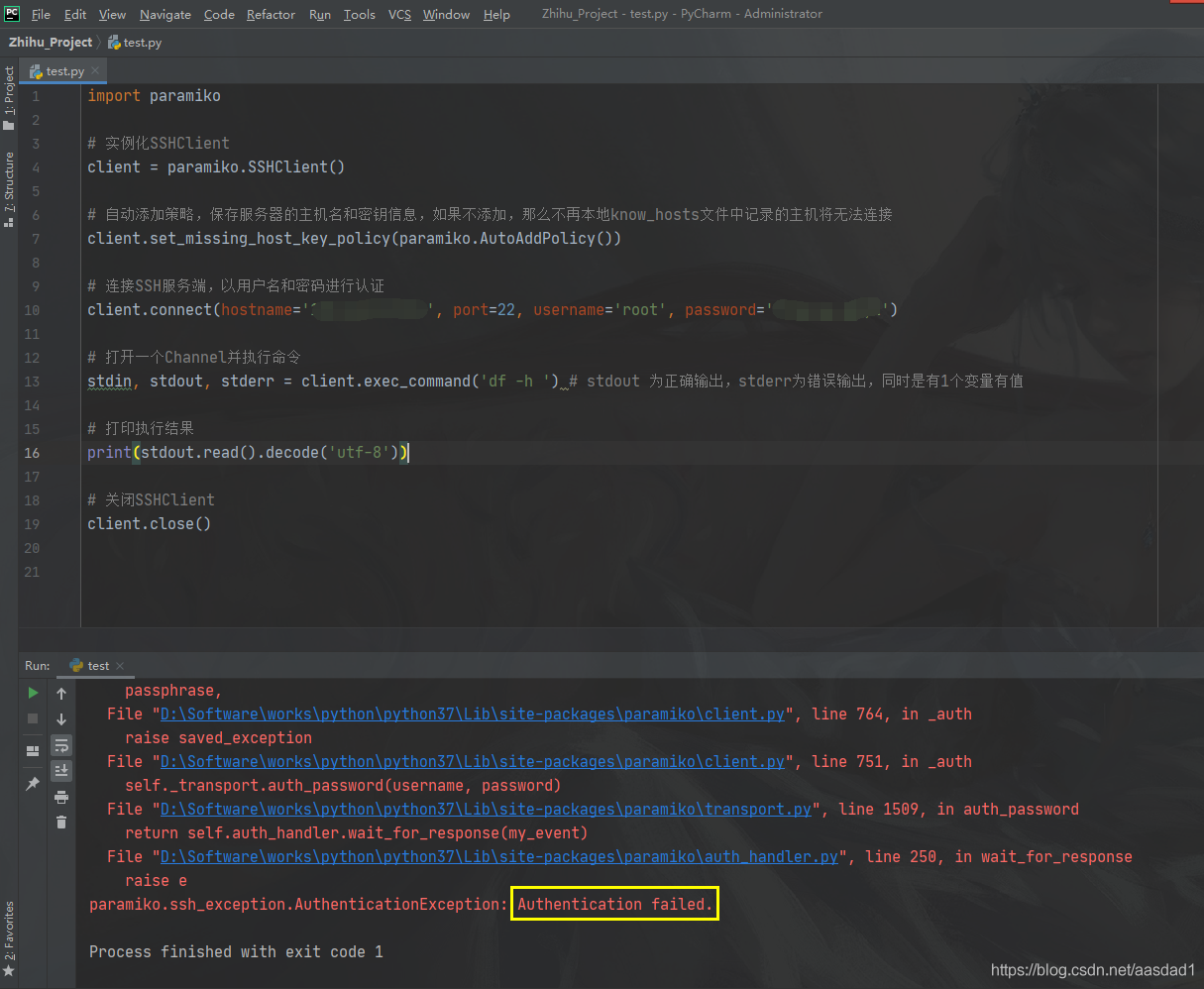
When an exception is thrown, paramiko. Ssh_exception. AuthenticationException: Authentication failed.
Please check:
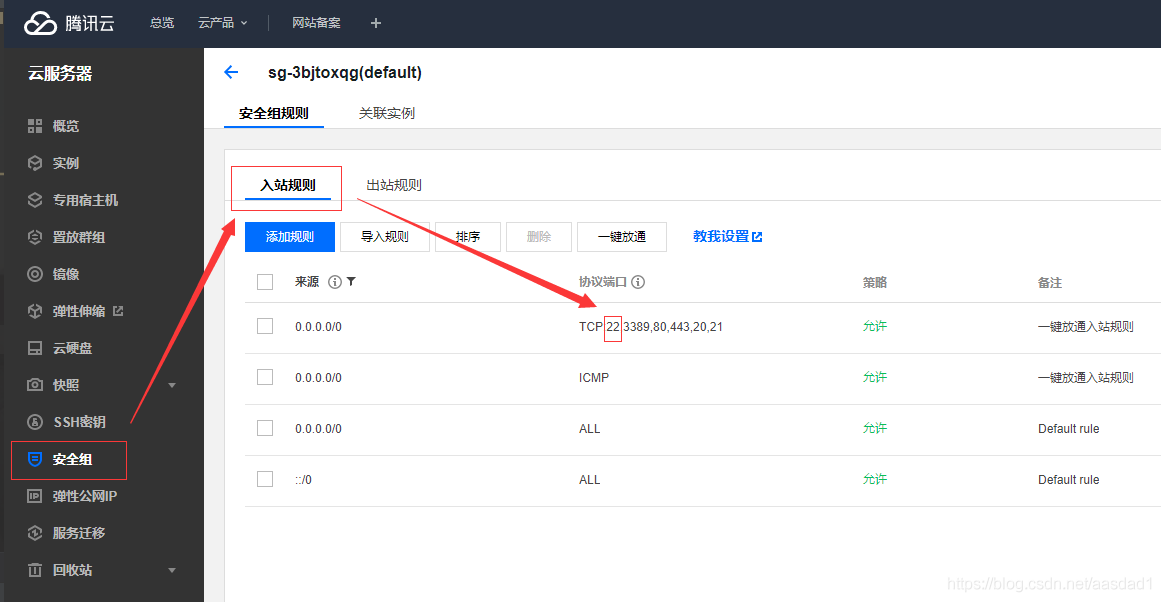
1. Is port 22 enabled on the cloud server?
2. Is the password wrong when passing the parameter?

Error reporting example:

 
Operation method:
 
Take my Tencent Cloud as an example:
1. Click the security group rule to check whether the server opens port 22:

 
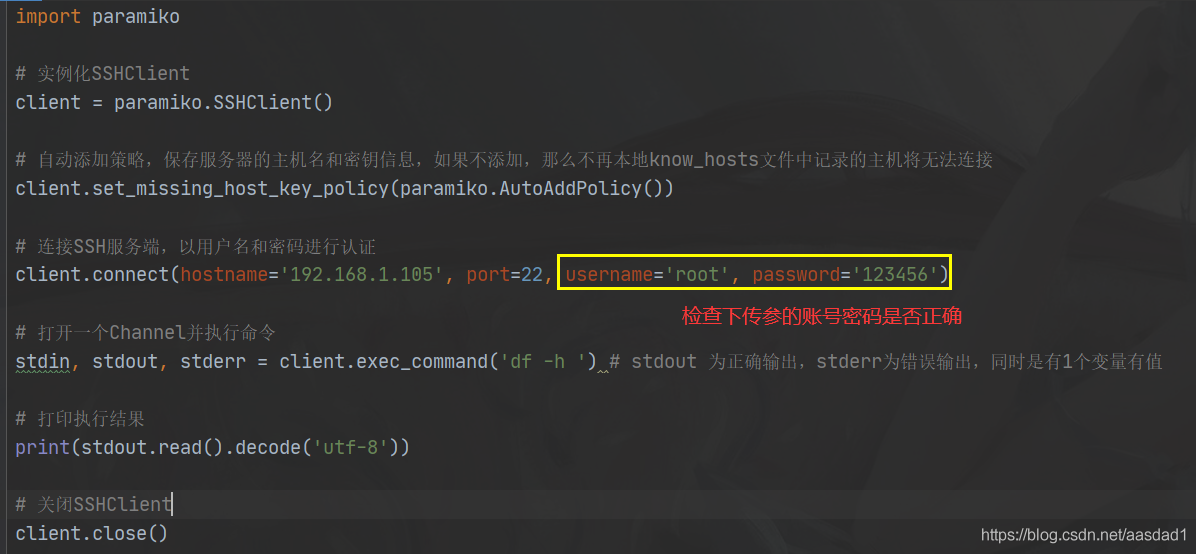
2. Check whether the code transmission parameter: account password is correct:

import paramiko

# 实例化SSHClient
client = paramiko.SSHClient()

# 自动添加策略,保存服务器的主机名和密钥信息,如果不添加,那么不再本地know_hosts文件中记录的主机将无法连接
client.set_missing_host_key_policy(paramiko.AutoAddPolicy())

# 连接SSH服务端,以用户名和密码进行认证
client.connect(hostname='192.168.1.105', port=22, username='root', password='123456')

# 打开一个Channel并执行命令
stdin, stdout, stderr = client.exec_command('df -h ') # stdout 为正确输出,stderr为错误输出,同时是有1个变量有值

# 打印执行结果
print(stdout.read().decode('utf-8'))

# 关闭SSHClient
client.close()

 
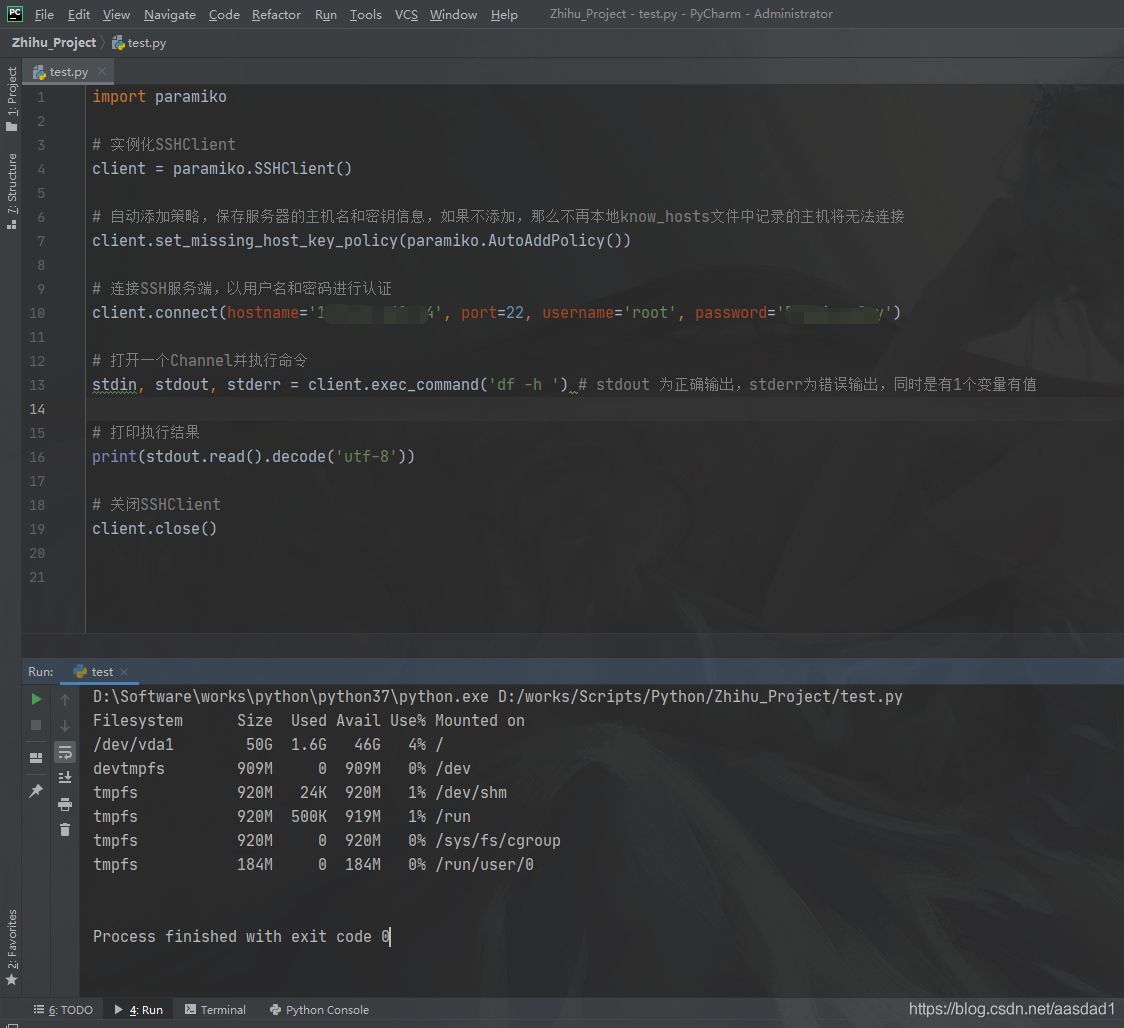
3. After checking, run the Linux command with Python:

Conversion to dalvik format failed with error 1 solution

Note: transfer to http://dev.wo.com.cn/docportal/doc_queryMdocDetail.action?Mdoc docindex = 6540
 
Resource description:

1. If you do not modify the Android SDK version, use the Project Clean command to work on a project.
(this process is only compatible with the lower version of the project in the higher version, not a real upgrade)

2. If the android SDK version is modified, the following steps are required:

1) modify the SDK

select project, buildpath –> configure build path —> Library delete the lower version of referenced SDK,
then add ExternalJARs, select the higher version SDK,OK, save

2) modify the classpath file

the file may have this item :< Classpathentry kind=”lib” path =” higher version address you specify “
change her to < classpathentrykind=”con”path=”com.android.ide.eclipse.adt.ANDROID_FRAMEWORK” />

3) modify androidmanifest.xml

add &lt after the application tag in the androidmanifest.xml file; uses-sdkandroid:minSdkVersion=”3″> < /uses-sdk>

4) modify default.properties (very important)

the last line of the file (not used in the previous #) target=android-3 target=android-8, save.
look again at your project and the new android2.2 project structure. 3. Many problems occurred in the development of Android Project in eclipse can be used to Project– > Clean is easy to solve.
but if it appears that the Android library cannot be found, or accidentally removed the Android library, how can you add the Android library again?

in eclipse Java Build Path can not add such as Android 2.1 defined system libraries. However, I tried to manually add android.jar in the SDK folder
, which showed a Conversion to Dalvik format failed with error 1. After playing around with
for a while, many users said that using Projectclean would solve the problem, but in my case, it was useless.

solution:

modify the project classpath file, which makes me understand, directly from other normal projects into the
< ! Note that this.classpath file is located in the Eclipse workspace hard disk location under the project directory –>
< Classpathentry kind=”lib”path =” Address of custom JAR “/>

modified to www.2cto.com
< classpathentry kind=”con”path=”com.android.ide.eclipse.adt.ANDROID_FRAMEWORK”/> .

like this refresh project, Android system library Android 2.1 is back, that error is resolved.
— — — — — — — — — — — — — — — — — — — — — — — — — — — — — — — — — — — — — — — — — — — — — — — — — — — — — — — — — — — — — — — — — — — — — — — — — — — — — — — — — — — — — — — — — — — — — — — — — — — — — — — — — — — — — — — — — — — — — — — — — —
this several days again encountered such a problem, however. The classpath file already contains the above con inside Path, then found a new method on BBS:

project -> properties -> androidlabel, check a target from the project build target list

< ! — Sometimes the error cannot be removed. At this time, please pay attention when entering project-> properties -> After android, there is a
is library item below, tick it, and then click “OK”. This is how my error was solved. At first, I could not solve it according to
above and the following methods.
(is library)
(is library)
(is library)
(is library)
; There is another case: the package conflict, please go to the project directory to remove the same package, re-import one, this is similar to the first case, but this is for other packages, not android package

solution: Java Build Path-> Libraries-> JARs and class folders on thebuild path
see if there are identical JARs some jar versions are not necessarily android JARs other library JARs can also cause such errors
last time signpost-core-1[1].2.1.1.jar and signpost-core-1.2.1.1.jar conflicts this occurs so you have to see if there are identical JARs

Compared with before is the fourth kind of situation, I’m from others that take an examination of a andengine game engine code, me to his libs folder is set as the source folder, and then put inside the jar package add to the buildpath, then came the problem of subject, checked a lot of solution, no solution, then carefully observed my question and the fourth is like, put the jar all removed, and then reload time, under this solved, ha ha, here the method summary posted, convenient viewing.


TNS-03505: Failed to resolve name – accidental error!

The original address: http://blog.csdn.net/zhpsam109/article/details/727289
Modify TNsnames. ora with VI to add a local service name configuration with the following types:
 
(DESCRIPTION = = XXX

(ADDRESS_LIST =
(ADDRESS = (TCP) PROTOCOL = (HOST = 192.168.100.131) (1521) PORT =))

(CONNECT_DATA =

(= DEDICATED SERVER) (SERVICE_NAME = XXX)
)
)
 
After the configuration, use the command WQ, save and exit, and then test with TNSPing XXX, error occurs:
 
TNS-03505: Failed to resolve name
 
After a good check, the content added in tnsnames.ora above is correct and hard to understand! had to search the Internet to find a solution, just know is TNS|NAME before a space, re-open tnsnames.ora with VI, and then delete XXX in front of the space, with tnsping XXX, the problem is solved!
A small problem, toss me for a long time, ha ha!

The resource has been blocked.

Question.
No valid summary could be found in the resource ‘http://localhost:4200/assets/css/bootstrap.min的’integrity’ attribute. css’ with computed SHA-256 integrity ‘ nvT75FkXevX06WR8vlhFFP02xzhq9qFxLQOuS0LkWyQ=’This resource is blocked.

Causes.


      <!-- Bootstrap CSS -->
  <!-- <link rel="stylesheet" href="https://stackpath.bootstrapcdn.com/bootstrap/4.1.1/css/bootstrap.min.css" integrity="sha384-WskhaSGFgHYWDcbwN70/dfYBj47jz9qbsMId/iRN3ewGhXQFZCSftd1LZCfmhktB" crossorigin="anonymous"> -->
    <!-- Bootstrap CSS -->
  <link rel="stylesheet" href="assets/css/bootstrap.min.css" integrity="sha384-WskhaSGFgHYWDcbwN70/dfYBj47jz9qbsMId/iRN3ewGhXQFZCSftd1LZCfmhktB" crossorigin="anonymous">

Remove:
integrity=”sha384-WskhaSGFgHYWDcbwN70/dfYBj47jz9qbsMId/iRN3ewGhXQFZCSftd1LZCfmhktB” crossorigin=”anonymous”
"anonymous"
A cross-domain request (that is, containing the Origin: HTTP header). But no authentication information is sent (that is, no cookies, X.509 certificates, and HTTP basic authentication information). If the server does not give the source site credentials (do not set access-control-allow-origin : HTTP header), the image will be contaminated and restricted.
The integrity </ code>
Contains inline metadata, which is the hash value of a resource file that you get with your browser, encoded in base64 so that users can verify that a retrieved resource has not been tampered with during transmission. Check Subresource Integrity for details.
Documents:
https://developer.mozilla.org/zh-CN/docs/Web/HTML/Element/link

Failed building wheel for psycopg2

My mistake:
Command "/ Users/qinlan/myproject/lenv1/bin/python3.6 - u - c" import setuptools, tokenize; __file__='/private/var/folders/l1/y1ch9__s6xx00p046b096_6m0000gn/T/pip-install-_p50tkoi/psycopg2/setup.py'; f=getattr(tokenize, 'open', open)(__file__); code=f.read().replace('\r\n', '\n'); f.close(); exec(compile(code, __file__, 'exec'))" install --record /private/var/folders/l1/y1ch9__s6xx00p046b096_6m0000gn/T/pip-record-jml81n0v/install-record.txt --single-version-externally-managed --compile --install-headers /Users/qinlan/myproject/lenv1/bin/../include/site/python3.6 psycopg2 "failed with the error code 1 in/private/var/folders/l1/y1ch9__s6xx00p046b096_6m0000gn/T/PIP - install - _p50tkoi/psycopg2/
Fix:
I fixed this problem by installing the command line tool
xcode-select --install
then install openssl through Homebrew and manually link the openssl installed by my homemade software to PIP:
env LDFLAGS = "-i/usr/local/opt/openssl/include - L/usr/local/opt/openssl/lib" PIP install psycopg2
in the macOS Sierra 10.12.1
It is recommended that PIP Install PsycopG2-Binary instead

git push error failed to push some refs to solution

Problem specification
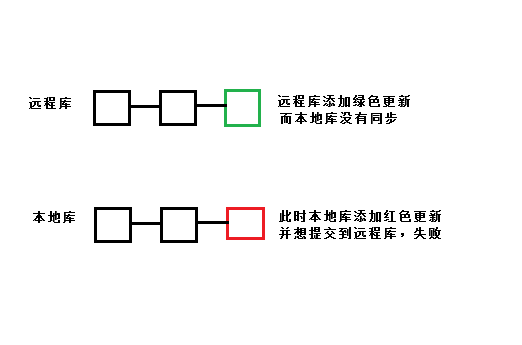
When we found a problem in the Github repository, you changed it online on Github; Or you can just add a README file or something to a library on Github without synchronizing it. Push fails when you have a commit again to commit from the local library to the remote Github library.

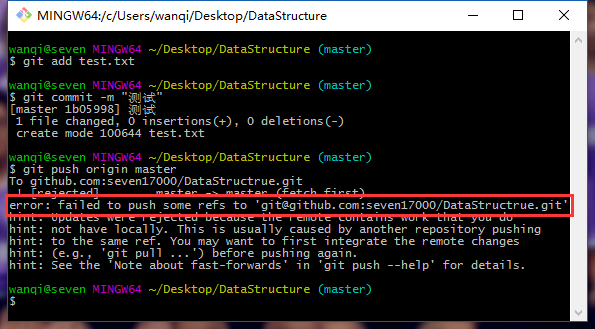
I edited a file online in github library, and it was not synchronized to the local library. After that, I added the file test.txt in the local library and tried to submit it to github, but the following error occurred: error: failed to push some refs to.

A statement in advance
For the code lost in the comments, it should be emphasized again that the base should be used with caution, and the branch should be determined before operation. In this case, the master branch is taken as an example, and the loss of the code caused by the wrong branch should be taken as the consequence.
The solution
The problem is that the remote library is inconsistent with the local library, so we can just synchronize the remote library to the local library. Note: I use the master branch here, please change the branch according to your own development branch.

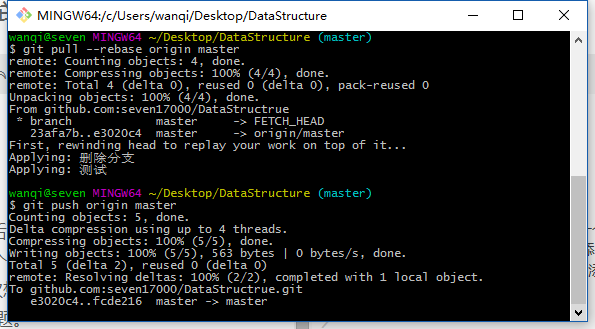
git pull --rebase origin master

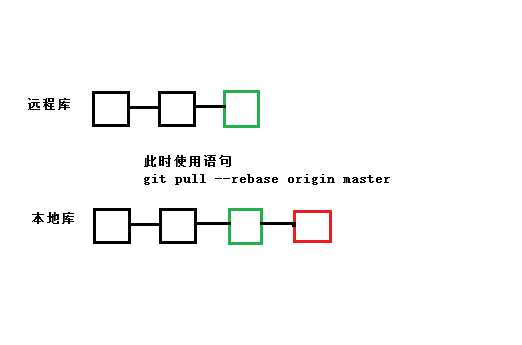
This directive merges updates from the remote library into the local library – the rebase function is to cancel the commit from the local library and connect them to the updated version library.


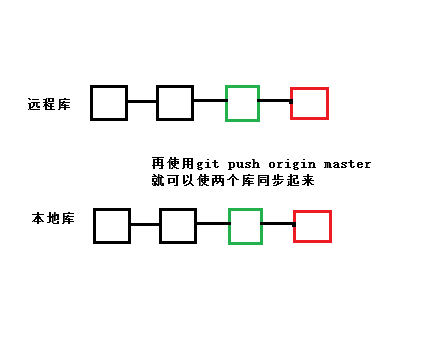
The following is a graphical explanation of the occurrence and resolution of the error situation

git pull –rebase origin master means to cancel commit records, temporarily save them as patches (in the “.git/rebase” directory), synchronize the remote repository to the local repository, and finally merge the patches into the local repository.

will then be able to push the local library into the remote library.

Login failed in rabbitmq

First, use the following command to see why the log is logged:

 tail /var/log/rabbitmq/rabbit\@wzb1.log

Note: The default user guest only allows localhost login.
 
To create a remote login user, the guest user can only run under localhost:

rabbitmqctl add_user admin admin
rabbitmqctl set_user_tags admin administrator
rabbitmqctl set_permissions -p/admin ".*" ".*" ".*"


Error in loadNamespace(j <- i[[1L]], c(lib.loc, .libPaths()) error appears in the R language installation package

In the evening, when I was studying in hefei, a lab sent me QQ and asked me a drawing question in R language. It required the numerical value to be added on the bar chart. I tried it, but instead of solving it with R, I used EXCEL instead, and pretend bility was not reduced.
But anyway,

> library("ggplot2")
Error in loadNamespace(j <- i[[1L]], c(lib.loc, .libPaths()), versionCheck = vI[[j]]) : 
  不存在叫‘munsell’这个名字的程辑包
In addition: Warning message:
程辑包‘ggplot2’是用R版本3.2.3 来建造的 
Error: ‘ggplot2’程辑包或名字空间载入失败,

This error is caused by not installing Munsell packages. Just install. Packages (“munsell”) in the console

Jenkins SVN error Server SSL certificate verification failed: issuer is not trusted

Jenkins was used for continuous integration in the project. SVN command was found in the BAT file and BAT Times: Server SSL Certificate Verification Failed: Bach is not trusted was executed
The server SSL certificate has failed to authenticate and the issuer is not trusted
The solution,
Add: –non-interactive — trust-server-CERT after the SVN command. Can solve
Refer to SVN for the meaning of the command.

AS error: failed to find target with hash string’Google Inc.:Google APIs:21′ error solution

The original address: https://blog.csdn.net/amylaogong/article/details/51906627

Error:Cause: failed to find target with hash string ‘Google Inc.:Google APIs:21’ in: F:\my_profile\tools\androidSDK
< a href=”openAndroidSdkManager”> Open Android SDK Manager< /a>

AS menu: Tools-> Android-> SDK Manager-> Then pop up the Default Settings window and select Appearance & AMP; Behavior/ System settings /Android SDK -> SDK Platforms TAB.
Click the blue text below to Launch the Standalone SDK Manager-> Pop-up Android SDK Manager-& GT; Select Android5.0.1/Google APIs
install