Parent project pom.xml
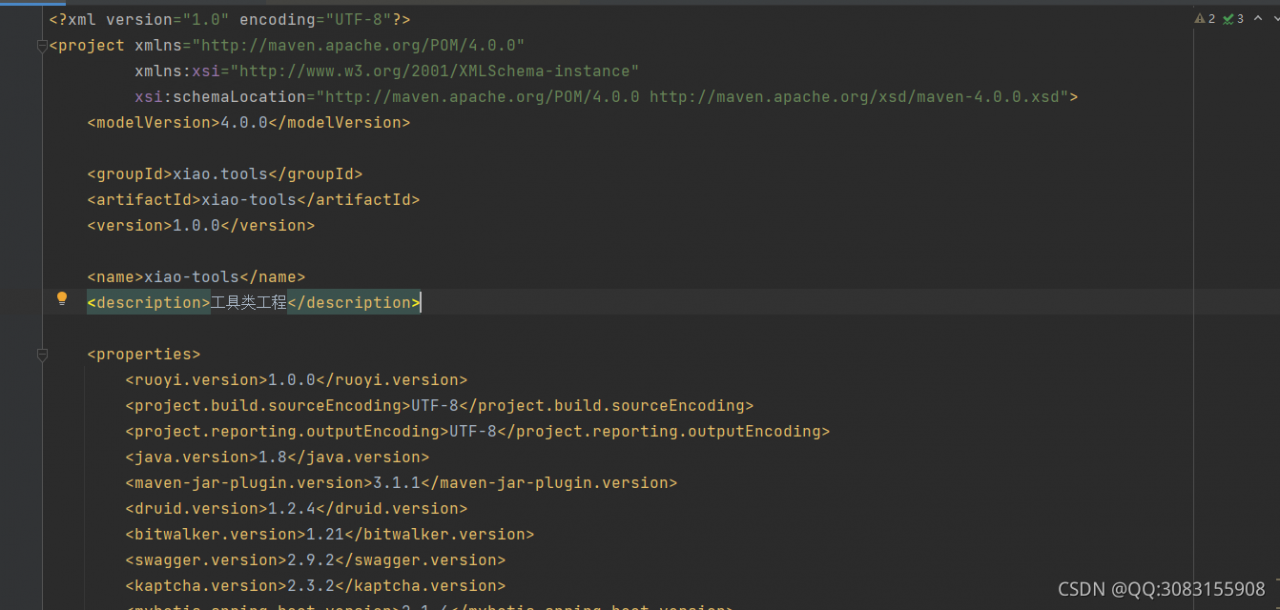
Sub project pom.xml
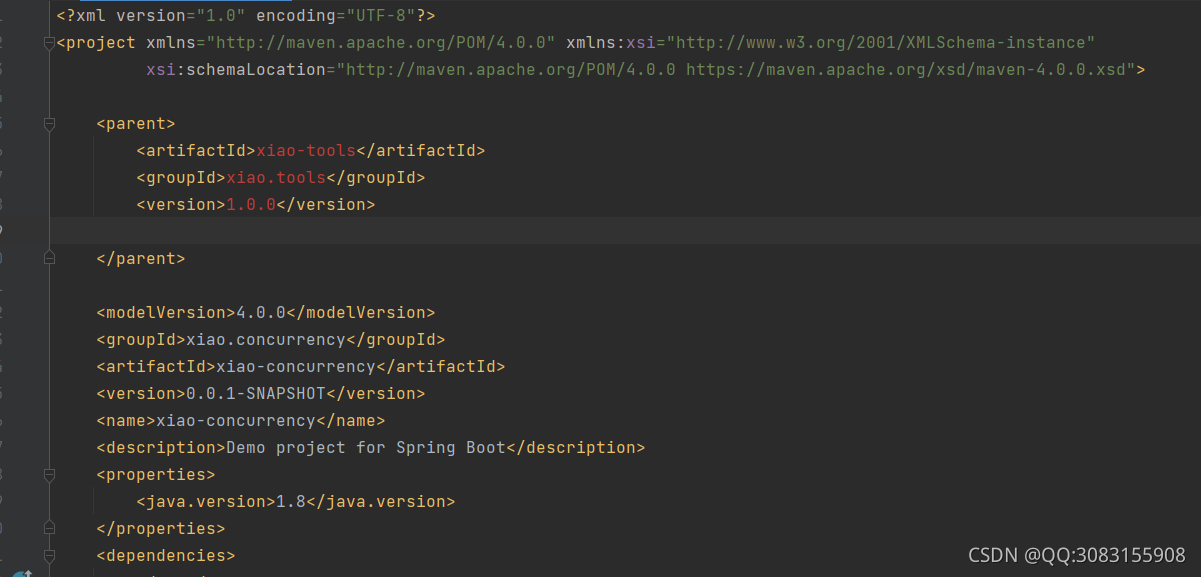
terms of settlement:
Add relative path
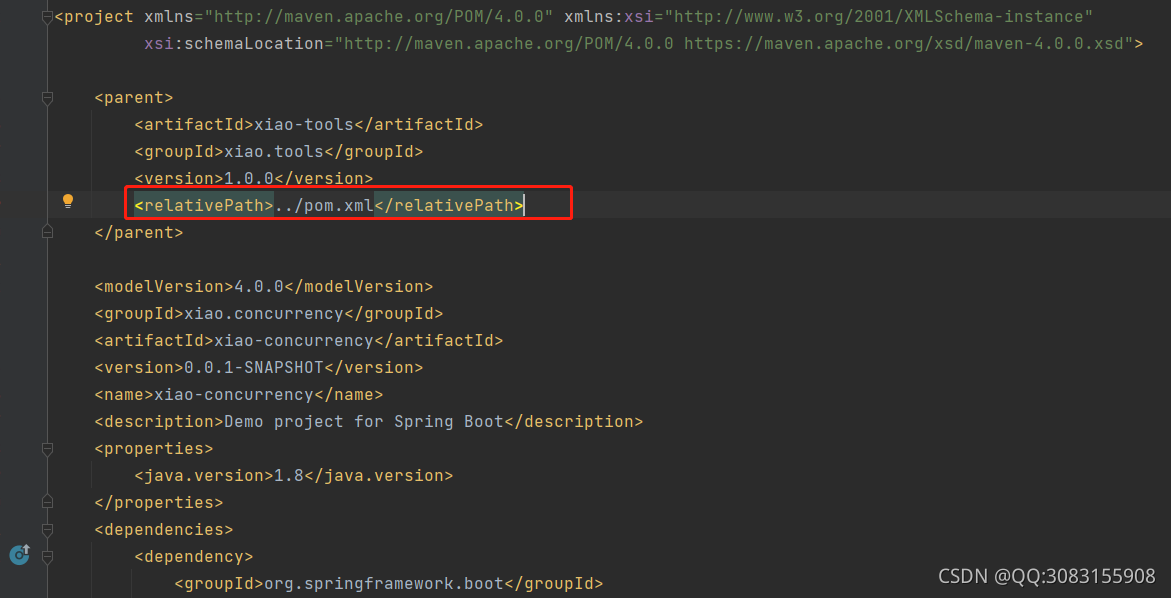
Parent project pom.xml
Sub project pom.xml
terms of settlement:
Add relative path

According to the information prompted by the console, find the cpexcel.js file in node module
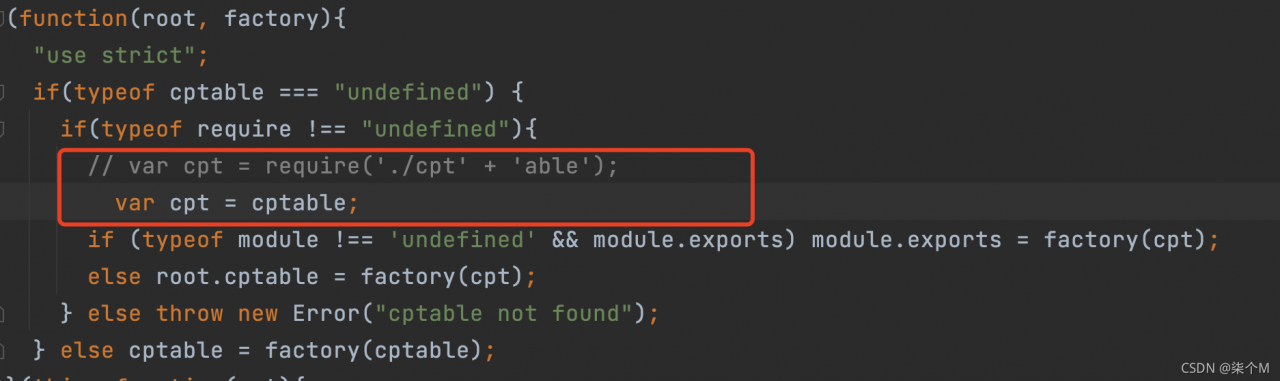
After commenting out and changing lines, add
var cpt = cptableError reporting solution!
An error is reported when using SecureCRT to log in to a non root account, as follows:

Cause analysis: the user name in SecureCRT settings does not match the user name entered during login.
Solution: SecureCRT option – session option – connection – SSH2, change the user name to the account to log in.
//splint-3.1.1/config/missing: line 46: aclocal-1.6: command not found
WARNING: `aclocal-1.6' is needed, and you do not seem to have it handy on your
         system.  You might have modified some files without having the
         proper tools for further handling them.  Check the `README' file,
         it often tells you about the needed prerequirements for installing
         this package.  You may also peek at any GNU archive site, in case
         some other package would contain this missing `aclocal-1.6' program
Solution:
1. Install automake sudo apt get install automake
2. If automake is installed, the version should not correspond. If you manually enter aclocal without an error, modify the makefile of splint, and manually delete the version number after aclocal and automake, followed by

When writing a project recently, in order to solve the problem that the mobile browser usually has a delay of about 300ms when sending click events, this is because the double click of the mobile terminal will scale, resulting in the delay of click judgment. Therefore, the fastlick library is introduced. It is a simple and easy-to-use library, which eliminates the delay between the physical click on the mobile browser and triggering a click event. The purpose is to make your application feel no delay and respond more sensitively without interfering with your current logic.
However, in the process of use, it will report an error if you double-click anywhere on the page. Even if it does not affect normal use, I can’t see it, so I’ll eliminate it.

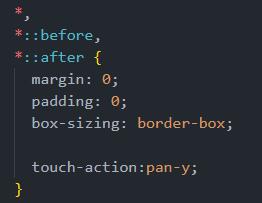
So Baidu found a very simple way to introduce the global style touch action: pan-y;
*{
    touch-action: pan-y;
 }
Put it in the global CSS and try it. Sure enough, no error will be reported when clicking (*^▽^*)
Docker compose reports an error and multiple containers conflict
When the vulnerability repeats, I want to open the vulnerability environment. The docker compose result reports an error. I understand that it is a multi container conflict problem
The error contents are as follows:
WARNING: Found orphan containers (unacc_slave_1, unacc_master_1) for this project. If you removed or renamed this service in your compose file, you can run this command with the --remove-orphans flag to clean it up.
unacc_web_1 is up-to-date

The solution given by the system here is: – remove orphans, but it will directly delete the container, which is obviously not very good
Learned that each configuration has a project name. If you provide the - P flag, you can specify the project name. If no flag is specified, compose uses the current directory name.
Use the following command to specify a container name
docker-compose -p xxx up -d

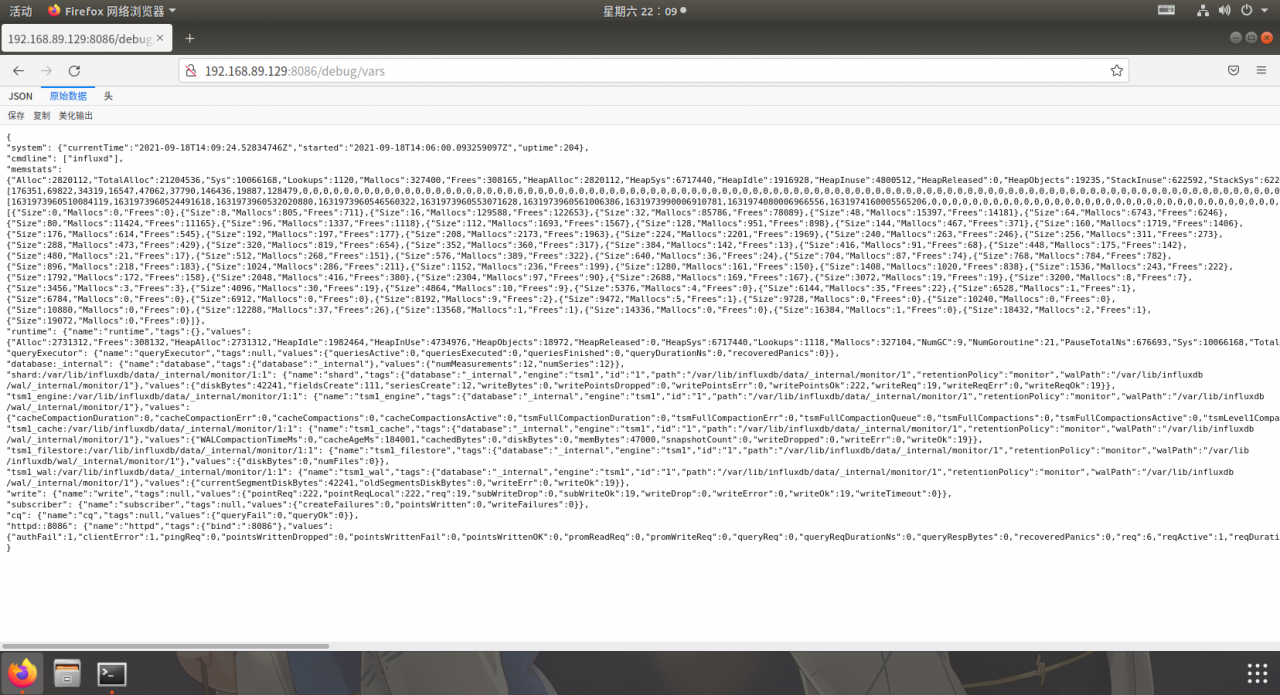
Open the 8086 port specified here in the container to successfully open the mirror environment.
Selenium driver chrome failed to start and reported an error
Message: unknown error: Failed to create Chrome process
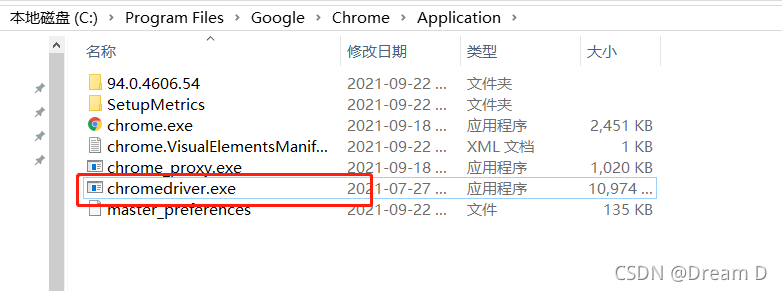
Maybe this version of the chrome driver must be placed in the directory where the Chrome browser is installed to take effect:
Refer to springboot startup error [extshutdown hook] – ask at the door – blog park
The main reason is package import error
No or wrong web initiator was imported
The processing method is as follows: import the following configuration into the POM file
       <dependency>
            <groupId>org.springframework.boot</groupId>
            <artifactId>spring-boot-starter-web</artifactId>
            <version>2.4.4</version>
        </dependency>
Just run it again
Solution of selenium driven edge error reporting
Selenium uses edge to run an error message: ‘microsoftwebdriver. Exe’ executable needs to be in path
// An highlighted block
selenium.common.exceptions.WebDriverException: Message: 'MicrosoftWebDriver.exe' executable needs to be in PATH
Problem cause: the driver file name written in selenium is inconsistent with the actual driver file name
Solution: rename the downloaded driver file msedgedriver.exe to Microsoft webdriver.exe, save it and run it again
Error message
The Zeppelin service was started successfully, and the UI interface was accessed normally, but the running code reported an error.
org.apache.thrift.transport.TTransportException
    at org.apache.thrift.transport.TIOStreamTransport.read(TIOStreamTransport.java:132)
    at org.apache.thrift.transport.TTransport.readAll(TTransport.java:86)
    at org.apache.thrift.protocol.TBinaryProtocol.readAll(TBinaryProtocol.java:429)
    at org.apache.thrift.protocol.TBinaryProtocol.readI32(TBinaryProtocol.java:318)
    at org.apache.thrift.protocol.TBinaryProtocol.readMessageBegin(TBinaryProtocol.java:219)
    at org.apache.thrift.TServiceClient.receiveBase(TServiceClient.java:69)
    at org.apache.zeppelin.interpreter.thrift.RemoteInterpreterService$Client.recv_interpret(RemoteInterpreterService.java:241)
    at org.apache.zeppelin.interpreter.thrift.RemoteInterpreterService$Client.interpret(RemoteInterpreterService.java:225)
    at org.apache.zeppelin.interpreter.remote.RemoteInterpreter.interpret(RemoteInterpreter.java:229)
    at org.apache.zeppelin.interpreter.LazyOpenInterpreter.interpret(LazyOpenInterpreter.java:93)
    at org.apache.zeppelin.notebook.Paragraph.jobRun(Paragraph.java:229)
    at org.apache.zeppelin.scheduler.Job.run(Job.java:171)
    at org.apache.zeppelin.scheduler.RemoteScheduler$JobRunner.run(RemoteScheduler.java:328)
    at java.util.concurrent.Executors$RunnableAdapter.call(Executors.java:471)
    at java.util.concurrent.FutureTask.run(FutureTask.java:262)
    at java.util.concurrent.ScheduledThreadPoolExecutor$ScheduledFutureTask.access$201(ScheduledThreadPoolExecutor.java:178)
    at java.util.concurrent.ScheduledThreadPoolExecutor$ScheduledFutureTask.run(ScheduledThreadPoolExecutor.java:292)
    at java.util.concurrent.ThreadPoolExecutor.runWorker(ThreadPoolExecutor.java:1145)
    at java.util.concurrent.ThreadPoolExecutor$Worker.run(ThreadPoolExecutor.java:615)
    at java.lang.Thread.run(Thread.java:745)
Cause of error reporting: this error is caused by the failure to connect to the corresponding spark and other related service parsers. If the spark and Hadoop services run normally, it is the cause of version incompatibility.
Solution
Replace with a compatible Zeppelin version.
1. Error description
DevTools failed to load SourceMap: Could not load content for
chrome-extension://ncennffkjdiamlpmcbajkmaiiiddgioo/js/xl-content.js.map:
HTTP error: status code 404, net::ERR_UNKNOWN_URL_SCHEME
Unchecked runtime.lastError: The message port closed before a response was received.
2. Cause analysis
It is mainly caused by the use of plug-ins such as oil monkey or Xunlei in Google browser
3. Solutions
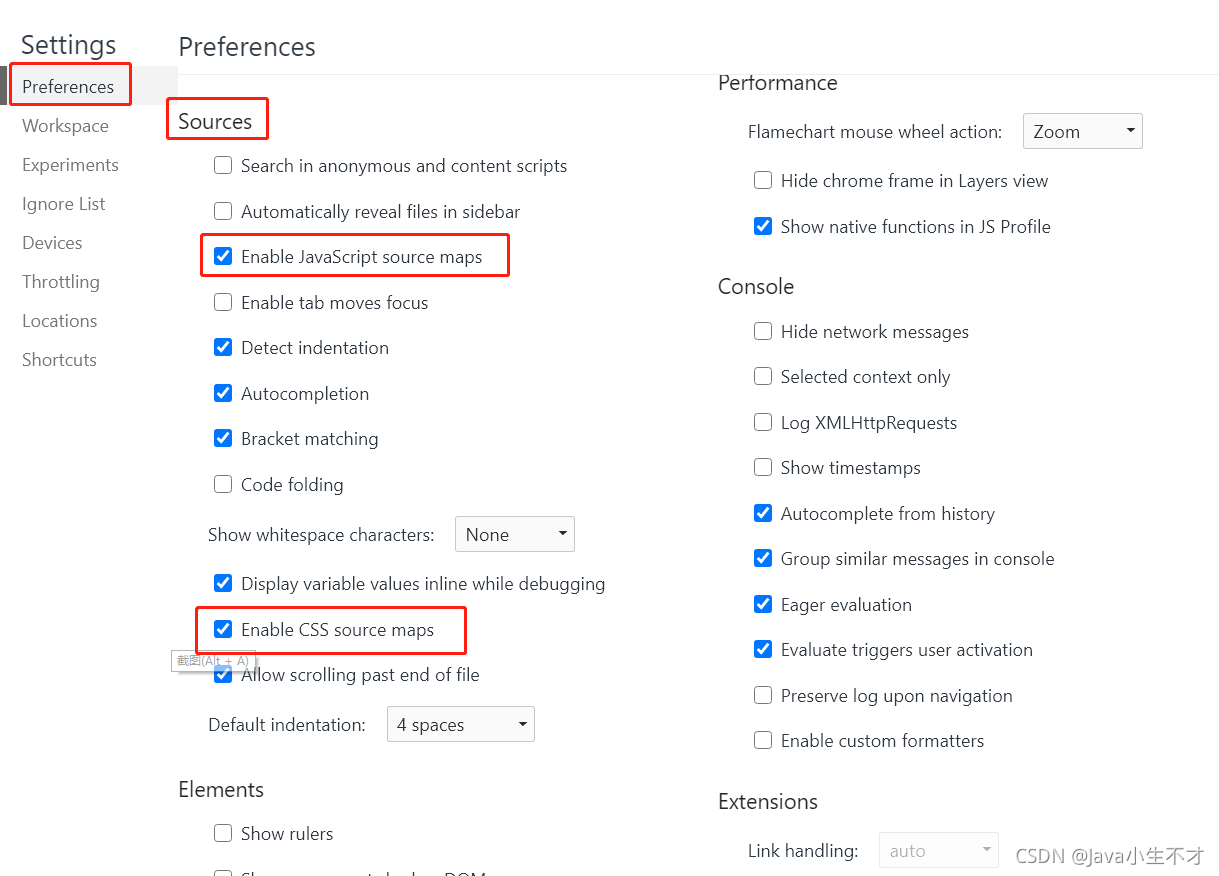
Address bar entry chrome://extensions/ , turn off the oil monkey or thunder one by one, if not, F12 – & gt; Settings – & gt; Perferences–> Sources, disable JavaScript maps and CSS maps, clear cache and re access
Unit reports an error when loading an old version of the project: unit reports an error assets \ standard assets \ utility \ forcedreset. CS (6,27): error cs0619: ‘guitexture’ is obsolete:
The solution is as follows:
1、 Forcedreset.cs
1. Add the namespace
using unityengine.ui;
2. The guitexture in [requirecomponent (typeof (guitexture))] is changed to image, and the result is: [requirecomponent (typeof (image))]
2、 Simpleactivatormenu.cs
1. Add the namespace
using unityengine.ui;
2. Change guitext in public guitext camswitchbutton to text, and the result is:
public text camswitchbutton;