Category Archives: How to Fix

The GPU is still occupied after the program stops

When running deep learning programs, sometimes the program is forced to terminate, but the GPU resources occupied by the program are still not released. After being trapped for a long time, it is thought that the GPU has been occupied by others. As a result, the GPU resources are leaked.

You can use this command to view the usage of GPU in Linux system

nvidia-smi

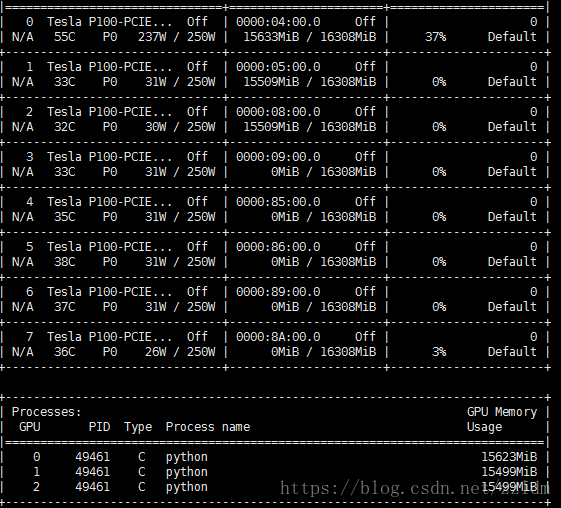
The result is as shown in the figure

At this time, you can manually kill the process that occupies the GPU to release the GPU resources

kill -9 49461

If the screen command is used, the program running in the background stops and occupies the GPU, you can also close all screen windows to release the GPU

killall screen

Of course, it’s OK to kill the process directly
Android DP, SP to PX

private int dp2px(int value){
        return (int) TypedValue.applyDimension(TypedValue.COMPLEX_UNIT_DIP,value,getResources()
                .getDisplayMetrics());
    }

    private int sp2px(int value){
        return (int) TypedValue.applyDimension(TypedValue.COMPLEX_UNIT_SP,value,getResources()
                .getDisplayMetrics());
    }

original text

Getactionbar is null

We use getactionbar to get the actionbar instance, hide it or do other operations.

ActionBar actionBar = getActionBar();

But I did, but actionbar is null.

The problem is caused by the base class of activity. When using the base class of appcompatactivity or other support packages, you need to use another corresponding method to get the actionbar instance, that is, getsupportactionbar (), and the actionbar also needs to use the base class of the corresponding support package.

android.support.v7.app.ActionBar actionBar = getSupportActionBar();

In this way, the null pointer will not be reported.

original text

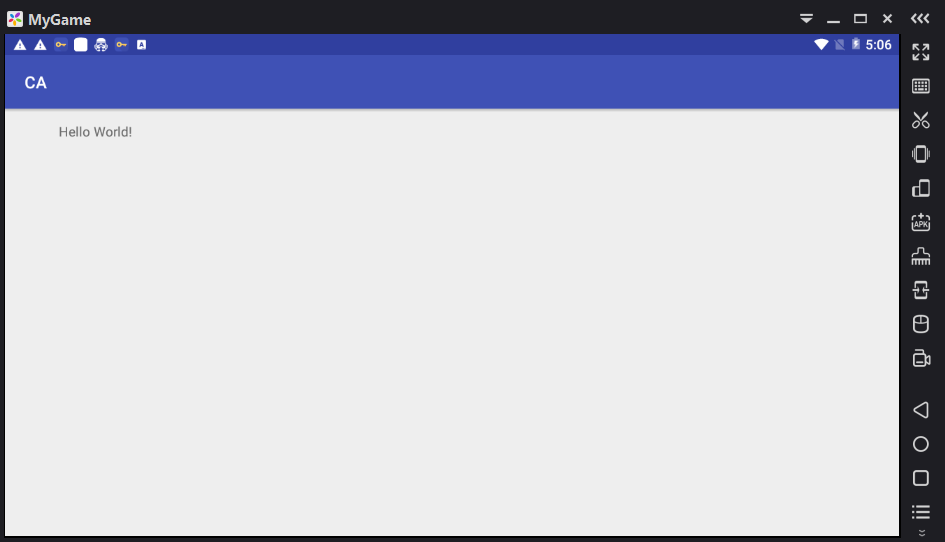
[Android] – Android studio + carefree simulator

It is too laggy for Andriod Studio to bring its own simulator, and VirtualBox is installed in Genymotion simulator, and then a bunch of settings will result in card B.

Online under a carefree simulator, this simulator is dedicated to the game, the current official version are Android 4. X version. I used Android 5.1, a beta version, to debug.

Setting method of Android studio + carefree simulator:

(how to install as and how to download and install Xiaoyao will not be mentioned.)

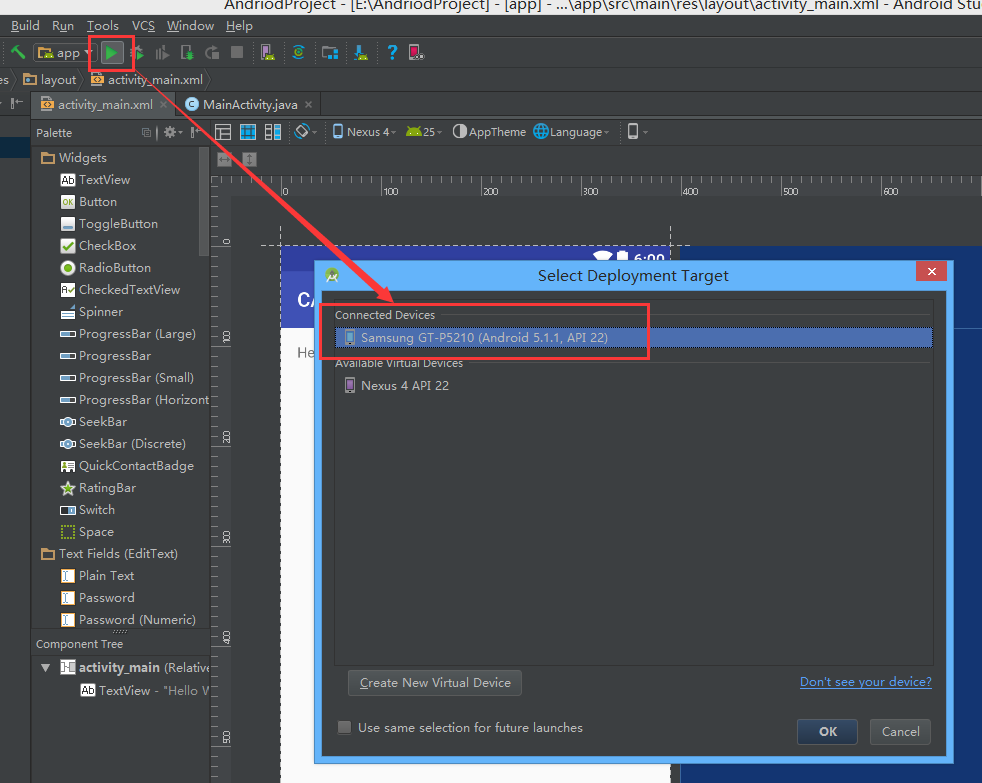
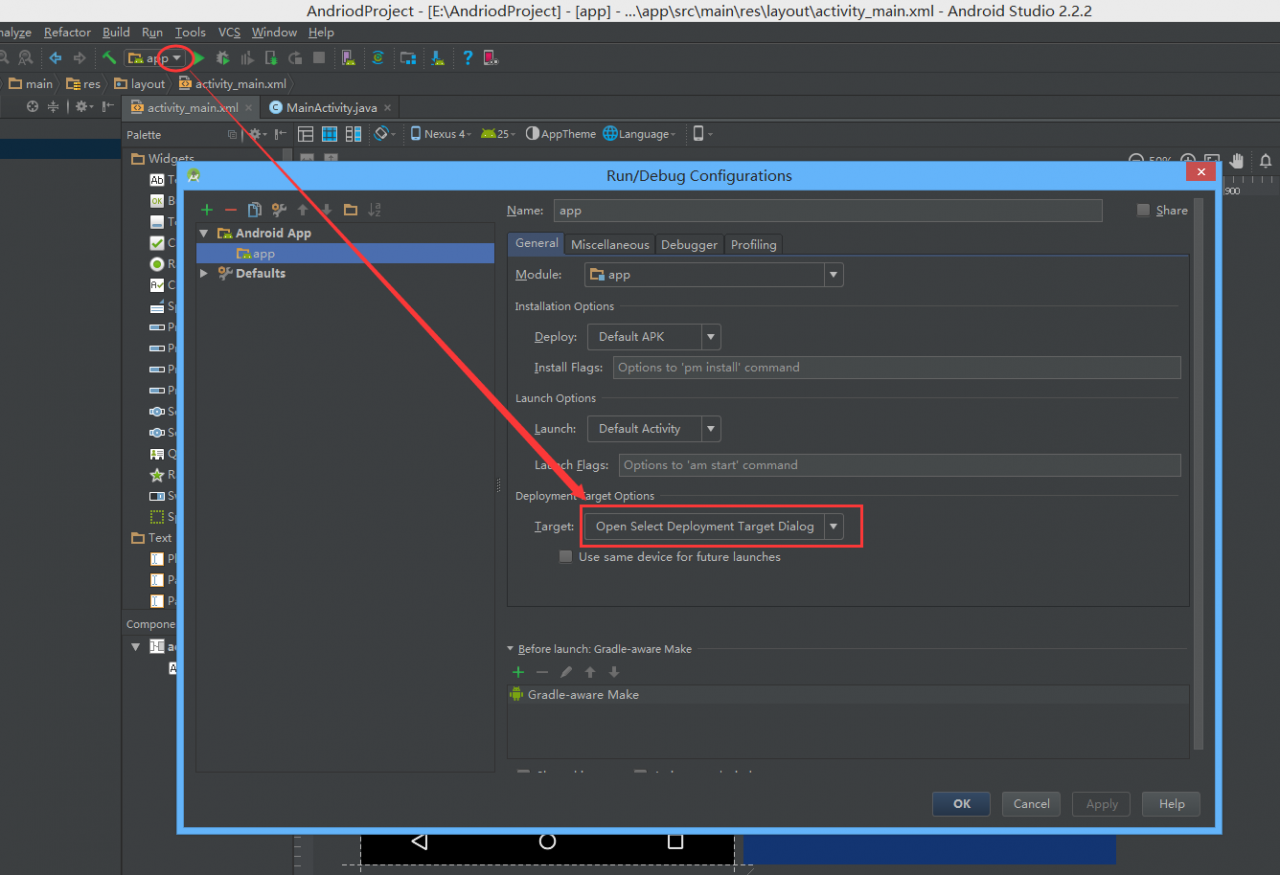
1. Set deployment target options

2. Running carefree simulator

3. Run the command line and switch the directory to the installed carefree Directory: (mine is on D: disk)

cd D:\Program Files\Microvirt\MEmu

4. Use the command to check the number of ports opened by the free running program

netstat -nb

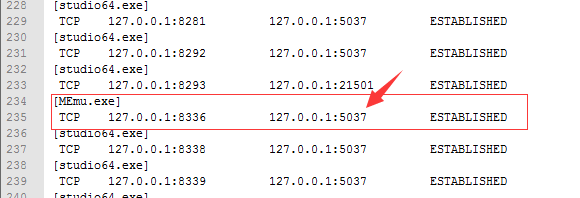
The default port is 5037

Because there are too many ports on this computer, I use the command to write the output to a file

netstat -nb > c:\port.txt

Open C:\ port.txt You can find data like this:

5. Using command to connect Xiaoyao

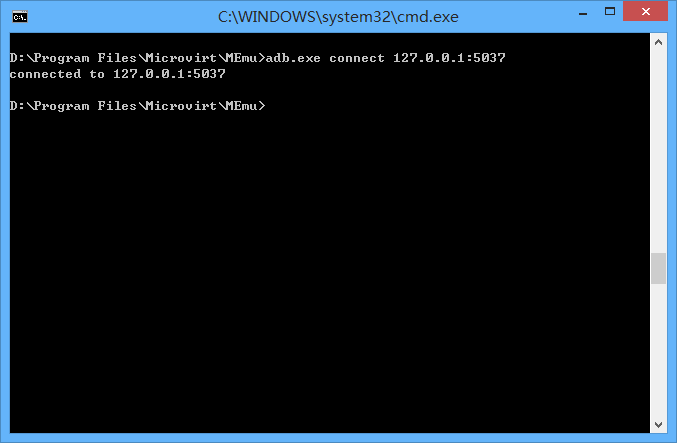
adb.exe connect 127.0.0.1:5037

The connected prompt indicates that the connection is successful

6. Android studio point to run, select just successfully connected to the carefree simulator

PS: if Android studio can’t connect to night God, restart the simulator.
Original text

Notes on Java IO streaming

1: The solution to the garbled code in reading Chinese:
add the encoding mode “UTF-8” when constructing the inputstreamreader

BufferedReader br = new BufferedReader(new InputStreamReader(
                new FileInputStream(new File("F:/download/test.txt")),"utf-8"))

2: When using filewriter to write a file, you must add

fw.flush();

To write successfully.

Transfer: completely solve the problem that the browser home page is tampered by deleting the script file

Transferred from: https://blog.csdn.net/weixin_ 38382105/article/details/79320653

This blog is very detailed, so I want to collect it and organize it in my blog to facilitate future reference. The writing is too detailed. I finally solved this annoying problem (I tried to change the shortcut and delete the registry before, but it can’t be solved. The people who do this thing are really disgusting). The home page of the browser has been tampered with, so that every time I start Google browser, the desktop icon will refresh, and Google will white screen, which is absolutely intolerable for my obsessive-compulsive patients. Finally, I found the above blog, successfully solved my problem, it’s just a comfortable batch of people!!!

This paper summarizes the content of the article

1. Tools needed

https://pan.baidu.com/s/1pYUxQzMyr_ Download and install shwrzubtrcuq

2. Tool usage: enter the installation directory folder and find the file: wbemeventviewer.exe Right click to run in administrator mode

3. Click the pen Icon in the upper left corner to connect to rootcimv2, ignore the account and password, and confirm directly

4. On the left_ You can see below EventFilter_ EventFilter.Name= “VBScriptLKLive_ On the right is the details of the filter.

5. Right click on the right side and select View instance properties to see the specific content of the VBScript.

6. Close the property window, right-click on the right side of the event filter, select unregister, and then right-click on the left side to delete the event filter vbscriptlklive_ Filter”

7. Exit after confirmation.


Windows 10 startup item repair an operating system was’t found solution

Recently, in the dual systems of deepin15 ( Ubuntu ) and windows10 , we encountered a series of problems when uninstalling deepin. The records are as follows:
after windows installs deepin system, the general boot item will change to deepin boot. After uninstalling, the boot item will disappear, and the system will not automatically restore win boot, resulting in failure to enter the system normally. Before deleting the partition of deepin, you can use the official uninstall instruction of deepin to guide me to use it. However, it is invalid, so I have to delete the partition by myself, and then use the USB flash disk to start and repair it.
(step 1-2) it needs to be made on another computer that can be used normally

    Download laomaotao or u start or Chinese cabbage. And install. Insert the U-disk and make it with one click. When finished, unplug the U-disk. Insert the USB flash disk into the computer that can't be started normally, and press F12 to select the option of USB flash disk. Enter (the name is usually the manufacturer of your USB flash disk). Select Windows 8 to start the new computer. Wait for normal entry. Open diskgenius, change the drive letter to the previous good state (generally starting from the U disk will change the initial drive letter), and use the boot repair software to automatically repair. Exit and restart.

If the win system can be started normally after 6, the following can be ignored. Otherwise, if an operating system wasn't found, press Ctrl + Alt + Del to restart. Then restart or repeat the above 3-5 (no 6). And follow the steps below

    after entering the PE system, click the windows logo in the lower left corner and find dism + + in the folder. Open the top column, find the partition where the system is located, and click to find the tool repair guide. Restart, that's it.

Difference between vs code user and system version

Difference between vs code user and system version

Recently, the version of win10 LTSC has been re installed, and the new version of visual studio code has just come out.
However, the official website provides user and system versions. Simple installation is tried.

For installation

The

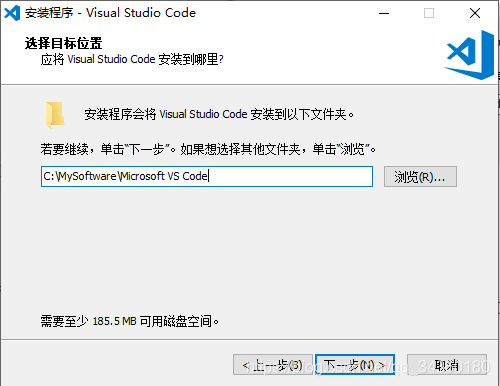
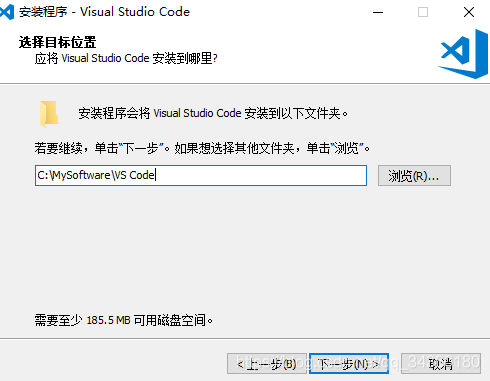
    user version can’t create the default folder in the system partition (disk) Microsoft vs Code , which shows that the permissions are insufficient. The solution is to name the self created folder in the directory
    in advance, and then click next, For example, vs Code , in order to synchronize the path box, you need to delete the default Microsoft, as shown in figure

    For the system version, there is no such problem, but the next step is the same as other software

    Language problems (win10 LTSC Chinese language)

      I'm not sure whether this is just me or a common problem. For the user version of the installation program and vscode program, the default is English. It seems that the system language environment can't be read. The system version is the Chinese installation program directly, and the Chinese display panel user version uses the Chinese method

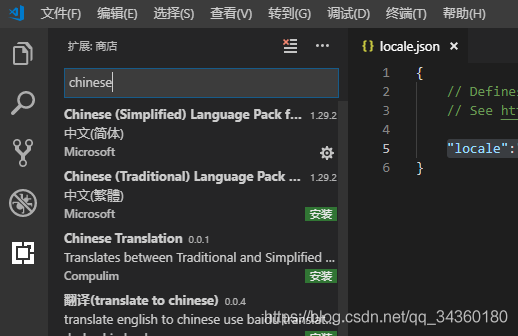
        open vs code, enter Ctrl + Shift + P , and enter configure display in the search box Language , click open to change the quotation mark en to 'zh CN', or delete the quotation mark "en" to the colon, and enter Z to complete it as "locale": "zh CN" click the plug-in, click the bottom icon on the left side of the software, and then search Chinese , download the language pack, install and restart

        Concluding remarks

          at present, I don't know the specific difference between the two versions.
          in stakoverflow's Q & A, some people said that there are differences between the two versions. I don't know for the moment. I may need to understand the good intentions of Microsoft. The software is also divided into users and system administrators, for ordinary users, in order to avoid unnecessary trouble, it is recommended to use the system version. For reference only

Solution of insufficient memory space or desktop stack in GX works2

Solution of insufficient memory space or desktop stack in GX works2

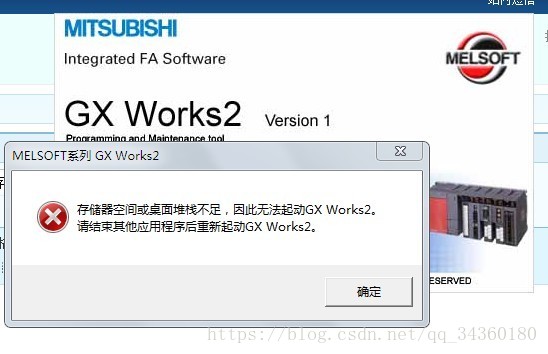
Open Mitsubishi PLC programming software GX works2 prompt

There is not enough memory space or desktop stack to start GX works2
Please restart GX works2 after finishing other applications


New on December 30, 2018, shared by @ Oops. You can delete the registry and reload it.
The method is as follows

    press win + R , enter regedit , and press enter to find HKEY_ CURRENT_ Right click to delete. Reload the software.

Solutions that cannot be opened


Google and Baidu have found many similar situations, but there is no perfect solution

For example, reloading software still doesn't work. It's also said that the cost of reloading the system is too high. After all, a lot of software has to be installed.


#Solution:

##1. First install GX works3
?2. Then install GX works2. Perfectly solve this problem
?3. Pay attention not to unload GX3, otherwise GX2 still can't work.

I thought the GX3 version was high and good, but later I learned that 2 and 3 only support different PLC. The FX2N and gxworks2 that I wanted to use were available, so I unloaded 3. As a result, 2 is not available. Later in accordance with the previous way to try, and good..

Hope to help you

Vs (Visual Studio) encountered a solution that could not open iostream

Recently, when configuring some projects, I couldn’t even open the iostream header file

Finally, we try to reset vs C + +, and successfully solve the problem.

My version is vs2013 in the following way

Tools -> Import and Export -> Reset all -> ..

Tools → import and export settings → reset all settings → next →

Select “save the current settings (I chose to reset directly)”,

Next → select “development language to reset (for example, Visual C + + development settings)” → finish

My CSDN first blog actually wrote this..