Category Archives: How to Fix

Inheritance relationship causes class loading order

Question: when wechat authentication defines variables in weixinpaycontroller, the assigned value is obtained by reading the configuration file in initcontroller, which may cause that sometimes the data of the configuration file cannot be read?


Reason: This is caused by the loading order of the controller. First, the class inheritance relationship of weixinpaycontroller is weixinpaycontroller — & gt; absauthcontroller — & gt; basemcccontroller — & gt; mvccontroller. The inheritance relationship of initcontroller class is initcontroller — & gt; mvccontroller. It can be seen that these two controllers are inherited from mvccontroller, so there will be the problem of loading order first and then


Short term solution: when deploying online, test it first, and you can see that there is no problem. If there is no problem, you can. If there is a problem, it will be deployed again, and then detected again


Long term solution: weixinpaycontroller is directly inherited from initcontroller, so that the loading order is fixed and consistent

How to prevent duplicate submission

When the user clicks the submit button twice in a row, if no measures are taken, there will be two pieces of data in the data.

Solution: check when inserting database. Insert a distributed lock on the database in the code. Use redis as the object of the lock. After locking, make a judgment. The short rule is to look up a piece of data from the database. If the data does not exist, insert it and generate an ID in the database. If it exists (insert the second data), take out this data and update it. In this way, the problem of repeated insertion can be solved.

Existing problems: it is not clear whether it is a duplicate submission or a user’s update operation

Android listview entry button click state chaos solution

Problems:

Click the button button on listview item, click to change the display state of button, slide the button on listview item is reused, the corresponding button state on item is not corresponding, and the button state on item is chaotic.

Analysis of the reasons:

Listview item caching mechanism: for better performance, listview will cache line items (the view corresponding to a line). Listview gets the items of each line through the getview function of the adapter. During sliding,

A. if a line item has already been shown on the screen, if the modified item is not in the cache, put it into the cache, otherwise update the cache;

B. before obtaining the line items that slide into the screen, it will first determine whether there are available items in the cache. If there are, it will be passed to the getview of the adapter as the convertview parameter.

In this way, getview writing can make full use of the cache and greatly improve the performance of listview. Even if there are tens of thousands of line items, the maximum number of inflates is n, and N is the maximum number of listview line items displayed on a screen.

According to the above caching principle, the reuse of listview will cause the chaos of the control state on the item.

For detailed analysis, please refer to http://www.trinea.cn/android/android-listview-display-error-image-when-scroll/

Solution:

The idea of Java programming is that everything is an object. If the status of an item is recorded in the corresponding object of each item, through the field of the object, each time you click to change the field value of the object, each time you display the status of the control on the item, you can judge the field value of the object. The problem of chaos has to be solved.

Add a field to the entry object without reason, but the server does not need this field. In order to unify the front and back ends, this will cause trouble. Therefore, when we add the Boolean value of state judgment to the object, we add the field modifier keyword transient before the field in the bean. For example, if the judgment Boolean value added in the bean is ischeck, then it is private transient Boolean ischeck in the bean;

Transient as the name suggests: (from Youdao dict)

Transient phenomena; passing passengers; migratory birds

In Java, “transient” modifier is a special annotation to indicate that the modified field is ignored in serialization.

For detailed analysis, please refer to http://www.cnblogs.com/gaojing/archive/2011/04/14/2844973.html

Conclusion:

Therefore, adding a field to the entry object (in order to record the state of the object) and adding the keyword “transient” in front of the field can solve the problem of confusion when clicking the listview entry button~

NPM and cnpm installation failure solution

First, post the error: here is my error log:

0 info it worked if it ends with ok
1 verbose cli [ 'D:\\nodejs\\node.exe',
1 verbose cli   'D:\\nodejs\\node_modules\\npm\\bin\\npm-cli.js',
1 verbose cli   'install',
1 verbose cli   '-g',
1 verbose cli   'cnpm',
1 verbose cli   '--registry=https://registry.npm.taobao.org' ]
2 info using [email protected]
3 info using [email protected]
4 verbose npm-session 026191e276c3f621
5 silly install loadCurrentTree
6 silly install readGlobalPackageData
7 silly fetchPackageMetaData error for cnpm@latest request to https://registry.npm.taobao.org/cnpm failed, reason: connect ETIMEDOUT 93.184.216.34:8080
8 timing stage:rollbackFailedOptional Completed in 1ms
9 timing stage:runTopLevelLifecycles Completed in 133469ms
10 verbose type system
11 verbose stack FetchError: request to https://registry.npm.taobao.org/cnpm failed, reason: connect ETIMEDOUT 93.184.216.34:8080
11 verbose stack     at ClientRequest.req.on.err (D:\nodejs\node_modules\npm\node_modules\node-fetch-npm\src\index.js:68:14)
11 verbose stack     at ClientRequest.emit (events.js:189:13)
11 verbose stack     at onerror (D:\nodejs\node_modules\npm\node_modules\agent-base\index.js:100:9)
11 verbose stack     at callbackError (D:\nodejs\node_modules\npm\node_modules\agent-base\index.js:122:5)
11 verbose stack     at process._tickCallback (internal/process/next_tick.js:68:7)
12 verbose cwd C:\Users\Administrator.L6BFMF7743P5SU1
13 verbose Windows_NT 10.0.17763
14 verbose argv "D:\\nodejs\\node.exe" "D:\\nodejs\\node_modules\\npm\\bin\\npm-cli.js" "install" "-g" "cnpm" "--registry=https://registry.npm.taobao.org"
15 verbose node v10.15.3
16 verbose npm  v6.4.1
17 error code ETIMEDOUT
18 error errno ETIMEDOUT
19 error network request to https://registry.npm.taobao.org/cnpm failed, reason: connect ETIMEDOUT 93.184.216.34:8080
20 error network This is a problem related to network connectivity.
20 error network In most cases you are behind a proxy or have bad network settings.
20 error network
20 error network If you are behind a proxy, please make sure that the
20 error network 'proxy' config is set properly.  See: 'npm help config'
21 verbose exit [ 1, true ]

Installed many times, are the same error, the installation of online solutions to try a lot of unresolved. Later, according to the log, it was found that it was the agent setting problem.

At first, I thought that the Taobao agent was not effective. Later, when I installed cnpm, I found the same problem, but it was not the problem of Taobao setting.

Note the proxy address printed in the log: 93.184.216.34:8080.

Solution: set the above address and port as proxy

Step one:

npm config set prefix "D:\nodejs\node_global"

Step 2:

npm config set cache "D:\nodejs\node_cache"

Step 3:

npm config set proxy 93.184.216.34:8080

Step 4:

npm config set https-proxy 93.184.216.34:8080

last:

npm install -g cnpm --registry=https://registry.npm.taobao.org

After the above execution, you can enter: cnpm – V to test

 
Refer to node for specific installation process . JS installation and cnpm configuration

Reference article: NPM and cnpm (Windows) installation steps

                   npm ERR ! network connect ETIMEDOUT

With root cause solution

Phenomenon: 1. There is no exception when the project starts, when the page is loaded into the spring:message In the background, the null pointer is abnormal, and the console will display the prompt with root cause;

2. Note out spring:message After related tags, there is no exception, but where the specific content should be displayed, the code value in the tag is displayed;

3. The same project can be used on other people’s computers, but not on my computer;

4. Available on eclipse, not on MyEclipse;

Reason: there is a space in the Tomcat installation path;

Solution: put the Tomcat of the deployment project in a path without spaces, such as the root directory.

The above are the phenomena and solutions I encountered. If there are any other phenomena and solutions, please add.

The difference, cause and solution of memory overflow and memory leak

memory overflow and memory leak are two different problems, but they are closely related to heap.

Mainly about the JVM memory structure and how to use the scheme.

Memory overflow?Possible causes of memory overflow?Memory overflow solutions, memory leak small series of recommendations for you

Memory overflow?Common memory overflow?The solution of memory overflow

memory overflow:

when you apply for 2 bytes, if you use the int type and occupy 4 bytes, there will be memory overflow in this case

possible reasons for memory overflow: 1

1. The amount of data loaded in the memory is too large, such as fetching too much data from the database at one time;
2. There are references to objects in the collection class, which are not cleared after use, so that the JVM cannot recycle;
3. There are dead loops in the code or too many duplicate object entities generated by loops;
4. Bugs in the third-party software used;
5. The memory value of the startup parameter is set too small

solution to memory overflow:

The first step is to modify the JVM startup parameters to increase the memory directly. (- XMS, – Xmx parameters must not be added. )

Second, check the error log to see if there are other exceptions or errors before the “OUTOFMEMORY” error. (check the next error log)

The third step is to walk through and analyze the code to find out the possible location of memory overflow. (Debug)

The fourth step is to use the memory view tool to dynamically view the memory usage

Memory leak

there are too many static modified variables defined in the project, but these variables are in the permanent area, which may not be recycled regularly by GC. With the accumulation, memory leakage will occur when applying for memory next time.

Suggestions for you

We must not define too many variables in the development process, because the variables modified by static all exist in the permanent area. You can understand the details

JVM memory structure

learn in actual combat and grow in happiness

Caused by: java.io.IOException: APR error: -730053

After the project started, the swigger web page was closed, and the error was reported. Ah, just now it was good. How could the error be reported?I didn’t see the error, and I didn’t know what the problem was. I thought it was a code problem, and then I went to Baidu

The general reason is: the server is outputting problems to the browser, and I shut them down. That’s why the problem is caused. Let’s do it again and solve the problem

Postscript: although it’s a small problem, if you don’t know it, you can waste a lot of time and change your bad habits.

learn in actual combat and grow in happiness

[details] jar conflict resolution in Maven (personal test)

Jar conflicts are the most troublesome in Maven development

[INFO] Scanning for projects...
[ERROR] [ERROR] Some problems were encountered while processing the POMs:
[WARNING] 'dependencyManagement.dependencies.dependency.(groupId:artifactId:type:classifier)' must be unique: net.sf.ezmorph:ezmorph:jar -> duplicate declaration of version ${ezmorph.version} @ line 1030, column 16
[ERROR] Child module E:\EclipseHomeWork\parent\upiweb-cms of E:\EclipseHomeWork\parent\pom.xml does not exist @ 
[ERROR] Child module E:\EclipseHomeWork\parent\upiweb-cms0719 of E:\EclipseHomeWork\parent\pom.xml does not exist @ 
[ERROR] Child module E:\EclipseHomeWork\parent\upiweb-interface of E:\EclipseHomeWork\parent\pom.xml does not exist @ 
 @ 
[ERROR] The build could not read 1 project -> [Help 1]
[ERROR]   
[ERROR]   The project com.upi.web:upiweb-parent:1.0-SNAPSHOT (E:\EclipseHomeWork\parent\pom.xml) has 3 errors
[ERROR]     Child module E:\EclipseHomeWork\parent\upiweb-cms of E:\EclipseHomeWork\parent\pom.xml does not exist
[ERROR]     Child module E:\EclipseHomeWork\parent\upiweb-cms0719 of E:\EclipseHomeWork\parent\pom.xml does not exist
[ERROR]     Child module E:\EclipseHomeWork\parent\upiweb-interface of E:\EclipseHomeWork\parent\pom.xml does not exist
[ERROR] 
[ERROR] To see the full stack trace of the errors, re-run Maven with the -e switch.
[ERROR] Re-run Maven using the -X switch to enable full debug logging.
[ERROR] 
[ERROR] For more information about the errors and possible solutions, please read the following articles:
[ERROR] [Help 1] http://cwiki.apache.org/confluence/display/MAVEN/ProjectBuildingException

In any case, it is to solve the conflict problem
after reading a lot of blogs or CSDN on the Internet, I feel that they are farting, which is useless at all. At that time, maybe the blogger forwarded or something, in order to cheat the Everbright programmer’s browsing times

in fact, I don’t understand why they sum up, that is, their wrong understanding of the past.

Baidu has n methods, but it can’t solve them

Why install one

What about plug-ins?That’s not nonsense. There must be only one advantage. It’s easy to use. How much time can an easy-to-use plug-in save you

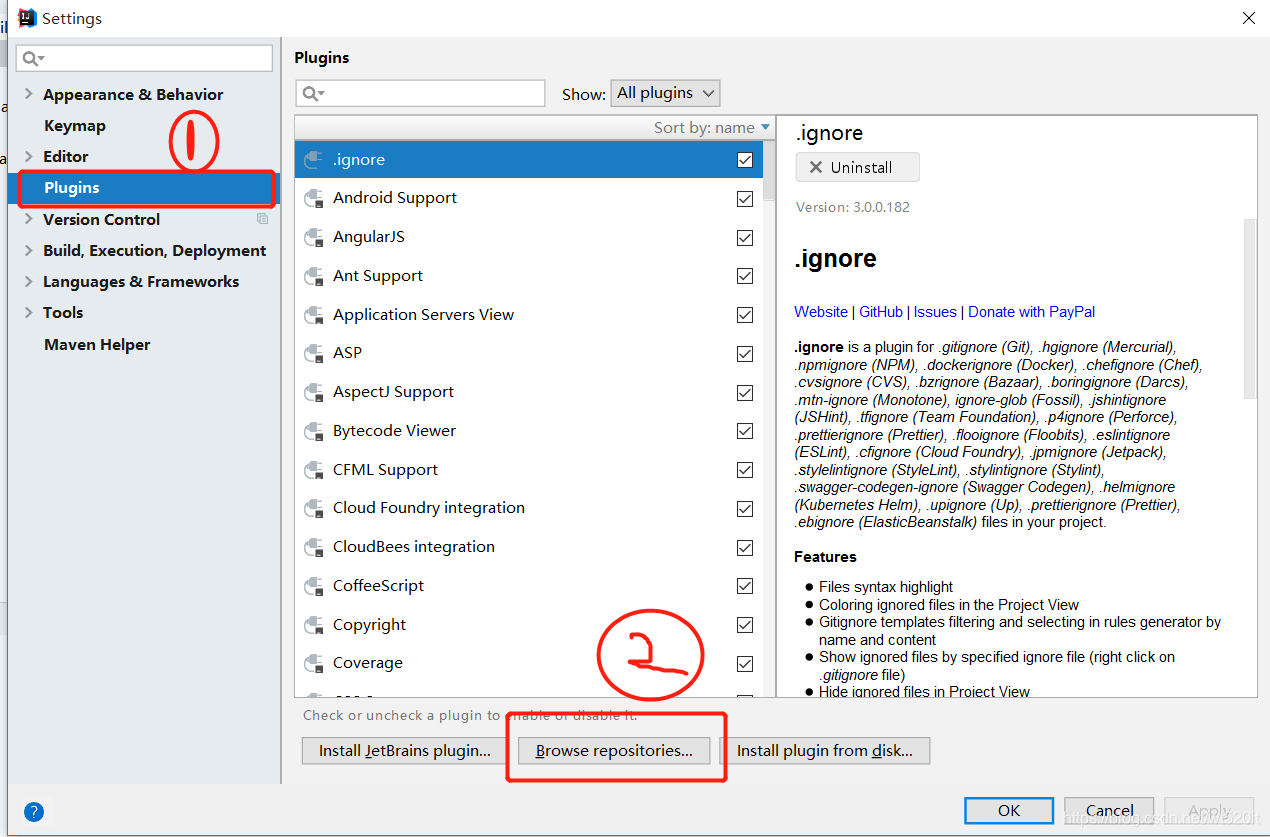
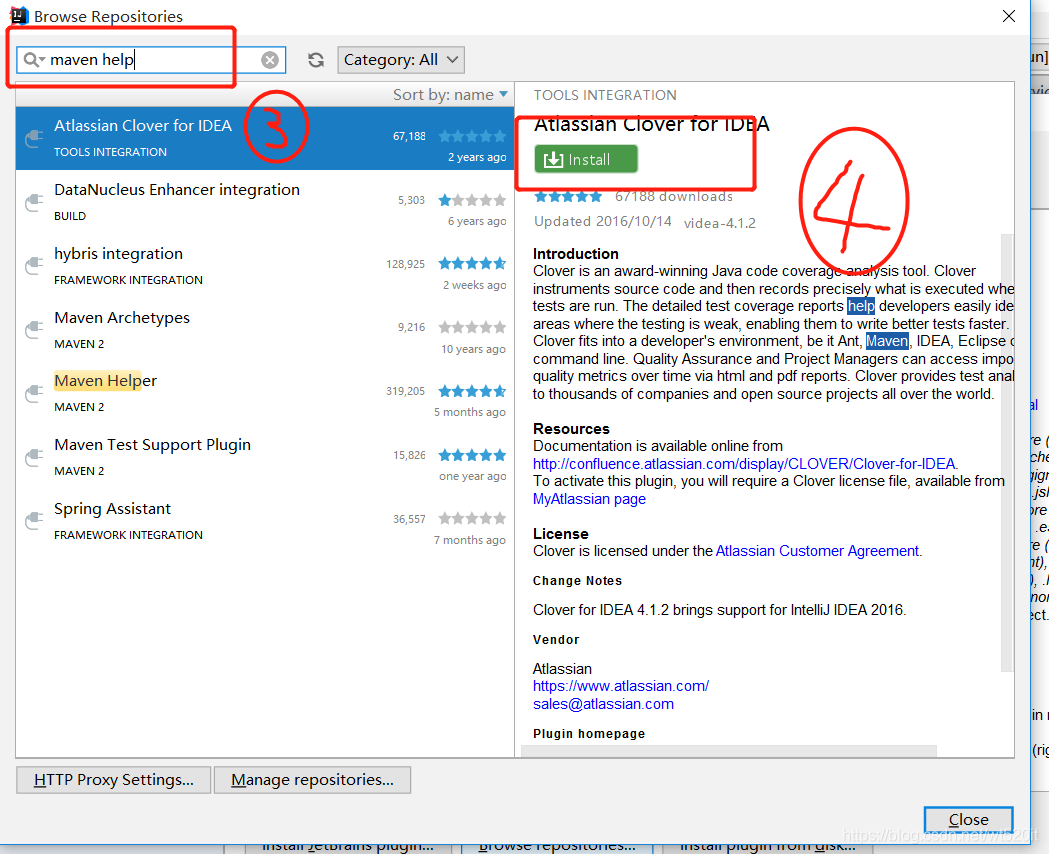
Just go to the installation steps:
file — & gt; settings — & gt; plugs — & gt;

I installed it locally (I was too busy to write this blog before)

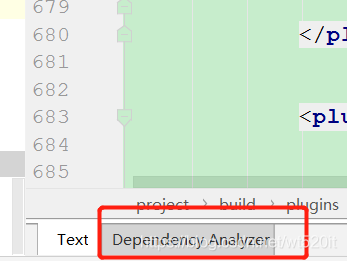
After installation, what is the specific function?I believe you will only pay attention to it when you use it

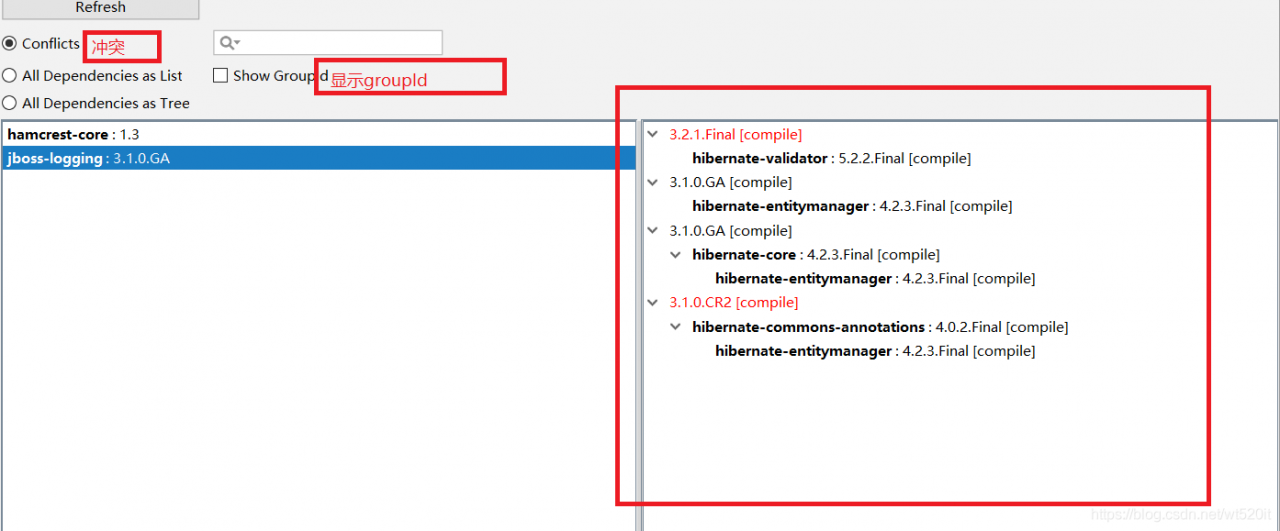
open pom.xml —-> Dependency Analyzer

Then open the sample and compare it:

Then right click: exclude solved

the article comes from the Internet, and the copyright belongs to the author himself. If it infringes the rights and interests of the original author, please contact us for deletion or authorization.
if there is any error, please contact the author for change, thank you, My wechat: void666666

About WLW (Windows Live Writer): “unable to connect to your log service: invalid server response” solution

The following error occurred while configuring the blog’s WLW (Windows Live Writer) service: “unable to connect to your log service: invalid server response – received response from the log server blogger.getUsersBlogs Method’s response is invalid: invalid response document returned from XMLRPC server. Please try to resolve the problem and try again. ”

Document the solution:

Windows Live Writer (hereinafter referred to as WLW) is a very convenient blog offline editor launched by Microsoft. Recently, I want to use it to update the blog, but there are many problems in the configuration. Please record here for more friends to see.

First of all, to use WLW in WordPress, you must enable the XML-RPC publishing protocol. This protocol is enabled by default in WordPress versions after 3.5. If it is a version before 3.5, you need to find the xml-prc protocol under the “Settings – & gt; composition” menu, and then open it.

After the service is started, configure the parameters according to the regulations and wait for the link. The result is “unable to connect to your log service: invalid response from the server – the response received from the log server is invalid” blogger.getUsersBlogs Method’s response is invalid: invalid response document returned from XMLRPC server. Please try to resolve the problem and try again. ” This is a mistake.

The cause of this problem is very simple – this is due to a bug in WordPress itself. Under UTF-8 encoding, XML RPC returns an incorrect format and lacks three bytes.

Find the reason and solve it

    Step 1: find class- IXR.php The second step is to open and edit the class- IXR.php File, and then find the statement [$length = strlen ($XML);] to replace [$length = strlen ($XML) + 3;], and the problem is solved!

Note: please back up the original file before editing

OK, restart WLW to link. Is that ok?

OK, the problem was solved successfully~~

Sudo: unable to resolve host solution

When using the sudo command of Linux, some people may encounter such a problem: “sudo: can’t parse the host: xxxxx (your host name). I also encounter this problem. I have found a solution on the Internet and share it with you here.

This problem is caused by the hosts file is not well configured, Linux can not resolve to your host address, the solution is as follows:

sudo vim /etc/hosts

VIM is the command of your text editor. If you don’t have VIM in your computer, you can use GEDIT.

After opening the file, the

127.0.1.1  xxxxx

The following XXX is replaced by your computer host name, which is the last string of characters in the error. If not, add it in. If there are many parts of soybean oil, they can be replaced in batches.

Article link: sudo: unable to resolve host solution

Causes and solutions of WordPress media library pictures not showing or showing errors

Recently, I am developing a WordPress Theme – wait theme, but in the process of development, a wonderful problem suddenly appears, the media library pictures are not displayed!! Always show the small circle in loading, and upload images always fail. After struggling for two or three days, I finally found out the problem and quickly wrote it down….

describe

Recently, I am developing a WordPress Theme – wait theme, but in the process of development, a wonderful problem suddenly appears, the media library pictures are not displayed!! Always show the small circle in loading, and upload images always fail. The details are shown in the figure below:

The selection list mode is normal

attempt

After finding this problem, the other work of theme development can only be temporarily stopped and focused on solving this problem.

First go to the Internet search, the results found that the results are the same, what folder permissions, file coding problems, plug-in settings and so on.

However, this is a local test system. No plug-ins are installed and there is no permission problem. The coding format is utf8 without BOM.

It is found that a few netizens have the same problem as me, but no one below gives a solution…..

After the search on the Internet is fruitless, we can only find a solution by ourselves.

explore

First of all, I suspect that my topic function has the same name as the function of WP. So open it upload.php , compare the functions one by one with the functions written by yourself, and find that there is no duplicate name problem, so this option is excluded.

Then check the admin file, no suspicious situation is found.

In the browser debugging window, check the loading and debugging of CSS and JS, and no exception is found.

Finally, there is no way to open the code window, line by line to view the code, also did not find anything suspicious.

It took me two or three days to go back and forth in this way. Until this afternoon, I found the root of the problem~~~~

problem

When looking at the code again this afternoon, I suddenly found such a statement:

The problem lies in this sentence!!!!

Look at the explanation of HTML Declaration on w3school

≪! DOCTYPE & gt; declaration must be the first line of an HTML document, before the & lt; HTML & gt; tag.

≪! DOCTYPE & gt; declaration is not an HTML tag; it is an instruction to the web browser about which HTML version the page is written with.

In HTML 4.01, the & lt;! DOCTYPE & gt; declaration references DTD because HTML 4.01 is based on SGML. DTD specifies the rules of markup language, so that the browser can present the content correctly.

HTML5 is not based on SGML, so there is no need to reference DTD.

Tip: always add a & lt;! DOCTYPE & gt; declaration to an HTML document so that the browser knows the document type.

≪! DOCTYPE & gt; declaration must be the first line of an HTML document, before the & lt; HTML & gt; tag! ≪! DOCTYPE & gt; declaration must be the first line of an HTML document, before the & lt; HTML & gt; tag! ≪! DOCTYPE & gt; declaration must be the first line of an HTML document, before the & lt; HTML & gt; tag!

Three important words~~

Therefore, as long as the above obnoxious sentence is removed, this problem can be solved ~ ~
by removing it

solve

Looking for the source code, I found that there was a reference in my admin file:

At that time, I thought that this sentence would be in the main body of the web page, so I wrote it. But today, I found that no matter where I put it, it will always appear in the first line of the web page!!! WTF!!!

Only by deleting it and writing the CSS code to the file, can the problem be solved successfully~~~~

summary

1. Don’t blindly believe in things on the Internet, do it yourself is the king

2. Debugging a bug starts with the source code.

3. When it comes to problems, be calm and don’t be impatient~~

4. Do it yourself~~~

prospect

Wait theme will be released soon, please look forward to it~~~

Reprint English blogs with source

Reprint English blogs with source

Reprint English blogs with source

Three important words~~


Welcome to my website:

Other English Blogs

++>

Causes and solutions of WordPress media library pictures not showing or showing errors