Category Archives: Error

[Solved] Parsing JSON error unexpected end of JSON input

It’s normal to jump and pass parameters using JSON, but today I don’t know why I reported an error, unexpected end of JSON input,
reason
I found the answer on the Internet because there are unrecognized contents in the passed parameters, and the parameters I passed contain rich text, Therefore, there is no resolution
solution
start with JSON character parameters (parent page) on the page to jump to

issueanswer(item){
				let arrar = JSON.stringify(item)
				uni.navigateTo({
					url:"issueanswer?arr="+encodeURIComponent(arrar)
				})
			},

Then accept and parse the parameters in onload of the sub page

onLoad(option) {
			this.arr =JSON.parse(decodeURIComponent(option.arr))
		},

How to Solve quantum espressoproblems computing cholesky Error

Problems computing Cholesky in quantum espresso reports an error

When running a small system, such as graphene of 11 or elemental iron of 11 * 1, QE calculation reports an error:
%%%%%%%%%%%%%%%%%%%%%%%%%%%%%%%%%%%%%%%%%%%%%%%%%%%%%%%%%%%%%%%%%%%%%%%%%%%%%%%%%%%%%%%%%%%%%%%%%%%%%%%%%%%%%%%%%%%%%%%%%%%%%%%%%%%%%%%%%%%%%%%%%%%%%%%%%%%%%%%%%%%%%%%

 stopping ...

After testing, it is found that this error is due to the use of too many kernel computing and small tasks. For example, if you use 32 small tasks such as accounting, such errors will appear
the solution is to use fewer cores for calculation. For example, on Cheng Chao’s machine, the corresponding statement is modified as follows:
#sbatch -- ntasks per node = 32
to
#sbatch -- ntasks per node = 8

How to Solve Git submodule update error

Question:

When using git submodule update, an error is reported:

        fatal: Needed a single revision

        Unable to find current revision in submodule path 'test'

reason:

Git is incorrectly configured, or the code was downloaded from the sub module directory, but the association failed.

Solution:

        rm -rf test/

Then go back to the root directory of the main module and use the command again:

        git submodule update --init

How to Solve Fopen bus error

Bus error (core dumped) occurs in my program, and the error is locked in the fopen part of the code

void dipget(int icdp, int nti, float *dip, char * tanpath)
{
  FILE * dfile;
  char *filename;

  printf("Choose %d from %s\n",icdp, tanpath);
  sprintf(filename, "%s%d.x.dat",tanpath, icdp);
  printf("Open file: %s \n", filename);

  if((dfile = fopen(filename,"rb"))==NULL) // Bus error
  {
    printf("\n Open %s File error\n",filename);
    exit(EXIT_FAILURE);
  }
  fread(dip, sizeof(float), nti, dfile);
  fclose(dfile);
}

Here, you only need to make one step of modification to solve the problem. The reason is very simple. Before using sprintf, you need to allocate a buffer space to it

  char *filename;
  Change to
  char filename[200];

[Solved] App Store Connect Operation Error ERROR ITMS-90087: “Unsupported Architectures

App Store Connect Operation Error ERROR ITMS-90087: “Unsupported architectures.
1. Reason description
the app uses dingxiangcaptchasdk.framework. An error is reported when submitting the app store
reason: dingxiangcaptchasdk.framework contains x86_ 64. I386 architecture. Of course, this app store is not allowed. All errors will be reported when uploading. The solution is to eliminate x86 from this SDK_64, i386 these two architectures
2. Solution
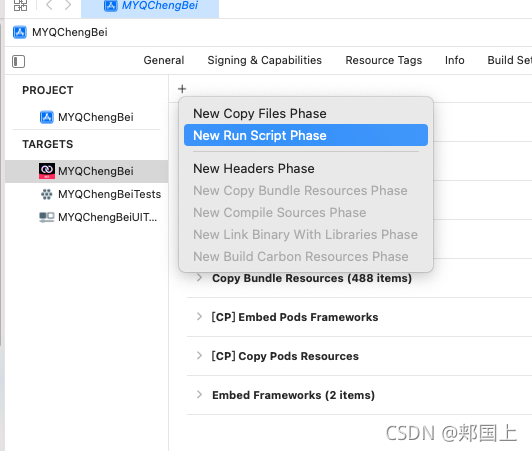
solution: targets – > Build Phases-> Click the plus sign to select new run script phase

to facilitate identification, double-click and rename to supported architectures [x86_64, i386].

Then copy and paste the following code:

APP_PATH="${TARGET_BUILD_DIR}/${WRAPPER_NAME}"  

# This script loops through the frameworks embedded in the application and  
# removes unused architectures.  
find "$APP_PATH" -name '*.framework' -type d | while read -r FRAMEWORK  
do  
FRAMEWORK_EXECUTABLE_NAME=$(defaults read "$FRAMEWORK/Info.plist" CFBundleExecutable)  
FRAMEWORK_EXECUTABLE_PATH="$FRAMEWORK/$FRAMEWORK_EXECUTABLE_NAME"  
echo "Executable is $FRAMEWORK_EXECUTABLE_PATH"  

EXTRACTED_ARCHS=()  

for ARCH in $ARCHS  
do  
echo "Extracting $ARCH from $FRAMEWORK_EXECUTABLE_NAME"  
lipo -extract "$ARCH" "$FRAMEWORK_EXECUTABLE_PATH" -o "$FRAMEWORK_EXECUTABLE_PATH-$ARCH"  
EXTRACTED_ARCHS+=("$FRAMEWORK_EXECUTABLE_PATH-$ARCH")  
done  

echo "Merging extracted architectures: ${ARCHS}"  
lipo -o "$FRAMEWORK_EXECUTABLE_PATH-merged" -create "${EXTRACTED_ARCHS[@]}"  
rm "${EXTRACTED_ARCHS[@]}"  

echo "Replacing original executable with thinned version"  
rm "$FRAMEWORK_EXECUTABLE_PATH"  
mv "$FRAMEWORK_EXECUTABLE_PATH-merged" "$FRAMEWORK_EXECUTABLE_PATH"  

done  ```
![Insert image description here](https://img-blog.csdnimg.cn/9d9ee5a118d2405d83e92877912eee89.png?x-oss-process=image/watermark,type_ZHJvaWRzYW5zZmFsbGJhY2s,shadow_50,text_Q1NETiBA6YOP5Zu95LiK,size_20,color_FFFFFF,t_70,g_se,x_16)


Keil5 error: #29: expected an expression [Solved]

…/Core/Src/main.c(113): error: #29: expected an expression


preface

When defining a macro, you habitually align and type spaces, resulting in an error when calling

1. Wrong situation

#define SDA_High()   do{HAL_GPIO_WritePin(I2C_Port,I2C_SDA_Pin,GPIO_PIN_SET);}while(0)
#define SDA_Low ()   do{HAL_GPIO_WritePin(I2C_Port,I2C_SDA_Pin,GPIO_PIN_RESET);}while(0)  
//      SDA_Low ()  Spaces added for alignment

When calling the program

	SDA_Low();
	SDA_High();

Program error:
…/core/SRC/main. C (113): error: #29: expected an expression
…/core/SRC/main. C (113): error: #65: expected a “;”
solution: remove the space

Summary

Format #define identifier replacement list of macro definition
macro definition uses “identifier” to represent the content in the “replacement list”. The identifier is called the macro name. During preprocessing, the preprocessor will replace all macro names in the source program with the contents in the replacement list in the macro definition. When defining many parameters, it is recommended to use do {} while (0). For reasons, refer to the benefits of using do {} while (0) in macro definition

[Solved] Yarn install Error: “error Found incompatible module.”

Today, an error was reported when installing the dependency using yarn install. After consulting the online resources, the problem was solved. Here is a record.

The error content is as follows: no matching version was found

D:\Web Storm-Workspace\xxxx>yarn install
yarn install v1.22.15
[1/6] Validating package.json...
[2/6] Resolving packages...
[3/6] Fetching packages...
info [email protected]: The platform "win32" is incompatible with this module.

info "[email protected]" is an optional dependency and failed compatibility ch
eck. Excluding it from installation.
error [email protected]: The engine "node" is incompatible with this module.
 Expected version "^10.13.0 || ^12.13.0 || ^14.15.0 || >=15.0.0". Got "14.8
.0"
error Found incompatible module.
info Visit https://yarnpkg.com/en/docs/cli/install for documentation about
this command.

Enter the following line of code: yarn config set ignore – engines true

The problem is solved.

D:\Web Storm-Workspace\xxxx>yarn config set ignore
-engines true

yarn config v1.22.15
success Set "ignore-engines" to "true".
Done in 0.11s.

Re-execute yarn Install, you will find that yarn is successfully installed!!!

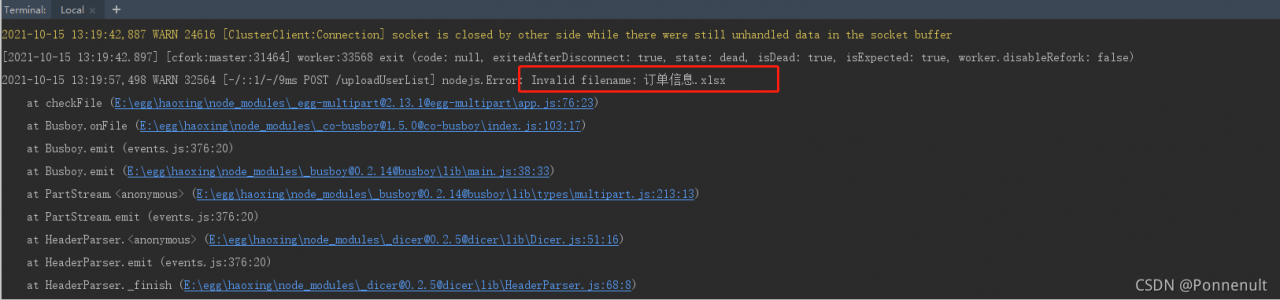
EGG Error: nodejs.Error: Invalid filename [How to Solve]

preface:

This error occurs when using the upload function of egg.

1. Error message:

Error in file name

2. Error reporting reason:

There is no configuration file information in config.default.js, but it is directly obtained in the controller, and an error CTX. Request. Files = = undefined is reported

const file = ctx.request.files[0]; //Get uploaded files

3. Solution:

Add in config.default.js:

//Enable file mode
  config.multipart = {
    mode: 'file'
  }

4. Cause new problems:   Invalid filename: order information.xlsx

5. Solutions to new problems and types have to be set. There is a parameter in the upload that is a white list

Add: whitelist: [‘. Xlsx’] in config.default.js

//Enable file mode
  config.multipart = {
    mode: 'file',
    fileSize: 1048576000,
    whitelist: ['.xlsx']
  }

That’s it!

How to Solve Excel Error Log 0: Install Error

SLOVER installation manual:
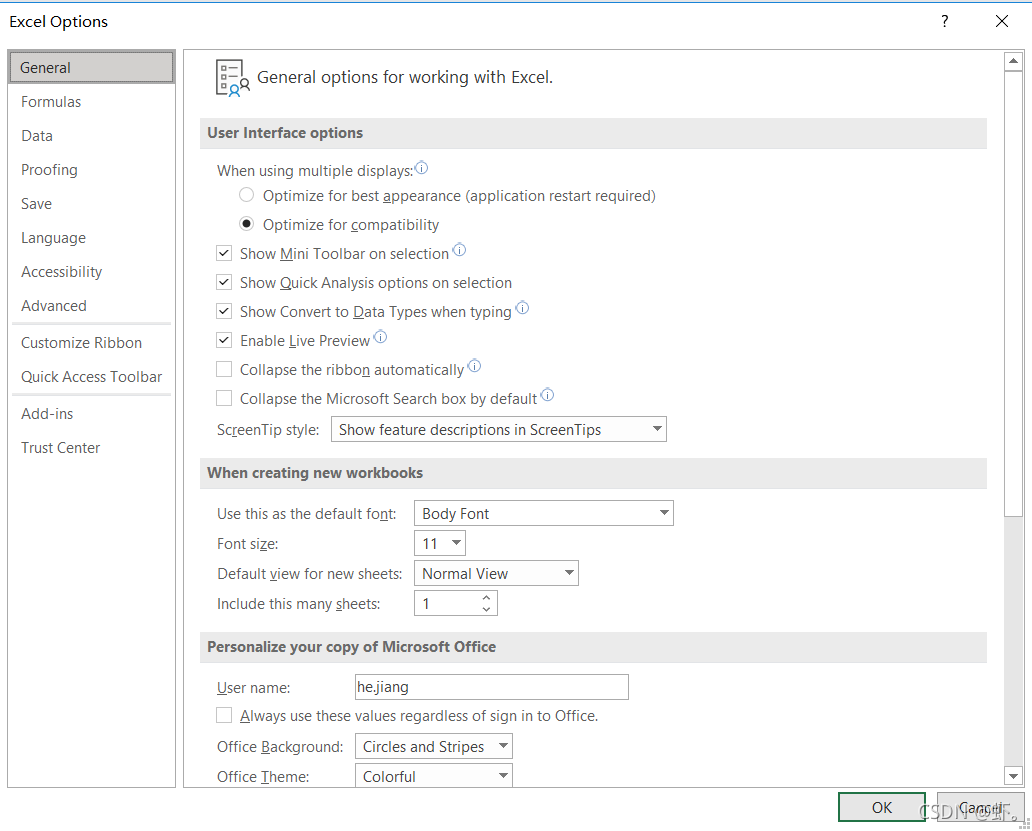
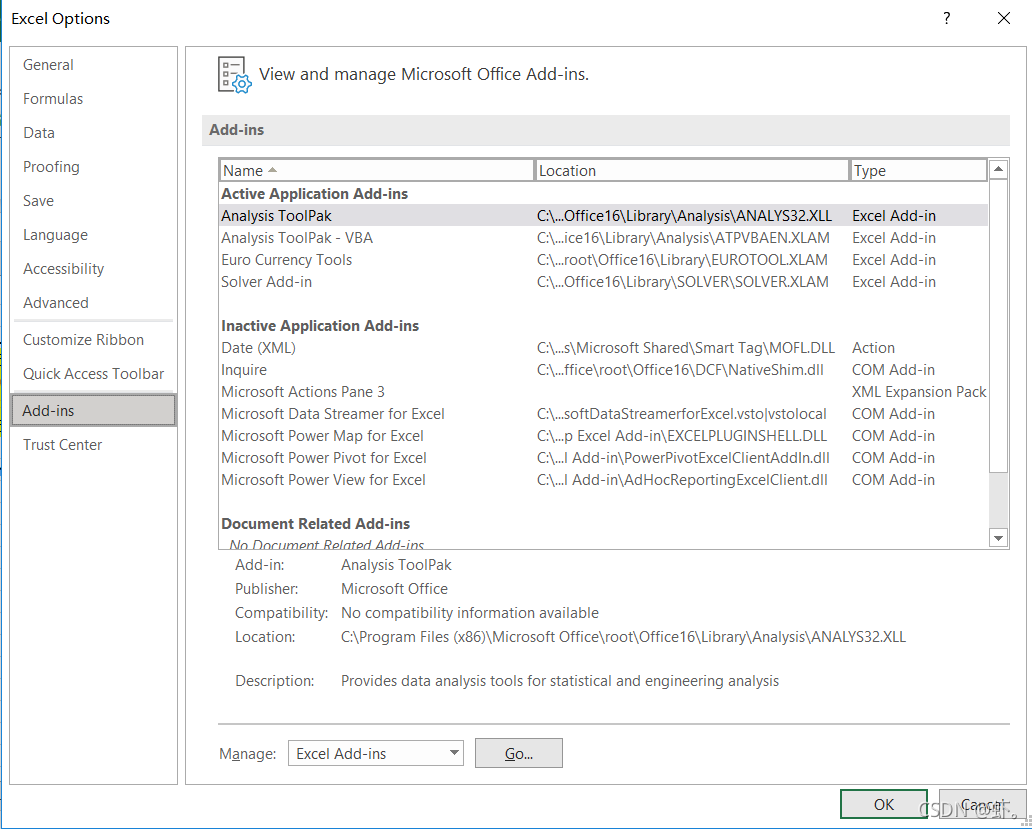
① file -> More-> Options

②Add-in

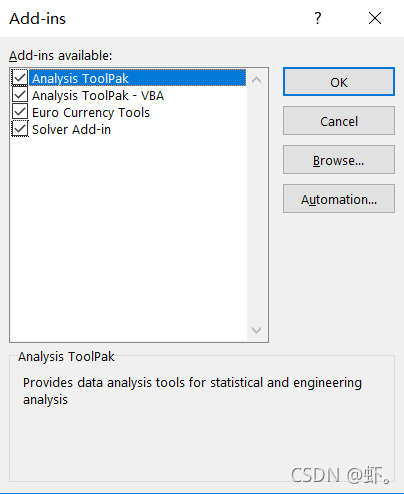
③ Bottom go

④ Check solver add in and confirm to save

⑤ solver will appear in the upper right corner of the data toolbar

Error phenomenon:
the computer with 64 bit Office installed will prompt that the macro is not available after installation

even options -> Trust Center -> Credit center settings -> Macro settings -> Enable all macros and still prompt the same error.

Solution:
① the solver cannot be installed on a 64 bit computer. You can uninstall the local 64 bit office and reinstall 32-bit office.

Or

② Install VMware, build a win10, install an office 32-bit system on the virtual machine, and open network sharing and shared folders
(1) VMware installation reference: the latest super detailed VMware virtual machine download and installation
VMware official website: VMware download
(basically the default installation)

(2) Install virtual machine win10
VMware virtual machine install windows system

(3) Setting shared folders for virtual machines
VMware sets shared folders for windows virtual machines

(4) Virtual machine settings network
I found many strategies and didn’t understand
it turns out that it’s actually very simple
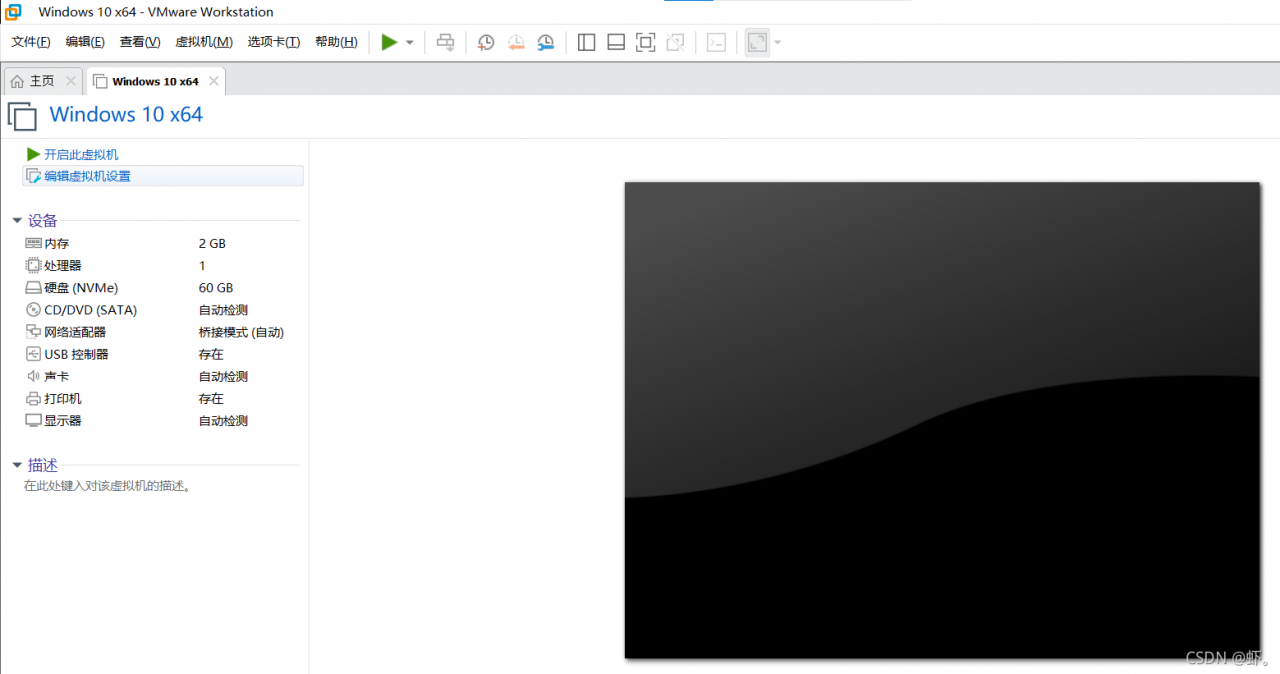
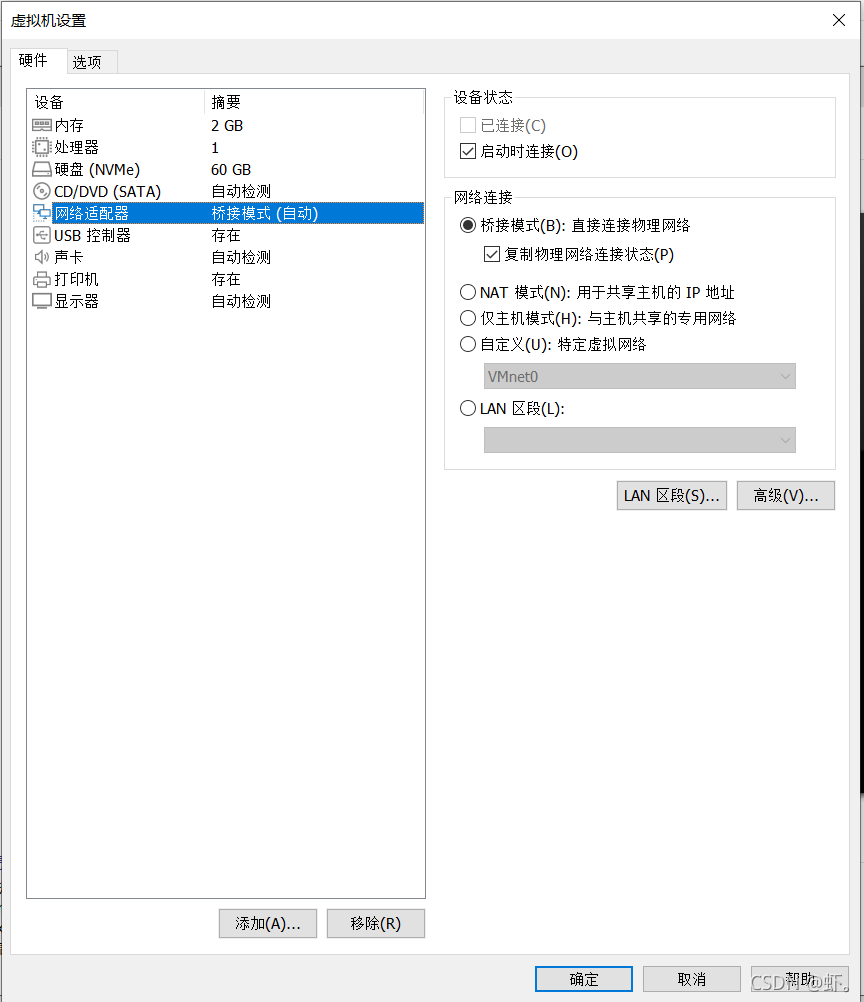
when the virtual machine is turned off, select Edit virtual machine settings

then select network adapter, check bridge mode and copy physical network connection status

OK, turn on the virtual machine again and find that the virtual machine can access the Internet normally

(5) the last step is the installation of 32-bit office
Microsoft Office
come to an official website link, download and install, and finish it.