Category Archives: Error

How to Solve Logstash error: failed to execute action

Logstash error failed to execute action

The main reason why most of them report this error is that the conf file configuration is written incorrectly

input {
    stdin {
    }
    jdbc {
      # mysql database connection
      jdbc_connection_string => "jdbc:mysql://127.0.0.1:3306/itripdb?useUnicode=true&characterEncoding=utf8&serverTimezone=UTC"
      # mysqly username and password
      jdbc_user => "root"
      jdbc_password => ""
      # Driver configuration Here fill in your own mysql-connector-java-8.0.13.jar path
      jdbc_driver_library => "D:\soft\Elasticsearch\logstash-7.9.3\logstash-7.9.3\bin\mysql-connector-java-8.0.13.jar"
      # Driver class name
      jdbc_driver_class => "com.mysql.jdbc.Driver"
      jdbc_paging_enabled => "true"
      # Specify to display 300000 entries per page
      jdbc_page_size => "300000"
      # Execute the specified sql file
 
     # The sql statement to be executed
       statement => "SELECT * FROM itrip_hotel"
      # Set listen to the meaning of each field minute hour day month year, default all * means: updated every minute
      schedule => "* * * * * *"
      # index type
      # type => ""
    }
}
 
 
output {
 
    elasticsearch {
        #es server
        hosts => ["localhost:9200"]
        #ES index name
        index => "itrip_hotel"
        #primary key self-incrementing ID
        document_id => "%{id}"
    }
    
    #Set json format
    stdout {
        codec => json_lines
    }
}

K8s initializing the master & worker node error [How to Solve]

Error 1:coredns:1.8.0 Solution

Error 2:bridge-nf-call-iptables does not exist Solution
ip_forward contents are not set to 1Solution

CentOS 7.8

Error 1:

[config/images] Pulled registry.aliyuncs.com/k8sxio/pause:3.2
[config/images] Pulled registry.aliyuncs.com/k8sxio/etcd:3.4.13-0
failed to pull image “swr.cn-east-2.myhuaweicloud.com/coredns:1.8.0”:
output: time=“2021-04-30T13:26:14+08:00” level=fatal msg=“pulling
image failed: rpc error: code = NotFound desc = failed to pull and
unpack image “swr.cn-east-2.myhuaweicloud.com/coredns:1.8.0”:
failed to resolve reference
“swr.cn-east-2.myhuaweicloud.com/coredns:1.8.0”:
swr.cn-east-2.myhuaweicloud.com/coredns:1.8.0: not found”, error: exit
status 1 To see the stack trace of this error execute with –v=5 or
higher

coredns:1.8.0
failed to resolve reference \"swr.cn-east-2.myhuaweicloud.com/coredns:1.8.0\"
Solution:

curl -sSL https://kuboard.cn/install-script/v1.20.x/init_master.sh | sh -s 1.20.6 /coredns

Error 2:

[config/images] Pulled
swr.cn-east-2.myhuaweicloud.com/coredns/coredns:1.8.0
Initialize Master Node [init] Using Kubernetes version: v1.20.6 [preflight]
Running pre-flight checks error execution phase preflight: [preflight]
Some fatal errors occurred: [ERROR
FileContent–proc-sys-net-bridge-bridge-nf-call-iptables]:
/proc/sys/net/bridge/bridge-nf-call-iptables does not exist [ERROR
FileContent–proc-sys-net-ipv4-ip_forward]:
/proc/sys/net/ipv4/ip_forward contents are not set to 1

bridge-nf-call-iptables does not exist
[ERROR FileContent--proc-sys-net-bridge-bridge-nf-call-iptables]: /proc/sys/net/bridge/bridge-nf-call-iptables does not exist
Solution:
Execute in root:

modprobe br_netfilter

ip_forward contents are not set to 1
[ERROR FileContent--proc-sys-net-ipv4-ip_forward]: /proc/sys/net/ipv4/ip_forward contents are not set to 1
Solution:
ip_forward contents is not set to 1. View contents.

cat /proc/sys/net/ipv4/ip_forward
0

0 means prohibit
1 means forward
Modify

echo "1" > /proc/sys/net/ipv4/ip_forward

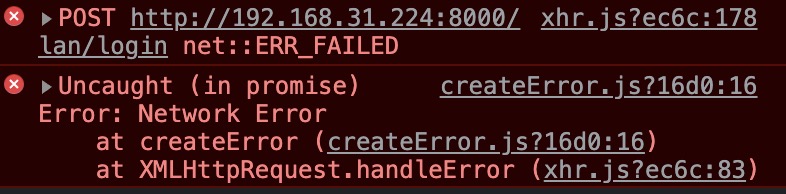
How to Solve Chrome Error: net::ERR_FAILED

I found that I couldn’t access the local project as soon as I started up after the holiday.

At first I thought it was a back-end problem, but the back-end checked for a while and found no problem. Then I used the Google browser of three colleagues to test that my IP access project can be successful. Testing with other browsers was also successful…
I reinstalled chrome, but I still couldn’t. finally, I analyzed the network and found that the request was blocked
the solution is as follows:

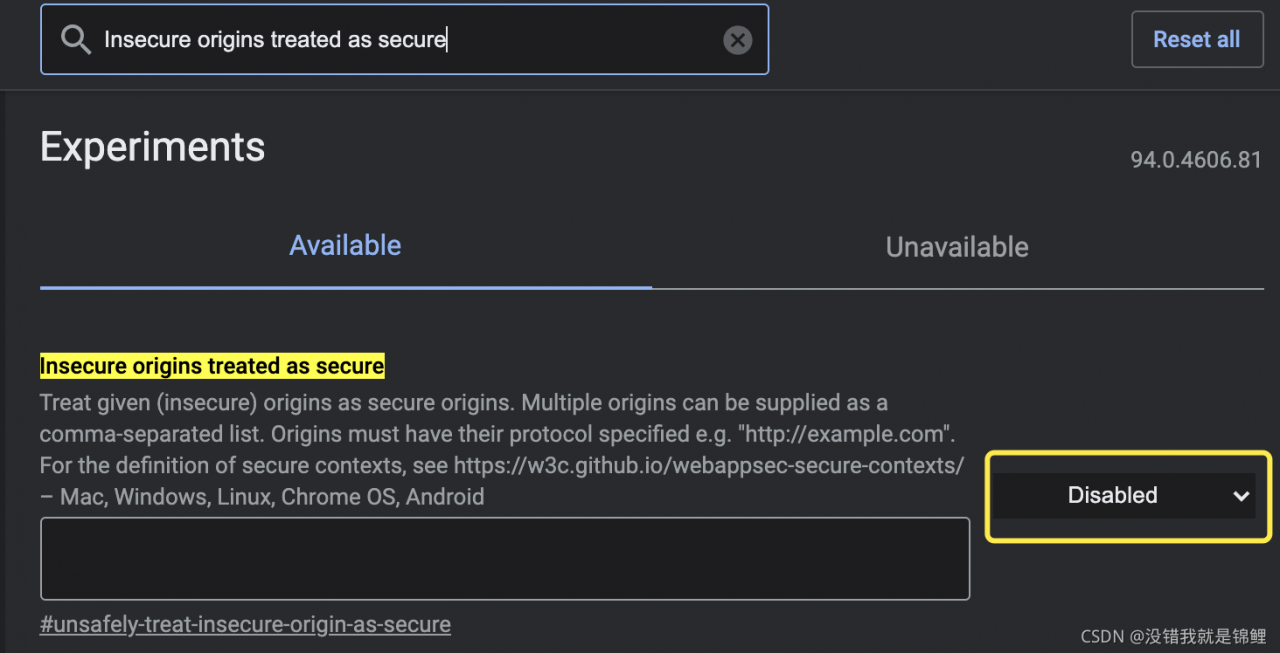
    1. browser address bar input: chrome://flags/ Search: Secure origins treated as secure change enabled to disabled

    1. or paste the project address into the following input box, you don’t need to change it to disabled
    OK, successfully solved

Conda create New environment Error: An unexpected error has occurred. Conda has prepared the above report.

Problem Description:

In Anaconda prompt (anaconda3), use the CONDA create command to create a new environment. The error is as follows:

(base) D:\OneDrive\Desktop>conda create -n my_env python==3.8
Collecting package metadata (current_repodata.json): failed

# >>>>>>>>>>>>>>>>>>>>>> ERROR REPORT <<<<<<<<<<<<<<<<<<<<<<

    Traceback (most recent call last):
      File "D:\anaconda3\lib\site-packages\conda\core\subdir_data.py", line 259, in _load
        raw_repodata_str = fetch_repodata_remote_request(
      File "D:\anaconda3\lib\site-packages\conda\core\subdir_data.py", line 613, in fetch_repodata_remote_request
        raise Response304ContentUnchanged()
    conda.core.subdir_data.Response304ContentUnchanged

    During handling of the above exception, another exception occurred:

    Traceback (most recent call last):
      File "D:\anaconda3\lib\site-packages\conda\exceptions.py", line 1079, in __call__
        return func(*args, **kwargs)
      File "D:\anaconda3\lib\site-packages\conda\cli\main.py", line 84, in _main
        exit_code = do_call(args, p)
      File "D:\anaconda3\lib\site-packages\conda\cli\conda_argparse.py", line 83, in do_call
        return getattr(module, func_name)(args, parser)
      File "D:\anaconda3\lib\site-packages\conda\cli\main_create.py", line 41, in execute
        install(args, parser, 'create')
      File "D:\anaconda3\lib\site-packages\conda\cli\install.py", line 261, in install
        unlink_link_transaction = solver.solve_for_transaction(
      File "D:\anaconda3\lib\site-packages\conda\core\solve.py", line 114, in solve_for_transaction
        unlink_precs, link_precs = self.solve_for_diff(update_modifier, deps_modifier,
      File "D:\anaconda3\lib\site-packages\conda\core\solve.py", line 157, in solve_for_diff
        final_precs = self.solve_final_state(update_modifier, deps_modifier, prune, ignore_pinned,
      File "D:\anaconda3\lib\site-packages\conda\core\solve.py", line 262, in solve_final_state
        ssc = self._collect_all_metadata(ssc)
      File "D:\anaconda3\lib\site-packages\conda\common\io.py", line 88, in decorated
        return f(*args, **kwds)
      File "D:\anaconda3\lib\site-packages\conda\core\solve.py", line 425, in _collect_all_metadata
        index, r = self._prepare(prepared_specs)
      File "D:\anaconda3\lib\site-packages\conda\core\solve.py", line 1020, in _prepare
        reduced_index = get_reduced_index(self.prefix, self.channels,
      File "D:\anaconda3\lib\site-packages\conda\core\index.py", line 276, in get_reduced_index
        new_records = SubdirData.query_all(spec, channels=channels, subdirs=subdirs,
      File "D:\anaconda3\lib\site-packages\conda\core\subdir_data.py", line 120, in query_all
        result = tuple(concat(executor.map(subdir_query, channel_urls)))
      File "D:\anaconda3\lib\concurrent\futures\_base.py", line 611, in result_iterator
        yield fs.pop().result()
      File "D:\anaconda3\lib\concurrent\futures\_base.py", line 432, in result
        return self.__get_result()
      File "D:\anaconda3\lib\concurrent\futures\_base.py", line 388, in __get_result
        raise self._exception
      File "D:\anaconda3\lib\concurrent\futures\thread.py", line 57, in run
        result = self.fn(*self.args, **self.kwargs)
      File "D:\anaconda3\lib\site-packages\conda\core\subdir_data.py", line 112, in <lambda>
        subdir_query = lambda url: tuple(SubdirData(Channel(url), repodata_fn=repodata_fn).query(
      File "D:\anaconda3\lib\site-packages\conda\core\subdir_data.py", line 125, in query
        self.load()
      File "D:\anaconda3\lib\site-packages\conda\core\subdir_data.py", line 189, in load
        _internal_state = self._load()
      File "D:\anaconda3\lib\site-packages\conda\core\subdir_data.py", line 277, in _load
        _internal_state = self._read_local_repdata(mod_etag_headers.get('_etag'),
      File "D:\anaconda3\lib\site-packages\conda\core\subdir_data.py", line 326, in _read_local_repdata
        _internal_state = self._process_raw_repodata_str(raw_repodata_str)
      File "D:\anaconda3\lib\site-packages\conda\core\subdir_data.py", line 364, in _process_raw_repodata_str
        json_obj = json.loads(raw_repodata_str or '{}')
      File "D:\anaconda3\lib\json\__init__.py", line 357, in loads
        return _default_decoder.decode(s)
      File "D:\anaconda3\lib\json\decoder.py", line 337, in decode
        obj, end = self.raw_decode(s, idx=_w(s, 0).end())
      File "D:\anaconda3\lib\json\decoder.py", line 353, in raw_decode
        obj, end = self.scan_once(s, idx)
    json.decoder.JSONDecodeError: Expecting ',' delimiter: line 420202 column 26 (char 12681108)

`$ D:\anaconda3\Scripts\conda-script.py create -n my_env python==3.8`

  environment variables:
                 CIO_TEST=<not set>
                CLASSPATH=.;D:\Programming Environment\Java\java_8\lib\dt.jar;D:\Programming
                          Environment\Java\java_8\lib\tools.jar;
        CONDA_DEFAULT_ENV=base
                CONDA_EXE=D:\anaconda3\condabin\..\Scripts\conda.exe
               CONDA_EXES="D:\anaconda3\condabin\..\Scripts\conda.exe"
             CONDA_PREFIX=D:\Anaconda3
    CONDA_PROMPT_MODIFIER=(base)
         CONDA_PYTHON_EXE=D:\anaconda3\python.exe
               CONDA_ROOT=D:\anaconda3
              CONDA_SHLVL=1
                CUDA_PATH=D:\Mx-yolov3\CUDAv10.0
           CURL_CA_BUNDLE=<not set>
                 HOMEPATH=\Users\MSTIFIY
          NVTOOLSEXT_PATH=C:\Program Files\NVIDIA Corporation\NvToolsExt\
                     PATH=D:\anaconda3;D:\anaconda3\Library\mingw-w64\bin;D:\anaconda3\Library\u
                          sr\bin;D:\anaconda3\Library\bin;D:\anaconda3\Scripts;D:\anaconda3\bin;
                          D:\Anaconda3;D:\Anaconda3\Library\mingw-w64\bin;D:\Anaconda3\Library\u
                          sr\bin;D:\Anaconda3\Library\bin;D:\Anaconda3\Scripts;D:\Anaconda3\bin;
                          D:\anaconda3\condabin;D:\Mx-yolov3\CUDAv10.0\bin;D:\Mx-yolov3\CUDAv10.
                          0\libnvvp;C:\ProgramData\Oracle\Java\javapath;C:\WINDOWS;C:\WINDOWS\sy
                          stem32;C:\WINDOWS\System32;C:\WINDOWS\System32\Wbem;C:\WINDOWS\System3
                          2\WindowsPowerShell\v1.0;C:\WINDOWS\System32\OpenSSH;D:\Lauguage
                          Studing\PythonSpider;C:\Program Files
                          (x86)\Google\Chrome\Application\chromedriver;D:\Programming
                          Environment\Java\java_8;D:\Lauguage
                          Studing\Android\Git\Git\cmd;D:\Programming Environment\Tesseract-
                          OCR;C:\Program Files (x86)\Windows Kits\8.1\Windows Performance
                          Toolkit;C:\Program Files (x86)\NVIDIA
                          Corporation\PhysX\Common;C:\Program Files\NVIDIA Corporation\NVIDIA
                          NvDLISR;D:\Lauguage Studing\Matlab\runtime\win64;D:\Lauguage
                          Studing\Matlab\bin;D:\Lauguage
                          Studing\Matlab\polyspace\bin;D:\Lauguage
                          Studing\opencv3.4.0\opencv\build\x64\vc14\bin;D:\Lauguage Studing\rasp
                          berry\putty;C:\WINDOWS\system32;C:\WINDOWS;C:\WINDOWS\System32\Wbem;C:
                          \WINDOWS\System32\WindowsPowerShell\v1.0;C:\WINDOWS\System32\OpenSSH;D
                          :\anaconda3\envs\Mx_yolov3\Scripts;D:\anaconda3\envs\Mx_yolov3;D:\Andr
                          oidSDK;\platform-tools;D:\AndroidSDK;\tools;D:\Tools\cmake-3.21.2-wind
                          ows-x86_64\bin;C:\WINDOWS;C:\WINDOWS\system32;C:\WINDOWS\System32;C:\W
                          INDOWS\System32\Wbem;C:\WINDOWS\System32\WindowsPowerShell\v1.0;C:\WIN
                          DOWS\System32\OpenSSH;D:\Programming
                          Environment\python;D:\Fiddler;D:\Lauguage Studing\鐖櫕\PyCharm
                          Community Edition 2019.3.1\bin;.;D:\Programming
                          Environment\python\Scripts;C:\Program Files
                          (x86)\Google\Chrome\Application;D:\Programming
                          Environment\Java\java_8\bin;D:\Programming
                          Environment\Java\java_8\jre\bin;"D:\Programming
                          Environment\Java\java_8\bin;D:\Mx-yolov3\CUDAv10.0\bin;D:\Mx-yolov3\CU
                          DAv10.0\libnvvp;C:\ProgramData\Oracle\Java\javapath;C:\WINDOWS;C:\WIND
                          OWS\system32;C:\WINDOWS\System32;C:\WINDOWS\System32\Wbem;C:\WINDOWS\S
                          ystem32\WindowsPowerShell\v1.0;C:\WINDOWS\System32\OpenSSH;D:\Lauguage
                          Studing\PythonSpider;C:\Program Files
                          (x86)\Google\Chrome\Application\chromedriver;D:\Programming
                          Environment\Java\java_8;D:\Lauguage
                          Studing\Android\Git\Git\cmd;D:\Programming Environment\Tesseract-
                          OCR;C:\Program Files (x86)\Windows Kits\8.1\Windows Performance
                          Toolkit;C:\Program Files (x86)\NVIDIA
                          Corporation\PhysX\Common;C:\Program Files\NVIDIA Corporation\NVIDIA
                          NvDLISR;D:\Lauguage Studing\Matlab\runtime\win64;D:\Lauguage
                          Studing\Matlab\bin;D:\Lauguage
                          Studing\Matlab\polyspace\bin;D:\Lauguage
                          Studing\opencv3.4.0\opencv\build\x64\vc14\bin;D:\Lauguage Studing\rasp
                          berry\putty;C:\WINDOWS\system32;C:\WINDOWS;C:\WINDOWS\System32\Wbem;C:
                          \WINDOWS\System32\WindowsPowerShell\v1.0;C:\WINDOWS\System32\OpenSSH;D
                          :\anaconda3\envs\Mx_yolov3\Scripts;D:\anaconda3\envs\Mx_yolov3;D:\Andr
                          oidSDK;\platform-tools;D:\AndroidSDK;\tools;D:\Tools\cmake-3.21.2-wind
                          ows-x86_64\bin;";"D:\AndroidSDK;\platform-
                          tools;D:\AndroidSDK;\tools鈥嬧€嬧€嬧€嬧€嬧€嬧€?;D:\Programming
                          Environment\Tesseract-OCR;D:\anaconda3;C:\Users\MSTIFIY\AppData\Local\
                          Microsoft\WindowsApps;D:\Lauguage Studing\miktex\MiKTeX\miktex\bin\x64
             PSMODULEPATH=C:\Program Files\WindowsPowerShell\Modules;C:\WINDOWS\system32\Windows
                          PowerShell\v1.0\Modules
       REQUESTS_CA_BUNDLE=<not set>
            SSL_CERT_FILE=<not set>

     active environment : base
    active env location : D:\Anaconda3
            shell level : 1
       user config file : C:\Users\MSTIFIY\.condarc
 populated config files : C:\Users\MSTIFIY\.condarc
          conda version : 4.9.2
    conda-build version : 3.18.11
         python version : 3.8.3.final.0
       virtual packages : __cuda=10.2=0
                          __win=0=0
                          __archspec=1=x86_64
       base environment : D:\anaconda3  (writable)
           channel URLs : https://mirrors.ustc.edu.cn/anaconda/pkgs/main/win-64
                          https://mirrors.ustc.edu.cn/anaconda/pkgs/main/noarch
                          https://mirrors.ustc.edu.cn/anaconda/pkgs/free/win-64
                          https://mirrors.ustc.edu.cn/anaconda/pkgs/free/noarch
                          https://mirrors.ustc.edu.cn/anaconda/cloud/conda-forge/win-64
                          https://mirrors.ustc.edu.cn/anaconda/cloud/conda-forge/noarch
          package cache : D:\anaconda3\pkgs
                          C:\Users\MSTIFIY\.conda\pkgs
                          C:\Users\MSTIFIY\AppData\Local\conda\conda\pkgs
       envs directories : D:\anaconda3\envs
                          C:\Users\MSTIFIY\.conda\envs
                          C:\Users\MSTIFIY\AppData\Local\conda\conda\envs
               platform : win-64
             user-agent : conda/4.9.2 requests/2.24.0 CPython/3.8.3 Windows/10 Windows/10.0.19041
          administrator : False
             netrc file : None
           offline mode : False


An unexpected error has occurred. Conda has prepared the above report.

If submitted, this report will be used by core maintainers to improve
future releases of conda.
Would you like conda to send this report to the core maintainers?

[y/N]:

Solution:

Open the .Condarc file:

channels:
  - https://mirrors.ustc.edu.cn/anaconda/pkgs/main/
  - https://mirrors.ustc.edu.cn/anaconda/pkgs/free/
  - https://mirrors.ustc.edu.cn/anaconda/cloud/conda-forge/
ssl_verify: true

Delete the mirror source of CONDA forge

channels:
  - https://mirrors.ustc.edu.cn/anaconda/pkgs/main/
  - https://mirrors.ustc.edu.cn/anaconda/pkgs/free/
ssl_verify: true

Create a new environment again. The operation is successful.
Git Error: failed: The TLS connection was non-properly terminated

Tencent virtual machine doesn’t know why it can’t git clone, and an error is reported:

fatal: unable to access 'https://github.com/asdf-vm/asdf-plugins.git/': gnutls_handshake() failed: The TLS connection was non-properly terminated.
plugin ruby not found in repository

After checking, you need to use libcurl4 OpenSSL dev to replace gnutls to compile GIT.

sudo apt-get install build-essential fakeroot dpkg-dev
mkdir ~/git-openssl
cd ~/git-openssl
sudo apt-get source git
sudo apt-get build-dep git

If there is an error that the source code cannot be found, use the command sudo vim /etc/apt/sources.list to open the file and uncomment the line with deb_src, save and run sudo apt update, and then execute the last command above.
Then:

sudo apt-get install libcurl4-openssl-dev
sudo dpkg-source -x git_2.17.1-1ubuntu0.9.dsc
cd git_2.17.1 # Actual version may differ

Then edit the Debian/control file and use the command sudo VIM deebian/control to change all libcurl4 gnutls dev to libcurl4 OpenSSL dev. (I only met one libcurl4 gnutls dev here)
then run the command:

# This step will take a long time, wait patiently
sudo dpkg-buildpackage -rfakeroot -b

sudo dpkg -i git_2.17.1-1ubuntu0.9_amd64.deb

That’s it. Just git again

+ git clone https://github.com/asdf-vm/asdf.git /root/.asdf --depth 1
Cloning into '/root/.asdf'...
+ echo -e '\n. $HOME/.asdf/asdf.sh'
+ echo -e '\n. $HOME/.asdf/completions/asdf.bash'
+ echo -e 'legacy_version_file = yes'
+ asdf plugin-add ruby
initializing plugin repository...Cloning into '/root/.asdf/repository'...

————————————————————————————Renew

I did it again in the afternoon. There was still the same problem. Finally, the reset agent solved it perfectly

git config --global --unset https.https://github.com.proxy 
git config --global --unset http.https://github.com.proxy 

[Solved] SpringMVC Error: element web-app must be declared

Problem background

Today, when learning spring MVC, you need to configure the web.xml file, and an error message element web app must be declared appears.


Solution:

<web-app xmlns="http://xmlns.jcp.org/xml/ns/javaee"
         xmlns:xsi="http://www.w3.org/2001/XMLSchema-instance"
         xsi:schemaLocation="http://xmlns.jcp.org/xml/ns/javaee
                      http://xmlns.jcp.org/xml/ns/javaee/web-app_4_0.xsd"
         version="4.0"
         metadata-complete="true">
</web-app>

[Solved] Errors encountered when using VS to write opengl code

Record the errors encountered when writing opengl code using vs:
problem:
error: the following is a new check for glut 3.0; Update your code.
after checking for a long time, it is found that this may be the reason why the portal
does not write the callback function of the window

Solution:
write the callback function yourself

glutDisplayFunc(&display);

Among them, display is the calling function written by yourself, for example:

glutDisplayFunc(DrawOval);//Draw callback function, glut mechanism, it will be executed when it feels the need to redraw

The drawOval here is the function I wrote to draw an ellipse

How to Solve Show() error caused by empty data

In order to solve the show() error caused by empty data, it is used during filtering! x. Isnullat (1) determines whether it is empty. If it is empty, it will be discarded


//Filter .getDouble(1) 1 refers to the first column, starting from 0
    
    DF.filter(x => !x.isNullAt(1) && x.getDouble(1) < 1995).show(10)
    

Jenkins uses NPM to build Vue error, and the manual build is normal

Error reporting scenario

Jenkins uses NPM to build Vue. The front end reports an error, and the manual build is normal

Error reporting, such as

Treating warnings as errors because process.env.CI = true.
Most CI servers set it automatically.

Failed to compile.
src/api/api.js
  Line 2:8:  'React' is defined but never used  no-unused-vars

src/api/attestation/index.js
  Line 2:8:  'qs' is defined but never used  no-unused-vars

src/api/query/index.js
  Line 2:8:  'qs' is defined but never used  no-unused-vars
...

resolvent

# Adding variables
export CI=false
npm install 

Link:

https://stackoverflow.com/questions/62663451/treating-warnings-as-errors-because-process-env-ci-true-failed-to-compile