Author Archives: Robins

[Local Precompilation Error] do not set execute permissions for source files

1. Problem occurrence scenario

I created three new files under the project file. When submitting the code, I precompiled the script locally, and three errors occurred: do not set execute permissions for source files. Each file corresponds to one such error.

2. Understanding of error reporting

Do not set execute permissions for source files: do not set executable permissions for source files
understanding: you need to change the permission of the file to non-executable
for the understanding of file permissions, see how to understand file permission settings in this blog – 644 755 777, etc

3. Solution

1) On the console, after entering the file directory, enter
LS – L
to view the current permissions of the file. It is found that the file has “executable permissions”: X (generally 755)

2) Enter Chmod < File permission type, generally changed to 644><File name>

[Solved] Vue Error: Uncaught TypeError: Vue.createApp is not a function

Project scenario:

Today, in the process of reviewing the basis of Vue, I tried to introduce and use Vue with traditional HTML and native memory, and then found that I really pulled it. The memory is not only vague, but also confused. Vue2 mixed with vue3 is there! Next, let’s see how to report the error.

Problem Description:

The HTML structure is as follows:

<!DOCTYPE html>
<html lang="en">
  <head>
    <meta charset="UTF-8" />
    <meta http-equiv="X-UA-Compatible" content="IE=edge" />
    <meta name="viewport" content="width=device-width, initial-scale=1.0" />
    <title>Document</title>
    <script src="https://cdn.jsdelivr.net/npm/[email protected]"></script>
  </head>
  <body>
    <div id="app"></div>
  </body>
  <script>
    const app = Vue.createApp({
        data() {
            return {
                message: '666'
            }
        },
        template: "<h2>{{message}}</h2>"
    })
    app.mount("#app")
  </script>
</html>

Good guy, 666 didn’t render. Just click and report me the error
Uncaught TypeError: Vue.createApp is not a function。
I’m still wondering. I think it’s ok if createapp creates a Vue application and mount it to the node?Why, vue.createapp is not available yet

Cause analysis:

Later, I read the document and found that I had mixed up vue.createapp and mount, which are the writing methods of vue3, but I introduced vue2
it is clearly written on the official website. Vue2 uses new and is an EL mount node
vue2 is written as follows:

 var app = new Vue({
   el: '#app',
   data: {
     message: '666',
   },
   template: '<h2>{{message}}</h2>',
});

The following is the way vue3 is written

 const app = Vue.createApp({
     data() {
         return {
             message: '666'
         }
     },
     template: "<h2>{{message}}</h2>"
 })
 app.mount("#app")

MySQL OrderBy Error: Expression #1 of ORDER BY

Add any_value () package to all non-aggregated columns (that is, data directly fetched in the table)

**Note: The columns used in order by should also be wrapped**

The ANY_VALUE() function is useful when the ONLY_FULL_GROUP_BY mode is enabled and GROUP BY is used for query; this function is used to suppress the value rejection caused when the ONLY_FULL_GROUP_BY mode is enabled;
example:

SELECT
	any_value ( a.id ) AS id,
	a.footprint_id AS footprintId,
	any_value ( a.footprint_type ) AS footprintType,
	any_value ( a.user_id ) AS userId 
FROM
	info_footprint a 
WHERE
	a.footprint_type = 3 
	AND a.user_id = 1 
	AND a.del_flag = '0' 
GROUP BY
	footprint_id 
ORDER BY
	any_value(a.id) DESC 
	LIMIT 10;

Prometheus Error: “INVALID“ is not a valid start token [How to Solve]

Error: “INVALID” is not a valid start token

The configuration file that reports the error:

  - job_name: 'jiankong'
    scrape_interval: 15s
    static_configs:
    - targets: ['192.168.17.54:6666']

Solution:

add a line of code

metrics_path: '/prometheus'

configuration file after solution

  - job_name: 'jiankong'
    metrics_path: '/prometheus'
    scrape_interval: 15s
    static_configs:
    - targets: ['192.168.17.54:6666']

Reason for error reporting: this problem is caused by incorrect data format, which can be solved by specifying the pulled data format

[Solved] Read the resources resource and convert it to file error: java.io.filenotfoundexception

Read the resources resource and convert it to file

Project scenario:

read JSON file from resources directory to get file


Problem Description:

there are no problems in the local project. As a result, an error is reported after the spring boot hits jar

java.io.FileNotFoundException: class path resource [/static/xxxxx.json] cannot be resolved to absolute file path because it does not reside in the file system: jar:file:/app.jar!/ BOOT-INF/classes!/ static/xxxxxxx

Code example:

 Resource resource = new ClassPathResource(PushFcmApnsProperties.androidFilePath);
            FileInputStream serviceAccount = new FileInputStream(resource.getFile());
            

Cause analysis:

in the development and debugging stage, when there is no package, you can locate the resource file through the path. At this time, the resource file really exists in the local disk of the computer </ font>

After packaging, spring attempts to access the file system path, but cannot access the path in the jar. So report an error. At this time, the resource file is in the classes file in the jar package
for example:


Solution:


//Change the read method first via
InputStream inputStream = Thread.currentThread().getContextClassLoader().getResourceAsStream("relative path");

// Get the inputStream stream of the file and convert it to file to create a temporary file
File bathFile = File.createTempFile("filename", "file format");
            FileUtils.copyInputStreamToFile(inputStream, bathFile);

Taro Error: chunk common [mini-css-extract-plugin] Conflicting order between: ……

Error Messages:

chunk common [mini-css-extract-plugin]
Conflicting order between:
css ./node_modules/css-loader/dist/cjs.js??ref–2-oneOf-0-1!./node_modules/vue-loader/lib/loaders/stylePostLoader.js!./node_modules/@tarojs/mini-runner/node_modules/postcss-loader/dist/cjs.js??ref–2-oneOf-0-2!./node_modules/@tarojs/mini-runner/node_modules/less-loader/dist/cjs.js??ref–2-oneOf-0-3!./node_modules/vue-loader/lib??vue-loader-options!./src/components/place-holder/index.vue?vue&type=style&index=0&lang=less&css ./node_modules/css-loader/dist/cjs.js??ref–2-oneOf-0-1!./node_modules/vue-loader/lib/loaders/stylePostLoader.js!./node_modules/@tarojs/mini-runner/node_modules/postcss-loader/dist/cjs.js??ref–2-oneOf-0-2!./node_modules/@tarojs/mini-runner/node_modules/less-loader/dist/cjs.js??ref–2-oneOf-0-3!./node_modules/vue-loader/lib??vue-loader-options!./src/components/popup-scroll/index.vue?vue&type=style&index=0&lang=less&


Solution: It took a long time to find out that it was caused by the wrong order of introduction of components in a file, the pit.
Error example

<template>
	<view>
			<B/>
			<A/>
	</view>
</template>
<script>
		import A from "./components/a";
		import B from "../components/b";
</script>

Correct example

<template>
	<view>
			<B/>
			<A/>
	</view>
</template>

<script>
		import B from "../components/b";
		import A from "./components/a";
</script>

[Solved] OpenSSL ssL_read: Connection was aborted,errno 10053

OpenSSL ssL_Read: connection was aborted, errno 10053 error

Original error message:
git: fatal: unable to access’ https://github.com/overwhatx/gittest.git/ :
OpenSSL ssL_read: Connection was aborted,errno 10053

terms of settlement

Reason: git limits the size of push by default. Run the command to change the limit size to increase the buffer

Solution:
git config -- global http.postbuffer 524288000

Change network authentication settings

Solution:
git config http.sslverify "false"

[Solved] Cannot read properties of undefined (reading ‘propsData‘)“

When using Vue, I always reported errors when introducing components related to menus in antd, and other components unrelated to menus can be displayed normally. This bug bothered me for a long time, and finally found a solution to the problem on GitHub.

The error information is as follows:
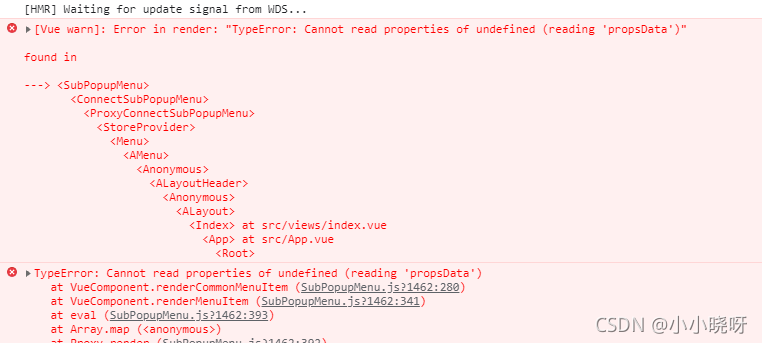
Problem Description:

I first introduced it this way:

import Vue from 'vue'
import { Menu, Layout, Icon, Breadcrumb } from 'ant-design-vue'
Vue.use(Layout)
export default {

  components: {
    'a-menu': Menu,
    'a-icon': Icon,
    'a-breadcrumb': Breadcrumb,
    'a-breadcrumb-item': Breadcrumb.Item
  },

Then the browser kept reporting errors. By checking the error information on the browser console, I probably knew that it was due to the lack of asubmenu and amenuitem. Therefore, I introduced it, but I didn’t respond, so I thought it wasn’t this problem. After asking Du Niang, I couldn’t find a solution. Finally, I found that the way I introduced it was wrong on GitHub.

The correct approach should be to introduce the following in the component:

     components: {
    'a-menu': Menu,
    'a-icon': Icon,
    'a-breadcrumb': Breadcrumb,
    'a-breadcrumb-item': Breadcrumb.Item,
    ASubMenu: Menu.SubMenu,
    AMenuItem: Menu.Item
  },

Finally, the source code of the page is attached for reference:

<template>
  <a-layout id="components-layout-demo-top-side-2">
    <a-layout-header class="header">
      <div class="logo" />
      <a-menu
        theme="dark"
        mode="horizontal"
        :default-selected-keys="['2']"
        :style="{ lineHeight: '64px' }"
      >
        <a-menu-item key="1">
          nav 1
        </a-menu-item>
        <a-menu-item key="2">
          nav 2
        </a-menu-item>
        <a-menu-item key="3">
          nav 3
        </a-menu-item>
      </a-menu>
    </a-layout-header>
    <a-layout>
      <a-layout-sider width="200" style="background: #fff">
        <a-menu
          mode="inline"
          :default-selected-keys="['1']"
          :default-open-keys="['sub1']"
          :style="{ height: '100%', borderRight: 0 }"
        >
          <a-sub-menu key="sub1">
            <span slot="title"><a-icon type="user" />subnav 1</span>
            <a-menu-item key="1">
              option1
            </a-menu-item>
            <a-menu-item key="2">
              option2
            </a-menu-item>
            <a-menu-item key="3">
              option3
            </a-menu-item>
            <a-menu-item key="4">
              option4
            </a-menu-item>
          </a-sub-menu>
          <a-sub-menu key="sub2">
            <span slot="title"><a-icon type="laptop" />subnav 2</span>
            <a-menu-item key="5">
              option5
            </a-menu-item>
            <a-menu-item key="6">
              option6
            </a-menu-item>
            <a-menu-item key="7">
              option7
            </a-menu-item>
            <a-menu-item key="8">
              option8
            </a-menu-item>
          </a-sub-menu>
          <a-sub-menu key="sub3">
            <span slot="title"><a-icon type="notification" />subnav 3</span>
            <a-menu-item key="9">
              option9
            </a-menu-item>
            <a-menu-item key="10">
              option10
            </a-menu-item>
            <a-menu-item key="11">
              option11
            </a-menu-item>
            <a-menu-item key="12">
              option12
            </a-menu-item>
          </a-sub-menu>
        </a-menu>
      </a-layout-sider>
      <a-layout style="padding: 0 24px 24px">
        <a-breadcrumb style="margin: 16px 0">
          <a-breadcrumb-item>Home</a-breadcrumb-item>
          <a-breadcrumb-item>List</a-breadcrumb-item>
          <a-breadcrumb-item>App</a-breadcrumb-item>
        </a-breadcrumb>
        <a-layout-content
          :style="{ background: '#fff', padding: '24px', margin: 0, minHeight: '280px' }"
        >
          Content
        </a-layout-content>
      </a-layout>
    </a-layout>
  </a-layout>
</template>
<script>
import Vue from 'vue'
import { Menu, Layout, Icon, Breadcrumb } from 'ant-design-vue'
Vue.use(Layout)
export default {

  components: {
    'a-menu': Menu,
    'a-icon': Icon,
    'a-breadcrumb': Breadcrumb,
    'a-breadcrumb-item': Breadcrumb.Item,
    ASubMenu: Menu.SubMenu,
    AMenuItem: Menu.Item

  },
  data () {
    return {
      collapsed: false
    }
  },
  methods: {
  }
}
</script>
<style>
#components-layout-demo-top-side-2 .logo {
  width: 120px;
  height: 31px;
  background: rgba(255, 255, 255, 0.2);
  margin: 16px 28px 16px 0;
  float: left;
}
</style>


Docker starts MySQL container and reports an error driver failed programming external connectivity on endpoint mysq

Look at the error first:

The mistake is like the above. At first, I thought my command was wrong or something else, but later I found it was not

But it’s still troubleshooting one by one.
first, the command to create a MySQL container:
docker create – P 3306:3306 — name of the container – e mysql_ ROOT_ Password = database password MySQL version:

After creation, enter the command: docker PS – a
to view all containers

Then you can see the MySQL you just named

Start command:
docker start container ID

Then an error will be reported. If an error is reported, please see the following:

Problem solving:

The first is to restart the docker. It is useless for me to restart anyway. The restart command:
systemctl restart docker
it is also possible that you will be OK after restarting

The second is to view all containers through the docker PS – a command. If you have created MySQL before, when you create a MySQL container again, you need to change an external port, not 3306. Ensure that the port and name are different from the MySQL container created before

You can also use the previous MySQL container and start it directly through the docker start container ID

Idea2021 reports an error. Default operand size is 64 sets the startup task to automatically add the registry

Problem background:

Idea with git will remind you of the following error
arbitrary: use of Rex. W is meaningless (default operand size is 64)
because there is security software, you need to add a key in the registry
Computer \ HKEY_ LOCAL_ Create a new [string value] HookApi under machine \ software \ Tec \ ocular. 3 \ agent \ config_ Dis INS, numerical data: 1
but it’s too troublesome to manually add and restart idea every time. Now it’s changed to automatically add registry configuration after startup

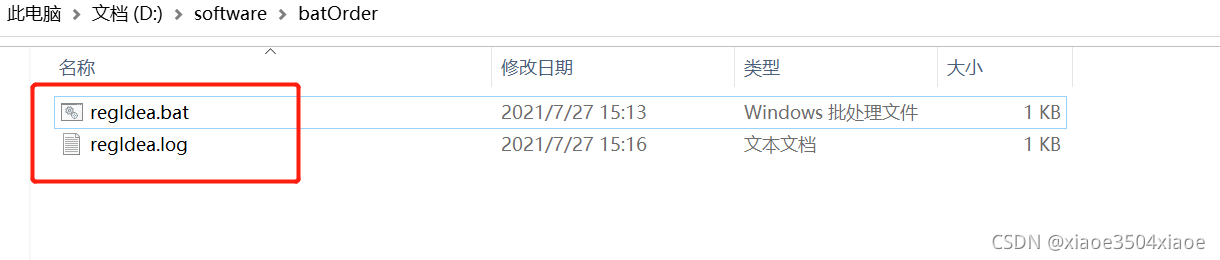
1. Find a directory and create two files, one regidea.bat and one regidea.log

As shown in Figure

2. Modify the bat file and enter the following instructions

(reg query HKEY_LOCAL_MACHINE\SOFTWARE\TEC\Ocular.3\agent\config /v hookapi_disins && (echo %date:~0,4%-%date:~5,2%-%date:~8,2% %time:~0,2%:%time:~3,2%:%time:~6,2% reg exist... >>%~dp0\regIdea.log )) || ((reg add HKEY_LOCAL_MACHINE\SOFTWARE\TEC\Ocular.3\agent\config  /t REG_SZ /v hookapi_disins /d 1)&&(echo %date:~0,4%-%date:~5,2%-%date:~8,2% %time:~0,2%:%time:~3,2%:%time:~6,2% reg set suc... >>%~dp0\regIdea.log ))

The main idea is to query whether there is a hook API in the registry_ Dis INS, set and print a line of text set suc… In regidea.log
If yes, print reg exist…
log file just to see if the instruction takes effect

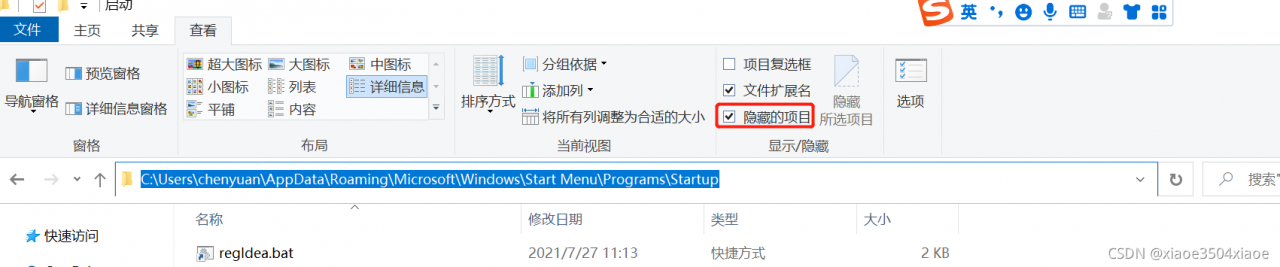
3. Create a shortcut to the bat file and drag it into the following directory

C: \ users \ XXX \ appdata \ roaming \ Microsoft \ windows \ start menu \ programs \ startup
where XXX is the user name
if the directory cannot be found, check the view hidden item of the folder

[screen recording] an error is reported in the screenrecord command: inaccessible or not found

[question]:

~ $ adb shell screenrecord /sdcard/test.mp4

/system/bin/sh: screenrecord: inaccessible or not found

This is because many mobile phones recycle the screenrecord function for safety, so we can’t use the command line for screen recording.

Through the ADB shell LS/system/bin/command, you can see LS:/system/bin// screenrecord: permission denied, indicating that you really don’t have screen recording permission.

Another easy-to-use screen recording method

Installation (MAC OS only):

brew install scrcpy

If there is no ADB, you need to install it first:

brew cask install android-platform-tools

Run scrcpy

After installation, connect the computer to the mobile phone and execute scrcpy to see the real-time projection of the mobile phone on the computer:

scrcpy

Recording screen

If you want to record the screen, execute one of the following two commands:

scrcpy --record test.mp4
scrcpy -r test.mp4

You can also record the screen without turning on the real-time image display:

scrcpy --no-display --record file.mp4
scrcpy -Nr file.mkv

more

For more details, see scrcpy (Chinese version – & gt; scrcpy)