Tag Archives: python

Record Stanford corenlp running all the time without error

Record the relevant contents of Stanford corenlp running without error

1. Detection method

NLP handles how to get the code for the cause of the error

from stanfordcorenlp import StanfordCoreNLP
import logging
# Use logging to monitor why errors occur

nlp = StanfordCoreNLP("D:\study\python\Lib\site-packages\stanfordcorenlp\stanford-corenlp-full-2018-02-27", lang='zh',quiet=False,logging_level=logging.DEBUG)
text = "Knowledge background in business management and related industry knowledge."

print('hello')
nlp.close()

2. Reason analysis

“The main problem is that my java environment is 32-bit. The largest memory of the 32-bit Java environment is 4G. And the memory required by Stanford corenlp is 4G. That’s why the Java environment refuses to create a JVM, and that’s why the program can’t run in the end. ” (from a blogger)

Several solutions to HDF5 error reporting in Python environment

Several solutions to the problem of HDF5 error reporting in Python environment (personal test)
the content of error reporting is as follows:
warning! HDF5 library version mismatched error
the HDF5 header files used to compile this application do not match
the version used by the HDF5 library to which this application is linked.
data corruption or segmentation faults may occur if the application continues.
This can happen when an application was compiled by one version of HDF5 but
linked with a different version of static or shared HDF5 library.
You should recompile the application or check your shared library related
settings such as ‘LD_ LIBRARY_ PATH’.
You can, at your own risk, disable this warning by setting the environment
variable ‘HDF5_ DISABLE_ VERSION_ CHECK’ to a value of ‘1’.
Setting it to 2 or higher will suppress the warning messages totally.
Headers are 1.10.4, library is 1.10.5

There are two ways to solve this problem.
first of all, this problem may be the mismatch of HDF5 library, or it may be something similar to warning. I will talk about it in detail below.
The first solution: uninstall HDF5 and then install it again.
The code executed by the terminal is as follows:
CONDA install HDF5
there are many friends on the Internet who use this method to be useful. I personally test that this method is useless to me.
The second solution: check the set path: LD_ LIBRARY_ Path
I personally test: because the system I use is win10, but LD_ LIBRARY_ I couldn’t find the path for a long time. Later, I searched for the path of Linux, so I didn’t use this method.
The third solution: the HDF5_ DISABLE_ VERSION_ Check is set to a higher level, ignoring warnings.
Before import tensorflow, add the following code to the code:
Import OS;
Import OS;
Import OS os.environ [‘HDF5_ DISABLE_ VERSION_ Check ‘] =’2’
my personal test: this method is really useful!

Pychar install paddlex error Microsoft Visual C ++ fourteen . 0 is required

Microsoft Visual C + + 14.0 is required

Solution 1

Install Microsoft Visual C + + build tools
directly by default. After the installation, install paddlex in pychar, and no error will be reported

Solution 2

After installing with PIP command, import pychar
and open pychar’s view – & gt; tool windows – & gt; Terminal (or use the shortcut key Alt + F12)
in the command window, enter PIP install padding
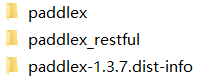
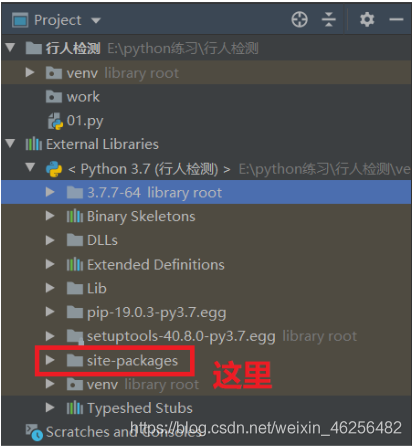
PIP command. By default, it is installed in the directory of Python's site packages (for example, my file is f:: (Python), 3.7.7-64, lib, site packages)
copy these files in the directory to pychar's external directory In site packages under libraries, you can import paddlex to use

[Solved] ValueError: the indices for endog and exog are not aligned

When running the following code

x = data1        
y = data2
X = sm.add_constant(x)
result = (sm.OLS(y, X)).fit()
print(result.summary)

Error: valueerror: the indexes for endog and exog are not aligned

Solutions:

1. Check the data type: it has nothing to do with the service or dataframe type, and it has nothing to do with whether the data types of Y and X are consistent

2. Check data length: len (y) and Len (x) have the same length

3. It is found that although the length of len is the same, the index value of data is different. That’s the problem.

Because my x data is vertically combined by two dataframe data through concat, the index values of the data are different.

As shown in the figure below:

The complete data are as follows:

       date 
0    20180101
1    20180102
2    20180103
3    20180104
4    20180105
5    20180106

But the consolidated data is presented in this way, but:

       date 
0    20180101
1    20180102
2    20180103
3    20180104
0    20180105
1    20180106

Because the index values on the left side of the two groups of service data used for calculation are different, an error is reported. Solution:

Whether the original data is of dataframe or service type, it is converted to list type first. Take dataframe data as an example

datalist = data['close'].tolist()                    # change dataframe to list
datalist = data + templist                           # list MERGER
dataf = pd.DataFrame(datalist, columns=['close'])    # list TO dataframe

After a series of data processing in the early stage, the program is executed again, and the error disappears.

Normal display:

                            OLS Regression Results
==============================================================================
Dep. Variable:                  close   R-squared:                       0.326
Model:                            OLS   Adj. R-squared:                  0.326
Method:                 Least Squares   F-statistic:                     1932.
Date:                Tue, 22 Jan 2019   Prob (F-statistic):               0.00
Time:                        14:34:33   Log-Likelihood:                -11706.
No. Observations:                4000   AIC:                         2.342e+04
Df Residuals:                    3998   BIC:                         2.343e+04
Df Model:                           1
Covariance Type:            nonrobust
==============================================================================
                 coef    std err          t      P>|t|      [0.025      0.975]
------------------------------------------------------------------------------
const          6.8217      0.092     74.332      0.000       6.642       7.002
close          0.3305      0.008     43.951      0.000       0.316       0.345
==============================================================================
Omnibus:                      786.494   Durbin-Watson:                   0.009
Prob(Omnibus):                  0.000   Jarque-Bera (JB):             1384.316
Skew:                           1.260   Prob(JB):                    2.51e-301
Kurtosis:                       4.399   Cond. No.                         15.7
==============================================================================

Eclipse PyDev “interpreter does not exist in filesystem”

The reason for the problem: this kind of problem is generally should be will python.exe The file has been renamed

Solution: there are generally two ways:

1: change the file name back (basically, it won’t be changed back, because the file name is usually changed to include both python2 and python3 on the computer. In order to add environment variables and successfully run two different versions of python, the file name is usually changed)

2: modify the python path of eclipse

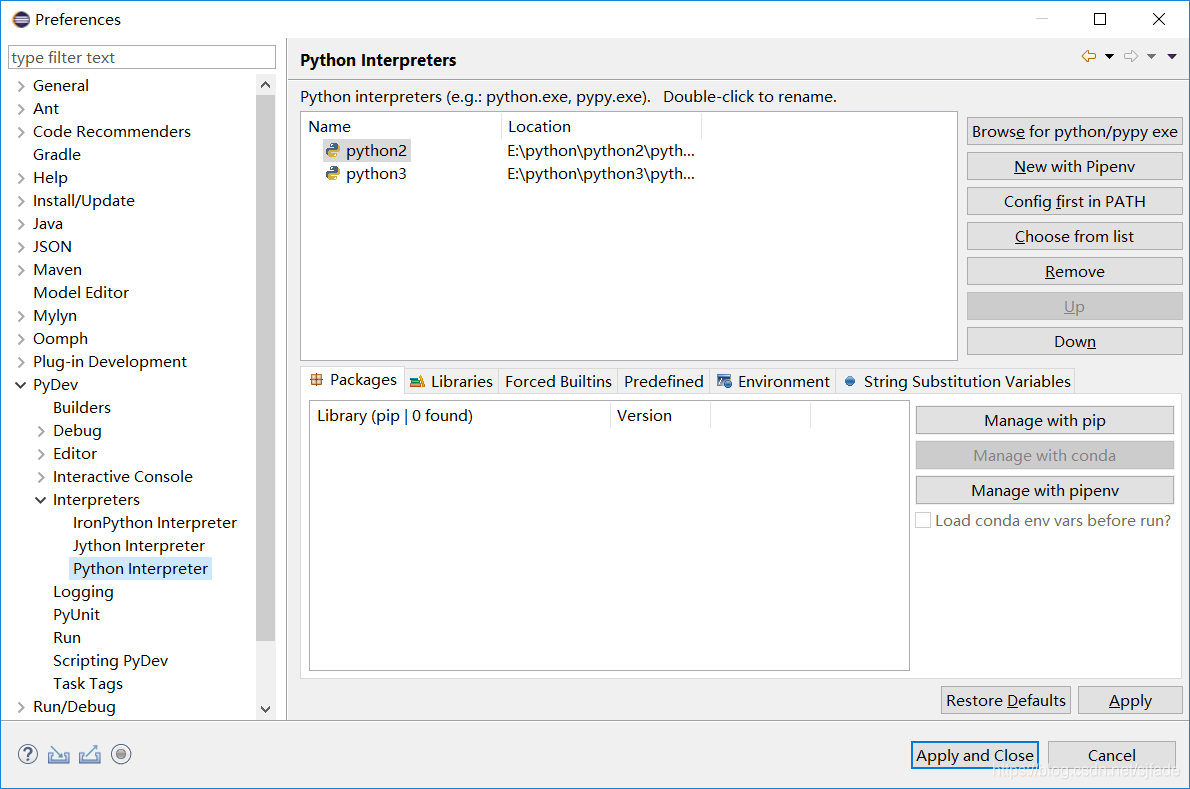
Modify in window – & gt; preferences – & gt; pydev – & gt; interpreters – & gt; Python interpreter


Use the remove button to delete the paths of the two Python versions, then click browse for Python/pypy exe, re select the path of python, and finally click apply and close


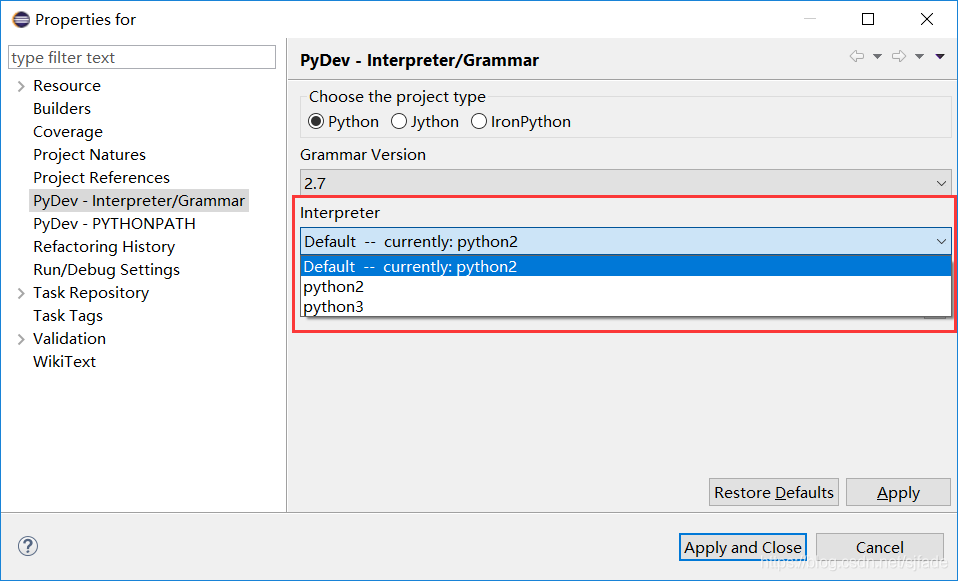
At this time, the project file still reports an error. At this time, select the project that reports an error, right-click and select the properties option – & gt; pydev interpreter/grammar, then switch to interpreter and select the corresponding Python Version (default)– currently:python2 Finally, click apply and close. Finally, restart eclipse


Python uses CX_ Oracle batch insert error report ora-01036 error solution

Recently, in the process of using Python to write data import program, CX is used_ When the Oracle database was imported into Oracle database, there was an error of “ora-01036: illegal variable name/number”. After querying the data and trying, the problem was solved.

The Error statement is:

sql = ‘insert into \”mytable_ a\” values(%s,%s,%s)’

cursor.executemany (sql, data)

As a result, the error “ora-01036: illegal variable name/number” appears.

resolvent:

Change the place holder of parameter transfer to “: 1,: 2,: 3”,

The modified statement is as follows:

sql = ‘insert into \”mytable_ a\” values(:1, :2, :3)’

cursor.executemany (sql, data)

Execute again and solve the problem.

Solution of error reporting in PIP installation of iPhone

Today, I encountered a problem when configuring pycaffe environment. I need to execute it when installing the library

for req in $(cat requirements.txt); do pip install $req; done
sudo pip install -r requirements.txt

Command, always report red error. Finally, sort it out.

First, there are various kinds of permission denied, which are finally solved by the root account operation.
Next, after all the others are installed, it’s hard to install IPython. You can install it with PIP install IPython
alone, and the error is:
command "Python" setup.py egg_ Info "failed with error code 1 in/TMP/pip-build-a63c8f/IPython/
after searching, we find the reason: the default version of IPython is too high, so we can only reduce the version manually.

pip install ipython==8888

The above command entered a non-existent version, so that all existing versions will be listed in the prompt.

After trying, the 6 and above versions all report errors, and finally use the highest version of 5.

sudo pip install ipython==5.5.0

Execute sudo PIP install - R again requirements.txt , there is a piece of requirement already satisfied . It's done!

ps:

    for reference only: my PIP version is manually upgraded to 9.0.2, and the python version comes with 2.7; warm tips: try to use root user to operate the whole process, not sudo, which can save a lot of trouble.

Debug | AttributeError: ‘numpy.int64‘ object has no attribute ‘to_pydatetime‘

reason

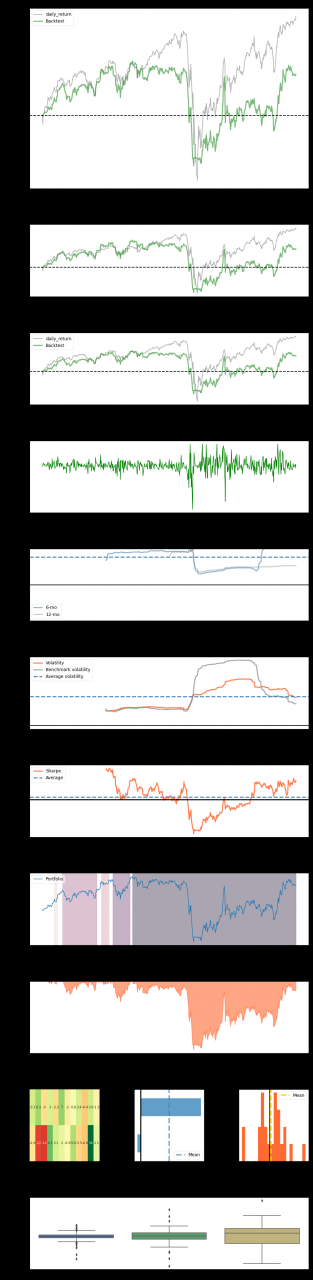
When using pyfolio , we encountered the following errors:

/usr/local/lib/python3.7/dist-packages/pyfolio/ timeseries.py in gen_ drawdown_ table(returns, top)
1006 recovery,
1007 freq=‘B’))
-> 1008 df_ drawdowns.loc [i, ‘Peak date’] = ( peak.to_ pydatetime()

AttributeError: ‘ numpy.int64 ’ object has no attribute ‘to_ pydatetime’

analysis

Confused, is very confused, after all, the transfer of a problem is also very uncomfortable.
search online, pyfoliogithub issues also has many people make complaints about this problem, such as #520, #652, #653, but more people are same error, no solution. 😦

Solution

Many solutions have been found on the Internet. They have tried one by one. Only the last one works well. Everyone can try it

s1 (Failed)

The /usr/local/lib/python3.7/dist-packages/pyfolio/ timeseries.py 893 line changed to

valley = underwater.index[np.argmin(underwater)] # end of the period

It’s no use, continue to change:

s2 (Failed)

The *. To_ Pydatetime() change to this

pd.to_datetime(peak)
pd.to_datetime(valley
pd.to_datetime(recovery)

Failure, and then repeatedly change those lines of code in the reference websites, mainly for the function that reported the error and def get_ max_ drawdown_ Underwater (underwater):
the code in
failed. It’s better to find a solution without changing the code:

sn (Success)

If we install it in PIP install pyfolio , then we uninstall and install it in GIT. Maybe it’s the latest version or something. In the end, this is the solution:

!pip uninstall pyfolio  # uninstall
!pip install git+https://github.com/quantopian/pyfolio # reinstall

After unloading, restart the code, or del pyfolio Import pyfolio , it is recommended to restart
and then run it again ~
finally, it’s out of the question:

How to Solve Python AttributeError: ‘module’ object has no attribute ‘xxx’

Python script error attributeerror: ‘module’ object has no attribute ‘xxx’ solution

when you encounter a few problems, you should pay attention to the same problem when you don’t ask for a solution

1. When naming py script, it should not be the same as the reserved word and module name of Python
(it is not easy to notice when naming files)
2 Delete the. PyC file of the library (because the. PyC file will be generated every time the PY script runs; if the. PyC file has been generated, if the code is not updated, the runtime will still go PyC, so you need to delete the. PyC file), rerun the code, or find an environment where you can run the code and copy and replace the. PyC file of the current machine Import questions </ font> </ font>

Python3 Fatal error in launcher: Unable to create process using ‘”‘

Under windows, python2 and python3 coexist. When installing pyGame or other third-party libraries with PIP3, an error is reported as follows:

Fatal error in launcher: Unable to create process using '"'

resolvent:

C:\Users\Administrator>python3 -m pip install pygame

Reason: it needs to be used like this in Windows environment. I don’t understand the reason, and the Python – M instruction can’t find the exact meaning

There are also hints that it is a problem with the PIP version. Just update the pip to the latest version. The update command is “Python – M PIP install – upgrade PIP”.