Tag Archives: python

Keras saves save() and save in the model_ weights()

Today, we did an experiment on the model saved by keras, hoping to help you understand the differences between the models saved by keras.


We know that the model of keras is usually saved as a file with the suffix H5, such as final_ model.h5。 The same H5 file uses save () and save_ The effect of weight () is different.

We use MNIST, the most common data set in the universe, to do this experiment

inputs = Input(shape=(784, ))
x = Dense(64, activation='relu')(inputs)
x = Dense(64, activation='relu')(x)
y = Dense(10, activation='softmax')(x)

model = Model(inputs=inputs, outputs=y)

Then, import MNIST data for training, and save the model in two ways. Here, I also save the untrained model, as follows:

from keras.models import Model
from keras.layers import Input, Dense
from keras.datasets import mnist
from keras.utils import np_utils


(x_train, y_train), (x_test, y_test) = mnist.load_data()
x_train=x_train.reshape(x_train.shape[0],-1)/255.0
x_test=x_test.reshape(x_test.shape[0],-1)/255.0
y_train=np_utils.to_categorical(y_train,num_classes=10)
y_test=np_utils.to_categorical(y_test,num_classes=10)

inputs = Input(shape=(784, ))
x = Dense(64, activation='relu')(inputs)
x = Dense(64, activation='relu')(x)
y = Dense(10, activation='softmax')(x)

model = Model(inputs=inputs, outputs=y)

model.save('m1.h5')
model.summary()
model.compile(loss='categorical_crossentropy', optimizer='sgd', metrics=['accuracy'])
model.fit(x_train, y_train, batch_size=32, epochs=10)
#loss,accuracy=model.evaluate(x_test,y_test)

model.save('m2.h5')
model.save_weights('m3.h5')

As you can see, I have saved m1.h5, m2.h5 and m3.h5 files. So, let’s see what’s the difference between these three things. First, look at the size:

M2 represents the result of the model saved by save (), which not only keeps the graph structure of the model, but also saves the parameters of the model. So it’s the biggest.

M1 represents the result of the model before training saved by save (). It saves the graph structure of the model, but it should not save the initialization parameters of the model, so its size is much smaller than m2.

M3 means save_ Weights () saves the results of the model. It only saves the parameters of the model, but it does not save the graph structure of the model. So it’s much smaller than m2.


Through the visualization tool, we found that: (open M1 and M2 can show the following structure)
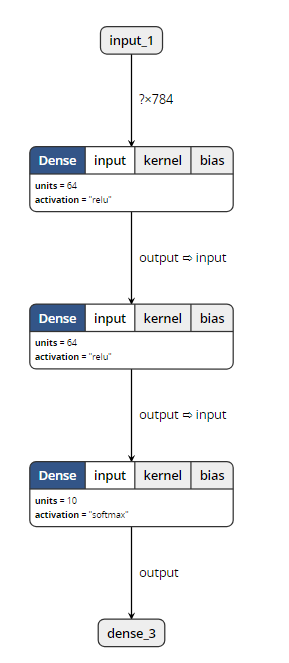
When opening m3, the visualization tool reported an error. So it can be proved that save_ Weights () does not contain model structure information.


Loading model

The model files saved by two different methods also need different loading methods.

from keras.models import load_model

model = load_model('m1.h5')
#model = load_model('m2.h5')
#model = load_model('m3.h5')
model.summary()

Only when loading m3. H5, this code will report an error. Other outputs are as follows:
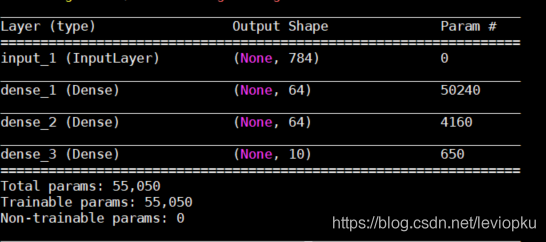
It can be seen that only the H5 file saved by save() can be downloaded directly_ Model () open!

So, how can we open the saved parameter (M3. H5)?

This is a little more complicated. Because m3 does not contain model structure information, we need to describe the model structure again before loading m3, as follows:

from keras.models import Model
from keras.layers import Input, Dense


inputs = Input(shape=(784, ))
x = Dense(64, activation='relu')(inputs)
x = Dense(64, activation='relu')(x)
y = Dense(10, activation='softmax')(x)

model = Model(inputs=inputs, outputs=y)
model.load_weights('m3.h5')

The above m3 into M1 and M2 is no problem! It can be seen that the model saved by save () has obvious advantages except that it takes up more memory. Therefore, in the case of no lack of hard disk space, it is recommended that you use save () to save more.

be careful! If you want to load_ Weights (), you must ensure that the calculation structure with parameters described by you is completely consistent with that in H5 file! What is parametric computing structure?Just fill in the parameter pit. We changed the above non parametric structure and found that H5 files can still be loaded successfully. For example, changing softmax to relu does not affect the loading.


For save() and save() of keras_ No problem at all

 

Python: CUDA error: an illegal memory access was accounted for

Error in pytorch1.6 training:

RuntimeError: CUDA error: an illegal memory access was encountered

The reason for the error is the same as that of the lower version of python (such as version 1.1)

Runtimeerror: expected object of backend CUDA but get backend CPU for argument https://blog.csdn.net/weixin_ 44414948/article/details/109783988

Cause of error:

The essence of this kind of error reporting is model and input data_ image、input_ Label) is not all moved to GPU (CUDA).
* * tips: * * when debugging, you must carefully check whether every input variable and network model have been moved to the GPU. I usually report an error because I have missed one or two of them.

resolvent:

Model, input_ image、input_ The example code is as follows:

model = model.cuda()
input_image = input_iamge.cuda()
input_label = input_label.cuda()

or

device = torch.device("cuda" if torch.cuda.is_available() else "cpu")
model = model.to(device)
input_image = input_iamge.to(device)
input_label = input_label.to(device)

Python switch / case statement implementation method

Different from Java, C/C + + and other languages, python does not provide switch/case statements, which makes me feel very strange. We can implement the switch/case statement in the following ways.

Use if elif… elif… Else to realize switch/case

You can use if elif… Elif.. else sequence to replace the switch/case statement, this is the easiest way to think of. However, with the increase of branches and frequent modification, this alternative method is not very good for debugging and maintenance.

Switch/case using dictionary

Switch/case can be realized by dictionary, which is easy to maintain and can reduce the amount of code. The following is the switch/case implementation using dictionary simulation:


def num_to_string(num):
    numbers = {
        0 : "zero",
        1 : "one",
        2 : "two",
        3 : "three"
    }

    return numbers.get(num, None)

if __name__ == "__main__":
    print num_to_string(2)
    print num_to_string(5)

The results are as follows:

two
None

Python dictionary can also include functions or lambda expressions. The code is as follows:

def success(msg):
    print msg

def debug(msg):
    print msg

def error(msg):
    print msg

def warning(msg):
    print msg

def other(msg):
    print msg

def notify_result(num, msg):
    numbers = {
        0 : success,
        1 : debug,
        2 : warning,
        3 : error
    }

    method = numbers.get(num, other)
    if method:
        method(msg)

if __name__ == "__main__":
    notify_result(0, "success")
    notify_result(1, "debug")
    notify_result(2, "warning")
    notify_result(3, "error")
    notify_result(4, "other")

The results are as follows:

success
debug
warning
error
other

Through the above example, it can be proved that the switch/case statement can be fully implemented through Python dictionary, and it is flexible enough. especially at runtime, it is convenient to add or delete a switch/case option in the dictionary.

Switch/case can be implemented by using scheduling method in class

If you are not sure which method to use in a class, you can use a scheduling method to determine it at run time. The code is as follows:

class switch_case(object):

    def case_to_function(self, case):
        fun_name = "case_fun_" + str(case)
        method = getattr(self, fun_name, self.case_fun_other)
        return method

    def case_fun_1(self, msg):
        print msg

    def case_fun_2(self, msg):
        print msg

    def case_fun_other(self, msg):
        print msg


if __name__ == "__main__":
    cls = switch_case()
    cls.case_to_function(1)("case_fun_1")
    cls.case_to_function(2)("case_fun_2")
    cls.case_to_function(3)("case_fun_other")

The results are as follows:

case_fun_1
case_fun_2
case_fun_other

summary

Personally, using dictionary to realize switch/case is the most flexible, but it is also difficult to understand.

Python generates (x, y, z) 3D coordinate sequence

For a (x, y, z) three-dimensional space, the dataframe sequence of [‘x ‘,’y’,’z ‘] is generated

import pandas as pd
import numpy as np

# x = 30 ,y = 20, z = 5
_x_size_temp = 30
_y_size_temp = 20
_z_size_temp = 5

_x_se = []
for _ in range(_x_size_temp):
    _x_se += [_] * (_y_size_temp * _z_size_temp)

_y_se = []
for _ in range(_y_size_temp):
    _y_se += [_] * (_z_size_temp)
_y_se *= _x_size_temp

_z_se = []
_z_se = np.arange(0, _z_size_temp).tolist() * (_x_size_temp * _y_size_temp)

cargo_state_3d = pd.DataFrame(data={
    'x': _x_se,
    'y': _y_se,
    'z': _z_se,
})

Start cell keyerror and report an error

Local “Python” manage.py The error is as follows:

{'timelimit': (None, None), 'utc': False, 'chord': None, 'args': [], 'retries': 0, 'expires': None, 'task': u'home_application.celery_tasks.get_data_cycle_info', 'callbacks': None, 'errbacks': None, 't
askset': None, 'kwargs': {}, 'eta': None, 'id': '881d3c41-0d40-4a0e-9a86-60eca081b49c'} (248b)
Traceback (most recent call last):
  File "C:\python_env\dc_iip\lib\site-packages\celery\worker\consumer.py", line 455, in on_task_received
    strategies[name](message, body,
KeyError: u'home_application.celery_tasks.get_data_cycle_info'

In the early stage, the celery task was run, and then the app name initialized by the framework was changed to the specified project name due to the normalization of the project.
Rabbitmq service under windows is running all the time, in which the previous app name is also recorded, so an error is reported.

Solution: restart rabbitmq service

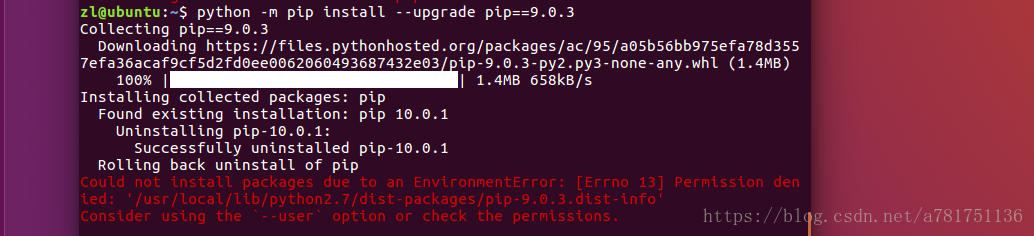
Could not install packages due to anenvironment error: [winerror 5] access denied

I’ve been learning Python before, but I’m not familiar with PIP

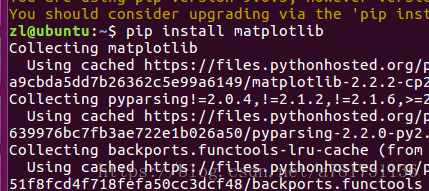
Every time you install a package, PIP will

You are asked to install the updated version of PIP, which is 10.1

But after the update, when installing other libraries, we habitually install the libraries in the same way as before

This is a problem

Due to time constraints, pip10.1 has no time to study. I want to go back, but I can’t

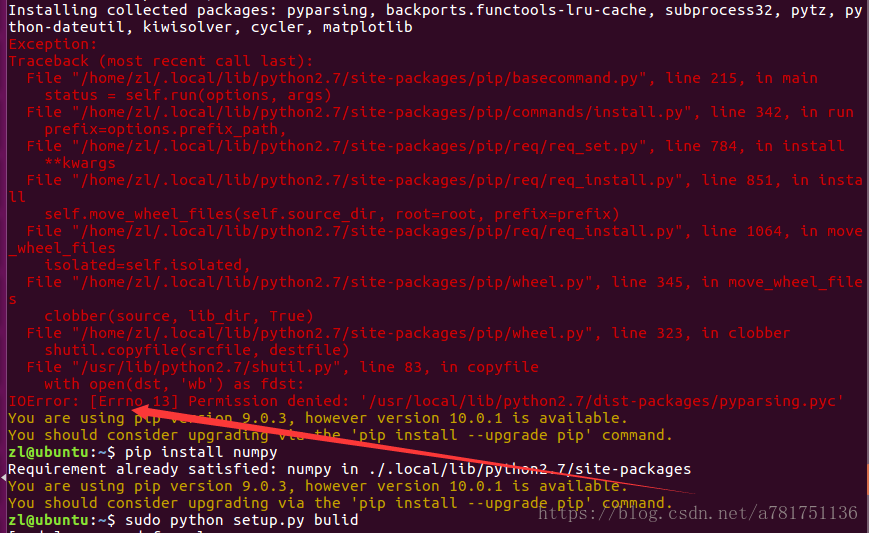
Look at the wrong requirements

Just Python – M PIP install — user — upgrade PIP = = 9.0.3

Just add a — user

As for why, I don’t know. I’ll be in a hurry when I have a problem. I can use it

If you still report an error when installing some packages after returning!!

I often encounter this error, and I feel that the online solutions are a bit messy

Just add a — user directly after install

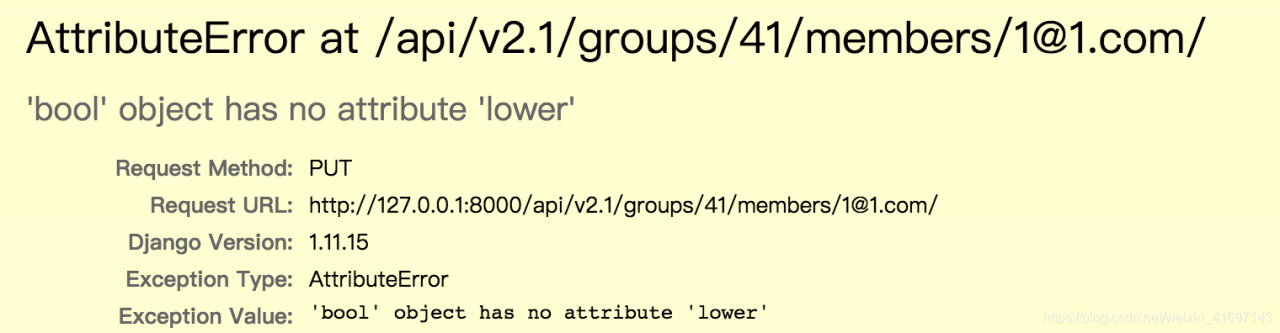
Attributeerror: object has no attribute

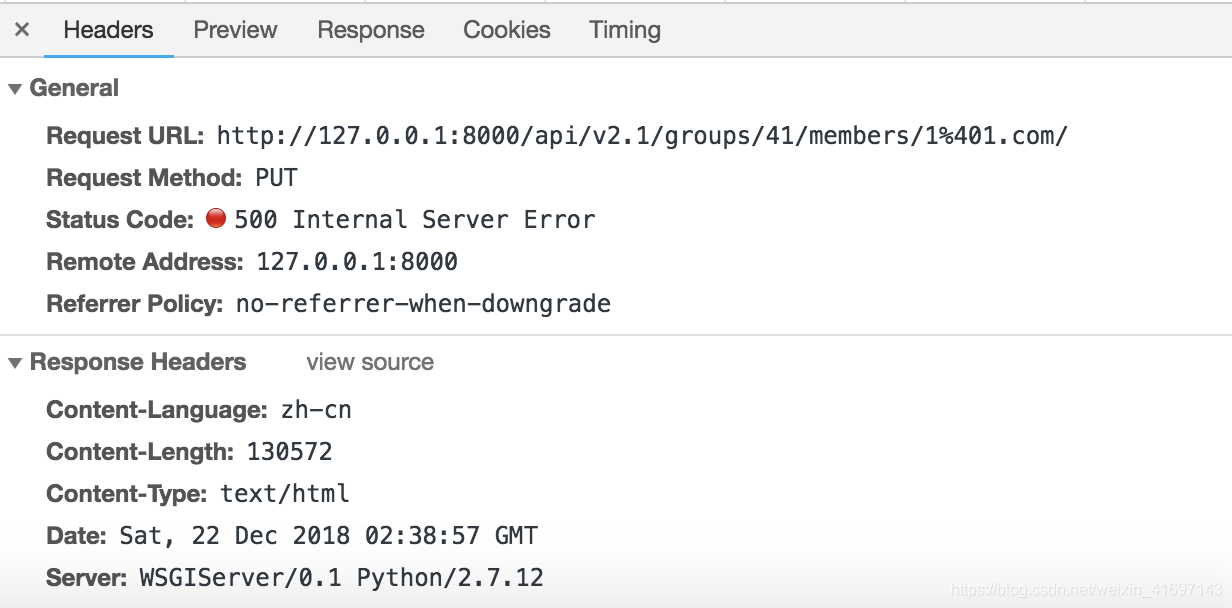
Error report: in the front-end test, the interface sends a put request, the error report occurs on the interface, the request cannot respond, and the server status code is 500.

Error analysis: semantically, “the object does not have a XXX attribute.”.

Look up most of the information, most of the problems with Python. The front end of this project uses react, and the back end uses the djongo framework of Python.

The main reason for asking the back-end colleagues is that the data type of the parameters passed by the front-end is incorrect. The back end needs a string “true”, but the front end passes a Boolean “true”, which causes the above problem.

In case of such a problem, the error code returned by the server is 500. For such a problem, usually ask the back-end colleagues to check the log for common analysis.

Python2.7 + uwsgi error internal server error

First of all, I had no problem running the project before. Then I updated the code and restart uwsgi as usual today. As a result, the access interface reported an error internal server error and checked it uwsgi.xml and uwsgi.log 、 error.log They didn’t find any problems, and then they went to stop uwsgi and started uwsgi again, and the problems appeared in the uwsgi.log Inside. It is due to compilation errors at the code level. If I don’t stop uwsgi and restart uwsgi, I will never get the error log. Therefore, I think there is a bug in the logging mechanism of uwsgi

Find the corresponding code error to solve, return to normal!

Python error: syntax error: encoding problem: utf8

Python error: syntax error: encoding problem: utf8

Such as the title.
The first line reported an error, but I have checked the file code, it is indeed utf8.
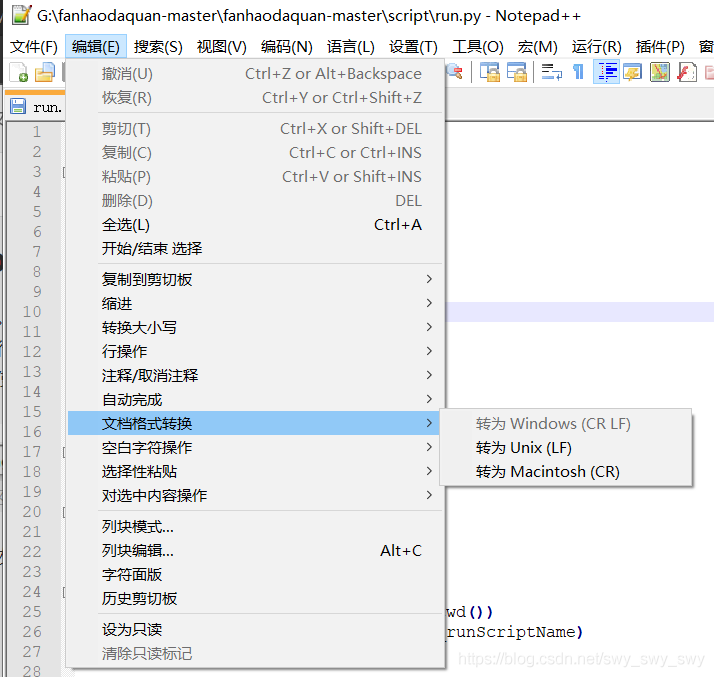
At this point, use Notepad + + to open the file, and you can see the newline style of the file at the bottom right. (CR LF is windows style, LF is UNIX style)

so I found that the original. Py file is UNIX newline style, because I pulled it from GitHub, and the original author’s environment is probably UNIX.
So the. Py file can be converted to a Windows style line feed.

finish

Solution to syntaxerror: invalid syntax in PIP install XXX

Solution to syntaxerror: invalid syntax in PIP install XXX

Statement: 1. PIP install requests are taken as an example; 2. Windows system;
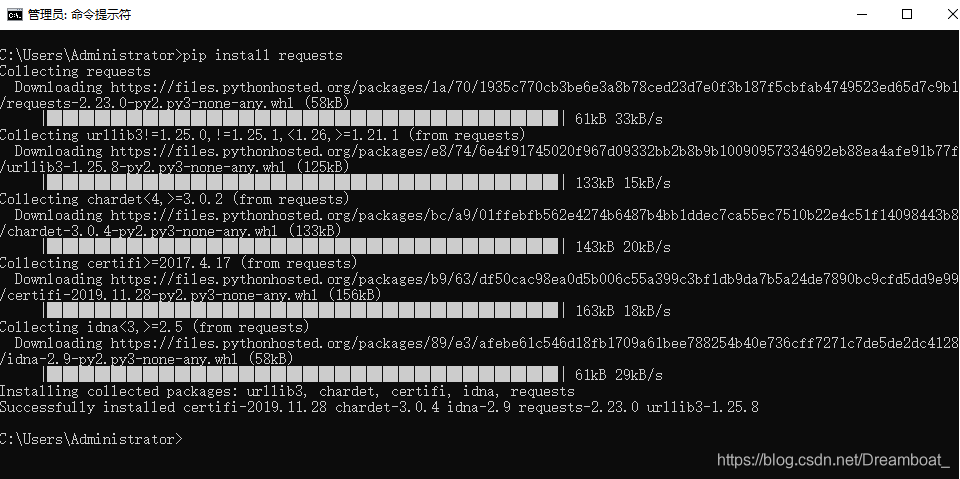
first of all, check whether you have run PIP in the python environment. If so, please open the start menu, enter CMD, find the command prompt and open it.
Enter PIP install requests in CMD, If “not an internal or external command, nor a runnable program or batch file” appears, the specific solutions are as follows:
1. Find the folder where Python is located, find the scripts file, and use Ctrl + C to copy the file path. Take an individual as an example: C: 2 2. Return to the desktop, right-click “my computer” and click “properties”
3. In the pop-up page, select “advanced system settings – variable environment – path – Edit – add the file path copied in step 1 and click OK
4. Restart the computer

After restarting the computer, open CMD again, and then enter the command PIP install requests. If
appears, the installation is successful and the problem is solved.
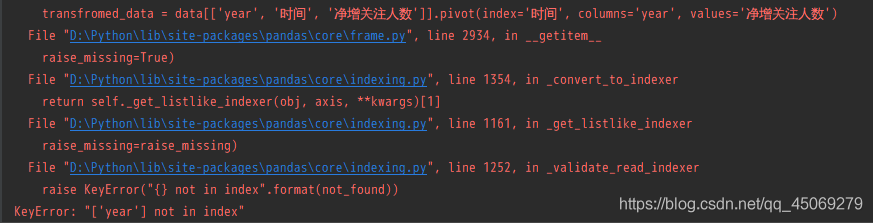
Keyerror: “year not in index”

During learning, when writing Python code, the following error was reported: “keyerror” [‘year ‘] not in index “.

Problem description

When learning data visualization, the pandas package is called, and the code runs with an error. The error prompt is as follows

KeyError: "['year'] not in index"

Key error: ‘[‘year’] is not in index ‘

problem analysis

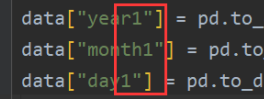
Check the code and find that the front and the back are inconsistent, and there are some problems when you write your own code

Solution
delete “1” and solve the problem

OK, keep learning.