Tag Archives: python

Solutions to Django is not importable in this environment

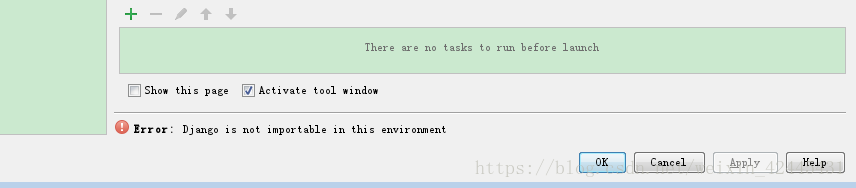
Django is not importable in this environment.
(1) the first thing to illustrate the point, now on the network all kinds of copy, about today I encountered this problem, didn’t find a good way to online, and open a, then open a, completely identical copy, was no, really is too sad, to solve the problem it took me 4 to 5 hours (I am a rookie!
If this article does not obtain my consent, do not reprint and plagiarism!
(2) PyCharm downloaded from the Internet or copied from other computers cannot be opened directly, and some Settings need to be made, which is very annoying! Of course, the main problem is to set up the interpreter, but there are other problems, such as Django is not importable in this environment. My software version is python3.4.3 and django 2.0.7
(3) Solutions to this problem:
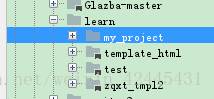
The file – & gt; Open, find your project file (project name), as follows, my project file is under the Learn folder, which has 4 projects

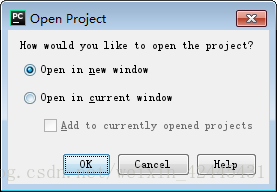
Then look at the following:
Select open in the new window to open a new window. Select another window to close the one you are currently open.

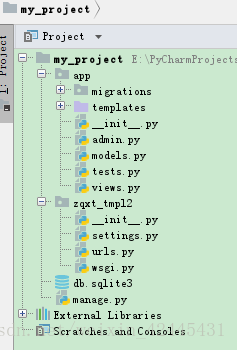
My entire project list is as follows:

It doesn’t matter that my project name is not the same as zaxt_tMP12 under the project.
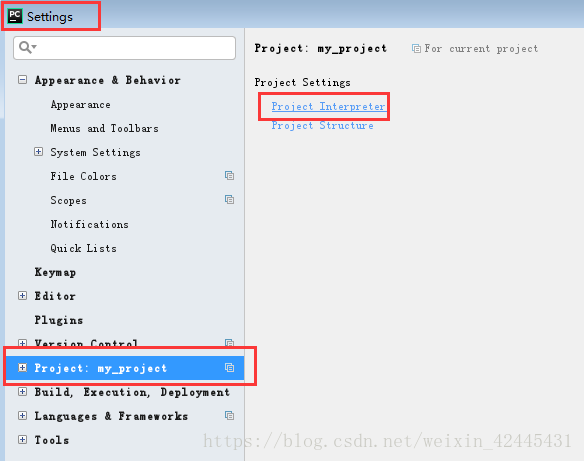
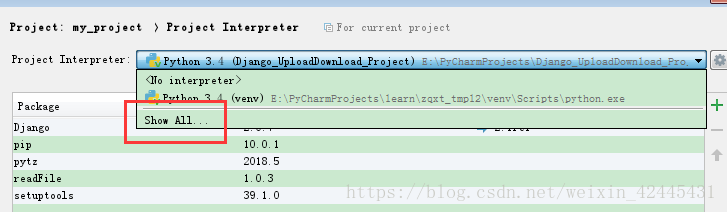
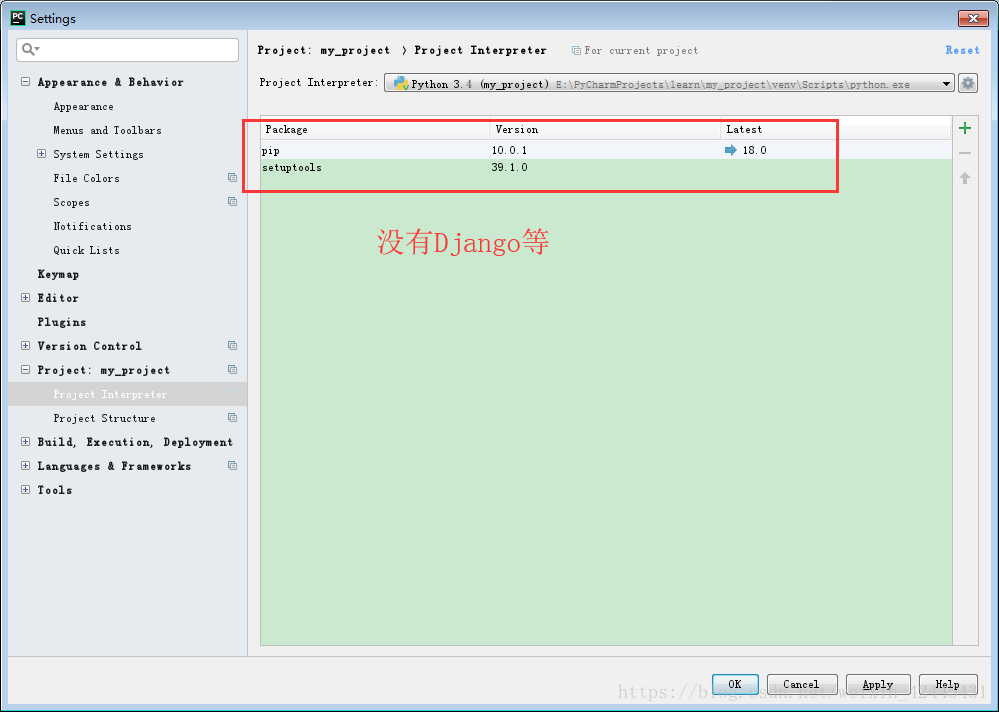
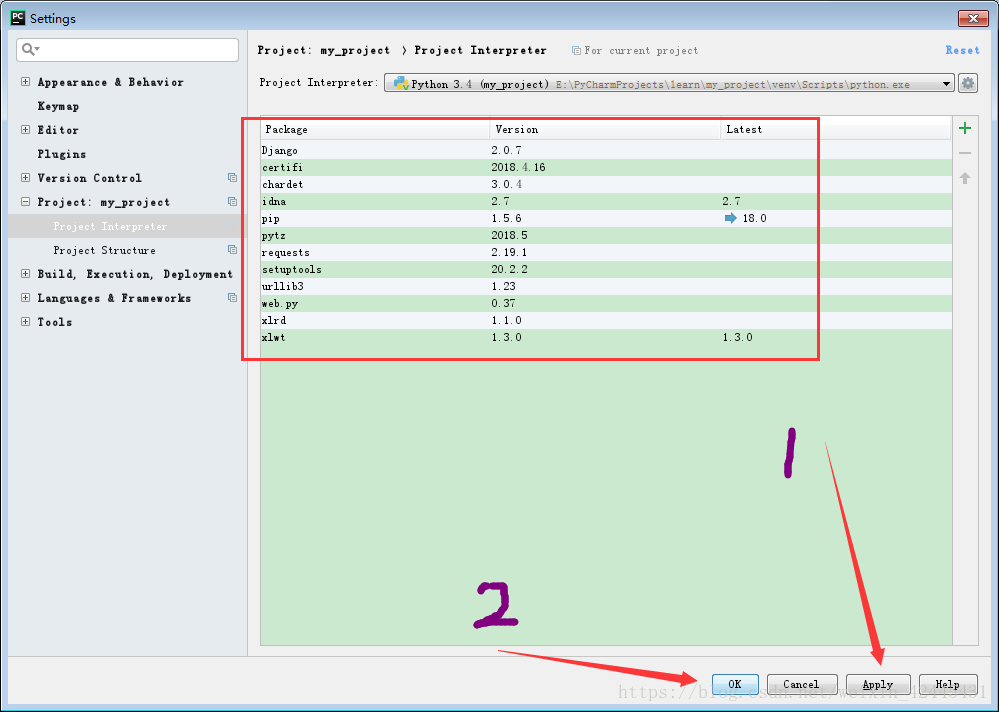
And then: file – & gt; Settings – & gt; Project Interpreter

Then, look at the picture:

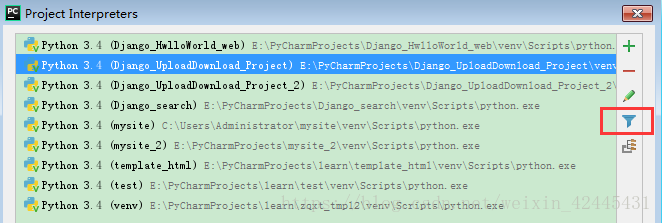
Hide interpreters that connect to other projects:

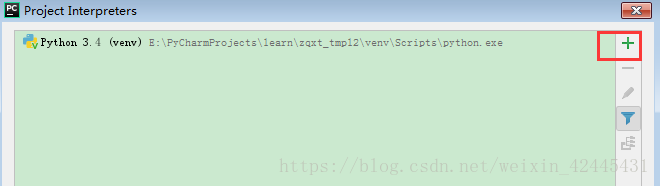
The effect is as follows, then green + :

If it’s OK, the result is like this (don’t follow it here, I’m just showing you!! :

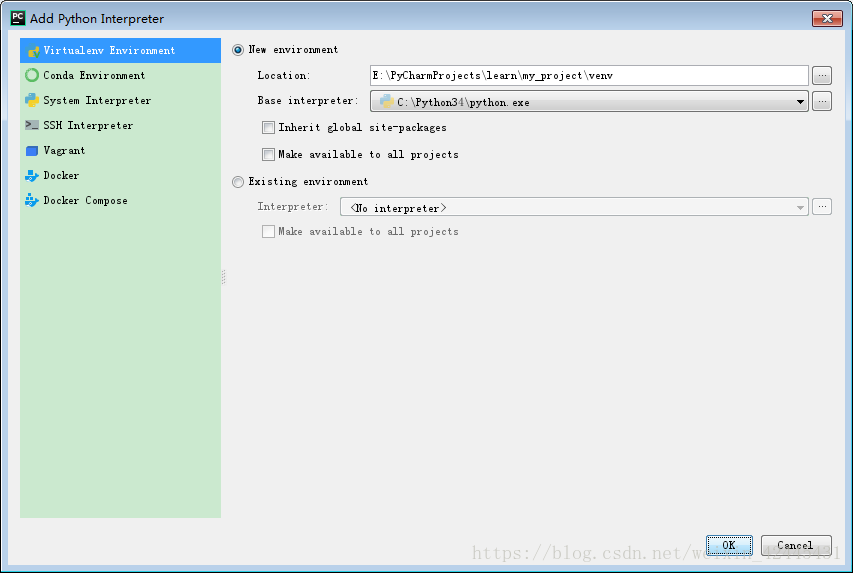
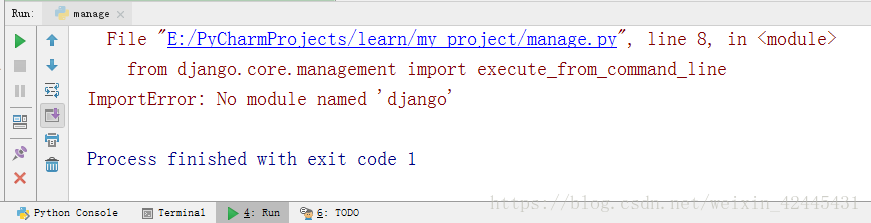
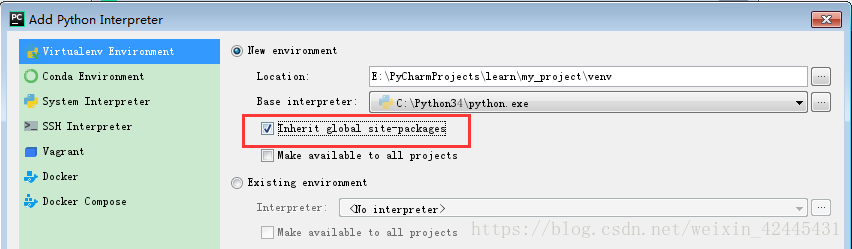
Django is not importable in this environment if you don’t grab Inherit global site-packages, you will get an error when you run.


Very distressed! ?You’ve been messing with me for a long time. In fact, here’s what you should do:

Then, apply – & gt; ok

Django is out!!
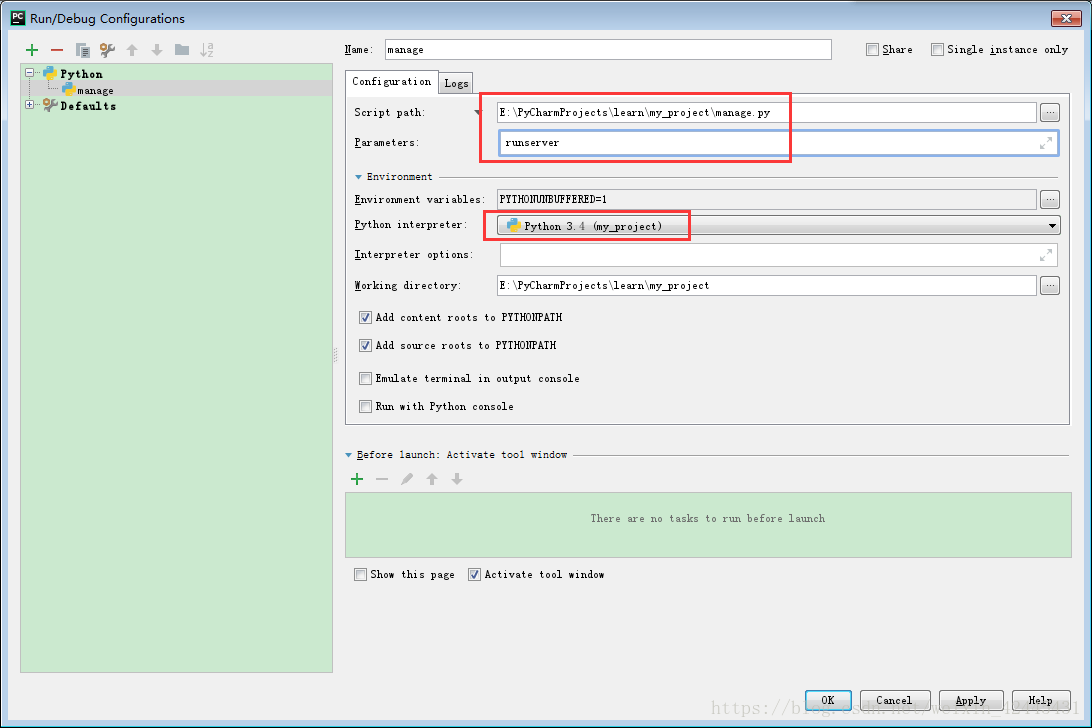
(4) Finally, add an interpreter:

Select the interpreter we set up in the previous step! And run manager.py Runserver. Click Run again and you’re ready to run!

It took quite a while to write the document, redid it and liked it if it helped.
If this article does not obtain my consent, do not reprint and plagiarism!

urllib2.HTTPError: HTTP Error 403: Forbidden

This occurs in the crawler process:

Traceback (most recent call last):
  File "D:\pythonDemo01\pythonDemo01\Demo19.py", line 11, in <module>
    response=urllib2.urlopen(imag_url)
  File "D:\Python27\lib\urllib2.py", line 154, in urlopen
    return opener.open(url, data, timeout)
  File "D:\Python27\lib\urllib2.py", line 435, in open
    response = meth(req, response)
  File "D:\Python27\lib\urllib2.py", line 548, in http_response
    'http', request, response, code, msg, hdrs)
  File "D:\Python27\lib\urllib2.py", line 473, in error
    return self._call_chain(*args)
  File "D:\Python27\lib\urllib2.py", line 407, in _call_chain
    result = func(*args)
  File "D:\Python27\lib\urllib2.py", line 556, in http_error_default
    raise HTTPError(req.get_full_url(), code, msg, hdrs, fp)
urllib2.HTTPError: HTTP Error 403: Forbidden

Code:

imag_url='http://img4.imgtn.bdimg.com/it/u=495525449,2738183538&fm=214&gp=0.jpg'
response=urllib2.urlopen(imag_url)
with open('nv.jpg','wb') as f:
    f.write(response.read())

Baidu said the site has banned crawlers because we haven’t disguised ourselves as a browser yet:
It seems that we need to add something related to the request header:

headers={
'Accept-Language': 'zh-CN',
'User-Agent': 'Mozilla/5.0 (Windows NT 6.1; Trident/7.0; rv:11.0) like Gecko'
} 
imag_url='http://img4.imgtn.bdimg.com/it/u=495525449,2738183538&fm=214&gp=0.jpg'
res=urllib2.Request(url=imag_url,headers=headers)
response=urllib2.urlopen(res)
with open('nv.jpg','wb') as f:
    f.write(response.read())


How to Fix pandas.errors.ParserError Error tokenizing data C error Buffer overflow caught

When wrapped pandas, pd. Read_csv (r. ‘\ data \ data. The CSV, encoding = “utf-8”, the header = None,)
Error message: pandas. Errors. ParserError: Error tokenizing data. C Error: Buffer overflow caught – possible malformed input file.
I read some blog posts saying that adding the parameter error_bad_lines=False
but I tried and failed
I read another blog that it may be caused by modifying the suffix name of the file, I did change the suffix name of.xlsx to.cvs
, so you can change the suffix name back to.xlsx, use pd.read_excel() function to
or you can use excl to build a table, copy the data over, and then you save is to save to.csv file
And then there’s the coding problem, which you’ll see in my previous posts

When python installs pocketsphinx module (package), an error is reported: command ‘swig.exe’ failed: No such file or directory

Today, when installing Pocket Sphinx, the error command ‘swig.exe’ failed: No such File or Directory. I found a lot of content on the Internet, and finally I succeeded.
first of all, my computer is Windows10 system, the method is only available for Windows system, other systems do not know.
error is due to the fact that swig is missing from your computer, so you need to download and install it. I download from the website of the latest package swig 4.0.2, website address is: http://www.swig.org/download.html.
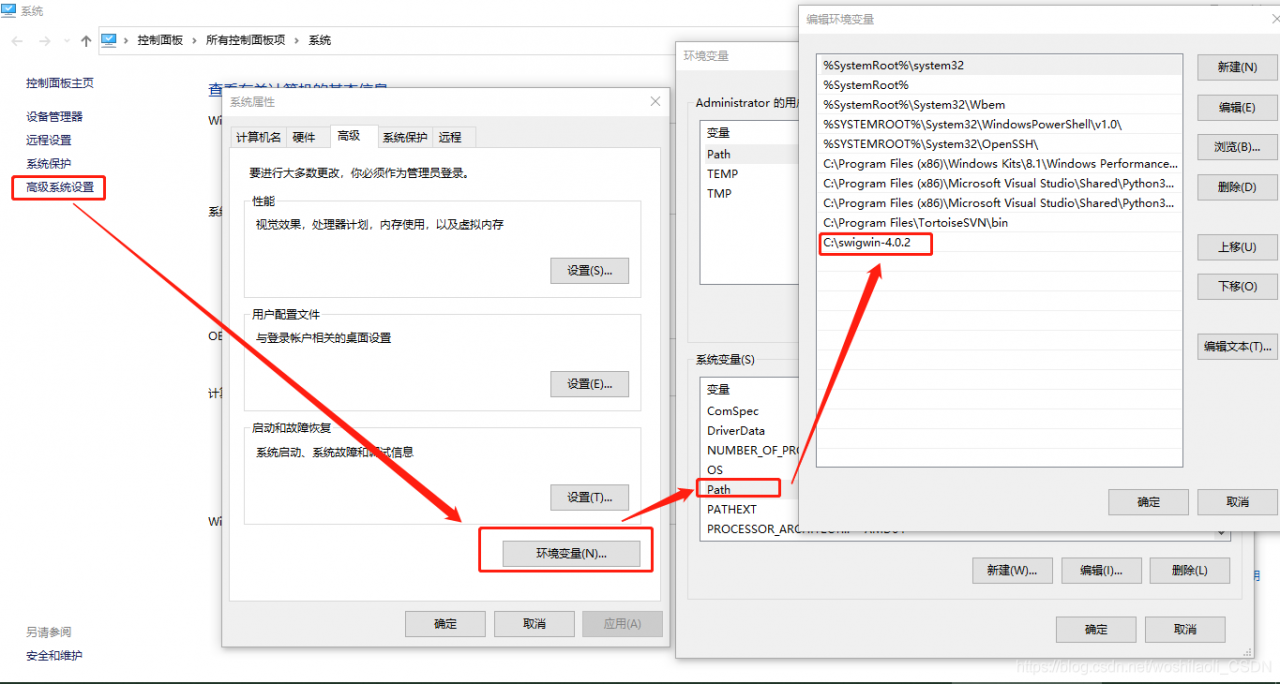
to unzip the downloaded files to C pan-gen directory. I want to emphasize the root directory here, because my previous attempts to put it in C:\Program Files (x86) still didn’t work (for unknown reasons). Finally, I just put it under C:\swigwin-4.0.2.
then add a new path path to the environment variable.

after the above steps are completed, then there is no problem with installing pocketsphinx.

python3 Error in sitecustomize; set PYTHONVERBOSE for traceback: NameError: name ‘modules_list’ …

Error in Sitecustomize; set PYTHONVERBOSE for traceback: NameError: name ‘modules_list’ is not …The original link: https://www.jianshu.com/p/b1ed42918380
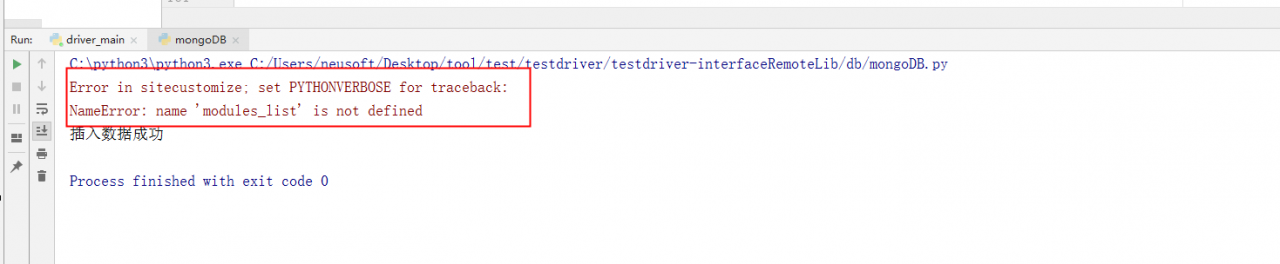
Error in sitecustomize; set PYTHONVERBOSE for traceback:
NameError: name ‘modules_list’ is not defined

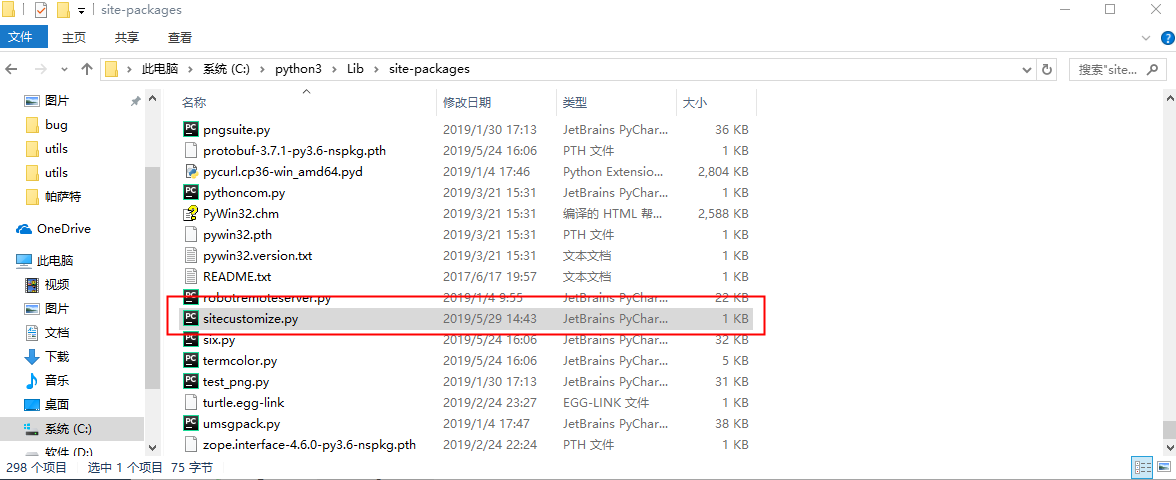
Problem. PNG
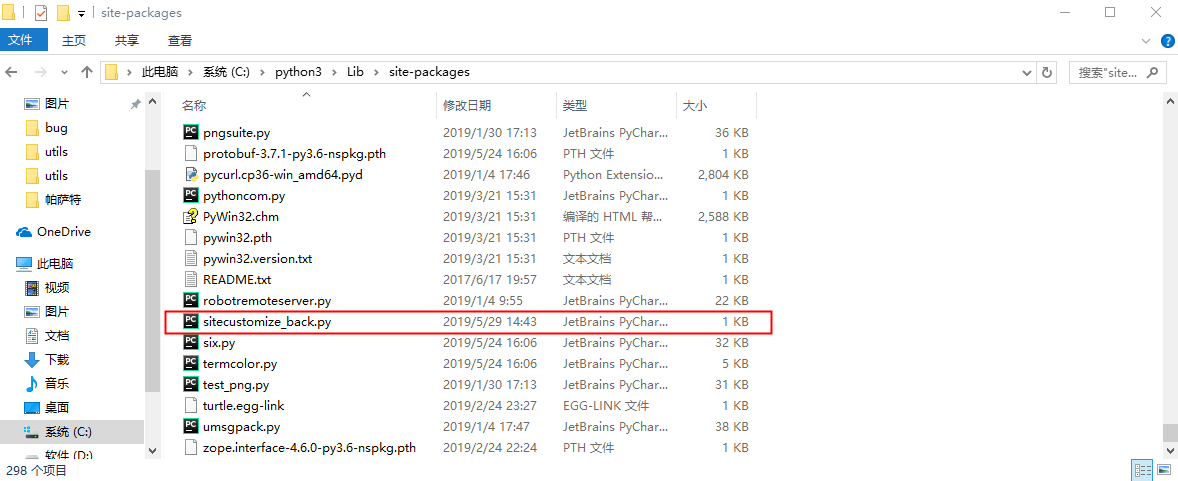
Modify a file called sitecustomize.py to be located under C:\python3\Lib\site-packages and change the name to Sitecustomize_back. py


File location. PNG

File name modified. PNG

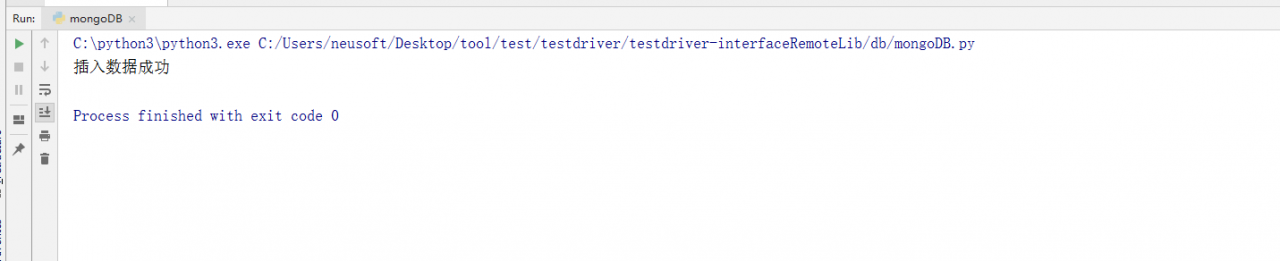
Run without error. PNG

(Solved) pytorch error: RuntimeError: cuDNN error: CUDNN_STATUS_EXECUTION_FAILED (install cuda)

RuntimeError: cuDNN error: CUDNN_STATUS_EXECUTION_FAILED
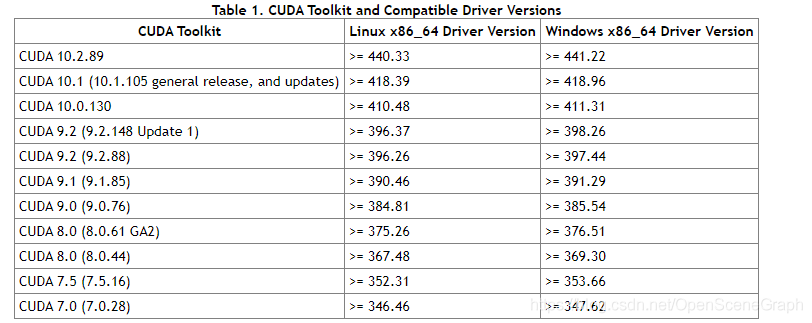
Reason: Pytorch and CUDA versions are not right
(It is also possible that there is not enough memory space, you can change the virtual space size)
Uninstall Pytorch: Conda Uninstall Pytorch, and if you install CUDA, it will automatically override the CUDA version.
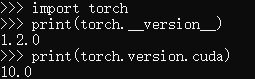
Open CMD and type from the command line

import torch
print(torch.__version__)
print(torch.version.cuda) 


Similar errors occur if the cudA version is not installed with the torch version.

Here’s how to install CUDA:
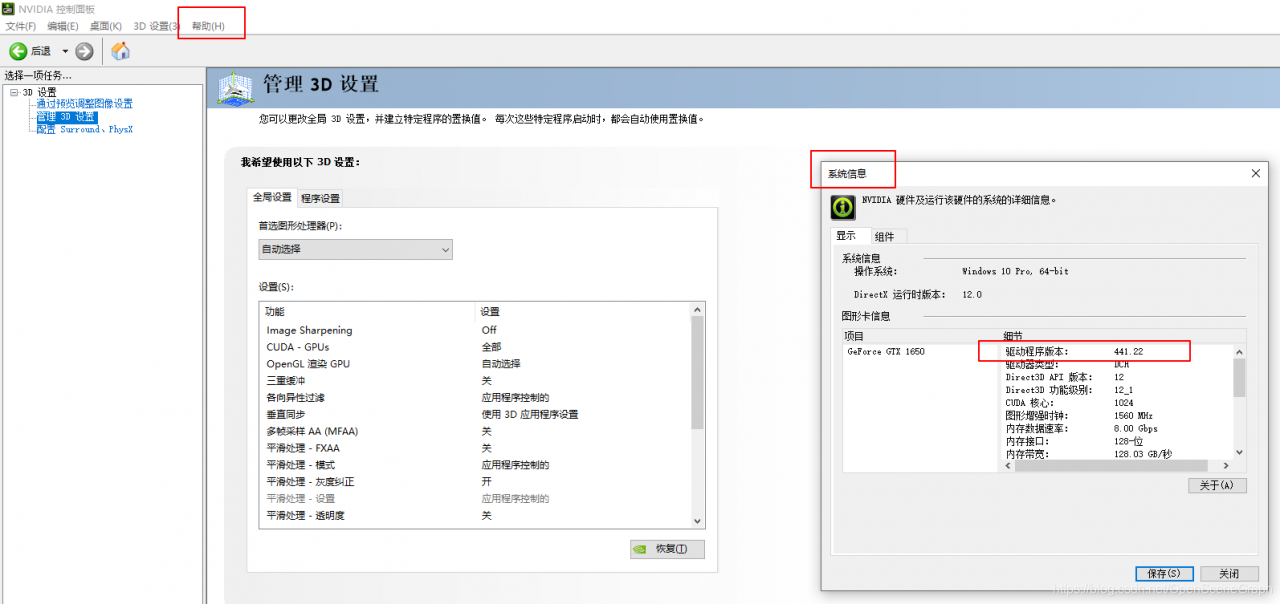
1. Open the NVIDIA control panel to view the CUDA version supported by the current video card driver:


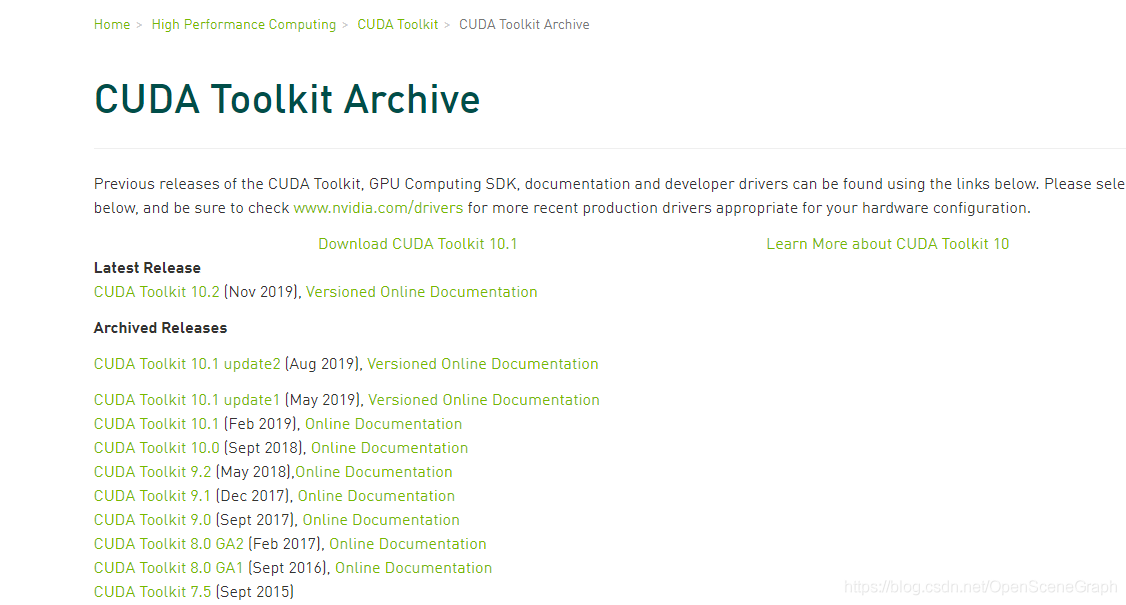
2. Download CUDA address
https://developer.nvidia.com/cuda-toolkit-archive
Or offline installation package download required in https://mirrors.tuna.tsinghua.edu.cn/anaconda/cloud/pytorch/linux-64/. Tar..bz2
Background Conda Install XXXX.. tar.bz2
Install after installation is complete

First anaconda Conda switches to the domestic source

conda config --add channels https://mirrors.tuna.tsinghua.edu.cn/anaconda/pkgs/free/
conda config --add channels https://mirrors.tuna.tsinghua.edu.cn/anaconda/cloud/conda-forge 
conda config --add channels https://mirrors.tuna.tsinghua.edu.cn/anaconda/cloud/msys2/

conda config --set show_channel_urls yes

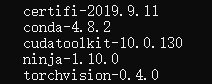
Conda Install Pytorch Torchvision Cudatoolkit =10.0
Install other packages
Pytorch official website: Pytorch official website

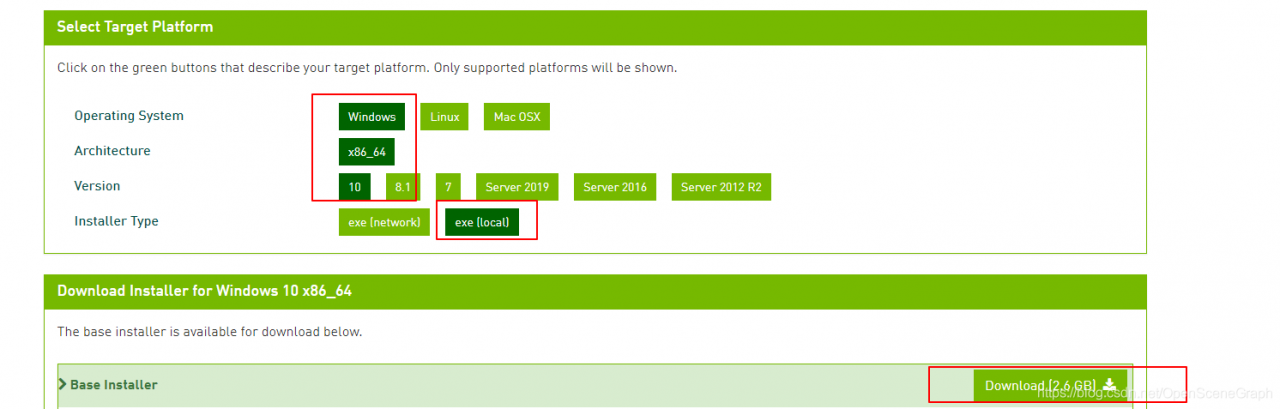
Download according to the actual situation:

3. After successful download, double-click the exe file to install.
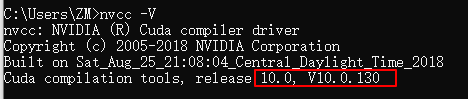
The verification method for successful installation is to enter nvcc-v under CMD

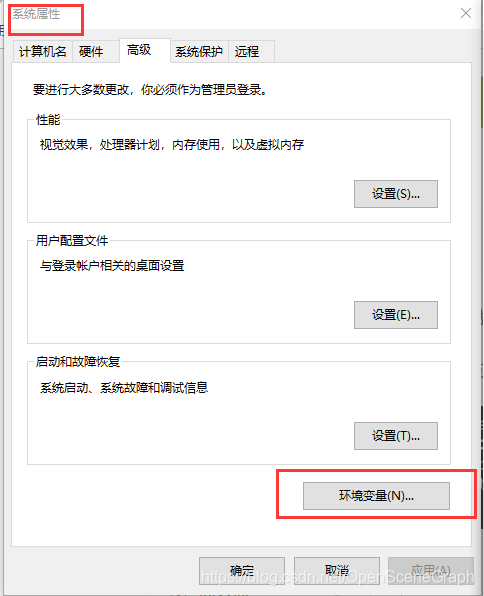
The installation was successful. You can see in system variables:


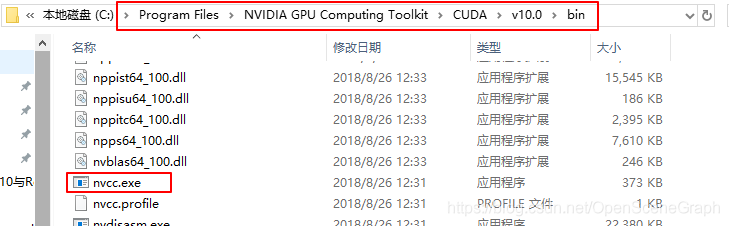
Or you can see nvCC.exe under the installation path

Install python’s C extension compilation environment under windows (solve “error: command’cl.exe’ failed: No such file or directory”)

Following a blog post, fixed in python2: Debugger speedups using cython not found.

The same problem was found in python3.5, where the original python required a VC++ Compiler for the installation (MInGW is also available, and it is generally not recommended to use PIP to install some third-party python libraries, and many extensions written in C required a VC++ Compiler for the installation, otherwise “error: command ‘cl.exe’ failed:” would occur. The most common compiler is Visual Studio C ++.

Compiler VS2008 C++ compiler is required in Python2.7, whereas python3 to 3.4 is compiled using VS2010, and python3.5 is compiled using VS2015.
However, as anyone who has ever installed a bloated IDE like VS knows, it comes bundled with a bunch of Microsoft plug-ins, takes up a lot of C disk space, and starts slowly.
if the computer is configured in a general way, the computer will be very stuck, and generally there is no need to install the entire VS.

For Python 2.7, Microsoft has released the Microsoft Visual C++ Compiler for Python 2.7 directly for download and installation.
http://www.microsoft.com/en-us/download/details.aspx?id=44266

For python3.5 you will need to install the Visual C++ Build Tools compiler provided by Microsoft
Download address: http://landinghub.visualstudio.com/visual-cpp-build-tools
to install, remember to choose Windows SDK 8.1 and 10 SDK, so don’t pack VS2015 can also compiled a package of C code in the PIP.

Python uses requests to request and reports SSL: CERTIFICATE_VERIFY_FAILED error

Requests module has been normal, before one day began to HTTPS requests the thrown error:
requests. Exceptions. SSLError: [1] Errno _ssl. C: 504: error: 14090086: SSL routines: SSL3_GET_SERVER_CERTIFICATE: certificate verify failed
At first, I thought the agent was unstable and restarting the agent was invalid, then I restarted the machine and it was invalid. Code problems?It is ok to copy the error code to another machine, or to report the certificate error if the code running normally on another machine is copied to the error machine. Just try the requests. Get requests FOR HTTP.
All sorts of solutions have been tried in vain. Search the Internet for answers. I found two solutions: the first One I used. The second one is also backed up.
The first solution:
What is SSL validation?
SSL certificates are SSL protocol compliant, issued by a trusted digital certificate authority (CA) after server authentication, with server authentication and data transmission encryption.
SSL routines:SSL3_GET_SERVER_CERTIFICATE:certificate verify failed
add a new feature in python 2.7 that will validate the SSL certificate when urlopen requests it, or make an error if it is a self-signed SSL certificate.
Python request SSL error
has a verify parameter in both the request-post and request-get methods. Set the verify parameter to FALSE.
r = requests. Get (“xxx.com”, headers=request_headers, verify=False)
print r.tent
The second solution:
Try:

sudo apt-get install ca-certificates
sudo update-ca-certificates

No effect,
finally tried the following one that worked:

sudo pip uninstall -y certifi
sudo pip install certifi==2015.04.28

Of course, there are caveats:

/usr/local/lib/python2.7/dist-packages/requests/packages/urllib3/util/ssl_.py:79: InsecurePlatformWarning: A true SSLContext object is not available. This prevents urllib3 from configuring SSL appropriately and may cause certain SSL connections to fail. For more information, see https://urllib3.readthedocs.org/en/latest/security.html#insecureplatformwarning.
  InsecurePlatformWarning

No, at least we can use it for now. The reason for this is estimated to be that the Later version (2016.2.8) CertiFI is more certifying.
 

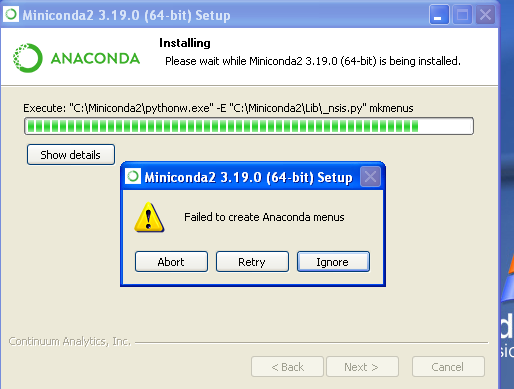
Install anaconda error: failed to create anaconda menus

Problem: my computer is Windows server 2008, installed anaconda 64 bit

Finally, failed to create anaconda menus, the following references for picture reference,

Solution:
to install Microsoft Visual c + + 2008 Redistributable Package (x64)
https://www.microsoft.com/en-us/download/details.aspx?id=15336
You should be able to run the Anaconda installer again.
Reference: https://github.com/ContinuumIO/anaconda-issues/issues/732

About the solution of ERROR: Failed building wheel for dlib

Error reporting in some dependency libraries with dlib and Face_recognition installed

(face_recognition) C:\Users\FlynnLi>pip install dlib -i http://pypi.douban.com/simple --trusted-host pypi.douban.com
Looking in indexes: http://pypi.douban.com/simple
Collecting dlib
  Downloading http://pypi.doubanio.com/packages/63/92/05c3b98636661cb80d190a5a777dd94effcc14c0f6893222e5ca81e74fbc/dlib-19.19.0.tar.gz (3.2 MB)
     |████████████████████████████████| 3.2 MB 2.2 MB/s
Building wheels for collected packages: dlib
  Building wheel for dlib (setup.py) ... error
  ERROR: Command errored out with exit status 1:
   command: 'D:\Python\Virtual\face_recognition\Scripts\python.exe' -u -c 'import sys, setuptools, tokenize; sys.argv[0] = '"'"'C:\\Users\\FlynnLi\\AppData\\Local\\Temp\\pip-install-ywrf5o_o\\dlib\\setup.py'"'"'; __file__='"'"'C:\\Users\\FlynnLi\\AppData\\Local\\Temp\\pip-install-ywrf5o_o\\dlib\\setup.py'"'"';f=getattr(tokenize, '"'"'open'"'"', open)(__file__);code=f.read().replace('"'"'\r\n'"'"', '"'"'\n'"'"');f.close();exec(compile(code, __file__, '"'"'exec'"'"'))' bdist_wheel -d 'C:\Users\FlynnLi\AppData\Local\Temp\pip-wheel-4oqer9mq'
       cwd: C:\Users\FlynnLi\AppData\Local\Temp\pip-install-ywrf5o_o\dlib\
  Complete output (55 lines):
  running bdist_wheel
  running build
  running build_py
  package init file 'dlib\__init__.py' not found (or not a regular file)
  running build_ext
  Building extension for Python 3.7.5 (tags/v3.7.5:5c02a39a0b, Oct 15 2019, 00:11:34) [MSC v.1916 64 bit (AMD64)]
  Invoking CMake setup: 'cmake C:\Users\FlynnLi\AppData\Local\Temp\pip-install-ywrf5o_o\dlib\tools\python -DCMAKE_LIBRARY_OUTPUT_DIRECTORY=C:\Users\FlynnLi\AppData\Local\Temp\pip-install-ywrf5o_o\dlib\build\lib.win-amd64-3.7 -DPYTHON_EXECUTABLE=D:\Python\Virtual\face_recognition\Scripts\python.exe -DCMAKE_LIBRARY_OUTPUT_DIRECTORY_RELEASE=C:\Users\FlynnLi\AppData\Local\Temp\pip-install-ywrf5o_o\dlib\build\lib.win-amd64-3.7 -A x64'
  -- Building for: NMake Makefiles
  CMake Error at CMakeLists.txt:3 (project):
    Generator

      NMake Makefiles

    does not support platform specification, but platform

      x64

    was specified.


  CMake Error: CMAKE_C_COMPILER not set, after EnableLanguage
  CMake Error: CMAKE_CXX_COMPILER not set, after EnableLanguage
  -- Configuring incomplete, errors occurred!
  See also "C:/Users/FlynnLi/AppData/Local/Temp/pip-install-ywrf5o_o/dlib/build/temp.win-amd64-3.7/Release/CMakeFiles/CMakeOutput.log".
  Traceback (most recent call last):
    File "<string>", line 1, in <module>
    File "C:\Users\FlynnLi\AppData\Local\Temp\pip-install-ywrf5o_o\dlib\setup.py", line 261, in <module>
      'Topic :: Software Development',
    File "D:\Python\Virtual\face_recognition\lib\site-packages\setuptools\__init__.py", line 144, in setup
      return distutils.core.setup(**attrs)
    File "d:\python\lib\distutils\core.py", line 148, in setup
      dist.run_commands()
    File "d:\python\lib\distutils\dist.py", line 966, in run_commands
      self.run_command(cmd)
    File "d:\python\lib\distutils\dist.py", line 985, in run_command
      cmd_obj.run()
    File "D:\Python\Virtual\face_recognition\lib\site-packages\wheel\bdist_wheel.py", line 223, in run
      self.run_command('build')
    File "d:\python\lib\distutils\cmd.py", line 313, in run_command
      self.distribution.run_command(command)
    File "d:\python\lib\distutils\dist.py", line 985, in run_command
      cmd_obj.run()
    File "d:\python\lib\distutils\command\build.py", line 135, in run
      self.run_command(cmd_name)
    File "d:\python\lib\distutils\cmd.py", line 313, in run_command
      self.distribution.run_command(command)
    File "d:\python\lib\distutils\dist.py", line 985, in run_command
      cmd_obj.run()
    File "C:\Users\FlynnLi\AppData\Local\Temp\pip-install-ywrf5o_o\dlib\setup.py", line 135, in run
      self.build_extension(ext)
    File "C:\Users\FlynnLi\AppData\Local\Temp\pip-install-ywrf5o_o\dlib\setup.py", line 172, in build_extension
      subprocess.check_call(cmake_setup, cwd=build_folder)
    File "d:\python\lib\subprocess.py", line 363, in check_call
      raise CalledProcessError(retcode, cmd)
  subprocess.CalledProcessError: Command '['cmake', 'C:\\Users\\FlynnLi\\AppData\\Local\\Temp\\pip-install-ywrf5o_o\\dlib\\tools\\python', '-DCMAKE_LIBRARY_OUTPUT_DIRECTORY=C:\\Users\\FlynnLi\\AppData\\Local\\Temp\\pip-install-ywrf5o_o\\dlib\\build\\lib.win-amd64-3.7', '-DPYTHON_EXECUTABLE=D:\\Python\\Virtual\\face_recognition\\Scripts\\python.exe', '-DCMAKE_LIBRARY_OUTPUT_DIRECTORY_RELEASE=C:\\Users\\FlynnLi\\AppData\\Local\\Temp\\pip-install-ywrf5o_o\\dlib\\build\\lib.win-amd64-3.7', '-A', 'x64']' returned non-zero exit status 1.
  ----------------------------------------
  ERROR: Failed building wheel for dlib
  Running setup.py clean for dlib
Failed to build dlib
Installing collected packages: dlib
    Running setup.py install for dlib ... error
    ERROR: Command errored out with exit status 1:
     command: 'D:\Python\Virtual\face_recognition\Scripts\python.exe' -u -c 'import sys, setuptools, tokenize; sys.argv[0] = '"'"'C:\\Users\\FlynnLi\\AppData\\Local\\Temp\\pip-install-ywrf5o_o\\dlib\\setup.py'"'"'; __file__='"'"'C:\\Users\\FlynnLi\\AppData\\Local\\Temp\\pip-install-ywrf5o_o\\dlib\\setup.py'"'"';f=getattr(tokenize, '"'"'open'"'"', open)(__file__);code=f.read().replace('"'"'\r\n'"'"', '"'"'\n'"'"');f.close();exec(compile(code, __file__, '"'"'exec'"'"'))' install --record 'C:\Users\FlynnLi\AppData\Local\Temp\pip-record-vngiiz8h\install-record.txt' --single-version-externally-managed --compile --install-headers 'D:\Python\Virtual\face_recognition\include\site\python3.7\dlib'
         cwd: C:\Users\FlynnLi\AppData\Local\Temp\pip-install-ywrf5o_o\dlib\
    Complete output (57 lines):
    running install
    running build
    running build_py
    package init file 'dlib\__init__.py' not found (or not a regular file)
    running build_ext
    Building extension for Python 3.7.5 (tags/v3.7.5:5c02a39a0b, Oct 15 2019, 00:11:34) [MSC v.1916 64 bit (AMD64)]
    Invoking CMake setup: 'cmake C:\Users\FlynnLi\AppData\Local\Temp\pip-install-ywrf5o_o\dlib\tools\python -DCMAKE_LIBRARY_OUTPUT_DIRECTORY=C:\Users\FlynnLi\AppData\Local\Temp\pip-install-ywrf5o_o\dlib\build\lib.win-amd64-3.7 -DPYTHON_EXECUTABLE=D:\Python\Virtual\face_recognition\Scripts\python.exe -DCMAKE_LIBRARY_OUTPUT_DIRECTORY_RELEASE=C:\Users\FlynnLi\AppData\Local\Temp\pip-install-ywrf5o_o\dlib\build\lib.win-amd64-3.7 -A x64'
    -- Building for: NMake Makefiles
    CMake Error at CMakeLists.txt:3 (project):
      Generator

        NMake Makefiles

      does not support platform specification, but platform

        x64

      was specified.


    CMake Error: CMAKE_C_COMPILER not set, after EnableLanguage
    CMake Error: CMAKE_CXX_COMPILER not set, after EnableLanguage
    -- Configuring incomplete, errors occurred!
    See also "C:/Users/FlynnLi/AppData/Local/Temp/pip-install-ywrf5o_o/dlib/build/temp.win-amd64-3.7/Release/CMakeFiles/CMakeOutput.log".
    Traceback (most recent call last):
      File "<string>", line 1, in <module>
      File "C:\Users\FlynnLi\AppData\Local\Temp\pip-install-ywrf5o_o\dlib\setup.py", line 261, in <module>
        'Topic :: Software Development',
      File "D:\Python\Virtual\face_recognition\lib\site-packages\setuptools\__init__.py", line 144, in setup
        return distutils.core.setup(**attrs)
      File "d:\python\lib\distutils\core.py", line 148, in setup
        dist.run_commands()
      File "d:\python\lib\distutils\dist.py", line 966, in run_commands
        self.run_command(cmd)
      File "d:\python\lib\distutils\dist.py", line 985, in run_command
        cmd_obj.run()
      File "D:\Python\Virtual\face_recognition\lib\site-packages\setuptools\command\install.py", line 61, in run
        return orig.install.run(self)
      File "d:\python\lib\distutils\command\install.py", line 545, in run
        self.run_command('build')
      File "d:\python\lib\distutils\cmd.py", line 313, in run_command
        self.distribution.run_command(command)
      File "d:\python\lib\distutils\dist.py", line 985, in run_command
        cmd_obj.run()
      File "d:\python\lib\distutils\command\build.py", line 135, in run
        self.run_command(cmd_name)
      File "d:\python\lib\distutils\cmd.py", line 313, in run_command
        self.distribution.run_command(command)
      File "d:\python\lib\distutils\dist.py", line 985, in run_command
        cmd_obj.run()
      File "C:\Users\FlynnLi\AppData\Local\Temp\pip-install-ywrf5o_o\dlib\setup.py", line 135, in run
        self.build_extension(ext)
      File "C:\Users\FlynnLi\AppData\Local\Temp\pip-install-ywrf5o_o\dlib\setup.py", line 172, in build_extension
        subprocess.check_call(cmake_setup, cwd=build_folder)
      File "d:\python\lib\subprocess.py", line 363, in check_call
        raise CalledProcessError(retcode, cmd)
    subprocess.CalledProcessError: Command '['cmake', 'C:\\Users\\FlynnLi\\AppData\\Local\\Temp\\pip-install-ywrf5o_o\\dlib\\tools\\python', '-DCMAKE_LIBRARY_OUTPUT_DIRECTORY=C:\\Users\\FlynnLi\\AppData\\Local\\Temp\\pip-install-ywrf5o_o\\dlib\\build\\lib.win-amd64-3.7', '-DPYTHON_EXECUTABLE=D:\\Python\\Virtual\\face_recognition\\Scripts\\python.exe', '-DCMAKE_LIBRARY_OUTPUT_DIRECTORY_RELEASE=C:\\Users\\FlynnLi\\AppData\\Local\\Temp\\pip-install-ywrf5o_o\\dlib\\build\\lib.win-amd64-3.7', '-A', 'x64']' returned non-zero exit status 1.
    ----------------------------------------
ERROR: Command errored out with exit status 1: 'D:\Python\Virtual\face_recognition\Scripts\python.exe' -u -c 'import sys, setuptools, tokenize; sys.argv[0] = '"'"'C:\\Users\\FlynnLi\\AppData\\Local\\Temp\\pip-install-ywrf5o_o\\dlib\\setup.py'"'"'; __file__='"'"'C:\\Users\\FlynnLi\\AppData\\Local\\Temp\\pip-install-ywrf5o_o\\dlib\\setup.py'"'"';f=getattr(tokenize, '"'"'open'"'"', open)(__file__);code=f.read().replace('"'"'\r\n'"'"', '"'"'\n'"'"');f.close();exec(compile(code, __file__, '"'"'exec'"'"'))' install --record 'C:\Users\FlynnLi\AppData\Local\Temp\pip-record-vngiiz8h\install-record.txt' --single-version-externally-managed --compile --install-headers 'D:\Python\Virtual\face_recognition\include\site\python3.7\dlib' Check the logs for full command output.

Anaconda is downloaded according to the Suggestions on the Internet, conda is used to download, and the virtual environment is created before downloading

conda create -n face python=3.7 #Python3.7
activate face 

Installing Opencv has reported another error… Don’t recurse…

 D:\Anaconda\envs>conda install opencv-python
Collecting package metadata (current_repodata.json): done
Solving environment: failed with initial frozen solve. Retrying with flexible solve.
Collecting package metadata (repodata.json): done
Solving environment: failed with initial frozen solve. Retrying with flexible solve.

Actually, the name of the package under Python is OpencV-Python, and Anaconda is Opencv

conda install -c conda-forge opencv

Error reporting also occurred when installing the face_recognition library, and the solution is to use

pip install --no-dependencies face_recognition

And then I can introduce usage and write code normally.