Said earlier, I am in the model test and not appear this error when training, as for the model training report this error, please refer to my another blog: runtimeerror: about errors CUDA out of memory. The Tried to the allocate 1.17 GB
actually very simple solution, originally I procedures specify the gpu is 3, run the test code is called the title out of memory error, the diagram below: 

I specified the gpus as 2 and 3, and then ran the code without error.
How to Fix error reported by rqt_plot tool in ROS
Install python PIP
You can determine whether it is installed by using the following command:
pip --version     # Python2.x
pip3 --version    # Python3.x
If not already installed, Ubuntu can be installed using the following methods:
sudo apt-get install python-pip
Upgrade matplotlib
View the matplotlib version
pip show matplotlib
And then upgrade
pip install --upgrade matplotlib
Then run rqt_plot
rosrun rqt_plot rqt_plotPython Error: bash syntax error near unexpected token `newline’

Namely: bash: Syntax error near unexpected Token ‘newline’
The original code is
$ python pano.py <txtlists/files1.txt>Solution: Angle brackets < > To remove, ‘< ‘and’ & gt; ‘is a special character that needs attention when typing at the command terminal.
Python synthesizes multiple pictures into one video
Reference python + opencv to save the picture as video – 2016 update,
code example is:
def imgs2video(imgs_dir, save_name):
    fps = 24
    fourcc = cv2.VideoWriter_fourcc(*'MJPG')
    video_writer = cv2.VideoWriter(save_name, fourcc, fps, (1920, 1080))
    # no glob, need number-index increasing
    imgs = glob.glob(os.path.join(imgs_dir, '*.png'))

    for i in range(len(imgs)):
        imgname = os.path.join(imgs_dir, 'core-{:02d}.png'.format(i))
        frame = cv2.imread(imgname)
        video_writer.write(frame)

    video_writer.release()
Reference python opencv VideoWriter: opencv:frame size mismatched video size,
-
- Error
"mMovieWriter.status: 3. Error: Cannot Save"Because I already have a file with the same name, I can’t overwrite it, so just delete it and convert it.
-
-
- Warning:
-
OpenCV: Frame size does not match video size.-
-
- warning:
-
WARNING: -finishWriting should not be called on the main thread.Error: option –single-version-externally-managed not recognized when python pip installs third-party libraries
Command: PIP install mysql-Connector-Python-RF ==2.1.3 Prompt error message when installing packages: Error :option — single-version — managednotrecognized
The reason may be that your installation package is a wheel-based installation package.
will report this error if you do not have wheels installed on your computer.
install wheel:
PIP install wheel
and then install with PIP I want package :
PIP install mysql-connector-python-rf==2.1.3
error(-215) !empty() in function detectMultiScale solution
error(-215) ! Empty () In function detectMultiScale solution
Errors like this can occur when building a cascading classifier using OpenCV Python
error: (-215:Assertion failed) !empty() in function 'detectMultiScale'Any discussion about this question on Stack Overflow at https://stackoverflow.com/questions/30508922/error-215-empty-in-function-detectmultiscale
The common perception is that XML or other files are missing or incorrectly routed.
The correct path would look like this:
cascade_fn = args.get('--cascade', "../../data/haarcascades/haarcascade_frontalface_alt.xml")
nested_fn  = args.get('--nested-cascade', "../../data/haarcascades/haarcascade_eye.xml")

cam = create_capture(video_src, fallback='synth:bg=../data/lena.jpg:noise=0.05')
There are also some references to this answer:
http://answers.opencv.org/question/52340/opencv-error-assertion-failed-empty-in-detectmultiscale/
When writing teacher Wu Enda’s machine learning class, there was a problem with the result of using scipy.optimize.fmin_cg
Warning: Desired error not necessarily achieved due to precision loss.
         Current function value:
The reason is I in front of def computeCost (myTheta myX, myy, mylambda = 0.) : # cost function first parameter myTheta write wrong, right should be myTheta… This problem has been looking for an hour, sad, it is good to change
python reads csv file is an error _csv.Error: iterator should return strings, not bytes (did you open the file in text)
import csv

with open('E:/Selenium2script/DDTModle/test.csv','rb') as f:
    readers = csv.reader(f)
    next(readers,None)
    for line in readers:
        print(line)
_csv.Error: iterator should return strings, not bytes (did you open the file in text mode?)
Problem analysis: This CSV file is a text file, not a binary file.
Solution:
import csv

with open('E:/Selenium2script/DDTModle/test.csv','rt') as f:
    readers = csv.reader(f)
    next(readers,None)
    for line in readers:
        print(line)
Or we could replace rt with R.
Note: The next statement here does not read the header key value
with open(file_name,'wt',newline='') as f:
Add newline= “‘, the data written will not be blank.
[Fixed]Error executing Jupyter command ‘notebook’: [Errno ‘jupyter-notebook’ not found] 2
The problem
First install jupyter, command PIP install jupyter
(venv) D:\MLiA>pip install jupyter

Collecting jupyter
  Downloading https://files.pythonhosted.org/packages/83/df/0f5dd132200728a86190397e1ea87cd76244e42d39ec5e88efd25b2abd7e/jupyter-1.0.0-py2
.py3-none-any.whl
Collecting ipywidgets (from jupyter)
  Downloading https://files.pythonhosted.org/packages/34/3a/5b258ea6d584f5a8527c2295d0ebf7ffb1654e3de38d37697f88bbef6621/ipywidgets-7.4.0-
py2.py3-none-any.whl (109kB)
    100% |████████████████████████████████| 112kB 728kB/s
Then, it started jupyter , but prompted an error
(venv) D:\MLiA>jupyter notebook

Error executing Jupyter command 'notebook': [Errno 'jupyter-notebook' not found] 2
The solution
Enter jupyter - notebook </ code>
(venv) D:\MLiA>jupyter-notebook

[I 15:33:17.594 NotebookApp] Writing notebook server cookie secret to C:\Users\AppData\Roaming\jupyter\runtime\notebook_cookie_secre
t
[W 15:33:18.032 NotebookApp] Terminals not available (error was No module named 'winpty.cywinpty')
[I 15:33:18.032 NotebookApp] Serving notebooks from local directory: D:\MLiA
[I 15:33:18.032 NotebookApp] The Jupyter Notebook is running at:
[I 15:33:18.032 NotebookApp] http://localhost:8888/?token=58d6cbb67aba487dc5f952ebdea19a8462f2ba551cd24a21
[I 15:33:18.032 NotebookApp] Use Control-C to stop this server and shut down all kernels (twice to skip confirmation).
[C 15:33:18.063 NotebookApp]
Reference data: https://stackoverflow.com/questions/42648610/error-when-executing-jupyter-notebook-no-such-file-or-directory
Error: Could not locate Flask application. You did not provide the FLASK_APP environment variable.
Problem description:
Error: Could not locate Flask application. You did not provide the FLASK_APP environment variable.
why
The FLASK_APP environment variable is not set
To solve
Under the win10
Powershell: $env:FLASK_APP="main.py" remember to replace main.py with your own filename
Py main. Py CMD: set FLASK_APP=flasky.py
As opposed to PowerShell… 😈
Anaconda opens Navigator to report an error and a web page appears Navigator Error An unexpected error occurred on Navigator start-up Report
Anaconda Navigator opens the following web page:
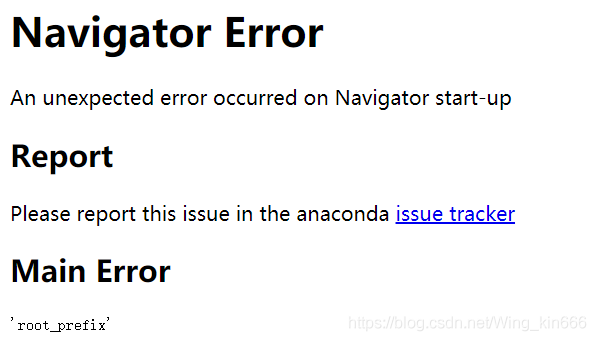
solution:
1. Run with the administrator: Anaconda Prompt
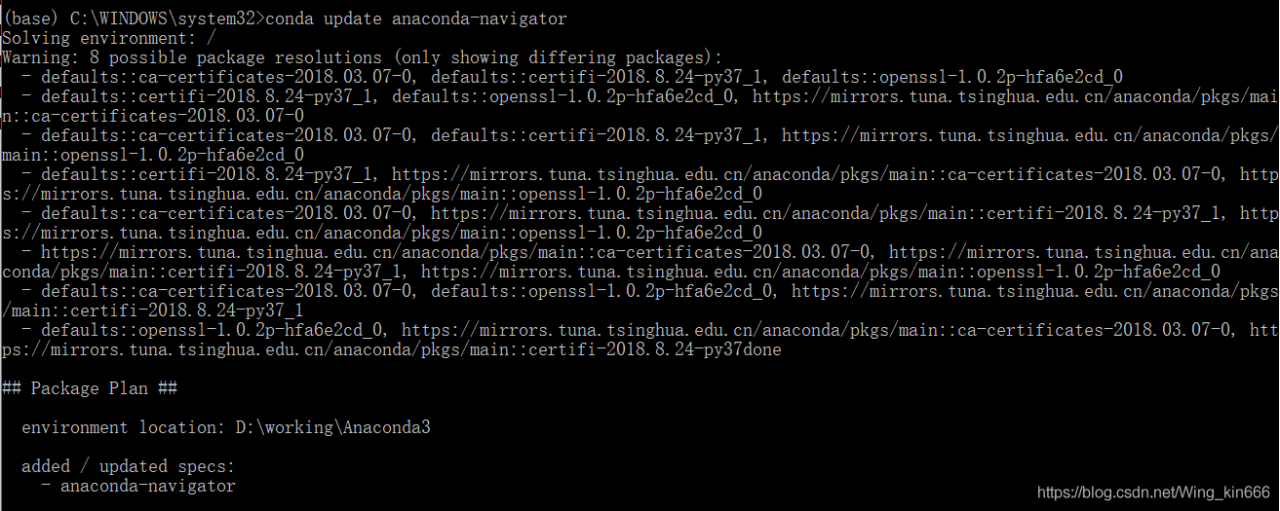
2. Conda update anaconda-navigator
this command may cause the following error:
InvalidTypeError: Parameter _channels = ‘- https://mirrors.tuna.tsinghua.edu.cn/anaconda/pkgs/main/ – https://mirrors.tuna.tsinghua.edu.cn/anaconda/cloud/bioconda/ declared in C: \ Users \ 12270 condarc has type STR.
Valid types:- tuple

Solution: Find the.condarc file under C:\Users\username folder and change it to the following:
channels:
  - https://mirrors.tuna.tsinghua.edu.cn/anaconda/pkgs/free/
  - https://mirrors.tuna.tsinghua.edu.cn/anaconda/pkgs/main/
  - https://mirrors.tuna.tsinghua.edu.cn/anaconda/pkgs/free/win-64
  - https://mirrors.tuna.tsinghua.edu.cn/anaconda/pkgs/free/noarch
  - https://mirrors.tuna.tsinghua.edu.cn/anaconda/pkgs/main/win-64
  - https://mirrors.tuna.tsinghua.edu.cn/anaconda/pkgs/main/noarch
show_channel_urls: true
3. Conda update anaconda-navigator
In scan(file = file, what = what, sep = sep, quote = quote, dec = dec, : EOF within quoted string
Warning message:
In scan(file = file, what = what, sep = sep, quote = quote, dec = dec, :
EOF within quoted string
method 1: call Sys. Setlocale (“LC_ALL”, “English”)
method 2: disable qutoe, set quote = “” “, change the statement to sms_raw < -read.csv (“E:/R/mlrdatasets/sms_spam. CSV “, stringsAsFactors = FALSE,quote = “”)