Category Archives: Python

Python: Panda scramble data

pandas own:

shuffle_data = df. Sample (frac = 1). Reset_index (drop = True)


sklearn:

import numpy as np
import pandas as pd
from sklearn.utils import shuffle as reset


def train_test_split(data, test_size=0.3, shuffle=True, random_state=None):
    '''Split DataFrame into random train and test subsets
    
    Parameters
    ----------
    data : pandas dataframe, need to split dataset.
    
    test_size : float
        If float, should be between 0.0 and 1.0 and represent the
        proportion of the dataset to include in the train split.
        
    random_state : int, RandomState instance or None, optional (default=None)
        If int, random_state is the seed used by the random number generator;
        If RandomState instance, random_state is the random number generator;
        If None, the random number generator is the RandomState instance used
        by `np.random`.
        
    shuffle : boolean, optional (default=None)
        Whether or not to shuffle the data before splitting. If shuffle=False
        then stratify must be None.
    '''

    if shuffle:
        data = reset(data, random_state=random_state)
	
    train = data[int(len(data)*test_size):].reset_index(drop = True)
    test  = data[:int(len(data)*test_size)].reset_index(drop = True)
    
    return train, test


Python: How to Reshape the data in Pandas DataFrame

directory

perspective Pandas DataFrame

groups the data in Pandas DataFrame

summary


After using our dataset, we’ll take a quick look at visualizations that can be easily created from the dataset using the popular Python library, and then walk through an example of visualizations.

  • download CSV and database file – 127.8 KB
  • download the source code 122.4 KB

    Python and “Pandas” is part of the data cleaning series. It aims to leverage data science tools and technologies to get developers up and running quickly.

    if you would like to see other articles in this series, they can be found here:

    Part 1 – introduction to Pandas</li b>

  • – loading CSV and SQL data into Pandas
  • – correcting missing data
  • – merging multiple data sets in Pandas
  • – cleaning up Pandas part 5 – removing Pandas
  • -0 1 1 2 4 5

  • 6
  • 7 part 7 – use seaframe and Pandas to visualize data
  • 8

9
DataFrame to make the most of the data.

, even after the data set is cleaned up, the Pandas need to be reshaped to make the most of the data. Remodeling is manipulating the table structure to form a term used when different data sets, such as </ span> “</ span> wide </ span> ” </ span> data table is set to </ span> “</ span> long </ span> ” </ span> .

and 0 1 cross 2 3 table support, you will be familiar with this if you have used pivottability tables in or data built into many relational databases pivot and 1 cross 2 3 table support.

For example, the table above (Pandas document. ) has been adjusted by perspective, stacking or disassembling the table.

</ span> stack0 method takes tables with multiple indexes and groups them into groups 1 2

  • 3 4 unstack6 method takes tables with multiple unique columns and ungroups them into groups 7 89in this phase, we will study a variety of methods to use to reshape the data. We’ll see how to use perspective and stack of data frames to get different images of the data.

    please note that we have used this series of module source data files to create a full , you can in the head of this article download and install .

    see through  Pandas  DataFrame

    , we can use pivot function to create a new 0 1 DataFrame2 3 from the existing frame. So far, our table has been indexed by buy ID, but let’s convert the previously created combinedData table into a more interesting table.

    First, let’s try the following

    method by starting a new code block and adding:

    productsByState = combinedData.pivot(index='product_id', columns='company', values='paid')

    the result looks something like this:

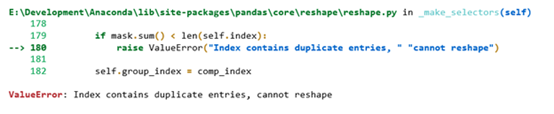
    running this command will result in a duplicate index error, only applies to DataFrame.

    but there’s another way to get us to a solution to this problem. pivot_table works similarly to PivotTable, but it will aggregate duplicate values without generating errors.


; pivot_table; pivot_table; pivot_table

let’s use this method with the default value:

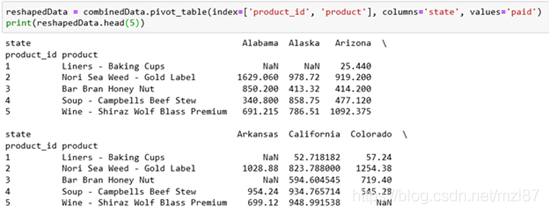
productsByState = combinedData.pivot_table(index=['product_id', 'product'], columns='state', values='paid')

you can view the results here:

This will produce a DataFrame, which contains the list of products and the average of each state in each column. This isn’t really that useful, so let’s change the aggregation method:

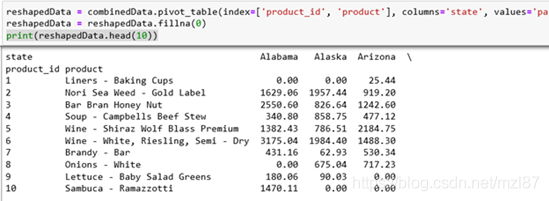
reshapedData = combinedData.pivot_table(index=['product_id', 'product'], columns='state', values='paid', aggfunc=np.sum)
reshapedData = reshapedData.fillna(0)
print(reshapedData.head(10))

now, this will generate a product table that contains the total sales of all these products in each state. The second line of this method also removes the NaN value and replaces it with 0, since it is assumed that the product is not sold in this state.

in to group data

another remodeling activity that we’ll see is grouping data elements together. Let’s go back to the original large DataFrame and create a new DataFrame.

  • groupby </ span> method the large data set and grouped according to the column value </ span> </ li> </ ul>
    Start a new code block and add:
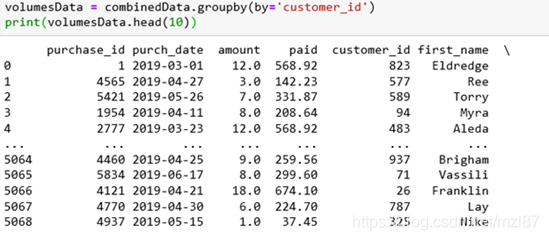
volumesData = combinedData.groupby(by='customer_id') print(volumesData.head(10))

results as follows:

doesn’t seem to be really doing anything because our DataFrame was on purchase_id.

let’s add a summary function to summarize the data so that our grouping works as expected:

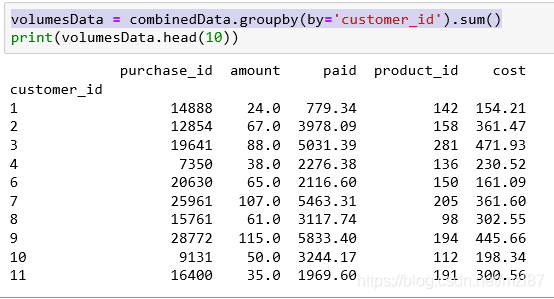
volumesData = combinedData.groupby(by='customer_id').sum()
print(volumesData.head(10))

again, this is the result:

this would group the data set the way we expected but we seem to be missing some columns and doesn’t make any sense so let’s extend the groupby method and trim that 0 1 purchase_id2 3 column: 4

5

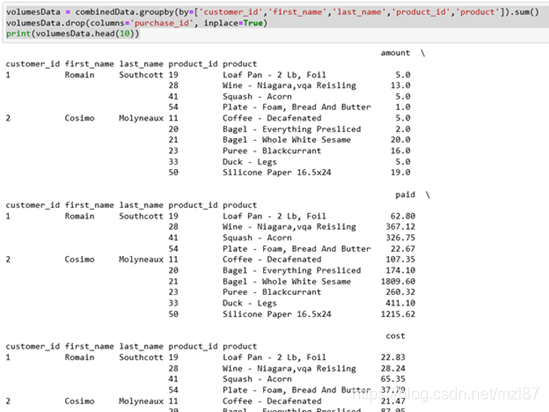
volumesData = combinedData.groupby(by=['customer_id','first_name','last_name','product_id','product']).sum()
volumesData.drop(columns='purchase_id', inplace=True)
print(volumesData.head(10))

this is our new result:

the end result looks good and gives us a good idea of what the customer is buying, the amount of money and how much they are paying.

Finally, we will make another change to the groupby data set. Add the following to create a total for each state DataFrame :

totalsData = combinedData.groupby(by='state').sum().reset_index()
totalsData.drop(columns=['purchase_id','customer_id','product_id'], inplace=True)

The key change here is that we added a sum after the reset_index. This is to ensure that the generated DataFrame has available indexes for our visualization work.

summary

we have taken a complete, clean data set and adapted it in several different ways to give us more insight into the data.

Next, we’ll look at visualizations and see how they can be an important tool for presenting our data and ensuring that the results are clean.

Python error: ‘int’ object is not callable

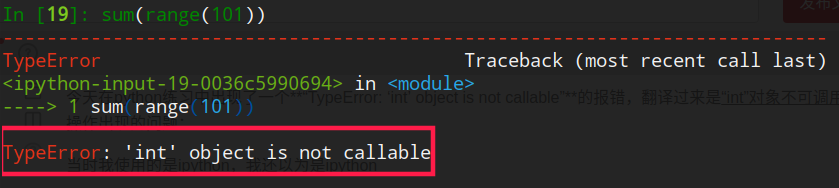
TypeError: ‘int’ object is not callable ‘; ‘int’ object cannot be called .

I just want to use the sum of the 1-100, and () function, but an error, because I’m using ipython, I at first thought it was the cause of the ipython, then I will bring in python interactive tool test, found that there is no problem, can be normal use, the following figure:

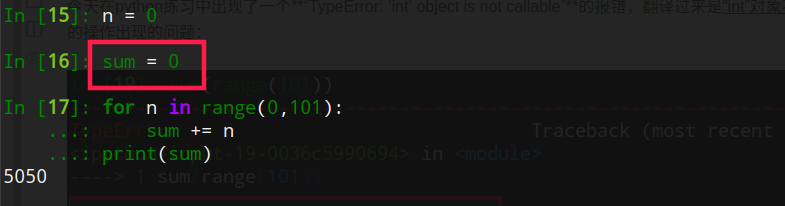
I then looked at me in ipython before operation, before the “sum” this keyword is defined as a variable name, then I tried to put their own custom variables to deleted, please try again after deleting, found, it was the sum () function is when the cause of the variable name before, It’s attempt to:
lookup is defined before the variable name

by reset delete custom variable

try again, can be normal use

this is my problem and the solution, the hope can help you!
hint: python variable names and method names should not be the same

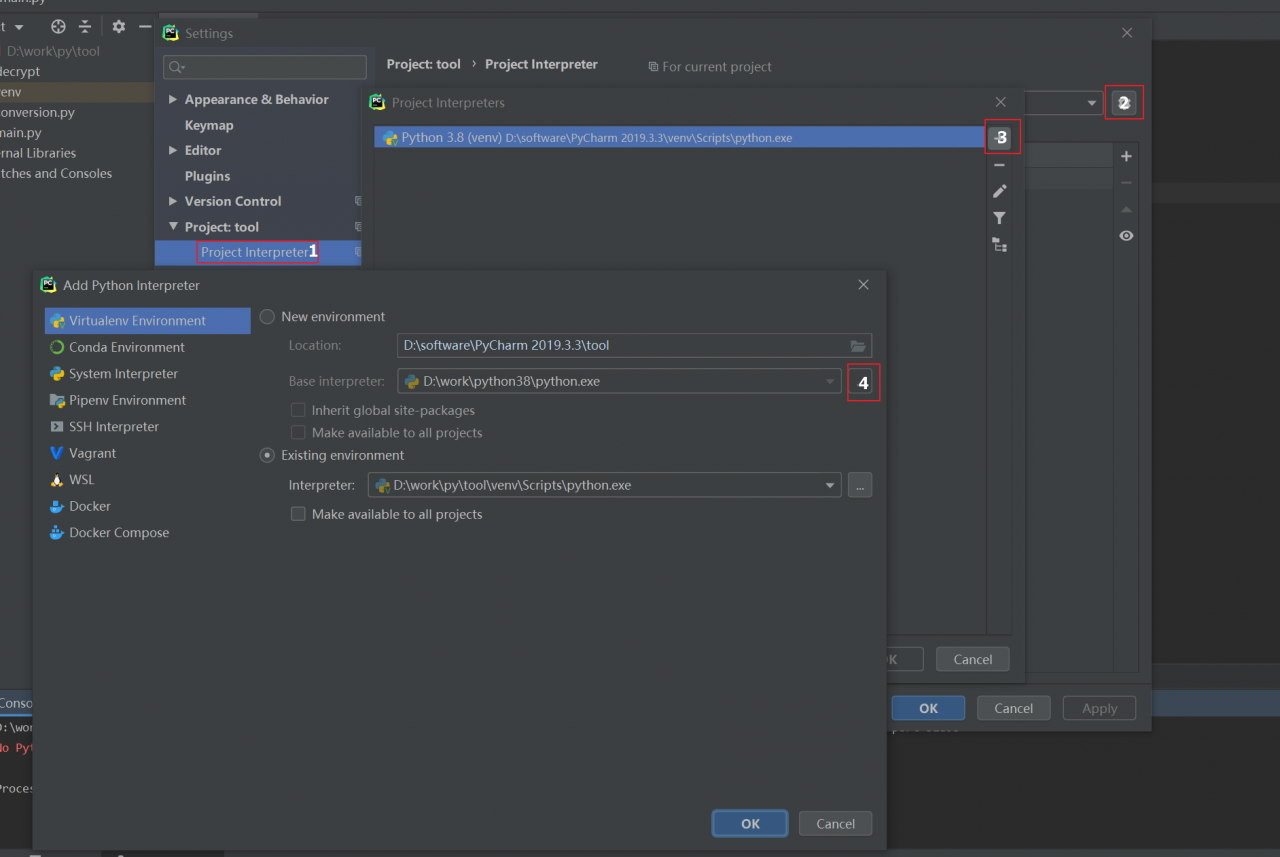
Change the Python installation path in Pycharm

Change the python installation path in

pycharm

introduction

sometimes python is installed in a path that is not suitable and python needs to be reinstalled. If pycharm has been installed before, a change in the new python path will cause pycharm to fail and the pycharm configuration needs to be changed. This article is to document how the Python path is changed in Pycharm.

operation method

click file – & gt; Setting

new changes, in turn, click the above button to choose python installation path can

Python+ Pandas + Evaluation of Music Equipment over the years (Notes)

from the point of view of the title, this lesson is supposed to explore how something changes over time. Therefore, the core content should be to explore the changing trend of time series data. Details are as follows:

1. Fetch data

data source: http://jmcauley.ucsd.edu/data/amazon/links.html

amazon e-commerce website, provides some data resources, the data on the above page is from May 1996 to July 2014, more than 20 years of product reviews. Ratings only data header “user, item, rating, timestamp”
we download “himself Instruments” comments in the file. (the data download is very slow, almost to the time of day), the teacher can use the downloaded file: time analysis/https://www.njcie.com/python/2
2. Processing data

1, read data

[script]

rnames = ['uid', 'pid', 'rating', 'timestamp']
ratings = pd.read_csv('D:\\ratings_Musical_Instruments.csv', header=None, names=rnames)

2. Processing time stamp

[script]

ratings['date'] = ratings['timestamp'].apply(datetime.fromtimestamp)
ratings['year'] = ratings['date'].dt.year
ratings['month'] = ratings['date'].dt.month
ratings= ratings['date'].to_period(freq='M')
print(ratings)

[result]
date uid pid rating timestamp year month
2014-03 A1YS9MDZP93857 00028320 3.0 1394496000 2014 3
2013-06 A3TS466QBAWB9D 0014072149 5.0 1370476800 2013 6
[description]

  1. time stamp is an integer, 1970-01-01 00:00:00 to the number of seconds of statistical time.
  2. datetime. Fromtimestamp () converts timestamp data to datetime data
  3. . Note that the datatime data is converted to period data by specifying the index column and assigning the converted dataframe to a DF variable. Namely: ratings ratings of = [‘ date ‘] to_period (freq = “M”)
    Analysis data

    1. Mean score of each month

    [script 1]

    pingFen = ratings['rating'].groupby('date').mean()
    plt.plot(pingFen)
    plt.show()
    

    [script 2]

    pingFen = ratings['rating'].groupby('date').mean()
    plt.plot(pingFen.to_timestamp())
    plt.show()
    

    TypeError: float() argument must be a string or a number, not ‘Period’. TypeError: float() argument must be a string or a number, not ‘Period’. TypeError: float() argument must be a string or a number, not ‘Period’, TypeError: TypeError: float() argument must be a string or a number, not ‘Period’.

    script 2 results as follows:

    [description]
    1) this does not indicate the score for which item, but only the overall score for the “musical instrument” product.
    2) it can be seen that the score of Musical Instruments tends to be stable after 2004, and shows a downward trend from 1998 to 2004.

    2. The number of participants per month

    because the above results seem to ignore one factor, which is the number of participants in the scoring. In extreme cases, the fewer participants, the more unstable the scoring and the worse the representation. Let’s take a look at the number of ratings:
    [script]

    pingFenR = ratings['rating'].groupby('date').count()
    plt.plot(pingFenR.to_timestamp())
    plt.show()
    

    【 results 】

    From the figure, we can see that before 2010, the number of participants was very small, but after 2010, the number of participants increased rapidly, so in analysis 1, the mean score after 2010 was more stable, which can also be said that the data at this stage is more meaningful.

    3. Combined with the effective number of scores in each period, the score was observed

    , then how to present the data of three dimensions in the same graph, including time, number of participants and mean score?
    scatter plot with size!
    [script]

    pingFen = ratings[['rating']].groupby('date').agg(['count', 'mean'])
    plt.scatter(pingFen.index.to_timestamp(),pingFen['rating']['mean'], ingFen['rating']['count'])
    plt.show()
    

    【 results 】

    【 description 】
     contrast PLT. Scatter (“) and (PLT) the plot (), the period index into the timestamp, the different?
    plt.plot() : pingfn.to_timestamp ()
    plt.scatter() : pingfn.index. To_timestamp () :
    plt.scatter() : pingfn.index. To_timestamp () :
    ; == I don’t know about this point, anyone who knows can leave a message ~ ==

    4. Adjust the image display effect

    1) resize (enlarge or shrink)

    sometimes we show little difference in the size of the scatter, so we can adjust it by multiplying or dividing the parameter of the size of the point by a value.
    for example: in the graph I formed above, some points are too big. The way to turn them down is as follows:

    plt.scatter(pingFen.index.to_timestamp(), pingFen['rating']['mean'], pingFen['rating']['count']/100)
    

    results are as follows:

    2) resize (normalized)

    maps all data to between 0 and 1, using (n-min)/(max-min).
    I tried the following script and got the wrong result
    (pingFen['count'] -pingfen ['count']. Min () /(pingFen['count']. Max ())
    KeyError: ‘count’
    the reason is that there is no field in this rating table (pingFen) called ‘count’, count is just an algorithm.
    solution is as follows:

    pingFen = ratings.groupby('date').agg(cnt=('rating', 'count'), avg =('rating', 'mean'))
    pingFen['sl'] = (pingFen['cnt']-pingFen['cnt'].min())/(pingFen['cnt'].max())
    

    and I’m going to talk specifically about the agg() function here, and it’s going to take me a lot of work to understand it.
    “about pandas in the agg (instructions) 】

    3) color

    parameter details, see https://www.jb51.net/article/127806.htm
    here I use the script as follows:

    ratings = ratings.to_period(freq='M')
    pingFen = ratings.groupby('date').agg(cnt=('rating', 'count'), avg =('rating', 'mean'))
    pingFen['sl'] = (pingFen['cnt']-pingFen['cnt'].min())/(pingFen['cnt'].max())
    plt.scatter(pingFen.index.to_timestamp(), pingFen['avg'], s=pingFen['sl']*1500, c=pingFen['cnt']/pingFen['cnt'].mean(), alpha=0.3)
    

    to scatter () interpretation is as follows:

    after the adjustment effect below, this is my dream JingTu, although is not the best,

    【 description 】
     figure in x axis as the time
     y for scoring average, as can be seen from the graph, after 2006, scoring average concentration between 4.1 to 4.5
     point of capital for the number of participation grade, can be seen from the diagram after 2012, the number of raters broad and the number of scores before 2004, so its score more valuable
     color representation of the information can be configured, because this case without introducing too much observation data dimensions, I still use the grading number to display color here, Purple is small, yellow is large, and green is in the middle.

    [end]

Design python+mysql database with multi-level menu directory

1. Database design

for multilevel directory design, the simplest and most direct way, can directly put the directory name and content and other related information into a table, how to distinguish the top-level directory and subdirectory is the key to the design.

thought :

you can think of a directory tree as a tree structure with multiple root nodes, subdirectories being sons, parent directories being parents, and each subdirectory having only one parent node. Therefore, at the time of design, the parent_ID of the top-level directory can be set as NULL, and all top-level directories can be directly searched out according to NULL. How to add child nodes?Each subdirectory has a parent_ID, and the value of parent_ID corresponds to the ID of other records, so that a tree can be formed by parent_ID and ID. Get to the root node, then iterate through each of the root node leaf nodes, if there is a leaf node, then hung beneath it, such as id for the object of the 5 parent_id is 1, then put the data on id not the record of 1, id is 20 records the parent_id is 5, then hang the id for the record of 20 id for 5 record, json structure is as follows:

           
         {
            "id": 1,
            "text": "顶级目录",
            "parent_menu_tree_item": null,
            "menu_type": 0,
            "data": [
                {
                    "id": 5,
                    "text": "二级目录",
                    "parent_menu_tree_item": 1,
                    "menu_type": 0,
                    "data": {
                        "id": 20,
                        "text": "三级目录",
                        "parent_menu_tree_item": 5,
                        "menu_type": 0
                    }
                }
             ]
         }

ii. Programming

idea: recursion. We select all null records with parent_ID, that is, the root node, and then traverse through each parent subtree. If there are any, we recursively traverse through all the subtrees, each time hanging on the I [“data”] of the parent node, and then traverse to the next root node.

core code is as follows :

1) gets all root nodes :

items = HandsOnCaseMenuTreeItem.objects.using("admin").filter(parent_menu_tree_item=None,
                                                                          resource_id=resource_id) \
                .values("id", "text", "parent_menu_tree_item", "menu_type")
            datas = []
            for i in items:
                find_child(i, datas, resource_id)
            r.data = datas

2) recursively traverses all root nodes :

def find_child(i, datas):
    p_id = i["id"]
    p = HandsOnCaseMenuTreeItem.objects \
        .filter(parent_menu_tree_item=p_id) \
        .values("id", "text", "parent_menu_tree_item", "menu_type")
    if len(p) > 1:
        i['data'] = list(p)
        datas.append(i)
        for j in p:
            find_child(j, datas)
    elif len(p) == 1:
        find_child(p[0], datas)
        i["data"] = p[0]
    return datas


Linux installs Python and upgrades Python

summary dry goods

#解包
tar -zxvf  Python-3.8.2.tgz
#进入解包后的目录
cd /home/urs/Python-3.8.2
#设置安装目录
mkdir /usr/local/python3
./configure --prefix=/usr/local/python3
#进行编译安装
make && make install
#设置软链接
cd /usr/bin
#备份
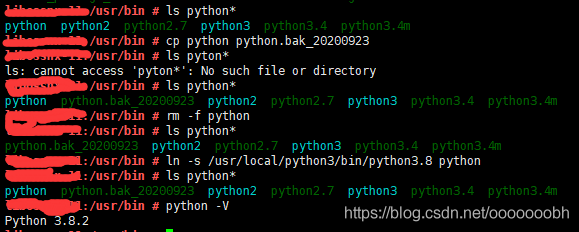
cp python python.bak_20200923 
#删除
rm -f python
#创建
ln -s /usr/local/python3/bin/python3.8 python

specify

first you need to look at what version of python is currently installed in your environment
python -V
或者
python --version
或者
rpm -qa|grep python

2. General python is installed to/urs/bin can go to have a look at the soft connection
CD/usr/bin

3. After determining the current version, if the requirements are not met or Python is not installed, look below.

install python

download python unpack the tar ZXVF python – 3.8.2. TGZ
python – after unpacking 3.8.2

to create the installation directory, using the mkdir command/usr/local/python3

compile and install
tar -zxvf Python-3.8.0b2.tgz
mkdir /usr/local/python3
#如果没有编译环境,会有错误提示,修复的办法是安装gcc或者工具套件
#先查看有没有gcc  whereis gcc 如果有说明当前你没有权限切换root执行

[root@ax Python-3.8.0b2]# ./configure --prefix=/usr/local/python3
checking build system type... x86_64-pc-linux-gnu
checking host system type... x86_64-pc-linux-gnu
checking for python3.8... no
checking for python3... no
checking for python... python
checking for --enable-universalsdk... no
checking for --with-universal-archs... no
checking MACHDEP... "linux"
checking for gcc... no
checking for cc... no
checking for cl.exe... no
configure: error: in `/home/axing/Python-3.8.0b2':
configure: error: no acceptable C compiler found in $PATH
See `config.log' for more details
#如果没有编译环境先安装
[root@ax Python-3.8.0b2]# yum -y groupinstall "Development Tools"
#装完后重新编译
cd Python-3.8.0b2
#设置配置
./configure --prefix=/usr/local/python3
#进行编译 需要耐心等待一会
make && make install

the installation is complete will generate the following documents/usr/local/python3 # Ls
bin include lib share

to view the current soft links

#设置软链接
cd /usr/bin
#备份
cp python python.bak_20200923 
#删除
rm -f python
#创建
ln -s /usr/local/python3/bin/python3.8 python
例如:
[[email protected]]# ln -s /usr/local/python3/bin/python3.8 /usr/bin/python3
[root@ax]# python3
Python 3.8.0b2 (default, Jul  8 2019, 12:01:59)
[GCC 4.8.5 20150623 (Red Hat 4.8.5-36)] on linux
Type "help", "copyright", "credits" or "license" for more information.
>>>

native connection Internet installation method

[root@localhost ~]# cd /usr/local/src
[root@localhost ~]# wget https://www.python.org/ftp/python/2.7.5/Python-2.7.5.tgz
[root@localhost ~]# tar xvf Python-2.7.5.tgz
[root@localhost ~]# cd Python-2.7.5
[root@localhost ~]# ./configure
[root@localhost ~]# make all
[root@localhost ~]# make install
[root@localhost ~]# make clean
[root@localhost ~]# make distclean

may cause problems

 这种方法虽然能安装成功,但是它带来了新的问题,比如yum不能正常用了

  修改/usr/bin/yum的第一行为:

  #!/usr/bin/python_old2

  就可以了    

full installation log

ooooooobh:/ooooooobh/Python-3.8.2 # ./configure --prefix=/usr/local/python3
checking build system type... x86_64-pc-linux-gnu
checking host system type... x86_64-pc-linux-gnu
checking for python3.8... no
checking for python3... python3
checking for --enable-universalsdk... no
checking for --with-universal-archs... no
checking MACHDEP... "linux"
checking for gcc... gcc
checking whether the C compiler works... yes
checking for C compiler default output file name... a.out
checking for suffix of executables... 
checking whether we are cross compiling... no
checking for suffix of object files... o
checking whether we are using the GNU C compiler... yes
checking whether gcc accepts -g... yes
checking for gcc option to accept ISO C89... none needed
checking how to run the C preprocessor... gcc -E
checking for grep that handles long lines and -e... /usr/bin/grep
checking for a sed that does not truncate output... /usr/bin/sed
checking for --with-cxx-main=<compiler>... no
checking for g++... no
configure:

  By default, distutils will build C++ extension modules with "g++".
  If this is not intended, then set CXX on the configure command line.
  
checking for the platform triplet based on compiler characteristics... x86_64-linux-gnu
checking for -Wl,--no-as-needed... yes
checking for egrep... /usr/bin/grep -E
checking for ANSI C header files... yes
checking for sys/types.h... yes
checking for sys/stat.h... yes
checking for stdlib.h... yes
checking for string.h... yes
checking for memory.h... yes
checking for strings.h... yes
checking for inttypes.h... yes
checking for stdint.h... yes
checking for unistd.h... yes
checking minix/config.h usability... no
checking minix/config.h presence... no
checking for minix/config.h... no
checking whether it is safe to define __EXTENSIONS__... yes
checking for the Android API level... not Android
checking for --with-suffix... 
checking for case-insensitive build directory... no
checking LIBRARY... libpython$(VERSION)$(ABIFLAGS).a
checking LINKCC... $(PURIFY) $(MAINCC)
checking for GNU ld... yes
checking for --enable-shared... no
checking for --enable-profiling... no
checking LDLIBRARY... libpython$(VERSION)$(ABIFLAGS).a
checking for ar... ar
checking for readelf... readelf
checking for a BSD-compatible install... /usr/bin/install -c
checking for a thread-safe mkdir -p... /usr/bin/mkdir -p
checking for --with-pydebug... no
checking for --with-trace-refs... no
checking for --with-assertions... no
checking for --enable-optimizations... no
checking PROFILE_TASK... -m test --pgo
checking for --with-lto... no
checking for llvm-profdata... no
checking for -Wextra... yes
checking whether gcc accepts and needs -fno-strict-aliasing... no
checking if we can turn off gcc unused result warning... yes
checking if we can turn off gcc unused parameter warning... yes
checking if we can turn off gcc missing field initializers warning... yes
checking if we can turn on gcc mixed sign comparison warning... yes
checking if we can turn on gcc unreachable code warning... no
checking if we can turn on gcc strict-prototypes warning... no
checking if we can make implicit function declaration an error in gcc... yes
checking whether pthreads are available without options... no
checking whether gcc accepts -Kpthread... no
checking whether gcc accepts -Kthread... no
checking whether gcc accepts -pthread... yes
checking whether g++ also accepts flags for thread support... yes
checking for ANSI C header files... (cached) yes
checking asm/types.h usability... yes
checking asm/types.h presence... yes
checking for asm/types.h... yes
checking crypt.h usability... yes
checking crypt.h presence... yes
checking for crypt.h... yes
checking conio.h usability... no
checking conio.h presence... no
checking for conio.h... no
checking direct.h usability... no
checking direct.h presence... no
checking for direct.h... no
checking dlfcn.h usability... yes
checking dlfcn.h presence... yes
checking for dlfcn.h... yes
checking errno.h usability... yes
checking errno.h presence... yes
checking for errno.h... yes
checking fcntl.h usability... yes
checking fcntl.h presence... yes
checking for fcntl.h... yes
checking grp.h usability... yes
checking grp.h presence... yes
checking for grp.h... yes
checking ieeefp.h usability... no
checking ieeefp.h presence... no
checking for ieeefp.h... no
checking io.h usability... no
checking io.h presence... no
checking for io.h... no
checking langinfo.h usability... yes
checking langinfo.h presence... yes
checking for langinfo.h... yes
checking libintl.h usability... yes
checking libintl.h presence... yes
checking for libintl.h... yes
checking process.h usability... no
checking process.h presence... no
checking for process.h... no
checking pthread.h usability... yes
checking pthread.h presence... yes
checking for pthread.h... yes
checking sched.h usability... yes
checking sched.h presence... yes
checking for sched.h... yes
checking shadow.h usability... yes
checking shadow.h presence... yes
checking for shadow.h... yes
checking signal.h usability... yes
checking signal.h presence... yes
checking for signal.h... yes
checking stropts.h usability... yes
checking stropts.h presence... yes
checking for stropts.h... yes
checking termios.h usability... yes
checking termios.h presence... yes
checking for termios.h... yes
checking utime.h usability... yes
checking utime.h presence... yes
checking for utime.h... yes
checking poll.h usability... yes
checking poll.h presence... yes
checking for poll.h... yes
checking sys/devpoll.h usability... no
checking sys/devpoll.h presence... no
checking for sys/devpoll.h... no
checking sys/epoll.h usability... yes
checking sys/epoll.h presence... yes
checking for sys/epoll.h... yes
checking sys/poll.h usability... yes
checking sys/poll.h presence... yes
checking for sys/poll.h... yes
checking sys/audioio.h usability... no
checking sys/audioio.h presence... no
checking for sys/audioio.h... no
checking sys/xattr.h usability... yes
checking sys/xattr.h presence... yes
checking for sys/xattr.h... yes
checking sys/bsdtty.h usability... no
checking sys/bsdtty.h presence... no
checking for sys/bsdtty.h... no
checking sys/event.h usability... no
checking sys/event.h presence... no
checking for sys/event.h... no
checking sys/file.h usability... yes
checking sys/file.h presence... yes
checking for sys/file.h... yes
checking sys/ioctl.h usability... yes
checking sys/ioctl.h presence... yes
checking for sys/ioctl.h... yes
checking sys/kern_control.h usability... no
checking sys/kern_control.h presence... no
checking for sys/kern_control.h... no
checking sys/loadavg.h usability... no
checking sys/loadavg.h presence... no
checking for sys/loadavg.h... no
checking sys/lock.h usability... no
checking sys/lock.h presence... no
checking for sys/lock.h... no
checking sys/mkdev.h usability... no
checking sys/mkdev.h presence... no
checking for sys/mkdev.h... no
checking sys/modem.h usability... no
checking sys/modem.h presence... no
checking for sys/modem.h... no
checking sys/param.h usability... yes
checking sys/param.h presence... yes
checking for sys/param.h... yes
checking sys/random.h usability... no
checking sys/random.h presence... no
checking for sys/random.h... no
checking sys/select.h usability... yes
checking sys/select.h presence... yes
checking for sys/select.h... yes
checking sys/sendfile.h usability... yes
checking sys/sendfile.h presence... yes
checking for sys/sendfile.h... yes
checking sys/socket.h usability... yes
checking sys/socket.h presence... yes
checking for sys/socket.h... yes
checking sys/statvfs.h usability... yes
checking sys/statvfs.h presence... yes
checking for sys/statvfs.h... yes
checking for sys/stat.h... (cached) yes
checking sys/syscall.h usability... yes
checking sys/syscall.h presence... yes
checking for sys/syscall.h... yes
checking sys/sys_domain.h usability... no
checking sys/sys_domain.h presence... no
checking for sys/sys_domain.h... no
checking sys/termio.h usability... no
checking sys/termio.h presence... no
checking for sys/termio.h... no
checking sys/time.h usability... yes
checking sys/time.h presence... yes
checking for sys/time.h... yes
checking sys/times.h usability... yes
checking sys/times.h presence... yes
checking for sys/times.h... yes
checking for sys/types.h... (cached) yes
checking sys/uio.h usability... yes
checking sys/uio.h presence... yes
checking for sys/uio.h... yes
checking sys/un.h usability... yes
checking sys/un.h presence... yes
checking for sys/un.h... yes
checking sys/utsname.h usability... yes
checking sys/utsname.h presence... yes
checking for sys/utsname.h... yes
checking sys/wait.h usability... yes
checking sys/wait.h presence... yes
checking for sys/wait.h... yes
checking pty.h usability... yes
checking pty.h presence... yes
checking for pty.h... yes
checking libutil.h usability... no
checking libutil.h presence... no
checking for libutil.h... no
checking sys/resource.h usability... yes
checking sys/resource.h presence... yes
checking for sys/resource.h... yes
checking netpacket/packet.h usability... yes
checking netpacket/packet.h presence... yes
checking for netpacket/packet.h... yes
checking sysexits.h usability... yes
checking sysexits.h presence... yes
checking for sysexits.h... yes
checking bluetooth.h usability... no
checking bluetooth.h presence... no
checking for bluetooth.h... no
checking linux/tipc.h usability... yes
checking linux/tipc.h presence... yes
checking for linux/tipc.h... yes
checking linux/random.h usability... yes
checking linux/random.h presence... yes
checking for linux/random.h... yes
checking spawn.h usability... yes
checking spawn.h presence... yes
checking for spawn.h... yes
checking util.h usability... no
checking util.h presence... no
checking for util.h... no
checking alloca.h usability... yes
checking alloca.h presence... yes
checking for alloca.h... yes
checking endian.h usability... yes
checking endian.h presence... yes
checking for endian.h... yes
checking sys/endian.h usability... no
checking sys/endian.h presence... no
checking for sys/endian.h... no
checking sys/sysmacros.h usability... yes
checking sys/sysmacros.h presence... yes
checking for sys/sysmacros.h... yes
checking linux/memfd.h usability... yes
checking linux/memfd.h presence... yes
checking for linux/memfd.h... yes
checking sys/memfd.h usability... no
checking sys/memfd.h presence... no
checking for sys/memfd.h... no
checking sys/mman.h usability... yes
checking sys/mman.h presence... yes
checking for sys/mman.h... yes
checking for dirent.h that defines DIR... yes
checking for library containing opendir... none required
checking whether sys/types.h defines makedev... yes
checking bluetooth/bluetooth.h usability... no
checking bluetooth/bluetooth.h presence... no
checking for bluetooth/bluetooth.h... no
checking for net/if.h... yes
checking for linux/netlink.h... yes
checking for linux/qrtr.h... yes
checking for linux/vm_sockets.h... yes
checking for linux/can.h... yes
checking for linux/can/raw.h... yes
checking for linux/can/bcm.h... yes
checking for clock_t in time.h... yes
checking for makedev... yes
checking for le64toh... yes
checking for mode_t... yes
checking for off_t... yes
checking for pid_t... yes
checking for size_t... yes
checking for uid_t in sys/types.h... yes
checking for ssize_t... yes
checking for __uint128_t... yes
checking size of int... 4
checking size of long... 8
checking size of long long... 8
checking size of void *... 8
checking size of short... 2
checking size of float... 4
checking size of double... 8
checking size of fpos_t... 16
checking size of size_t... 8
checking size of pid_t... 4
checking size of uintptr_t... 8
checking for long double... yes
checking size of long double... 16
checking size of _Bool... 1
checking size of off_t... 8
checking whether to enable large file support... no
checking size of time_t... 8
checking for pthread_t... yes
checking size of pthread_t... 8
checking size of pthread_key_t... 4
checking whether pthread_key_t is compatible with int... yes
checking for --enable-framework... no
checking for dyld... no
checking the extension of shared libraries... .so
checking LDSHARED... $(CC) -shared
checking CCSHARED... -fPIC
checking LINKFORSHARED... -Xlinker -export-dynamic
checking CFLAGSFORSHARED... 
checking SHLIBS... $(LIBS)
checking for sendfile in -lsendfile... no
checking for dlopen in -ldl... yes
checking for shl_load in -ldld... no
checking uuid/uuid.h usability... no
checking uuid/uuid.h presence... no
checking for uuid/uuid.h... no
checking uuid.h usability... no
checking uuid.h presence... no
checking for uuid.h... no
checking for uuid_generate_time_safe... no
checking for uuid_create... no
checking for uuid_enc_be... no
checking for library containing sem_init... -lpthread
checking for textdomain in -lintl... no
checking aligned memory access is required... no
checking for --with-hash-algorithm... default
checking for --with-address-sanitizer... no
checking for --with-memory-sanitizer... no
checking for --with-undefined-behavior-sanitizer... no
checking for t_open in -lnsl... no
checking for socket in -lsocket... no
checking for --with-libs... no
checking for pkg-config... /usr/bin/pkg-config
checking pkg-config is at least version 0.9.0... yes
checking for --with-system-expat... no
checking for --with-system-ffi... yes
checking for --with-system-libmpdec... no
checking for --enable-loadable-sqlite-extensions... no
checking for --with-tcltk-includes... default
checking for --with-tcltk-libs... default
checking for --with-dbmliborder... 
checking if PTHREAD_SCOPE_SYSTEM is supported... yes
checking for pthread_sigmask... yes
checking for pthread_getcpuclockid... yes
checking if --enable-ipv6 is specified... yes
checking if RFC2553 API is available... yes
checking ipv6 stack type... linux-glibc
checking for CAN_RAW_FD_FRAMES... yes
checking for --with-doc-strings... yes
checking for --with-pymalloc... yes
checking for --with-c-locale-coercion... yes
checking for --with-valgrind... no
checking for --with-dtrace... no
checking for dlopen... yes
checking DYNLOADFILE... dynload_shlib.o
checking MACHDEP_OBJS... none
checking for alarm... yes
checking for accept4... yes
checking for setitimer... yes
checking for getitimer... yes
checking for bind_textdomain_codeset... yes
checking for chown... yes
checking for clock... yes
checking for confstr... yes
checking for copy_file_range... no
checking for ctermid... yes
checking for dup3... yes
checking for execv... yes
checking for explicit_bzero... no
checking for explicit_memset... no
checking for faccessat... yes
checking for fchmod... yes
checking for fchmodat... yes
checking for fchown... yes
checking for fchownat... yes
checking for fdwalk... no
checking for fexecve... yes
checking for fdopendir... yes
checking for fork... yes
checking for fpathconf... yes
checking for fstatat... yes
checking for ftime... yes
checking for ftruncate... yes
checking for futimesat... yes
checking for futimens... yes
checking for futimes... yes
checking for gai_strerror... yes
checking for getentropy... no
checking for getgrgid_r... yes
checking for getgrnam_r... yes
checking for getgrouplist... yes
checking for getgroups... yes
checking for getlogin... yes
checking for getloadavg... yes
checking for getpeername... yes
checking for getpgid... yes
checking for getpid... yes
checking for getpriority... yes
checking for getresuid... yes
checking for getresgid... yes
checking for getpwent... yes
checking for getpwnam_r... yes
checking for getpwuid_r... yes
checking for getspnam... yes
checking for getspent... yes
checking for getsid... yes
checking for getwd... yes
checking for if_nameindex... yes
checking for initgroups... yes
checking for kill... yes
checking for killpg... yes
checking for lchown... yes
checking for lockf... yes
checking for linkat... yes
checking for lstat... yes
checking for lutimes... yes
checking for mmap... yes
checking for memrchr... yes
checking for mbrtowc... yes
checking for mkdirat... yes
checking for mkfifo... yes
checking for madvise... yes
checking for mkfifoat... yes
checking for mknod... yes
checking for mknodat... yes
checking for mktime... yes
checking for mremap... yes
checking for nice... yes
checking for openat... yes
checking for pathconf... yes
checking for pause... yes
checking for pipe2... yes
checking for plock... no
checking for poll... yes
checking for posix_fallocate... yes
checking for posix_fadvise... yes
checking for posix_spawn... yes
checking for posix_spawnp... yes
checking for pread... yes
checking for preadv... yes
checking for preadv2... no
checking for pthread_condattr_setclock... yes
checking for pthread_init... no
checking for pthread_kill... yes
checking for putenv... yes
checking for pwrite... yes
checking for pwritev... yes
checking for pwritev2... no
checking for readlink... yes
checking for readlinkat... yes
checking for readv... yes
checking for realpath... yes
checking for renameat... yes
checking for sem_open... yes
checking for sem_timedwait... yes
checking for sem_getvalue... yes
checking for sem_unlink... yes
checking for sendfile... yes
checking for setegid... yes
checking for seteuid... yes
checking for setgid... yes
checking for sethostname... yes
checking for setlocale... yes
checking for setregid... yes
checking for setreuid... yes
checking for setresuid... yes
checking for setresgid... yes
checking for setsid... yes
checking for setpgid... yes
checking for setpgrp... yes
checking for setpriority... yes
checking for setuid... yes
checking for setvbuf... yes
checking for sched_get_priority_max... yes
checking for sched_setaffinity... yes
checking for sched_setscheduler... yes
checking for sched_setparam... yes
checking for sched_rr_get_interval... yes
checking for sigaction... yes
checking for sigaltstack... yes
checking for sigfillset... yes
checking for siginterrupt... yes
checking for sigpending... yes
checking for sigrelse... yes
checking for sigtimedwait... yes
checking for sigwait... yes
checking for sigwaitinfo... yes
checking for snprintf... yes
checking for strftime... yes
checking for strlcpy... no
checking for strsignal... yes
checking for symlinkat... yes
checking for sync... yes
checking for sysconf... yes
checking for tcgetpgrp... yes
checking for tcsetpgrp... yes
checking for tempnam... yes
checking for timegm... yes
checking for times... yes
checking for tmpfile... yes
checking for tmpnam... yes
checking for tmpnam_r... yes
checking for truncate... yes
checking for uname... yes
checking for unlinkat... yes
checking for unsetenv... yes
checking for utimensat... yes
checking for utimes... yes
checking for waitid... yes
checking for waitpid... yes
checking for wait3... yes
checking for wait4... yes
checking for wcscoll... yes
checking for wcsftime... yes
checking for wcsxfrm... yes
checking for wmemcmp... yes
checking for writev... yes
checking for _getpty... no
checking for rtpSpawn... no
checking whether dirfd is declared... yes
checking for chroot... yes
checking for link... yes
checking for symlink... yes
checking for fchdir... yes
checking for fsync... yes
checking for fdatasync... yes
checking for epoll... yes
checking for epoll_create1... yes
checking for kqueue... no
checking for prlimit... yes
checking for memfd_create... no
checking for ctermid_r... no
checking for flock declaration... yes
checking for flock... yes
checking for getpagesize... yes
checking for broken unsetenv... no
checking for true... true
checking for inet_aton in -lc... yes
checking for chflags... no
checking for lchflags... no
checking for inflateCopy in -lz... yes
checking for hstrerror... yes
checking for inet_aton... yes
checking for inet_pton... yes
checking for setgroups... yes
checking for openpty... no
checking for openpty in -lutil... yes
checking for forkpty... yes
checking for fseek64... no
checking for fseeko... yes
checking for fstatvfs... yes
checking for ftell64... no
checking for ftello... yes
checking for statvfs... yes
checking for dup2... yes
checking for strdup... yes
checking for getpgrp... yes
checking for setpgrp... (cached) yes
checking for gettimeofday... yes
checking for library containing crypt... -lcrypt
checking for library containing crypt_r... none required
checking for crypt_r... yes
checking for clock_gettime... yes
checking for clock_getres... yes
checking for clock_settime... yes
checking for major... yes
checking for getaddrinfo... yes
checking getaddrinfo bug... no
checking for getnameinfo... yes
checking whether time.h and sys/time.h may both be included... yes
checking whether struct tm is in sys/time.h or time.h... time.h
checking for struct tm.tm_zone... yes
checking for struct stat.st_rdev... yes
checking for struct stat.st_blksize... yes
checking for struct stat.st_flags... no
checking for struct stat.st_gen... no
checking for struct stat.st_birthtime... no
checking for struct stat.st_blocks... yes
checking for struct passwd.pw_gecos... yes
checking for struct passwd.pw_passwd... yes
checking for siginfo_t.si_band... yes
checking for time.h that defines altzone... no
checking whether sys/select.h and sys/time.h may both be included... yes
checking for addrinfo... yes
checking for sockaddr_storage... yes
checking for sockaddr_alg... yes
checking whether char is unsigned... no
checking for an ANSI C-conforming const... yes
checking for working signed char... yes
checking for prototypes... yes
checking for variable length prototypes and stdarg.h... yes
checking for socketpair... yes
checking if sockaddr has sa_len member... no
checking for gethostbyname_r... yes
checking gethostbyname_r with 6 args... yes
checking for __fpu_control... yes
checking for --with-libm=STRING... default LIBM="-lm"
checking for --with-libc=STRING... default LIBC=""
checking for x64 gcc inline assembler... yes
checking whether float word ordering is bigendian... no
checking whether we can use gcc inline assembler to get and set x87 control word... yes
checking whether we can use gcc inline assembler to get and set mc68881 fpcr... no
checking for x87-style double rounding... no
checking for acosh... yes
checking for asinh... yes
checking for atanh... yes
checking for copysign... yes
checking for erf... yes
checking for erfc... yes
checking for expm1... yes
checking for finite... yes
checking for gamma... yes
checking for hypot... yes
checking for lgamma... yes
checking for log1p... yes
checking for log2... yes
checking for round... yes
checking for tgamma... yes
checking whether isinf is declared... yes
checking whether isnan is declared... yes
checking whether isfinite is declared... yes
checking whether POSIX semaphores are enabled... yes
checking for broken sem_getvalue... no
checking whether RTLD_LAZY is declared... yes
checking whether RTLD_NOW is declared... yes
checking whether RTLD_GLOBAL is declared... yes
checking whether RTLD_LOCAL is declared... yes
checking whether RTLD_NODELETE is declared... yes
checking whether RTLD_NOLOAD is declared... yes
checking whether RTLD_DEEPBIND is declared... yes
checking whether RTLD_MEMBER is declared... no
checking digit size for Python's longs... no value specified
checking wchar.h usability... yes
checking wchar.h presence... yes
checking for wchar.h... yes
checking size of wchar_t... 4
checking for UCS-4 tcl... no
checking whether wchar_t is signed... yes
checking whether wchar_t is usable... no
checking whether byte ordering is bigendian... no
checking ABIFLAGS... 
checking SOABI... cpython-38-x86_64-linux-gnu
checking LDVERSION... $(VERSION)$(ABIFLAGS)
checking whether right shift extends the sign bit... yes
checking for getc_unlocked() and friends... yes
checking how to link readline libs... none
checking for rl_pre_input_hook in -lreadline... no
checking for rl_completion_display_matches_hook in -lreadline... no
checking for rl_resize_terminal in -lreadline... no
checking for rl_completion_matches in -lreadline... no
checking for append_history in -lreadline... no
checking for broken nice()... no
checking for broken poll()... no
checking for working tzset()... yes
checking for tv_nsec in struct stat... yes
checking for tv_nsec2 in struct stat... no
checking curses.h usability... yes
checking curses.h presence... yes
checking for curses.h... yes
checking ncurses.h usability... yes
checking ncurses.h presence... yes
checking for ncurses.h... yes
checking for term.h... yes
checking whether mvwdelch is an expression... yes
checking whether WINDOW has _flags... yes
checking for is_pad... yes
checking for is_term_resized... yes
checking for resize_term... yes
checking for resizeterm... yes
checking for immedok... yes
checking for syncok... yes
checking for wchgat... yes
checking for filter... yes
checking for has_key... yes
checking for typeahead... yes
checking for use_env... yes
configure: checking for device files
checking for /dev/ptmx... yes
checking for /dev/ptc... no
checking for %zd printf() format support... yes
checking for socklen_t... yes
checking for broken mbstowcs... no
checking for --with-computed-gotos... no value specified
checking whether gcc -pthread supports computed gotos... yes
checking for build directories... done
checking for -O2... yes
checking for glibc _FORTIFY_SOURCE/memmove bug... no
checking for gcc ipa-pure-const bug... no
checking for stdatomic.h... no
checking for GCC >= 4.7 __atomic builtins... yes
checking for ensurepip... upgrade
checking if the dirent structure of a d_type field... yes
checking for the Linux getrandom() syscall... yes
checking for the getrandom() function... no
checking for library containing shm_open... -lrt
checking for sys/mman.h... (cached) yes
checking for shm_open... yes
checking for shm_unlink... yes
checking for pkg-config... /usr/bin/pkg-config
checking whether compiling and linking against OpenSSL works... yes
checking for X509_VERIFY_PARAM_set1_host in libssl... yes
checking for --with-ssl-default-suites... python
configure: creating ./config.status
config.status: creating Makefile.pre
config.status: creating Misc/python.pc
config.status: creating Misc/python-embed.pc
config.status: creating Misc/python-config.sh
config.status: creating Modules/ld_so_aix
config.status: creating pyconfig.h
creating Modules/Setup.local
creating Makefile


If you want a release build with all stable optimizations active (PGO, etc),
please run ./configure --enable-optimizations

Python automatically generates the requirements file for the current project

python automatically generates the requirements file for the current project

there are several ways:

1. Use PIP freeze

< pre style=”margin: 0px 0px 15px; padding: 0px; font-family: “Courier New” ! important; font-size: 12px ! important; The line – height: 1.72222; color: inherit; white-space: pre; border-radius: 6px; overflow-wrap: break-word;” > pip freeze > requirements.txt< /pre>

this way is to list the packages in the entire environment, if it is a virtual environment. In general, we only need to export the current project’s requirement.txt, and pipreqs

is recommended
2. Use pipreqs

is a helpful tool that scans the project directory to automatically discover which libraries are used, automatically generates dependency listings, and only generates project-related dependencies to requirements. TXT

installation

< pre style=”margin: 0px 0px 15px; padding: 0px; font-family: “Courier New” ! important; font-size: 12px ! important; The line – height: 1.72222; color: inherit; white-space: pre; border-radius: 6px; overflow-wrap: break-word;” > pip install pipreqs< /pre>

Use

also easy to use pipreqs pathname
here goes directly to the project root directory, so it is./
error

File "c:\users\devtao\appdata\local\programs\python\python36-32\lib\site-packages\pipreqs\pipreqs.py", line 341, in init
    extra_ignore_dirs=extra_ignore_dirs)

  File "c:\users\devtao\appdata\local\programs\python\python36-32\lib\site-packages\pipreqs\pipreqs.py", line 75, in get_all_imports
    contents = f.read()

UnicodeDecodeError: 'gbk' codec can't decode byte 0xa6 in position 186: illegal multibyte sequence

UnicodeDecodeError: ‘GBK’ codec can’t decode byte 0xa6 in position 186: illegal multibyte sequence
directly modify line 407 of pipreqs.py, change encoding to utf-8, save, and run on pipreqs./
pipreqs.py path

C:\Users\linxiao\AppData\Local\Programs\Python\Python37\Lib\site-packages\pipreqs


Python algorithm for “anagram” judgment problem

[TOC]

“anagram” judgment problem

problem description

“anagram” refers to a rearrangement of letters between two words

e.g. Heart and earth, Python and TYPHON

for simplicity, assume that the two words participating in the judgment are composed of only lowercase letters and have the same length

problem goal

writes a bool function that takes two words as arguments to return whether they are anagram

solution 1: check

verbatim

solution idea

check the existence of the characters in word 1 one by one into word 2. Check the existence of the “check” mark (to prevent repetition)

if every character can be found, then these two words are an anagram, as long as a character is not found, it is not an anagram

program tips

implements the “tick” mark: set the character corresponding to word 2 to None

since the string is immutable, you need to copy

into the list first

code

        def abc(s1,s2):
    s2_list=list(s2)  # str转换为list
    pos1=0
    stillok = True
    while pos1<len(s1) and stillok:  # 循环s1长度的次数
        pos2=0
        found = False
        while pos2<len(s2_list) and not found:  # 循环s2长度的次数
            if s1[pos1]==s2_list[pos2]:
                found=True
            else:
                pos2=pos2+1
        if found:
            s2_list[pos2] = None
        else:
            stillok=False
        pos1 = pos1+1
    return stillok
if __name__ == "__main__":
    zzz = abc("abcd","dcba")
    print(zzz)
      

solution 2: sorting comparison

problem solving idea

  1. the two strings are sorted
  2. and compared to see if they are equal

program tips

  1. turn STR list
  2. sort
  3. turn list STR
  4. compare
            def Method2(s1,s2):
        # 字符串是不可变的无法排序,str转list
        list1=list(s1) 
        list2=list(s2)
        # 进行排序
        list1.sort()
        list2.sort()
        # list 转 str
        a = ''.join(list1)
        b = ''.join(list2)
        # 进行比较
        if a==b:
            return True
        else:
            return False
    
    
    if __name__ == "__main__":
        zzz2 = Method2('ablc','lcab')
        print(zzz2)
          

    solution 3: violent method

    problem solving idea

    is just going to exhaust all the possible combinations

    then sort all the characters that appear in s1, and see if s2 appears in the full sorted list

    , there is no code attached here, violence is probably not a good algorithm here

    solution 4: count comparison

    problem solving idea

    compares the number of occurrences of each character in the two words. If all 26 letters have the same number of occurrences, then the two words are an anagram

    program tips

            def Method4(s1,s2):
        c1 = [0]* 26
        c2 = [0]* 26
        for i in range(len(s1)):
            pos = ord(s1[i])-ord('a')
            c1[pos] = c1[pos]+1
        for i in range(len(s2)):
            pos = ord(s2[i])-ord('a')
            c2[pos] = c2[pos]+1
        stillok =True
        j=0
        while  stillok and j<26:
            if c1[j]!=c2[j]:
                stillok=False
            j+=1
        return stillok
    if __name__ == "__main__":
        zzz4 = Method4('ablc','lcab')
        print(zzz4)
          

    , which is the best of the four solutions, T(n)=2n+26

    the solution relies on two lists of 26 counters to hold the character count, so it requires more space than the previous three algorithms. In this case, space is exchanged for time

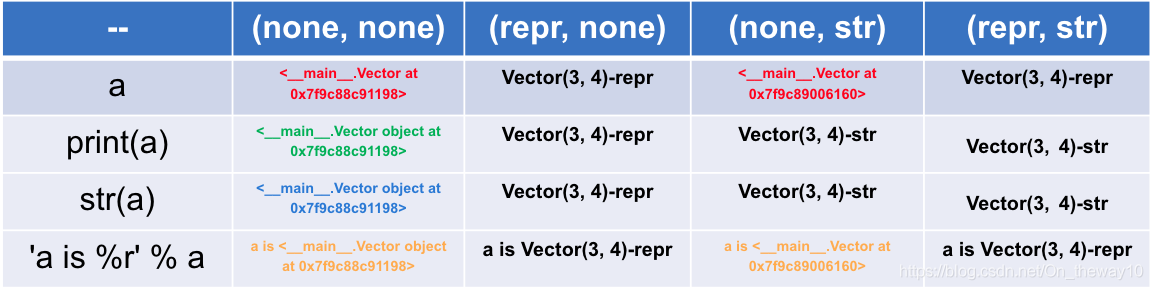
Python: ___ () vs ___ str__()


class Vector(object):

    def __init__(self, x=0, y=0):
        self.x = x
        self.y = y

    def __repr__(self):
        return 'Vector(%r, %r)-repr' % (self.x, self.y)

    def __abs__(self):
        return 'Vector(%r, %r)-str' % (self.x, self.y)

Result

Comment

The method of

  • /repr__() is provided by the object class, and all Python classes are subclasses of the object class, so all Python objects have the method of ___. So if you need to concatenate any object with a string, you can call the method with ___ first to turn the object into a string and then concatenate the strings together.
  • repr__() is special because it is a “self-describing” method, usually with the following scenario: when the developer prints the object directly, the system prints out the “self-describing” message with the object, telling the outside world the state the object has . __repr__() the method provided by the
  • object always returns the “ class name +object at + memory address ” with the object implementation class. This return value does not really implement the ‘self-describing’ function, so if the user needs to custom class to do it, he/she must rewrite the method with repr__().
  • is generally more readable with succinct __str__(), and the return result of each __repr__() is more accurate and more appropriate for the developer. </ li>
  • for developers, in the implementation class, suggested rewriting __repr__ () function </ span> </ strong>!

Python classes that connect to the database

article directory

    • overview
    • python connection MySQL
    • python connection PostgreSQL

    overview

    in general, when using python to connect to a database, I like to define a Class to facilitate the subsequent use of
    Class: a collection of objects that have the same properties and methods. It defines the properties and methods that are common to each object in the collection. An object is an instance of a class.
    can be likened to a Word template that you can use every time you create a new Word file, which is handy for frequently used scenarios

    connects to the database to execute commands and return results and then disconnects, as is often the case when writing scripts, so define a class

    python connection MySQL

    connects to MySQL using pymysql

    class cnMySQL:
        def __init__(self):
            self._dbhost = '172..16.56.2'
            self._dbuser = 'dba'
            self._dbpassword = 'dba1'
            self._dbname = 'test'
            self._dbcharset = 'utf8'
            self._dbport = int(3306)
            self._conn = self.connectMySQL()
    
            if (self._conn):
                self._cursor = self._conn.cursor(cursor=pymysql.cursors.DictCursor)
        
        def connectMySQL(self):
            try:
                conn = pymysql.connect(host=self._dbhost,
                                       user=self._dbuser,
                                       passwd=self._dbpassword,
                                       db=self._dbname,
                                       port=self._dbport,
                                       cursorclass=pymysql.cursors.DictCursor,
                                       charset=self._dbcharset)
            except Exception as e:
                raise
                #print("数据库连接出错")
                conn = False
            return conn
    
        def close(self):
            if (self._conn):
                try:
                    if (type(self._cursor) == 'object'):
                        self._conn.close()
                    if (type(self._conn) == 'object'):
                        self._conn.close()
                except Exception:
                    print("关闭数据库连接异常")
    
        def ExecQuery(self,sql,*args):
            """
            执行查询语句
            """
            res = ''
            if (self._conn):
                try:
                    self._cursor.execute(sql,args)
                    res = self._cursor.fetchall()
                except Exception:
                    res = False
                    print("查询异常")
                self.close()
            return res


    use method :
    first call: conn = cnMySQL()
    execute SQL example: test_sql = conn.ExecQuery(” select * from test where id = %s; Canshu)
    returns a list

    containing dict when the data is returned

    python connection PostgreSQL

    connects to PG using the package psycopg2

    class PGINFO:
    
        def __init__(self,host, user, pwd, db, port):
            self.host = host
            self.user = user
            self.pwd = pwd
            self.db = db
            self.port = port
    
        def __GetConnect(self):
            """
            得到连接信息
            返回: conn.cursor()
            """
            if not self.db:
                raise(NameError, "没有设置数据库信息")
            self.conn = psycopg2.connect(database=self.db, user=self.user, password=self.pwd, host=self.host, port=self.port)
            cur = self.conn.cursor()
            if not cur:
                raise (NameError, "连接数据库失败")
            else:
                return  cur
    
        def ExecQuery(self, sql):
            """
            执行查询语句
            """
            if sql == 'close':
                self.conn.close()
            else:
                cur = self.__GetConnect()
                cur.execute(sql)
                # resList = cur.fetchall()
                return cur
    

    is called first, where

    using the parameter file is called

     pg = PGINFO(host=host_cus, user=user_cus, pwd=pwd_cus, db=db_cus, port=port_cus)
    

    executes the command, fetching the returned result

    cur = pg.ExecQuery("show data_directory;")
        pgdata = cur.fetchone()
    

You can run the Ansible Playbook in Python by hand

article directory

    • ansible playbook call
      • find command path
      • to find the source code and analyze
      • simplify call

      • call after the interaction of the
        • ansible run analysis
          • cli. The run ()
          • PlaybookExecutor. The run ()
          • TaskQueueManager. The run ()
          • strategy. The run ()
          • TaskQueueManager. Send_callback ()
      • final code

    about ansible, I will not talk about science, in a word, it is necessary to do the operation and maintenance of the distributed system, to achieve the functions of batch system configuration, batch program deployment, batch run commands and so on. Ansible is a big killer, it can make you get twice the result with half the effort.

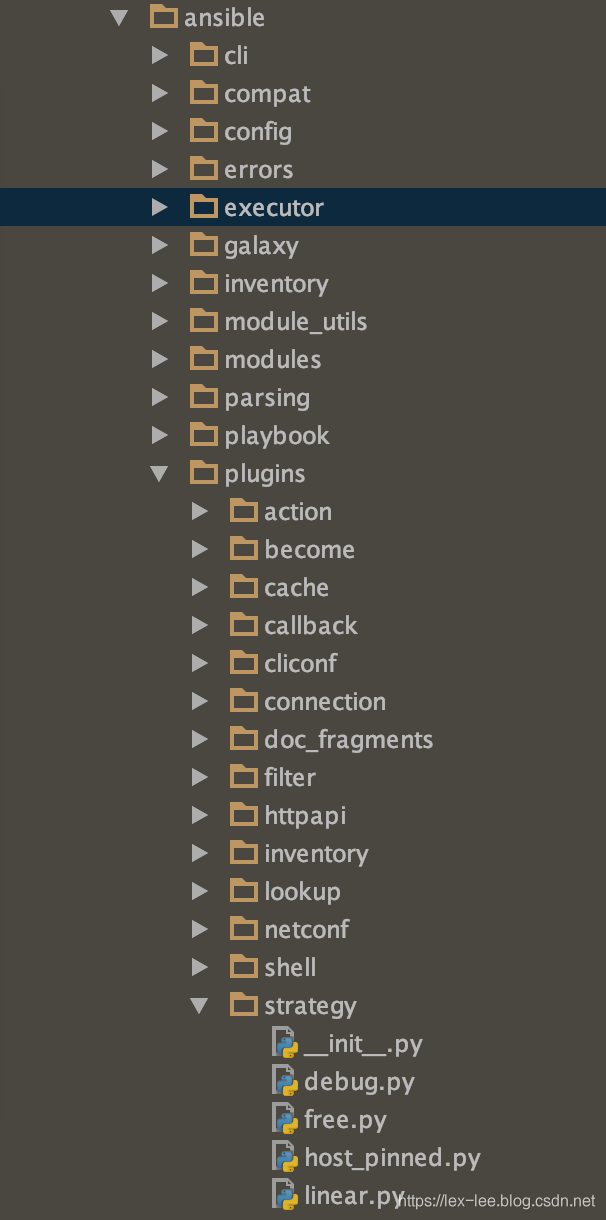
    , however, as a cli tool, its usage scenario is still limited by cli, unable to achieve deeper interaction and logical control in the running process. Ansible itself is done in Python, so it is actually seamlessly linked to python’s script control and can be used directly in Python. But there’s very little of this in the documentation on the website itself, and very little on the Internet, so this post is an attempt to provide some guidance.

    first of all, I’m not a python Daniel, can’t directly from the code of the line to see the entire ansible architecture and code, and official website said ansible code has been refactoring (found in the Internet from a handful of cases have proved that, the python call ansible example, in the new version of the ansbile can hardly run a), as a result, what we need is a way of thinking: from the CLI to start with

    ansible playbook call

    Let’s take ansible

    as an example, and show you how we can start from CLI and find a way to call ansible

    in python, step by step

    find the command path

    $ which ansible-playbook 
    /Library/Frameworks/Python.framework/Versions/3.6/bin/ansible-playbook
    

    find the source code and analyze

    use the above command to find ansible-playbook. Open the file (don’t read the contents of the file) :

    #!/Library/Frameworks/Python.framework/Versions/3.6/bin/python3.6
    
    # (c) 2012, Michael DeHaan <[email protected]>
    #
    # This file is part of Ansible
    #
    # Ansible is free software: you can redistribute it and/or modify
    # it under the terms of the GNU General Public License as published by
    # the Free Software Foundation, either version 3 of the License, or
    # (at your option) any later version.
    #
    # Ansible is distributed in the hope that it will be useful,
    # but WITHOUT ANY WARRANTY; without even the implied warranty of
    # MERCHANTABILITY or FITNESS FOR A PARTICULAR PURPOSE.  See the
    # GNU General Public License for more details.
    #
    # You should have received a copy of the GNU General Public License
    # along with Ansible.  If not, see <http://www.gnu.org/licenses/>.
    
    ########################################################
    from __future__ import (absolute_import, division, print_function)
    __metaclass__ = type
    
    __requires__ = ['ansible']
    
    
    import os
    import shutil
    import sys
    import traceback
    
    from ansible import context
    from ansible.errors import AnsibleError, AnsibleOptionsError, AnsibleParserError
    from ansible.module_utils._text import to_text
    
    
    # Used for determining if the system is running a new enough python version
    # and should only restrict on our documented minimum versions
    _PY3_MIN = sys.version_info[:2] >= (3, 5)
    _PY2_MIN = (2, 6) <= sys.version_info[:2] < (3,)
    _PY_MIN = _PY3_MIN or _PY2_MIN
    if not _PY_MIN:
        raise SystemExit('ERROR: Ansible requires a minimum of Python2 version 2.6 or Python3 version 3.5. Current version: %s' % ''.join(sys.version.splitlines()))
    
    
    class LastResort(object):
        # OUTPUT OF LAST RESORT
        def display(self, msg, log_only=None):
            print(msg, file=sys.stderr)
    
        def error(self, msg, wrap_text=None):
            print(msg, file=sys.stderr)
    
    
    if __name__ == '__main__':
    
        display = LastResort()
    
        try:  # bad ANSIBLE_CONFIG or config options can force ugly stacktrace
            import ansible.constants as C
            from ansible.utils.display import Display
        except AnsibleOptionsError as e:
            display.error(to_text(e), wrap_text=False)
            sys.exit(5)
    
        cli = None
        me = os.path.basename(sys.argv[0])
    
        try:
            display = Display()
            display.debug("starting run")
    
            sub = None
            target = me.split('-')
            if target[-1][0].isdigit():
                # Remove any version or python version info as downstreams
                # sometimes add that
                target = target[:-1]
    
            if len(target) > 1:
                sub = target[1]
                myclass = "%sCLI" % sub.capitalize()
            elif target[0] == 'ansible':
                sub = 'adhoc'
                myclass = 'AdHocCLI'
            else:
                raise AnsibleError("Unknown Ansible alias: %s" % me)
    
            try:
                mycli = getattr(__import__("ansible.cli.%s" % sub, fromlist=[myclass]), myclass)
            except ImportError as e:
                # ImportError members have changed in py3
                if 'msg' in dir(e):
                    msg = e.msg
                else:
                    msg = e.message
                if msg.endswith(' %s' % sub):
                    raise AnsibleError("Ansible sub-program not implemented: %s" % me)
                else:
                    raise
    
            try:
                args = [to_text(a, errors='surrogate_or_strict') for a in sys.argv]
            except UnicodeError:
                display.error('Command line args are not in utf-8, unable to continue.  Ansible currently only understands utf-8')
                display.display(u"The full traceback was:\n\n%s" % to_text(traceback.format_exc()))
                exit_code = 6
            else:
                cli = mycli(args)
                exit_code = cli.run()
    
        except AnsibleOptionsError as e:
            cli.parser.print_help()
            display.error(to_text(e), wrap_text=False)
            exit_code = 5
        except AnsibleParserError as e:
            display.error(to_text(e), wrap_text=False)
            exit_code = 4
    # TQM takes care of these, but leaving comment to reserve the exit codes
    #    except AnsibleHostUnreachable as e:
    #        display.error(str(e))
    #        exit_code = 3
    #    except AnsibleHostFailed as e:
    #        display.error(str(e))
    #        exit_code = 2
        except AnsibleError as e:
            display.error(to_text(e), wrap_text=False)
            exit_code = 1
        except KeyboardInterrupt:
            display.error("User interrupted execution")
            exit_code = 99
        except Exception as e:
            if C.DEFAULT_DEBUG:
                # Show raw stacktraces in debug mode, It also allow pdb to
                # enter post mortem mode.
                raise
            have_cli_options = bool(context.CLIARGS)
            display.error("Unexpected Exception, this is probably a bug: %s" % to_text(e), wrap_text=False)
            if not have_cli_options or have_cli_options and context.CLIARGS['verbosity'] > 2:
                log_only = False
                if hasattr(e, 'orig_exc'):
                    display.vvv('\nexception type: %s' % to_text(type(e.orig_exc)))
                    why = to_text(e.orig_exc)
                    if to_text(e) != why:
                        display.vvv('\noriginal msg: %s' % why)
            else:
                display.display("to see the full traceback, use -vvv")
                log_only = True
            display.display(u"the full traceback was:\n\n%s" % to_text(traceback.format_exc()), log_only=log_only)
            exit_code = 250
        finally:
            # Remove ansible tmpdir
            shutil.rmtree(C.DEFAULT_LOCAL_TMP, True)
    
        sys.exit(exit_code)
    

    as you can see, most of the content is exception handling, skip it and find the most important sentence:

    ...
            if len(target) > 1:
                sub = target[1]
                myclass = "%sCLI" % sub.capitalize()
            elif target[0] == 'ansible':
                sub = 'adhoc'
                myclass = 'AdHocCLI'
            else:
                raise AnsibleError("Unknown Ansible alias: %s" % me)
    
            try:
                mycli = getattr(__import__("ansible.cli.%s" % sub, fromlist=[myclass]), myclass)
    ...
                cli = mycli(args)
                exit_code = cli.run()
    

    through these lines of code, we can locate the package ansible. Cli directory. A variety of CLI is supported below :

    ├── adhoc.py
    ├── arguments
    │   ├── __init__.py
    │   ├── __pycache__
    │   │   ├── __init__.cpython-36.pyc
    │   │   └── optparse_helpers.cpython-36.pyc
    │   └── optparse_helpers.py
    ├── config.py
    ├── console.py
    ├── doc.py
    ├── galaxy.py
    ├── inventory.py
    ├── playbook.py
    ├── pull.py
    └── vault.py
    

    and the way to call it is also very simple, just need to figure out what args is, you can simply add print(args).

    simplifies calling

    finally the above code can be simplified to the following example:

    from ansible.cli.playbook import PlaybookCLI
    
    mycli = PlaybookCLI
    
    cli = mycli([" ",'-i', 'hosts.uat', 'kibana_deploy_plugin.yml'])
    exit_code = cli.run()
    

    note that the parameter is ['-i', 'hosts. Uat ', 'kibana_deploy_plugin.yml']. The format is the same as we run ansible playbook, except that is required to provide as an array.

    run it, and here’s the result:

    PLAY [Deploy kibana optimize] **************************************************
    
    TASK [Gathering Facts] *********************************************************
    fatal: [BI-LASS-Kibana_10.60.x.x]: UNREACHABLE! => {"changed": false, "msg": "Failed to connect to the host via ssh: ssh: connect to host 10.60.x.x port 22: Operation timed out", "unreachable": true}
    fatal: [BI-LASS-Kibana_10.50.x.x]: UNREACHABLE! => {"changed": false, "msg": "Failed to connect to the host via ssh: ssh: connect to host 10.50.x.x port 22: Operation timed out", "unreachable": true}
    
    PLAY RECAP *********************************************************************
    BI-LASS-Kibana_10.60.x.x : ok=0    changed=0    unreachable=1    failed=0    skipped=0    rescued=0    ignored=0   
    BI-LASS-Kibana_10.50.x.x : ok=0    changed=0    unreachable=1    failed=0    skipped=0    rescued=0    ignored=0   
    
    
    Process finished with exit code 0
    

    , we can see that the script is working, so at this point, we can call ansible playbook in python.

    interaction after the call

    is not enough, we need interaction, we need to get the results of task running, and do additional analysis and logical processing based on the results, so we need to study the code in more depth.

    ansible operating analysis

    cli.run()

    first take a look at cli.run() function:

       def run(self):
    
            super(PlaybookCLI, self).run()
    
            # Note: slightly wrong, this is written so that implicit localhost
            # manages passwords
            sshpass = None
            becomepass = None
            passwords = {}
    
            # initial error check, to make sure all specified playbooks are accessible
            # before we start running anything through the playbook executor
    
            b_playbook_dirs = []
            for playbook in context.CLIARGS['args']:
                if not os.path.exists(playbook):
                    raise AnsibleError("the playbook: %s could not be found" % playbook)
                if not (os.path.isfile(playbook) or stat.S_ISFIFO(os.stat(playbook).st_mode)):
                    raise AnsibleError("the playbook: %s does not appear to be a file" % playbook)
    
                b_playbook_dir = os.path.dirname(os.path.abspath(to_bytes(playbook, errors='surrogate_or_strict')))
                # load plugins from all playbooks in case they add callbacks/inventory/etc
                add_all_plugin_dirs(b_playbook_dir)
    
                b_playbook_dirs.append(b_playbook_dir)
    
            set_collection_playbook_paths(b_playbook_dirs)
    
            # don't deal with privilege escalation or passwords when we don't need to
            if not (context.CLIARGS['listhosts'] or context.CLIARGS['listtasks'] or
                    context.CLIARGS['listtags'] or context.CLIARGS['syntax']):
                (sshpass, becomepass) = self.ask_passwords()
                passwords = {'conn_pass': sshpass, 'become_pass': becomepass}
    
            # create base objects
            loader, inventory, variable_manager = self._play_prereqs()
    
            # (which is not returned in list_hosts()) is taken into account for
            # warning if inventory is empty.  But it can't be taken into account for
            # checking if limit doesn't match any hosts.  Instead we don't worry about
            # limit if only implicit localhost was in inventory to start with.
            #
            # Fix this when we rewrite inventory by making localhost a real host (and thus show up in list_hosts())
            CLI.get_host_list(inventory, context.CLIARGS['subset'])
    
            # flush fact cache if requested
            if context.CLIARGS['flush_cache']:
                self._flush_cache(inventory, variable_manager)
    
            # create the playbook executor, which manages running the plays via a task queue manager
            pbex = PlaybookExecutor(playbooks=context.CLIARGS['args'], inventory=inventory,
                                    variable_manager=variable_manager, loader=loader,
                                    passwords=passwords)
    
            results = pbex.run()
    
            if isinstance(results, list):
                for p in results:
    
                    display.display('\nplaybook: %s' % p['playbook'])
                    for idx, play in enumerate(p['plays']):
                        if play._included_path is not None:
                            loader.set_basedir(play._included_path)
                        else:
                            pb_dir = os.path.realpath(os.path.dirname(p['playbook']))
                            loader.set_basedir(pb_dir)
    
                        msg = "\n  play #%d (%s): %s" % (idx + 1, ','.join(play.hosts), play.name)
                        mytags = set(play.tags)
                        msg += '\tTAGS: [%s]' % (','.join(mytags))
    
                        if context.CLIARGS['listhosts']:
                            playhosts = set(inventory.get_hosts(play.hosts))
                            msg += "\n    pattern: %s\n    hosts (%d):" % (play.hosts, len(playhosts))
                            for host in playhosts:
                                msg += "\n      %s" % host
    
                        display.display(msg)
    
                        all_tags = set()
                        if context.CLIARGS['listtags'] or context.CLIARGS['listtasks']:
                            taskmsg = ''
                            if context.CLIARGS['listtasks']:
                                taskmsg = '    tasks:\n'
    
                            def _process_block(b):
                                taskmsg = ''
                                for task in b.block:
                                    if isinstance(task, Block):
                                        taskmsg += _process_block(task)
                                    else:
                                        if task.action == 'meta':
                                            continue
    
                                        all_tags.update(task.tags)
                                        if context.CLIARGS['listtasks']:
                                            cur_tags = list(mytags.union(set(task.tags)))
                                            cur_tags.sort()
                                            if task.name:
                                                taskmsg += "      %s" % task.get_name()
                                            else:
                                                taskmsg += "      %s" % task.action
                                            taskmsg += "\tTAGS: [%s]\n" % ', '.join(cur_tags)
    
                                return taskmsg
    
                            all_vars = variable_manager.get_vars(play=play)
                            for block in play.compile():
                                block = block.filter_tagged_tasks(all_vars)
                                if not block.has_tasks():
                                    continue
                                taskmsg += _process_block(block)
    
                            if context.CLIARGS['listtags']:
                                cur_tags = list(mytags.union(all_tags))
                                cur_tags.sort()
                                taskmsg += "      TASK TAGS: [%s]\n" % ', '.join(cur_tags)
    
                            display.display(taskmsg)
    
                return 0
            else:
                return results
    

    The function

    is still very long, but the point is:

    # create the playbook executor, which manages running the plays via a task queue manager
    pbex = PlaybookExecutor(playbooks=context.CLIARGS['args'], inventory=inventory,
                                    variable_manager=variable_manager, loader=loader,
                                    passwords=passwords)
    
            results = pbex.run()
    

    here the execution process is encapsulated with PlaybookExecutor, and the task queue manager.

    PlaybookExecutor.run()

    follow up PlaybookExecutor. Run (), we can see the key code is:

    class PlaybookExecutor:
    
        '''
        This is the primary class for executing playbooks, and thus the
        basis for bin/ansible-playbook operation.
        '''
    
        def __init__(self, playbooks, inventory, variable_manager, loader, passwords):
            self._playbooks = playbooks
            self._inventory = inventory
            self._variable_manager = variable_manager
            self._loader = loader
            self.passwords = passwords
            self._unreachable_hosts = dict()
    
            if context.CLIARGS.get('listhosts') or context.CLIARGS.get('listtasks') or \
                    context.CLIARGS.get('listtags') or context.CLIARGS.get('syntax'):
                self._tqm = None
            else:
                self._tqm = TaskQueueManager(
                    inventory=inventory,
                    variable_manager=variable_manager,
                    loader=loader,
                    passwords=self.passwords,
                    forks=context.CLIARGS.get('forks'),
                )
                ...
        def run(self):
            '''
            Run the given playbook, based on the settings in the play which
            may limit the runs to serialized groups, etc.
            '''   
            ...         
                        if self._tqm is None:
                            # we are just doing a listing
                            entry['plays'].append(play)
    
                        else:
                            self._tqm._unreachable_hosts.update(self._unreachable_hosts)
    
                            previously_failed = len(self._tqm._failed_hosts)
                            previously_unreachable = len(self._tqm._unreachable_hosts)
    
                            break_play = False
                            # we are actually running plays
                            batches = self._get_serialized_batches(play)
                            if len(batches) == 0:
                                self._tqm.send_callback('v2_playbook_on_play_start', play)
                                self._tqm.send_callback('v2_playbook_on_no_hosts_matched')
                            for batch in batches:
                                # restrict the inventory to the hosts in the serialized batch
                                self._inventory.restrict_to_hosts(batch)
                                # and run it...
                                result = self._tqm.run(play=play)
    		...
    

    you can see a couple of things:

    • if the parameter contains listhosts, listtasks, listtags, syntax then it does not actually run, but returns the information for playbook
    • 0

    • 1 if it needs to run, then through 2 TaskQueueManager3, (4))
    • we need to look further into the _tq.run (play=play)

    for batchforks (such concurrency is not thread-safe)

  • TaskQueueManager.run()

    a few things can be seen from the following code:

    The default strategy is linear strategy

  • . Once the task has been completed on all hosts, it will proceed to the next task
    def run(self, play):
        '''
        Iterates over the roles/tasks in a play, using the given (or default)
        strategy for queueing tasks. The default is the linear strategy, which
        operates like classic Ansible by keeping all hosts in lock-step with
        a given task (meaning no hosts move on to the next task until all hosts
        are done with the current task).
        '''

        if not self._callbacks_loaded:
            self.load_callbacks()

        all_vars = self._variable_manager.get_vars(play=play)
        warn_if_reserved(all_vars)
        templar = Templar(loader=self._loader, variables=all_vars)

        new_play = play.copy()
        new_play.post_validate(templar)
        new_play.handlers = new_play.compile_roles_handlers() + new_play.handlers

        self.hostvars = HostVars(
            inventory=self._inventory,
            variable_manager=self._variable_manager,
            loader=self._loader,
        )

        play_context = PlayContext(new_play, self.passwords, self._connection_lockfile.fileno())
        if (self._stdout_callback and
                hasattr(self._stdout_callback, 'set_play_context')):
            self._stdout_callback.set_play_context(play_context)

        for callback_plugin in self._callback_plugins:
            if hasattr(callback_plugin, 'set_play_context'):
                callback_plugin.set_play_context(play_context)

        self.send_callback('v2_playbook_on_play_start', new_play)

        # build the iterator
        iterator = PlayIterator(
            inventory=self._inventory,
            play=new_play,
            play_context=play_context,
            variable_manager=self._variable_manager,
            all_vars=all_vars,
            start_at_done=self._start_at_done,
        )

        # adjust to # of workers to configured forks or size of batch, whatever is lower
        self._initialize_processes(min(self._forks, iterator.batch_size))

        # load the specified strategy (or the default linear one)
        strategy = strategy_loader.get(new_play.strategy, self)
        if strategy is None:
            raise AnsibleError("Invalid play strategy specified: %s" % new_play.strategy, obj=play._ds)

        # Because the TQM may survive multiple play runs, we start by marking
        # any hosts as failed in the iterator here which may have been marked
        # as failed in previous runs. Then we clear the internal list of failed
        # hosts so we know what failed this round.
        for host_name in self._failed_hosts.keys():
            host = self._inventory.get_host(host_name)
            iterator.mark_host_failed(host)

        self.clear_failed_hosts()

        # during initialization, the PlayContext will clear the start_at_task
        # field to signal that a matching task was found, so check that here
        # and remember it so we don't try to skip tasks on future plays
        if context.CLIARGS.get('start_at_task') is not None and play_context.start_at_task is None:
            self._start_at_done = True

        # and run the play using the strategy and cleanup on way out
        play_return = strategy.run(iterator, play_context)

        # now re-save the hosts that failed from the iterator to our internal list
        for host_name in iterator.get_failed_hosts():
            self._failed_hosts[host_name] = True

        strategy.cleanup()
        self._cleanup_processes()
        return play_return

therefore, we still need to go to strategy.run() to find out

strategy.run()

through this part of the code

    def run(self, iterator, play_context):
        '''
        The linear strategy is simple - get the next task and queue
        it for all hosts, then wait for the queue to drain before
        moving on to the next task
        '''

        # iterate over each task, while there is one left to run
        result = self._tqm.RUN_OK
        work_to_do = True
        while work_to_do and not self._tqm._terminated:

            try:
                display.debug("getting the remaining hosts for this loop")
                hosts_left = self.get_hosts_left(iterator)
                display.debug("done getting the remaining hosts for this loop")

                # queue up this task for each host in the inventory
                callback_sent = False
                work_to_do = False

                host_results = []
                host_tasks = self._get_next_task_lockstep(hosts_left, iterator)

...

                    results += self._process_pending_results(iterator, max_passes=max(1, int(len(self._tqm._workers) * 0.1)))

...

        return super(StrategyModule, self).run(iterator, play_context, result)

(this function is too long, I omitted most of it)

the final line here is results += self._process_pending_results(iterator, max_process_pending_results = Max (1, int(len(self._tqm._workers) * 0.1)) , that is, we process through the _process_pending_results function, and we use a lot of callbacks:

                if task_result.is_failed() or task_result.is_unreachable():
                    self._tqm.send_callback('v2_runner_item_on_failed', task_result)
                elif task_result.is_skipped():
                    self._tqm.send_callback('v2_runner_item_on_skipped', task_result)
                else:
                    if 'diff' in task_result._result:
                        if self._diff or getattr(original_task, 'diff', False):
                            self._tqm.send_callback('v2_on_file_diff', task_result)
                    self._tqm.send_callback('v2_runner_item_on_ok', task_result)

The

callbacks are from the taskQueueManager

TaskQueueManager.send_callback()

from the following code, we can see that the callback can come from _stdout_callback

    def send_callback(self, method_name, *args, **kwargs):
        for callback_plugin in [self._stdout_callback] + self._callback_plugins:
            # a plugin that set self.disabled to True will not be called
            # see osx_say.py example for such a plugin
            if getattr(callback_plugin, 'disabled', False):
                continue

            # try to find v2 method, fallback to v1 method, ignore callback if no method found
            methods = []
            for possible in [method_name, 'v2_on_any']:
                gotit = getattr(callback_plugin, possible, None)
                if gotit is None:
                    gotit = getattr(callback_plugin, possible.replace('v2_', ''), None)
                if gotit is not None:
                    methods.append(gotit)

Therefore, as long as we can override the stdout_callback of the TaskQueueManager, we can get the intermediate result

final code

omits the intermediate analysis step and goes directly to the code


from ansible.cli.playbook import PlaybookCLI
from ansible.plugins.callback import CallbackBase
import json
from ansible.cli import CLI
from ansible.executor.playbook_executor import PlaybookExecutor
from ansible import context
from ansible import constants as C


class ResultCallback(CallbackBase):
    """A sample callback plugin used for performing an action as results come in

    If you want to collect all results into a single object for processing at
    the end of the execution, look into utilizing the ``json`` callback plugin
    or writing your own custom callback plugin
    """
    def v2_runner_on_ok(self, result, **kwargs):
        """Print a json representation of the result

        This method could store the result in an instance attribute for retrieval later
        """
        host = result._host
        print(json.dumps({host.name: result._result}, indent=4))


    def v2_runner_on_failed(self, result, **kwargs):
      host = result._host.get_name()
      self.runner_on_failed(host, result._result, False)
      print('===v2_runner_on_failed====host=%s===result=%s'%(host,result._result))

    def v2_runner_on_unreachable(self, result):
      host = result._host.get_name()
      self.runner_on_unreachable(host, result._result)
      print('===v2_runner_on_unreachable====host=%s===result=%s'%(host,result._result))

    def v2_runner_on_skipped(self, result):
        if C.DISPLAY_SKIPPED_HOSTS:
         host = result._host.get_name()
         self.runner_on_skipped(host, self._get_item(getattr(result._result,'results',{})))
         print("this task does not execute,please check parameter or condition.")

    def v2_playbook_on_stats(self, stats):
      print('===========play executes completed========')

cli = PlaybookCLI([" ",'-i', 'hosts.uat', 'kibana_deploy_plugin.yml'])

super(PlaybookCLI,cli).run()

loader, inventory, variable_manager = cli._play_prereqs()

CLI.get_host_list(inventory, context.CLIARGS['subset'])

pbex = PlaybookExecutor(playbooks=context.CLIARGS['args'], inventory=inventory,
                                variable_manager=variable_manager, loader=loader,
                                passwords=None)

pbex._tqm._stdout_callback = ResultCallback()
pbex.run()

run it, so nice…


===v2_runner_on_unreachable====host=BI-LASS-Kibana_10.60.x.x===result={'unreachable': True, 'msg': 'Failed to connect to the host via ssh: ssh: connect to host 10.60.x.x port 22: Operation timed out', 'changed': False}
===========play executes completed========