Category Archives: Python

The PIP installation package was successful but the import failed

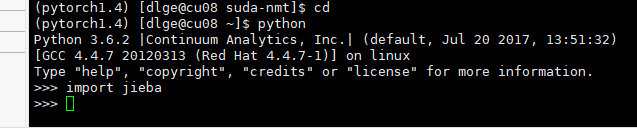
the problem I ran into was not installing the package in the virtual environment, taking the jieba package as an example

enter python in the virtual environment, and then you can import the package. We thought it was packaged, but it was actually installed in the basic environment.

When

USES conda list to view the packages in the current environment, there is no jieba package.

conda list

forgot the screenshot,,,,

so you need to install jieba using the PIP of the virtual environment.


after confirming wrapping in a virtual environment, switching to a python environment cannot be done by simply typing python commands. Instead, use virtual environment Python, just like the previous PIP.

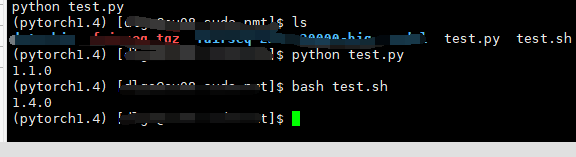
for example, you now have two files, test.py and test.sh.

test.py

import torch
print(torch.__version__)

test.sh

python test.py

you can see that the PIP version printed in the virtual environment is different from the one printed in the bash script.

so while I installed jieba in the pytorch1.4 environment, the command I used directly was not python in pytorch1.4, but python in the base environment.

summary:

  1. whether the package to the environment
  2. used the python interpreter is not the package environment interpreter

there are a lot of ways to do it online, so this is a supplement to what’s possible.

Python RarFile unpack RAR package Error Rarfile.RarCannotExec: Cannot find Working Tool

recently encountered an error using python to unzip rar.
installation is the rarfile package, but the implementation of decompression error, the Internet to find a lot of methods have not solved.

import rarfile
path1 = "E://test.rar"
with rarfile.RarFile(path1) as rf:
    rf.extractall()

currently the main online solutions are as follows:
1. Put winrar. Exe under python project venv – scripts. 2. Install unrar on Windows and configure environment variables.

I tried the first method and found that it did not solve the problem, and I did not try the second method because I could not find a suitable installation package.

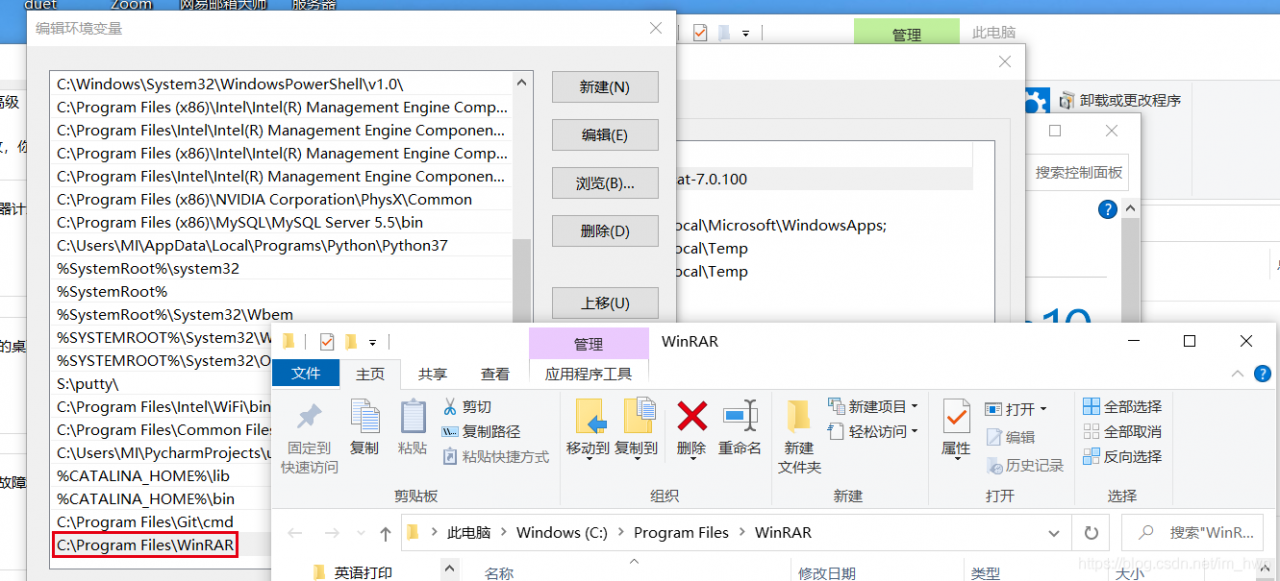
considering that winrar program is installed on the machine, so inspired by the second method, configure winrar path in the system environment variable, and then restarts pycharm, and the problem is found to be perfectly solved.

Install PyTorch in Anaconda environment

download address: https://download.pytorch.org/whl/torch_stable.html

my CPU is python 3, 7 win10 system corresponding to the following

2 switch directory

copies the downloaded WHL file to the site-packages directory in the lib of anaconda.
directory such as: E:\Anaconda3\Lib\site-packages.

3 installation
After

open the anaconda prompt and switch to the site-packages directory:
(base) C:\Users\Lenovo> E:
(base) E:> cd Anaconda3\Lib\site-packages
(base) E:\Anaconda3\Lib\site-packages> For example, my WHL file name is:
torch 1.3.0+cpu-cp37-cp37m-win_amd64. WHL

test: import torch
no error should be no problem

KeyError: b ‘TEST’ problem in python3 conversion from csn-rcnn code

One of the faster RCNN codes that

has been using is python2, and we decided to change it to python3.

many errors are print function, xrange function, easy to solve.

solution to the last error was reported, the card for a day, can not find a solution on the Internet, record:

error as follows:

Caused by op ‘PyFunc’, defined at:
File “/home/q/yd/Faster -rcnn-21 /tools/demo.py”, line 118, in < module>
net = get_network(args.demo_net)
File “/home/q/yd/ swift-rcnn-21 /tools/.. /lib/networks/factory.py”, line 29, in get_network
return network.vggnet_test ()
File “/home/q/yd/ quickly-rcnn-21 /tools/.. /lib/networks/ vggnet_test.py “, line 18, in init__,> self. Setup ()
File “/home/q/yd/Faster -rcnn-21 /tools/.. (proposal_layer(__feat_stride, anchor_scales, STR (‘TEST’), name=’rois’))
File “/home/q/yd/ quickly-rcnn-21 /tools/. Floatal_layer [proposal_layer]), [-1, 5], proposal_layer [proposal_layer], [proposal_layer] Name = name)
the File “/ home/q/anaconda3 envs/py35/lib/python3.5/site – packages/tensorflow/python/ops/script_ops py”, line 212, in py_func
input = inp, token = token, Tout = Tout, Name = name)
the File “/ home/q/anaconda3 envs/py35/lib/python3.5/site – packages/tensorflow/python/ops/gen_script_ops py”, line, 50 in _py_func
“PyFunc”, input = input, token = token, Tout = Tout, Name = name)
the File “/ home/q/anaconda3 envs/py35/lib/python3.5/site – packages/tensorflow/python/framework/op_def_library py”, line 787, In _apply_op_helper
op_def = op_def)
the File “/ home/q/anaconda3/envs/py35/lib/python3.5/site – packages/tensorflow/python/framework/ops. Py”, line 2956, In create_op
op_def = op_def)
the File “/ home/q/anaconda3/envs/py35/lib/python3.5/site – packages/tensorflow/python/framework/ops. Py”, line 1470,
self._traceback = self._graph._extract_stack() # pylint: disable=protected-access

UnknownError (see above for traceback): KeyError: b’TEST’
[[Node:] PyFunc = PyFunc[Tin=[DT_FLOAT, DT_FLOAT, DT_FLOAT, DT_STRING, DT_INT32, DT_INT32], Tout=[DT_FLOAT], token=”pyfunc_0″, _device=”/job:localhost/replica:0/task:0/device:CPU:0″](rpn_cls_prob_reshape/_95, Rpn_bbox_pred /rpn_bbox_pred/_97, _arg_Placeholder_1_0_1, PyFunc/input_3, PyFunc/input_4, PyFunc/input_5)]]
[[Node: PyFunc/_99 = _Recv[client_terminated=false, recv_device=”/job:localhost/replica:0/task:0/device:GPU:0″, send_device=”/job:localhost/replica:0/task:0/device:CPU:0″, send_device_incarnation=1, tensor_name=”edge_218_PyFunc”, tensor_type=DT_FLOAT, _device=”/job:localhost/replica:0/task:0/device:GPU:0″]()]]


KeyError: b’TEST’,

after analysis, the final locating reason is that a ‘TEST’ string entered in tf initialization cannot be parsed.

error in the vgg_test.py file

(self.feed('rpn_cls_prob_reshape', 'rpn_bbox_pred', 'im_info')
 .proposal_layer(_feat_stride, anchor_scales, str('TEST'), name='rois'))

there is a ‘TEST’ that will be entered into the tb.py_func () function

cannot resolve reason unknown

the final solution is to assign a value of

directly to ‘TEST’ in the proposal_layer_tf.py file

cfg_key = 'TEST'
pre_nms_topN  = cfg[cfg_key].RPN_PRE_NMS_TOP_N
post_nms_topN = cfg[cfg_key].RPN_POST_NMS_TOP_N
nms_thresh    = cfg[cfg_key].RPN_NMS_THRESH
min_size      = cfg[cfg_key].RPN_MIN_SIZE

with this in red, it works.

original code, syntax check is not wrong, only manually assign ‘TEST’ to cfg_key first to solve this problem.

many on the web say that python2 and python3 are coded differently, plus utf-8, and the test doesn’t work.

Here is the difference and connection of Torch. View (), Transpose (), and Permute ()

having recently been stretched by several of pytorch’s Tensor Tensor dimensional transformations, I delve into them, outlining their journey and their results as follows:

note: torch. The __version__ 1.2.0 ‘= =’

torch. Transpose () and the torch permute ()

and

are used to exchange content from different dimensions. Here, however, torch. () is exchange the content of two specified dimensions, and permute() can exchange more than one dimension all at once. Here is code:
(): the exchange of two dimensions

 >>> a = torch.Tensor([[[1,2,3,4,5], [6,7,8,9,10], [11,12,13,14,15]], 
                  [[-1,-2,-3,-4,-5], [-6,-7,-8,-9,-10], [-11,-12,-13,-14,-15]]])
 >>> a.shape
 torch.Size([2, 3, 5])
 >>> print(a)
 tensor([[[  1.,   2.,   3.,   4.,   5.],
         [  6.,   7.,   8.,   9.,  10.],
         [ 11.,  12.,  13.,  14.,  15.]],

        [[ -1.,  -2.,  -3.,  -4.,  -5.],
         [ -6.,  -7.,  -8.,  -9., -10.],
         [-11., -12., -13., -14., -15.]]])
 >>> b = a.transpose(1,2)  # 使用transpose,将维度1和2进行交换。这个很好理解。转换后tensor与其shape如下
 >>> print(b, b.shape)
 (tensor([[[  1.,   6.,  11.],
         [  2.,   7.,  12.],
         [  3.,   8.,  13.],
         [  4.,   9.,  14.],
         [  5.,  10.,  15.]],

        [[ -1.,  -6., -11.],
         [ -2.,  -7., -12.],
         [ -3.,  -8., -13.],
         [ -4.,  -9., -14.],
         [ -5., -10., -15.]]]),
torch.Size([2, 5, 3])))

permute() : does an arbitrary dimension swap

at once

 >>> c = a.permute(2, 0, 1)
 >>> print(c, c.shape)  # 此举将原维度0,1,2的次序变为2,1,0,所以shape也发生了相应的变化。
 (tensor([[[  1.,   6.,  11.],
          [ -1.,  -6., -11.]],
 
         [[  2.,   7.,  12.],
          [ -2.,  -7., -12.]],
 
         [[  3.,   8.,  13.],
          [ -3.,  -8., -13.]],
 
         [[  4.,   9.,  14.],
          [ -4.,  -9., -14.]],
 
         [[  5.,  10.,  15.],
          [ -5., -10., -15.]]]),
 torch.Size([5, 2, 3]))

This transformation between

transpose() and permute() :

>>> b = a.permute(2,0,1)
>>> c = a.transpose(1,2).transpose(0,1)
>>> print(b == c, b.shape)
(tensor([[[True, True, True],
          [True, True, True]],
 
         [[True, True, True],
          [True, True, True]],
 
         [[True, True, True],
          [True, True, True]],
 
         [[True, True, True],
          [True, True, True]],
 
         [[True, True, True],
          [True, True, True]]]),
 torch.Size([5, 2, 3]))

as shown in the code, if you swap the first and second dimensions for Tensor a, and then swap the first and second dimensions for Tensor a, then they will get the same result as permute.


transpose () and the view ()

view() is a very common function in pytorch. This function also ACTS as an Tensor dimension, but does all this in a very different way from Transpose ()/permute(). If tranpose() is the Tensor whose original dimensions are exchanged faithfully, then view() is much more straightforward and simple — first, the view() function flattens all the Tensor dimensions into one, and then reconstructs an Tensor based on the incoming dimension information. Code is as follows:

# 还是上面的Tensor a
 >>> print(a.shape)
 torch.Size([2, 3, 5])
 >>> print(a.view(2,5,3))
 tensor([[[  1.,   2.,   3.],
         [  4.,   5.,   6.],
         [  7.,   8.,   9.],
         [ 10.,  11.,  12.],
         [ 13.,  14.,  15.]],

        [[ -1.,  -2.,  -3.],
         [ -4.,  -5.,  -6.],
         [ -7.,  -8.,  -9.],
         [-10., -11., -12.],
         [-13., -14., -15.]]])
  >>> c = a.transpose(1,2)
 >>> print(c, c.shape)
(tensor([[[  1.,   6.,  11.],
          [  2.,   7.,  12.],
          [  3.,   8.,  13.],
          [  4.,   9.,  14.],
          [  5.,  10.,  15.]],
 
         [[ -1.,  -6., -11.],
          [ -2.,  -7., -12.],
          [ -3.,  -8., -13.],
          [ -4.,  -9., -14.],
          [ -5., -10., -15.]]]),
 torch.Size([2, 5, 3]))

is shown in the code. Even though view() and () end up doing the same thing, their contents are not the same. The view function is just going to be applied to the Tensor dimensions of (2,5,3), which are going to be applied to the elements and ; All this does is do of the first second dimension.


Moreover, there are cases where the Tensor after transpose cannot be called view, because the Tensor after transpose is not “continuous” (non-self-help). The question about self-help array is the same in numpy, we have a great explanation here for
Python USES the PO design pattern for automated testing

in web automation test, PO mode is Page Object (operation flow is separated from Page elements); The test case does not contain any element positioning, only the business logic, and the page element positioning is written as a method encapsulated in the object.

PO mode basic steps are divided into 3 steps:
1. Prepare the base class BasePage, which contains all the page’s element operation methods
2. Define A class A, which inherits the BasePage class, which contains all the element positioning and action that the test page needs to use encapsulated as A method
3. Define A class B to inherit from unittest, write the test case (just call the corresponding wrapper method in A to complete the business logic writing)

follow the above three steps to operate the login of suning:

# !/usr/bin/env python
# -*- coding: utf-8 -*-
from selenium.webdriver.support.ui import Select
from selenium.webdriver.common.action_chains import ActionChains


class BasePage(object):

    def __init__(self, br, url):
        self.br = br
        self.url = url

    # 打开网页
    def open_url(self):
        self.br.get(self.url)

    # 查找元素
    def find_element(self, *loc):
        return self.br.find_element(*loc)

    # 输入
    def input_txt(self, loc, text):
        self.find_element(*loc).send_keys(text)

    # 清空文本
    def clear(self, loc):
        self.find_element(*loc).clear()

    # 点击
    def click(self, loc):
        self.find_element(*loc).click()

    # 下拉列表选择
    def select_term(self, loc, index):
        # 实例化Select
        Select(self.find_element(*loc)).select_by_index(int(index))
        # s1.select_by_index(1)  # 选择第二项选项:o1
        # s1.select_by_value("o2")  # 选择value="o2"的项
        # s1.select_by_visible_text("o3")  # 选择text="o3"的值,即在下拉时我们可以看到的文本

    # 鼠标悬浮
    def mouse_hover(self, loc):
        move = self.find_element(*loc)
        ActionChains(self.br).move_to_element(move).perform()

    # 获取title
    def get_title(self):
        return self.br.title

    # 获取文本信息
    def get_txt(self, loc):
        return self.find_element(*loc).text

    # 获取当前页面url
    def get_page_url(self):
        return self.br.current_url


web_login.py

# !/usr/bin/env python
# -*- coding: utf-8 -*-
from selenium.webdriver.common.by import By
from bs_page import BasePage


class LoginPage(BasePage):

    def __init__(self, br, url):
        BasePage.__init__(self, br, url)

    # 切换登录方式
    def switch_login_type(self):
        login_type = (By.XPATH, '/html/body/div[2]/div/div/div[1]/a[2]')
        self.click(login_type)

    # 输入用户名
    def send_user_name(self, username):
        name_input = (By.ID, "userName")
        self.clear(name_input)
        self.input_txt(name_input, username)

    # 输入密码
    def send_user_pwd(self, userpwd):
        pwd_input = (By.ID, "password")
        self.clear(pwd_input)
        self.input_txt(pwd_input, userpwd)

    # 点击 登录按钮
    def click_login_btn(self):
        login_btn = (By.ID, 'submit')
        self.click(login_btn)

    # 获取提示信息
    def get_emg_txt(self):
        emg_txt = (By.XPATH, '/html/body/div[2]/div/div/div[2]/div[1]/div[1]/div[2]/span')
        return self.get_txt(emg_txt)


ex_login.py

# !/usr/bin/env python
# -*- coding: utf-8 -*-
import time
import ddt
import unittest
from pages.web_login import LoginPage
from common import html_report, read_yaml, journal, set_browser


@ddt.ddt
class TestBiliLogin(unittest.TestCase):

    # 日志
    log = journal.bs_log()
    # 读取用例
    login_data = read_yaml.get_yaml_data("login_data.yaml")
    # 浏览器初始化配置
    br = set_browser.base_browser()
    # 网站首页地址
    web_url = set_browser.base_url()

    @classmethod
    def setUpClass(cls):
        pass

    @classmethod
    def tearDownClass(cls):
        # 退出浏览器
        cls.br.quit()

    # 初始化工作
    def setUp(self):
        time.sleep(1)

    # 退出清理工作
    def tearDown(self):
        time.sleep(1)

    @ddt.data(*login_data)
    def test_login(self, user_data):
        br = self.br
        p_url = self.web_url+"/login"

        b_page = LoginPage(br, p_url)
        # 打开登录页面
        b_page.open_url()
        # 切换登录方式
        b_page.switch_login_type()
        # 输入用户名
        b_page.send_user_name(user_data[0])
        # 输入密码
        b_page.send_user_pwd(user_data[1])
        # 点击 登录
        b_page.click_login_btn()
        # 获取当前页面地址
        page_url = b_page.get_page_url()
        # 判断页面地址是否发生变化
        if page_url == p_url:
            # 获取提示信息
            emg = b_page.get_emg_txt()
            self.assertEqual(user_data[2], emg)
        else:
            # 获取页面title
            p_title = b_page.get_title()
            self.assertEqual(user_data[2], p_title)


if __name__ == '__main__':
    suite = unittest.TestLoader().loadTestsFromTestCase(TestBiliLogin)
    # 调用定义HTMLTestRunner的方法
    runner = html_report.re_html_cn()
    # 执行测试套件
    runner.run(suite)


A summary of a demo development process for Python using the QT5 development interface

Python using QT5 development interface of a demo development process summary

1. Current python version:


2. Use PIP to install QT5:

pip install pyqt5


Pyqt5-tools: PIP install pyqt5-tools


4. Check whether QT was installed successfully:

from PyQt5 import QtWidgets, QtGui
import sys

app = QtWidgets.QApplication(sys.argv)
window = QtWidgets.QWidget();
window.show()
sys.exit(app.exec_())

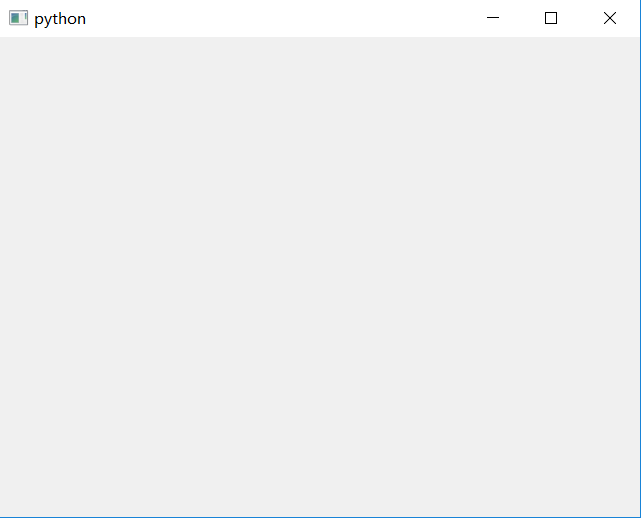
pops out the following interface :

Pycharm related configuration :

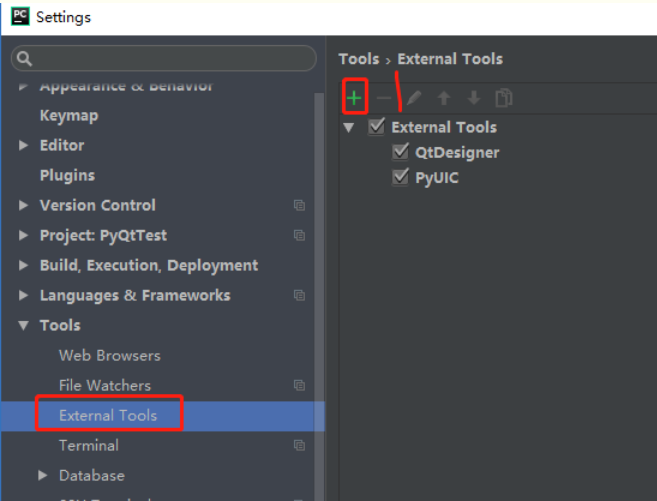
1. Add external Tools

open Settings – & gt; Tools-> External Tools click “+”


2. Add QtDesigner

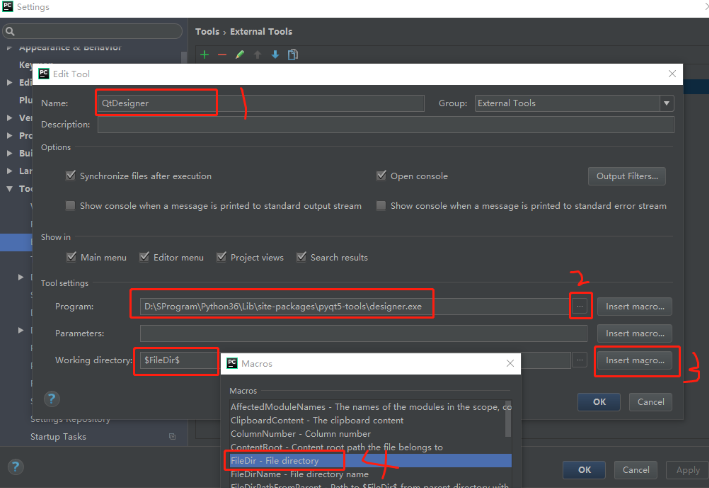
set

as shown below


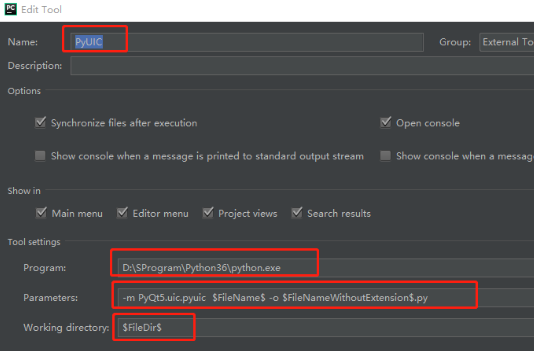
3. Add PyUIC

is set as shown below.

Parameters: -m pyqt5.uic. Pyuic $FileName$-o $FileNameWithoutExtension$.py

Parameters: -m pyqt5.uic. Pyuic $FileName$-o $FileNameWithoutExtension$.py


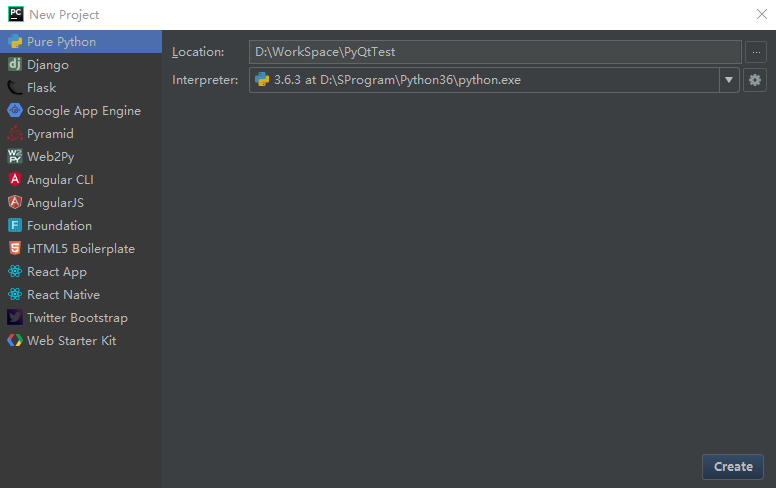
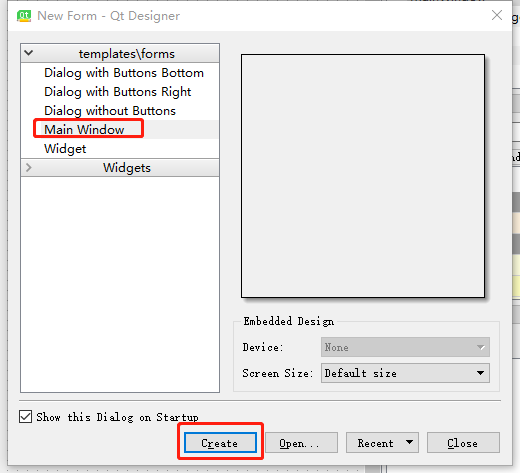
3. Create a new PyQt demo and create a project

as shown below


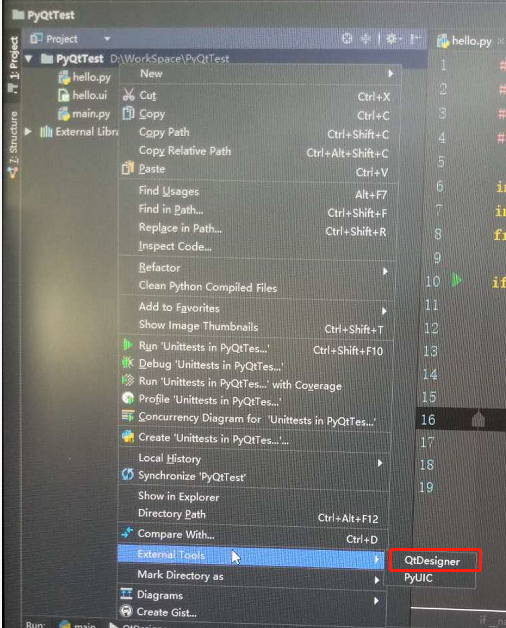
Open QtDesigner

as shown below

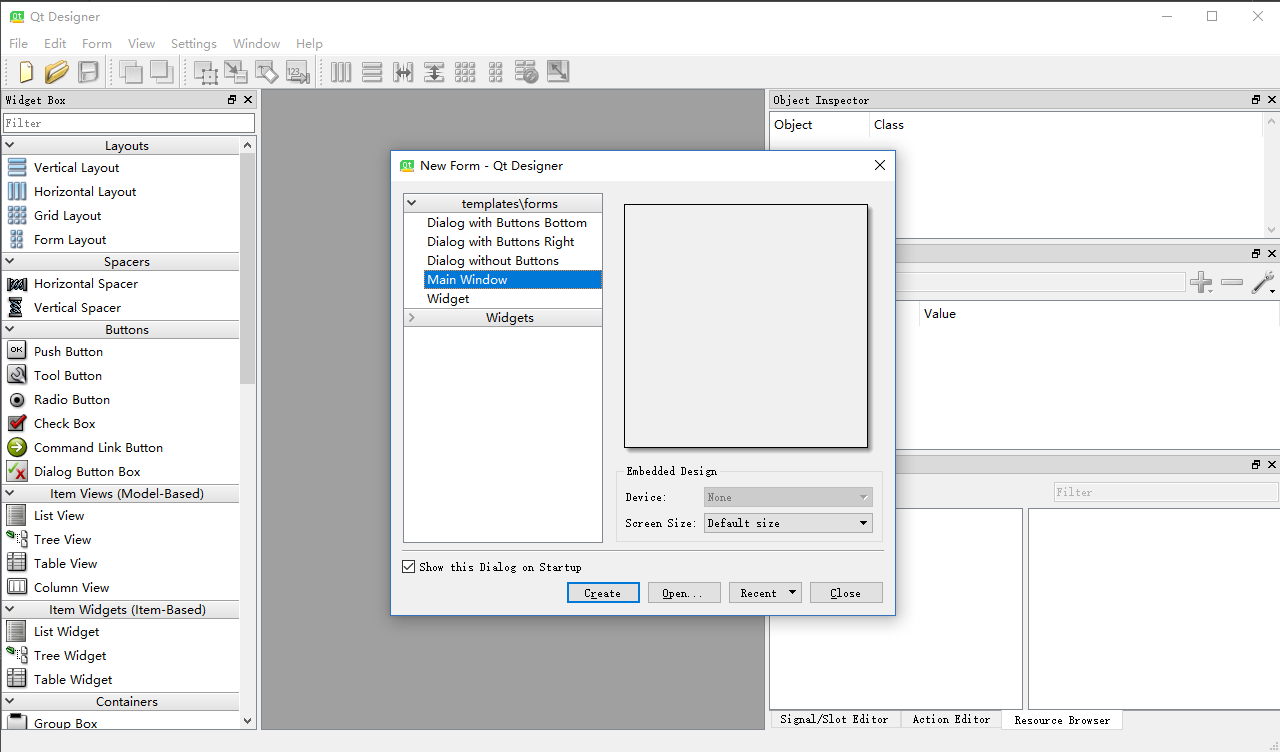
open Qt interface as shown in the figure below

create a Main Window

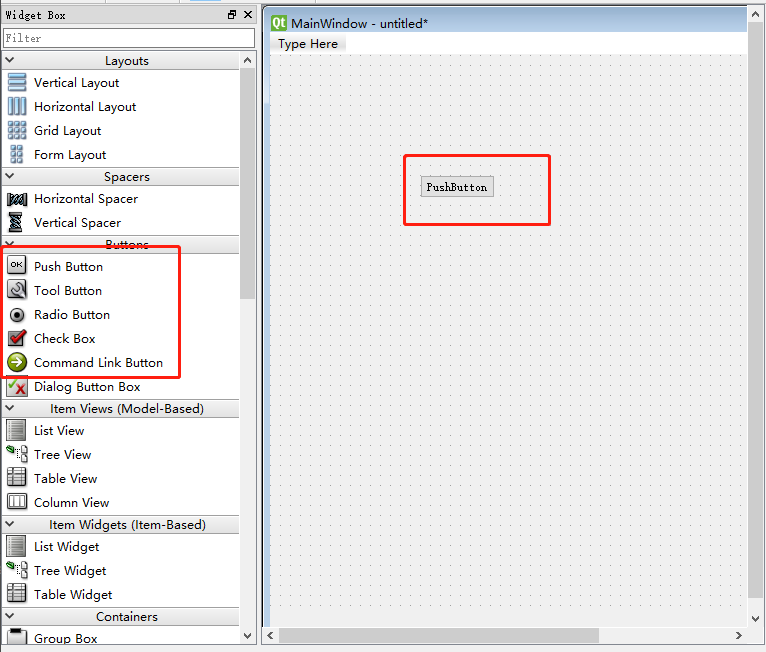
as shown in the figure, you can add your own component

as needed

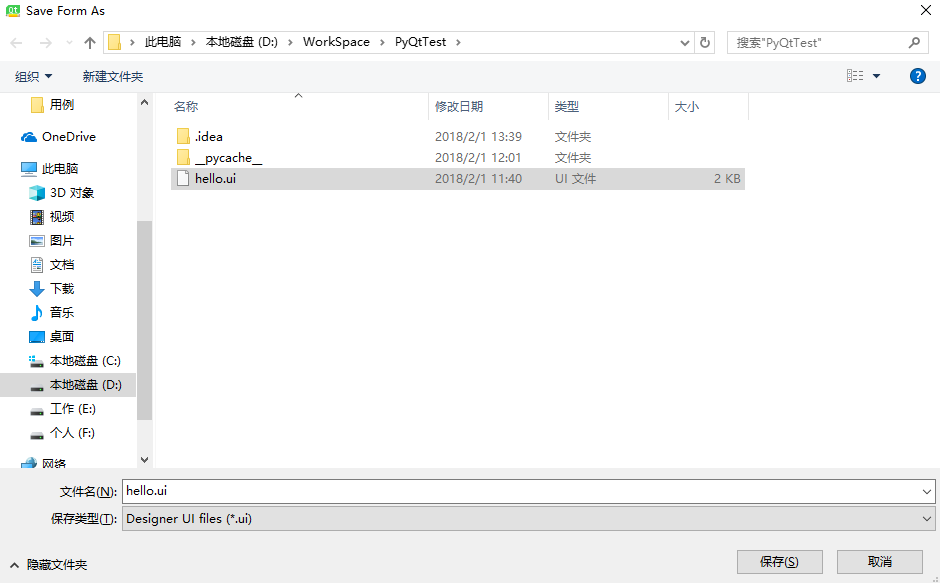
save

as shown

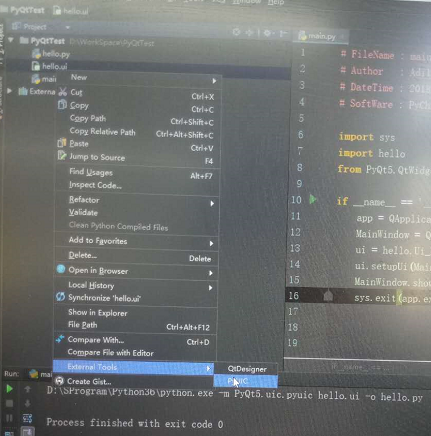
as shown below, use PyUIC to convert hello. UI file to hello.py

and here’s what I did:

# -*- coding: utf-8 -*-
from helloworld import Ui_MainWindow
from PyQt5 import QtCore, QtGui, QtWidgets
import sys


class query_window(QtWidgets.QMainWindow):
    def __init__(self):
        QtWidgets.QMainWindow.__init__(self)
        self.ui = Ui_MainWindow()
        self.ui.setupUi(self)
        self.ui.pushButton.clicked.connect(self.query_formula)
        # 给button 的 点击动作绑定一个事件处理函数


    def query_formula(self):
        pass
        # 此处编写具体的业务逻辑

if __name__ == '__main__':
    app = QtWidgets.QApplication(sys.argv)
    window = query_window()
    window.show()
    sys.exit(app.exec_())


Full explanation of SYS module of Python

sys module has many functions, here we introduce some more practical functions, I believe you will like it, and I will walk into the python module!

sys module list of common functions

  • sys.argv: implements passing parameters from outside the program to the program.

  • sys. Exit ([arg]) : in the middle of the program exit, arg = 0 as normal exit.

  • sys.getdefaultencoding(): gets the current code of the system, which is generally ASCII by default.

  • sys.setdefaultencoding(): set the default code of the system. This method will not be seen when dir (sys) is executed. It cannot be executed in the interpreter. (see set the system default encoding)

  • sys. Getfilesystemencoding () : access to the file system using encoding, return the 'MBCS' Windows, MAC returns' utf-8.

  • sys. Path : Gets a collection of strings that specify the module search path. You can place the written module in one of the resulting paths and find it correctly when importing in your program.

  • sys. Platform : access to current system platform.

  • sys. Stdin, sys. Stdout, sys. Stderr : stdin, stdout, and stderr variable contains corresponding with the standard I/O flow stream objects. If you need more control over the output, and print doesn't give you what you want, that's all you need. You can also replace them by redirecting output and input to other devices, or by processing them in a non-standard way

sys.argv

function: pass parameters from outside to inside the program
example: sys.py

#!/usr/bin/env python

import sys
print sys.argv[0]
print sys.argv[1]

run:

# python sys.py argv1
sys.py
argv1

try it yourself and understand the corresponding parameter

sys.exit(n)

function: at the end of the main program, the interpreter exits automatically, but if you need to exit the program, you can call sys.exit with an optional integer argument returned to the calling program, indicating that you can capture a call to sys.exit from the main program. (0 is normal exit, others are exceptions)

example: exit.py

#!/usr/bin/env python

import sys

def exitfunc(value):
    print value
    sys.exit(0)

print "hello"

try:
    sys.exit(1)
except SystemExit,value:
    exitfunc(value)

print "come?"

run:

# python exit.py
hello
1

sys.path

function: get the string collection of the specified module search path, you can put the written module under the path, it can be found correctly in the program import.

example:

>>> import sys
>>> sys.path
['', '/usr/lib/python2.7', '/usr/lib/python2.7/plat-x86_64-linux-gnu', '/usr/lib/python2.7/lib-tk', '/usr/lib/python2.7/lib-old', '/usr/lib/python2.7/lib-dynload', '/usr/local/lib/python2.7/dist-packages', '/usr/lib/python2.7/dist-packages', '/usr/lib/python2.7/dist-packages/PILcompat', '/usr/lib/python2.7/dist-packages/gtk-2.0', '/usr/lib/python2.7/dist-packages/ubuntu-sso-client']

sys.path. Append (" custom module path ")

sys.modules

is a global dictionary that is loaded in memory after python is started. Every time a programmer imports a new module, sys.modules will automatically record the module. When the module is imported a second time, Python looks it up directly in the dictionary, which speeds up the program. It has everything a dictionary has.

Py

#!/usr/bin/env python

import sys

print sys.modules.keys()

print sys.modules.values()

print sys.modules["os"]

run:

python modules.py
['copy_reg', 'sre_compile', '_sre', 'encodings', 'site', '__builtin__',......

sys.stdin\stdout\stderr

features: stdin, stdout, and stderr variables contain flow objects corresponding to standard I/O flows. If you need more control over the output, and print doesn't give you what you want, that's all you need. You can also replace them by redirecting output and input to other devices, or by processing them in a nonstandard way

Don't forget the original intention, always put

An introduction to sys modules in Python and how packages are imported and used

introduction to sys module in Python and usage of package import


1. Argv: implementation from the outside of the program to the program to pass the parameter
in F:\Pywork temp.py file to write the following code :

import sys
print (sys.argv[0])#文件名
print (sys.argv[1])#传入的外部参数
命令行:
F:\Pywork> python temp.py "andy"
temp.py
andy

2. sys. Modules. Keys () returns all have imported module list
3. sys. Exit (n)

function: at the end of the main program, the interpreter exits automatically, but if you need to exit the program, you can call sys.exit with an optional integer argument returned to the calling program, indicating that you can capture a call to sys.exit from the main program. (0 is normal exit, others are exceptions)

4.sys.path

function: get the string collection of specified module search path, you can put the written module under the path, you can find

correctly when import in the program

sys.path.append("自定义模块路径")

5. Sys. Returns the imported module field system modules, the key is the module name, the value is the module
6. Sys. Stdin, sys. Stdout, sys. Stderr: stdin, stdout, and stderr variable contains corresponding with the standard I/O flow stream objects. If you need more control over the output, and print doesn't give you what you want, that's all you need. You can also replace them by redirecting output and input to other devices, or processing them in a nonstandard way.

import sys 
sys.stdout.write('HelloWorld!')
print ('Please enter yourname:')
name=sys.stdin.readline()[:-1]
print 'Hi, %s!' % name

Package import in python and use
first, there are three ways to import a package. Take importing sys package as an example

import sys 
print("-----------python modules-----------")
print("命令行参数:")
for x in sys.argv:  #sys.argv传递给Python脚本的命令行参数列表。argv[0]是脚本名
    #argv[1]就是执行脚本命令行外部传递的第一个参数,[2]就是第二个
    print(x)
print("Python的路径是:",sys.path)

is the normal import method, and the sys package is imported using the sys. function name to use the sys built-in function

from sys import argv,path
print("-----------python modules-----------")
print("命令行参数:")
for x in argv:  
    print(x)
print("Python的路径是:",path)

is a built-in function specified by sys, which can be used directly. Sys.

is not required

import sys as s
print("-----------python modules-----------")
print("命令行参数:")
for x in s.argv:  
    print(x)
print("Python的路径是:",s.path)

USES as to rename sys packages for later use.

Python Time Module timestamp, Time string formatting and Conversion (13-bit timestamp)

Python built-in modules for processing time and timestamp include time, and datetime.

several concepts about timestamps

  • timestamp, offset in seconds starting at 00:00:00 on January 1, 1970.
  • time tuple (struct_time), containing 9 elements. Struct_time (tm_year=2017, tm_mon=10, tm_mday=1, tm_hour=14, tm_min=21, tm_sec=57, tm_wday=6, tm_yday=274, tm_isdst=0)
  • time format string, string form time.

time module is an important function related to timestamp and time

  • time.time() generates the current timestamp in the form of a 10-bit integer floating point number. Strftime () generates a time formatted string based on the time tuple. Strptime () generates time tuples based on time formatting strings. time.strptime() and time.strftime() are interoperable.
  • time.localtime() generates the time tuple for the current time zone based on the timestamp.
  • time.mktime() generates timestamps based on time tuples.

example
A simple example of a timestamp and formatted string is

import time

#生成当前时间的时间戳,只有一个参数即时间戳的位数,默认为10位,输入位数即生成相应位数的时间戳,比如可以生成常用的13位时间戳
def now_to_timestamp(digits = 10):
    time_stamp = time.time()
    digits = 10 ** (digits -10)
    time_stamp = int(round(time_stamp*digits))
    return time_stamp

#将时间戳规范为10位时间戳
def timestamp_to_timestamp10(time_stamp):
    time_stamp = int (time_stamp* (10 ** (10-len(str(time_stamp)))))
    return time_stamp

#将当前时间转换为时间字符串,默认为2017-10-01 13:37:04格式
def now_to_date(format_string="%Y-%m-%d %H:%M:%S"):
    time_stamp = int(time.time())
    time_array = time.localtime(time_stamp)
    str_date = time.strftime(format_string, time_array)
    return str_date

#将10位时间戳转换为时间字符串,默认为2017-10-01 13:37:04格式
def timestamp_to_date(time_stamp, format_string="%Y-%m-%d %H:%M:%S"):
    time_array = time.localtime(time_stamp)
    str_date = time.strftime(format_string, time_array)
    return str_date

#将时间字符串转换为10位时间戳,时间字符串默认为2017-10-01 13:37:04格式
def date_to_timestamp(date, format_string="%Y-%m-%d %H:%M:%S"):
    time_array = time.strptime(date, format_string)
    time_stamp = int(time.mktime(time_array))
    return time_stamp

#不同时间格式字符串的转换
def date_style_transfomation(date, format_string1="%Y-%m-%d %H:%M:%S",format_string2="%Y-%m-%d %H-%M-%S"):
    time_array  = time.strptime(date, format_string1)
    str_date = time.strftime(format_string2, time_array)
    return str_date

test

print(now_to_date())
print(timestamp_to_date(1506816572))
print(date_to_timestamp('2017-10-01 08:09:32'))
print(timestamp_to_timestamp10(1506816572546))
print(date_style_transfomation('2017-10-01 08:09:32'))

is

1506836224000
2017-10-01 13:37:04
2017-10-01 08:09:32
1506816572
1506816572
2017-10-01 08-09-32

Python time tuples are converted to timestamps, strings

The

python time tuples are converted to timestamps and strings

1, time tuple –> Timestamp

import time
timeArray = time.localtime(time.time())
timeStamp = time.mktime(timeArray)  # 时间戳:1600858387.0

2, time tuple –> String

timeDate = time.strftime("%Y-%m-%d %H:%M:%S", timeArray)  # datetime.datetime:'2020-09-23 18:53:07'
timeDate = time.strftime("%Y-%m-%d", timeArray)  # datetime.date:'2020-09-23'

Python: SVN deletes files on local and remote repositories

SVN command to delete files in local and remote repositories.

we directly deleted the folder in the local, SVN status check status, found that the local deleted file in front of an exclamation mark.

The

exclamation mark indicates that local files and remote files are in conflict. Because we have deleted the file locally, but not remotely. If we do SVN update, the directly deleted file will be restored.

for example, there is a folder named SB, we want to delete this folder on the local and remote warehouse and all the files in it

svn delete SB

after using the SVN delete SB command, you will find that the deleted file is preceded by a D, indicating easy deletion.

svn commit -m "Delete the sb files."

commit the folder SB on the remote repository will also be deleted. Take a backup before deleting the code!