first edition:
# BEGIN VECTOR_V1
from array import array
import reprlib
import math


class Vector:
    typecode = 'd'

    def __init__(self, components):
        self._components = array(self.typecode, components)  # <1>

    def __iter__(self):
        return iter(self._components)  # <2>

    def __repr__(self):
        components = reprlib.repr(self._components)  # <3>
        components = components[components.find('['):-1]  # <4>
        return 'Vector({})'.format(components)

    def __str__(self):
        return str(tuple(self))

    def __bytes__(self):
        return (bytes([ord(self.typecode)]) +
                bytes(self._components))  # <5>

    def __eq__(self, other):
        return tuple(self) == tuple(other)

    def __abs__(self):
        return math.sqrt(sum(x * x for x in self))  # <6>

    def __bool__(self):
        return bool(abs(self))

    @classmethod
    def frombytes(cls, octets):
        typecode = chr(octets[0])
        memv = memoryview(octets[1:]).cast(typecode)
        return cls(memv)  # <7>
# END VECTOR_V1
second edition: slicable sequence
from array import array
import reprlib
import math
import numbers


class Vector:
    typecode = 'd'

    def __init__(self, components):
        self._components = array(self.typecode, components)

    def __iter__(self):
        return iter(self._components)

    def __repr__(self):
        components = reprlib.repr(self._components)
        components = components[components.find('['):-1]
        return 'Vector({})'.format(components)

    def __str__(self):
        return str(tuple(self))

    def __bytes__(self):
        return (bytes([ord(self.typecode)]) +
                bytes(self._components))

    def __eq__(self, other):
        return tuple(self) == tuple(other)

    def __abs__(self):
        return math.sqrt(sum(x * x for x in self))

    def __bool__(self):
        return bool(abs(self))

# BEGIN VECTOR_V2
    def __len__(self):
        return len(self._components)

    def __getitem__(self, index):
        cls = type(self)  # <1>
        if isinstance(index, slice):  # <2>
            return cls(self._components[index])  # <3>
        elif isinstance(index, numbers.Integral):  # <4>
            return self._components[index]  # <5>
        else:
            msg = '{cls.__name__} indices must be integers'
            raise TypeError(msg.format(cls=cls))  # <6>
# END VECTOR_V2

    @classmethod
    def frombytes(cls, octets):
        typecode = chr(octets[0])
        memv = memoryview(octets[1:]).cast(typecode)
        return cls(memv)
The biggest change in
V2 is the implementation of ___ and ___, thereby enabling slicing, both of which are also necessary for vector to behave as a sequence:
if [1:4] is used, a slice is returned. Slice is a built-in type. A review of the slice reveals that it has the start,stop, step data attributes, and the indices methods. In indices, given a sequence of len, indexes at the beginning and the end of an extension section marked with S, as well as the stride length, are computed. Indexes exceeding the boundary are truncated.
Vector version 3: dynamic access property
from array import array
import reprlib
import math
import numbers


class Vector:
    typecode = 'd'

    def __init__(self, components):
        self._components = array(self.typecode, components)

    def __iter__(self):
        return iter(self._components)

    def __repr__(self):
        components = reprlib.repr(self._components)
        components = components[components.find('['):-1]
        return 'Vector({})'.format(components)

    def __str__(self):
        return str(tuple(self))

    def __bytes__(self):
        return (bytes([ord(self.typecode)]) +
                bytes(self._components))

    def __eq__(self, other):
        return tuple(self) == tuple(other)

    def __abs__(self):
        return math.sqrt(sum(x * x for x in self))

    def __bool__(self):
        return bool(abs(self))

    def __len__(self):
        return len(self._components)

    def __getitem__(self, index):
        cls = type(self)
        if isinstance(index, slice):
            return cls(self._components[index])
        elif isinstance(index, numbers.Integral):
            return self._components[index]
        else:
            msg = '{.__name__} indices must be integers'
            raise TypeError(msg.format(cls))

# BEGIN VECTOR_V3_GETATTR
    shortcut_names = 'xyzt'

    def __getattr__(self, name):
        cls = type(self)  # <1>
        if len(name) == 1:  # <2>
            pos = cls.shortcut_names.find(name)  # <3>
            if 0 <= pos < len(self._components):  # <4>
                return self._components[pos]
        msg = '{.__name__!r} object has no attribute {!r}'  # <5>
        raise AttributeError(msg.format(cls, name))
# END VECTOR_V3_GETATTR

# BEGIN VECTOR_V3_SETATTR
    def __setattr__(self, name, value):
        cls = type(self)
        if len(name) == 1:  # <1>
            if name in cls.shortcut_names:  # <2>
                error = 'readonly attribute {attr_name!r}'
            elif name.islower():  # <3>
                error = "can't set attributes 'a' to 'z' in {cls_name!r}"
            else:
                error = ''  # <4>
            if error:  # <5>
                msg = error.format(cls_name=cls.__name__, attr_name=name)
                raise AttributeError(msg)
        super().__setattr__(name, value)  # <6>

# END VECTOR_V3_SETATTR

    @classmethod
    def frombytes(cls, octets):
        typecode = chr(octets[0])
        memv = memoryview(octets[1:]).cast(typecode)
        return cls(memv)
, ___ getattr__ and ___ setattr__, the former is to get vector components and the latter is to protect the existing components. V.x cannot be directly assigned because x has become an attribute of v. The value of v.x has changed, but the value of v has not.
Vector iv: hashing and fast equivalence testing
from array import array
import reprlib
import math
import numbers
import functools
import operator


class Vector:
    typecode = 'd'

    def __init__(self, components):
        self._components = array(self.typecode, components)

    def __iter__(self):
        return iter(self._components)

    def __repr__(self):
        components = reprlib.repr(self._components)
        components = components[components.find('['):-1]
        return 'Vector({})'.format(components)

    def __str__(self):
        return str(tuple(self))

    def __bytes__(self):
        return (bytes([ord(self.typecode)]) +
                bytes(self._components))

    def __eq__(self, other):
        return (len(self) == len(other) and
                all(a == b for a, b in zip(self, other)))

    def __hash__(self):
        hashes = (hash(x) for x in self)
        return functools.reduce(operator.xor, hashes, 0)

    def __abs__(self):
        return math.sqrt(sum(x * x for x in self))

    def __bool__(self):
        return bool(abs(self))

    def __len__(self):
        return len(self._components)

    def __getitem__(self, index):
        cls = type(self)
        if isinstance(index, slice):
            return cls(self._components[index])
        elif isinstance(index, numbers.Integral):
            return self._components[index]
        else:
            msg = '{cls.__name__} indices must be integers'
            raise TypeError(msg.format(cls=cls))

    shortcut_names = 'xyzt'

    def __getattr__(self, name):
        cls = type(self)
        if len(name) == 1:
            pos = cls.shortcut_names.find(name)
            if 0 <= pos < len(self._components):
                return self._components[pos]
        msg = '{.__name__!r} object has no attribute {!r}'
        raise AttributeError(msg.format(cls, name))

    @classmethod
    def frombytes(cls, octets):
        typecode = chr(octets[0])
        memv = memoryview(octets[1:]).cast(typecode)
        return cls(memv)
fifth edition: format
# BEGIN VECTOR_V5
"""
A multi-dimensional ``Vector`` class, take 5

A ``Vector`` is built from an iterable of numbers::

    >>> Vector([3.1, 4.2])
    Vector([3.1, 4.2])
    >>> Vector((3, 4, 5))
    Vector([3.0, 4.0, 5.0])
    >>> Vector(range(10))
    Vector([0.0, 1.0, 2.0, 3.0, 4.0, ...])


Tests with 2-dimensions (same results as ``vector2d_v1.py``)::

    >>> v1 = Vector([3, 4])
    >>> x, y = v1
    >>> x, y
    (3.0, 4.0)
    >>> v1
    Vector([3.0, 4.0])
    >>> v1_clone = eval(repr(v1))
    >>> v1 == v1_clone
    True
    >>> print(v1)
    (3.0, 4.0)
    >>> octets = bytes(v1)
    >>> octets
    b'd\\x00\\x00\\x00\\x00\\x00\\x00\\x08@\\x00\\x00\\x00\\x00\\x00\\x00\\x10@'
    >>> abs(v1)
    5.0
    >>> bool(v1), bool(Vector([0, 0]))
    (True, False)


Test of ``.frombytes()`` class method:

    >>> v1_clone = Vector.frombytes(bytes(v1))
    >>> v1_clone
    Vector([3.0, 4.0])
    >>> v1 == v1_clone
    True


Tests with 3-dimensions::

    >>> v1 = Vector([3, 4, 5])
    >>> x, y, z = v1
    >>> x, y, z
    (3.0, 4.0, 5.0)
    >>> v1
    Vector([3.0, 4.0, 5.0])
    >>> v1_clone = eval(repr(v1))
    >>> v1 == v1_clone
    True
    >>> print(v1)
    (3.0, 4.0, 5.0)
    >>> abs(v1)  # doctest:+ELLIPSIS
    7.071067811...
    >>> bool(v1), bool(Vector([0, 0, 0]))
    (True, False)


Tests with many dimensions::

    >>> v7 = Vector(range(7))
    >>> v7
    Vector([0.0, 1.0, 2.0, 3.0, 4.0, ...])
    >>> abs(v7)  # doctest:+ELLIPSIS
    9.53939201...


Test of ``.__bytes__`` and ``.frombytes()`` methods::

    >>> v1 = Vector([3, 4, 5])
    >>> v1_clone = Vector.frombytes(bytes(v1))
    >>> v1_clone
    Vector([3.0, 4.0, 5.0])
    >>> v1 == v1_clone
    True


Tests of sequence behavior::

    >>> v1 = Vector([3, 4, 5])
    >>> len(v1)
    3
    >>> v1[0], v1[len(v1)-1], v1[-1]
    (3.0, 5.0, 5.0)


Test of slicing::

    >>> v7 = Vector(range(7))
    >>> v7[-1]
    6.0
    >>> v7[1:4]
    Vector([1.0, 2.0, 3.0])
    >>> v7[-1:]
    Vector([6.0])
    >>> v7[1,2]
    Traceback (most recent call last):
      ...
    TypeError: Vector indices must be integers


Tests of dynamic attribute access::

    >>> v7 = Vector(range(10))
    >>> v7.x
    0.0
    >>> v7.y, v7.z, v7.t
    (1.0, 2.0, 3.0)

Dynamic attribute lookup failures::

    >>> v7.k
    Traceback (most recent call last):
      ...
    AttributeError: 'Vector' object has no attribute 'k'
    >>> v3 = Vector(range(3))
    >>> v3.t
    Traceback (most recent call last):
      ...
    AttributeError: 'Vector' object has no attribute 't'
    >>> v3.spam
    Traceback (most recent call last):
      ...
    AttributeError: 'Vector' object has no attribute 'spam'


Tests of hashing::

    >>> v1 = Vector([3, 4])
    >>> v2 = Vector([3.1, 4.2])
    >>> v3 = Vector([3, 4, 5])
    >>> v6 = Vector(range(6))
    >>> hash(v1), hash(v3), hash(v6)
    (7, 2, 1)


Most hash values of non-integers vary from a 32-bit to 64-bit CPython build::

    >>> import sys
    >>> hash(v2) == (384307168202284039 if sys.maxsize > 2**32 else 357915986)
    True


Tests of ``format()`` with Cartesian coordinates in 2D::

    >>> v1 = Vector([3, 4])
    >>> format(v1)
    '(3.0, 4.0)'
    >>> format(v1, '.2f')
    '(3.00, 4.00)'
    >>> format(v1, '.3e')
    '(3.000e+00, 4.000e+00)'


Tests of ``format()`` with Cartesian coordinates in 3D and 7D::

    >>> v3 = Vector([3, 4, 5])
    >>> format(v3)
    '(3.0, 4.0, 5.0)'
    >>> format(Vector(range(7)))
    '(0.0, 1.0, 2.0, 3.0, 4.0, 5.0, 6.0)'


Tests of ``format()`` with spherical coordinates in 2D, 3D and 4D::

    >>> format(Vector([1, 1]), 'h')  # doctest:+ELLIPSIS
    '<1.414213..., 0.785398...>'
    >>> format(Vector([1, 1]), '.3eh')
    '<1.414e+00, 7.854e-01>'
    >>> format(Vector([1, 1]), '0.5fh')
    '<1.41421, 0.78540>'
    >>> format(Vector([1, 1, 1]), 'h')  # doctest:+ELLIPSIS
    '<1.73205..., 0.95531..., 0.78539...>'
    >>> format(Vector([2, 2, 2]), '.3eh')
    '<3.464e+00, 9.553e-01, 7.854e-01>'
    >>> format(Vector([0, 0, 0]), '0.5fh')
    '<0.00000, 0.00000, 0.00000>'
    >>> format(Vector([-1, -1, -1, -1]), 'h')  # doctest:+ELLIPSIS
    '<2.0, 2.09439..., 2.18627..., 3.92699...>'
    >>> format(Vector([2, 2, 2, 2]), '.3eh')
    '<4.000e+00, 1.047e+00, 9.553e-01, 7.854e-01>'
    >>> format(Vector([0, 1, 0, 0]), '0.5fh')
    '<1.00000, 1.57080, 0.00000, 0.00000>'
"""

from array import array
import reprlib
import math
import numbers
import functools
import operator
import itertools  # <1>


class Vector:
    typecode = 'd'

    def __init__(self, components):
        self._components = array(self.typecode, components)

    def __iter__(self):
        return iter(self._components)

    def __repr__(self):
        components = reprlib.repr(self._components)
        components = components[components.find('['):-1]
        return 'Vector({})'.format(components)

    def __str__(self):
        return str(tuple(self))

    def __bytes__(self):
        return (bytes([ord(self.typecode)]) +
                bytes(self._components))

    def __eq__(self, other):
        return (len(self) == len(other) and
                all(a == b for a, b in zip(self, other)))

    def __hash__(self):
        hashes = (hash(x) for x in self)
        return functools.reduce(operator.xor, hashes, 0)

    def __abs__(self):
        return math.sqrt(sum(x * x for x in self))

    def __bool__(self):
        return bool(abs(self))

    def __len__(self):
        return len(self._components)

    def __getitem__(self, index):
        cls = type(self)
        if isinstance(index, slice):
            return cls(self._components[index])
        elif isinstance(index, numbers.Integral):
            return self._components[index]
        else:
            msg = '{.__name__} indices must be integers'
            raise TypeError(msg.format(cls))

    shortcut_names = 'xyzt'

    def __getattr__(self, name):
        cls = type(self)
        if len(name) == 1:
            pos = cls.shortcut_names.find(name)
            if 0 <= pos < len(self._components):
                return self._components[pos]
        msg = '{.__name__!r} object has no attribute {!r}'
        raise AttributeError(msg.format(cls, name))

    def angle(self, n):  # <2>
        r = math.sqrt(sum(x * x for x in self[n:]))
        a = math.atan2(r, self[n-1])
        if (n == len(self) - 1) and (self[-1] < 0):
            return math.pi * 2 - a
        else:
            return a

    def angles(self):  # <3>
        return (self.angle(n) for n in range(1, len(self)))

    def __format__(self, fmt_spec=''):
        if fmt_spec.endswith('h'):  # hyperspherical coordinates
            fmt_spec = fmt_spec[:-1]
            coords = itertools.chain([abs(self)],
                                     self.angles())  # <4>
            outer_fmt = '<{}>'  # <5>
        else:
            coords = self
            outer_fmt = '({})'  # <6>
        components = (format(c, fmt_spec) for c in coords)  # <7>
        return outer_fmt.format(', '.join(components))  # <8>

    @classmethod
    def frombytes(cls, octets):
        typecode = chr(octets[0])
        memv = memoryview(octets[1:]).cast(typecode)
        return cls(memv)
# END VECTOR_V5
Python parses XML files (parses, updates, writes)
Overview
This blog post will include parsing the XML file, appending new elements to write to the XML, and updating the value of a node in the original XML file. The python xml.dom.minidom package is used, and the details can be seen in its official document: xml.dom.minidom official document. The full text will operate around the following customer.xml :
<?xml version="1.0" encoding="utf-8" ?>
<!-- This is list of customers -->
<customers>
  <customer ID="C001">
    <name>Acme Inc.</name>
    <phone>12345</phone>
    <comments>
      <![CDATA[Regular customer since 1995]]>
    </comments>
  </customer>
  <customer ID="C002">
    <name>Star Wars Inc.</name>
    <phone>23456</phone>
    <comments>
      <![CDATA[A small but healthy company.]]>
    </comments>
  </customer>
</customers>
CDATA: part of the data in XML that is not parsed by the parser.
declaration: in this article, nodes and nodes are considered to be the same concept, you can replace them anywhere in the whole text, I personally feel the difference is not very big, of course, you can also view it as my typing error.
1. Parse XML file
when parsing XML, all text is stored in a text node, and the text nodes are regarded as nodes child elements, such as: 2005, element nodes, has a text node value is “2005”, “2005” is not the value of the element, the most commonly used method is the getElementsByTagName () method, and then further access to the nodes according to the document structure parsing.
specific theory is not enough to describe, with the above XML file and the following code, you will clearly see the operation method, the following code is to perform all node names and node information output as follows:
# -*- coding: utf-8 -*-
"""
    @Author  : LiuZhian
    @Time    : 2019/4/24 0024 上午 9:19
    @Comment :
"""
from xml.dom.minidom import parse
def readXML():
	domTree = parse("./customer.xml")
	# 文档根元素
	rootNode = domTree.documentElement
	print(rootNode.nodeName)

	# 所有顾客
	customers = rootNode.getElementsByTagName("customer")
	print("****所有顾客信息****")
	for customer in customers:
		if customer.hasAttribute("ID"):
			print("ID:", customer.getAttribute("ID"))
			# name 元素
			name = customer.getElementsByTagName("name")[0]
			print(name.nodeName, ":", name.childNodes[0].data)
			# phone 元素
			phone = customer.getElementsByTagName("phone")[0]
			print(phone.nodeName, ":", phone.childNodes[0].data)
			# comments 元素
			comments = customer.getElementsByTagName("comments")[0]
			print(comments.nodeName, ":", comments.childNodes[0].data)

if __name__ == '__main__':
	readXML()
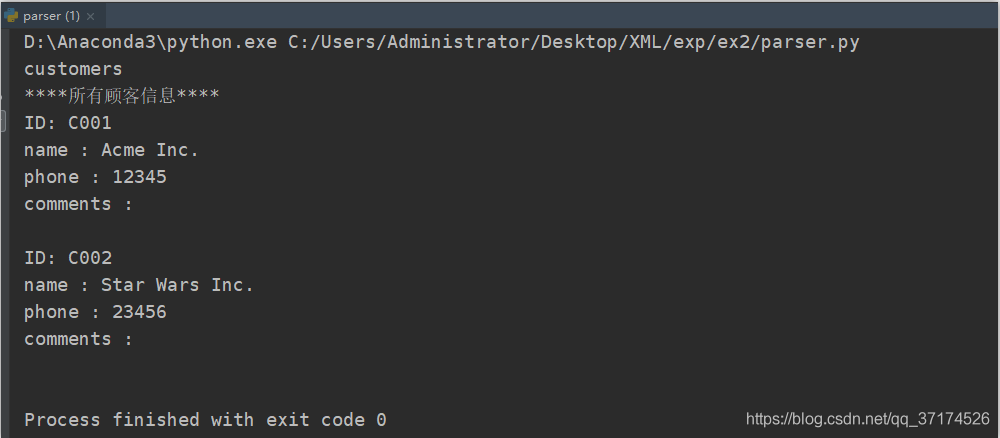
2. Write to XML file When writing
, I think there are two ways:
Create a new XML file
in both cases, the method for creating element nodes is similar, all you have to do is create/get a DOM object, and then create a new node based on the DOM.
in the first case, you can create it by dom= minidom.document (); In the second case, you can get the dom object directly by parsing the existing XML file, for example dom = parse("./customer.xml")
when creating element/text nodes, you’ll probably write a four-step sequence like this:
now, I need to create a new customer node with the following information :
<customer ID="C003">
    <name>kavin</name>
    <phone>32467</phone>
    <comments>
      <![CDATA[A small but healthy company.]]>
    </comments>
  </customer>
code as follows:
def writeXML():
	domTree = parse("./customer.xml")
	# 文档根元素
	rootNode = domTree.documentElement

	# 新建一个customer节点
	customer_node = domTree.createElement("customer")
	customer_node.setAttribute("ID", "C003")

	# 创建name节点,并设置textValue
	name_node = domTree.createElement("name")
	name_text_value = domTree.createTextNode("kavin")
	name_node.appendChild(name_text_value)  # 把文本节点挂到name_node节点
	customer_node.appendChild(name_node)

	# 创建phone节点,并设置textValue
	phone_node = domTree.createElement("phone")
	phone_text_value = domTree.createTextNode("32467")
	phone_node.appendChild(phone_text_value)  # 把文本节点挂到name_node节点
	customer_node.appendChild(phone_node)

	# 创建comments节点,这里是CDATA
	comments_node = domTree.createElement("comments")
	cdata_text_value = domTree.createCDATASection("A small but healthy company.")
	comments_node.appendChild(cdata_text_value)
	customer_node.appendChild(comments_node)

	rootNode.appendChild(customer_node)

	with open('added_customer.xml', 'w') as f:
		# 缩进 - 换行 - 编码
		domTree.writexml(f, addindent='  ', encoding='utf-8')

if __name__ == '__main__':
	writeXML()
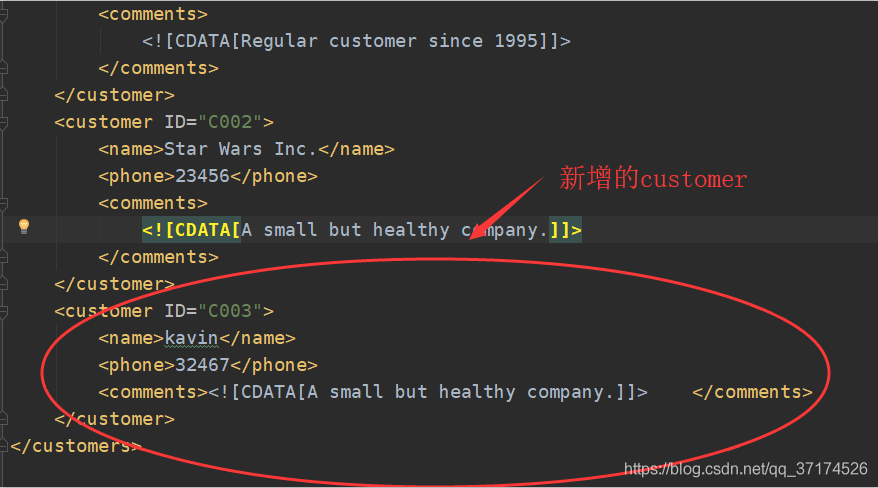
3. Update XML file
when updating XML, we only need to find the corresponding element node first, and then update the value of the text node or attribute under it, and then save it to the file. I will not say more about the details, but I have made the idea clear in the code, as follows:
def updateXML():
	domTree = parse("./customer.xml")
	# 文档根元素
	rootNode = domTree.documentElement

	names = rootNode.getElementsByTagName("name")
	for name in names:
		if name.childNodes[0].data == "Acme Inc.":
			# 获取到name节点的父节点
			pn = name.parentNode
			# 父节点的phone节点,其实也就是name的兄弟节点
			# 可能有sibNode方法,我没试过,大家可以google一下
			phone = pn.getElementsByTagName("phone")[0]
			# 更新phone的取值
			phone.childNodes[0].data = 99999

	with open('updated_customer.xml', 'w') as f:
		# 缩进 - 换行 - 编码
		domTree.writexml(f, addindent='  ', encoding='utf-8')

if __name__ == '__main__':
	updateXML()
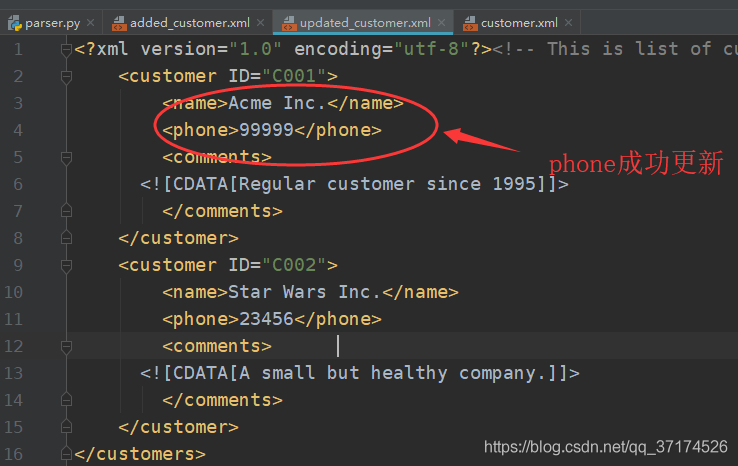
if there is anything wrong, please advise ~
The Python DOM method iterates over all the XML in a folder
I just started learning Python recently. To implement this same function, iterate through an XML file in the res\\value directory of an Android app code. Because its XML file format is basically the following, relatively simple.
string.xml
<?xml version="1.0" encoding="utf-8"?>
<resources>

    <string name="app_name">ActivityLife</string>
    <string name="hello_world">Hello world!</string>
    <string name="action_settings">Settings</string>

</resources>
As you can see, there are actually three String children under the resources parent node. Because I’m new to Python, I find it easier to use the XML.dom method (forgive me for being a whitehead).
The
XML dom defines the objects and attributes of XML elements and the methods to access them. Dom treats XML documents as a tree structure. To see this, click the open link. Ok, let’s get back to business. To solve the above problem, the specific idea is
1. Traverse the folder to get all the XML files. (glob.glob())
2. Read and parse each XML. Gets the child node attribute value and the text node value.
below is the implementation code:
# -*- coding: UTF-8 -*-
#遍历某个文件夹下所有xml文件
import sys
import glob
import os
import  xml.dom.minidom
def traversalDir_XMLFile(path):
    #判断路径是否存在
 if (os.path.exists(path)):
     #得到该文件夹路径下下的所有xml文件路径
    f = glob.glob(path + '\\*.xml' )

    for file in f :
        print file
        #打开xml文档
        dom = xml.dom.minidom.parse(file)
        #得到文档元素对象
        root = dom.documentElement
        #得到子节点列表,print childs
        childs = root.childNodes
        for child in childs:
            #筛选符合需求的child
            if(child.nodeType == 1):
                #得出子节点属性和文本节点值
                print'key:', child.getAttribute('name')
                print'value:',child.firstChild.data

traversalDir_XMLFile('E:\\work\\ActivityLife\\res\\values')
The path path is one of my value folders with dimens.xml; string.xml; styles.xml; There are also several Word files and TXT format files. The output result is:
E:\work\ActivityLife\res\values\dimens.xml
key: activity_horizontal_margin
value: 16dp
key: activity_vertical_margin
value: 16dp
E:\work\ActivityLife\res\values\strings.xml
key: app_name
value: ActivityLife
key: hello_world
value: Hello world!
key: action_settings
value: Settings
E:\work\ActivityLife\res\values\styles.xml
key: AppBaseTheme
value:

key: AppTheme
value:
The comments in the code are pretty clear. Because I have other XML files in my file, although the parent nodes are all under Resources, the children are different. There are strings, there are dimen and so on. But the format is the same. So, instead of using child.nodeValue when I print value, I get none, which is not so clear. I think it might be this:
Text is always stored in the text node
A common mistake in DOM processing is to assume that the element node contains text.
However, the text of the element node is stored in the text node.
In this case: < year> 2005< /year> , element node < year> , has a text node with a value of “2005”.
“2005” not < year> Element value!
specific reasons hope readers can tell me ha!! Do ⌒ (* ^ – ゜) v
some reference documents are given below:
Python golb methods: http://www.cnblogs.com/hongten/p/hongten_python_glob.html
XML parsing: http://www.cnblogs.com/fnng/p/3581433.html
http://www.runoob.com/python/python-xml.html
Python recursively traverses all files in the directory to find the specified file
before I read someone on the Internet saying “os.path.isdir() determines that absolute path must be written”, I thought Python has an iteration context, why not?Therefore,
is verified in this paper
code section
Consider using a path variable to refer to the current traversal element’s absolute path (correct practice)
def search(root, target):
    items = os.listdir(root)
    for item in items:
        path = os.path.join(root, item)
        if os.path.isdir(path):
            print('[-]', path)
            search(path, target)
        elif path.split('/')[-1] == target:
            print('[+]', path)
        else:
            print('[!]', path)
normal traversal result
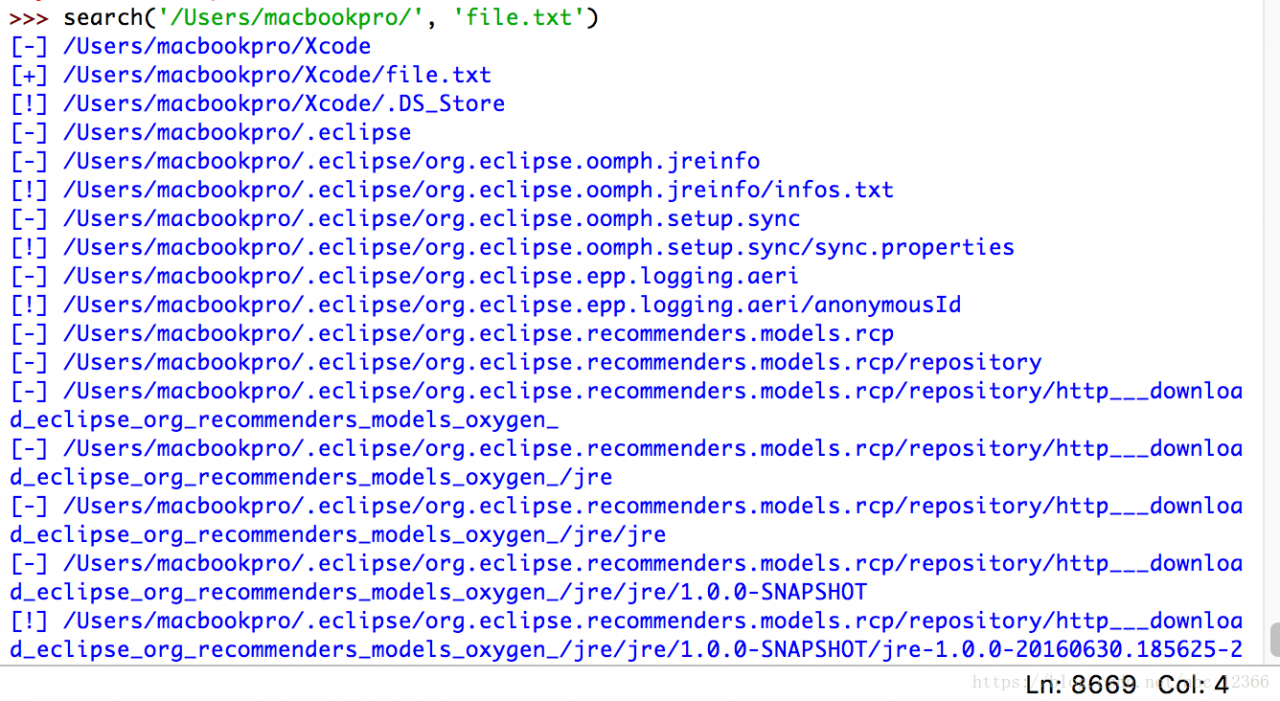
if I write it this way, I’m going to replace all the paths with item (iterative element)
def search(root, target):
    items = os.listdir(root)
    for item in items:
        if os.path.isdir(item):
            print('[-]', item)
            search(os.path.join(root, item), target)
        elif item == target:
            print('[+]', os.path.join(root,item))
        else:
            print('[!]', os.path.join(root, item))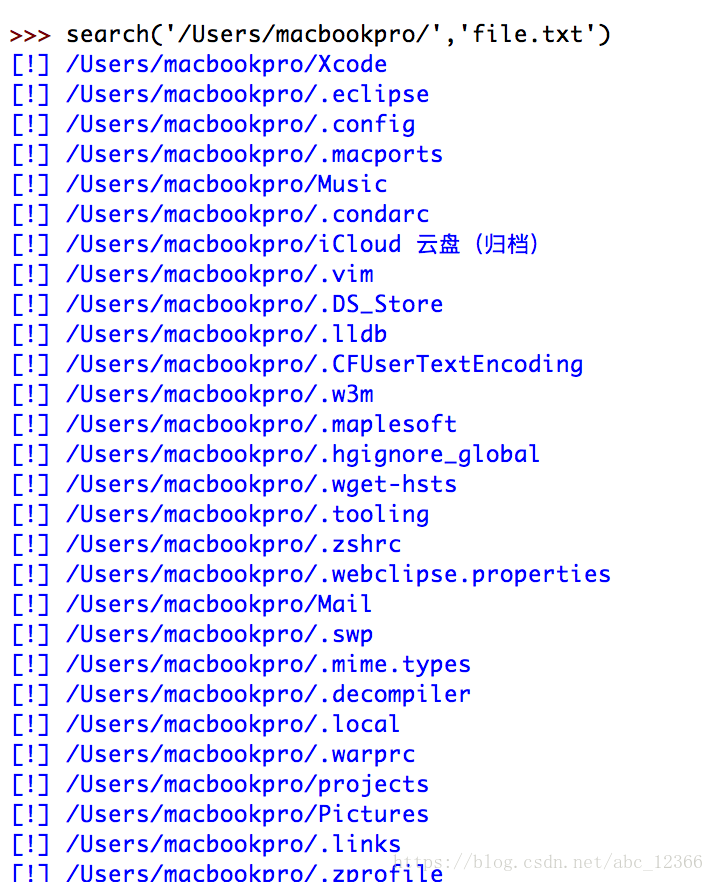
can be seen that this does not work: if you use the item to iterate over the current path, you will recursively recursively refer to the current path only two levels further down (subfolders, subfolder files), you can see that the missing context management mechanism is completely ineffective here
reflection and summary
1) how would you react if you just changed the iteration mechanism of the passing element for each recursion based on the correct traversal writing?
In the above example, just change search(os.path.join(root, item), target) to search(item, target) :
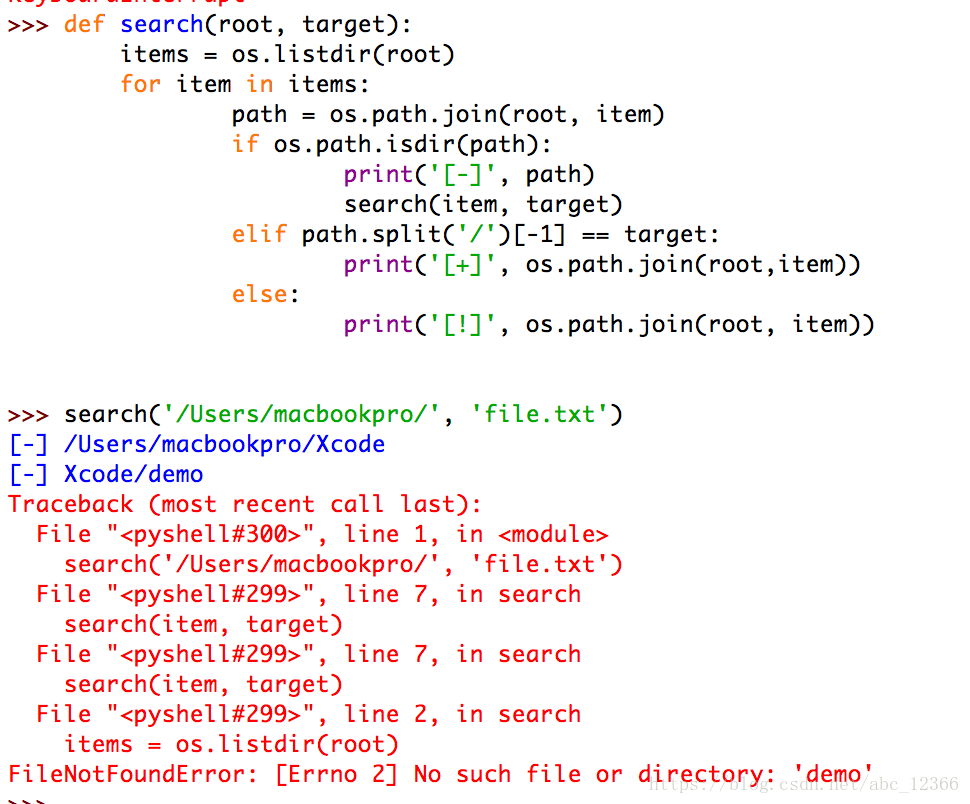
this is easy to see because the first time you call search(..) is passed in an absolute path. If the relative path is passed in because there is no context, it cannot correctly locate the location of the file
2)os.path. Abspath (path) method can replace os.path. Join (root, current)?
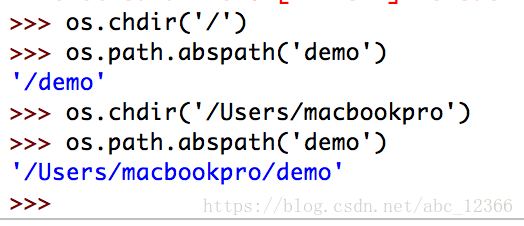
(fog) original os.path. Abspath (..) means: relative path to the current working directory! (not the relative path to the system root!)
so, os.path. Abspath (..) and OS path. Join (..) is two completely different things that cannot be replaced by
3) what exactly is a Python file?
again, change each output to use type(..) function package form
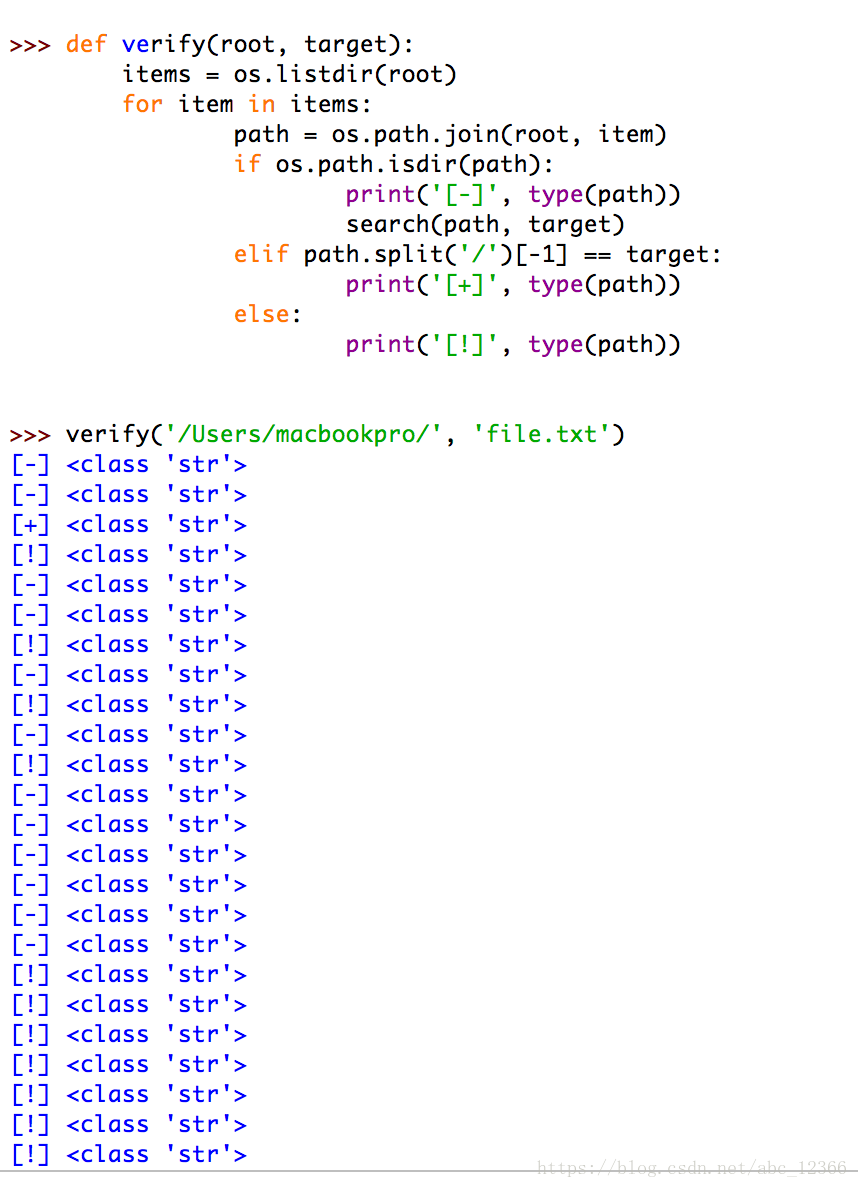
let's look at another example
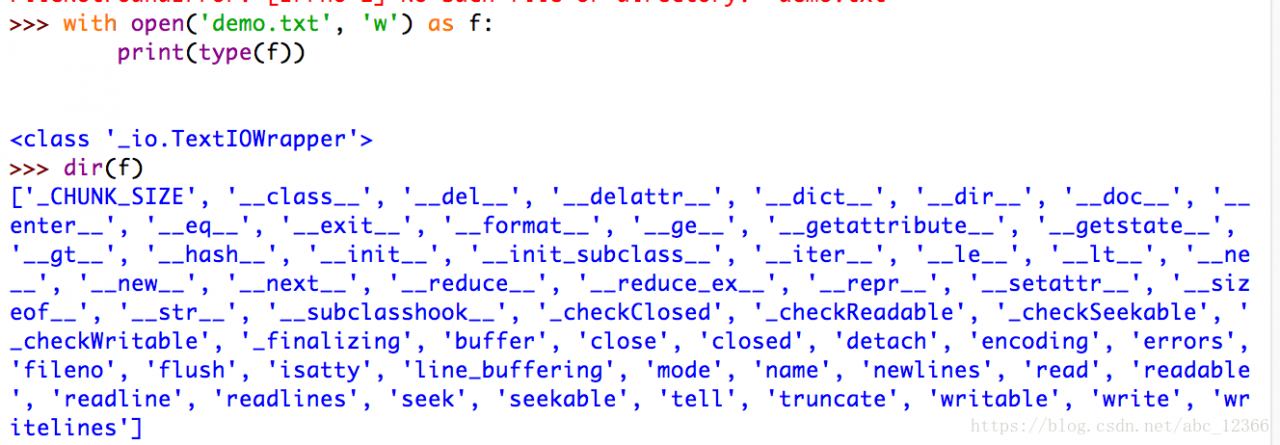
In line with the Python "everything is an object" belief, the path we enter (including its iteration version, and the variable used to accept it) is a string STR object, and the file handle (pointer) used to describe the file is a
object
In general, we search and filter folders and files horizontally, using the path description of STR type. However, to read or write a specific file (not a folder), we need to use the file handle of _io.TextIOWrapper type. Unlike Java, which is completely encapsulated as a File(String path) object, it reduces the role of the File path as a single individual -- but Python takes the path as a separate one, and many of our File operations (broadly defined as finding a specific File, not just a File IO) are based on the File path as
4) thinking: is there any way to traverse the file other than the method given at the beginning?
answer: yes
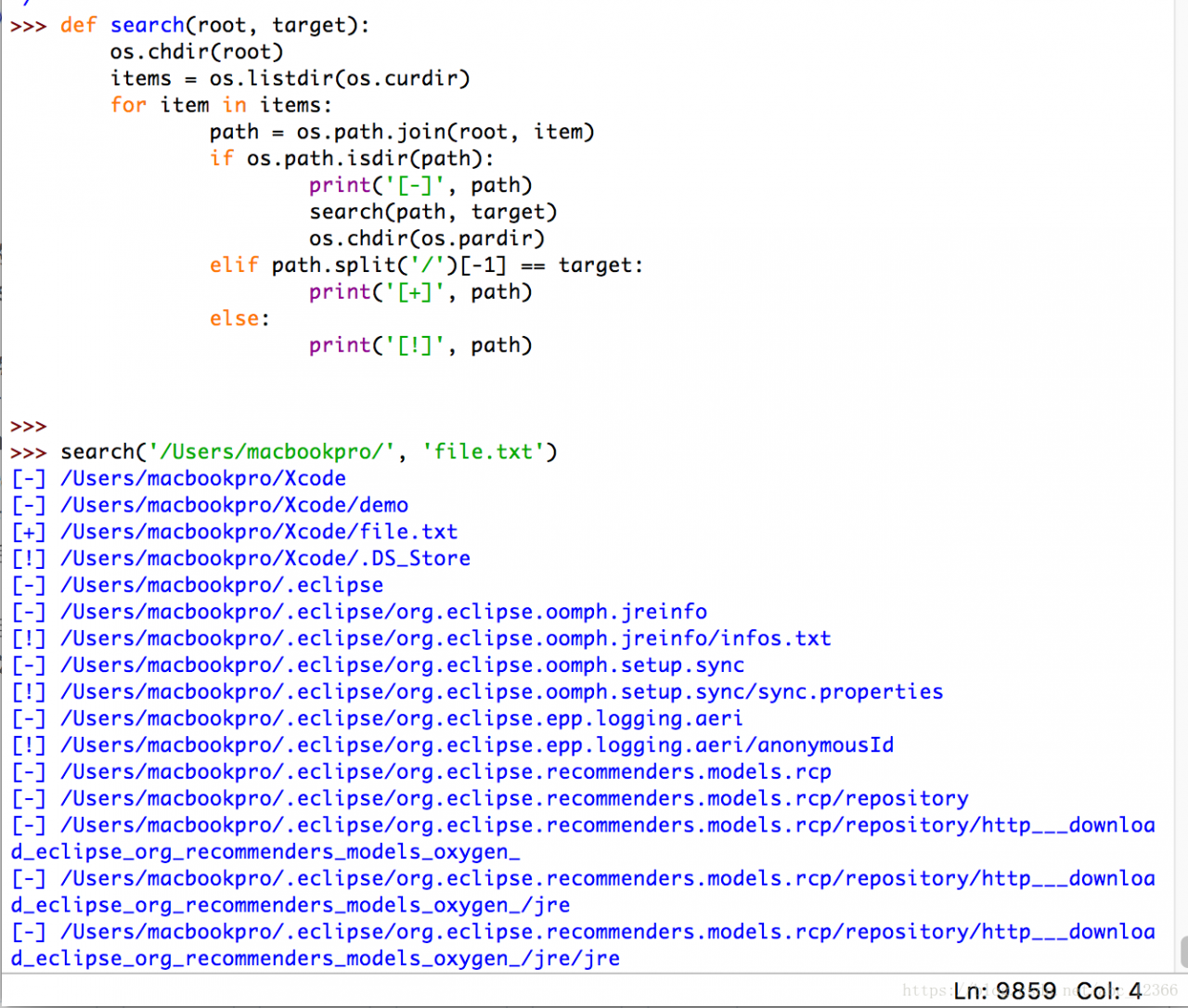
Chdir (path) os.chdir(path) path
but we do not recommend this method because it modifies the global variable, which is validated before and after the function call using the os.getcwd() function
First switch the working directory to the root directory, then execute the custom change() function
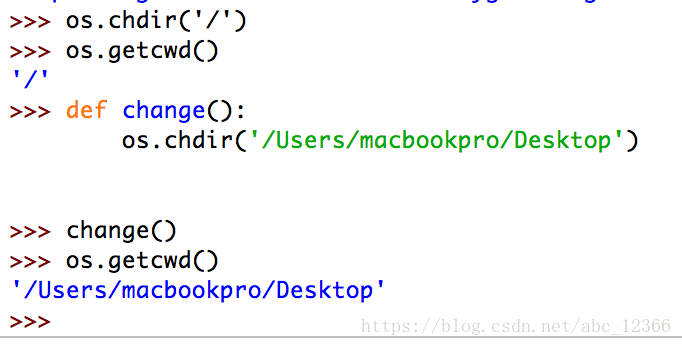
as you can see, by this time the global current working directory has changed
python: File Processing and Input and Output
Sometimes your program will interact with the user. For example, you would want to get the user’s input and print out some returned results to the user. We can achieve this requirement through input() function and print function respectively.
For input, we can also use various methods of the str (String) class. For example, you can use the rjust method to get a string that is right-justified to a specified width. You can check help(str) for more details.
Another common type of input and output is processing files. Creating, reading, and writing files are essential functions for many programs , and we will explore this aspect in this chapter.
User input
Save the following program as io_input.py:
def reverse(text):
    return text[::-1]
def is_backtext(text):
    return text == reverse(text)
something = input("请输入文字: ")
if is_backtext(something):
    print("是回文")
else:
    print("不是回文")
Output:
python io_input.py
输入文字: abc
不是回文

python io_input.py
输入文字: moom
是回文
We use the slice function to flip the text. We have learned that we can slice a sequence from the beginning of position a to the end of position b by using seq[a:b]. We can also provide a third parameter to determine the step size of the slice (Step). The default step size is 1, it will return a continuous text. If a negative step size is given, such as -1, the flipped text will be returned.
The input() function can accept a string as a parameter and display it to the user. After that, it will wait for the user to input content or hit the return key. Once the user enters something and hits the return key, the input() function will return the text entered by the user.
We get the text and flip it. If the original text is the same as the flipped text, it is judged that this text is a palindrome.
file
You can open or use files by creating an object belonging to the file class and using its read, readline, and write methods appropriately , and read or write them. The ability to read or write files depends on how you specify to open the file. Finally, when you have finished the file, you can call the close method to tell Python that we have finished using the file.
Example (save as io_using_file.py):
poem = '''编程是很有趣的事件,
如果你想让你的工作也变得有趣的话:
使用Python!'''

# 打开文件以编辑('w'riting)
f = open('poem.txt', 'w',encoding='utf-8')
# 向文件中编写文本
f.write(poem)
# 关闭文件
f.close()

# 如果没有特别指定,
# 将假定启用默认的阅读('r'ead)模式
f = open('poem.txt')
while True:
    line = f.readline()
    # 零长度指示 EOF
    if len(line) == 0:
        break # 每行(`line`)的末尾
    # 都已经有了换行符
    #因为它是从一个文件中进行读取的
    print(line, end='')
# 关闭文件
f.close()
Output:
python io_using_file.py
编程是很有趣的事件,
如果你想让你的工作也变得有趣的话:
使用Python!
How it works
First, we use the built-in open function and specify the file name and the open mode we want to use to open a file.
The open mode can be read mode (‘r’), write mode (‘w’) and append mode (‘a’).
We can also choose whether to read, write or append text in text mode (‘t’) or binary mode (‘b’ ). There are actually more modes available, help(open) will give you more details about them.
By default, open() treats the file as a text file and opens it in read mode .
In our case, we first open the file in write mode and use the write method of the file object to write the file, and finally close the file with close.
Next, we reopen the same file in reading mode. We don’t need to specify a certain mode, because “read text file” is the default. We use the readline method in the loop to read each line of the file. This method will be a complete line, which also contains a newline at the end of the line. When an empty string returns, it means that we have reached the end of the file and exit the loop with break
Finally, we finally closed the file with close. Now, you can check the content of the poem.txt file to confirm that the program has indeed written and read the file.
encoding=utf-8
When we read or write a file or when we want to communicate with other computers on the Internet, we need to convert our Unicode string to a format that can be sent and received. This format is called == “UTF- 8″==. We can read and write in this format, just use a simple keyword parameter to our standard open function: encoding=’utf-8′
Unicode has multiple translations such as “Unicode”, “Universal Code” and “International Code”.
Python traverses all files under the specified path and retrieves them according to the time interval
demand
It is required to find the word documents in a certain date range in the folder, and list the names and paths of all words, such as all word documents under the D drive from July 5 to July 31.
Modify file type

Modify file path

Retrieve file modification time interval

#conding=utf8
import os
import time
g = os.walk(r"C:\Users\Administrator\Downloads")
def judge_time_file(path, file, update_time):
    if not file.endswith(('.doc','.docx')):
        return False
    start_time = time.mktime(time.strptime('2020-04-12 00:00:00', "%Y-%m-%d %H:%M:%S"))
    end_time   = time.mktime(time.strptime('2020-05-23 00:00:00', "%Y-%m-%d %H:%M:%S"))
    # print(start_time ,  update_time , end_time)
    if start_time < update_time < end_time:
        return True
    return True

data_list = []
i = 0

for path, dir_list, file_list in g:

    for file_name in file_list:
        local_time = os.stat(os.path.join(path, file_name)).st_mtime
        if judge_time_file(path, file_name, local_time):
            data_list.append([os.path.join(path, file_name), time.strftime("%Y-%m-%d %H:%M:%S",time.localtime(local_time))])
            # print(data_list)
        i=i+1
        print(i)
data_list.sort(key=lambd