POM add dependency:
<!-- https://mvnrepository.com/artifact/org.olap4j/olap4j -->
<dependency>
    <groupId>org.olap4j</groupId>
    <artifactId>olap4j</artifactId>
    <version>1.2.0</version>
</dependency>
POM add dependency:
<!-- https://mvnrepository.com/artifact/org.olap4j/olap4j -->
<dependency>
<groupId>org.olap4j</groupId>
<artifactId>olap4j</artifactId>
<version>1.2.0</version>
</dependency>
There is a problem with version 31.0.0. You can choose another version
first go to tools – & gt; Uninstall 31.0.0 in SDK manager, Download Android R (API 30: version 11)
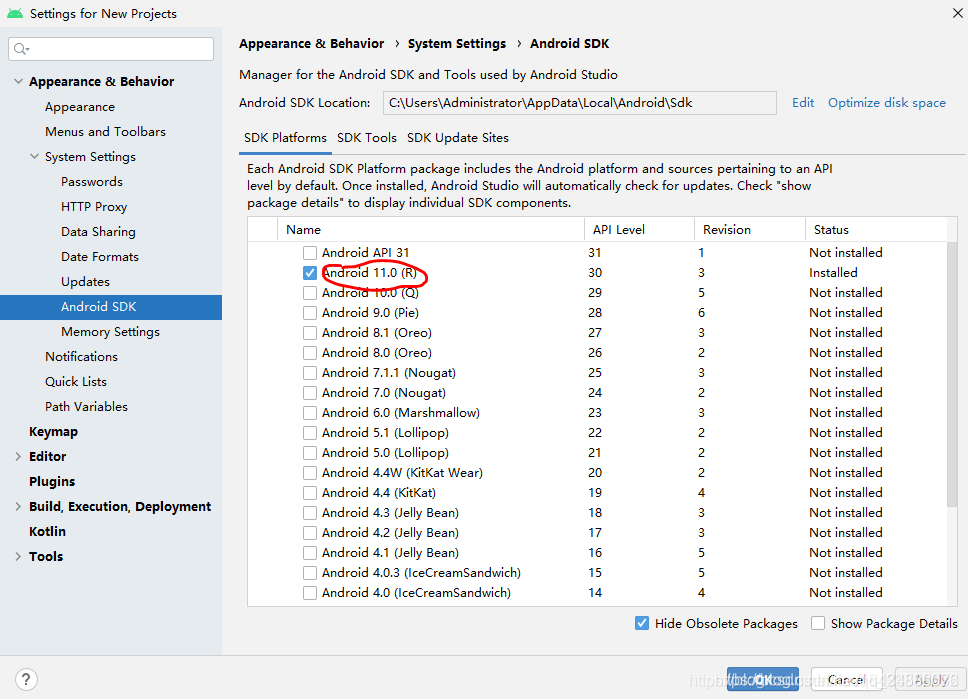
after that, modify the three variables compilesdkversion, buildtoolsversion and targetsdkversion in APP/build.gradle file
compileSdkVersion 30
buildToolsVersion “30.0.0”
targetSdkVersion 30
This error is usually caused by the mismatch of numpy versions, and the related MKL libraries are also uninstalled
pip unstall numpy
pip unstall mkl-service
Then PIP reinstall it
I just don’t know why I can’t solve it with CONDA uninstall + reinstall. Just replace it with PIP. It seems that there is a difference between uninstall and installed library?
The idea prompts an error when running the test. Failed to resolve org. JUnit. Platform: JUnit platform launcher: 1.7.0
POM add dependency
 <dependency>
            <groupId>org.junit.platform</groupId>
            <artifactId>junit-platform-launcher</artifactId>
            <version>1.7.0</version>
            <scope>test</scope>
</dependency>
Question
The CentOS container is started based on docker. You need to use systemctl start XXX to start the service in the CentOS container. An error occurred:
Failed to get D-Bus connection: Operation not permitted
reason
The permission of ptrace system call. By default, the container does not have permission to ptrace process.
resolvent
When starting the container, turn on the privileged mode through privileged = true , and start it with /usr/SBIN/init as the entry command, for example:
docker run -d -name centos7 --privileged=true centos:7 /usr/sbin/init
After entering the container with the command docker exec - it centos7/bin/bash , you can start the service internally with systemctl start .
(END)
Arm64 swconfig failed to configure VLAN
Failed to set attribute: invalid input data or parameter
Kernel version: linux-5.20.26
phenomenon:
root@OpenWrt:/usr/lib# swconfig dev switch0 vlan 2 set ports "1 2 3"
Failed to set attribute: Invalid input data or parameter
Ref:
https://forum.openwrt.org/t/ath79-kernel-5-4-swconfig-libnl-tiny-issue/50689
https://github.com/MartB/openwrt/commit/df051318503ff41c6214fa845e447dcfc5d1a1d8
Reason: The problem with libnl-tiny can be solved by using libnl-3 instead
--- a/package/network/config/swconfig/Makefile
+++ b/package/network/config/swconfig/Makefile
@@ -14,27 +14,26 @@ PKG_MAINTAINER:=Felix Fietkau <[email protected]>
 PKG_LICENSE:=GPL-2.0

 include $(INCLUDE_DIR)/package.mk
-include $(INCLUDE_DIR)/kernel.mk

 define Package/swconfig
   SECTION:=base
   CATEGORY:=Base system
-  DEPENDS:=+libuci +libnl-tiny
+  DEPENDS:=+libuci +libnl
   TITLE:=Switch configuration utility
 endef

 TARGET_CPPFLAGS := \
        -D_GNU_SOURCE \
-       -I$(STAGING_DIR)/usr/include/libnl-tiny \
+       -I$(STAGING_DIR)/usr/include/libnl3\
+       -I$(LINUX_DIR)/include \
        -I$(PKG_BUILD_DIR) \
-       $(TARGET_CPPFLAGS) \
-       -I$(LINUX_DIR)/user_headers/include
+       $(TARGET_CPPFLAGS)

 define Build/Compile
        CFLAGS="$(TARGET_CPPFLAGS) $(TARGET_CFLAGS)" \
        $(MAKE) -C $(PKG_BUILD_DIR) \
                $(TARGET_CONFIGURE_OPTS) \
-               LIBS="$(TARGET_LDFLAGS) -lnl-tiny -lm -luci -lubox"
+               LIBS="-L$(STAGING_DIR)/usr/lib -lnl-genl-3 -lnl-3 -lm -luci -lubox"
 endef
Click “blue word” above
Pay attention to us and enjoy more dry goods!
The customer has a set of Oracle 19C DataGuard database environment. The standby side always has large gap at intervals. At the same time, LGWR (ospid: 105521) waits for event ‘DLM cross Inst call completion’ for n secs. The standby side does not provide external queries. At the same time, multi instance log applications are disabled, and the operating system resources are idle, The number of LMS processes is normal. If other nodes are shut down, leaving only the apply log does not exist. DLM is a distributed lock manager, which belongs to the core mechanism of Rac architecture. It realizes multi node resource sharing scheduling and transmits requests through the interconnect network. Here is a brief record of this case:
db alert log
PR00 (PID:109603): Media Recovery Log +ARCH/anbob1/ARCHIVELOG/2021_07_12/thread_3_seq_13586.1479.1077669291
2021-07-12T20:25:29.643687+08:00
PR00 (PID:109603): Media Recovery Log +ARCH/anbob1/ARCHIVELOG/2021_07_12/thread_2_seq_14361.1072.1077669019
2021-07-12T20:29:38.183656+08:00
LGWR (ospid: 105521) waits for event 'DLM cross inst call completion' for 1 secs.
2021-07-12T20:29:48.137737+08:00
LGWR (ospid: 105521) waits for event 'DLM cross inst call completion' for 2 secs.
2021-07-12T20:31:21.952345+08:00
 rfs (PID:113884): Selected LNO:26 for T-2.S-14456 dbid 3902007743 branch 1037635587
2021-07-12T20:31:21.987333+08:00
 rfs (PID:114704): Error ORA-235 occurred during an un-locked control file
 rfs (PID:114704): transaction.  This error can be ignored.  The control
 rfs (PID:114704): file transaction will be retried.
2021-07-12T20:31:43.532600+08:00
ARC2 (PID:106404): Archived Log entry 9591 added for T-2.S-14455 ID 0xe894b1bf LAD:1
2021-07-12T20:31:47.151671+08:00
 rfs (PID:113882): Selected LNO:31 for T-3.S-13731 dbid 3902007743 branch 1037635587
2021-07-12T20:31:49.116049+08:00
 rfs (PID:113880): Selected LNO:22 for T-1.S-13006 dbid 3902007743 branch 1037635587
2021-07-12T20:31:53.393547+08:00
ARC3 (PID:106408): Archived Log entry 9592 added for T-1.S-13005 ID 0xe894b1bf LAD:1
2021-07-12T20:32:02.346585+08:00
ARC2 (PID:106404): Archived Log entry 9593 added for T-3.S-13730 ID 0xe894b1bf LAD:1
2021-07-12T20:33:13.805344+08:00
LGWR (ospid: 105521) waits for event 'DLM cross inst call completion' for 0 secs.
2021-07-12T20:33:13.805470+08:00
LGWR (ospid: 105521) is hung in an acceptable location (inwait 0x1.ffff).
2021-07-12T20:33:21.196764+08:00
LGWR (ospid: 105521) waits for event 'DLM cross inst call completion' for 2 secs.
2021-07-12T20:33:31.310737+08:00
LGWR (ospid: 105521) waits for event 'DLM cross inst call completion' for 0 secs.
2021-07-12T20:33:41.223781+08:00
LGWR (ospid: 105521) waits for event 'DLM cross inst call completion' for 1 secs.
2021-07-12T20:33:51.205776+08:00
LGWR (ospid: 105521) waits for event 'DLM cross inst call completion' for 2 secs.
2021-07-12T20:34:01.307770+08:00
LGWR (ospid: 105521) waits for event 'DLM cross inst call completion' for 0 secs.
2021-07-12T20:34:25.440231+08:00
PR00 (PID:109603): Media Recovery Log +ARCH/anbob1/ARCHIVELOG/2021_07_12/thread_2_seq_14362.1867.1077670807
2021-07-12T20:34:44.864009+08:00
PR00 (PID:109603): Media Recovery Log +ARCH/anbob1/ARCHIVELOG/2021_07_12/thread_3_seq_13587.691.1077670845
2021-07-12T20:34:45.204773+08:00
PR00 (PID:109603): Media Recovery Log +ARCH/anbob1/ARCHIVELOG/2021_07_12/thread_1_seq_12934.1156.1077670917
2021-07-12T20:36:09.378685+08:00
LGWR (ospid: 105521) waits for event 'DLM cross inst call completion' for 2 secs.
2021-07-12T20:36:19.341635+08:00
LGWR (ospid: 105521) waits for event 'DLM cross inst call completion' for 0 secs.
2021-07-12T20:36:28.416573+08:00
LGWR (ospid: 105521) waits for event 'DLM cross inst call completion' for 0 secs.
2021-07-12T20:36:38.375742+08:00
LGWR (ospid: 105521) waits for event 'DLM cross inst call completion' for 1 secs.
LGWR trace
*** 2021-07-12T20:33:43.793041+08:00 ((4))
Received ORADEBUG command (#235) 'dump KSTDUMPCURPROC 1' from process '105470'
-------------------------------------------------------------------------------
Trace Bucket Dump Begin: default bucket for process 47 (osid: 105521, LGWR)
CDB_NAME(CON_ID):CON_UID:TIME(*=approx):SEQ:COMPONENT:FILE@LINE:FUNCTION:SECT/DUMP:SID:SERIAL#: [EVENT#:PID] DATA
-------------------------------------------------------------------------------
IRMSDB(4):3247498417:2021-07-12 20:33:42.784 :KJCI:kjci.c@1957:kjci_complete():4466:40278: freeing request 0x20fd651e8 (inst|inc|reqid)=(1|88|823031) with opcode=146 and completion status [DONE]
IRMSDB(4):3247498417:2021-07-12 20:33:42.784 :KJCI:kjci.c@1089:kjci_initreq():4466:40278: request 0x20fd651e8 (inst|inc|reqid)=(1|88|823032) with group (type|id)=(1|1), opcode=146, flags=0x0, msglen=56, where=[kqlmClusterMessage] to target instances=
IRMSDB(4):3247498417:2021-07-12 20:33:42.784 :KJCI:kjci.c@1091:kjci_initreq():4466:40278:    1 2
IRMSDB(4):3247498417:2021-07-12 20:33:42.784 :KJCI:kjci.c@1618:kjci_processcrq():4466:40278: processing reply 0x2cff2d4e8 for request 0x20fd651e8 (inst|inc|reqid)=(1|88|823032) with opcode=146 from callee (inst|pid|psn)=(1|36|1)
IRMSDB(4):3247498417:2021-07-12 20:33:42.784 :KJCI:kjci.c@1618:kjci_processcrq():4466:40278: processing reply 0x2cff2d718 for request 0x20fd651e8 (inst|inc|reqid)=(1|88|823032) with opcode=146 from callee (inst|pid|psn)=(2|36|1)
IRMSDB(4):3247498417:2021-07-12 20:33:42.784 :KJCI:kjci.c@1957:kjci_complete():4466:40278: freeing request 0x20fd651e8 (inst|inc|reqid)=(1|88|823032) with opcode=146 and completion status [DONE]
IRMSDB(4):3247498417:2021-07-12 20:33:42.785 :KJCI:kjci.c@1089:kjci_initreq():4466:40278: request 0x20fd651e8 (inst|inc|reqid)=(1|88|823033) with group (type|id)=(1|1), opcode=146, flags=0x0, msglen=56, where=[kqlmClusterMessage] to target instances=
IRMSDB(4):3247498417:2021-07-12 20:33:42.785 :KJCI:kjci.c@1091:kjci_initreq():4466:40278:    1 2
IRMSDB(4):3247498417:2021-07-12 20:33:42.785 :KJCI:kjci.c@1618:kjci_processcrq():4466:40278: processing reply 0x2cff2d4e8 for request 0x20fd651e8 (inst|inc|reqid)=(1|88|823033) with opcode=146 from callee (inst|pid|psn)=(1|36|1)
IRMSDB(4):3247498417:2021-07-12 20:33:42.785 :KJCI:kjci.c@1618:kjci_processcrq():4466:40278: processing reply 0x2cff2d718 for request 0x20fd651e8 (inst|inc|reqid)=(1|88|823033) with opcode=146 from callee (inst|pid|psn)=(2|36|1)
IRMSDB(4):3247498417:2021-07-12 20:33:42.785 :KJCI:kjci.c@1957:kjci_complete():4466:40278: freeing request 0x20fd651e8 (inst|inc|reqid)=(1|88|823033) with opcode=146 and completion status [DONE]
IRMSDB(4):3247498417:2021-07-12 20:33:42.785 :KJCI:kjci.c@1089:kjci_initreq():4466:40278: request 0x20fd651e8 (inst|inc|reqid)=(1|88|823034) with group (type|id)=(1|1), opcode=146, flags=0x0, msglen=56, where=[kqlmClusterMessage] to target instances=
IRMSDB(4):3247498417:2021-07-12 20:33:42.785 :KJCI:kjci.c@1091:kjci_initreq():4466:40278:    1 2
**KJCJ ** ==> ( kjci)_ processcrq – kernel lock management communication cross instance call
For cross node communication, there is no known bug in MOS. First analyze the network problem. You can also do SSD from the process blocker or view the hangmgr trace. The AHF framework in Oracle 19C CRS comes with OSW.
OSW netstat data
zzz ***Tue Jul 13 00:59:51 CST 2021
...
#kernel
IpInReceives                    1456201695         0.0
IpInHdrErrors                   0                  0.0
IpInAddrErrors                  0                  0.0
IpForwDatagrams                 0                  0.0
IpInUnknownProtos               0                  0.0
IpInDiscards                    0                  0.0
IpInDelivers                    1085210966         0.0
IpOutRequests                   1007206469         0.0
IpOutDiscards                   5280               0.0
IpOutNoRoutes                   8                  0.0
IpReasmTimeout                  6333500            0.0
IpReasmReqds                    408470736          0.0
IpReasmOKs                      37504539           0.0
IpReasmFails                    8651478            0.0
IpFragOKs                       29029579           0.0
Note:
currently, there are high IP reorganization failure packets, which is a cumulative value. You can view the daily changes below.
View the failure of daily IP reorganization
 awk '/zzz/{d=$3"/"$4" "$5}/IpReasmFails/{curr=$2;diff=curr-prev;if(diff>5)print d,diff,prev,curr;prev=curr}' *.dat
Jul/13 00:00:16 8620039  8620039
Jul/13 00:00:46 185 8620039 8620224
Jul/13 00:01:16 242 8620224 8620466
Jul/13 00:01:46 324 8620466 8620790
Jul/13 00:02:16 279 8620790 8621069
Jul/13 00:02:46 325 8621069 8621394
Jul/13 00:03:16 325 8621394 8621719
Jul/13 00:03:46 247 8621719 8621966
Jul/13 00:04:16 246 8621966 8622212
Jul/13 00:04:46 210 8622212 8622422
Jul/13 00:05:16 327 8622422 8622749
Jul/13 00:05:46 247 8622749 8622996
Jul/13 00:06:16 238 8622996 8623234
Jul/13 00:06:46 219 8623234 8623453
Jul/13 00:07:16 262 8623453 8623715
Jul/13 00:07:46 254 8623715 8623969
Jul/13 00:08:16 179 8623969 8624148
Jul/13 00:08:46 294 8624148 8624442
Note:
it can be seen that there are high IP reorganization failures at ordinary times. Let’s try to use Ping to verify the network
Using Ping authentication
— on node1
ping -s 4000 {node2-privateIP}
Note:
Forget to keep the historical output here. It is found that there is 12% package loss, indicating that the current and heartbeat networks are not healthy. However, the bond made of two network cards is used. At present, it is in active backup active and standby mode. You can try to switch another network card.
Network card switching
cat /proc/net/bonding/bond0Note:
Check that the current primary card is ens9f0 and switch to the standby card ens9f1
ifenslave -c bond0 ens9f1After switching between active and standby network cards: Ping is normal, IP reorganization failure disappears, DLM cross Inst call completion does not appear, DG synchronization is normal, and the problem is solved.
Cesium recording canvas video
Using H5 API Mediarecorder and borrow canvas.capturestream to record the screen.
Direct upper code (Vue lower)
recorderCanvas () {
      let that = this
      let viewer = window.earth
      const stream = viewer.canvas.captureStream()
      const recorder = new MediaRecorder(stream, { MimeType: 'video/webm' })
      that.data = []
      recorder.ondataavailable = function (event) {
        if (event.data && event.data.size) {
          that.data.push(event.data)
        }
      }
      recorder.onstop = () => {
        that.url = URL.createObjectURL(new Blob(that.data, { type: 'video/webm' }))
        that.startDownload(that.url)
      }
      recorder.start()
      setTimeout(() => {
        recorder.stop()
      }, 10000)
    },
Disadvantages: only canvas can be recorded, and other DOM pages cannot be recorded.
Add a camera to open the video, also using mediarecorder or Mediastreamrecorder, mediastreamrecorder provides more control means, and the corresponding JS files need to be imported.
Mediastreamrecorder GitHub address
Mediarecorder mode
Note that when creating a mediarecorder instance, you should correctly set the value of mimeType. Otherwise, the downloaded video will be black. In addition, the video format chrome seems to only support WEMP format.
Calling mediarecorder. Stop() does not turn off the camera. You need to manually turn off video and audio by stream.gettracks.
makeRecordes () {
      if (navigator.mediaDevices) {
        console.log('getUserMedia supported.')

        var constraints = { audio: true, video: { width: 1280, height: 720 } }
        var chunks = []
        let that = this
        navigator.mediaDevices.getUserMedia(constraints)
          .then(function (stream) {
            var mediaRecorder = new MediaRecorder(stream, { mimeType: 'video/webm;codecs=vp8,opus' })

            mediaRecorder.start()
            mediaRecorder.ondataavailable = function (e) {
              chunks.push(e.data)
            }
            setTimeout(() => {
              mediaRecorder.stop()
              stream.getTracks().forEach(function (track) {
                track.stop()
              })
              mediaRecorder.onstop = () => {
                const videoBlob = new Blob(chunks, { 'type': 'video/webm' })
                let videoUrl = window.URL.createObjectURL(videoBlob)
                that.startDownload(videoUrl)
              }
            }, 10000)
          })
          .catch(function (err) {
            console.log('The following error occurred: ' + err)
          })
      }
    },
If you need more control, such as pause, and don’t want to implement it yourself, use mediastreamrecorder
Also set the value mimeType correctly, otherwise the recorded video will be black.
makeRecordesByMSR () {
      if (navigator.mediaDevices) {
        console.log('getUserMedia supported.')

        var constraints = { audio: true, video: { width: 1280, height: 720 } }
        navigator.mediaDevices.getUserMedia(constraints)
          .then(function (stream) {
            // eslint-disable-next-line no-undef
            var mediaRecorder = new MediaStreamRecorder(stream)
            mediaRecorder.stream = stream
            mediaRecorder.width = window.screen.width
            mediaRecorder.height = window.screen.height
            mediaRecorder.mimeType = 'video/webm;codecs=vp8,opus'
            mediaRecorder.ondataavailable = function (blob) {
              mediaRecorder.save(blob, 'myName.webm')
            }
            mediaRecorder.start(6000)

            setTimeout(() => {
              mediaRecorder.stream.stop()
            }, 12000)
          })
          .catch(function (err) {
            console.log('The following error occurred: ' + err)
          })
      }
}Welcome to reprint the original blog. Please attach the blog link when reprinting. Thank you for your respect.
Problem Description:
Local environment: Windows 10 system
Compiler: idea 2018.3.4
Code warehouse: GitHub
When submitting the test code with [git push], the prompt “login failed, use Ctrl + C to cancel the basic voucher” appears, as follows:
Logon failed, use ctrl+c to cancel basic credential prompt. unable to access…
Because the incident happened suddenly, only the error information was copied, and there was no screenshot to keep the certificate. Forgive me, O (╯ □ ╯) O
Cause analysis:
Ha ha, to tell you the truth, it’s really not clear.
However, after the problem was finally solved, the GitHub official website sent me an email, which roughly said that they “do not recommend using git’s password for basic authentication”.
Therefore, I have reason to suspect that this is the result of my login with GitHub account and password in idea. It is recommended to log in in in the way of “git account + token”, which should be all right.
The screenshot of the email content is as follows:
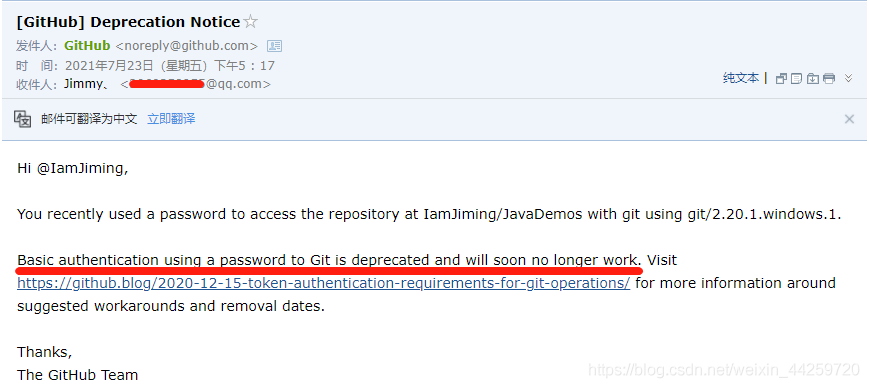
Solution:
On the [git bash] command line, enter the following command, and then push the branch again.
setx GIT_TRACE ""My case:
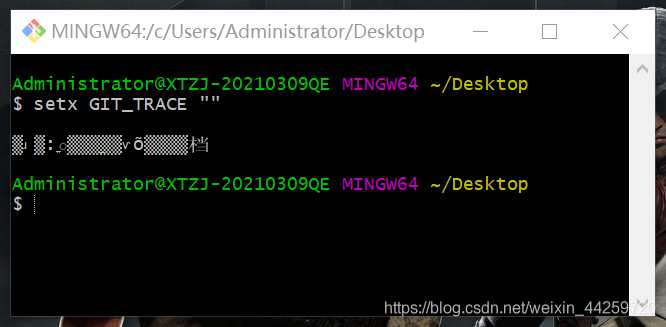
There are other methods, such as [git account + token] login recommended by the government, but they are not as simple as the above method. It is not a big problem and there is no need to pay attention, so I won’t be wordy.
I hope I can help you!!
I haven’t opened the Android project for a while; Open compilation and report an error
w: Runtime JAR files in the classpath should have the same version. These files were found in the classpath:
e: D:/software/Gradle_ workplace/caches/modules-2/files-2.1/org.jetbrains.kotlin/kotlin-stdlib-common/1.5.10/6b84d926e28493be69daf673e40076f89492ef7/kotlin-stdlib-common-1.5.10.jar!/ META-INF/kotlin-stdlib-common.kotlin_ Module: module was compiled with an incompatible version of kotlin. The binary version of its metadata is 1.5.1, expected version is 1.1.13.
insert a picture description here

the final solution is:
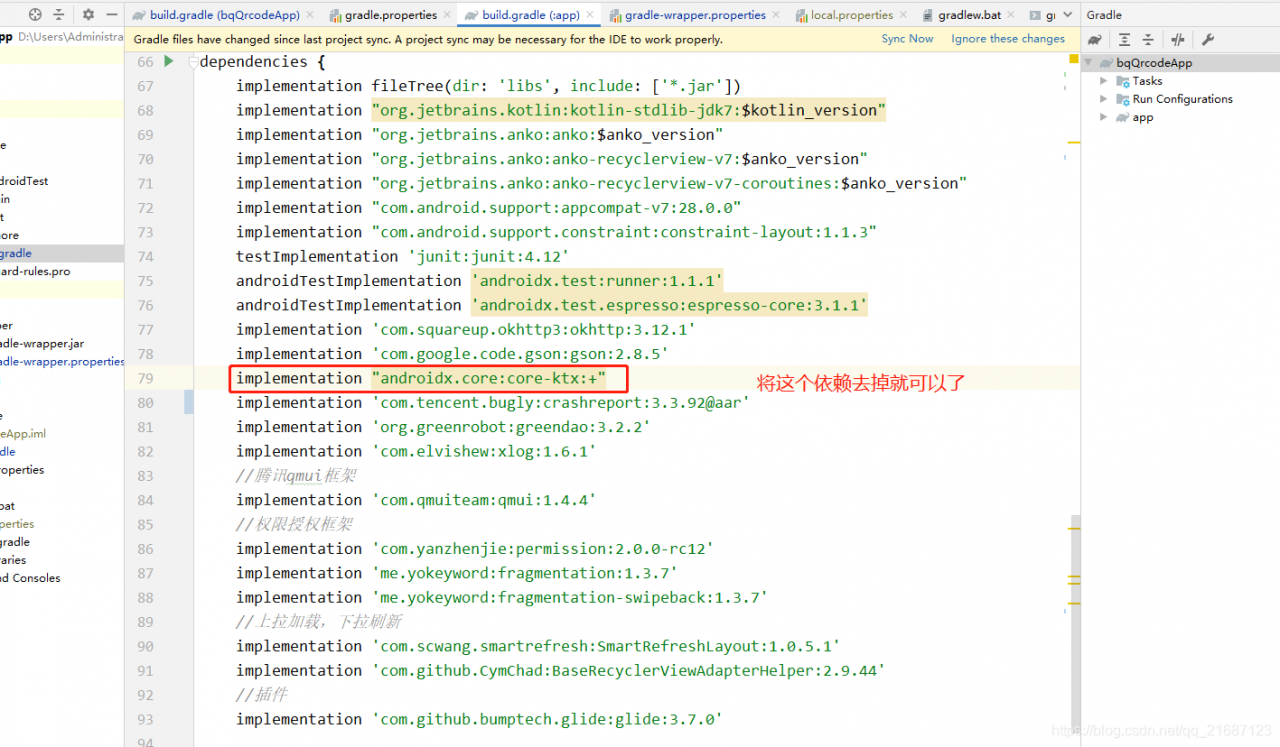
add this dependency; Implementation “androidx. Core: core KTX: +”
remove it and you can compile it;
Feeling is conflict; Moreover, this feeling at the beginning of Android x is prone to conflict sometimes. After all, the dependence on the new package name feels unstable. If there is a problem in the future, just lean in this direction;
The boss who knows the problem can also give advice;
Environment:
kotlin version is 1.3.11
JDK is 1.8
gradle is 4.6
Android studio is 4.1.3
If the previous line of error is warning (292000): FLEXlm software error: Invalid (inconsistent) license key. The license key and data for the feature… The computer may be 64 bits, and then the cracking program is installed into 32 bits. As long as the broken version in the original license.dat and bin is deleted (preferably permanently deleted) and replaced with 64 bits, the compilation can succeed.
v1.0.0
Environment introduction
1、 The virtual machine on this machine. There is jupyter in the virtual machine
2、 Jupyter notebook web server is an online editor
3、 A proxy server on this machine, such as nginx
Configuration steps
1、 Virtual machine
Start the virtual machine
2、 Jupyter
Set the root directory of the file
sudo GEDIT (VIM) ~ /. Jupyter/jupyter_ notebook_ config.py
c.NotebookApp.notebook_dir = '/path/to/jupyter'
sudo gedit(vim)~/.jupyter/jupyter notebook config.py
c.NotebookApp.allow_origin = '*' # allow cors
3、 Nginx
Start nginx configuration nginx.conf excerpt
# Actual tcp/websocket server address
    upstream jupyter_url {
        server virtual machine ip:8888;
    }

    server {
        listen       8000;
        server_name  localhost;

        charset utf-8;

      location/{
          proxy_pass http://jupyter_url;
          proxy_http_version 1.1;
          proxy_set_header Upgrade $http_upgrade;
          proxy_set_header Connection "upgrade";
      }
	}
Test effect
Visit: nginxip: 8000