Add this code sudo/etc/hosts below
52.74.223.119 github.com
192.30.253.119 gist.github.com
54.169.195.247 api.github.com
185.199.111.153 assets-cdn.github.com
151.101.76.133 raw.githubusercontent.com
151.101.108.133 user-images.githubusercontent.com
151.101.76.133 gist.githubusercontent.com
151.101.76.133 cloud.githubusercontent.com
151.101.76.133 camo.githubusercontent.com
151.101.76.133 avatars0.githubusercontent.com
151.101.76.133 avatars1.githubusercontent.com
151.101.76.133 avatars2.githubusercontent.com
151.101.76.133 avatars3.githubusercontent.com
151.101.76.133 avatars4.githubusercontent.com
151.101.76.133 avatars5.githubusercontent.com
151.101.76.133 avatars6.githubusercontent.com
151.101.76.133 avatars7.githubusercontent.com
151.101.76.133 avatars8.githubusercontent.com
Category Archives: How to Fix
Error failed to build IOS project. We ran “xcodebuild” command but it exited wit
did not change the profile file before NPM run ios is no error. After changing the profile to introduce react and using pod install, the error report is as follows:
error Failed to build iOS project. We ran “xcodebuild” command but it exited with error code 65. To debug build logs further, consider building your app with Xcode.app
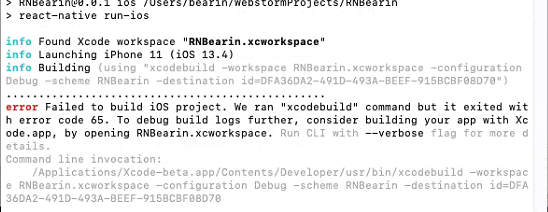
solution
1. Delete the item dependent package and the yarn cache
rm -rf node_modules & & yarn cache clean
2. Repackage
yarn install
3. Clear React-Native cache
rm -rf ~/.rncache
New folder .rncache
mkdir ~/.rncache
5. Directly run the download script
node_modules/react-native/scripts/ios-install-third-party.sh
6. If the download is completed, run react-native run-ios directly to succeed
7. If the download fails, run the code in 4 repeatedly for more than 20 times before I succeed, or do the following steps
8. The four download links are key, use the tool to download these four files. download link is closely related to React-Native version, please check the file version carefully.
(1) https://github.com/google/glog/archive/v0.3.5.tar.gz
(2) https://github.com/google/double-conversion/archive/v1.1.6.tar.gz
(3) https://github.com/react-native-community/boost-for-react-native/releases/download/v1.63.0-0/boost_1_63_0.tar.gz
(4) https://github.com/facebook/folly/archive/v2018.10.22.00.tar.gz
page open the link to download
9. After downloading, enter directory
open ~ /. Rncache
10. Move the four downloaded files to the directory
11. Run the installation script again, because you are using the local download file, all run quickly
node_modules/react-native/scripts/ios-install-third-party.sh
12. If not successful, continue running node_modules/react-native/scripts/ ix-install – thirdparty. sh until successful
13. The project can run, the first start will be a little slow, patience will wait on the line
react-native run-ios
npm install optipng-bin Failed at the [email protected] postinstall script
as shown in the question, error when installing optipng-bin dependency in the project, screenshot as shown below:
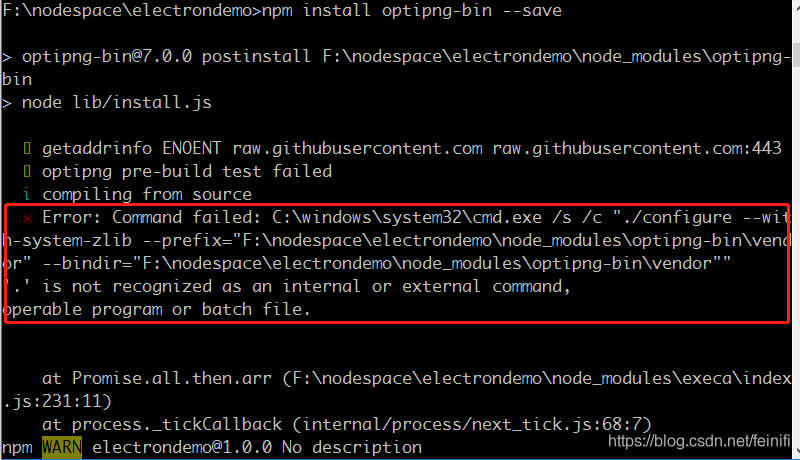
from the error message, it seems to be similar to the Linux system source installation, I thought this problem could not be solved, until I found a way to add a parameter to the installation, –ignore-scripts is ok, as shown below:
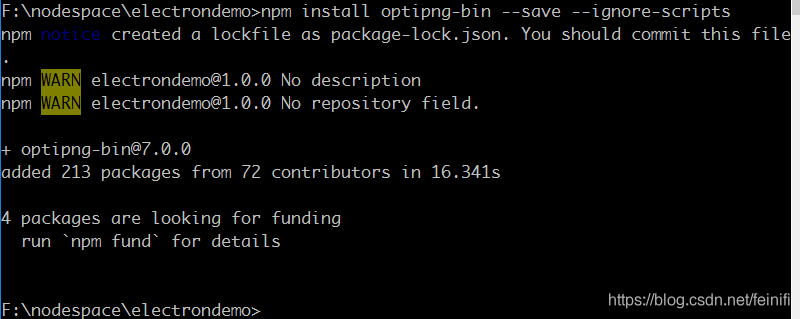
is a little hard to believe, but it’s true, it seems to bypass source compilation. A bit of a surprise, a bit of a surprise. I hope it will be helpful to those who encounter this problem.
npm install Error: gyp verb `which` failed Error: not found: python
a new project was launched today and an error was reported when NPM install install the dependency.
$ npm install

> [email protected] install D:\programs\rubik-web\node_modules\husky
> node ./bin/install.js

husky
setting up Git hooks
done


> [email protected] install D:\programs\rubik-web\node_modules\node-sass
> node scripts/install.js

Downloading binary from https://github.com/sass/node-sass/releases/download/v4.14.1/win32-x64-83_binding.node
Cannot download "https://github.com/sass/node-sass/releases/download/v4.14.1/win32-x64-83_binding.node":

read ECONNRESET

Hint: If github.com is not accessible in your location
      try setting a proxy via HTTP_PROXY, e.g.

      export HTTP_PROXY=http://example.com:1234

or configure npm proxy via

      npm config set proxy http://example.com:8080

> [email protected] postinstall D:\programs\rubik-web\node_modules\core-js
> node -e "try{require('./postinstall')}catch(e){}"

Thank you for using core-js ( https://github.com/zloirock/core-js ) for polyfilling JavaScript standard library!

The project needs your help! Please consider supporting of core-js on Open Collective or Patreon:
> https://opencollective.com/core-js
> https://www.patreon.com/zloirock

Also, the author of core-js ( https://github.com/zloirock ) is looking for a good job -)


> [email protected] postinstall D:\programs\rubik-web\node_modules\ejs
> node ./postinstall.js

Thank you for installing EJS: built with the Jake JavaScript build tool (https://jakejs.com/)


> [email protected] postinstall D:\programs\rubik-web\node_modules\node-sass
> node scripts/build.js

Building: C:\Program Files\nodejs\node.exe D:\programs\rubik-web\node_modules\node-gyp\bin\node-gyp.js rebuild --verbose --libsass_ext= --libsass_cflags= --libsass_ldflags= --libsass_library=
gyp info it worked if it ends with ok
gyp verb cli [
gyp verb cli   'C:\\Program Files\\nodejs\\node.exe',
gyp verb cli   'D:\\programs\\rubik-web\\node_modules\\node-gyp\\bin\\node-gyp.js',
gyp verb cli   'rebuild',
gyp verb cli   '--verbose',
gyp verb cli   '--libsass_ext=',
gyp verb cli   '--libsass_cflags=',
gyp verb cli   '--libsass_ldflags=',
gyp verb cli   '--libsass_library='
gyp verb cli ]
gyp info using [email protected]
gyp info using [email protected] | win32 | x64
gyp verb command rebuild []
gyp verb command clean []
gyp verb clean removing "build" directory
gyp verb command configure []
gyp verb check python checking for Python executable "python2" in the PATH
gyp verb `which` failed Error: not found: python2
gyp verb `which` failed     at getNotFoundError (D:\programs\rubik-web\node_modules\which\which.js:13:12)
gyp verb `which` failed     at F (D:\programs\rubik-web\node_modules\which\which.js:68:19)
gyp verb `which` failed     at E (D:\programs\rubik-web\node_modules\which\which.js:80:29)
gyp verb `which` failed     at D:\programs\rubik-web\node_modules\which\which.js:89:16
gyp verb `which` failed     at D:\programs\rubik-web\node_modules\isexe\index.js:42:5
gyp verb `which` failed     at D:\programs\rubik-web\node_modules\isexe\windows.js:36:5
gyp verb `which` failed     at FSReqCallback.oncomplete (fs.js:176:21)
gyp verb `which` failed  python2 Error: not found: python2
gyp verb `which` failed     at getNotFoundError (D:\programs\rubik-web\node_modules\which\which.js:13:12)
gyp verb `which` failed     at F (D:\programs\rubik-web\node_modules\which\which.js:68:19)
gyp verb `which` failed     at E (D:\programs\rubik-web\node_modules\which\which.js:80:29)
gyp verb `which` failed     at D:\programs\rubik-web\node_modules\which\which.js:89:16
gyp verb `which` failed     at D:\programs\rubik-web\node_modules\isexe\index.js:42:5
gyp verb `which` failed     at D:\programs\rubik-web\node_modules\isexe\windows.js:36:5
gyp verb `which` failed     at FSReqCallback.oncomplete (fs.js:176:21) {
gyp verb `which` failed   code: 'ENOENT'
gyp verb `which` failed }
gyp verb check python checking for Python executable "python" in the PATH
gyp verb `which` failed Error: not found: python
gyp verb `which` failed     at getNotFoundError (D:\programs\rubik-web\node_modules\which\which.js:13:12)
gyp verb `which` failed     at F (D:\programs\rubik-web\node_modules\which\which.js:68:19)
gyp verb `which` failed     at E (D:\programs\rubik-web\node_modules\which\which.js:80:29)
gyp verb `which` failed     at D:\programs\rubik-web\node_modules\which\which.js:89:16
gyp verb `which` failed     at D:\programs\rubik-web\node_modules\isexe\index.js:42:5
gyp verb `which` failed     at D:\programs\rubik-web\node_modules\isexe\windows.js:36:5
gyp verb `which` failed     at FSReqCallback.oncomplete (fs.js:176:21)
gyp verb `which` failed  python Error: not found: python
gyp verb `which` failed     at getNotFoundError (D:\programs\rubik-web\node_modules\which\which.js:13:12)
gyp verb `which` failed     at F (D:\programs\rubik-web\node_modules\which\which.js:68:19)
gyp verb `which` failed     at E (D:\programs\rubik-web\node_modules\which\which.js:80:29)
gyp verb `which` failed     at D:\programs\rubik-web\node_modules\which\which.js:89:16
gyp verb `which` failed     at D:\programs\rubik-web\node_modules\isexe\index.js:42:5
gyp verb `which` failed     at D:\programs\rubik-web\node_modules\isexe\windows.js:36:5
gyp verb `which` failed     at FSReqCallback.oncomplete (fs.js:176:21) {
gyp verb `which` failed   code: 'ENOENT'
gyp verb `which` failed }
gyp verb could not find "python". checking python launcher
gyp verb could not find "python". guessing location
gyp verb ensuring that file exists: C:\Python27\python.exe
gyp ERR! configure error
gyp ERR! stack Error: Can't find Python executable "python", you can set the PYTHON env variable.
gyp ERR! stack     at PythonFinder.failNoPython (D:\programs\rubik-web\node_modules\node-gyp\lib\configure.js:484:19)
gyp ERR! stack     at PythonFinder.<anonymous> (D:\programs\rubik-web\node_modules\node-gyp\lib\configure.js:509:16)
gyp ERR! stack     at callback (D:\programs\rubik-web\node_modules\graceful-fs\polyfills.js:295:20)
gyp ERR! stack     at FSReqCallback.oncomplete (fs.js:176:21)
gyp ERR! System Windows_NT 10.0.18363
gyp ERR! command "C:\\Program Files\\nodejs\\node.exe" "D:\\programs\\rubik-web\\node_modules\\node-gyp\\bin\\node-gyp.js" "rebuild" "--verbose" "--libsass_ext=" "--libsass_cflags=" "--libsass_ldflags=" "--libsass_library="
gyp ERR! cwd D:\programs\rubik-web\node_modules\node-sass
gyp ERR! node -v v14.5.0
gyp ERR! node-gyp -v v3.8.0
gyp ERR! not ok
Build failed with error code: 1
npm WARN optional SKIPPING OPTIONAL DEPENDENCY: [email protected] (node_modules\fsevents):
npm WARN notsup SKIPPING OPTIONAL DEPENDENCY: Unsupported platform for [email protected]: wanted {"os":"darwin","arch":"any"} (current: {"os":"win32","arch":"x64"})

npm ERR! code ELIFECYCLE
npm ERR! errno 1
npm ERR! [email protected] postinstall: `node scripts/build.js`
npm ERR! Exit status 1
npm ERR!
npm ERR! Failed at the [email protected] postinstall script.
npm ERR! This is probably not a problem with npm. There is likely additional logging output above.

npm ERR! A complete log of this run can be found in:
npm ERR!     C:\Users\wangdan11\AppData\Roaming\npm-cache\_logs\2020-07-21T06_55_31_581Z-debug.log
It has a problem, looking online, you stepped in the hole, the predecessors should have stepped in.
The final solution is:
npm install -g mirror-config-china --registry=http://registry.npm.taobao.org
npm install node-sass
npm install
OK, we’re done.
curl: (7) Failed to connect to raw.githubusercontent.com port 443: Connection refused
problem description: implement the sh -c "$(curl - fsSL https://raw.githubusercontent.com/ohmyzsh/ohmyzsh/master/tools/install.sh)" download ohmyzsh times wrong: curl: port 443 (7) Failed to connect to raw.githubusercontent.com: Connection refused
join process
Hinata% sh -c "$(curl -fsSL https://raw.githubusercontent.com/ohmyzsh/ohmyzsh/master/tools/install.sh)"
curl: (7) Failed to connect to raw.githubusercontent.com port 443: Connection refused
reason: this is not the connection timeout, nor the certificate problem, this is not to let the connection, indicating that
is qiang
solution: fan goes out and reexecutes the command
and how to get out, I'm using the (s)(s)+polipo, (s)(s) (s) tutorial and you can search again, polipo USES which I've written before, you can look at this Linux socks5 over HTTP
Solution to GitHub desktop login error: failed to fetch
Today is my first day to use github Desktop. When I try to log in with my account, an error occurs: Failed to fetch. This is so depressing. While I was searching that problem on Baidu, I found some other developers also met that problem, but I found no answer.
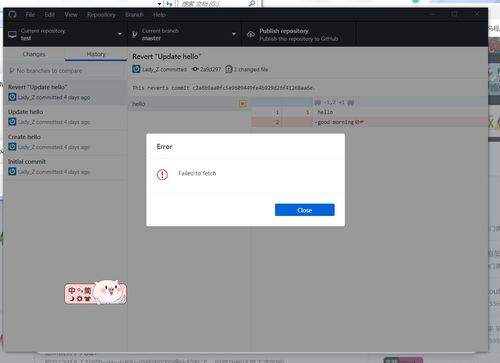
Then I searched that problem on Bing with English, I found a similar github issue. Some warm-hearted developer suggested that firewall or DNS problems can result in that kind of error. Then I found this is a network error. It is difficult visit Making in China. So, I runned a vpn, then the problem is solved. So, Check you firewall and network.
today was my first day on the github desktop. An error occurred when I tried to log in using my account: could not get. It’s frustrating. When I searched for this question on Baidu, I found that some other developers had also encountered this question, but I couldn’t find the answer.
then I searched the problem in English on Bing and found a similar github problem. Some avid developers have suggested that a firewall or DNS problem could cause this error. Then I realized it was a network mistake. It’s hard to visit Github in China. So, I ran a VPN and the problem was fixed. So check your firewall and network.
Problem solving: failed to connect to github.com port 443: Operation timed out(2020.06.04)
1. Problem description
time: Thursday, June 4, 2020 15:19:26
today, when I was using
git push original mastercommand, the following error occurred suddenly:
why wouldFailed to connect to github.com port 443: Operation timed out, previously I could push to the far end of GitHub

2. Solution
toss around for a long time, found a solution
enter the command sudo vim /etc/hosts on the terminal (you must use sudo, as the administrator, or you cannot modify the hosts file)
, comment out the lines related to Github, save the hosts file, and then you can push to the remote Github

0
1 2
Saturday, June 13, 2020 18:14:30 update
if you comment out all GitHub related content, you may have a problem accessing GitHub images will not load, the solution please move to here
Failed: error connecting to db server: server returned error on SASL authentication step: Authentica
mongdb database can not be backed up after adding user name and password, it has been suggested that the verification failed. Finally found that their database password with a special character reason.
Failed: error connecting to db server: server returned error on SASL authentication step: Authentication failed.
The solution given on
network is to add — authenticationDatabase, but I still can’t add it.
~ $ mongodump -h 127.0.0.1 --port 27017 --authenticationDatabase manager -u LorettaLei -p LorettaLei$001 -o db

2019-11-26T16:30:21.206+0800    Failed: error connecting to db server: server returned error on SASL authentication step: Authentication failed.
finally figured out that it might be because I had a special character in my password. I put a backslash before the special character, and it succeeded immediately. I was so clever!
Solve the error in Ubuntu 18.04: called “net usershare info” but it failed: failed to execute child process “net”
1. Problem description
Ubuntu 18.04 suddenly encountered the following error while using:
Called "net usershare info" but it failed: Failed to execute child process “net” (No such file or directory)
The
error comes from Ubuntu nautilus, and the trigger is when nautilus is closed, as shown below:

2. Solution
s1.install samba-common-bin by running the following command from the terminal:
sudo apt install samba-common-bin
if you finish executing S1 and close nautilus with the following error, proceed with S2.

S2. Execute the following command:
sudo mkdir /var/lib/samba/usershares
you can now find that closing nautilus will no longer report an error, and the problem is resolved.
reference:
https://askubuntu.com/questions/1024593/failed-to-execute-child-process-net-when-entering-nautilus
How to solve problems like curl: (7) failed to connect to raw.githubusercontent.com Port 443: problem with connection used
Background of
the following error was reported when installing my-zsh
sh -c "$(curl -fsSL https://raw.github.com/ohmyzsh/ohmyzsh/master/tools/install.sh)"
curl: (7) Failed to connect to raw.githubusercontent.com port 443: Connection refused
I recently noticed that github users’ profile pictures and images from my posts no longer show up. Then today I found an error message for the title when homeBrew and NVM were installed.

these are installed PNPM error message, can be found that the script needs to pull the code on raw.githubusercontent.com.
Internet search, found that some github domain name DNS resolution is contaminated, causing DNS resolution process can not get the correct IP address through the domain name.
DNS pollution
DNS pollution, interested friends can go to understand.
solution
open https://www.ipaddress.com/ input can’t access the domain name
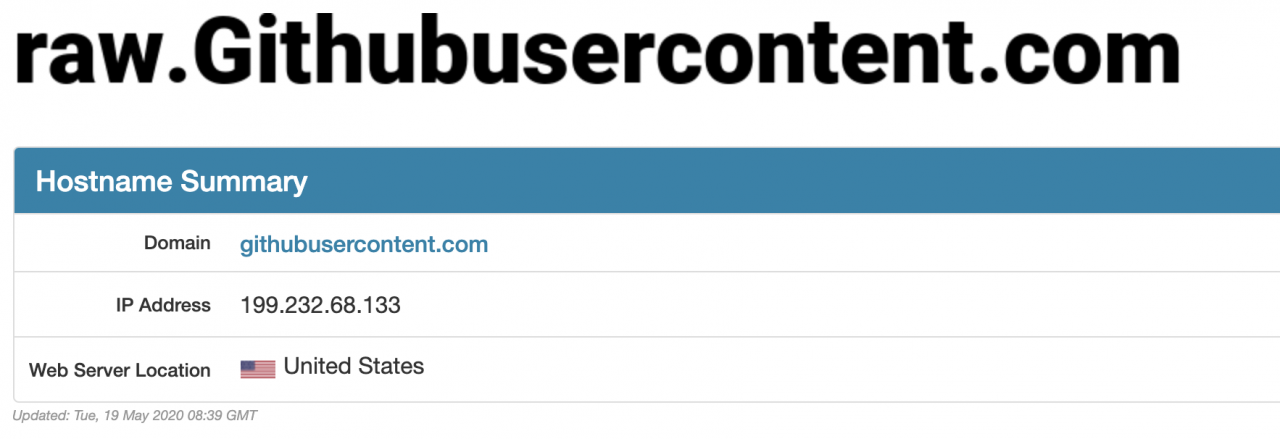
query can get the correct IP address
is added in the host file of the machine. It is recommended to use switchhosts to facilitate host management of
199.232.68.133 raw.githubusercontent.com 199.232.68.133 user-images.githubusercontent.com
199.232.68.133 avatars2.githubusercontent.com
199.232.68.133 avatars1.githubusercontent.com
add the above several host configuration, the page picture display will be normal, homebrew can also be installed, NVM action is flexible.
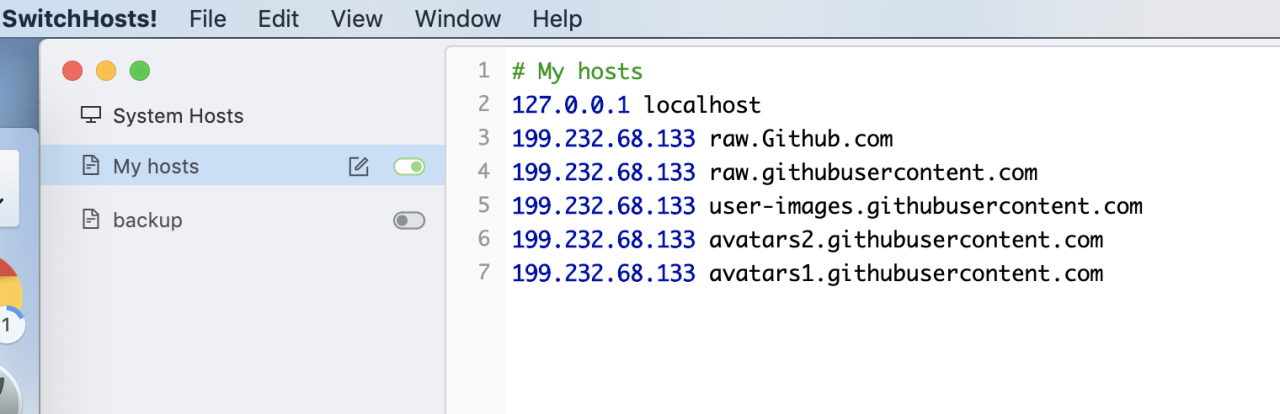
Reference
https://github.com/hawtim/blog/issues/10
Simple Python crawler exercise: News crawling on sohu.com
python crawler: sohu news crawler
python crawler exercise: sohu news crawl
helped a friend write a course design to get the title, time, and body content of the news page.
write very simple, not very complicated knowledge, should be easy to understand.
is the first step to import the libraries we need, including requests for third-party libraries. Remember to install
with PIP
    import requests
    import re
    import os
first get all the HTML code you need from the sohu home page
# 获得搜狐页面的内容
def get_all_url(url):
    try:
        # 获取总的html内容
        html = getHTMLText(url)
        return html
    except:
        print("failed connect")


# 获得html内容,套路内容
def getHTMLText(url):
    try:
        # requests爬虫的正常操作,访问获得返回
        r = requests.get(url)
        # 判断是否成功?
        r.raise_for_status()
        # 改变编码方式,转为UTF-8
        r.encoding = r.apparent_encoding
        # 返回html正文内容
        return r.text
    except:
        return ''
and then we need to parse out all the hyperlinks in the HTML, so we need to call the re library here.
if you don’t know regular expressions, learn them yourself, and I won’t go into that.
note that all url links are obtained here without analyzing whether the url is a news url. And, of course, there’s the judgment
# 分析内容,获得我需要的链接们
def parsePage(html):
    plt = []
    try:
        # findall函数的意思:(pattern, string),将所有匹配项组成一个列表,并返回该列表
        # 匹配符合url链接格式的所有内容
        plt = re.findall('http://www\.sohu\.com(?:[a-zA-Z]|[0-9]|[$-_@.&+]|[!*\(\),]|(?:%[0-9a-fA-F][0-9a-fA-F]))+', html)

    except:
        print("介个地方出错了")
    print(plt)
    return plt
here also USES re library to analyze the news title, sending time and news body content. Note that different websites have different HTML idioms. When writing a crawler, it must take some time to analyze the page. Press F12 to view all the HTML code.
since I’m not sure if pictures and the like count as text, I just put in a big chunk of text.
# 正则分析获得时间与标题,嘻嘻
def title_and_time(html):
    tat = []
    try:
        # findall函数的意思:(pattern, string),将所有匹配项组成一个列表,并返回该列表
        # 获得时间,若无法匹配就返回空列表
        time = re.findall('dateUpdate" content="(.*)" />', html)
        # 获得标题,若无法匹配就返回空列表
        title = re.findall("title>(.*)</title", html)
        # 文章正文内容,若无法匹配就返回空列表
        article = re.findall('<article class="article" id="mp-editor">([\s\S]*)</article>', html)
        # 三者组成一个列表,传回去嘻嘻
        # 若其中有的为空列表,则不占用位置
        # 因此如果是正规的新闻页面,tat的长度len应该是3
        tat = title + time + article
    except:
        print("捏个地方出错了")
    return tat
and that’s all we need, so I’m going to put all the code out here for your reference.
# code="utf-8"
# 人生苦短,我用python
# 转行不易,请多鼓励


import requests
import re
import os


# 刚过完61儿童节的二十多岁的小朋友们上车啦,here we go


# 获得搜狐页面的内容
def get_all_url(url):
    try:
        # 获取总的html内容
        html = getHTMLText(url)
        return html
    except:
        print("failed connect")


# 获得html内容,套路内容
def getHTMLText(url):
    try:
        # requests爬虫的正常操作,访问获得返回
        r = requests.get(url)
        # 判断是否成功?
        r.raise_for_status()
        # 改变编码方式,转为UTF-8
        r.encoding = r.apparent_encoding
        # 返回html正文内容
        return r.text
    except:
        return ''

# 分析内容,获得我需要的链接们
def parsePage(html):
    plt = []
    try:
        # findall函数的意思:(pattern, string),将所有匹配项组成一个列表,并返回该列表
        # 匹配符合url链接格式的所有内容
        plt = re.findall('http://www\.sohu\.com(?:[a-zA-Z]|[0-9]|[$-_@.&+]|[!*\(\),]|(?:%[0-9a-fA-F][0-9a-fA-F]))+', html)

    except:
        print("介个地方出错了")
    print(plt)
    return plt


# 正则分析获得时间与标题,嘻嘻
def title_and_time(html):
    tat = []
    try:
        # findall函数的意思:(pattern, string),将所有匹配项组成一个列表,并返回该列表
        # 获得时间,若无法匹配就返回空列表
        time = re.findall('dateUpdate" content="(.*)" />', html)
        # 获得标题,若无法匹配就返回空列表
        title = re.findall("title>(.*)</title", html)
        # 文章正文内容,若无法匹配就返回空列表
        article = re.findall('<article class="article" id="mp-editor">([\s\S]*)</article>', html)
        # 三者组成一个列表,传回去嘻嘻
        # 若其中有的为空列表,则不占用位置
        # 因此如果是正规的新闻页面,tat的长度len应该是3
        tat = title + time + article
    except:
        print("捏个地方出错了")
    return tat


# 以下是正式开始操作主函数

def main():
    # 开始访问搜狐网,并获得对应html代码
    html = get_all_url("http://www.sohu.com/")
    # 正则表达式分析取出新闻url链接
    sp_url = parsePage(html)
    # 设置一个列表,用于存储新闻标题以及时间
    answer = []

    # 判断保存的路径存在不 不存在就创建一个呗嘻嘻嘻嘻
    path = "新闻//"
    # 如果路径存在则返回True,否则返回false
    isExists = os.path.exists(path)

    # 判断结果
    if not isExists:
        # 如果不存在则创建目录
        # 创建目录操作函数
        os.makedirs(path)

        print(path + ' 创建成功')
    else:
        # 如果目录存在则不创建,并提示目录已存在
        print(path + ' 目录已存在')

    # 遍历每一个新闻url链接
    for url in sp_url:
        # 获得每个新闻页面的html代码
        html_sp = get_all_url(url)
        # 获得每个页面的标题以及时间
        title_time = title_and_time(html_sp)

        # 设置一个临时变量
        tt=0
        # 如果是正常新闻的话,则len==3,即可对tt重新赋值
        if(len(title_time) == 3):
            tt = title_time[0] + "\n" + title_time[1] + "\n" + title_time[2] + "\n"

        # 判断一下是正常新闻,即可写入answer
        if tt != 0:
            print(tt)  # 程序运行期间随便输出点东西,不然就很无聊
            answer.append(tt)   # 将这个新闻作为一个字符串element添加到answer最后


            # 写入文件
            try:
                # 每个新闻的题目自动生成一个txt文件
                with open("新闻//" + title_time[0] + ".txt", "w+") as f:
                    # 参数为列表,writelines可以将每一个元素写入txt
                    f.writelines(answer)
                    # 关闭文件,其实不写也一样的
                    f.close()
            except:
                pass


# 主程序运行
if __name__ == '__main__':
    main()


# 输出一句话,告诉我结束了
print("搜狐网新闻爬取已完成")

# 完工
because there is no Javascript dynamic generation content, so the whole code is very simple, and when I have a chance later, I will climb a js dynamic generation to show you.
QT — get hard disk margin
header file:
#include < windows.h>
implementation:
quint64 ImageSave::getDiskFreeSpace(QString _driver)
{
	LPCWSTR lpcwstrDriver = (LPCWSTR)_driver.utf16();
	ULARGE_INTEGER liFreeBytesAvailable, liTotalBytes, liTotalFreeBytes;
	if (!GetDiskFreeSpaceEx(lpcwstrDriver, &liFreeBytesAvailable, &liTotalBytes, &liTotalFreeBytes))
	{
		qDebug() << "ERROR: Call to GetDiskFreeSpaceEx() failed.";
		return 0;
	}
	return (quint64)liTotalFreeBytes.QuadPart/1024/1024/1024;//返回单位G
}