Category Archives: How to Fix

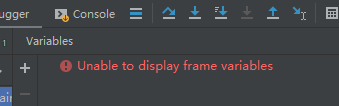
pycharm: Unable to display frame vriables

works fine when you use pycharm to connect to programs on a Linux server. But can not be debugged, debugging time is special card, and variable window variables can not load out

tried to expand the memory of pycharm, but failed.

pycharm website for the solution of the method can effectively solve the: https://blog.jetbrains.com/pycharm/2012/08/gevent-debug-support/

is recorded here:

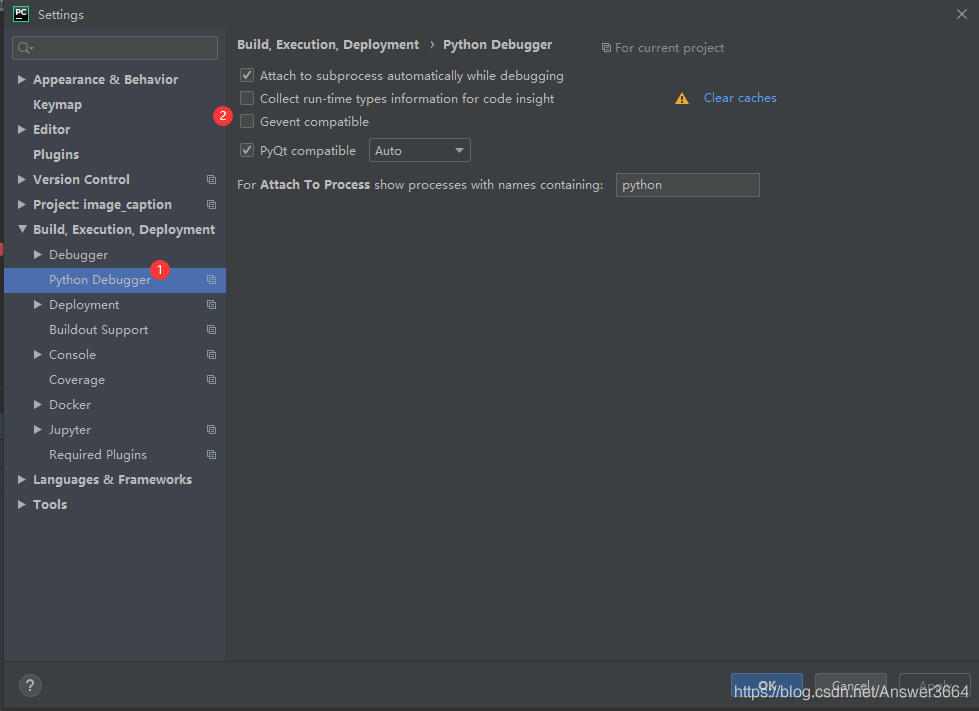
file-> setting-> python debugger

and then check the box in front of the Gevent compatible.

Vue element UI uses this. $notify is not a function problem resolution using the notification box

first we use the Element UI that encapsulates Notifacation for us so there is no need to install Notifacation in your project;

so there is no need to introduce the installed notifacation

in main

some web sites say that installing “Notifications” directly and importing Notifications from “Notifications” in main.js is wrong.

if you want to use notifaction why do you need to import additional components to install other components in this place if you bring in additional notifaction please customize the notifaction do not use element Ui;

if you want to use element Ui, simply make the following configuration in element. Js to solve the problem:

step1: import {Notifacation} from ‘element-ui’

step2: do not write vue. use(Notifacation) when using; instead, write

Vue.prototype.$notify = Notification

> this.$notify is not a function;

> this.$notify is not a function.

if a prompt for toast pops up as soon as you enter a page or refresh the top of a page in the project, remove vue. use (Message) from element.js, but Import is still needed;

Mac install yarn 2020-10-18

brew install yarn 

if the save Failed to connect to port 443 raw.githubusercontent.com: Connection refused, because no Homebrew

normally installs Homebrew

/bin/bash -c "$(curl -fsSL https://raw.githubusercontent.com/Homebrew/install/master/install.sh)"

but due to some of the you understand factors, lead to a lot of raw.githubusercontent.com DNS has been polluted.

solution

is solved directly using this open source script with one click:

https://gitee.com/cunkai/HomebrewCN

Homebrew domestic automatic installation script

/bin/zsh -c "$(curl -fsSL https://gitee.com/cunkai/HomebrewCN/raw/master/Homebrew.sh)"

is then loaded with yarn

brew install yarn

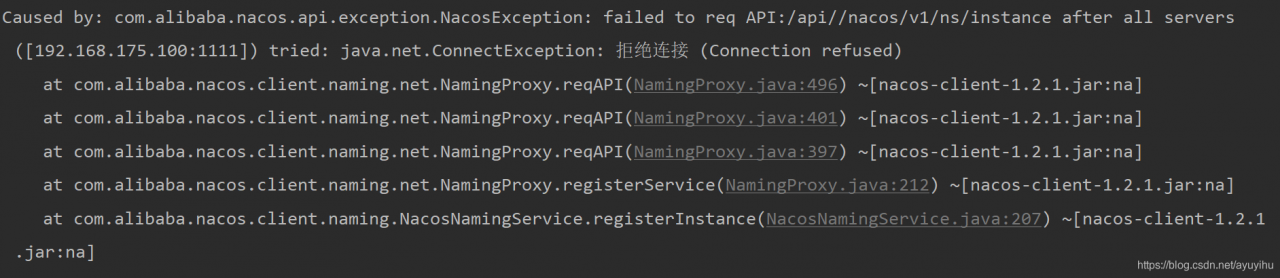
NACOS error com.alibaba.nacos.api.exception.NacosException: failed to req API:/api//nacos/v1/ns/instance

service registry to nacos error: com. Alibaba. Nacos. API. Exception. NacosException: failed to the req API:/API// nacos/v1/ns/instance after all the servers ([192.168.175.100:1111]) tried: java.net.ConnectException: Refuse a Connection (Connection union)

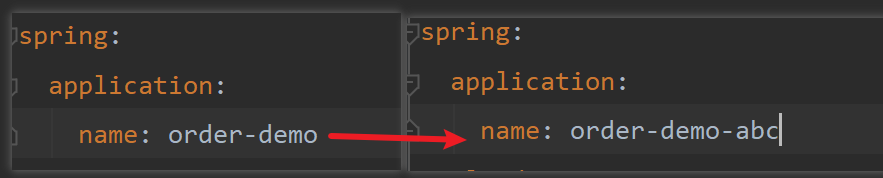
after looking for a long time without finding the reason, it turns out that as long as you modify spring.application.name, it can be restored to normal:

so that it can start normally, which is very strange.

sometimes stops the service, restarts it and can’t be registered, and then changes the service name again.

Python2 PicklingError: Can‘t pickle <type ‘instancemethod‘>: attribute lookup __builtin__.instanceme

PicklingError: Can ‘t pickling & lt; The type ‘instancemethod & gt; : attribute lookup builtin.instancemethod failed

The Python2
** library: **multiprocessing. Pool
problem description: use the method of the class to pool. Apply_async for parameter passing error
solution: cannot use the method of the class directly copy, call the method of the class through the intermediate function, and then use the intermediate function for apply_async for parameter passing.
complete code:

#coding=utf-8
import time
from multiprocessing import Pool

class Attack:
    def __init__(self):
        pass
    
    def run(self, data):
        print '[+] ' + data + "attack exploit."
        time.sleep(3)
        return {'data': data}

# + ---------------------------------下面是一起的--------------------------------------
attacker = Attack()
def conumers_wrapper(data):
    return attacker.run(data)

class Test:
    def __init__(self):
        pass

    def _save_result(self, data):
        try:
            print '[-] _save_result -> ', data
        except Exception as e:
            print e

    def main(self):
        name = 'aquaman'
        pool = Pool(processes=20)
        for _ in range(10): 
            #            func[, args=()[, kwds={}[, callback=None]]]
            pool.apply_async(conumers_wrapper, (name,), callback=self._save_result)

        pool.close()
        pool.join()

        print "[*] finished."

if __name__ == '__main__':
    Test().main()

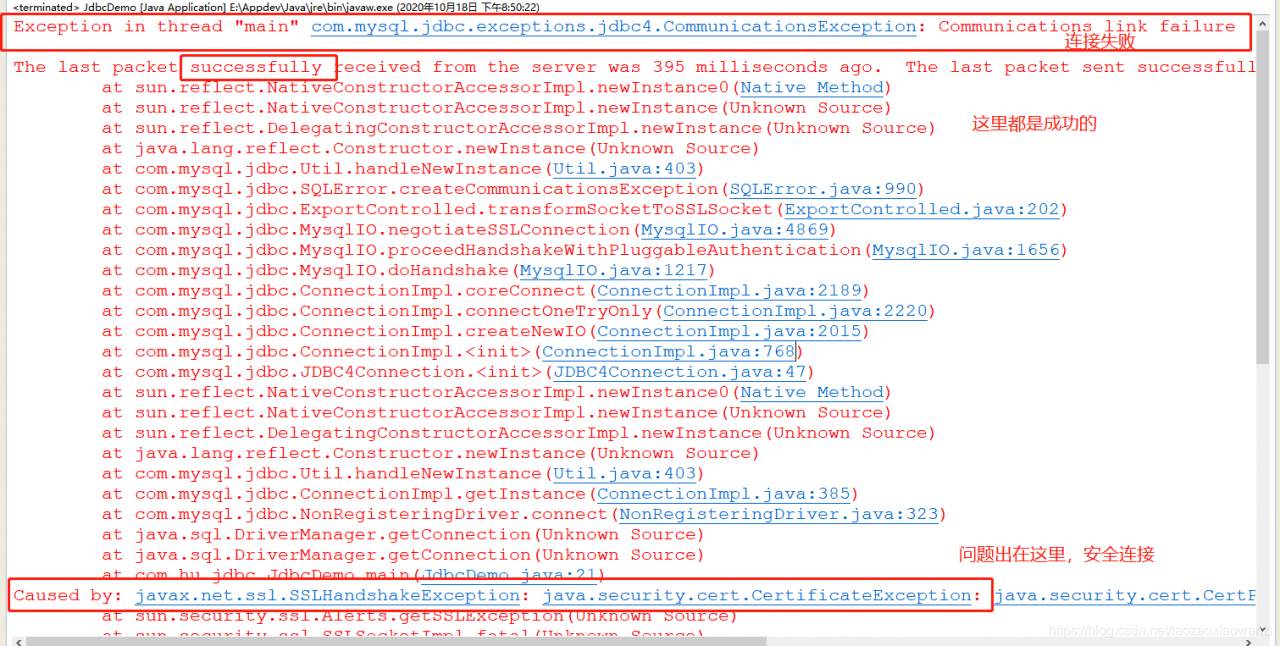
How to Fix Exception in thread “main“ com.mysql.jdbc.exceptions.jdbc4.CommunicationsException: Communications

this problem is in the database connection failure, looked up from the Internet, the solution is varied, there are configuration files, and change the code. But everyone makes the same mistake for different reasons.

will be stupid, suddenly realized that the database can not connect, either url, or a user name or password. Turning back, the real cause was found…

error code:

String url="jdbc:mysql://localhost:3306/jdbcstudy?useUnicode=true&characterEncoding=utf8&useSSL=true";
String username="root";
String password="123456";

remove (with warning) or change to false after url:

String url="jdbc:mysql://localhost:3306/jdbcstudy?useUnicode=true&characterEncoding=utf8&useSSL=false";
String username="root";
String password="123456";

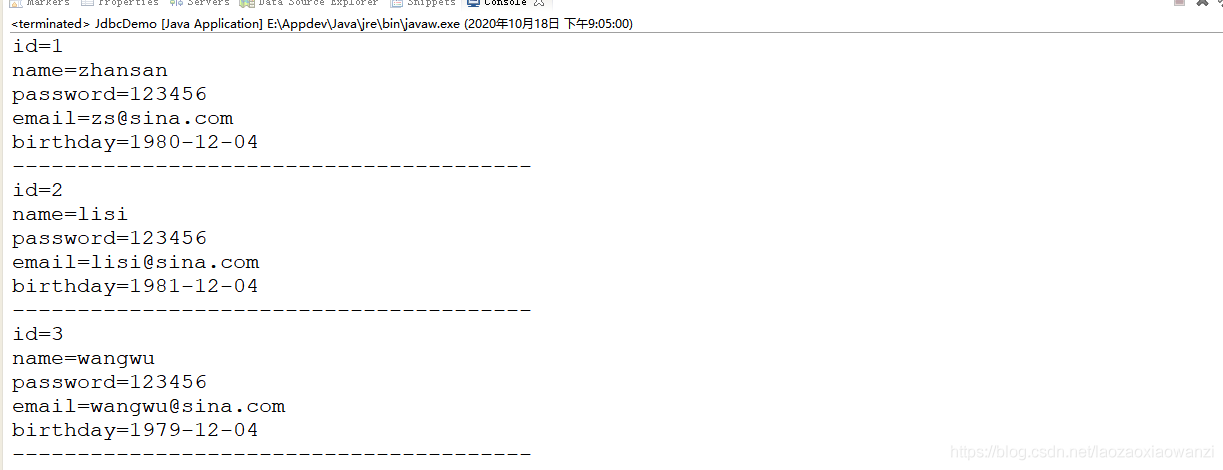
is not an error, you can query out.

Login authority verification

permission system to ensure effective login to do the background permission check

write login interface when logging in successfully pass an encrypted AccessToken in session containing login information and expiration time

  • write a AccessToken class to pack the information
import lombok.Data;
import lombok.NoArgsConstructor;
@Data
@NoArgsConstructor
public class AccessToken {
	//登录信息仅用name代替
    private String name;
	//过期时间
    private long expire;

    public AccessToken(String name){
        this.name = name;
        this.expire = System.currentTimeMillis() + 1000L * 60 * 2;
    }
}

encryption and decryption tool class

import org.jasypt.encryption.pbe.StandardPBEStringEncryptor;

public class EncryptorUtil {
    private static StandardPBEStringEncryptor encryptor;
    static {
        encryptor = new StandardPBEStringEncryptor();
        encryptor.setPassword("et2004");
    }
    public static  String encrypt(String text){
        return encryptor.encrypt(text);
    }
    public static String decrypt(String ciphertext){
        return encryptor.decrypt(ciphertext);
    }
}

uniform response return format

import lombok.AllArgsConstructor;
import lombok.Data;
import lombok.NoArgsConstructor;

@Data
@NoArgsConstructor
@AllArgsConstructor
public class ResultVo<T> {
    private int code;
    private String msg;
    private T data;

    private static final int SUCCESS_CODE=200;
    private static final int ERROR_CODE=201;
    private static final int NO_AUTH_CODE = 999;
    private static final String SUCCESS_MSG="SUCCESS";
    //成功!
    public static <T> ResultVo<T> success(T data){
        return new ResultVo<>(SUCCESS_CODE,SUCCESS_MSG,data);
    }

    public static ResultVo failed(String message) {
        return new ResultVo<>(ERROR_CODE,message,"");
    }
    public static ResultVo noAuth(String message) {
        return new ResultVo(NO_AUTH_CODE,message,"");
    }
}

login interface:

/**
     * 登录接口
     * 1.根据用户名查询用户
     *      如果用户为空 则返回用户名或密码错误
     * 2.用户名不为空就验证密码
     *      密码不匹配 则返回用户名或密码错误
     * 3.验证通过
     *      创建AccessToken
     *      把AccessToken转成json字符串
     *      加密AccessToken的json字符串返回前端
     * */
    @PostMapping("/login")
    public ResultVo login(@RequestParam String name,@RequestParam String password){
        //
        User user = userService.getUser(name);
        if(ObjectUtils.isEmpty(user)){
            return ResultVo.failed("用户名或密码错误");
        }
        //验证用户密码
        password = DigestUtils.md5Hex(password);
        if(!StringUtils.equals(password,user.getPassword())){
            return ResultVo.failed("用户名或密码错误");
        }
        AccessToken token = new AccessToken(name);
        String jsonToken = JSONObject.toJSONString(token);
        return ResultVo.success(EncryptorUtil.encrypt(jsonToken));
    }

save it to sessionStorage after the

front end receives the AccessToken

let qs = new URLSearchParams();
qs.append("name", this.loginForm.name);
 qs.append("password", this.loginForm.password);
 this.$http
   .post("/user/login",qs)
   .then((res) => {
     if (res.data.code === 200) {
       window.sessionStorage.setItem("token", res.data.data);
       this.$router.push("/");
     } else {
       this.$message.error(res.data.msg);
     }
   })
   .catch((e) => {
     console.log(e);
     this.$message.error("网络异常");
   });

from this front-end request must be added with a request header token in main.js add request interceptor
return response we also need to get the token in response to add response interceptor
add response interceptor
before logging in we cannot jump route from navigation bar to set global route guard

import Vue from 'vue'

import App from './App.vue'
import router from './router'
import './assets/css/et2004.css'
import ElementUI from 'element-ui';
import 'element-ui/lib/theme-chalk/index.css';

Vue.use(ElementUI);
//全局前置导航守卫
router.beforeEach((to,from,next)=>{
  //to:即将进入的路由
  //from:即将离开的路由
  //如果访问的是登录 直接放行
  if(to.path === '/login'){
    return next()
  }
  //验证是否有登录的token
  let token = window.sessionStorage.getItem('token')
  if(token){
    return next()
  }else{
    ElementUI.Message.error("登录失效,请重新登录")
    return next('/login')
  }
})
//请求拦截器
axios.interceptors.request.use(config =>{
  let url = config.url
  if(url === '/user/login'){
    return config
  }
  let token =window.sessionStorage.getItem('token')
  if(token){
    config.headers.token = token
    return config
  }else{
    router.push('/login')
    Promise.reject('用户未登录')
  }
  //标识放行
  return config
},error=>{
  Promise.reject(error)
})
//响应拦截器
axios.interceptors.response.use(response=>{
  //1.如果登录接口的响应 直接放行
  if(response.config.url === "/user/login"){
    return response
  }
  //2.判断返回码是否999.999表示无权限访问
  if(response.data.code === 999){
    console.log('认证失败:',response.data.msg);
    router.push('/login')
    return Promise.reject(error)
  }
  //拿到后端响应的token,重新设置到sessionStorage中
  console.log();
  let newToken = response.headers.token
  window.sessionStorage.setItem('token',newToken)
  return response
},error=>{
  Promise.request(error)
})

import axios from 'axios'
axios.defaults.baseURL = 'http://localhost:8000/car-app'
Vue.prototype.$http = axios
Vue.prototype.contextPath = 'http://localhost:8000/car-app'
Vue.config.productionTip = false

new Vue({
  router,
  render: h => h(App)
}).$mount('#app')

and in our back end we also need to validate all tokens carried by requests other than login. This requires the request interceptor
LoginInterceptor
interceptor needs to configure

in the configuration class

//登录拦截器
@Component
@Slf4j
public class LoginInterseptor implements HandlerInterceptor {

    private static final String OPTIONS_METHOD = "OPTIONS";
    private static final String TOKEN = "token";
    @Autowired
    UserService userService;

    @Override
    public boolean preHandle(HttpServletRequest request, HttpServletResponse response, Object handler) throws Exception {
        //1.放行OPTION预检请求
        String method = request.getMethod();
        if (StringUtils.equals(OPTIONS_METHOD,method.toUpperCase())){
            log.info("options请求");
            return true;
        }
        //2.验证请求头中是否有token
        String tokenHeader = request.getHeader(TOKEN);
        if(StringUtils.isEmpty(tokenHeader)){
            this.noAuth(response,"没有携带认证数据");
            return false;
        }
        //3.解码token(解码之后是json 将json转换成AccessToken),验证有效期
        try{
            String jsonToken = EncryptorUtil.decrypt(tokenHeader);
            AccessToken accessToken = JSONObject.parseObject(jsonToken, AccessToken.class);
            //3.1 验证有效
            System.out.println(new Date().getTime()+"-"+accessToken.getExpire());
            if(new Date().getTime()-accessToken.getExpire()>=0){
                log.warn("token过期");
                this.noAuth(response,"token过期");
                return false;
            }
            //3.2 验证用户名
            User user = userService.getUser(accessToken.getName());
            if(ObjectUtils.isEmpty(user)){
                log.warn("用户不存在");
                this.noAuth(response,"认证失败");
                return false;
            }
            //重新生成token返回前端
            accessToken = new AccessToken(accessToken.getName());
            System.out.println(accessToken.getName());//

            response.setHeader(TOKEN,EncryptorUtil.encrypt(JSONObject.toJSONString(accessToken)));
            return true;

        }catch(Exception e){
            log.error(e.getMessage(),e);
            this.noAuth(response,"服务器异常");
            return false;
        }
    }

    private void noAuth(HttpServletResponse response,String message) throws IOException {
        response.setCharacterEncoding("UTF-8");
        response.setContentType("application/json;charset=UTF-8");
        PrintWriter pw = response.getWriter();
        pw.print(JSONObject.toJSONString(ResultVo.noAuth(message)));
        pw.flush();
        pw.close();
    }
}

configures interceptor

@Configuration
public class MvcConfig implements WebMvcConfigurer {
 @Autowired
    LoginInterseptor loginInterseptor;

    @Override
    public void addInterceptors(InterceptorRegistry registry) {
        registry.addInterceptor(loginInterseptor)
                .addPathPatterns("/**")
                .excludePathPatterns("/user/login")// 登录请求放行
                .excludePathPatterns("/pics/**");//   访问图片放行
    }
}
Eclipse Maven package error

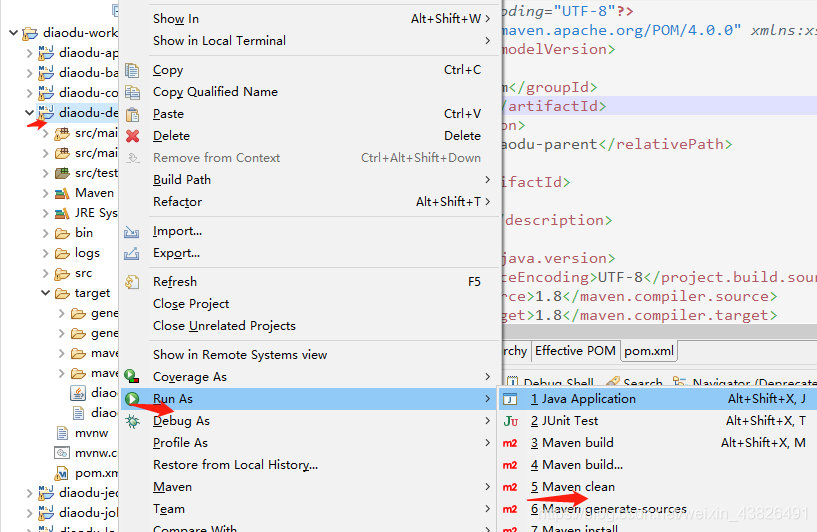
Maven: non-resolvable parent POM: Failure to find error

subproject clean, clean is to delete the jar package under target


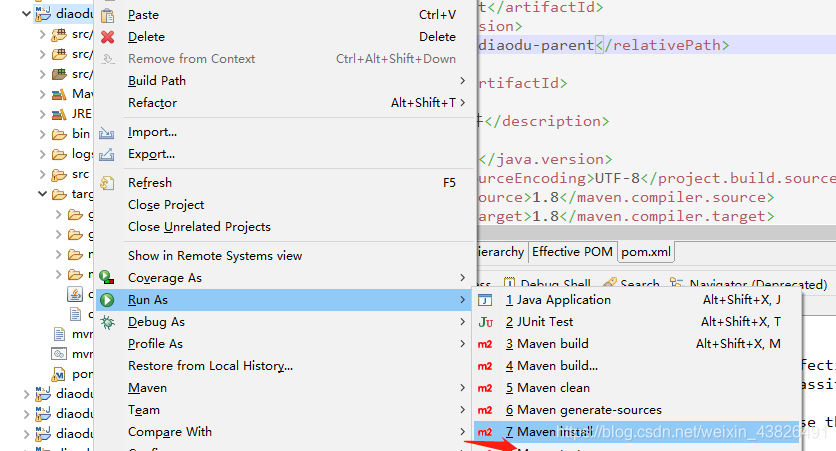
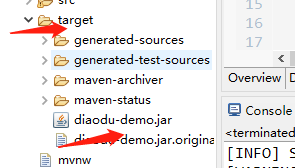
the install, successful, will be under the target to generate the jar package,

packaging success

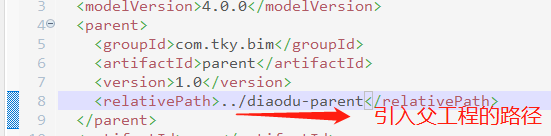
note: only the parent project, introduced a subproject, and then in the subproject right-click the run as maven install, all components of package are automatically packed, if commend father is right, then all the components of pom. The XML file is to introduce the parent project path
After

is packaged, start
java-jar diaodu-demo.jar

by entering the command CMD
in the directory with the boot class


just like launching in eclipse, if there is any error, it will report an error, and if there is no error, it will launch successfully


generally appears on the port, which is successfully started

Springboot project startup exception – required a single bean, but 2 were found

springboot project startup exception – required a single bean, but 2 were found

    • description
    • detailed error message
    • error analysis
    • why
    • solution

    problem description

    springboot+mybatis, write interface and implementation classes, and use @autowired injection controller, start exception: required a single bean, but 2 were found

    controller interface:

    @RestController
    @RequestMapping("/api/sys/statistic")
    public class StatisticController {
    
        @Autowired
        private ISysAccessLogService iSysAccessLogService;
        
    }
    

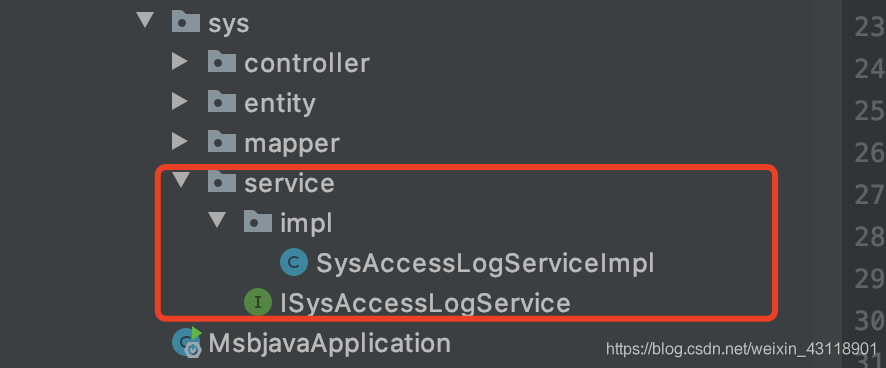
    interface and implementation class

    detail error

    APPLICATION FAILED TO START
    Description:

    Field iSysAccessLogService in com.msb.sys.controller.StatisticController required a single bean, but 2 were found:
    – sysAccessLogServiceImpl: defined in file [/Users/ronghuilin/java/msbjava/target/classes/com/msb/sys/service/impl/SysAccessLogServiceImpl.class]
    – ISysAccessLogService: defined in file [/Users/ronghuilin/java/msbjava/target/classes/com/msb/sys/service/ISysAccessLogService.class]

    Action:

    Consider marking one of the beans as @Primary, updating the consumer to accept multiple beans, or using @Qualifier to identify the bean that should be consumed

    Disconnected from the target VM, address: ‘127.0.0.1:61739’, transport: ‘socket’

    error analysis

    if you’re prompted, there’s no way to automatically inject iSysAccessLogService at StatisticController.

    @autowired is injected by type by default, and as prompted, my project has two beans of this type, so it cannot be injected automatically.

    The

    error message also suggests a solution:
    1. Use one of the beans with the @primary annotation as the default,
    2. Add @qualifier to the injected property to specify beanName to specify which bean

    to use

    but I’ve only written one implementation class for the interface, and as expected there’s only one bean, which should be fine.

    Reason

    after a roundabout search, I found that I had annotated springboot’s boot class with @mapperscan (” “com”).

    @mapperscan this is the annotation is the Mapper scan annotation for mybatis, and the scope of the scan I specified is the com package.
    mybatis scans the interface under com, generates the implementation class of the interface, and infuses it into spring.
    then spring scans the interface implementation class I wrote, injects spring, and you have two beans.

    solution

    in the springboot project it is recommended to add @mapper directly to the Mapper interface and not to use @mapperscan.

    if you want to use @mapperscan annotations, be careful to configure the scope of the scan to avoid the above problems caused by repeat scan injection of spring beans.

Solve Android studio connection dl.google.com Timeout problem

error as follows

Connect to dl.google.com:443 [dl.google.com/120.253.255.33] failed

problem:
is an IP whose DNS is not resolved to the domain name dl.google.com or an error occurs during the resolution.

solution:
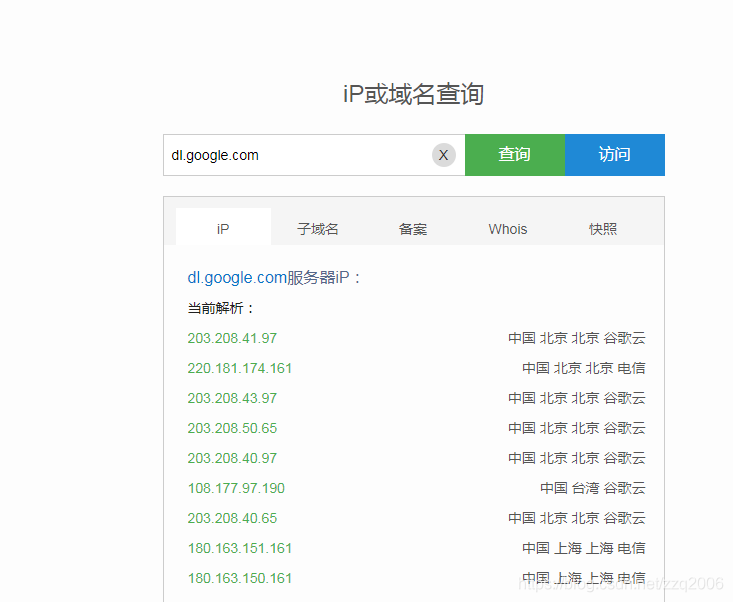
1. Baidu an IP query url, enter the domain name dl.google.com, find the corresponding IP

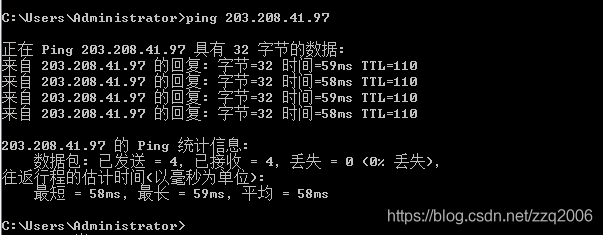
2. Let’s look at the first few pings to see if they work, so let’s pick the first one

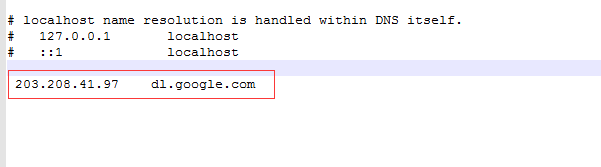
3. Find the file hosts of your computer, C:\Windows\System32\drivers\etc\hosts
write the domain name and the corresponding IP into the file.

Failed to configure a DataSource: ‘ url’ attribute

Description:. Failed to configure a DataSource: ‘ url’ attribute is not specif:Reason: Failed to determine a suitable driver class

  • error cause: database not configured
  • solution:

error cause: database

is not configured

solution:

1.配置数据库

2. Set do not configure database

  • 1
  • 2
  • 3
@SpringBootApplication(exclude = DataSourceAutoConfiguration.class)


  • 1