recently, there are too many things in my life, I have been wanting to learn Linux operating system well, but I have no time.
last night, ready to configure the FTP server, the results found that the virtual machine and the local network connection is not connected, baidu online once, the problem was quickly solved, so will solve the problem to share out.
>
1, use ifconfig command to check the RedHat network device (network interface card), found that eth0 network card did not start.
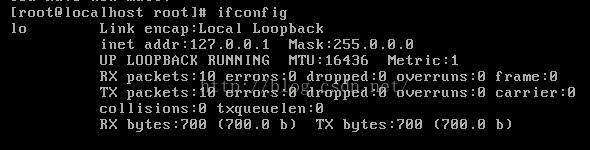
2. So I use the ifup eth0 command to enable the network interface eth0, and I realize that I cannot start today. failed; no link present. Check cable?”

solution:
1. The connection mode between the virtual machine and the machine is: host-only mode. I will not introduce the differences between several connection modes. If the previous connection was not host-only, the virtual machine will need to be restarted after the change.
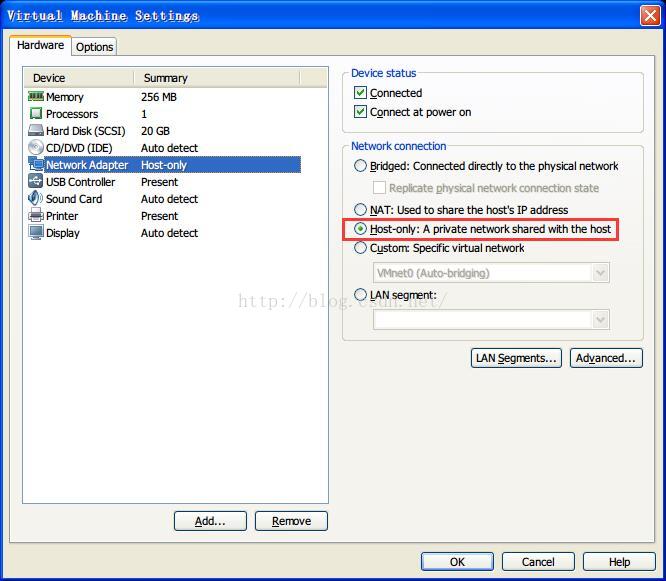
2. Start the two virtual network CARDS of the machine. 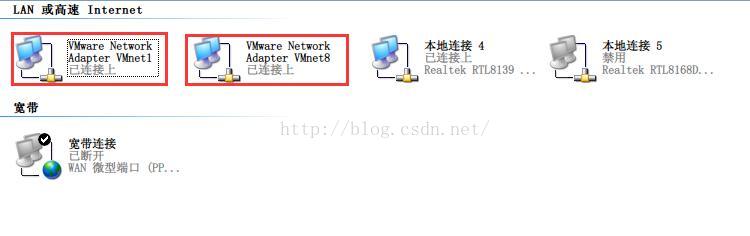
3. Add the following script in /etc/sysconfig/network-scripts/ifcfg-eth0:
check_link_down() {
return 1;
}
specific operation is as follows:
enter the following command:
[root@localhost root]# cd /etc/sysconfig/network-scripts/
[root@localhost network-scripts]# vi ifcfg-eth0

return 1;
check_link_down() {
return 1;
check_link_down() {
return 1;
check_link_down() {
return 1;
}
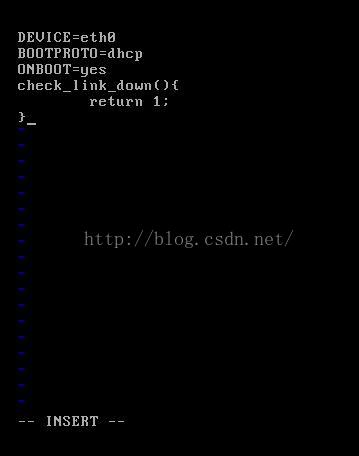
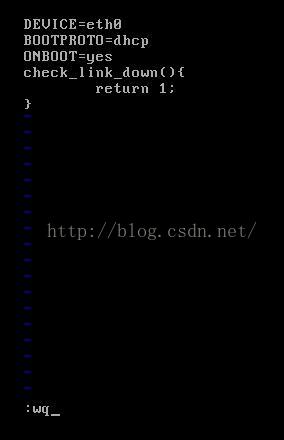
Next, restart the network (if it doesn’t work, restart the system!).
[root@localhost network-scripts]# ifup eth0
Determining IP information for eth0… done.
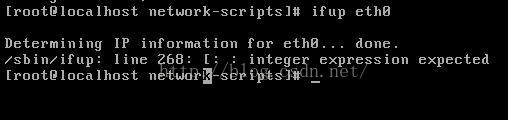
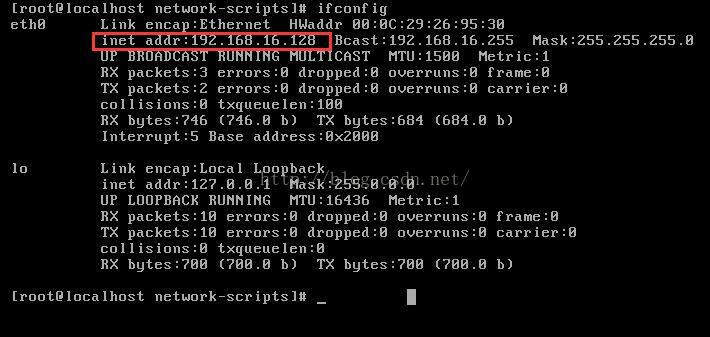
ok, see the above prompt indicates that it has been successful, you can check if you have got a valid IP by ifconfig.
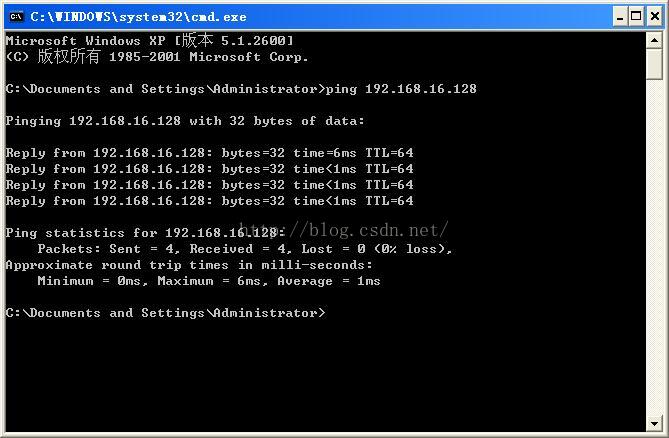
Finally, check on the machine to see if you can PING the Linux operating system in the virtual machine
Install Python package under MacOS: “error: Command ‘GCC’ failed with exit status 1”
“error: command ‘GCC’ failed with exit status 1”,
when installing psutil package todaylooked up a lot of methods did not resolve, the final is to execute the following command to resolve:
$ xcode-select --installspecific error as follows:
➜  ~ pip install psutil
Collecting psutil
  Using cached https://files.pythonhosted.org/packages/1c/ca/5b8c1fe032a458c2c4bcbe509d1401dca9dda35c7fc46b36bb81c2834740/psutil-5.6.3.tar.gz
Building wheels for collected packages: psutil
  Building wheel for psutil (setup.py) ... error
  ERROR: Complete output from command /Library/Frameworks/Python.framework/Versions/3.7/bin/python3.7 -u -c 'import setuptools, tokenize;__file__='"'"'/private/var/folders/lc/19sy67z94fddlb57t50zd7_c0000gn/T/pip-install-72tjomie/psutil/setup.py'"'"';f=getattr(tokenize, '"'"'open'"'"', open)(__file__);code=f.read().replace('"'"'\r\n'"'"', '"'"'\n'"'"');f.close();exec(compile(code, __file__, '"'"'exec'"'"'))' bdist_wheel -d /private/var/folders/lc/19sy67z94fddlb57t50zd7_c0000gn/T/pip-wheel-w8plfncs --python-tag cp37:
  ERROR: running bdist_wheel
  running build
  running build_py
  creating build
  creating build/lib.macosx-10.9-x86_64-3.7
  creating build/lib.macosx-10.9-x86_64-3.7/psutil
  copying psutil/_pswindows.py -> build/lib.macosx-10.9-x86_64-3.7/psutil
  copying psutil/_common.py -> build/lib.macosx-10.9-x86_64-3.7/psutil
  copying psutil/__init__.py -> build/lib.macosx-10.9-x86_64-3.7/psutil
  copying psutil/_psosx.py -> build/lib.macosx-10.9-x86_64-3.7/psutil
  copying psutil/_psbsd.py -> build/lib.macosx-10.9-x86_64-3.7/psutil
  copying psutil/_psaix.py -> build/lib.macosx-10.9-x86_64-3.7/psutil
  copying psutil/_pslinux.py -> build/lib.macosx-10.9-x86_64-3.7/psutil
  copying psutil/_compat.py -> build/lib.macosx-10.9-x86_64-3.7/psutil
  copying psutil/_psposix.py -> build/lib.macosx-10.9-x86_64-3.7/psutil
  copying psutil/_pssunos.py -> build/lib.macosx-10.9-x86_64-3.7/psutil
  creating build/lib.macosx-10.9-x86_64-3.7/psutil/tests
  copying psutil/tests/test_contracts.py -> build/lib.macosx-10.9-x86_64-3.7/psutil/tests
  copying psutil/tests/test_connections.py -> build/lib.macosx-10.9-x86_64-3.7/psutil/tests
  copying psutil/tests/runner.py -> build/lib.macosx-10.9-x86_64-3.7/psutil/tests
  copying psutil/tests/test_unicode.py -> build/lib.macosx-10.9-x86_64-3.7/psutil/tests
  copying psutil/tests/test_misc.py -> build/lib.macosx-10.9-x86_64-3.7/psutil/tests
  copying psutil/tests/test_posix.py -> build/lib.macosx-10.9-x86_64-3.7/psutil/tests
  copying psutil/tests/test_linux.py -> build/lib.macosx-10.9-x86_64-3.7/psutil/tests
  copying psutil/tests/test_sunos.py -> build/lib.macosx-10.9-x86_64-3.7/psutil/tests
  copying psutil/tests/__init__.py -> build/lib.macosx-10.9-x86_64-3.7/psutil/tests
  copying psutil/tests/test_aix.py -> build/lib.macosx-10.9-x86_64-3.7/psutil/tests
  copying psutil/tests/test_process.py -> build/lib.macosx-10.9-x86_64-3.7/psutil/tests
  copying psutil/tests/test_bsd.py -> build/lib.macosx-10.9-x86_64-3.7/psutil/tests
  copying psutil/tests/test_system.py -> build/lib.macosx-10.9-x86_64-3.7/psutil/tests
  copying psutil/tests/test_osx.py -> build/lib.macosx-10.9-x86_64-3.7/psutil/tests
  copying psutil/tests/test_memory_leaks.py -> build/lib.macosx-10.9-x86_64-3.7/psutil/tests
  copying psutil/tests/test_windows.py -> build/lib.macosx-10.9-x86_64-3.7/psutil/tests
  copying psutil/tests/__main__.py -> build/lib.macosx-10.9-x86_64-3.7/psutil/tests
  running build_ext
  building 'psutil._psutil_osx' extension
  creating build/temp.macosx-10.9-x86_64-3.7
  creating build/temp.macosx-10.9-x86_64-3.7/psutil
  creating build/temp.macosx-10.9-x86_64-3.7/psutil/arch
  creating build/temp.macosx-10.9-x86_64-3.7/psutil/arch/osx
  gcc -Wno-unused-result -Wsign-compare -Wunreachable-code -fno-common -dynamic -DNDEBUG -g -fwrapv -O3 -Wall -arch x86_64 -g -DPSUTIL_POSIX=1 -DPSUTIL_VERSION=563 -DPSUTIL_OSX=1 -I/Library/Frameworks/Python.framework/Versions/3.7/include/python3.7m -c psutil/_psutil_common.c -o build/temp.macosx-10.9-x86_64-3.7/psutil/_psutil_common.o
  xcrun: error: invalid active developer path (/Library/Developer/CommandLineTools), missing xcrun at: /Library/Developer/CommandLineTools/usr/bin/xcrun
  error: command 'gcc' failed with exit status 1
  ----------------------------------------
  ERROR: Failed building wheel for psutil
  Running setup.py clean for psutil
Failed to build psutil
Installing collected packages: psutil
  Running setup.py install for psutil ... error
    ERROR: Complete output from command /Library/Frameworks/Python.framework/Versions/3.7/bin/python3.7 -u -c 'import setuptools, tokenize;__file__='"'"'/private/var/folders/lc/19sy67z94fddlb57t50zd7_c0000gn/T/pip-install-72tjomie/psutil/setup.py'"'"';f=getattr(tokenize, '"'"'open'"'"', open)(__file__);code=f.read().replace('"'"'\r\n'"'"', '"'"'\n'"'"');f.close();exec(compile(code, __file__, '"'"'exec'"'"'))' install --record /private/var/folders/lc/19sy67z94fddlb57t50zd7_c0000gn/T/pip-record-wr1nt_db/install-record.txt --single-version-externally-managed --compile:
    ERROR: running install
    running build
    running build_py
    creating build
    creating build/lib.macosx-10.9-x86_64-3.7
    creating build/lib.macosx-10.9-x86_64-3.7/psutil
    copying psutil/_pswindows.py -> build/lib.macosx-10.9-x86_64-3.7/psutil
    copying psutil/_common.py -> build/lib.macosx-10.9-x86_64-3.7/psutil
    copying psutil/__init__.py -> build/lib.macosx-10.9-x86_64-3.7/psutil
    copying psutil/_psosx.py -> build/lib.macosx-10.9-x86_64-3.7/psutil
    copying psutil/_psbsd.py -> build/lib.macosx-10.9-x86_64-3.7/psutil
    copying psutil/_psaix.py -> build/lib.macosx-10.9-x86_64-3.7/psutil
    copying psutil/_pslinux.py -> build/lib.macosx-10.9-x86_64-3.7/psutil
    copying psutil/_compat.py -> build/lib.macosx-10.9-x86_64-3.7/psutil
    copying psutil/_psposix.py -> build/lib.macosx-10.9-x86_64-3.7/psutil
    copying psutil/_pssunos.py -> build/lib.macosx-10.9-x86_64-3.7/psutil
    creating build/lib.macosx-10.9-x86_64-3.7/psutil/tests
    copying psutil/tests/test_contracts.py -> build/lib.macosx-10.9-x86_64-3.7/psutil/tests
    copying psutil/tests/test_connections.py -> build/lib.macosx-10.9-x86_64-3.7/psutil/tests
    copying psutil/tests/runner.py -> build/lib.macosx-10.9-x86_64-3.7/psutil/tests
    copying psutil/tests/test_unicode.py -> build/lib.macosx-10.9-x86_64-3.7/psutil/tests
    copying psutil/tests/test_misc.py -> build/lib.macosx-10.9-x86_64-3.7/psutil/tests
    copying psutil/tests/test_posix.py -> build/lib.macosx-10.9-x86_64-3.7/psutil/tests
    copying psutil/tests/test_linux.py -> build/lib.macosx-10.9-x86_64-3.7/psutil/tests
    copying psutil/tests/test_sunos.py -> build/lib.macosx-10.9-x86_64-3.7/psutil/tests
    copying psutil/tests/__init__.py -> build/lib.macosx-10.9-x86_64-3.7/psutil/tests
    copying psutil/tests/test_aix.py -> build/lib.macosx-10.9-x86_64-3.7/psutil/tests
    copying psutil/tests/test_process.py -> build/lib.macosx-10.9-x86_64-3.7/psutil/tests
    copying psutil/tests/test_bsd.py -> build/lib.macosx-10.9-x86_64-3.7/psutil/tests
    copying psutil/tests/test_system.py -> build/lib.macosx-10.9-x86_64-3.7/psutil/tests
    copying psutil/tests/test_osx.py -> build/lib.macosx-10.9-x86_64-3.7/psutil/tests
    copying psutil/tests/test_memory_leaks.py -> build/lib.macosx-10.9-x86_64-3.7/psutil/tests
    copying psutil/tests/test_windows.py -> build/lib.macosx-10.9-x86_64-3.7/psutil/tests
    copying psutil/tests/__main__.py -> build/lib.macosx-10.9-x86_64-3.7/psutil/tests
    running build_ext
    building 'psutil._psutil_osx' extension
    creating build/temp.macosx-10.9-x86_64-3.7
    creating build/temp.macosx-10.9-x86_64-3.7/psutil
    creating build/temp.macosx-10.9-x86_64-3.7/psutil/arch
    creating build/temp.macosx-10.9-x86_64-3.7/psutil/arch/osx
    gcc -Wno-unused-result -Wsign-compare -Wunreachable-code -fno-common -dynamic -DNDEBUG -g -fwrapv -O3 -Wall -arch x86_64 -g -DPSUTIL_POSIX=1 -DPSUTIL_VERSION=563 -DPSUTIL_OSX=1 -I/Library/Frameworks/Python.framework/Versions/3.7/include/python3.7m -c psutil/_psutil_common.c -o build/temp.macosx-10.9-x86_64-3.7/psutil/_psutil_common.o
    xcrun: error: invalid active developer path (/Library/Developer/CommandLineTools), missing xcrun at: /Library/Developer/CommandLineTools/usr/bin/xcrun
    error: command 'gcc' failed with exit status 1
    ----------------------------------------
ERROR: Command "/Library/Frameworks/Python.framework/Versions/3.7/bin/python3.7 -u -c 'import setuptools, tokenize;__file__='"'"'/private/var/folders/lc/19sy67z94fddlb57t50zd7_c0000gn/T/pip-install-72tjomie/psutil/setup.py'"'"';f=getattr(tokenize, '"'"'open'"'"', open)(__file__);code=f.read().replace('"'"'\r\n'"'"', '"'"'\n'"'"');f.close();exec(compile(code, __file__, '"'"'exec'"'"'))' install --record /private/var/folders/lc/19sy67z94fddlb57t50zd7_c0000gn/T/pip-record-wr1nt_db/install-record.txt --single-version-externally-managed --compile" failed with error code 1 in /private/var/folders/lc/19sy67z94fddlb57t50zd7_c0000gn/T/pip-install-72tjomie/psutil/
Attempt to reset the display driver and recover from timeout failed
a few days ago, my asus computer K42J played a war after 1942 normal shutdown, and then the next day after boot, found that the blue screen, and a little flower screen, forced shutdown, boot, again can not display, hard disk lamp, lamp power supply is normal, no boot logo, then look at the effect of the external monitor, found an external monitor can display properly asus logo, then start, after the blue screen, interface is as follows:

Attempt to reset the display driver and recover from timeout failed
atikmpag.sys
.
Then enter the safe mode, change the video card driver to VGA driver, can normally enter the system, the external display is normal, the built-in display is still no reaction, the driver changed to amd driver or blue screen, can’t enter the system.
suspected that the screen wiring was broken, so we took apart the wiring, and found that the wiring was normal.
to get the maintenance point, the master said the video card virtual welding…
so redo the video card, the problem is solved. Good is not the screen is broken, otherwise this book is useless ~~~~~ write down here, hope to meet the same problem friends can find some ideas.
Execution failed for task ‘:app:processDebugGoogleServices’. > No matching client found for package
错误信息:
……
FAILURE:构建失败,出现异常
*哪里出错了:任务’:app:processDebugGoogleServices’执行失败。
比;没有找到与包名’io.ionic.starter’匹配的客户端* Try:
运行与—stacktrace选项,以获得堆栈跟踪。使用——info或——debug选项运行以获得更多日志输出
*在https://help.gradle.org获得更多帮助
在4s中构建失败
:app:processDebugGoogleServices
解析json文件:D:项目\眼线\眼线\app\平台\android\app\google-servicesjson
:app:processDebugGoogleServices FAILED
26 actionable tasks: 2已执行,24最新
cmd:命令失败,退出代码1错误输出:
FAILURE: Build FAILED with an exception.
任务’:app:processDebugGoogleServices’执行失败。
比;没有找到与包名’io.ionic.starter’匹配的客户端* Try:
运行与—stacktrace选项,以获得堆栈跟踪。使用——info或——debug选项运行以获得更多日志输出
*在https://help.gradle.org获得更多帮助
[ERROR]运行子进程cordova时出现错误
使用——verbose标志重新运行此命令可以提供更多信息
解决办法:
将文件app \ config . xml中的id =“io.ionic.starter”和app \谷歌服务。json中的“package_name”:“io.ionic.starter”路径修改为一样的。
参考:
https://stackoverflow.com/questions/34679411/android-studio-gradle-errorexecution-failed-for-task-appprocessdebuggoogles
Failed to find target with hash string ‘android-25’ in:D:\SDK
error message
Failed to find target with hash string 'android-25' in:D:\SDK
Install missing platform(s) and sync project

watermark is so annoying!
没有找到与哈希字符串“android-25”匹配的目标在D:\ SDK。
安装丢失的平台并同步项目
appears in the scenario
got a nice project and opened it up locally. The above error occurred after compilation.
solution
problem error means: no information for Android API 25 was found in the SDK. Here’s why: You need Android API 25 in your project, but you haven’t downloaded it locally.
method 1
go to SDK Manager to download the corresponding API, and then re-compile it. In the new Version of Android Studio, click Ok or Apply below to confirm the download after selecting the corresponding API.
The pom file
gradle could not get
Could not GET 'https://dl.google.com/dl/android/maven2/com/android/tools/build/gradle/3.1.4/gradle-3.1.4.pom'. Received status code 405 from server: Method Not Allowed
Enable Gradle 'offline mode' and sync project
configure maven address for domestic :
allprojects {
    repositories {
        google()
        jcenter()
        maven { url 'http://maven.aliyun.com/nexus/content/groups/public/' }
    }
}
Android studio gradle cannot get the pom file
iOS Xcode:Failed to create provisioning profile.
compile error:
Failed to create provisioning profile. The app ID “com.aaa.bbb.demo” cannot be registered to your development team. Change your bundle identifier to a unique string to try again.
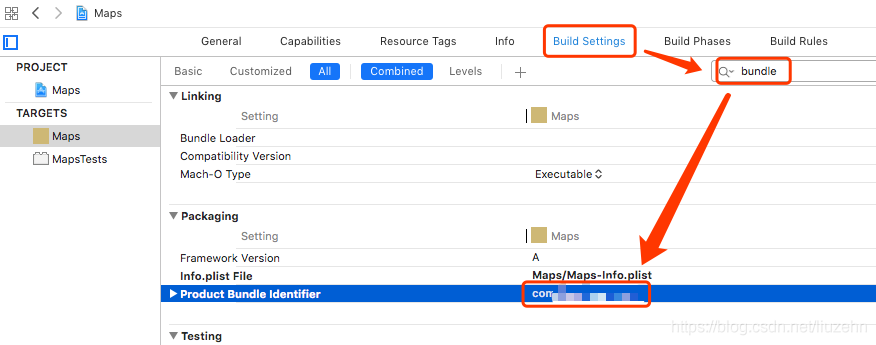
fix: open Build Settings, search for “bundle”, change the Product bundle Identifier option, change it to an unused package name, problem solved.
error: RPC failed; curl 56 OpenSSL SSL_ read: SSL_ ERROR_ Syscall, errno 10054 solution
is not guaranteed to solve the problem. Search multiple blogs to try to find a solution. Finally clone succeeded. (PS: don’t guarantee success)
http://www.wangxianfeng.cn/wordpress/2018/07/14/git use the common errors in the process of solving/
https://www.cnblogs.com/emmetyang/p/10620819.html attempts to download ffmpeg source problem: (PS: what is the difference between the snapshot version and the version, welcome to the great god taught)
$ git clone https://git.ffmpeg.org/ffmpeg.git ffmpeg
Cloning into 'ffmpeg'...
remote: Counting objects: 570040, done.
remote: Compressing objects: 100% (118805/118805), done.
error: RPC failed; curl 56 OpenSSL SSL_read: SSL_ERROR_SYSCALL, errno 10054
fatal: the remote end hung up unexpectedly
fatal: early EOF
fatal: index-pack failed
first is the problem may be upload size limit, execute the following command:
git config http.postBuffer 524288000
clone again may still error, then you can try
git config http.sslVerify "false"
but then it’s
fatal: not in a git directory
according to the second blog post, use the following command
git config --global http.sslVerify "false"
// note that the original blog command was written incorrectly. It should be – global
and then
git clone https://git.ffmpeg.org/ffmpeg.git ffmpeg
just wait.
Alicloud centos8 reports an error “error: failed to synchronize cache for repo ‘EPEL modular'”
ali cloud has been online centos8 system, the 8 series is relatively new, ali cloud bug is still there, use yum unexpectedly can not, the system default did not install git, want to install yum install git directly Error “Error: Failed to synchronize cache for repo ‘epel-modular'”, extend source Error, baidu has no solution, it can only solve by itself!
the solution is simple:
scheme 1: directly delete /etc/yum.repos. D (first backup)
directory epel beginning file
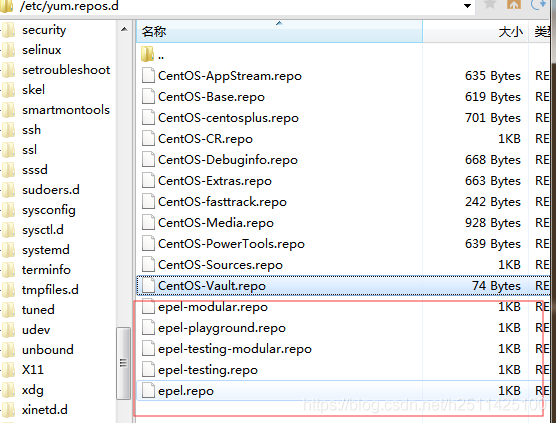
would be yum.
scheme 2:
yum succeeded but the prompt program does not exist and cannot install
do not delete /etc/yum.repos. D inside the file
edit
vi /etc/resolv.confand
nameserver 114.114.114.114save
and then execute yum successfully
ali cloud recently launched centos8 can’t yum, DNS can’t resolve the extended library domain name. Hey, their family is a little careless about their operation and maintenance
Convergence warning: lbfgs failed to converge (status=1): Stop: total no. of iterations reached L
How to Solve Convergence Warning: LBFGS failed to converge (status=1): STOP: TOTAL NO. ITERATIONS REACHED LIMIT. Increase the number of ITERATIONS (max_iter) or scale the data as shown in:
solve the problem
F:\Program Files\Python\Python36\lib\site-packages\sklearn\linear_model\_logistic.py:764: ConvergenceWarning: lbfgs failed to converge (status=1):
STOP: TOTAL NO. of ITERATIONS REACHED LIMIT.
Increase the number of iterations (max_iter) or scale the data as shown in:
https://scikit-learn.org/stable/modules/preprocessing.html
Please also refer to the documentation for alternative solver options:
https://scikit-learn.org/stable/modules/linear_model.html#logistic-regression
extra_warning_msg=_LOGISTIC_SOLVER_CONVERGENCE_MSG)
Solution Ideas
convergence warning: LBFGS cannot aggregate (state =1) :
stop: the total number of iterations is limited.
to increase the number of iterations (maximum) or scaling of data, as shown in https://scikit-learn.org/stable/modules/preprocessing.html
please refer to the documentation for other solver options: https://scikit-learn.org/stable/modules/linear_model.html#logistic-regression%20%C2%A0%20extra_warning_msg=_LOGISTIC_SOLVER_CONVERGENCE_MSG)
solution
The total number of iterations reached the limit. Increase the number of iterations (maximum) or scale the data. Matching and convergence warnings caused by the Scikit-learn version issue have been changed in the functions and methods called and will not affect the operation of the program.
recommended to upgrade the version or modify to the latest version of the usage, use the library functions properly!
Get synchronization retrieved hash chain is invalid error
error message:
########## BAD BLOCK #########
Chain config: {ChainID: 1 Homestead: 1150000 DAO: 1920000 DAOSupport: true EIP150: 2463000 EIP155: 2675000 EIP158: 2675000 Byzantium: 4370000 Constantinople: 7280000 Petersburg: 7280000 Istanbul: 9069000, Muir Glacier: 9200000, Engine: ethash}

Number: 9069000
Hash: 0x072cf1df374159c5f23087750d8a2f3201542da196939ce446ff2c5c390fe5f6
·································································
·································································
·································································
·································································
·································································
Error: invalid gas used (remote: 6395997 local: 6449093)
##############################

WARN [12-10|12:01:11.813] Synchronisation failed, dropping peer    peer=106a4c4cba9167bf err="retrieved hash chain is invalid"
environment
Geth
Version: 1.9.7
Architecture: amd64
Protocol Versions: [64 63]
Go Version: go1.13.1
Operating System: Linux
cause:
ethereum update 2.0, starting with block 9069000, found on github that this error
occurs with version 1.9.8 1.9.7
scheme:
updates geth to version 1.9.9. The following provides an update method
centos7 environment
- select the latest version to download geth download address
wget -c https://github.com/ethereum/go-ethereum/archive/v1.9.9.zip
- download good, unzip (no unzip download a unzip)
unzip v1.9.9.zip
- then enter the directory, make geth
cd go-ethereum-1.9.9
make geth
- if make geth for a long time no response, probably is the problem of the network, add a proxy, command line input:
export GOPROXY=https://goproxy.cn
-
and then re-make geth is ok.
-
after loading, check the version of geth. If it is still the original version, delete the original geth command
export PATH=$PATH:~/go-ethereum-1.9.9/build/bin/
$PATH:for your geth command
vim /etc/profile- and then refresh
source /etc/profilecheck the next version should be ok
and then back on track, pull block
session_ start(): open(SESSION_ FILE, O_ Rdwr)) failed: processing of permission denied (13)
phpMyAdmin — Error
Error during session start; please check your PHP and/or webserver log file and configure your PHP installation properly. Also ensure that cookies are enabled in your browser.session_start(): open(SESSION_FILE, O_RDWR)) failed: Permission denied (13)
a lot of friends have had this problem with phpmyadmin, so how do you solve it?
problem
usually occurs in this case, which is a problem of session.save_path assignment. The location of session can be empty, or the target address may not exist, or it may be a permission problem, we need to check one by one.
solution
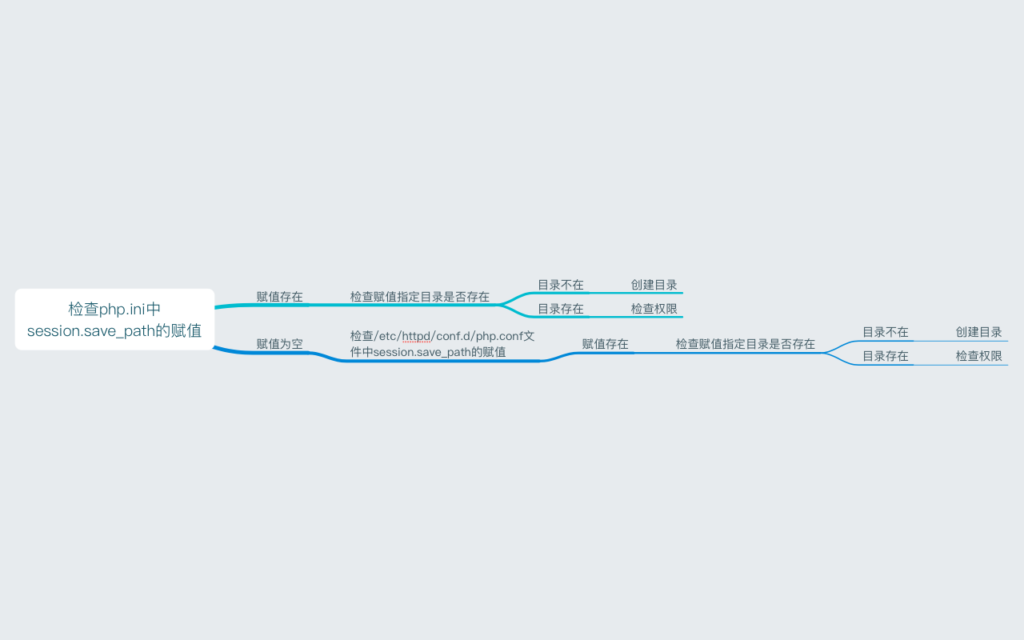
check PHP. The session in the ini. Save_path assignment, Linux system generally located in the/etc/PHP ini, if the assignment is empty, and then to check the/etc/HTTPD/conf. D/PHP. The conf file session. Save_path assignment, if the same is empty, you need to specify an existing path.
if either of the above two parameters has an assignment, you need to check whether the directory specified by the assignment exists, if not, you need to create a directory.
if the specified directory exists, then check the directory permissions, direct 777 is the most convenient.
thought flow
Top cloud blog, database, cloud speed, virtual host, domain name registration, domain name, cloud server, cloud host, cloud building site,ysidc.top
Solving environment: failed with initial frozen solve. Retrying with flexible solve.错误
error
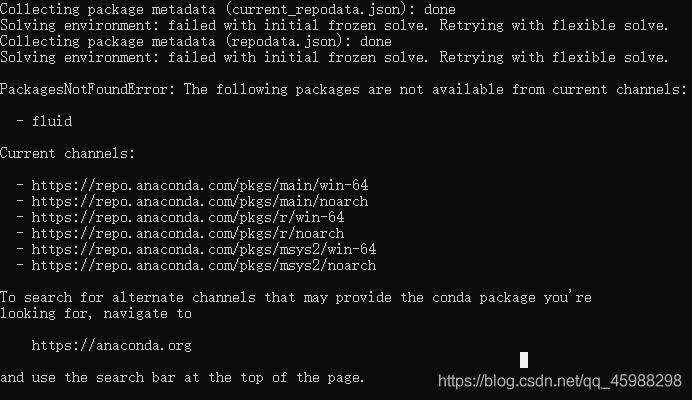
error: PackagesNotFoundError: The following packages are not available from current channels:
https://blog.csdn.net/The_Time_Runner/article/details/99848728, although not completely solve the problem, but you can use for a moment. But installing the version directly with PIP is problematic. I don’t have to do
as much as possible
The following packages are not available from current channels.
https://blog.csdn.net/Erice_s/article/details/80156191 appear above Solving environment: failed with initial frozen solve. Retrying with flexible solve. This error is due to the lack of a channel, which can then be used correctly.