Category Archives: How to Fix

ImportError: Importing the multiarray numpy extension module failed.

Numpy of

pycharm suddenly became unavailable. At first, I thought numpy version was a problem. Uninstall, reinstall, upgrade, and degrade were not allowed.

then I tested the numpy of anaconda and found that it could be used, but pycharm could not. However, I checked the setting repeatedly, and there was no problem.

finally put solution : system environment variable Path to the bin level C:\ProgramData\Anaconda3\Library\bin, and then restart the computer.

at first I just introduced Anaconda3, but before using numpy I had no problem, maybe I updated conda, the package is confused, so the environment variable introduced must be bin level.

ERROR: Failed to parse POMs (How to Fix)

recently had this problem while working on the Jenkins build release,

ERROR: Failed to parse POMs
java.io.IOException: Can't read POM: /opt/gamma/.jenkins/jobs/indra-parent/workspace/pom.xml
	at jenkins.plugins.maveninfo.extractor.properties.PomPropertiesFinder.findProperties(PomPropertiesFinder.java:54)
	at jenkins.plugins.maveninfo.extractor.MavenInfoExtractor.extract(MavenInfoExtractor.java:58)
	at jenkins.plugins.maveninfo.extractor.MavenInfoEnvironment.tearDown(MavenInfoEnvironment.java:42)
	at hudson.maven.MavenModuleSetBuild$MavenModuleSetBuildExecution.doRun(MavenModuleSetBuild.java:882)
	at hudson.model.AbstractBuild$AbstractBuildExecution.run(AbstractBuild.java:534)
	at hudson.model.Run.execute(Run.java:1720)
	at hudson.maven.MavenModuleSetBuild.run(MavenModuleSetBuild.java:531)
	at hudson.model.ResourceController.execute(ResourceController.java:98)
	at hudson.model.Executor.run(Executor.java:410)

maven has actually been built and turned out to be a pom.xml header

The error was caused by a corrupt XML header which contained merge conflicts.

head is normal after modification for the following

<?xml version="1.0" encoding="UTF-8"?>
<project xmlns="http://maven.apache.org/POM/4.0.0" xmlns:xsi="http://www.w3.org/2001/XMLSchema-instance"
		 xsi:schemaLocation="http://maven.apache.org/POM/4.0.0 http://maven.apache.org/xsd/maven-4.0.0.xsd">


Command codesign failed with a nonzero exit code or revoke certificate for IOS / Xcode problems

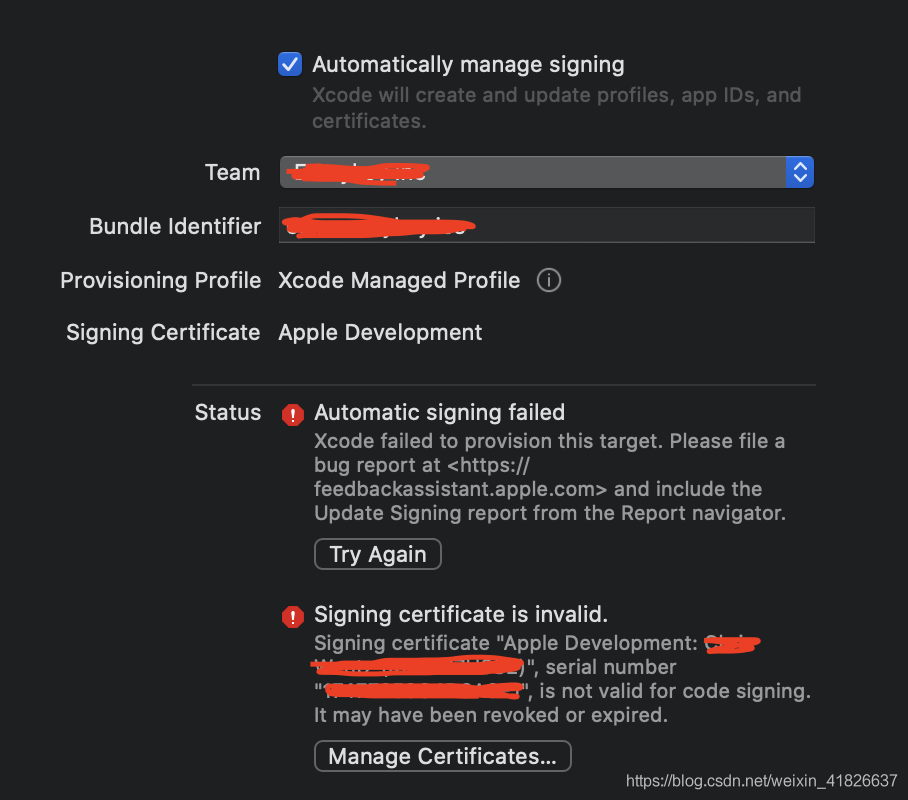
if you have experienced a similar error, try my method and see if you can solve it. The error case diagram is as follows:

  1. according to my experience, the cause of this problem is that I mistakenly reset the keychain access to the default, so I lost my development certificate.
  2. how do I solve this problem?
  3. I clean up my apple development certificate from Keychain Access
  4. I clean up my apple development private key
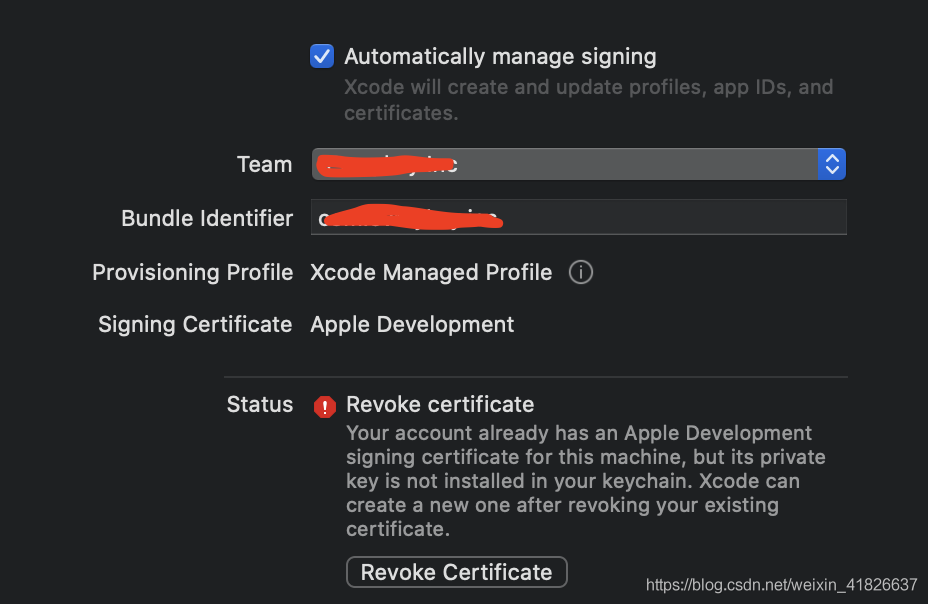
  5. and I get a new error: Revoke certificate Your account already has an Apple Development signing certificate for this machine, But its private key is not installed in your keychain. Xcode can create a new one after revoking your existing certificate.
  6. relocates to Xcode-> Preferences-> The Accounts tags – & gt; Find team name -&gt under Apple ID; Double-click on it – & gt; Click the + button in the bottom left corner of the box -> Select App Development
  7. in the project -> Signing & Capabilities-> From the Team drop-down menu, select “None”
  8. to re-select the correct development Team
  9. to rebuild the CMD + b project
  10. by shift + CMD + k clean project

Solution to UBI partman failed with code 141 when installing Ubuntu

when installing ubuntu with livecd, ubi-partman failed with code 141 May occur when the hard disk partition step is taken. The solution:

Ctrl+Alt+t pop-up terminal, input:

sudo fdisk /dev/sda

#sda is my hard disk device number, according to your system, it should be modified to the appropriate device number

then take a look at the partitions above sda with the p command, delete all Linux native and swap partitions with the d command (NTFS \ fat32 are for Windows, needless to say you wouldn’t dare to touch them), then write to the partition table with the w command, then double-click Install Ubuntu icon again, enter the installation process, everything is ok.

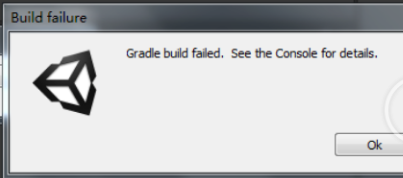
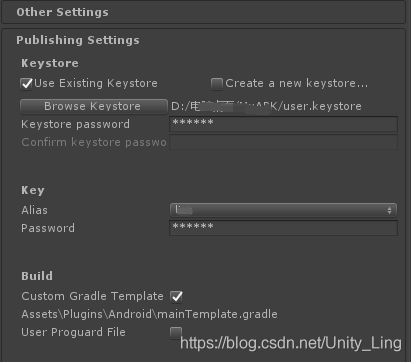
Solution: unity package failed. Commandinvocationfailure: gradle build failed

environment:

unity2018.4.1

jdk1.8.0 _221

is actually a normal procedure and there’s nothing wrong with it.

and then I found that your package today at a wrong CommandInvokationFailure: Gradle build failed. Just this one down here.

I didn’t know how to do it for a while, I thought it was my SDK that was not configured or the JDK version was wrong, but I felt there was no problem. I checked baidu online and found that many people had made this mistake, but they all put forward the problem and there was no good solution.

is generally said to Build System to choose Internal, but this does not seem to work well when it comes to signing certificates, just skipping this issue.

is also a problem with the NDK, the tools aren’t right, gradle isn’t installed, the name of AndroidMainfest, or the JDK version or android SDK. There’s a lot to say.

. signature certificate ?

so go to create a secret key

packaging again, oh huo, success!

so Gradle packaging must be signed!

in case something weird happens, it’s better not to have Chinese paths.

Rsync: failed to exec SSH: no such error in remote Rsync

1. Transfer the file /etc/hosts to 10.41.1.77/MNT /
[root@backup ~]# rsync-avz /etc/hostess-p 22′ [email protected]:/ MNT /
rsync: Failed to exec SSH No to the file or directory (2)
rsync error: error in the IPC code (code 14) at pipe. C (84) [sender = 3.0.6]
rsync: connection unexpectedly closed (0 bytes received so far) (sender)
rsync error: Error in IPC code (code 14) at io.c(600) [sender=3.0.6]
### # check the reason is that SSH client has not been installed ### # br>[root-backup MNT]# yum install openssh-counts-y
[root-@backup MNT]# rsync avz /etc/hosts-p 22′ [email protected]:/MNT/
The authenticity of host ‘10.41.1.77 (10.41.1.77)’ can ‘t be established.
RSA key fingerprint is: 85 4 f: when d: 41: e2: fb: eb: 88: e2: ba: ce: 4 e: 5 a: 49: c4.
Are you sure you want to continue connecting (yes/no)?Yes
Warning: Permanently added ‘10.41.1.77’ (RSA) to the list of known hosts.
[email protected]’s password:
bash: rsync: command not found: connection unexpectedly closed (0 bytes received so far) [sender]
rsync error: Remote command not found (code 127) at IO. C (600) [sender=3.0.6]
[root-@backup MNT]# rrm-qa rsync
rsync 3.0.6-12. El6.x86_64
prompt bash: rsync: Rsync program
client installer
[root-@nfs01 MNT]# yum install rsync-y
retransmit
[root-@backup MNT]# rsync-avz /etc/hosts-ssh-p 22′ [email protected]:/ MNT /
[email protected]’s password:
sending incremental file list
hosts

sent 196 bytes received 31 bytes 41.27 bytes/ SEC
total size is 309 speedup is 1.36
target computer check to see if the transmission was successful
[root@nfs01 MNT]# ls
hosts
chuan successfully

reproduced in: https://blog.51cto.com/11956937/2067602

SQL*Loader-522: lfiopn failed for file (xxx.log)

Classification:

copyright notice: this article is the original article of the blogger, and shall not be reproduced without the permission of the blogger.

reason:


1, SQL*Loader user has no permission to create files;


2, because the target path does not exist, SQL*Loader reported this error (not verified)

Some index files failed to download. They have been ignored, or old ones used instead

Some index files failed to download. They were ignored, or replaced with old ones.

When you are using

sudo apt-get update

fail and show

Some index files failed to download. They have been ignored, or old ones used instead

You can try

sudo su
vim /etc/resolv.conf

add

nameserver 8.8.8.8

and retry

sudo apt-get update

It will work
good luck!

Installation problems of aptana studio 3

Aptana Studio3 installation problem

reprinted

before has been using Dreamweaver to write HTML, after browsing the forum found that many people use Aptana Studio, then to download the official website, in the installation process appeared a lot of problems.

Click on aptana’s installer, and wait about 10 minutes for a dialog to pop up
“12029 http://go.appcelerator.com/installer_nodejs_windows.msi.” , according to the determined, according to the aptana no successful installation, click finish to exit the, and baidu aptana installation tutorial. Aptana needs to run Node. js and Git. For these two development environments, I have downloaded and installed the 64-bit Node. js and Git from the official website.

Click the installer for Aptana again, and the prompt box appears
” node.js mandatory installed was not installed correctly.”.Js has not been installed correctly.

Reinstall Aptana, and the prompt box appears again
Msi: CRC error.” is still the problem of node.js, which is supposed to need 32-bit node.js, so uninstall the original, download and install the 32-bit node.js from the official website.

After installing Aptana again, I still have the same problem. So I go to the Internet and look for the version of Node. js on Stackoverflow, I see a god saying it’s the wrong version of Node. js, download and install the node.js he provided.
node-v0.10.13-x86), reinstall aptana in less than 5 minutes!!

Importing the multiarray numpy extension module failed

from matplotlib import pyplot as pyp

and then run the file with the following error message

....
....
ImportError: 
Importing the multiarray numpy extension module failed.  Most
likely you are trying to import a failed build of numpy.
If you're working with a numpy git repo, try `git clean -xdf` (removes all
files not under version control).  Otherwise reinstall numpy.

the reason is that Aonconda’s numpy module has a problem
enters Aconconda’s Prompt on the command line to execute

(base) C:\Users\hfh>pip uninstall numpy
Uninstalling numpy-1.15.4:
  Would remove:
    e:\soft\anaconda\lib\site-packages\numpy-1.15.4.dist-info\*
    e:\soft\anaconda\lib\site-packages\numpy\*
    e:\soft\anaconda\scripts\f2py.py
Proceed (y/n)?y
  Successfully uninstalled numpy-1.15.4

execute

again

(base) C:\Users\hfh>pip install numpy
Collecting numpy
  Using cached https://files.pythonhosted.org/packages/00/0e/5a8c34adb97fc1cd6636d78050e575945e874c8516d501421d5a0f377a6c/numpy-1.15.4-cp37-none-win_amd64.whl
Installing collected packages: numpy
Successfully installed numpy-1.15.4

CentOS7 nginx Failed to read PID from file /run/nginx.pid: Invalid argument?

1. On centos7, after configuring the nginx proxy service,

systemctl status nginx.service

error:

Failed to read PID from file /run/nginx.pid: Invalid argument

2. See a lot of said to delete change nginx.pid file, after trying, invalid.

. 3. Then a solution was found:

the mkdir -p/etc/systemd/system/nginx. Service. D.

printf “[Service] \ nExecStartPost =/bin/sleep 0.1 \ n” & gt; /etc/systemd/system/nginx.service.d/override.conf

4. Finally, execute the command

systemctl daemon – reload

systemctl restart nginx.service

solves the problem