Category Archives: How to Fix

/sbin/mount.vboxsf: mounting failed with the error: No such device

centos7 VM VirtualBox setting Shared directory error.

Step 1: create the VM VirtualBox Shared directory

1. Create VM’s Shared directory under window D:\workspace

2. Create a Shared directory under Linux mkdir/MNT /workspace

3. Set the Shared directory

on the VM operation interface

Step 2: install the control

1. For Linux, install controls

yum groupinstall “GNOME Desktop” “Graphical Administration Tools”

ln -sf /lib/systemd/system/runlevel5.target /etc/systemd/system/default.target

2. Restart the system, enter the interface centos7 system, then install the enhanced functions on the operation interface of VM, and click run to install

Step 3: mount the Shared disk

mount -t vboxsf workspace /mnt/workspace

ln-s/MNT /workspace /home/daiyu (soft connection to user daiyu)

step 3: /sbin/mount.vboxsf: mounting failed with the error: No such device

solution:

yum clean all
yum update
yum install kernel
yum install kernel-devel
yum install kernel-headers
yum install GCC
yum install make
reboot

0


CD /opt/ vboxadd
./vboxadd setup
reboot

perform step 3 again and succeed.

the original source: http://blog.csdn.net/daiyudong2020/article/details/58073520

End;

TypeError:Network request failed

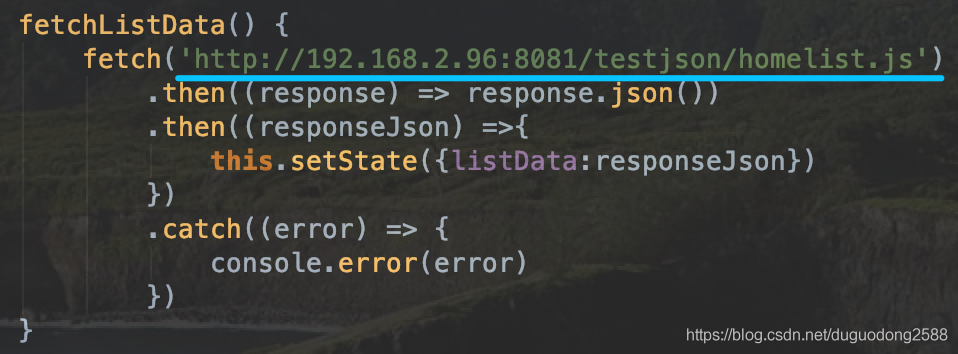
recently run react native project application in which the data is the local json of the request before good suddenly reported TypeError:Network request failed

The inside of the

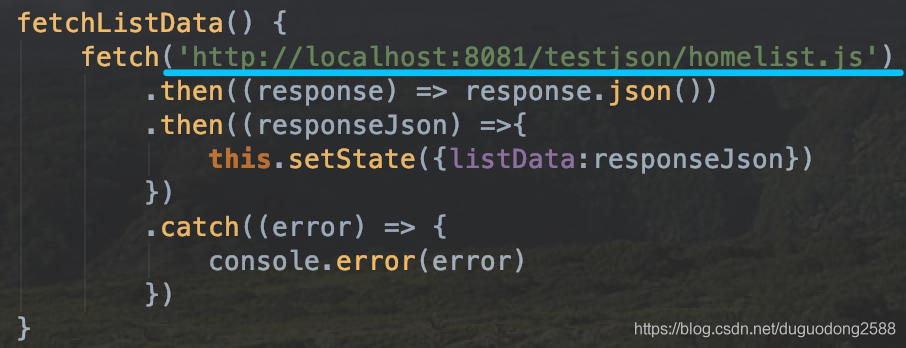
project request address localhost is written into computers at the real IP is ok

before modification :

modified:

view computer IP address method :

Windows: open the command window to execute ipconfig

MAC: open a command window to execute ifconfig

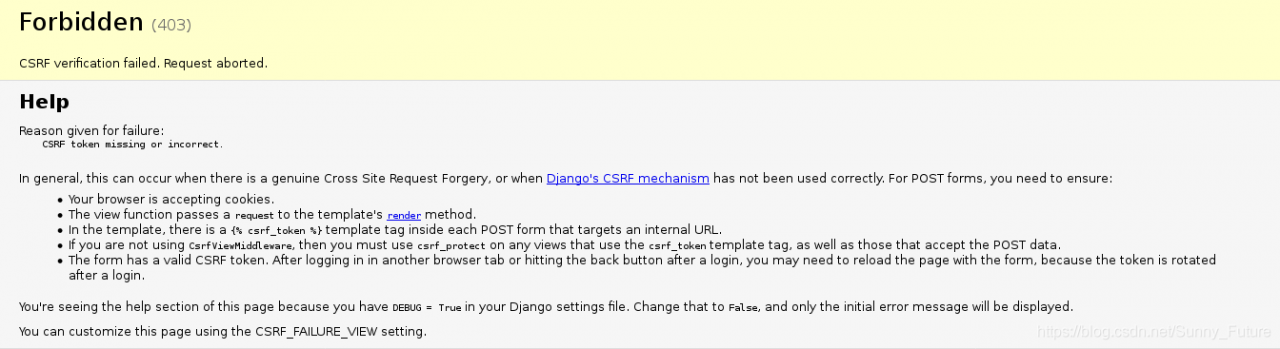
CSRF verification failed. Request aborted.

Forbidden (403)
CSRF验证失败。请求中止。

Help

Reason given for failure:

    CSRF token missing or incorrect.
    

In general, this can occur when there is a genuine Cross Site Request Forgery, or when Django's CSRF mechanism has not been used correctly. For POST forms, you need to ensure:

    Your browser is accepting cookies.
    The view function passes a request to the template's render method.
    In the template, there is a {% csrf_token %} template tag inside each POST form that targets an internal URL.
    If you are not using CsrfViewMiddleware, then you must use csrf_protect on any views that use the csrf_token template tag, as well as those that accept the POST data.
    The form has a valid CSRF token. After logging in in another browser tab or hitting the back button after a login, you may need to reload the page with the form, because the token is rotated after a login.

You're seeing the help section of this page because you have DEBUG = True in your Django settings file. Change that to False, and only the initial error message will be displayed.

You can customize this page using the CSRF_FAILURE_VIEW setting.

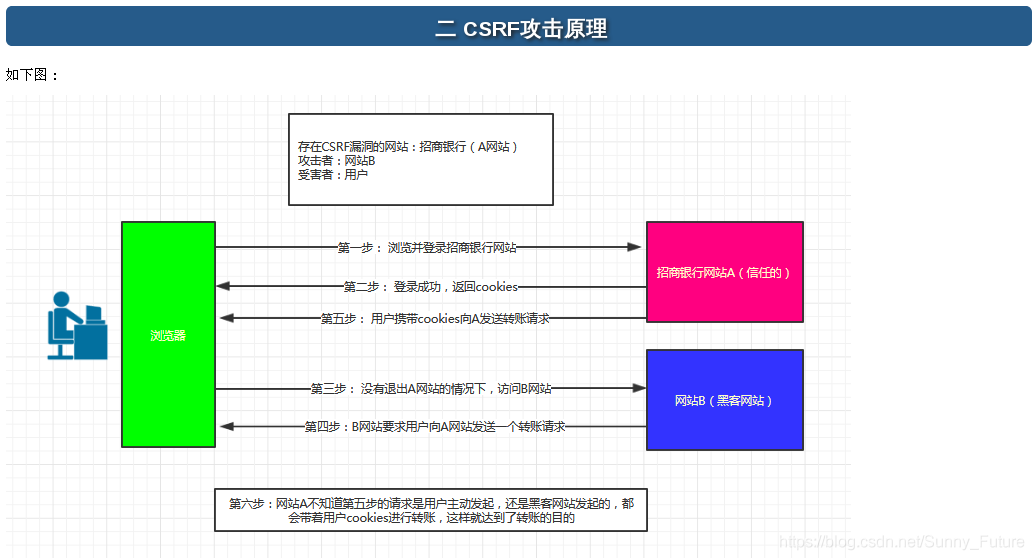
** cross-site Request Forgery (CSRF) vulnerability. ** is a malicious exploit of a website. Although it sounds like cross-site scripting (XSS), it is very different from XSS, which exploits a trusted user within a site, while CSRF exploits a trusted site by impersonating a Request from a trusted user. CSRF attacks tend to be less prevalent (and therefore have relatively few resources to defend against) and harder to defend against than XSS attacks, and are therefore considered more dangerous than XSS attacks

can understand :
the attacker steal your identity, in the name of your sending malicious request, the request for server is perfectly legal, but finished the attacker’s expectation of an operation, such as in the name of your email, send messages, to steal your account, add a system administrator, or even to buy goods, virtual currency transfer, etc.

Django’s protection against CSRF is to place an auto-generated token in each generated form to determine whether a POST request is coming from the same site

solution one:

Use the Django template here. Use the TemplateTag to add CSRF tokens. Add {% crrf_token %}

in the from form

# index.html
...
<form method="post">
  <div >
    <input  name="username" placeholder="username"><br>
    <input  name="password" placeholder="password"><br>
    <div >
    <button type='submit' id='btn'>提交</button>
    </div>
 </div>
  {% csrf_token %}
</form>
...

again, refresh the page and resubmit the form to access

normally

solution two:

simply ignores this check and comments CSRF in the Settings. Py of the project

MIDDLEWARE = [
    'django.middleware.security.SecurityMiddleware',
    'django.contrib.sessions.middleware.SessionMiddleware',
    'django.middleware.common.CommonMiddleware',
    #'django.middleware.csrf.CsrfViewMiddleware',
    'django.contrib.auth.middleware.AuthenticationMiddleware',
    'django.contrib.messages.middleware.MessageMiddleware',
    'django.middleware.clickjacking.XFrameOptionsMiddleware',
]

CSRF (cross-site request forgery)

CSRF specific see:
https://www.cnblogs.com/liuqingzheng/p/9505044.html

Failed to connect to remote VM. Connection reused. Connection reused: Connect

as shown in the figure:
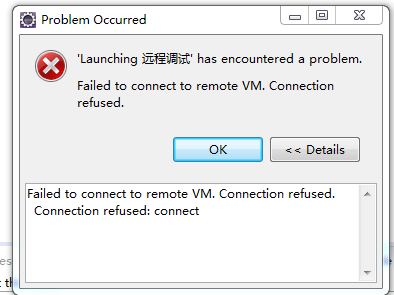
:

solution 1 : the service is started under the root account, turn off the service, kill the process, and then log in with a normal user to restart the service!

solution 2 : find run-debug Configurations -remote Java Application find the corresponding project under connect’s tag set port to 8000 (which means invalid in my case)

If

still doesn’t work, delete all WebViewHistory under Remote Java Application. Instead of creating a new one, Debug it and Eclipse will automatically create a default WebViewHistory for you. Do not debug directly! Close test)

solution 3 : it is possible that there is a firewall problem (close the firewall, this problem still exists!

solution 4 : because it was possible before, so puzzled, Google for a long time, can find the problem is generally because the other side did not open the remote debugging port, so naturally not connected, but I here obviously is not the case. After a long period of confusion, it occurred to me that I might be affected by the Eclipse proxy Settings. It seems unlikely, though, because my understanding is that the agent is only for Eclipse itself, not for applications launched through Eclipse.

solution 5 : this is because Tomcat has not started yet, or it is not started in Debug mode. (of course I don’t have this problem here)

solution 6 : other people in the same group own the connection (only one connection can be used for remote debugging), click the disconnect button. (I still don’t have that problem here)

: it’s important to run the application and connect to it, otherwise Eclipse will throw an exception “Failed to connect to remote vm.connection 40”. In the JVM DEBUG parameter, there is a parameter called “suspend” that takes two values, “y” or “n”, and if you want to DEBUG from the beginning, set it to “suspend=y” so that Eclipse can connect to Java applications remotely.
if you want to run the project first and then connect to Eclipse, you can set the parameter to “suspend=n” so that the Java application will be up and running, after which Eclipse will start the remote connection. Tip 2: use the startup script to enter JVM debugging parameters, and use the variable isDebugEnabled or REMOTE_DEBUG_PORT in the script, which you can export when you want to remotely debug Java applications. The entire operation is very simple, requiring only a one-time installation.
prompt 3: if you get an error message, “Failed to connect to remote vm.connection union” or “Connection union: connect”, there are two possible reasons for this. The first is that your Java project is not running on the remote host. The second is that there are errors in the input port and host name. After successful verification, you can fill in the complete host name. Tip 4: you also want to make sure that local Eclipse and remote Eclipse run the same code base. Code can be compiled using the debug option “-g”, and Eclipse can easily collect debugging information, such as debugging information for local variables. By default, with the debug option “-g”, the class file may have larger debug information.

.

solution 8 : find the tomcat/bin/catalina.bat file, edit, and add the downstream code

before CATALINA_OPTS

set CATALINA_OPTS=-server – xdebug-xnoager-djava.com piler= none-xrunjdwp :transport=dt_socket,server=y,suspend=n,address=50001 [port number used for debugging]

save and restart Tomcat (this one doesn’t solve my problem either)

solution 9 : the most likely reason is that the IP address in Eclipse is misconfigured (for this reason, copying the IP address is wrong, so am I…)

solution 10 :
estimated that the network is unstable, but finally the debugging was successful. this… )

solution 11 : firewall issues. Turn off the web firewall in 360 and you’re good to go. I reload every time. This time the reason has finally been found.

.

conclusion : in the future, you must look at the most basic configuration, and then step by step to determine whether your conclusion is correct. In fact, IP address error, this problem should be the first reason to rule out, but I for some reason, did not check, so that I wasted a day’s time!
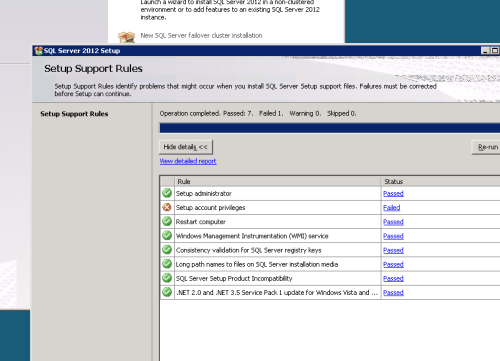
Unable to install SQL Server (setup.exe), VS Shell installation has failed with exit code 1638.

solution

problem may be that there is an updated version of Visual C ++ Redistributable that SQL Server is trying to install, for example, from Visual Studio 2017. If you don’t need the latest C ++ Redistributable component, one way to resolve this problem is to add or remove programs and undistribute all references to Visual C ++ 2017 Redistributable. After this, the SQL Server installation should continue without error.

The problem is likely that there’s a newer version of the Visual C++ Redistributable than SQL Server is trying to install, e.g., from Visual Studio 2017. So another way to address this, if you don’t need the latest C++ redistributable, is to go to Add or Remove Programs and uninstall all references to Visual C++ 2017 Redistributable. After this, the SQL Server installation should proceed without errors.

About Xcode command phasescriptexecution failed with a nonzero exit code solution

1. Problem description

USES Xcode for code writing, and the following error has been reported during the compilation process when the new project code is pulled down during project development.

Command PhaseScriptExecution failed with a nonzero exit code

after searching on the Internet, most of the solutions given on the Internet were as follows. However, after I tried, the problem was not solved, but more mistakes were reported. Therefore, I consulted my tutor again, and finally got the solution.

encountered this bug hint when running a project, which could not be compiled. This is actually a bug caused by Xcode10. Solution: Select File -&gt in Xcode menu bar; Workspace Setting -> Choose Legacy Build System to rerun.

The primary cause of

is that the workspace is full, leading to code compilation errors, and there are roughly two ways to solve this problem.

(1) enter the code working cache folder of Xcode to clean manually ( is error-prone, is not recommended)

(2) use only the cleaning method provided by Xcode directly. Xcode will automatically link the working file after cleaning the workspace ( will not make mistakes, is recommended)

because the second method is easier to work with and less likely to go wrong, we use this method directly in the solution.

ii. Solution

1. First in Product -> Scheme selects the main code module for the current project

2. Select Product -> Clean Build Folder Clean workspace

3. Recompile the project code after

Job for docker.service failed because the control process exited with error code. See systemctl sta

Dock worker startup error reported as:
[root@iz8vb4rhbik3h93v48ztfvz dockworker]# systemctl restart dockworker. Service
docker job. The service failed because the control process exited with an error code. See “systemctl state docker”. Services” and “journalctl -xe” for more information.
[root@iz8vb4rhbik3h93v48ztfvz docker]# systemctl stop docker
[root@iz8vb4rhbik3h93v48ztfvz docker]# systemctl status docker
● docker load:load(/usr/lib/systemd/system/ Docker .service; enable;
Activation:failed(result:startup limit) from Mon 2020-06-15 23:52:04 CST;
Docs: https://docs.docker.com>
Process: 9466 ExecStart=/usr/bin/dockerd -H fd://–containerd=/run/containerd/containerd. sock (code=exit, status=1/FAILURE)
Main PID: 9466 (code=exit, status=1/FAILURE)</p

Jun 15 23:52:02 iz8vb4rhbik3h93v48ztfvz systemd[1]: unit docker application container engine failed to start.
Jun 15 23:52:02 iz8vb4rhbik3h93v48ztfvz systemd[1]: Unit docker service enters failed state.
Jun 15 23:52:02 iz8vb4rhbik3h93v48ztfvz systemd[1]: docker service failed.
Jun 15 23:52:04 iz8vb4rhbik3h93v48ztfvz systemd[1]: docker service delay has expired, a restart is planned.
Jun 15 23:52:04 iz8vb4rhbik3h93v48ztfvz systemd: Docker application container engine stopped.
Jun 15 23:52:04 iz8vb4rhbik3h93v48ztfvz systemd[1]: docker startup request repeats too fast. iz8vb4rhbik3h93v48ztfvz systemd[1]: docker application container engine failed to start.
Jun 15 23:52:04 iz8vb4rhbik3h93v48ztfvz systemd[1]: unit docker. the service entered a failed state.
Jun 15 23:52:04 iz8vb4rhbik3h93v48ztfvz systemd[1]: docker service failed. Start docker.
Job to docker. Service failed because it tried to start the service too many times. See “systemctl state docker”. Services” and “journalctl -xe” for more information.
To force startup use “systemctl reset-failed docker”. Followed by “systemctl reset-failed docker”. Service” is now enabled.

The reason is that the daemon.json file has been modified and needs to be modified again.

After modification by mv command, the dock worker will start normally.


[root@iz8vb4rhbik3h93v48ztfvz docker]# mv daemon.json daemon.conf
[root@iz8vb4rhbik3h93v48ztfvz docker]# systemctl start docker
[root@iz8vb4rhbik3h93v48ztfvz docker]# systemctl status docker
● docker.service - Docker Application Container Engine
   Loaded: loaded (/usr/lib/systemd/system/docker.service; enabled; vendor preset: disabled)
   Active: active (running) since Mon 2020-06-15 23:53:59 CST; 4s ago
     Docs: https://docs.docker.com
 Main PID: 9510 (dockerd)
    Tasks: 10
   Memory: 50.6M
   CGroup: /system.slice/docker.service
           └─9510 /usr/bin/dockerd -H fd:// --containerd=/run/containerd/containerd.sock

Jun 15 23:53:58 iz8vb4rhbik3h93v48ztfvz dockerd[9510]: time="2020-06-15T23:53:58.554833629+08:00" level=info msg="ccResolverWrapper: sending update to cc: {[{unix:///run/contain...module=grpc
Jun 15 23:53:58 iz8vb4rhbik3h93v48ztfvz dockerd[9510]: time="2020-06-15T23:53:58.554857738+08:00" level=info msg="ClientConn switching balancer to \"pick_first\"" module=grpc
Jun 15 23:53:58 iz8vb4rhbik3h93v48ztfvz dockerd[9510]: time="2020-06-15T23:53:58.570959343+08:00" level=info msg="[graphdriver] using prior storage driver: overlay2"
Jun 15 23:53:58 iz8vb4rhbik3h93v48ztfvz dockerd[9510]: time="2020-06-15T23:53:58.898909596+08:00" level=info msg="Loading containers: start."
Jun 15 23:53:59 iz8vb4rhbik3h93v48ztfvz dockerd[9510]: time="2020-06-15T23:53:59.152882347+08:00" level=info msg="Default bridge (docker0) is assigned with an IP address 172.17....IP address"
Jun 15 23:53:59 iz8vb4rhbik3h93v48ztfvz dockerd[9510]: time="2020-06-15T23:53:59.245906513+08:00" level=info msg="Loading containers: done."
Jun 15 23:53:59 iz8vb4rhbik3h93v48ztfvz dockerd[9510]: time="2020-06-15T23:53:59.283200393+08:00" level=info msg="Docker daemon" commit=afacb8b graphdriver(s)=overlay2 version=19.03.8
Jun 15 23:53:59 iz8vb4rhbik3h93v48ztfvz dockerd[9510]: time="2020-06-15T23:53:59.289824517+08:00" level=info msg="Daemon has completed initialization"
Jun 15 23:53:59 iz8vb4rhbik3h93v48ztfvz dockerd[9510]: time="2020-06-15T23:53:59.320315408+08:00" level=info msg="API listen on /var/run/docker.sock"
Jun 15 23:53:59 iz8vb4rhbik3h93v48ztfvz systemd[1]: Started Docker Application Container Engine.
Hint: Some lines were ellipsized, use -l to show in full.

</ p>
</ div>

error:X11 initialization Failed solutions

tatus 1:Autolaunch error:X11 initialization failed.\n (sudo gedit..) Solution:

# vi /etc/sudoers

press a to enter edit mode

Defaults env_keep=”DISPLAY XAUTHORITY”

press ESC to exit edit mode

:wq (save and exit)

the article from Linux 51 cto blog, blog links to the original http://blog.51cto.com/yangzhiming/1396721 for reprint please contact our author


yangzhimingg

NPM warn optional skipping optional dependency: 1 [email protected] (node_ modules\fsevents):

when executing NPM install may report the following error:

NPM WARN optional Tours DEPENDENCY: fsevents@node_modules \fsevents> :
NPM WARN notsup Tours optional Tours DEPENDENCY: Unsupported platform for [email protected]: wanted {“os”:”darwin”,”arch”:”any”} (current: {“os”:”win32″,”arch”:”x64″})

query found that fsevent is MAC system, used in win or Linux, so there will be a warning, ignore it. The function of FSEvent is to detect the change of file directory, can record the illegal operation of the malware, obtain the full path of the malware, delete and modify date.

Mac – build. Net development environment

1。安装openssl

brew update
brew install openssl

2. Install.net core SDK

sudo install_name_tool -add_rpath /usr/local/opt/openssl/lib /usr/local/share/dotnet/shared/Microsoft.NETCore.App/1.0.2/System.Security.Cryptography.Native.dylib 

3. Go to install vs code
install c# extension: open vs code, press command+p and enter

ext install csharp

Test

4.

mkdir HelloWorld
cd HelloWorld
dotnet  new
dotnet restore
dotnet run

effect

Project HelloWorld (.NETCoreApp,Version=v1.0) will be compiled because expected outputs are missing
Compiling HelloWorld for .NETCoreApp,Version=v1.0

Compilation succeeded.
    0 Warning(s)
    0 Error(s)

Time elapsed 00:00:01.4283528


Hello World!

5. Open the newly created HelloWorld with vs code, install the plug-in according to the prompts, the final effect is

Updating C# dependencies...
Platform: darwin, x86_64

Downloading package 'OmniSharp for OSX' (24653 KB) .................... Done!
Downloading package '.NET Core Debugger (macOS/x64)' (43967 KB) .................... Done!

Installing package 'OmniSharp for OSX'
Installing package '.NET Core Debugger (macOS/x64)'

Finished
Failed to spawn 'dotnet --info'
Warning: project.json is no longer a supported project format for .NET Core applications. Update to the latest version of .NET Core (https://aka.ms/netcoredownload) and use 'dotnet migrate' to upgrade your project (see https://aka.ms/netcoremigrate for details).

resources http://www.cnblogs.com/gk0124/p/6066857.html

http://blog.csdn.net/x_studying/article/details/52730913

To solve the problem of loading rjava in installation of xlsx

[run target]
import XLSX file,
install. Packages (” rJava “)
install. Packages (” xlsxjars “)
install. Packages (” XLSXX “)
install

[error prompt]

library (XLSX) Error: package or namespace load failed for ‘XLSX:
loadNamespace counting’ rJava ‘in his (). When the onLoad fails, the detailed content:
call: inDL (x, as the logical (local), as the logical (now),…).
error: unable to load Shared object “d:/Program Files/R/R – 3.5.0/library/rJava/libs/x64/rJava DLL: ‘
LoadLibrary failure: % 1 is not a valid Win32 application.

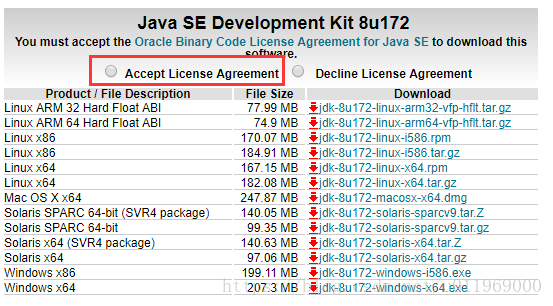
solution 】 【 1, Java on the website to download the Windows version of the Java software

http://www.oracle.com/technetwork/java/javase/downloads/jdk8-downloads-2133151.html

download download time attention to agree with statement after good Java installation
note:
if R is 64-bit, the installed Java must also be 64-bit and placed in C:\Program Files…
if you install C:\Program Files (x86), the system will continue to report the following error

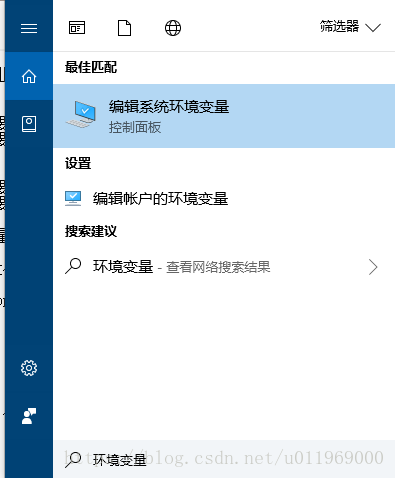
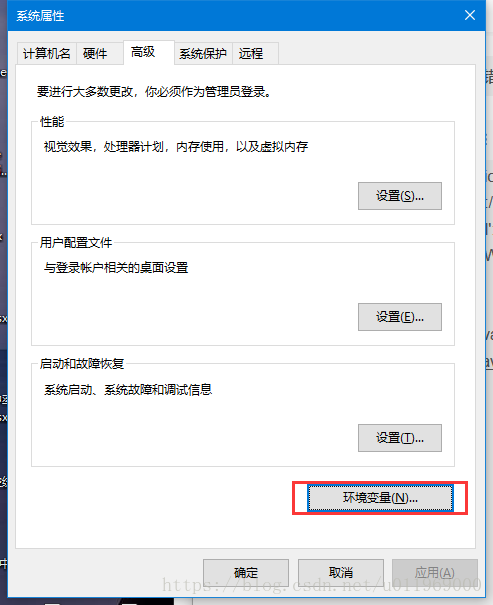
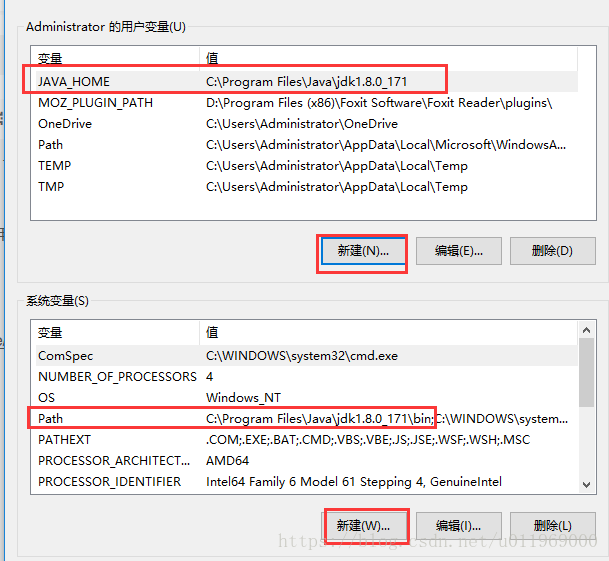
2, download the Java, and install it, Under CMD, type
set JAVA_HOME=C:\Program Files\Java\jdk1.8.0_171
Path=C:\Program Files\Java\jdk1.8.0_171\bin
you can also manually set


3, finally re-run
library(rJava)
library(xlsxjars)
library(XLSX)
XLSX package imported successfully