introduction
will encounter a variety of problems in the process of using tensorflow, which will be recorded here for my review and later learning.
problem description
has tensorflow installed in anaconda, and the call has this problem:
>>> import tensorflow
Traceback (most recent call last):
  File "<stdin>", line 1, in <module>
  File "D:\Anaconda\envs\dl\lib\site-packages\tensorflow\__init__.py", line 24, in <module>
    from tensorflow.python import pywrap_tensorflow  # pylint: disable=unused-import
  File "D:\Anaconda\envs\dl\lib\site-packages\tensorflow\python\__init__.py", line 59, in <module>
    from tensorflow.core.framework.graph_pb2 import *
  File "D:\Anaconda\envs\dl\lib\site-packages\tensorflow\core\framework\graph_pb2.py", line 6, in <module>
    from google.protobuf import descriptor as _descriptor
  File "D:\Anaconda\envs\dl\lib\site-packages\google\protobuf\descriptor.py", line 47, in <module>
    from google.protobuf.pyext import _message
ImportError: DLL load failed: 找不到指定的程序。
solution
through careful review, yesterday I upgraded to protobuf when installing object-detection, so, call back the protobuf version, it should be ok.
pip install protobuf==3.6.0

WebSocket handshake Unexpected response code 403
sometimes when a client makes a websocket request, the front end displays an error as follows:
index.js:9 WebSocket connection to 'ws://127.0.0.1:8080/shop/ws?uid=3224458&sid=826' failed: Error during WebSocket handshake: Unexpected response code: 403
cause:
as of Spring Framework 4.1.5, the default behavior of WebSocket and SockJS is to accept only the same original requests. You can also allow a list of all or specified sources.
resolved:
links that are allowed to be accessed can be set when registered in WebSocketConfig.
setAllowedOrigins(String[] domains) allows long connections to a given domain name or IP(including port number), domains allowed to be accessed.
if you use the “*” sign indefinitely, and if you specify a domain name, you must start with HTTP or HTTPS.
example:
setAllowedOrigins (” http://127.0.0.1:8080 “);
or add setAllowedOrigins(“*”)
@Configuration
@EnableWebMvc
@EnableWebSocket
public class ShopWebSocketConfig extends WebMvcConfigurerAdapter implements WebSocketConfigurer{

	@Resource
	private ShopWebSocketHandler shopWebSocketHandler;

	@Override
	public void registerWebSocketHandlers(WebSocketHandlerRegistry registry) {
		registry.addHandler(shopWebSocketHandler, "/ws").addInterceptors(new ShopHandshakeInterceptor()).setAllowedOrigins("*");
		registry.addHandler(shopWebSocketHandler, "/sockjs/ws").addInterceptors(new ShopHandshakeInterceptor()).withSockJS();
	}
}
error: src refspec master does not match any error:failed to push some refs to ‘[email protected]:xxxx
once you have a local repository you need to set up a github repository and have both repositories remotely synchronized, the first time you synchronize your code remotely
occursgit push-u origin master has problems:
error: src refspec master does not match any
error: failed to push some refs to '[email protected]:xxxxxxxx/xxx.git'
cause:
1. If the readme.md is not checked when the remote warehouse is created: commit to the remote library without any content in the staging area. If the empty staging area cannot be committed, add and commit
are required at least once
2. If the readme.md file on github is not in the local directory
resolved:
if question 1:
git add .
git commit -m “commit all local code to origin”
git push -u origin master
if question 2:
Git pull –rebase origin master
this is where you can see the local readme.md file
and now you can do git push-u origin master
Remember a virtual machine expansion swapoff failed: cannot allocate memory
capacity expansion method :
capacity expansion method point here
Gparted when deleting “Linux swap” reported an error:
swapoff failed: Cannot allocate memory
found a solution online:
error report solution point here
results at the end of the cat /proc/meminfo check found that their available memory is not enough… After adding memory to it, delete “Linux swap” without returning an error
Ubuntu 18.04 desktop installation tasksel aptitude failed (100) problem repair
the ubuntu 18.04 desktop will not boot, possibly because the configuration of the graphical desktop was damaged while installing the remote desktop.
because baidu is not specific error files and related configuration. You can only delete the desktop system.
then the problem came, sudo apt install ubuntu-desk reported dependency problems, not to install.
so baidu, can use tasksel, perform really pop up a graphic after installation tools:
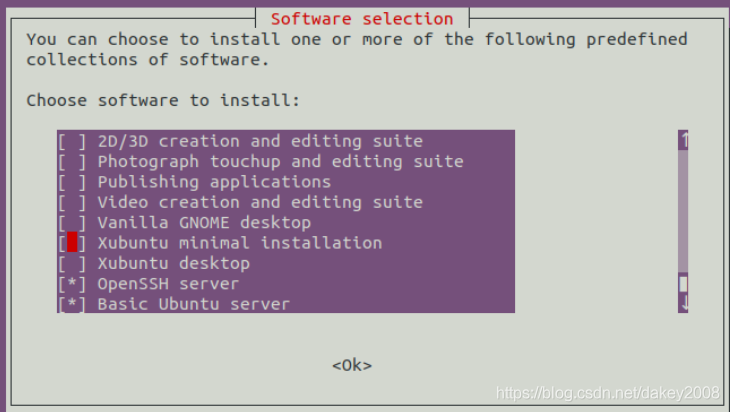
this installation should be OK, but TAB to OK, press ENTER, error:
tasksel aptitude failed (100)
is just another round of rummaging, but the good news is that something is wrong with the source of LINUX.
to view their current source, is a new ali cloud, may be posted online at that time there is a leak. Hurry up and get a new Qing Hua.
command-line switch:
CD/etc/apt/
vi sources.list
delete all content
copy and paste:
# 默认注释了源码镜像以提高 apt update 速度,如有需要可自行取消注释
deb https://mirrors.tuna.tsinghua.edu.cn/ubuntu/ bionic main restricted universe multiverse
# deb-src https://mirrors.tuna.tsinghua.edu.cn/ubuntu/ bionic main restricted universe multiverse
deb https://mirrors.tuna.tsinghua.edu.cn/ubuntu/ bionic-updates main restricted universe multiverse
# deb-src https://mirrors.tuna.tsinghua.edu.cn/ubuntu/ bionic-updates main restricted universe multiverse
deb https://mirrors.tuna.tsinghua.edu.cn/ubuntu/ bionic-backports main restricted universe multiverse
# deb-src https://mirrors.tuna.tsinghua.edu.cn/ubuntu/ bionic-backports main restricted universe multiverse
deb https://mirrors.tuna.tsinghua.edu.cn/ubuntu/ bionic-security main restricted universe multiverse
# deb-src https://mirrors.tuna.tsinghua.edu.cn/ubuntu/ bionic-security main restricted universe multiverse
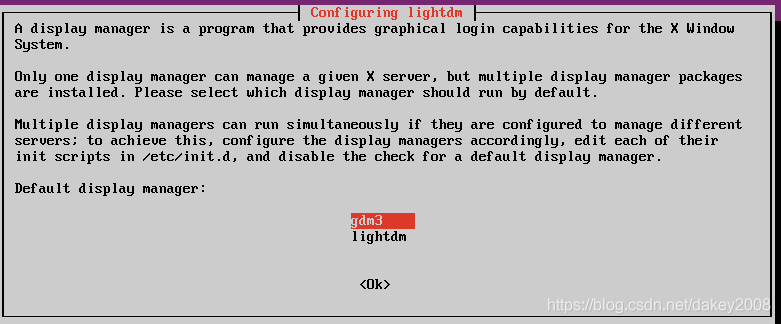
and tasksel will be running again. It’s like seeing the light of day again and tears running down my face.
After installing MySQL again under Linux, the solution of ‘MySQL module failed to start’ appears
had previously installed Mysql database on CentOS 6.4 and wanted to upgrade to a newer version so I updated the database. However, after reinstallation, run: service mysqld start to restart the database will always appear with the following prompt:
MySQL Daemon failed to start.
Starting mysqld: [failed]
Hint for
. If direct input mysql – root – p landing will appear (HY000)/mysql ERROR 2002: Can ‘t connect to local mysql server through socket’/var/lib/mysql/mysql. The sock ‘(2) errors. In general, the MySql server always fails to start. Many of the solutions offered online have not worked. Finally, the solution is as follows:
runs the following command:
 rm -fr /var/lib/mysql/*
rm /var/lock/subsys/mysqld
 killall mysqld
service mysqld restart
then run service mysqld start to launch mysql as shown in the figure below:
then run: service mysqld start
/etc/rc. D/init. D/mysqld status
view the database state as follows
found that the database is working properly problem solved.
Failed to read artifact descriptor for * maven
in the process of my code writing, this Maven error suddenly and inexplicably appeared,
Failed to read artifact descriptor for org.apache.hadoop:hadoop-common:jar:2.4.0query the cause of the problem, the original version is not matched, just the problem.
so here’s the solution:
1.
After opening the project, there is a Maven projects on the right side of Intellij, click on it, there is a Lifecycle, click on it again, you can see clean , validate, compile, .... Right-click clean, select Run 'project[clean]', where the project is the actual name of our project.
2.
In the same place (Lifecycle) find the install, select Run 'project[install]', where the project is also the name of our specific project, this process is longer, if you have encountered which jar package can not be downloaded, you can manually put it into the local m2 directory.
3.
Finally, find the Maven projects and click on "Reimport All Maven Projects", this time the error "Failed to .... " Disappears, required dependencies start downloading. Explanation of port mapping in dlink
http://hi.baidu.com/wwt06/item/29d5d5246f3a71d50f37f9f6
dlink set port map illustration (to solve the failure problem of electric TCP link test)
today to find a resource when you want to use the next donkey, so download the online reputation of emule a5.0a Xtreme8.0
test steps appear in the installation process, click test after. The problem arises:
Testing IP: 122.85.120.171 (122.85.120.171)
, Starting TCP connection test…
 TCP test failed! UDP test will not be performed.
Connection test finished.
Results in detail:
- TCP connection test failed.
It was not possible, to establish a TCP connection to your eMule.
Other users will only be able to connect to you with the help of a server, resulting in a low ID for you. While eMule still works, this will give you several disadvantages. Therfore it is highly recommended to solve this problem.
How to resolve port problems… Something is interfering with your network communications. There are two main reasons for this:
- If you are using a firewall, ensure that your firwall don’t block the required ports! You might need to set a rule to allow the ports to be available.
- If you use a router, make sure that your router forwards the required ports to your local IP!
- You can find more details and guides here in the online help.
this problem indicates that the TCP connection test fails and the udp test cannot be completed, which will become the low ID group and affect the normal function. We specifically look at the how to resolve Port Problems section, which focuses on how to resolve port problems and gives two main reasons:
1. If you use a firewall. To ensure that the firewall is not blocking this required port, you may need to set a rule to allow port use.
2. If you are using a router, make sure your router port maps to your own local IP!
for these two problems, let’s look at them separately. Easy to view for firewalls. Turn off the firewall at most. After the test does not matter, no firewall can still test not pass. Therefore, it is likely to be the second reason. The second reason should be checked in the router Settings. The specific steps are as follows:
(note that I am using a dlink di-524m router, which may have different Settings depending on the router)
enter in the browser: “192.168.0.1” to open the router interface, log in with admin, and click “advanced Settings” — “port forwarding”
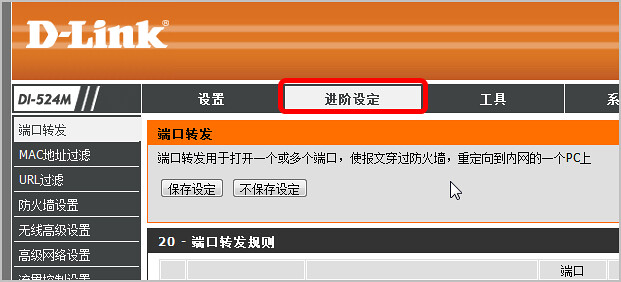
set specific rules as follows:
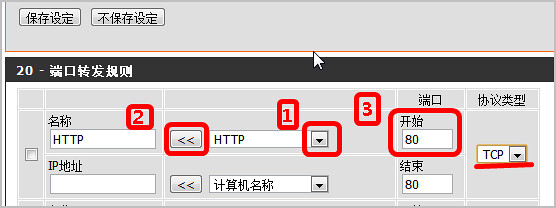
be careful here because we are dealing with TCP connections. So we chose the HTTP application, but otherwise we chose the computer name. Then click the arrow on the left to automatically add the IP address, and notice what port number you want to test, fill in the port box:
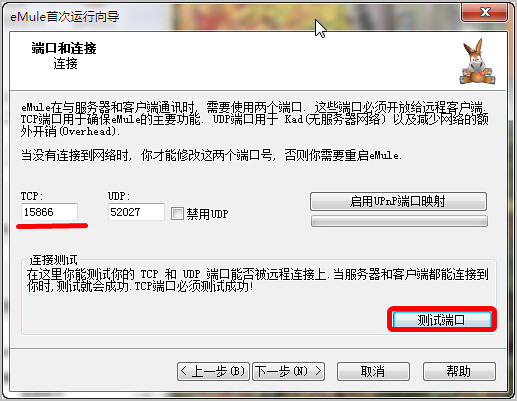
here is 15866, so we fill in 15866 in the port, the final effect is as follows:
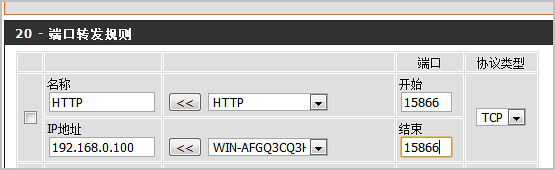
check the small box on the left and click save Settings at the top. With respect to ok. (This function opens only one port when the same port number is entered at the beginning and the end.)
retested the connection and found that the TCP test passed but the udp port test failed:
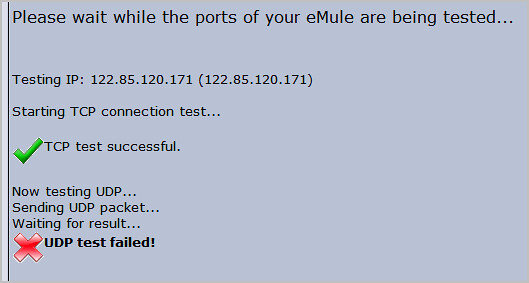
has a detail:
UDP connection test failed.
A sent UDP packet could not be received by your eMule. UDP communication is used for Kad and to reduce bandwidth usage (Overhead) – which will not work for you. Although the main operativeness of eMule is still available to you by TCP communication.
mean: udp test fails, a packet has not been sent out your emule software receives, udp communication is used by the kad network (no server network) and use less bandwidth overhead (network) – now it will not work for you, even if via TCP communications has made, the main operation effect.
should also be the problem that the port cannot be opened. Before, our port ends and starts with the same number 15866, so only this port is opened. Of course, whether to enable udp port is an optional item. It’s a must. See if you want to use it. Here we simply repeat the previous setup, except that the port is changed to UDP. Here Is 52027. After selecting udp (not TCP), please pay attention to select UDP in the protocol. Retest after saving:
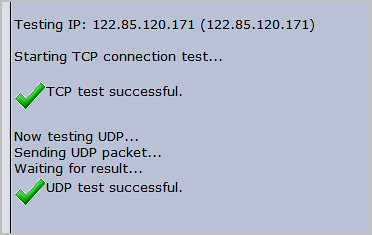
and it’s perfect! Perfect! Now that you know how to set up port mappings, you can solve some of the software problems you encounter.
reprint please indicate from: oh! Ding dong http://wodingdong.com/
comparison of Fixnum with nil failed
  def validate
    errors.add(:score, '您的积分不够') if (!self.cur_ask_score.nil?) && (self.score > self.cur_ask_score)
  end
, that’s the validation in the model.
  def validate
    errors.add(:score, '您的积分不够') if self.score > self.cur_ask_score
  end
results in the following error:
comparison of Fixnum with nil failed
just now, I ran into a weird problem — the usual assumption is that saving a successful operation doesn’t work!
this kind of problem, generally is the model validation failure caused by!
Macfee can not be upgraded, the prompt returns an error
Macfee can not be upgraded, the error is returned, uninstall and reinstall, the upgrade prompt becomes “Initialization of the general update program subsystem failed, make sure the McAfee Franework service is running. “. Going into the Service Console to manually start McAfee’s Common Frame service, the service cannot be started.
Official error message:
Corporate KnowledgeBase
ERROR: McAfee Common Framework returns error ffff95b @ 2 (issue: FrameworkManifest.xml corrupt)
Enterprise Knowledge Base ID: KB54520
Published: August 8, 2008
environment
McAfee Common Management Agent 3.60
McAfee VirusScan Enterprise 8.5i
McAfee VirusScan Enterprise 8.0i
McAfee VirusScan Enterprise 8.0i
The following error occurs after starting AutoUpdate:
McAfee Common Framework returns error ffff95b @ 2.(FrameworkManifest.xml corrupt).
Public Updater Subsystem Initialization Failure
Confirm that McAfee Framework services are running
Problem 2
Subsequent errors when trying to start the McAfee Framework service:
Unable to start McAfee Framework service on local computer
<p The system could not find the specified file.
Question No. 3
The following update method will cause an automatic error:
Right-click the McShield icon in the system tray and select Update Now
Right click on McCafe’s automation console and click on Start.
Create a new scheduled task to edit an existing property Automated tasks
Cause FrameworkManifest.xml has become corrupted.
Solution 1
McAfee Agent 4.0
McAfee Agent 4.0 design changes will prevent corruption of the FrameworkManifest.xml file.
Retrieved from www.mcafee.com网站下载McAfee代理, see KB54808. </ p>
Solution 2
General Management Agent
Solution 1 – Get frameworkmanife.xml from another computer:
Find another Virus Scanning Enterprise (VSE) computer where the update job is error-free. Copy FrameworkManifest.xml from the following path:
For VSE 8.5i (running on Windows Vista)
x:/Program Data/McAfee/Common Framework
x:/Documents and Settings/All Users/Application Data/McAfee/Generic Framework</font bb1 For VSE 8.5i (runs on Windows XP and earlier)
x:/documents and settings/all users/application data/McAfee/generic framework</font
Paste the file into a portable media or network share file that can be accessed by two computers.
Click Start, Run, type Service. , and click OK.
Right-click the McAfee Framework Service and select Stop.
Copy FrameworkManifest.xml to the public framework directory.
Right-click McAfee Framework Service and select Start.
Update the product. </ font> </ p>
Solution 2 – Delete FrameworkManifest.xml and reinstall the Common Management Agent (CMA)
It is necessary to remove FrameworkManifest.xml, as it may not be removed or replaced when uninstalling/reinstalling. </ font> </ p>
Step 1 – Allow to modify VSE files and settings (only VirusScan Enterprise 8.5i and above) </p
Click on Start, Programs, McAfee, VirusScan Console.
Right-click on Access Protection and select Properties.
Select Common Criteria Protection.
Select “Prevent modification of McAfee files and settings” and disable this option.
Click OK.
Step 2 – Delete FrameworkManifest.xml and reinstall CMA:
Remove FrameworkManifest.xml from the following path:
For VSE 8.5i (running on Windows Vista)
x:/Program Data/McAfee/Common Framework
x:/Documents and Settings/All Users/Application Data/McAfee/General Framework font bb1 For VSE 8.5i (runs on Windows XP and earlier)
x:/documents and settings/all users/application data/McAfee/generic frameworkfont
Font Restart your computer.
Reinstall the Common Management Agent (CMA)/ePO agent.
Note: The CMA can be downloaded from the McAfee download site. See KB54808.
Previous Document ID
5432392
Please take a moment to fill out this form to help us serve you better.
The original introductory page for the official font workaround is
https://kc.mcafee.com/corporate/index?page=content& id = KB54520
Translated with www.DeepL.com/Translator (free version)
Glxchoosevisual failed in Ubuntu 16.04 steam
system :Ubuntu16.04
after the update of graphics card driver steam has been prompted that ‘glXChooseVisual failed’, how can I bear
different methods on many blogs, the graphics drivers have changed and changed, the system kernel has also changed, finally still can not completely solve the problem, of course, it may be my machine was I do too much, a variety of miscellaneous problems stacked together
the final solution is
if you are using a nvidia driver, sometimes you will find libgl.so.1 pointing to the fuzzy libGL provided by mesa and nvidia. To test this, run this command on the terminal :
sudo ldconfig -p | grep -i gl.soyou’re going to get
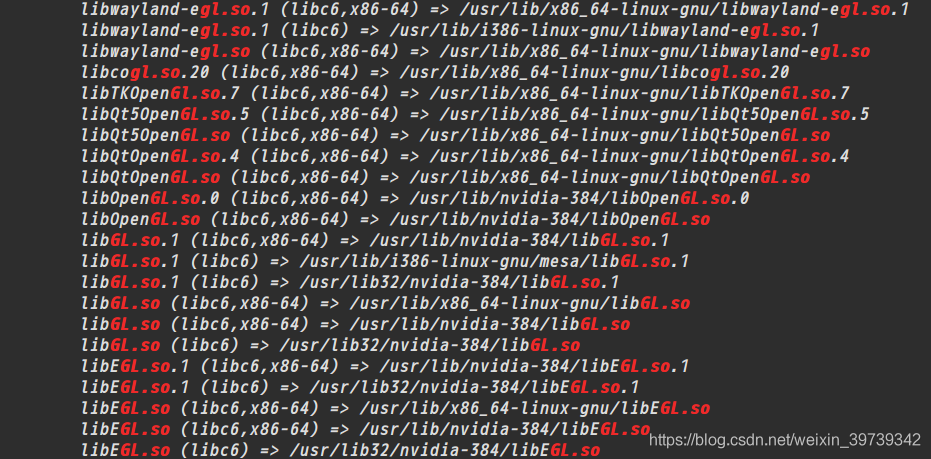
then you only need to delete the library provided on the table, as follows :
sudo rm /usr/lib/i386-linux-gnu/mesa/libGL.so.1and steam will be perfect
this issue was a night, finally found in this web site (https://askubuntu.com/questions/834254/steam-libgl-error-no-matching-fbconfigs-or-visuals-found-libgl-error-failed-t/903488#903488), a try, the perfect solution!!!!!
Driver failed programming external connectivity on endpoint quirky_ allen
docker port mapping or starting container Error Error response from daemon: driver failed programming external connectivity on endpoint quirky_allen
phenomenon:
[root@localhost ~]# docker run -d -p 9000:80 centos:httpd /bin/sh -c /usr/local/bin/start.sh
d5b2bd5a7bc4895a973fe61efd051847047d26385f65c278aaa09e4fa31c4d76
docker: Error response from daemon: driver failed programming external connectivity on endpoint quirky_allen (6bda693d1143657e46bee0300276aa05820da2b21a3d89441e820d1a274c48b6): (iptables failed: Iptables — wait-T nat-a Docker-P TCP-D 0/0 — Dport 9000-j DNAT — to-Destination 172.17.0.2:80! -i docker0: iptables: No chain/target/match by that name.
(exit status 1)).
[root@localhost ~]# docker start d5b2bd5a7bc4
Error response from daemon: driver failed programming external connectivity on endpoint quirky_allen (4127da7466709fd45695a1fbe98e13c2ac30c2a554e18fb902ef5a03ba308438): (iptables failed: Iptables — wait-T nat-a Docker-P TCP-D 0/0 — Dport 9000-j DNAT — to-Destination 172.17.0.2:80! -i docker0: iptables: No chain/target/match by that name.
(exit status 1))
Error: failed to start containers: d5b2bd5a7bc4
reason :
docker service startup custom chain docker due to centos7 firewall has been removed
The
firewall is based on iptables for data filtering, which may cause conflicts with Docker.
when firewalld is started or restarted, the rules of DOCKER will be removed from the iptables, thus affecting the normal work of DOCKER.
when you are using Systemd, firewalld will start before Docker, but if you start after Docker or restart firewalld, you will need to restart the Docker process.
restart docker service and regenerate the custom docker
chain
Chain PREROUTING (policy ACCEPT)
target     prot opt source               destination
DOCKER     all  --  0.0.0.0/0            0.0.0.0/0            ADDRTYPE match dst-type LOCAL

Chain INPUT (policy ACCEPT)
target     prot opt source               destination

Chain OUTPUT (policy ACCEPT)
target     prot opt source               destination
DOCKER     all  --  0.0.0.0/0           !127.0.0.0/8          ADDRTYPE match dst-type LOCAL

Chain POSTROUTING (policy ACCEPT)
target     prot opt source               destination
MASQUERADE  all  --  172.17.0.0/16        0.0.0.0/0
MASQUERADE  tcp  --  172.17.0.2           172.17.0.2           tcp dpt:8080

Chain DOCKER (2 references)
target     prot opt source               destination
RETURN     all  --  0.0.0.0/0            0.0.0.0/0
DNAT       tcp  --  0.0.0.0/0            0.0.0.0/0            tcp dpt:8888 to:172.17.0.2:8080
root@router:playbook#iptables -t nat -nL
Chain PREROUTING (policy ACCEPT)
target     prot opt source               destination
DOCKER     all  --  0.0.0.0/0            0.0.0.0/0            ADDRTYPE match dst-type LOCAL

Chain INPUT (policy ACCEPT)
target     prot opt source               destination

Chain OUTPUT (policy ACCEPT)
target     prot opt source               destination
DOCKER     all  --  0.0.0.0/0           !127.0.0.0/8          ADDRTYPE match dst-type LOCAL

Chain POSTROUTING (policy ACCEPT)
target     prot opt source               destination
MASQUERADE  all  --  172.17.0.0/16        0.0.0.0/0
MASQUERADE  tcp  --  172.17.0.2           172.17.0.2           tcp dpt:8080

Chain DOCKER (2 references)
target     prot opt source               destination
RETURN     all  --  0.0.0.0/0            0.0.0.0/0
DNAT       tcp  --  0.0.0.0/0            0.0.0.0/0            tcp dpt:8888 to:172.17.0.2:8080
restart docker service then start the container
systemctl restart docker
docker start foo