Category Archives: How to Fix

Error building Player because scripts had compiler errors when packaging ab package

The Error Building Player because scripts had Compiler errors occurred when packing AB packages

Generally occur when the problem mostly using UnityEditor namespace, solution is new and the Editor folder put the script in the space, but for ab to check the packaging can be more than just a namespace, please note that the Editor folder you script the macro definition of whether to use the UNITY_EDITOR or UNITY_EDITOR_WIN two macro definition, if you are using the macro definition is then packaged ab package when also can appear similar problem.
Just try UNITY_STANDALONE_WIN Windows and UNITY_STANDALONE_OSX or just UNITY_STANDALONE_OSX alone if you just want to test it on the Win or Mac platform
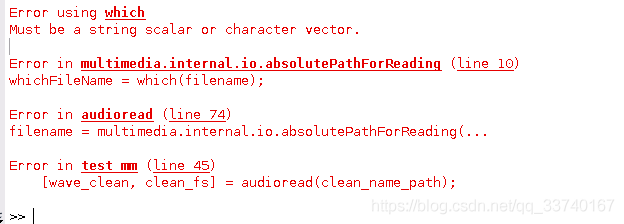
How to solve the problem of Cannot find module’npmlog’ when installing nodejs under Linux

I used Ubuntu version of Linux, downloaded nodeJS6 executable file compression package from nodeJS official website, extracted it into folder under the Window, and uploaded it to Linux server through WinSCP.
Configure environment variables:
Add a nodejs.sh script under /etc/profile.d/, which reads as follows:

export NODE_HOME=/home/TECS/nodejs/node-v6.11.1-linux-x64
export PATH=$PATH:$NODE_HOME/bin
export NODE_PATH=$NODE_HOME/lib/node_modules

If you want to make the configuration work without restarting the machine, repeat the three commands from the command line.
Running NPM-V at this time Cannot find Module ‘NPMLOG’ error.
The solution
CD command enter /home/TECS/nodejs/node-v6.11.1-linux-x64/bin then execute the following command to establish the soft connection:

ln -s ../lib/node_modules/npm/bin/npm-cli.js

The generated NPM-cli.JS soft connection is then renamed to NPM. The original NPM file is not available.

mv npm-cli.js npm

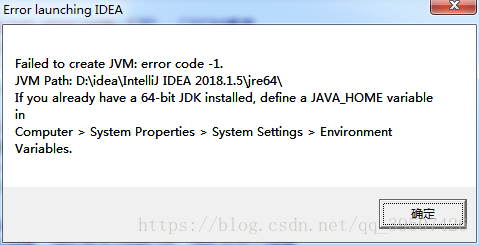
Idea startup prompt failed to create jvm: error code -1 jvm path solution


I modified ideA64. Exe. Vmoptions file of IDEA before, but when I restarted it prompted a problem similar to the above one, and deleted the parameters also prompted this one. Baidu searched for the solution, reloaded IDEA and reloaded JDK, but all of them failed to solve the problem.
This file does not have to exist, idea can still work without this file, but when custom parameters are needed, this file will be created for the first time.
Again this problem might as well delete C:\Users\ name \.IntelliJIdea2018.1\config vmoption file, simple and crude
 

Gulp Error: Cannot find module ‘jshint/src/cli’;

In the book “Automatic Construction of Web Front End”, according to the second chapter “Introduction to Gulp”, in order to use JSHint to conduct code style check, after installing Gulp-Jshint, I wrote the following example code:

const jshint = require('gulp-jshint');

gulp.task('test', () => {
    return gulp.src('./app/**/*.js')
        .pipe(jshint())
        .pipe(jshint.reporter('default'))
        .pipe(jshint.reporter('fail'))
});

When running gulp test, the following error occurs:

module.js:442
    throw err;
    ^

Error: Cannot find module 'jshint/src/cli'
    at Function.Module._resolveFilename (module.js:440:15)
    at Function.Module._load (module.js:388:25)
    at Module.require (module.js:468:17)
    at require (internal/module.js:20:19)
    at Object.<anonymous> (E:\Nodejs\mywebpackDemo\node_modules\gulp-jshint\src\extract.js:1:79)
    at Module._compile (module.js:541:32)
    at Object.Module._extensions..js (module.js:550:10)
    at Module.load (module.js:458:32)
    at tryModuleLoad (module.js:417:12)
    at Function.Module._load (module.js:409:3)

Analysis of the
The console reports an error and cannot find Jshint. The easiest way to resolve this error is to install the package that cannot be found.
The solution

NPM install --save-dev jshint
When using JSHint for code style checking, JSHint and gulp-jshint can be installed directly once.
namely:
NPM install --save-dev jshint gulp-jshint
Reference articles:
https://stackoverflow.com/questions/33984558/gulp-error-cannot-find-module-jshint-src-cli

Solution to stray’\357′ in program when gcc is compiled

Link: http://blog.chinaunix.net/uid-23089249-id-61541.html

I got a few header files from my colleagues. It’s ok to compile with GCC, but a whole bunch of them came up when I compiled with ARM-Linux-gcc!

SerialPort.h:1: error: stray ‘\357’ in program

SerialPort.h:1: error: stray ‘\273’ in program

SerialPort.h:1: error: stray ‘\277’ in program

Look at these errors confused, after looking up the Internet, found that some characters in the file compiler does not support. If you look for these characters one by one, you’ll probably be looking for a long time! The simplest solution:
Put the files into The Windows system, use “Notepad” to open these files, and then “save as”, choose the code ASNI, and then under Linux to re-compile with the compiler, generally can pass!

Experience:

The first time: unknown;

Second time: when compiling QT program, prompt this error; According to the above method solved.

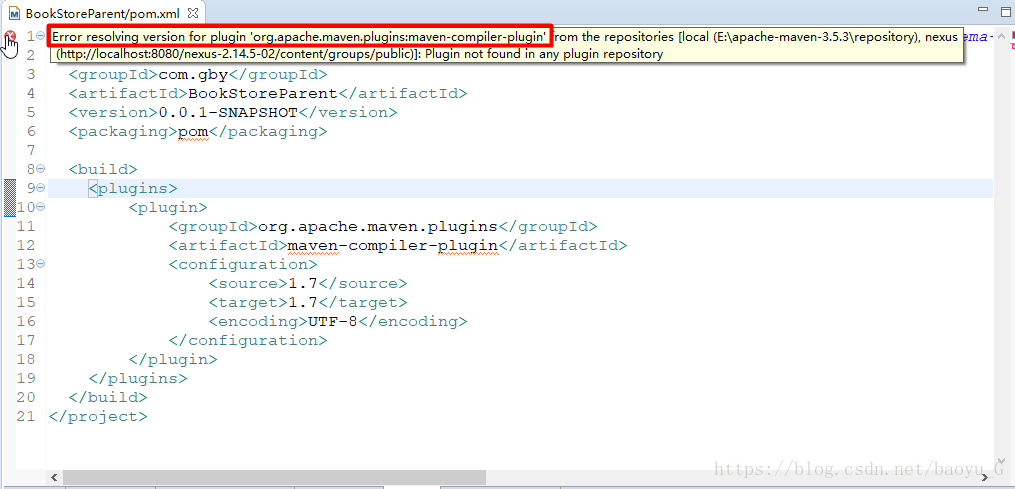
Error resolving version for plugin ‘org.apache.maven.plugins:maven-compiler-plugin’ from the repo…

Error resolving version for the plugin ‘. Org, apache maven plugins: maven — the compiler plugin ‘from the repositories [local (E: \ apache maven – 3.5.3 \ repository). Nexus
(http://localhost:8080/nexus-2.14.5-02/content/groups/public)]] : plugins not found in any Plugin repository
The above error occurred at the beginning of the parent project to create the Maven aggregation project. You can see that the maven-Complier-plugin version of org.apache.maven.plugin resolves the error. The wrong configuration is as follows:

Solution: Declare a version for the plug-in:
Add & lt; version> Tags:

  <build>
      <plugins>
          <plugin>
              <groupId>org.apache.maven.plugins</groupId>
              <artifactId>maven-compiler-plugin</artifactId>
              <version>2.5.1</version>
              <configuration>
                  <source>1.7</source>
                  <target>1.7</target>
                  <encoding>UTF-8</encoding>
              </configuration>
          </plugin>
      </plugins>
  </build>

In R language, for loop or array truncation, the following error occurs only 0’s may be mixed with negative subscripts

Only 0’s May be mixed with negative subscripts when writing loop statements in R language or truncating arrays

This error is usually caused by writing arrays like x[i-10: I + J-10], and is corrected by enclosing i-10 and I + J-10 in parentheses, such as x[(i-10): I + J-10)].

This will solve the problem, the R beginners must pay attention to these details, otherwise they will be tormented by this small problem