Category Archives: How to Fix

Android Studio Error: Some file crunching failed, see logs for details

Error description:
Error:Some file crunching failed, see logs for details
Recently, a lot of readers have asked me why I still report an error after adding in according to my method. So let me add a little bit here.
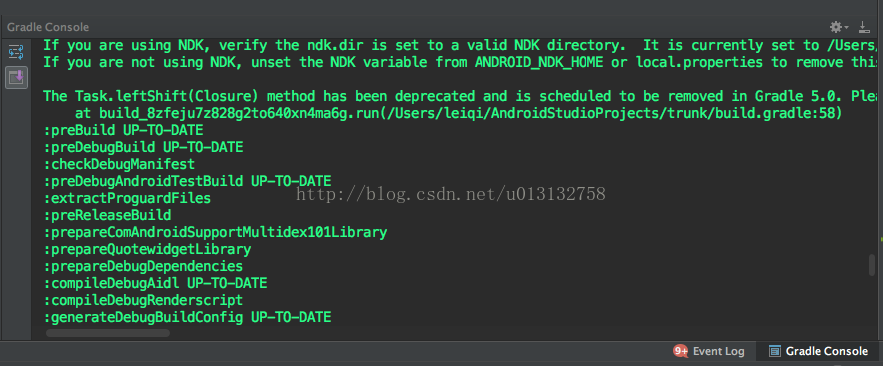
Note ⚠ ️ : this is a kind of problem! So if you read the error log for Gradle, you can read the error log for Gradle. The specific methods are as follows:
Click the Gradle Console in the lower right corner. View gradle detail log:
Reasons for the problem 1:
The image in the resource file is not a PNG file. (As shown in the error report below)

Cause 2:
No margins are set for figure.9.

 

Log Log 1:
AAPT: libpng error: Not a PNG file
Error: Some file crunching failed, see logs for details
:app:mergeDebugResources FAILED

FAILURE: Build failed with an exception.

* What went wrong:
Execution failed for task ‘:app:mergeDebugResources’.
> Error: Some file crunching failed, see logs for details

* Try:
Run with –stacktrace option to get the stack trace. Run with –info or –debug option to get more log output.

BUILD FAILED
Solutions for Reason 1:
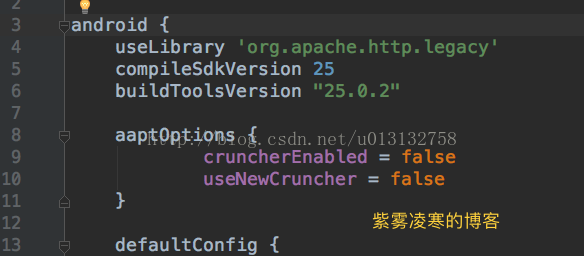
In the build.gradle file of the project app, add in the Android TAB:

aaptOptions {
        cruncherEnabled = false
        useNewCruncher = false
}

Solutions for Reason 2:

We looked at the log and found that there is no margin. What is margin?Let’s look at the following two pictures
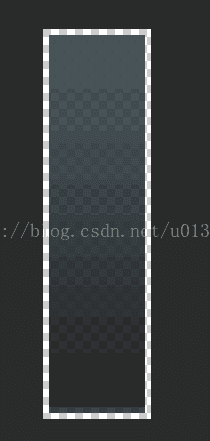
Boundless space (with no black edges)
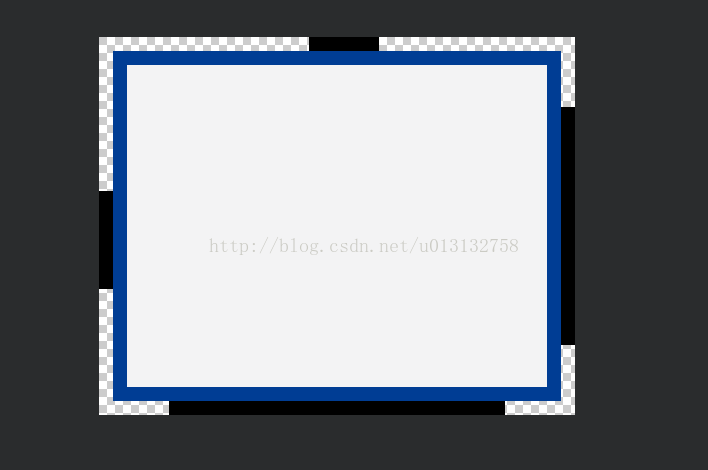
There are margins and there are black edges all around.


So how do you set it up?Very simple:

Click the white edge around, the position of the click will be black, left or right or drag up and down to make the black edge change, so as to achieve the size of the set margin.

Error may not have more than the above two kinds of log, if you encounter other reasons, welcome everyone harassment!!


Error running app: Default Activity Not Found


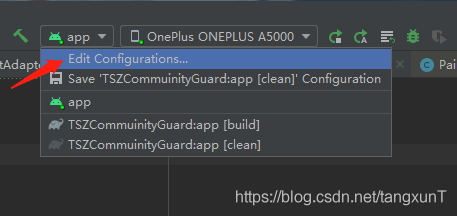
click on the run button and make a mistake

this is a mistake that many Android developers should have encountered, and the solution is not the same. But my solution might be a little odd, and it might help you. After this problem occurred, I tried the following solution.
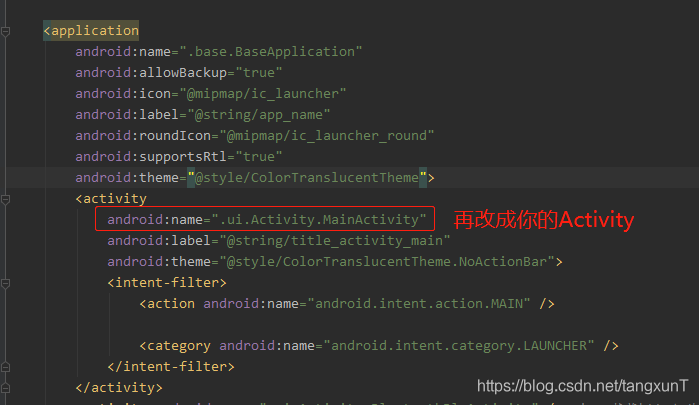
First, check whether the launch page in Androidmanfest.xml is configured
This is beside the point because mine is already configured
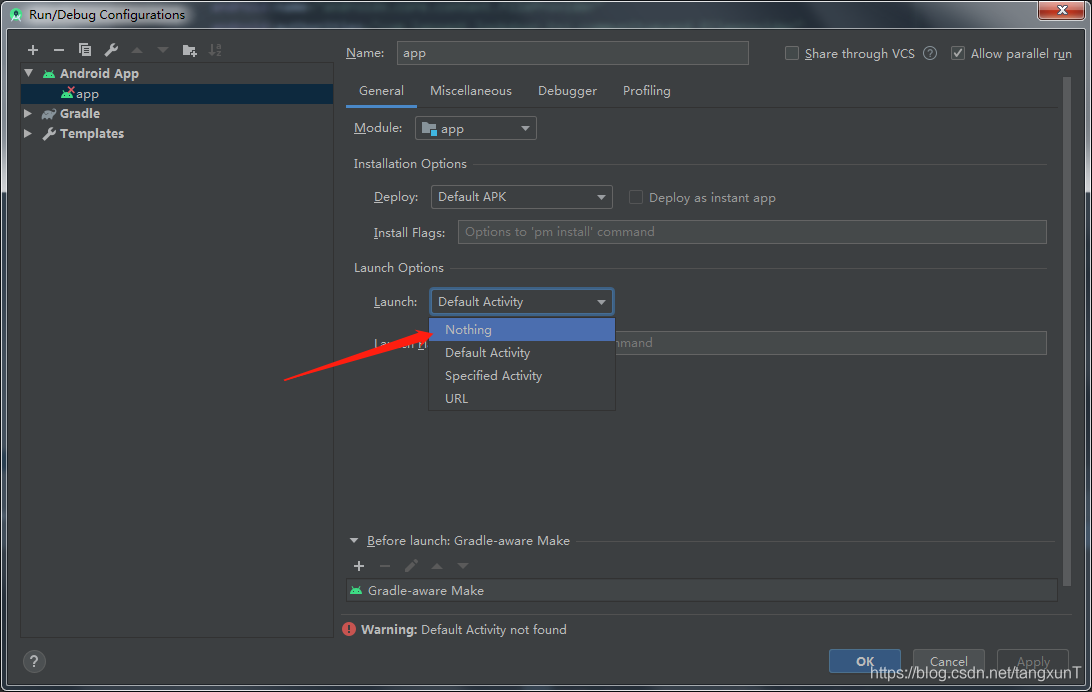
Second, set the Launch Options to Nothing in Run/Debug Configuarations
If there is no problem with plan 1, open Run/Debug Configuarations

and select Nothing — > The Apply – & gt;

this time run without error, and successfully installed into the phone, but… I didn’t launch my App after it was installed successfully. How could I launch it for you when everything was configured as Nothing?Obviously, it does not meet my requirements (when the project is very urgent, the result of this project has been very good, so we can give priority to the completion of the project and solve this problem later).
Scenario 3: Reset Android Studio
Delete.androidStudio4.0 from the directory “C:\Users\ user name” (maybe yours is another version), restart AndroidStudio and wait for the miracle, mine is still the same ghost, not solved.
Plan 4: Reinstall Android Studio
Also still be that ghost kind, fail to solve. Is it a project problem?But my colleague’s work is going really well. Finally, if you’ve reached this point, see if you can solve your problem, which is how I solved it. If not, please add plan 6 in the comments section, I am too weak.

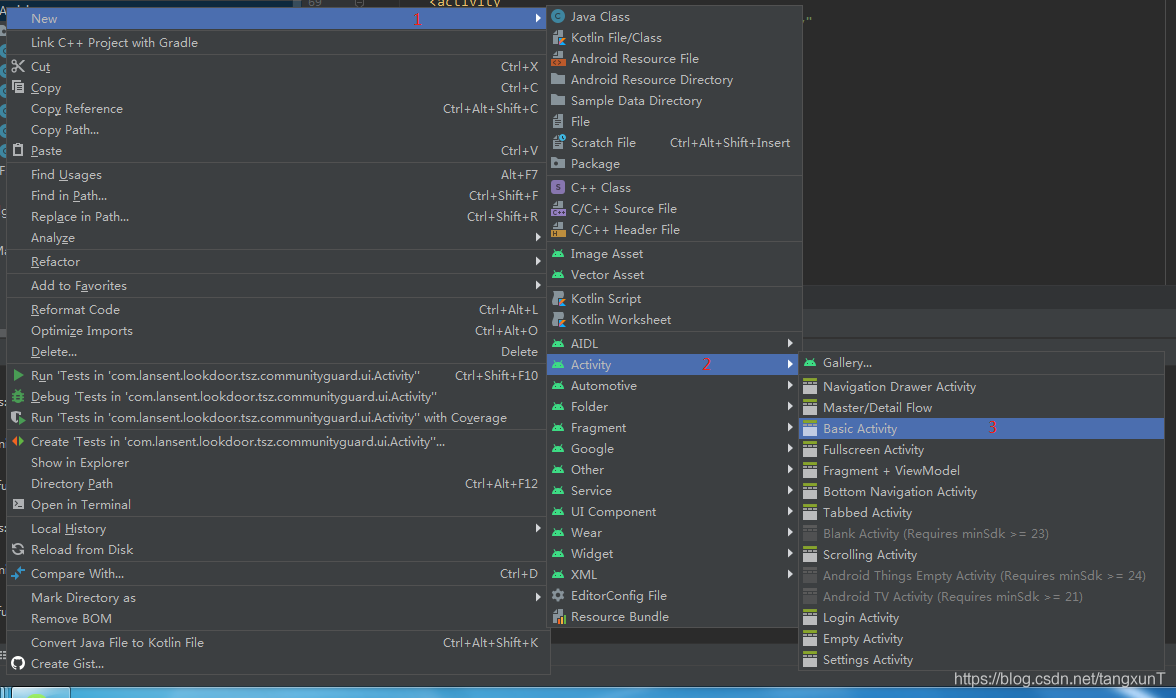
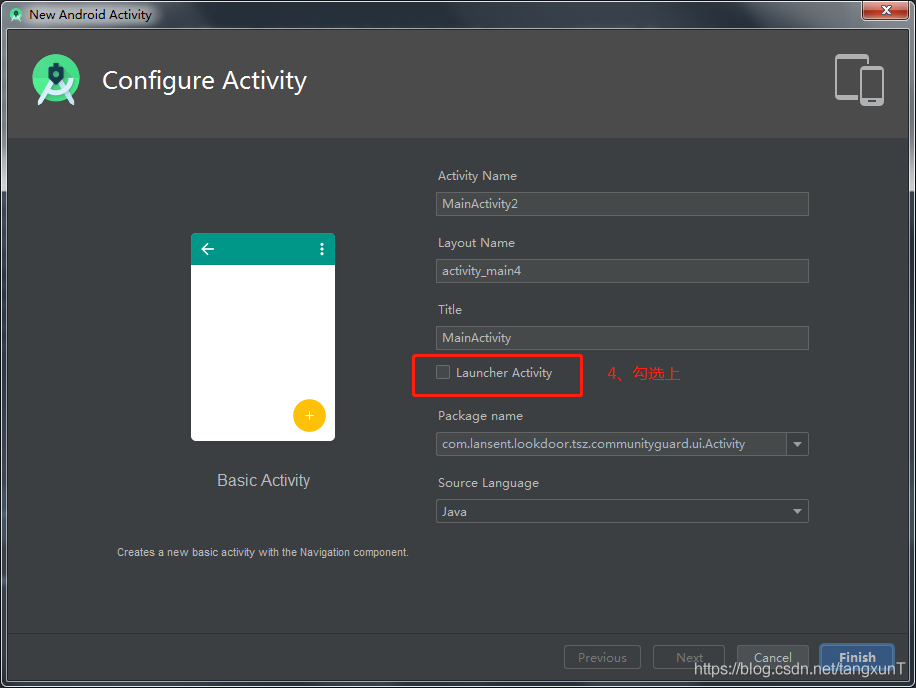
Create a new Activity and set it to Launch Activity


. Then select the Launcher Activity — > Finish, wait for Gradle synchronous

then AndroidManfest files in the start page changed back into before start page

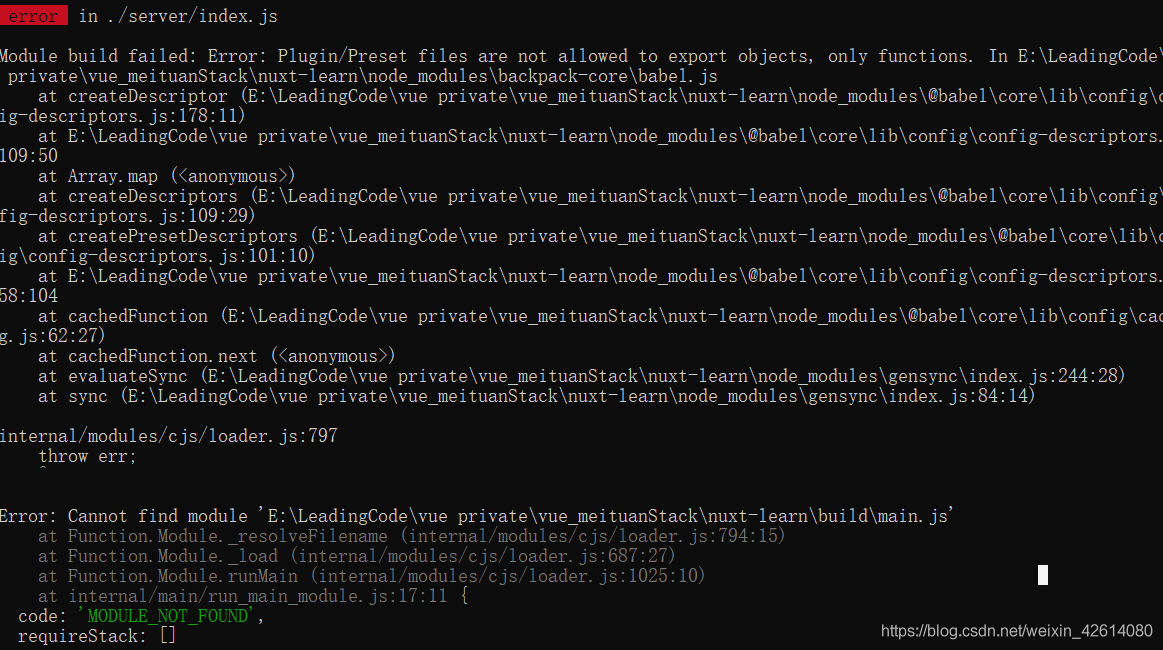
Module build failed Error Plugin/Preset files are not allowed to export objects, only functions (How to Fix)

As a way to make a project of nuxt, this exception occurred. Module build failed: Error: Plugin/ prefiles are not allowed to export objects, only functions : make of the following figure:

Ii. Problem Analysis and Solution: Babel version conflict, Babel dependency package is not compatible, package.json dependency package contains both Babel 7.0 version and Babel 6.0 version, the two versions are obviously incompatible, We can upgrade to Babel 7.0 version, through NPM install [email protected] command all upgrade to Babel 7.0 version, so the conflict problem of the versions can be solved.

Win32 Disk Imager Error 5: Access is Denied solution

★ ★ ★ ★ ★ ★ ★ ★ ★ ★ ★ ★ ★ ★ ★ ★ ★ ★ ★ ★ ★ An error when you are trying to write data to handle in Win32, error: An error occurred when you need to write data to handle
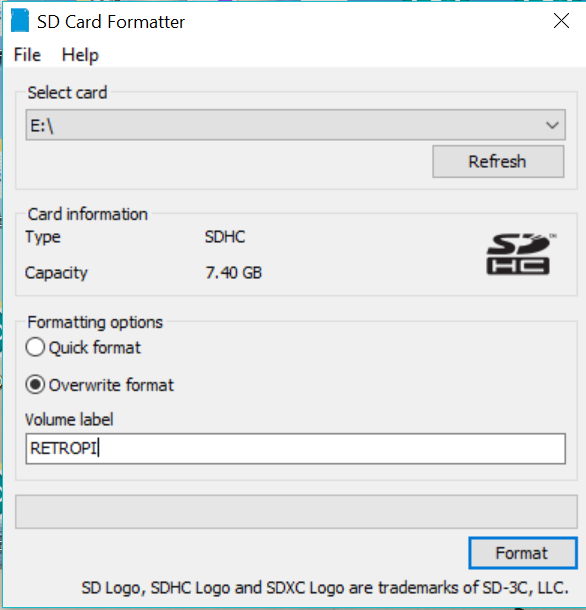
The solution: Format the SD memory card with THE SD Memory Card Formatter and then write the image file to the Win32 tool
Specific steps:
A, download SD memory card formatter software
the official download url: https://www.sdcard.org/downloads/formatter_4/
pay attention to choose to suit your operating system software
2, install the SD memory card formatter and open the configuration
to select the disk where your SD card is located (usually when you insert the card)
to select the Overwrite format (this is very important!)
Volume label
Volume label


click “Format” to start formatting, it usually takes 10 minutes
formatting is finished, you will find that your disk is completely empty, there are no files
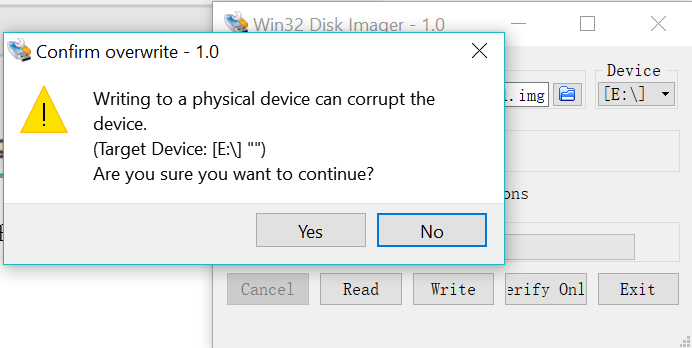
3. Open Win32 again and write the image file to the disk where the SD card is located. No error will occur (click Yes to continue writing)

write error in swap file problem solving

An error


write error in swap file


The solution


This error is simply an alert, not the cause of the problem, and is usually due to the current open file in the block, disk space used up


Log in using the sappers and find that a test cloud host cannot log in, use the administrator rights to enter the cloud server at the accessed end to see if it is caused by problems in the configuration of TCP_wrapper, open the file and find a write error in swap file, and the rules in the configuration file are correct. Next, I look at the disk space and see that the disk space is full and there is no public key account pushed by JumpServer under home.
Reason: The cloud host disk space is small, the tester did not clean the log in time, resulting in disk full


< 1> View disk
df-th


< 2> Clean disk space


< 3> Jumpserver re-pushes the account and public key for this asset


It’s too watery… But there’s really nothing to say.


The seahorse play simulator failed to start, start machine failed! error code = 3 and error code = 21

Ssdwin7 installed Visual Studio 2019, opened the web page, finally crashed at the last minute…
Then ghost reinstall, a few times plug and unplug and then SSD disappeared…
Repurchase SSDS and reinstall them.
… It’s all foreplay…
Today, I opened the seahorse inside the Ghost to play the simulator, and the result was wrong:
start machine failed! Error code = 3.
Search all kinds of methods, find the official forum, it is no good.
Turn on the BIOS and turn on Virtual Technology. I can’t.
On the official website of Haima Apple community, search start Machine Failed! Error code = 3,
http://forum.droid4x.cn/search.php?mod=forum& searchid=10& orderby=lastpost& ascdesc=desc& searchsubmit=yes& kw=start+machine+failed%21+error+code+%3D+21
It doesn’t work any way.
Delete c disk program files under Oracle is also not good.
Control panel unloading virtual Box does not work either.
The repair tool won’t work.
After reloading the official full version of the Virtual Box, and then reloading the Haima, the error code changed to 21.
http://forum.droid4x.cn/forum.php?mod=viewthread& tid=43521& highlight=start%2Bmachine%2Bfailed%21%2Berror%2Bcode%2B%3D%2B21
start machine failed! For users with errpr cpde = 21 problem resolution
Win+7 or above, press Win+R to open the run dialog and then run the following command to fix it.
%SystemRoot%\ InfDefaultInstall. Exe “%programfiles%\Oracle\VirtualBox\drivers\vboxdrv\ vboxdrv. inf”
XP user or not doing the above, please open this path: % programFiles %\Oracle\VirtualBox\ Drivers \vboxdrv\, then right-click “Vboxdrv. inf” and select “Install” from the right-click menu.
With respect to OK
 

Error C2065 ‘cout’: undeclared identifier

1 [problem background] Error C2065 appears in C++/MFC, that is, XXX is not defined, and the XXX you use is the base class library, do you think it may not exist?Except, of course, for your spelling mistakes, which I won’t discuss.
2 [Analysis] Check that the basic class library of VS/VC has no problem in loading and platform setting; This is usually due to placing certain header files in front of stdafx.h header files.
3 [Example of solution]
3.1 Question of the above title: Error C2065 ‘cout’: Undeclared Identifier. This is due to placing the header file “iostream.h” in the implementation file as follows:
// The following is the implementation of XXXX. CPP
# include & lt; iostream.h>
# include “stdafx. H”
/ /…
Int xxx_fun ()
{
STD: : cout< < somevar< < std::endl;
}
3.1.1 [Results] The above error C2065 will occur;
3.2 [Modification method] Put stdafx.h in the first place, and do not let the words of other header files come before it.
// The following is the implementation of XXXX. CPP
# include “stdafx. H”
# include & lt; iostream.h>
/ /…
Int xxx_fun ()
{
STD: : cout< < somevar< < std::endl;
}
3.2.1 [Results] There will be no Error C2065 above;
3.3 [Summary] If the library and platform are correctly configured, the above methods can be basically solved. This is a small mistake that is easy to overlook because we don’t usually feel the need to prioritize header files. Well, the devil is in the details, and the difference between first and second place in the arena is sometimes 0.001 seconds, so don’t make any small mistakes.

error MSB6006: “mt.exe” exited with code 31 solution

First, problems arise
Error MSB6006: “mt. Exe “exited with code 31 is always encountered when compiling the project with VS. That’s the question.
The specific error was

Second, solutions
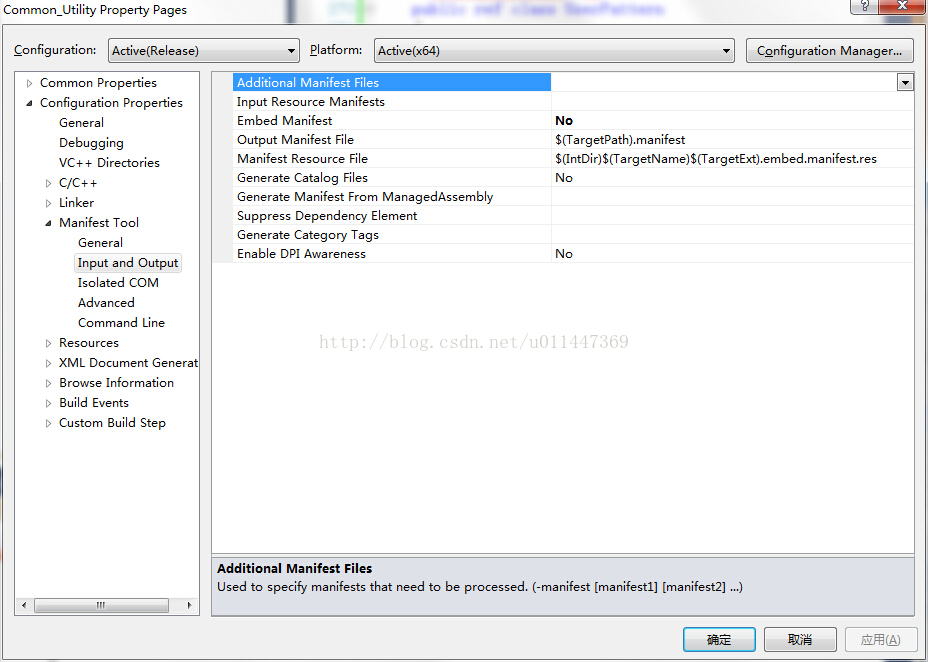
Set the project property Manifest Tool, and set the “Embed Manifest” in “Input and Output” to No, the specific operation is shown in the figure below:

Third, the cause of the problem
The reason has to do with manifest, seeing the explanation in someone else’s blog:
According to Microsoft’s documentation, 3. Mt. Exe is “a tool that generates signed files and catalogs”. Mt. Exe is used in the manifest generation process. “A manifest is an XML document that can be an external XML file or a resource embedded inside an application or an assembly. The manifest of an isolated application is used to manage the names and versions of shared side-by-side assemblies to which the application should bind at run time. The manifest of a side-by-side assembly specifies its dependencies on names, versions, resources, and other assemblies.”
According to Microsoft documentation, MT.EXE is “a tool for generating signed files and directories.” MT.EXE USES the listing generation process. If you don’t know what’s obvious, more documentation explains: “Manifest is an XML document, which can be an external XML file or a resource embedded within an application or assembly. The list of isolated Applications is used to manage the names and versions of the Shared parallel assemblies that the application should bind to at run time. The list of side-by-side assemblies specifies the assembly’s dependencies on name, version, resources, and other assemblies. ”

Ask for help

# for help! (R language novice)
to carry out summary(lm(change~AQI,data=dat)) operation, the system will report an error, the content is as follows:
Error in quantile.default(resid) : factors are not allowed
Warning messages:
1:
using type = “numeric” with a factor response will be ignored
2: In Ops. Factor (y, z$residuals) : ‘-‘ not meaningful for factors
3: In Ops. Factor (r, 2) : ‘^ not meaningful for factors
, I hope you can help me!!

How to Fix Error in module RSQL of the database interface

keywords
Error in module RSQL of the database interface error key: RFC_ERROR_SYSTEM_FAILUREdbtran ERROR (set_input_da_spec): statement too big[dbtran.c#4854] marker count = 18655 > max. marker count = 16000 [dbtran.c#4854] sap note:13607


Problem description
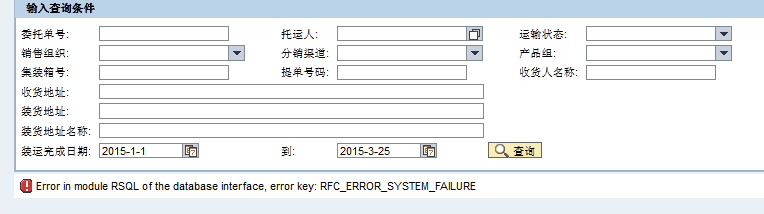
[Problem] After EP was tested by the development machine, the EP was executed after it was released to the production machine, and this Problem occurred:

Error message:
Error in module RSQL of the database interface, Error key: RFC_ERROR_SYSTEM_FAILURE
Problem analysis
You can first try the following operations:
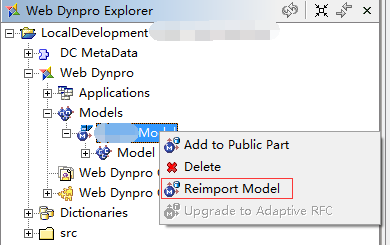
1, check, test the RFC, and transfer the related requests to the production environment; 2. Reimport RFC in NWDS and republish the project (note that the operation of production environment release is different from that of development machine); 3. Restart EP;
if the problem is still unresolved, read on.
Check the ABAP Runtime Error log

through the transport code ST22. Double-click the corresponding Error log to enter the Runtime Error Long Text interface, where there are detailed Error reports.
Some of the error messages I picked:
Kategorie (category) : ABAP Programming Error
Laufzeitfehler (runtime Error) : DBIF_RSQL_INVALID_RSQL
Ausnahme (exception) : CX_SY_OPEN_SQL_DB
ABAP Programm: SAPLZEWM_RFC2
【Kurztext】 (German, meaning category)
Error in module RSQL of the database interface

Error in the ABAP Application Program
the current ABAP Program “SAPLZEWM_RFC2” had to be terminated because it has come across a statement that unfortunately cannot be executed.

An exception that is explained in detail below once again occurred.
The Exception, which is assigned to class ‘CX_SY_OPEN_SQL_DB’, was not caught in procedure “ZTM_RFC_YSQSD_GETORDER_V2” (FUNCTION) “, nor was it propagated by a RAISING clause.
Since the caller of the procedure could not have anticipated that the exception would occur, the current program is terminated.
The reason for the exception is:
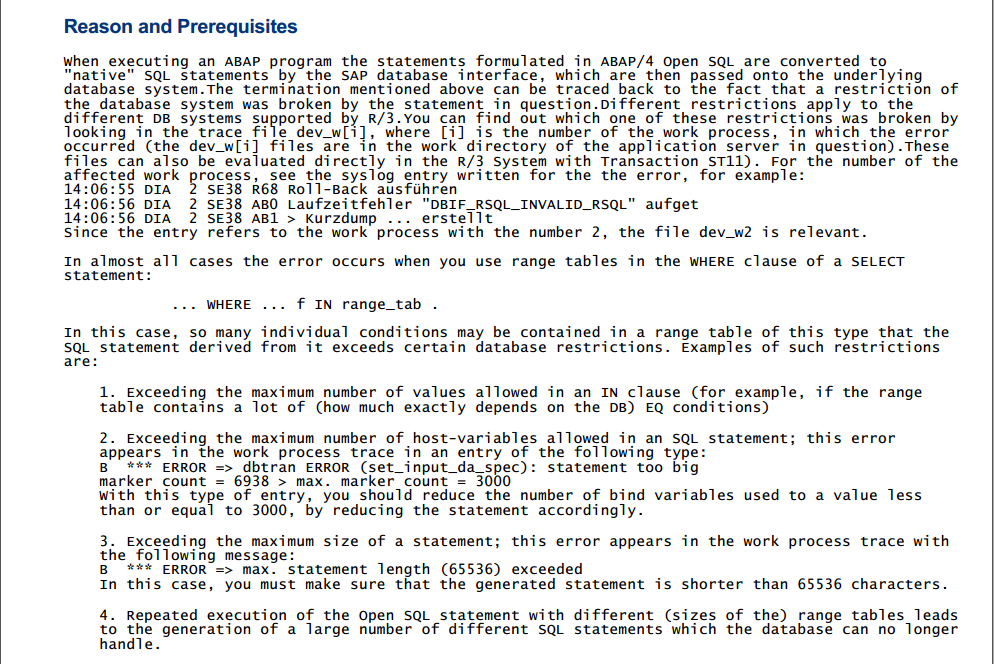
The SQL statement generated from the SAP Open SQL statement violates a restriction imposed by the underlying database system of the ABAP system.
Possible error causes:
o The maximum size of an SQL statement was exceeded.
o The statement contains too many input variables.
o The input data requires more space than is available.
You can generally find details in the system log (SM21) and in the developer trace of the relevant work process (ST11).
Cause analysis,
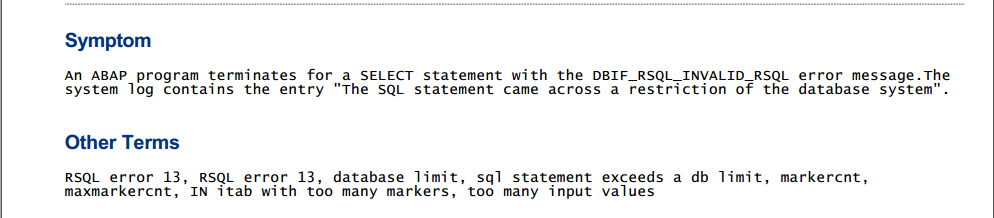
1. In the ABAP Select statement, when range Table is used in the WHERE clause, the type of range Table exceeds the maximum limit of the database (the maximum value is determined by DB).
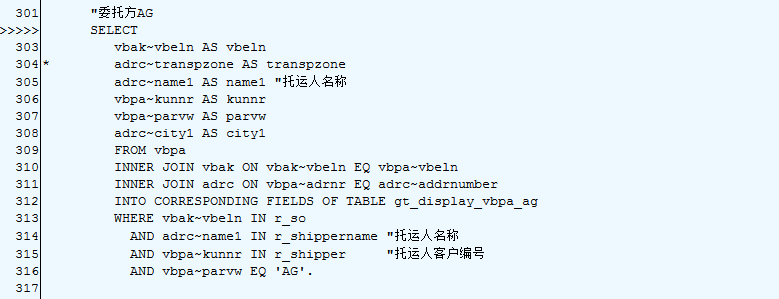
2. The source code location is already listed above the error message:

The solution
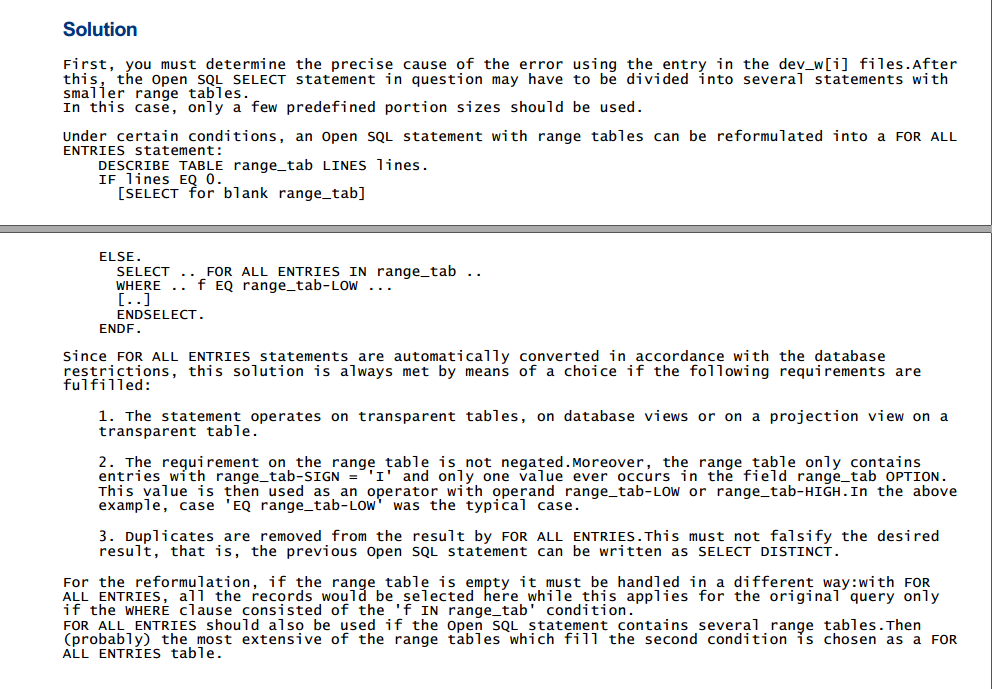
1. Search SAP Note: 13607. Extract the contents of Note


2. So I modified my code:

DATA r_so LIKE RANGE OF vbak-vbeln WITH HEADER LINE. 
DATA lines LIKE LINE OF r_so.
DESCRIBE TABLE r_so LINES lines.
IF lines EQ 0.
    SELECT
      vbak~vbeln AS vbeln
      adrc~name1 AS name1 
      vbpa~kunnr AS kunnr
      vbpa~parvw AS parvw
      adrc~city1 AS city1
      FROM vbpa
      INNER JOIN vbak ON vbak~vbeln EQ vbpa~vbeln
      INNER JOIN adrc ON vbpa~adrnr EQ adrc~addrnumber
      INTO CORRESPONDING FIELDS OF TABLE gt_display_vbpa_ag
      WHERE adrc~name1 IN r_shippername 
        AND vbpa~kunnr IN r_shipper     
        AND vbpa~parvw EQ 'AG'.
...
ELSE.
    TRY.
      SELECT
         vbak~vbeln AS vbeln
         adrc~name1 AS name1
         vbpa~kunnr AS kunnr
         vbpa~parvw AS parvw
         adrc~city1 AS city1
         FROM vbpa
         INNER JOIN vbak ON vbak~vbeln EQ vbpa~vbeln
         INNER JOIN adrc ON vbpa~adrnr EQ adrc~addrnumber
         INTO CORRESPONDING FIELDS OF TABLE gt_display_vbpa_ag
         FOR ALL ENTRIES IN r_so 
         WHERE vbak~vbeln EQ r_so-low
           AND adrc~name1 IN r_shippername 
           AND vbpa~kunnr IN r_shipper     
           AND vbpa~parvw EQ 'AG'.

   CATCH cx_sy_open_sql_db.
   ENDTRY.
...
ENDIF.

3. After modifying the RFC, it is necessary to re-import Model
in WD4J
4. Re-transmit the Request to production and re-publish it to EP. Problem solved
Summarize the ideas for solving THE SAP problem
1, do not do hand party, do not ask a mistake, be sure to read the error message, analysis of the possible part of the error, is RFC error or WD4J error; 2. Error messages can be viewed through Tcode ST22 or ST11 or sm21; 3. About search engines:
SAP search: http://search.sap.com/ (this SAP note the number 13607 is found in the above) SAP note: https://websmp206.sap-ag.de/NOTES (search keywords are provided in the error log)

SAP custom Google search engine, https://cse.google.com/cse/home?cx=013447253335410278659:k8ob9ipscwg