Category Archives: How to Fix

Encryption unsuccessful, need to factory reset or crash after android restarts several times

This reality has been seen in previous projects that did not have batteries, but the one that did not have a battery power outage and had data being written to EMMC, whereas reboot was supposed to shut down or pause all threads to make sure that no EMMC operation was written. Depressing.
There is no way to appear, it appears, take a look at what Android Reboot does, baidu, there are a lot of, post the process out:

framework 
./base/core/java/com/android/internal/app/ShutdownThread.java
/**
     * Do not call this directly. Use {@link #reboot(Context, String, boolean)}
     * or {@link #shutdown(Context, boolean)} instead.
     *
     * @param reboot true to reboot or false to shutdown
     * @param reason reason for reboot
     */
    public static void rebootOrShutdown(boolean reboot, String reason) {
        if (reboot) {
            Log.i(TAG, "Rebooting, reason: " + reason);
            try {
                Power.reboot(reason);
            } catch (Exception e) {
                Log.e(TAG, "Reboot failed, will attempt shutdown instead", e);
            }
        } else if (SHUTDOWN_VIBRATE_MS > 0) {
            // vibrate before shutting down
            Vibrator vibrator = new Vibrator();
            try {
                vibrator.vibrate(SHUTDOWN_VIBRATE_MS);
            } catch (Exception e) {
                // Failure to vibrate shouldn't interrupt shutdown.  Just log it.
                Log.w(TAG, "Failed to vibrate during shutdown.", e);
            }

            // vibrator is asynchronous so we need to wait to avoid shutting down too soon.
            try {
                Thread.sleep(SHUTDOWN_VIBRATE_MS);
            } catch (InterruptedException unused) {
            }
        }

        // Shutdown power
        Log.i(TAG, "Performing low-level shutdown...");
        Power.shutdown();
    }


./base/core/jni/android_os_Power.cpp 
static void android_os_Power_shutdown(JNIEnv *env, jobject clazz)
{
    android_reboot(ANDROID_RB_POWEROFF, 0, 0);
}

extern int go_recovery(void);

static void android_os_Power_reboot(JNIEnv *env, jobject clazz, jstring reason)
{
    if (reason == NULL) {
        android_reboot(ANDROID_RB_RESTART, 0, 0);
    } else {
        const char *chars = env->GetStringUTFChars(reason, NULL);
        //android_reboot(ANDROID_RB_RESTART2, 0, (char *) chars);
        go_recovery();
        android_reboot(ANDROID_RB_RESTART, 0, 0);
        env->ReleaseStringUTFChars(reason, chars);  // In case it fails.
    }
    jniThrowIOException(env, errno);
}

ANDOID_ROOT\system\core\libcutils\android_reboot.c
int android_reboot(int cmd, int flags, char *arg)
{
    int ret;

    if (!(flags & ANDROID_RB_FLAG_NO_SYNC))
        sync();

    if (!(flags & ANDROID_RB_FLAG_NO_REMOUNT_RO))
        remount_ro();

    switch (cmd) {
        case ANDROID_RB_RESTART:
            ret = reboot(RB_AUTOBOOT);
            break;

        case ANDROID_RB_POWEROFF:
            ret = reboot(RB_POWER_OFF);
            break;

        case ANDROID_RB_RESTART2:
            ret = __reboot(LINUX_REBOOT_MAGIC1, LINUX_REBOOT_MAGIC2,
                           LINUX_REBOOT_CMD_RESTART2, arg);
            break;

        default:
            ret = -1;
    }

    return ret;
}

android4.0/frameworks/base/core/jni/misc_rw.cpp
/* force the next boot to recovery */
int go_recovery(void){
	
	LOGE("go_recovery  =================\n");
	struct bootloader_message boot, temp;

	memset(&boot, 0, sizeof(boot));
	strcpy(boot.command, "boot-recovery");
	if (set_bootloader_message_block(&boot, MISC_DEVICE) )
		return -1;

	//read for compare
	memset(&temp, 0, sizeof(temp));
	if (get_bootloader_message_block(&temp, MISC_DEVICE))
		return -1;

	if( memcmp(&boot, &temp, sizeof(boot)) )
		return -1;
	LOGE("go_recovery  ++++++++++++++++++++++\n");
	return 0;

}

as you can see from above, the system is mount readonly before reboot:

  remount_ro();

So why is there a problem?The problem seems to be remount_ro(); The inside. Look at the code inside

static void remount_ro(void)
{
    int fd, cnt = 0;

    /* Trigger the remount of the filesystems as read-only,
     * which also marks them clean.
     */
    fd = open("/proc/sysrq-trigger", O_WRONLY);
    if (fd < 0) {
        return;
    }
    write(fd, "u", 1);
    close(fd);


    /* Now poll /proc/mounts till it's done */
    while (!remount_ro_done() && (cnt < 50)) {
        usleep(100000);
        cnt++;
    }

    return;
}


/proc/sysrq-trigger

This is a read-only node that can restart the system, remount, and so on, but it’s asynchronous, so there’s a check and wait, it’s probably not long enough to wait (5S), let’s try it out for a minute.
How to launch powershell script in C#

If you want to start a powershell script in a CSharp application, you don’t have to construct a cmd command line to start the script.

You can use the following example to make your life easier:

The variable “script” is the full path to the powershell script.
The variable “parameters” is an instance of an IDictionary type, which contains a set of parameter keys/values.

            using (var powerShellInstance = PowerShell.Create())
            {
                //Prepare powershell execution
                powerShellInstance.AddCommand(script);
                powerShellInstance.AddParameters(parameters);

                //Execute powershell command and get the results
                var results = powerShellInstance.Invoke();

                var errors = powerShellInstance.Streams.Error;
                var sb = new StringBuilder();

                if (errors.Count > 0)
                {
                    foreach (var error in errors)
                    {
                        sb.Append(error);
                    }
                    errorResult = sb.ToString();
                }
                else
                {
                    foreach (var result in results)
                    {
                        sb.AppendLine(result.ToString());
                    }
                    executionResult = sb.ToString();
                }

                return errors.Count == 0;
            }

Update:2015-07-01
I’m having a problem executing a powershell script in the logon server.
Actually, the application uses a system account to execute the powershell script.
But the account does not have enough privileges to run the script.

The exception is:PSSecurityException
Here are the details of the error:

Message: AuthorizationManager check failed.
InnerException stack trace:    
at System.Management.Automation.AuthorizationManager.ShouldRunInternal(CommandInfo commandInfo, CommandOrigin origin, PSHost host)
InnerException: A command that prompts the user failed because the host program or the command type does not support user interaction. The host was attempting to request confirmation with the following message: Run only scripts that you trust. While scripts from the internet can be useful, this script can potentially harm your computer. Do you want to run xxx.ps1?

I searched the internet for information. It is so important to repeat the same mistakes! First, I copied the service account into the integrated environment by removing it from the “Administrators” group.
You can go to the “Local Users and Groups”, then “Groups”, then “Administrators” group. Select the service account and delete it from the group. Well, I found that the problem is related to the enforcement policy on the server. I’ve tested it with the enforcement policy.
You can use open powershell.exe on the server.
Execute the command:

Get-ExecutionPolicy

You can even verify that a particular user is enforcing the policy.
You will need to open powershell.exe from your service account to run it.
Then execute the command:

Get-ExecutionPolicy -Scope:CurrentUser


In my server, the enforcement policy is set to unlimited in the LocalMachine range.

There are 7 enforcement policies in total.
Default:This is equal to Restricted
Restricted: Do not load configuration files or run scripts. This is the default.
AllSigned: Requires all scripts and configuration files to be signed by a trusted publisher, including scripts written on your local machine.
remotesizable: Requires all scripts and configuration files downloaded from the Internet to be signed by a trusted publisher.
unrestricted:Load all configuration files and run all scripts. If you run an unsigned script downloaded from the internet, you will be prompted for permission before running the script.
Bypass: No blocking, warnings or prompts.
Undefined:Deletes the currently assigned enforcement policy from the current scope. This parameter does not delete enforcement policies set within the Group Policy range.

0 has 5 ranges:
Process
CurrentUser
LocalMachine
UserPolicy
MachinePolicy

0 is actually the enforcement policy preventing the service account from running the script correctly. So I need to change the enforcement policy. In the end, the bypass method meets my needs. But I don’t apply this enforcement policy to all types of users within the local machine. So I only apply the bypass enforcement policy to the service account.

The commands used are:

Set-ExecutionPolicy -Scope:CurrentUser -ExecutionPolicy:Bypass

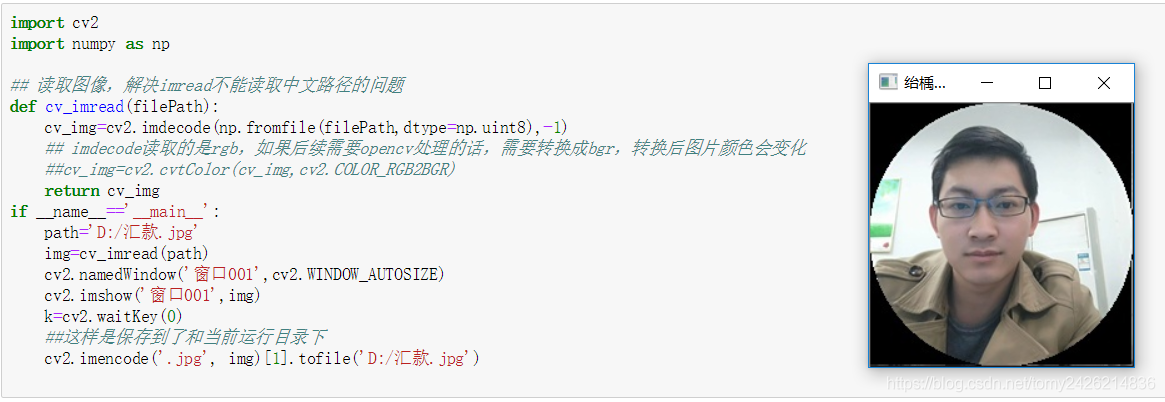
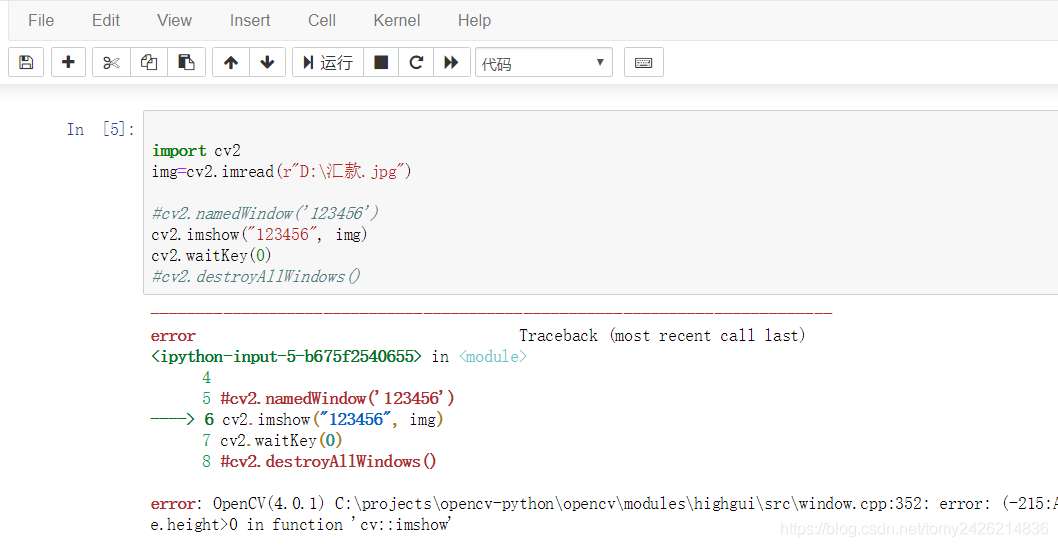
cv2.imread() error: (-215:Assertion failed) size.width>0 && size.height>0 in function ‘cv::imshow’

error: (-215:Assertion failed) size.width> 0 & & size.height> 0 in function ‘CV ::imshow’

Solution:
change the name and path of the picture to English or number

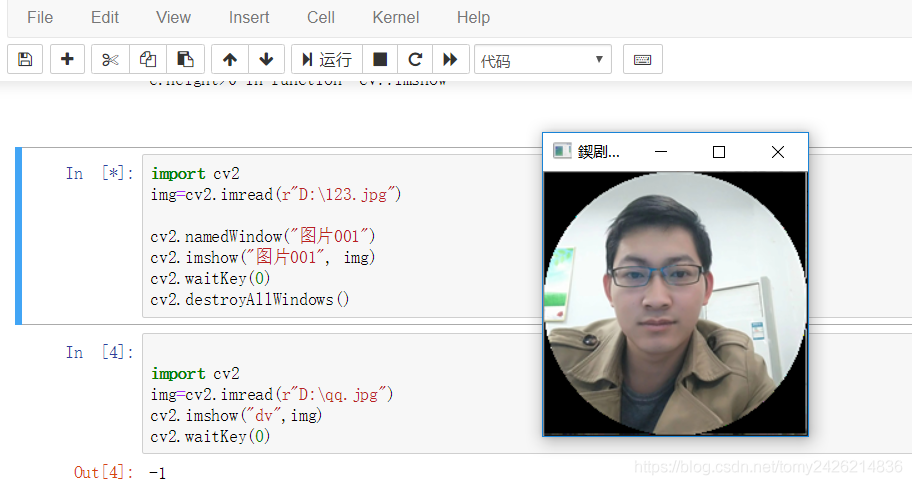
window name should also be set to English or number, otherwise it will show the code
from the code of https://www.zhihu.com/question/67157462/answer/251754530
Chinese path can be read normal, but still have window name Chinese garbled.

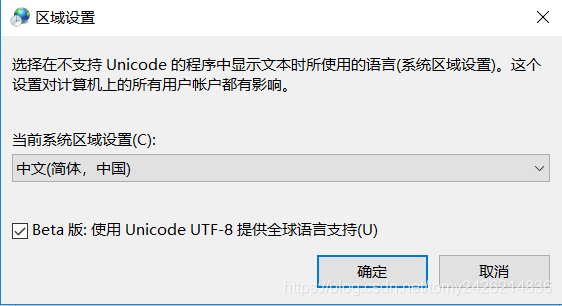
update: fix window name mess
change system Settings, check the system default code under the CMD window to enter CHCP. If the system encoding is UTF-8, output 65001, modify the language setting to UTF-8, and operate as follows:

red envelope + discount, ali cloud on cloud gift package!
https://promotion.aliyun.com/ntms/yunparter/invite.html?UserCode = 5 wzgtzow
“universal cloud computing” cloud host as low as 4
https://promotion.aliyun.com/ntms/act/qwbk.html?UserCode = 5 wzgtzow
cloud communication exclusive ali cloud new users 】 【 8 fold the
https://www.aliyun.com/acts/alicomcloud/new-discount?UserCode =5wzgtzow
[trademark registration service] as low as 680
https://tm.aliyun.com/?userCode=5wzgtzow

ERROR Unsupported method AndroidProject.getVariantNames().

ERROR: Unsupported method: AndroidProject.getVariantNames
Problem: Error cause: Solution:

Question:
Recently, the company asked me to connect to the function of one-button confidential-free login, and I also need to be familiar with client development. After opening the project with Android Studio, I reported an error, which was as follows:

ERROR: Unsupported method: AndroidProject.getVariantNames().
The version of Gradle you connect to does not support that method.
To resolve the problem you can change/upgrade the target version of Gradle you connect to.
Alternatively, you can ignore this exception and read other information from the model.

Translation:
Error: doesn’t support method: AndroidProject GetVariantNames (). The Gradle version to which
is connected does not support this method.
to solve this problem, you can change/upgrade the target version of the Gradle that you connect to.
or, you can ignore this exception and read additional information from the model.
Solutions:

    modify the build.gradle file under the project directory
classpath "com.android.tools.build:gradle:3.3.2" 
    project./gradle/wrapper/gradle-wrapper. Properties, see the address link
distributionUrl=https\://services.gradle.org/distributions/gradle-4.10.1-all.zip
    gradle sync once;

javac Task Error source release 1.7 requires target release

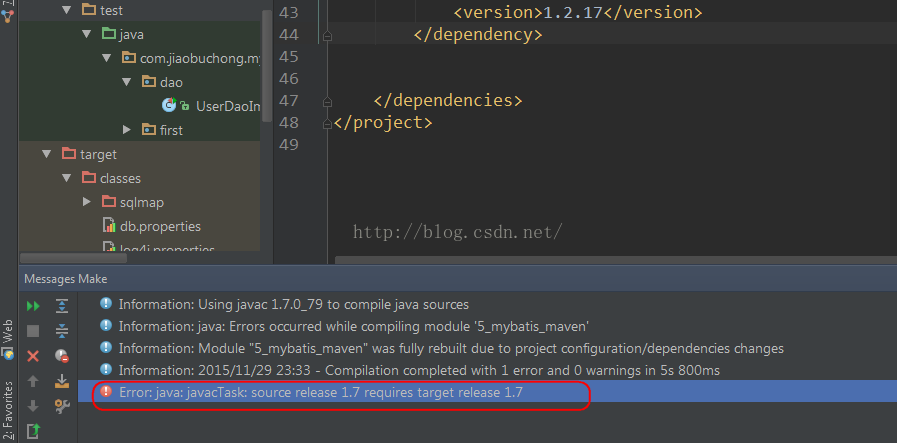
The following error occurred while compiling Java code using IDEA:
Error: Java: javacTask: source release 1.7 requires target release 1.7
Above:

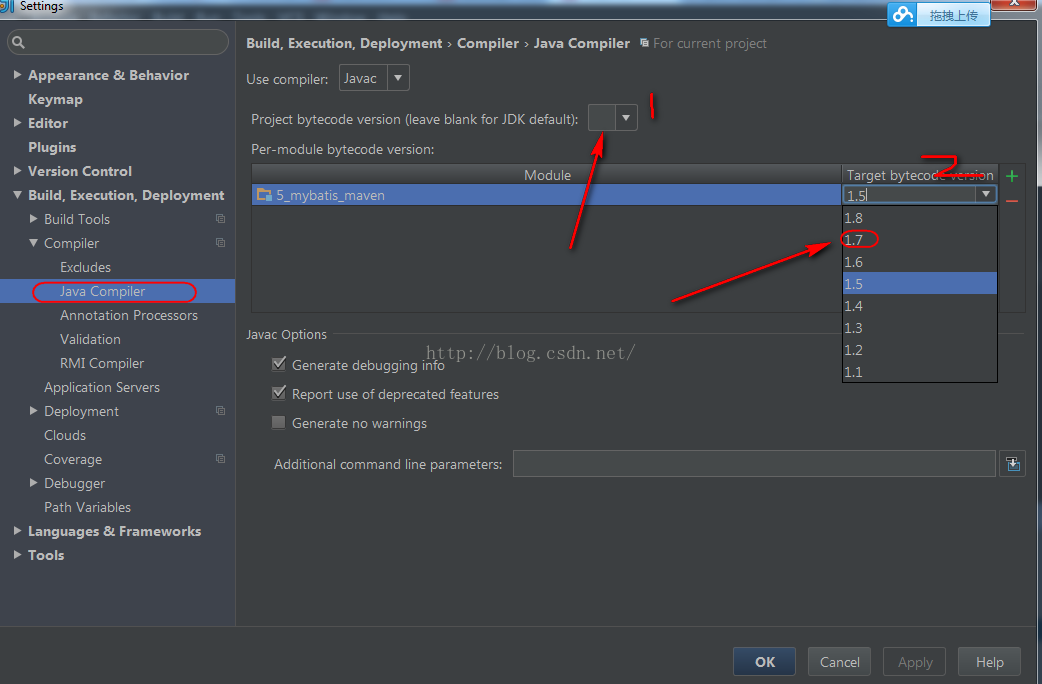
When such a problem occurs, you can set it in Settings:

Just set the compiler version to 1.7 here. The first place is where the project is set and the second place is where the module is set.

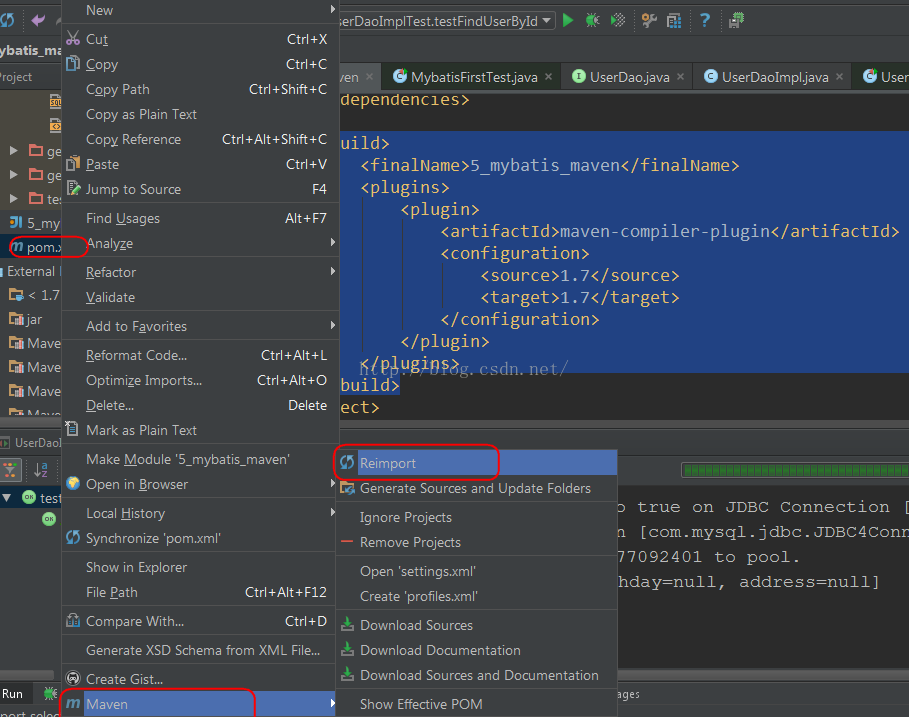
To build with Maven, specify the compiled version of Java directly in the POM, adding the following code:

    <build>
        <finalName>5_mybatis_maven</finalName>
        <plugins>
            <plugin>
                <artifactId>maven-compiler-plugin</artifactId>
                <configuration>
                    <source>1.7</source>
                    <target>1.7</target>
                </configuration>
            </plugin>
        </plugins>
    </build>

Then select pom.xml and right click, and Reimport will tell Maven to download the corresponding plug-in:


Now to compile, is not to see the rainbow in the wind and rain!
Reference link:
http://stackoverflow.com/questions/12900373/idea-javac-source-release-1-7-requires-target-release-1-7

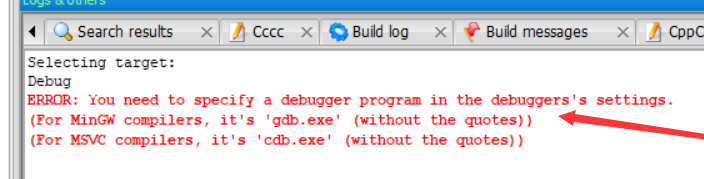
codeblocks ERROR: You need to specify a debugger program in the debuggers’s settings.

Codeblocks error:
Debug
ERROR: You need to specify a debugger program in the debuggers’s settings.
(For MinGW compilers, it’s ‘gdb.exe’ (without the quotes))
(For MSVC compilers, it’s ‘cdb.exe’ (without the quotes))

Solutions:
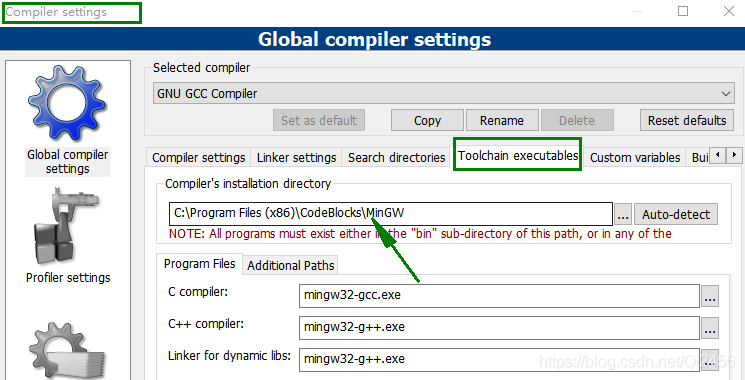
View compiler configuration:
setting -> compiler -> Toochain executables
Record the compiler installation path

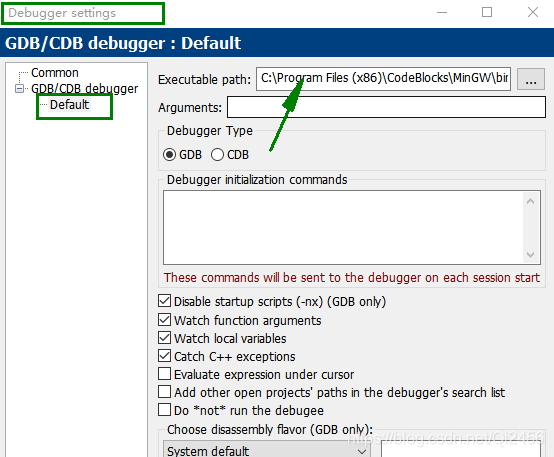
Check out the Debuger Setting
setting -> dubuger -> default
Add Executable Path: C:\Program Files (x86)\CodeBlocks\MinGW\bin\ gDB32.exe (note: select GDB.exe for 32-bit system and gdb64.exe for 64-bit system)

Once you confirm the addition, debug is ready.

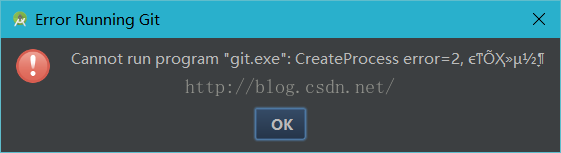
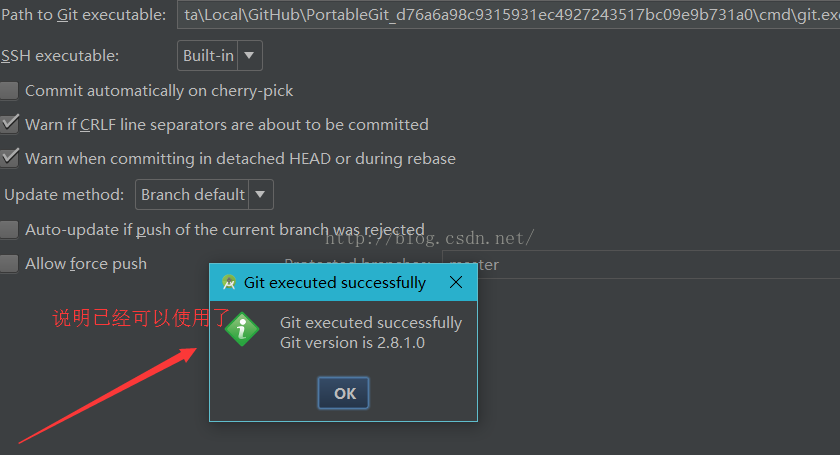
Cannot run program “git.exe”: CreateProcess error=2 the correct solution

Error cannot Run Program “Git.exe “:CreateProcess Error =2 when using Android Studio to check projects from Git
The operation steps are as follows:
Download Github For Windows client and install it.
after successful installation, connect to your account.
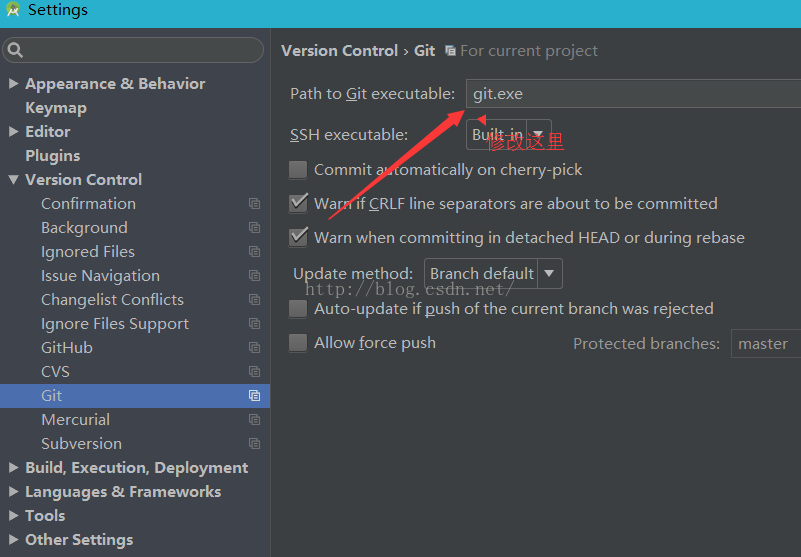
first check for error reporting

 
Setting–> VersionControl—> Git

 
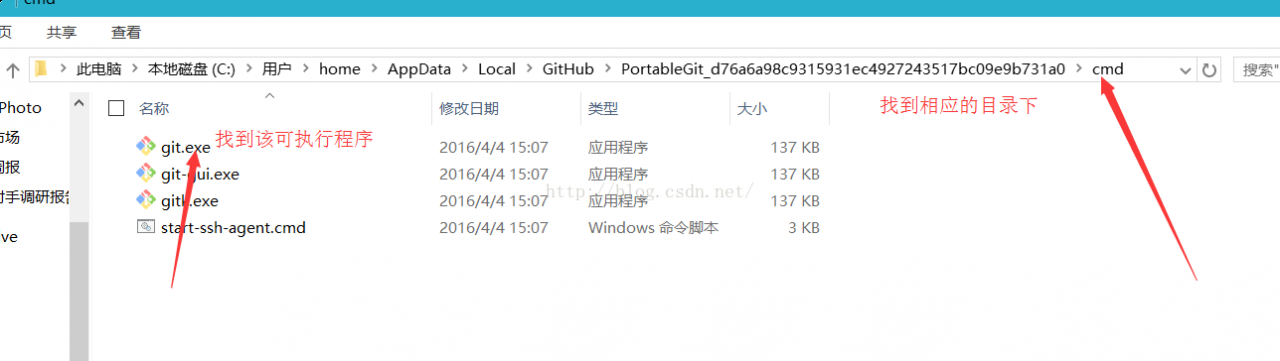
Find the GitHub installation directory (mine is the default)

 
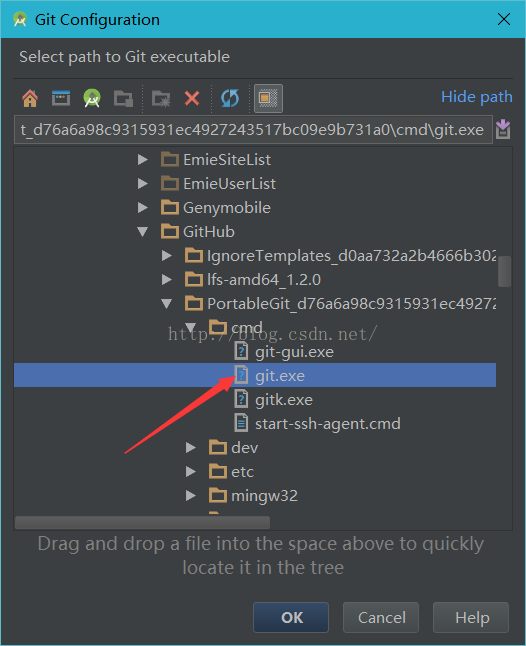
Point Gt.exe to the Android Studio reference

 
test

 
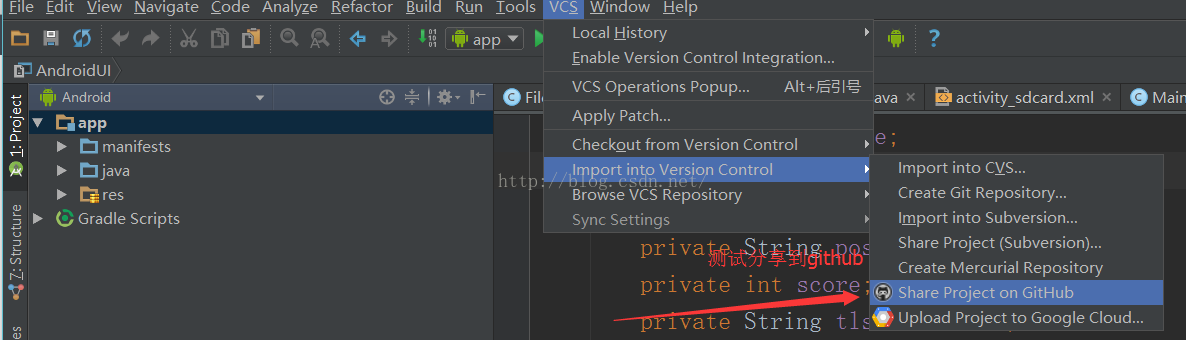
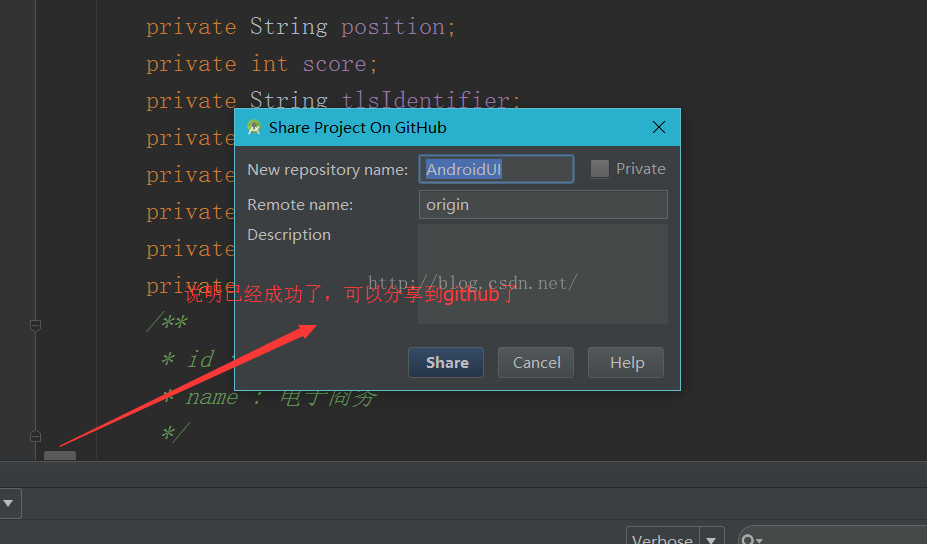
Next, test the project


Like this article friends, welcome to follow WeChat public “Java interview talent”, watch more exciting content

brew install node Error: No such file or directory @ dir_chdir Bottle installation failed

Enter the brew installation node in the terminal and the carriage return error is shown below.

brew installation node
==>Dependencies on the installation node:icu4c
==>Installation node dependency:icu4c
==>
Downloaded:
/Users/lvhongjian/Library/Caches/Homebrew/downloads/ 2ac5137342effaf79e199fb1612ebce7842df443578bcd61afd73767858aef – icu4c-62.1. mojave.bottle.tar>gz
Error: no such file or directory @ dir_chdir – /usr/local/Cellar
Warning: bottle installation failed: build from source.
== than; Downloaded:
/Users/lvhongjian/Library/ cache /Homebrew/downloads/ b79f5dd51110fb1096e57fc35ba03df84f69142b0374bae8a0381edde5a80448-icu4c-62_1- src. tgz
Error:An exception occurred in a subprocess:Errno::EPRM:
Operation not allowed @ dir_s_mkdir – /usr/local/Cellar
solution

As the log in user is not a HomeBrew installer, the above error is solved as follows.
1. reinstall HomeBrew /usr/bin/ruby -e "$(curl -fsSL https://raw.githubusercontent.com/Homebrew/install/master/install)" on the current user.
2. run brew install node prompt successful

When python installs pocketsphinx module (package), an error is reported: command ‘swig.exe’ failed: No such file or directory

Today, when installing Pocket Sphinx, the error command ‘swig.exe’ failed: No such File or Directory. I found a lot of content on the Internet, and finally I succeeded.
first of all, my computer is Windows10 system, the method is only available for Windows system, other systems do not know.
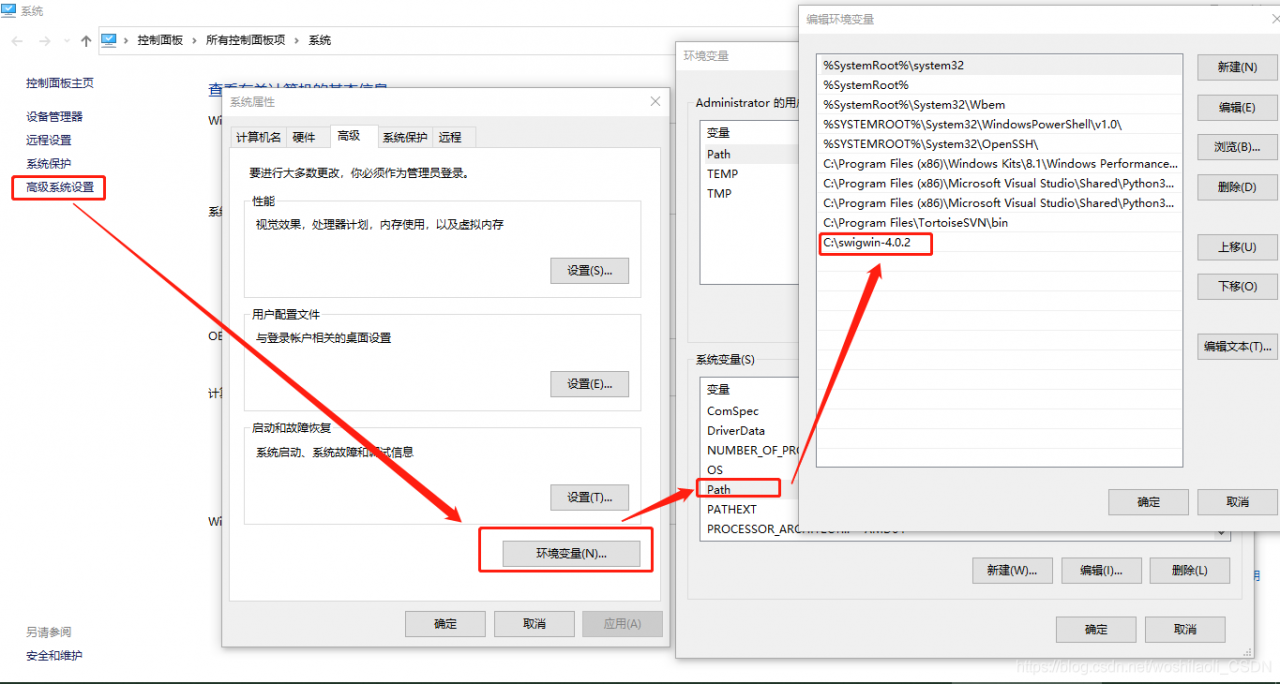
error is due to the fact that swig is missing from your computer, so you need to download and install it. I download from the website of the latest package swig 4.0.2, website address is: http://www.swig.org/download.html.
to unzip the downloaded files to C pan-gen directory. I want to emphasize the root directory here, because my previous attempts to put it in C:\Program Files (x86) still didn’t work (for unknown reasons). Finally, I just put it under C:\swigwin-4.0.2.
then add a new path path to the environment variable.

after the above steps are completed, then there is no problem with installing pocketsphinx.

could not open `C:\Program Files\Java\jre1.8.0_191\lib\amd64\jvm.cfg’

Running Java prompt error in CMd.exe Could not open ‘C:\Program Files\Java\ Jre1.8.0_lib \amd64\ JVN.cfg’
Note: Consider the following if the environment variable is configured correctly.
Solution a:
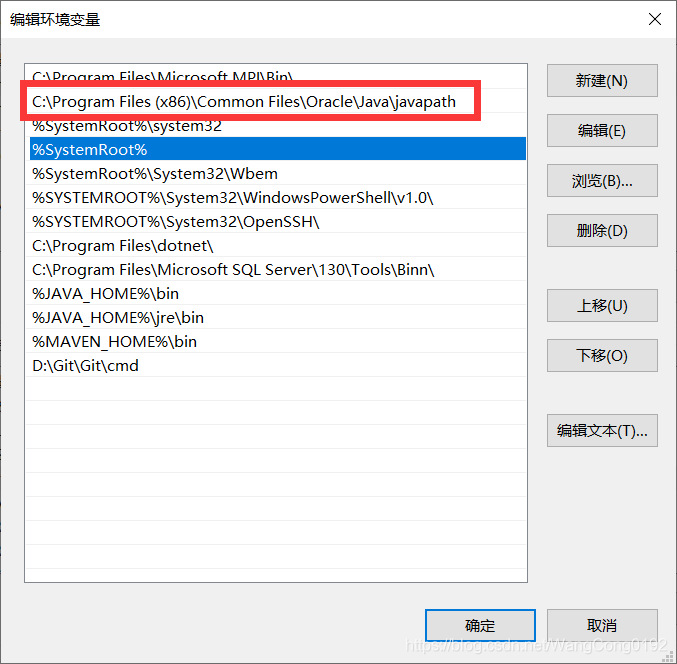
Find the following, my computer – properties – Advanced system Settings – environment variable – Path environment variable, above our %JAVA_HOME%\bin location, there is a C:\Program Files (x86)\Common Files\Oracle\Java\ Javapath, open this folder in the resource manager, there are three Files “Java.exe” “Javaw.exe” “Javaw.exe”, delete these three Files, Because they are high in the environment variables, the Java runtime finds them first and doesn’t go to our JAVA_HOME, so it reports an error.
Scheme 2:
Moving the two JAVA_HOMES up to the front will also solve the problem.
Problem: Probably caused by reinstalling the JDK.

Nginx error: nginx: [error] invalid PID number “” in “/run/nginx.pid”

After the server is restarted, it is OK to execute nginx-T, but an error is reported when executing nginx-S Reload
nginx: [error] invalid PID number “” in “/run/nginx.pid”
Solutions:
You need to do it first
Nginx – c/etc/nginx/nginx. Conf
The path to the nginx.conf file can be found in the return of nginx-t.
nginx -s reload