Category Archives: How to Fix

Solution to dev C + + error [error] LD returned 1 exit status

        I am a beginner of C language. When using dev C + + compiler, I encountered a situation: the program is correct and can be compiled and run normally, but it appears when I run it again after running it once   Error [error] LD returned 1 exit status. The reason for this problem is that although the last running window is closed, the program is still running in the background. This can be viewed through the task manager.

      The usual method on the Internet is to close the program and then open it. This is OK, but it is too inconvenient. Here is a method. I used this method to solve my problem:


Right click the compatibility attribute of devcpp.exe and check the run as administrator.     Just.

ERROR: Could not install packages due to an OSError: [Errno 13] Permission denied

Error content: importerror: C extension: DLL load failed: access denied. not built. If you want to import pandas from the source directory, you may need to run ‘python setup.py build_ ext –inplace –force’ to build the C extensions first.

Reason for error reporting: it may be caused by deleting the installation dependency package of pandas in the environment by mistake, or by deleting the anti-virus software. Generally, the latter does it.

Solution 1: uninstall pandas: PIP uninstall pandas , reinstall: PIP install pandas

—————————————————————————
if you use the above method, you may make mistakes

Error content: error: could not install packages due to an oserror: [errno 13] permission denied: ‘your project path \ venv \ lib \ site packages \ pandas\_ libs\
tslibs\period.cp36-win_ amd64.pyd’
Check the permissions.

Error reason: it means that there are missing files in the folder reported above and cannot be downloaded.

Solution 2: delete the folder and reinstall pandas. For example, in this example, delete pandas under site packages. Remember to delete pandas under site packages instead of site packages. Don’t make a mistake. Delete all the environment and you’ll be finished.

—————————————————————————

If it’s still the previous error, congratulations. I’ve been confused for half an hour. Hahaha……..

Why?The reason is that with Shadu software, I don’t need to repeat what sahdu software is. I know everything: the inner corners of a circle and. Because it is on, it causes the software to delete the PYD file during pandas installation

Solution 3: turn off the kill software, and then try again according to solution 2. It should be successful
if you still can’t, you can only be a freak. Ha ha ha. Just kidding, you can write private letters and step on the pit together!
cURL error 60: SSL certificate problem: self signed certificate in certificate chain

1、 Question

Curl error 60: SSL certificate problem: self signed certificate in certificate chain – server http302 this is generally a problem with self signed certificates

2、 Settle

Scheme 1. Directly use the domain name with HTTPS on the online server

Solution 2. Windows local development environment solution

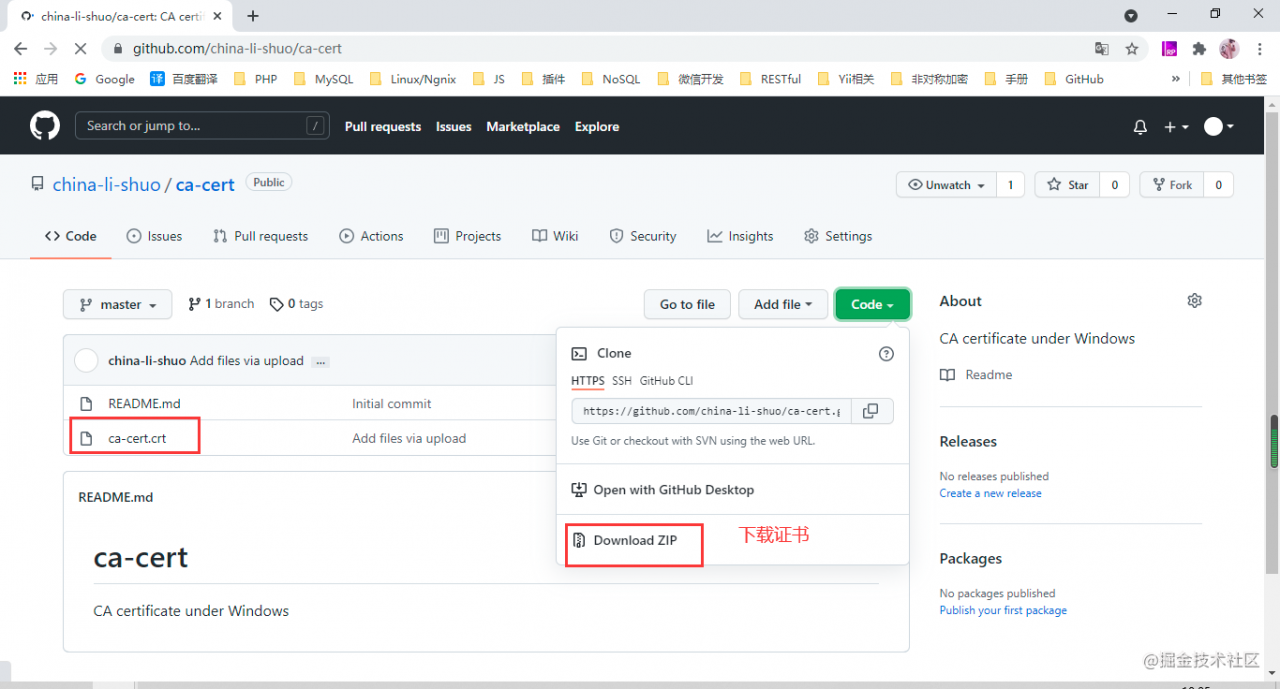
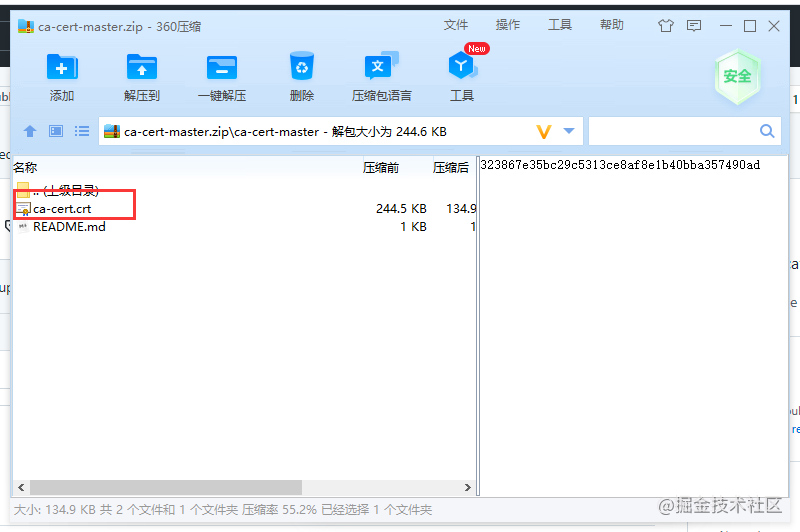
a) Download certificate:
https://github.com/china-li-shuo/ca-cert

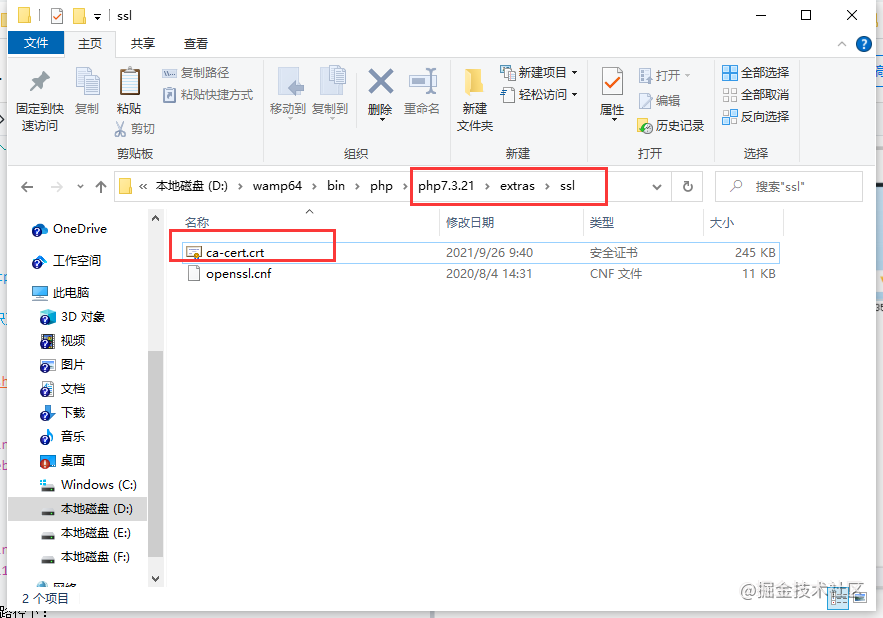
b) Put the downloaded Certificate in your PHP path:

D: \ wamp64 \ bin \ PHP \ php7.3.21 \ extras \ SSL this is your local PHP version path

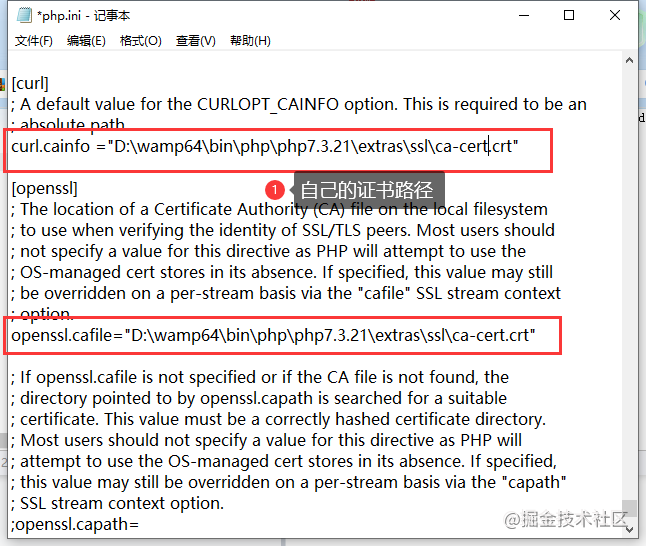
c) Modify the php.ini file

curl.cainfo ="D:\wamp64\bin\php\php7.3.21\extras\ssl\ca-cert.crt"
openssl.cafile="D:\wamp64\bin\php\php7.3.21\extras\ssl\ca-cert.crt"

d) Just restart PHP

A method to solve the error – 110 whilst initializing SD card of raspberry pie

A method to solve the error – 110 whilst initializing SD card of raspberry pie

Error – 110 whilst initializing SD card)

Recently, when playing raspberry pie 4b, it may be because the power supply is not stable enough. Suddenly, the SD card cannot be loaded when starting up. Specifically, the official 5v3a power supply is used, the green act flashes all the time, the red power light is always on, and the screen displays error – 110 whilst initializing SD card.

Changing two SD cards didn’t work, nor did updating the latest EEPROM. I had to start through the USB flash disk, but it didn’t seem to solve the problem at all.

Try the following:

    Update EEPROM. Use SD card to update EEPROM, which can be updated normally. This indicates that the SD card slot should be OK, but it still can’t solve the problem; Replace the SD card and find that it does not work, and the SD card can be read normally on the computer; Using USB flash disk to start, it is found that it can be started through USB flash disk, but it does not solve the problem of SD card startup** Try adding ‘sdhci. Debug’ to the cmdline.txt file_ Quirks2 = 4 ‘* *, solve the problem

Error when Linux executes sh script: syntax error: bad FD number

Today, when using the WCET analyzed by Chronos, there is an error:

: Syntax error: Bad fd number

This error occurs when executing the SH script and when opening the file
solution:
after consulting the data, it is possible that SH is linked to dash rather than bash, so you only need to check the link
execute command

ls -l /bin/sh

Results:

if the above results are obtained, continue to execute the command:

sudo mv /bin/sh /bin/sh.orig
sudo ln -s /bin/bash /bin/sh

Check again and you should get the correct results

ERR Slot 3300 is already busy (Redis::CommandError)

Can I set the above configuration?(type 'yes' to accept): yes
/usr/local/share/gems/gems/redis-3.0.0/lib/redis/client.rb:79:in `call': ERR Slot 3300 is already busy (Redis::CommandError)
        from /usr/local/share/gems/gems/redis-3.0.0/lib/redis.rb:2190:in `block in method_missing'
        from /usr/local/share/gems/gems/redis-3.0.0/lib/redis.rb:36:in `block in synchronize'
        from /usr/share/ruby/monitor.rb:211:in `mon_synchronize'
        from /usr/local/share/gems/gems/redis-3.0.0/lib/redis.rb:36:in `synchronize'
        from /usr/local/share/gems/gems/redis-3.0.0/lib/redis.rb:2189:in `method_missing'
        from ./redis-trib.rb:205:in `flush_node_config'
        from ./redis-trib.rb:657:in `block in flush_nodes_config'
        from ./redis-trib.rb:656:in `each'
        from ./redis-trib.rb:656:in `flush_nodes_config'
        from ./redis-trib.rb:997:in `create_cluster_cmd'
        from ./redis-trib.rb:1373:in `<main>'

It shows that the 3300 slot is occupied by multiple nodes. The landlord has solved it by using the following methods. Open each server, execute the flush hall, flush dB and cluster reset instructions, and then re create it successfully

Nebula queries data and reports an error. Storage error: part: XX error: e_ RPC_ FAILURE(-3).

Storage Error: part: xx   error: E_ RPC_ FAILURE(-3).

IndexScanExecutor failed, error E_ RPC_ FAILURE, part xx

The processing may have timed out due to the large amount of data. You can add storage in the configuration file of graphd_ client_ timeout_ ms, storage_ client_ timeout_ MS defaults to 60 seconds and you can increase it.

Modify nebula-graphid.conf to change the timeout to:

–storage_ client_ timeout_ ms=600000

Match execution failed storage error – usage problem – nebulagraph

Error: [VueLoaderPlugin Error] No matching use for vue-loader is found. Make sure the rule matching

Project scenario:

using webpck5 package vue3 plug-in to import Vue loader appears

Error: [VueLoaderPlugin Error] No matching use for vue-loader is found. 
Make sure the rule matching .vue files include vue-loader in its use.

terms of settlement:

It can be solved by putting Vue loader in the first place

  module: {
    rules: [
      {
        test: /\.vue$/,
        loader: "vue-loader",
      },

[Solved] adb shell error: no devices/emulators found

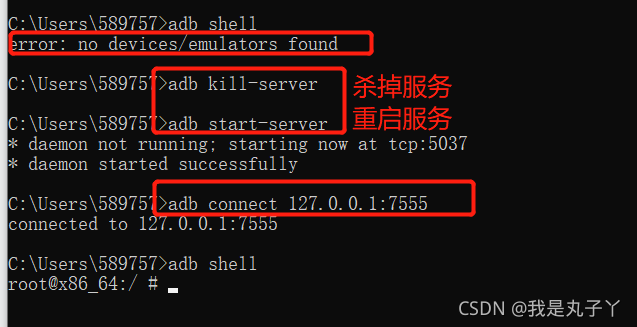
1. Confirm whether it is connected to the simulator: ADB connect XXX

2. Confirm whether the device enters the developer mode (enter settings – about mobile phone/tablet – continuously click the version number)

3. Confirm whether more than one device is connected: ADB devices

If there are multiple devices, you can kill ADB’s service: ADB kill server first

End the process again: taskkill/F/im adb.exe (if it still fails after killing the service, execute the command to end the process)

configure: error: C compiler cannot create executables

An error message appears when executing ./configure :

checking for a BSD-compatible install... /usr/bin/install -c
checking whether build environment is sane... yes
checking for a thread-safe mkdir -p... /bin/mkdir -p
checking for gawk... gawk
checking whether make sets $(MAKE)... yes
checking whether make supports nested variables... yes
checking build system type... x86_64-unknown-linux-gnu
checking host system type... x86_64-unknown-linux-gnu
checking how to print strings... printf
checking for style of include used by make... GNU
checking for gcc... gcc
checking whether the C compiler works... no
configure: error: in `/home/jiajia/libuuid-1.0.3/libuuid-1.0.3':
configure: error: C compiler cannot create executables
See `config.log' for more details

I wonder. I’ve looked up a lot of information and summarized it:

Case 1: the export operation changes the values of cflags and LIBS
solution: clear the values of cflags and LIBS

export LIBS=
export CFLAGS=

Case 2: environment variable is modified

vi  ~/.bashrc

Check whether there is similar information at the end:

export CC=arm-linux-gcc
export AR=arm-linux-ar
export LD=arm-linux-ld
export RANLIB=arm-linux-ranlib
export STRIP=arm-linux-strip

Solution: delete or comment out the above information

Case 3: the GCC compilation environment is not configured properly
to solve the problem:

sudo apt-get install gcc libc6-dev

However, none of the above is my case, and the above operations are useless
Case 4: there is a problem with the software package, and the list information of the necessary software packages for the compiler cannot be provided
solution: reinstall the build essential software package

sudo apt purge binutils
sudo apt remove make
sudo apt autoremove
sudo apt install build-essential

The problem was finally solved and ./configure was successfully executed

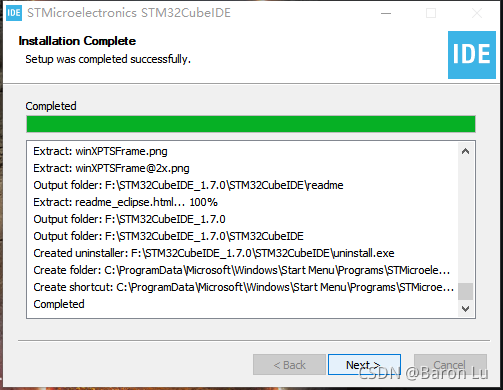
Stm32cube ide installation – NSIS error problem

Stm32cubeide is a tool officially launched by st for developing STM32. In fact, it integrates stm32cubemx and truestudio. For the development of STM32, this tool should become the mainstream in the future. This paper summarizes the problems encountered in installing this software to prevent similar problems in the future.

First attach the download connection to the official website, which is completely free. It is recommended to download from the official website.

https://www.st.com/content/st_ com/en/products/development-tools/software-development-tools/stm32-software-development-tools/stm32-ides/stm32cubeide.html?dl=dX5H5iG6jaTdAbPTEwejXA%3D%3D%2CrTf%2FR%2FW0bw3TdsE5geyarS%2Bx46lDPNXJJ%2FwoQwC2jvAqsWaJAv4gTkLJ4qSDWl0VdOI6vqvYjbxZpaN5e3OGR4Nu8KAJpfygznI%2FHtVJGBQ19G8mXVbW5rm9Y4ddBLs0dgsZ0plnr1i7c1v8BK7cFCIgEizW94LWN7PbjdeZgvyhhTJAibSp0V 5JbQ4Y9YAB8jXDKk0p77IW5172NlLbNRukH3uiA0oN%2FJ%2FXrRBHUNhifSJSL3q%2BTlfvAwIo1dQ8%2FlroraTNMB9f%2FeoHtreO5%2B76F7JZ22ct09VvzYrS5012d2J7R1KF0QJyZPMo1pVG9DAkfYduAj%2F8Kk%2FCCwOlh8vod3OfZ09kBaIbbTsXqvUzXuDgjZY3uvBFtlVpQ4d6wrPl3y8VwmHnS%2B6cLumUqqOOg75YeolR3ib%2F0PVDJvBIBLONtOLYQaOFojeuVoOw& uid=iNttJlvTrIR013Z64dbS0PWuF3wDZMRC#get-software

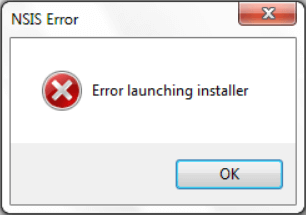
After downloading, be sure to decompress the compressed file into the file path of the standard ascall character set, otherwise you will encounter the following NSIS error problem

However, a lot of solutions have been found on the Internet:

    rename or relocate the installation files from the command prompt installer, re download programs, remove viruses and malware, update your Windows, turn off windows firewall, check your hard drive for errors, check your system language

    However, it doesn’t make any difference….

    Finally, I found that the most essential problem is that the installation package folder contains non ascall characters, which can be modified.

      In addition, a tutorial on the use of cube IDE is attached

    https://blog.csdn.net/Naisu_ kun/article/details/95935283