Category Archives: How to Fix

Eureka starts abnormally and prompts FreeMarker template error

When starting Eureka, an error is reported in DS replicas. The error contents are as follows:

FreeMarker template error (DEBUG mode; use RETHROW in production!): The following has evaluated to null or missing: ==> replica.key [in template "eureka/navbar.ftlh" at line 68, column 62] ---- Tip: It's the step after the last dot that caused this error, not those before it. ---- Tip: If the failing expression is known to legally refer to something that's sometimes null or missing, either

More exceptions will not be written. In short, it is FreeMarker’s exception.  

This should be the configuration file of spring boot. The default zone configuration of euraka is not standardized.

Note: this defaultzone requires absolute specifications, otherwise FreeMarker exceptions will be reported.

Two mistakes have been found:

  one    defaultZone: localhost:10000/eureka   

    Should be     defaultZone: http://localhost:10000/eureka

two   defaultZone: http://eurekaServer2:8762/eureka , http://eurekaServer3:8763/eureka ,

  For multiple zones, write an extra comma at the end. Just remove the last comma.
Solution to “error: invalid environment block” when Ubuntu starts up

Solution to “error: invalid environment block” when Ubuntu starts up

1. Error status 2. Solution


1. Error status

When starting Ubuntu with grub, some errors are displayed below:

error: invalid environment block

Press any key to continue...

2. Solutions

Execute the following instructions:

sudo cd /boot/grub
sudo rm grubenv
sudo grub-editenv grubenv create
sudo grub-editenv grubenv set default=0

Now check whether it is feasible

grub-editenv grubenv list
# default=0

Restart again should have no problem.


thank you

ERROR Docker Engine API on Mac Osx

    according to the official document docker desktop on MAC vs. docker toolbox, docker desktop on Mac only provides UNIX socket/var/run/docker.socket, and does not provide TCP listening (default 2375 port). If you configure host in docker desktop using the configuration method of Linux, Docker desktop cannot be started. You need to delete the hosts configuration in ~ /. Docker/daemon.json to start normally. The following method exposes 2375 TCP

    docker run --rm -d -v /var/run/docker.sock:/var/run/docker.sock -p 127.0.0.1:2375:2375 bobrik/socat TCP-LISTEN:2375,fork UNIX-CONNECT:/var/run/docker.sock
    
      then view the current docker engine version through docker version, such as 1.40. View the official engine API document: https://docs.docker.com/engine/api Search for an image to test:

      $curl -XGET http://127.0.0.1:2375/version | python -mjson.tool
      
      {
          "ApiVersion": "1.41",
          "Arch": "amd64",
          "BuildTime": "2021-07-30T19:52:10.000000000+00:00",
          "Components": [
              {
                  "Details": {
                      "ApiVersion": "1.41",
                      "Arch": "amd64",
                      "BuildTime": "2021-07-30T19:52:10.000000000+00:00",
                      "Experimental": "false",
                      "GitCommit": "75249d8",
                      "GoVersion": "go1.16.6",
                      "KernelVersion": "5.10.47-linuxkit",
                      "MinAPIVersion": "1.12",
                      "Os": "linux"
                  },
                  "Name": "Engine",
                  "Version": "20.10.8"
              },
              {
                  "Details": {
                      "GitCommit": "e25210fe30a0a703442421b0f60afac609f950a3"
                  },
                  "Name": "containerd",
                  "Version": "1.4.9"
              },
              {
                  "Details": {
                      "GitCommit": "v1.0.1-0-g4144b63"
                  },
                  "Name": "runc",
                  "Version": "1.0.1"
              },
              {
                  "Details": {
                      "GitCommit": "de40ad0"
                  },
                  "Name": "docker-init",
                  "Version": "0.19.0"
              }
          ],
          "GitCommit": "75249d8",
          "GoVersion": "go1.16.6",
          "KernelVersion": "5.10.47-linuxkit",
          "MinAPIVersion": "1.12",
          "Os": "linux",
          "Platform": {
              "Name": "Docker Engine - Community"
          },
          "Version": "20.10.8"
      }
      

Repo reports an error syntax error: invalid syntax

File "/mnt/fileroot/yuhua.lin/p/.repo/repo/main.py", line 79
    file=sys.stderr)
        ^
SyntaxError: invalid syntax

solve

This is because of the version of Python

mkdir -p ~/.bin
PATH="${HOME}/.bin:${PATH}"
curl https://storage.googleapis.com/git-repo-downloads/repo > ~/.bin/repo
chmod a+rx ~/.bin/repo

### The error may involve defaultParameterMap ### The error occurred while setting parameters

I encountered an error today. Running rankdao. Selectbyid (ID) directly reported an error to me. I didn’t understand it

Error message:

2021-09-22 10:40:58.824 ERROR 8364 --- [nio-8888-exec-4] o.a.c.c.C.[.[.[/].[dispatcherServlet]    : Servlet.service() for servlet [dispatcherServlet] in context with path [] threw exception [Request processing failed; nested exception is org.springframework.jdbc.BadSqlGrammarException: 
### Error querying database.  Cause: java.sql.SQLSyntaxErrorException: You have an error in your SQL syntax; check the manual that corresponds to your MySQL server version for the right syntax to use near 'rank WHERE id=1' at line 1
### The error may exist in com/brilliantZC/music/dao/MusicRankDao.java (best guess)
### The error may involve defaultParameterMap
### The error occurred while setting parameters
### SQL: SELECT id,song_list_id,consumer_id,score FROM rank WHERE id=?
### Cause: java.sql.SQLSyntaxErrorException: You have an error in your SQL syntax; check the manual that corresponds to your MySQL server version for the right syntax to use near 'rank WHERE id=1' at line 1
; bad SQL grammar []; nested exception is java.sql.SQLSyntaxErrorException: You have an error in your SQL syntax; check the manual that corresponds to your MySQL server version for the right syntax to use near 'rank WHERE id=1' at line 1] with root cause

At the beginning, Baidu has various methods, some say

    an error is reported when the value of the column in the created table is less than the actual value. The @ resource or @ Autowired annotation is forgotten on the service interface introduced by the controller layer. The method called by the controller layer is private, resulting in distribution failure. Check whether the mapper interface code conforms to the specification (automatically ignored by mybatis plus)

    I tried again, but I still couldn’t, so I took the wrong SQL statement and executed it

    SELECT id,song_list_id,consumer_id,score FROM rank WHERE id=1
    

    Still report an error

    music> SELECT id,song_list_id,consumer_id,score FROM rank WHERE id=1
    [2021-09-22 10:55:58] [42000][1064] You have an error in your SQL syntax; check the manual that corresponds to your MySQL server version for the right syntax to use near 'rank WHERE id=1' at line 1
    

    Then I was confused. Then I removed the query statement and still reported an error

    SELECT id,song_list_id,consumer_id,score FROM rank
    

    Then Baidu saw that because rank is a keyword, it can not be directly used as a non keyword. It needs to be used with `. It can be executed after replacement

    SELECT id,song_list_id,consumer_id,score FROM `rank`
    

    Then I modified the table name and solved the error!!!

Error about XX error 1 querying major version

Error Code 1: Myelin (cuBLASLt error 1 querying major version.)

This error is because the appropriate version information is not found. When looking for dynamic link libraries in some libraries, they will look for them according to the version information behind so . If they are not found, an error will be reported.

resolvent:

Set all the version suffixes of. So to find the path. OK~

For example, use the ln - s libcublaslt.so.11 libcublaslt.so.11.5.2.43 command to set the corresponding so:

 libcublasLt.so -> libcublasLt.so.11
 libcublasLt.so.11
 libcublasLt.so.11.5.2.43 -> libcublasLt.so.11

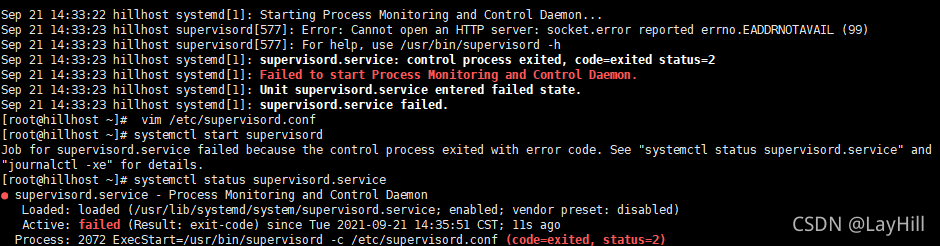
Error in startup after the supervisor modifies the configuration file: error: cannot open an HTTP server: socket.error reported errno.eaddnotavail

 vim /etc/supervisord.conf

Modify the configuration file
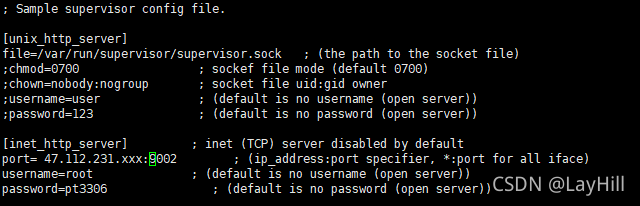
remove the comments of the [inet_http_server] module
and modify the default IP, user name and password

after modification, reload the configuration file:

supervisorctl reload

At this time, it is found that the supervisor service has stopped, systemctl status supervisor View Status:

this is generally an error in the configuration file:
note that the local address is not filled in after the port, such as 47.xxx.xxx.xxx , which refers to who can access the server’s supervisor. If it is not filled in, everyone can access it. For example, it can be directly changed to port =: 9001 , and then reload.

 supervisorctl reload
 systemctl start supervisord

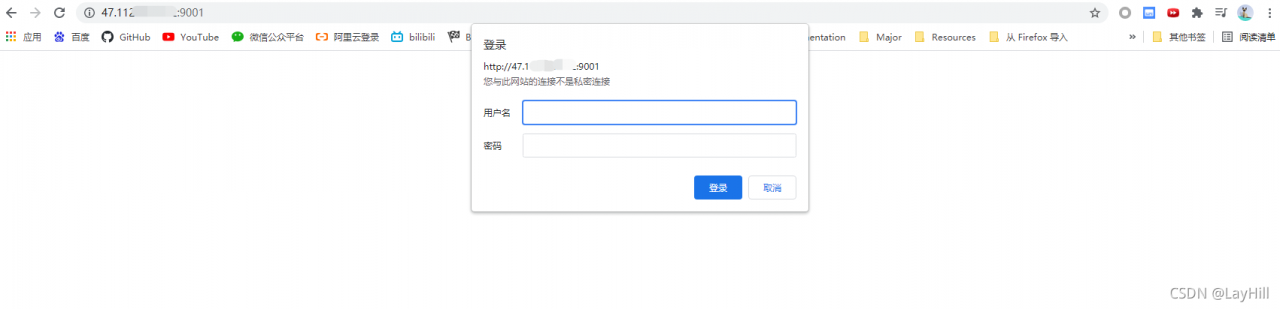
If it is set that everyone can access, you can log in to the browser:

I layhill successfully solved the problem through the above methods. Please correct the deficiencies!

Execution Error SQL_ERROR_INFO: near “.“: syntax error

I made the simplest mistake when doing SQL problems today

update  salaries set salaries.salary = salaries.salary *1.1 
where salaries.emp_no = (select emp_no from emp_bonus ) and to_date = '9999-01-01'

Then the idea reports an error. The error is near “.”: syntax error. In fact, when I update the salary table here, I don’t need to add “.” to index the elements in the table. I can call it directly.

update  salaries set salary = salary *1.1 
where emp_no = (select emp_no from emp_bonus ) and to_date = '9999-01-01'

Just change this.

Scala Flink Watermarker Error: Static Methods in interface require -target:jvm-1.8

explain

Gradle project + Scala 2.11 + java8 + Flink 1.12

Error code:

kafkaSource.assignTimestampsAndWatermarks(WatermarkStrategy
      .forBoundedOutOfOrderness[JSONObject](Duration.ofSeconds(10)))

Error message: static methods in interface require – target: jvm-1.8

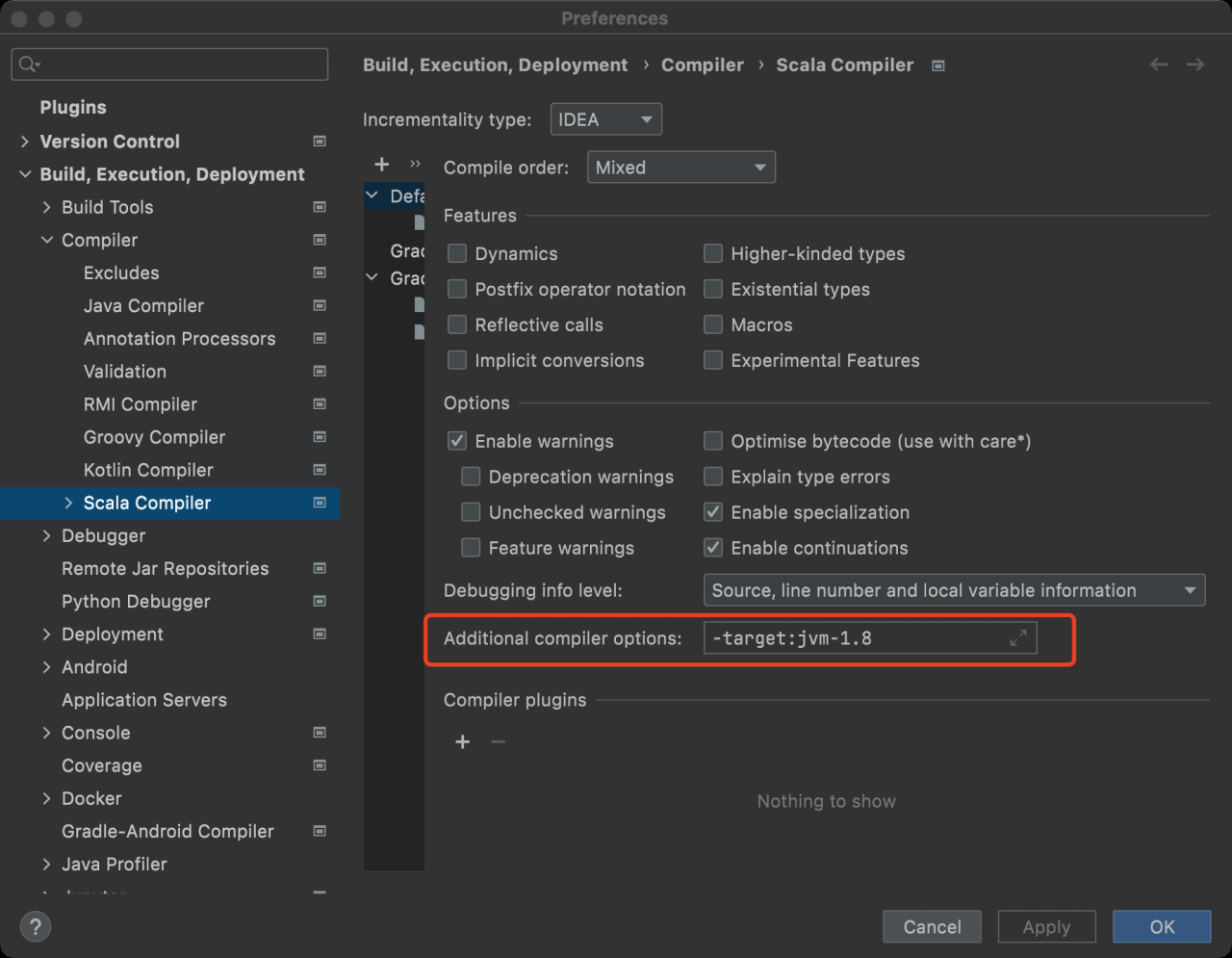
From the perspective of error reporting, it is an error reported by Scala trying to call a static method in the java interface. However, JDK1.8 is used for compiling and packaging in the idea configuration

Modifying the following idea configuration is not valid:

So think about another breakthrough and add the following configuration to the build.gradle file to solve the problem.

project.tasks.compileScala.scalaCompileOptions.additionalParameters = ["-target:jvm-1.8"]
project.tasks.compileTestScala.scalaCompileOptions.additionalParameters = ["-target:jvm-1.8"]

Django project running service reported an error NameError: name ‘OS’ is not defined

Existing problems:
after Django creates a new project, when running the service command “Python manage. Py runserver”, an error is reported: NameError: name ‘OS’ is not defined


Solution:
find the setting.py file in the new project path and add “import OS” to it

Note: the method to judge whether the project is successfully created is if something similar to“ http://127.0.0.1:8000/ ”The project address, and “the install worked successfully! Integrations!” is displayed in the browser.