I also configured the environment after installing the JDK, and the configuration of the environment was fine. Finally, I downloaded Eclipse and opened it and found the error shown in the following figure:
Java was started but returned exit code=13
C:\ProgramData\Oracle\Java\javapath\javaw.exe
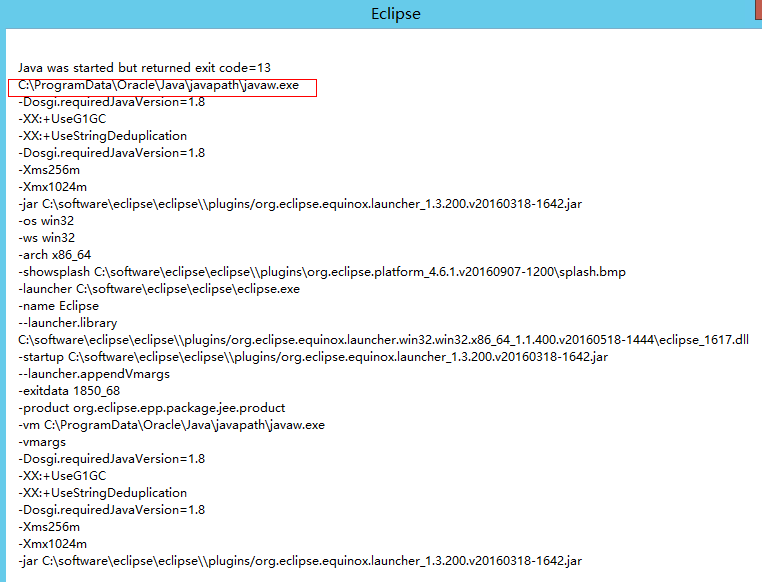
I searched the Internet first, and the answers I got were mostly unreliable. Then I checked over the wall geogel, and the answers I got were roughly in two aspects:
(1) There is a problem with the JDK environment
(2) The Jdk version is not consistent with the Eclipse version (Jdk is 32bit, Eclipse is 64bit or vice versa)
If a JDK environment error occurs, the general solution is to add the following sentence to the eclipse.ini (the same folder as Eclipse) file:
-vm
C: \ Program Files \ Java \ jdk1.7.0 _60 \ bin \ avaw exe
It’s not adding
-vm
C:\ProgramData\Oracle\Java\javapath\javaw.exe
After the above sentence is added, restart Eclipse, and the following error is found:
Failed to load the JNI Shared Library “C:\Program Files (x86)\Java\ JDk1.8.0_101 \ JRE \bin\ Server
\jvm.dll
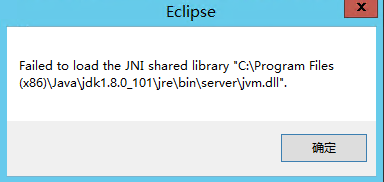
Therefore, I looked for errors such as Failed to load the JNI Shared Library. Generally, there are two cases:
1. There is a problem with the environment configuration of the JDK
2. JDK version not consistent with Eclispe (32-bit/64-bit)
So from our results above we can see that we have changed the configuration in Eclipse.ini and still can’t fix the problem. There is a new problem, which is probably the JDK and eclipse version.
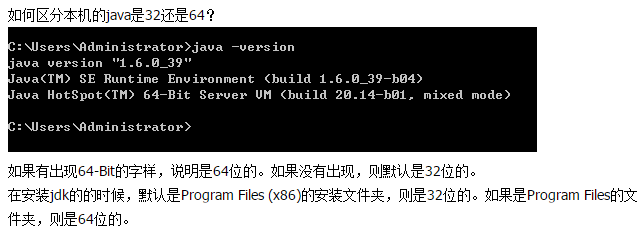
According to the above methods, it turned out that the inconsistency between the version of my JDK and eclipse caused our initial problems. My operating system was 64-bit, eclipse was 64-bit, while the JDK was 32-bit. Finally, I downloaded a 64-bit JDK and started Eclipse as normal.
Resources from:
http://stackoverflow.com/questions/4587518/eclipses-error-on-startup-in-windows-7
http://www.myexception.cn/program/2036913.html
Category Archives: How to Fix
Error connecting to master, – retry time: 60 retries: 86400
Two virtual machines configured MySQL master slave when the virtual machine input
> show slave status\G;
Displays the following error
Last_IO_Error: error connecting to master ‘[email protected]:3307’ – Retry time: 60 Retry: 86400
I. Screening:
1. The username and password are correct
2. The port number of master is correct
3. Master authorization
> show slave status\G;
Displays the following error
Last_IO_Error: error connecting to master ‘[email protected]:3307’ – Retry time: 60 Retry: 86400
I. Screening:
1. The username and password are correct
2. The port number of master is correct
3. Master authorization
# cat/data/mysql2/hostname. Err “to view the error log”
Slave I/O: ERROR connecting to master ‘[email protected]:3306’ – retry-time: 60 retry: 86400, Error_code: 2013
You don’t see anything. Error messages have no value.
Mysql – uslavelaowang – h192.168.32.133 – ppasswd
ERROR 2003 (HY000): Can’t connect to MySQL Server on ‘192.168.32.133’ (113)
# perror 113
OS Error code 113: No Route to host
【 Consider network reasons 】
# ping 192.168.32.133 [from the main ping] # Ping 192.168.32.132 [from the main ping] both have the return result, indicating network connection. Iptables -Fservice Iptables Save [Master Cleaning Firewall Rules]
Slave operation
# mysql – uslavelaowang h192.168.32.133 — ppasswd
ERROR 2003 (HY000): Can’t connect to MySQL Server on ‘192.168.32.133’ (111)
# perror 111
OS Error code 111: Connection union (union (union))
# mysql [Enter mysql under]
> slave stop;
> slave start;
> show slave status;
Slave_IO_Running: Yes
Slave_SQL_Running: Yes
Return two Yes’s
Reason: Iptalbes firewall rules are not cleared.
【error】postgresql relation does not exist
There have been a lot of problems with PostgresQL lately.
postgresql relation does not exist
When querling AAA tables using PostgresQL, postgresQL relation does not exist, but
SELECT tablename FROM pg_tables;AAA tables exist. It’s weird.
The search turned out to be a problem with quotes. PostgreSQL itself is not case sensitive, so if you want to create a new table with uppercase letters, you must use quotation marks, and if you want to query it, you must use quotation marks.
select * from "AAA";The following from: http://blog.csdn.net/dream20nn/article/details/51790106
A recently developed ETL tool for the WEB requires different data sources. The first time POSTGRESQL has found a problem with double quotes:
standard SQL is case-insensitive. But PostgreSQL allows case-sensitive definition and reference methods for the names of objects in the database. This is done by enclosing the name of the object you want to support size in double quotes in the DDL. For example, you want to create a table called AAA. If you use CREATE TABLE AAA (…) ; So the table that you create is actually aaa.
CREATE TABLE “AAA” (…) if you want to CREATE an upper case AAA TABLE. ; This is the double quote way of defining the object name. The disadvantage of writing
is that the query must also refer to the object name in double quotes. SELECT * FROM “AAA”; PostgreSQL doesn’t need to go to the AAA object and return an error that aaa doesn’t exist. It is important to note that not only tables can be defined and referenced in this way, but any object (column name, index name, etc.) in PostgreSQL is valid.
In fact, traditional SQL is case-insensitive, so there is no problem as long as DDL and DLLS manipulate database objects in the traditional (without double quotes) way. The problem is that if tables are created through PostgreSQL’s pgAdmin III tool, objects are created with double quotes by default, so the DLL must also be used with double quotes. However, this is not standard and is not supported if the database is accessed through some common library function.
Recommendation:
1. The tool pgAdmin III is not recommended for creating database objects. You should still write DDL statements by hand. 2. Double quotation marks in DDL are not recommended for creating case-sensitive objects. PostgreSQL recommends using uppercase for SQL key word and lowercase for all other names.
error code 11 – Administrative Limit Exceeded
The problem is ldap server has limitation for the user about numbers of entries searched.
Open your directory server (name), Configuration Folder, Performance. On right panel check Client Control folder. You may see:
Size limit
Look-through limit
Time limit
Idle timeout
The look-through limit specifies the maximum number of entries that will be examined for a search operation.
The size limit specifies the maximum number of entries the server returns to the client application in response to a search operation.
The time limit specifies the maximum time the server spends processing a search operation.
The idle timeout specifies the time a client connection to the server can be idle before the server drops the connection.
Change these options to “unlimited” can resolve this problem.
Not a PNG file.. solution
Let me show you what I did wrong
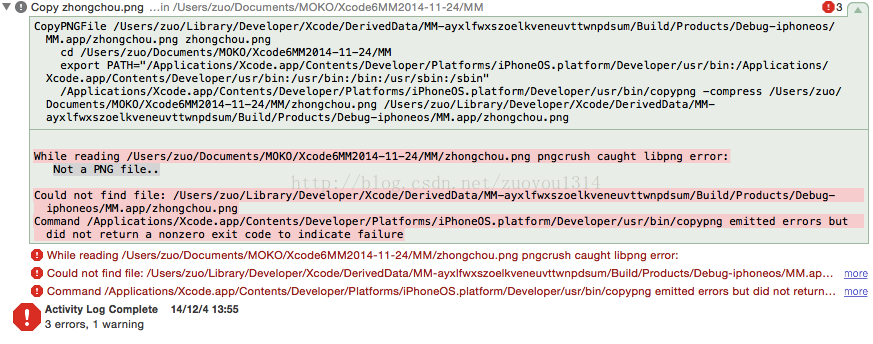
The reason for this error is that my image was in JPG format before, and then I changed the suffix name to PNG. It looks like you have changed it, but in fact you still haven’t changed it. The image is still in JPG format.
Solutions:
1. First change the image format to JPG format
(Why don’t you just drag the image to Photoshop, because you can’t do that at this time)
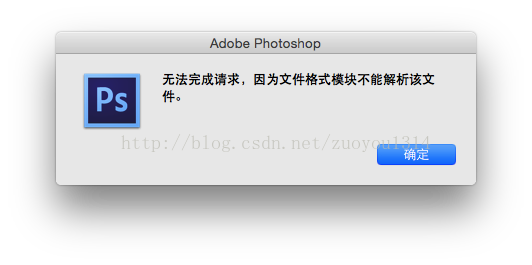
So, when we change the image format to JPG, we can drag it to PS
2. Drag the image into Photoshop and save it again. Make sure to change the format to PNG.
The reason for this error is that my image was in JPG format before, and then I changed the suffix name to PNG. It looks like you have changed it, but in fact you still haven’t changed it. The image is still in JPG format.
Solutions:
1. First change the image format to JPG format
(Why don’t you just drag the image to Photoshop, because you can’t do that at this time)
So, when we change the image format to JPG, we can drag it to PS
2. Drag the image into Photoshop and save it again. Make sure to change the format to PNG.
C++ vector find error: no matching function for call to ‘find(std::vector::iterator, std::v
Using the find method to find elements in the vector, I found a strange problem.
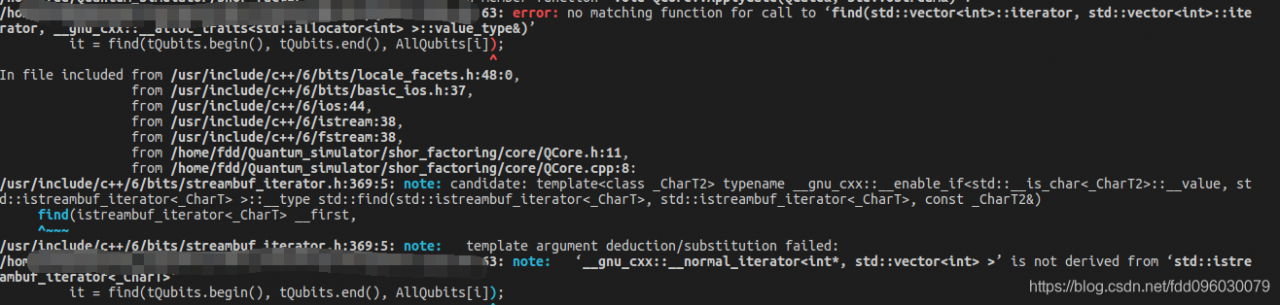
When I independently verified the find function myself, I found that there was no problem. It’s weird going into this code.
/ home// XXX XXX. CPP: 163:63: error: no matching function for the call to ‘find (STD: : vector< int> ::iterator, std::vector< int> ::ite
rator, __gnu_cxx::__alloc_traits< std::allocator< int> > ::value_type&) ‘
it = find (tQubits. The begin (), tQubits. The end (), AllQubits [I]);
^
In the file included the from/usr/include/c + +/6/bits/locale_facets. H: 48:0,
the from The/usr/include/c + +/6/bits/basic_ios. H: 37,
the from/usr/include/c + +/6/ios: 44,
the from/usr/include/c + +/6/cost: 38,
the from/usr/include/c + +/6/fstream: 38,
the from/home/FDD/Quantum_simulator shor_factoring/core/QCore. H: 11,
the from /home/fdd/Quantum_simulator/shor_factoring/core/QCore.cpp:8:
/usr/include/c++/6/bits/streambuf_iterator.h:369:5: note: candidate: template< class _CharT2> typename __gnu_cxx::__enable_if< std::__is_char< _CharT2> ::__value, st
d::istreambuf_iterator< _CharT> > ::__type std::find(std::istreambuf_iterator< _CharT> , std::istreambuf_iterator< _CharT> , const _CharT2&)
the find (istreambuf_iterator & lt; _CharT> __first,
^ ~ ~ ~
/usr/include/c + +/6/bits/streambuf_iterator. H: 369-5: note: the template argument deduction/substitution failed:
/home// XXX XXX. CPP: 163-63: Note: ‘__gnu_cxx: : __normal_iterator & lt; int*, std::vector< int> > “Is not derived from ‘STD ::istre
ambuf_iterator< _CharT> ‘
it = find (tQubits. The begin (), tQubits. The end (), AllQubits [I]);
^
It took a long time, but I finally found a solution on a foreign website. The find function needs a header file containing the algorithm…
Add a line #include< algorithm> That’s it!
So I have to write a note, hoping to be helpful to future generations!
Running program encountered Error:Access violation at 0x**(tried to write to 0x**) program terminated
Right click “My computer”. Click Properties.
in system properties, click advanced.
in performance, click Settings.
in performance options, click data execution protection.
click add. Select the program to run.
in system properties, click advanced.
in performance, click Settings.
in performance options, click data execution protection.
click add. Select the program to run.
SQL Server import MDF and LDF files appear: unable to open physical file “D:\ XX.mdf “。 Operating system error 5: “5 (access denied. )”Solutions
Right click on one of the databases in SQL Server Management Studio, select “New Query”, and run:
EXEC  sp_attach_db  @dbname  =  'store',
@filename1  =  'D:\XX.mdf',
@filename2  =  'D:\XX_log.ldf'
Press F5 or run button to execute.
Console output: appears
Unable to open physical file “D:\XX. MDF “. Operating system error 5:”5(access denied). ”
error log information:
Setting database option MULTI_USER to ON for database store.
Starting up database ‘store’.
error: 17204, severity: 16, status: 1.
FCB::Open failed: Could not Open file D:\store\store. MDF for file number 1. OS error: 5(denied access)
error: 17204, severity: 16, status: 1.
FCB::Open failed: Could not Open file D:\store\store_log.ldf for file number 2. OS error: 5(denied access)
error: 5105, severity: 16, status: 1.
A file activation error occurred. The physical file name’d :\store _store_log.ldf may be pen. account and correct additional errors, and retry The operation.
error: 928, severity: 20, status: 1
During upgrade, database raised exception 945, database raised exception 14, state 2, address 00000000009F3BD7. Use the exception number to determine the cause.
Solutions:
In the directory where the database resides, the folder where the MDF and LDF files are stored, right-click the folder — properties — security — Add the SqlServer service startup account or Everyone — check the box “Complete Control” — to exit.
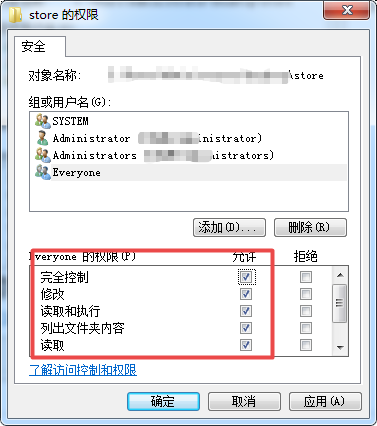
Finally, rerun the above code.
error: expected declaration or statement at end of input
This error is sometimes reported in Linux programming, and it hurts a lot because the compiler doesn’t tell you exactly what went wrong…
There are several possible reasons for this error:
1) Where the program is missing a parenthesis.
The detection method is as follows. If you are programming with VIM, you can use % to match the parentheses one by one. Here is how I did it
2) the variable does not declare
There are several possible reasons for this error:
1) Where the program is missing a parenthesis.
The detection method is as follows. If you are programming with VIM, you can use % to match the parentheses one by one. Here is how I did it
2) the variable does not declare
Tomcat service failed to start
After registering Tomcat as a Windows system service, it has been unable to start and has been reporting an error:
The Apache Tomcat 7.0 Tomcat7 service with The following service-specific error:
penfunction.
After debugging for half a day, the problem could not be solved even by reassigning account permissions and re-registering the service. Later, it was found that it was tomcat executable file tomcat7w.exe running mode
The problem of
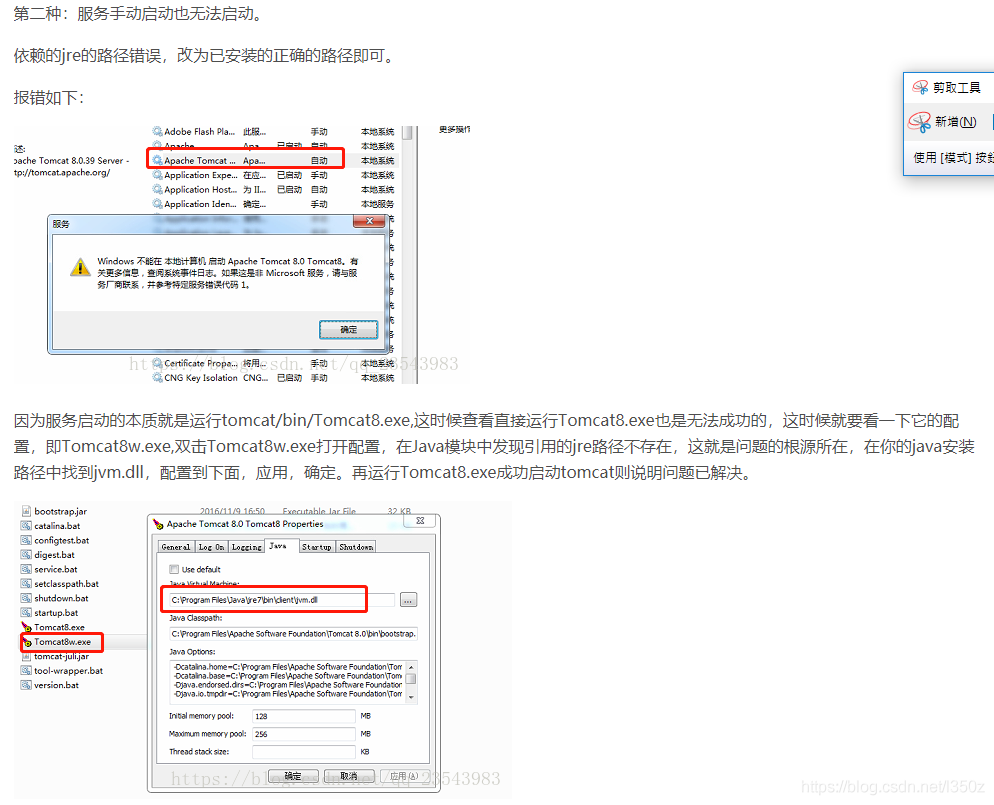
There is a Startup TAB in the figure above, click on it and select Java mode before restarting the service and the problem is resolved
The Apache Tomcat 7.0 Tomcat7 service with The following service-specific error:
penfunction.
After debugging for half a day, the problem could not be solved even by reassigning account permissions and re-registering the service. Later, it was found that it was tomcat executable file tomcat7w.exe running mode
The problem of
There is a Startup TAB in the figure above, click on it and select Java mode before restarting the service and the problem is resolved
Solution to Starting Fault of routing and remote access service (16389 (0x4005))
1. The routing and remote access service cannot be started on a Microsoft Windows 2000 Server computer or a Microsoft Windows Server 2003 Server computer.
the following error message was recorded in the system event log on the Windows 2000 server computer:
the following error message was recorded in the system event log on the Windows 2000 server computer:
Type error:
source: service control manager
category: none
event ID 7024:
note:
routing and remote access service due to a specific service error 87 (0x57).
Type error:
source: remote access
category: none
event ID: 20152
note:
the current configuration authentication provider failed to load and initialize. The parameter is an error.
The following error messages will be logged based on the system event log on the Windows Server 2003 machine:
Type error:
source: service control manager
category: none
event ID 7024:
note:
routing and remote access service due to a specific service error 16389 (0x4005).
Launching Routing and Remote Access Service prompts:
Routing and Remote Access cannot be started on a local computer. Refer to the system log for reasons. If this is not a Microsoft service, contact the service vendor. And refer to the specific error code 16389.
The details in the event viewer are:
Routing and Remote Access service to be stopped due to a 16389 (0x4005) service error. The error ID is 7024…
2, the reason
This problem occurred when the Internet Authentication Service (IAS) database was corrupted. IAS and routing and remote Access services use the IAS database.
3. Solutions
To solve this problem, follow these steps:
- extract ias.mdb file and dnary.mdb file from Windows2000Server CD or Windows Server 2003 CD to %WinDir%/System32/Ias folder on disk. To do this, follow these steps:
- click start, click run, type CMD in open, box, and then click ok. At the command prompt, type the following line. Press Enter after each line:
Drive:
cd i386
ren %windir%/system32/ias/ias.mdb %windir%/system32/ias/iasOLD.mdb
ren %windir%/system32/ias/dnary.mdb %windir%/system32/ias/dnaryOLD.mdb
expand ias.md_ %windir%/system32/ias/ias.mdb
expand dnary.md_ %windir%/system32/ias/dnary.mdb
note that in this step, driver is a dvd-rom drive containing the Windows2000Server or WindowsServer2003CD that represents the drive letter is a cd-rom drive or placeholder.
register oledb32r.dll file and register oledb32.dll file. To do this, follow these steps:
- at the command prompt, type the following line. Press Enter after each line:
Drive:
cd program files/common files/system/ole db
regsvr32 oledb32r.dll
note that in this step, drive is a placeholder representing the ProgramFiles folder is the drive letter to store. When you receive a message indicating whether the operation was successful, click OK. At the command prompt, type the following line, and then press ENTER:
regsvr32 oledb32.dll
When you receive a message indicating whether the operation was successful, click OK. Type EXIT and then press ENTER to exit the command prompt.
register vbscript.dll file. To do this, follow these steps:
- at the command prompt, type the following line. Press Enter after each line:
Drive:
cd %systemroot%/system32
regsvr32 vbscript.dll
note that in this step, driver is a placeholder representing the drive letter is stored in the System 32 folder. When you receive a message indicating whether the operation was successful, click OK. Type EXIT and then press ENTER to exit the command prompt.
starts routing and remote access services. To do this, follow these steps:
- points to the program, points to the management tool, and starts with Services. Right-click the Routing and Remote Access service, and click Start.
Error syncing pod, skipping: failed to “StartContainer” for “POD” with Image
When creating Kubernetes-DashboardPod, it is found that kubernetes-DashboardPod can be successfully created, but when viewing the status of pod, it is not found, and the running of pod is not found from node node. After the screening process, it was found that pod- Infrastructure image download failed, causing POD startup failure.
Pod -infrastructure image download configuration
open /etc/kubernetes/kubelet configuration file.
vim /etc/kubernetes/kubelet
1
###
# kubernetes kubelet (minion) config
# The address for The info server to serve on (set to 0.0.0.0 or “for all interfaces)
KUBELET_ADDRESS=”–address=0.0.0.0″
# The port for the info server to serve on
# KUBELET_PORT=”–port=10250″
# You may leave this blank to use the actual hostname
KUBELET_HOSTNAME=”–hostname-override=10.0.11.150″
# location of the api-server
KUBELET_API_SERVER=”–api-servers=http://10.0.11.150:8080″
# pod proceeds the container
KUBELET_POD_INFRA_CONTAINER = “- pod – infra – container – image = 10.0.11.150:5000/rhel7/pod – infrastructure: v1.0.0”
# Add your own!
KUBELET_ARGS=””
Pod -infrastructure image download configuration
open /etc/kubernetes/kubelet configuration file.
vim /etc/kubernetes/kubelet
1
###
# kubernetes kubelet (minion) config
# The address for The info server to serve on (set to 0.0.0.0 or “for all interfaces)
KUBELET_ADDRESS=”–address=0.0.0.0″
# The port for the info server to serve on
# KUBELET_PORT=”–port=10250″
# You may leave this blank to use the actual hostname
KUBELET_HOSTNAME=”–hostname-override=10.0.11.150″
# location of the api-server
KUBELET_API_SERVER=”–api-servers=http://10.0.11.150:8080″
# pod proceeds the container
KUBELET_POD_INFRA_CONTAINER = “- pod – infra – container – image = 10.0.11.150:5000/rhel7/pod – infrastructure: v1.0.0”
# Add your own!
KUBELET_ARGS=””
the configuration item information for the kubelet configuration file is shown above. Where the KUBELET_POD_INFRA_CONTAINER configuration item connotes the address at which the pod- Infrastructure image is downloaded. The original configuration address is:
KUBELET_POD_INFRA_CONTAINER = “– pod-infra-container-image=registry.access.redhat.com/rhel7/pod-infrastructure:latest”
1 through test, found that the domestic is unable to download the to pod – proceeds the mirror… .
The solution
first, you can first configure the local Docker and use image acceleration.
Then the image file that can be downloaded is found through Docker search Pod – Infrastructure
docker search pod-infrastructure
The INDEX NAME DESCRIPTION STARS OFFICIAL AUTOMATED
docker. IO Docker. IO/openshift origin – pod The pod proceeds image for openshift 3 5
docker. IO docker. IO/infrastructureascode/aws – cli Containerized AWS CLI on alpine to avoid r… 3 [OK]
docker. IO docker. IO/newrelic/infrastructure Public image for New Relic proceeds.
3 docker. IO Docker. IO/infrastructureascode uwsgi uwsgi application server 2 [OK]
docker. IO docker. IO/manageiq/manageiq – the pods OpenShift based images for manageiq. 2 [OK]
docker.io docker.io/podigg/podigg-lc-hobbit A hobbit dataset The generator wrapper for PoDiGG 1 [OK]
docker. IO docker. IO/tianyebj/pod – infrastructure registry.access.redhat.com/rhel7/pod-infra… 1
docker. IO docker. IO/w564791/pod – infrastructure latest 1
to find the image file, you want The image is then downloaded locally through the docker pull command.
Then mirror pod-Infrastructure into the local private library and modify the KUBELET_POD_INFRA_CONTAINER configuration item in the Kubelet configuration file:
KUBELET_POD_INFRA_CONTAINER = “- pod – infra – container – image = 10.0.11.150:5000/rhel7/pod – infrastructure: v1.0.0”
among them 1, 10.0.11.150 private library, is one of my local docker rhel7/pod – infrastructure is my a mirror image of the name, kept in a private library v1.0.0 is saved version.
Finally, restart the cluster:
Master node restart command:
For SERVICES in kube-apiserver Kube-Controller-Manager Kube-scheduler; Do
systemctl restart $SERVICES
done
Node restart command:
Systemctl restart kubelet
1
note: Master Node and Node Node both make this change.
— — — — — — — — — — — — — — — — — — — — —
the author: _silent YanQin
source: CSDN
,
https://blog.csdn.net/A632189007/article/details/78730903 copyright statement: this article original articles for bloggers, reproduced please attach link to blog!