Category Archives: How to Fix

Error: can’t resolve ‘FS’ in (webpack 2 configures CSS loaders)

Preamble, CSS loaders in Webpack 2 have been configured before, but how incorrect
Error:

ERROR in ./~/convert-source-map/index.js
Module not found: Error: Can't resolve 'fs' in '/Users/ceshi/Desktop/webpack/node_modules/convert-source-map'
 @ ./~/convert-source-map/index.js 2:9-22
 @ ./~/css-loader/lib/css-base.js
 @ ./~/css-loader!./app/style.css
 @ ./app/style.css
 @ ./app/main.js


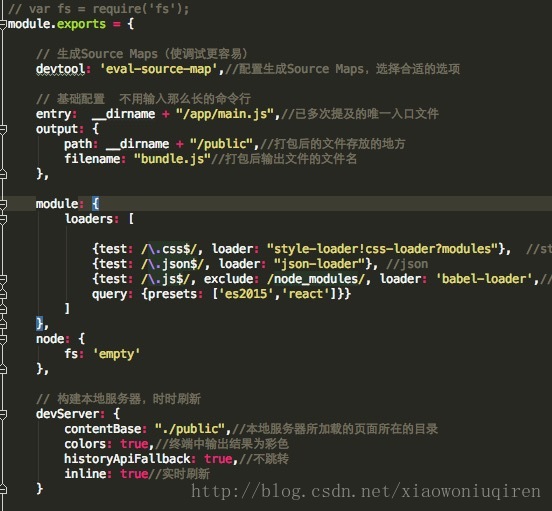
Fix this by modifying the webPack configuration file to add a single line of code

 node: {
        fs: 'empty'
    },


Test success

TCP error code 10061: unable to connect because the target machine actively refused http://localhost :8732/Design_ Time_ Addresses/TeacherHelperServic

 
An error occurred when we added a WCF service reference to the client with the following message:
TCP Error code 10061: Unable to connect due to active rejection of target machine
http://localhost:8732/Design_Time_Addresses/TeacherHelperServic
Unable to connect to remote server due to active rejection of target machine. 127.0.0.1:8732 /

Possible reasons:
1. The corresponding service port is not opened
2. Some TCP listening services are not enabled
3. The Client does not match the Serivce configuration
Solution reference:
 
1. Check firewall Settings. Do you open the service port, such as 8732?If not, add the service port as a secure port.
2. Check whether the service hosting process is started. In this case, the service hosting program is usually run for a custom host to host the service.
3. Perhaps a service such as net.TCP Listener Adapter is not started. The Net.TCP Listener Adapter is set to start automatically.


yum install/update error: sqlite3.DatabaseError: database disk image is malformed

Error message:

Running transaction check
Running transaction test
Transaction test succeeded
Running transaction
Traceback (most recent call last):
  File "/usr/bin/yum", line 29, in <module>
    yummain.user_main(sys.argv[1:], exit_code=True)
  File "/usr/share/yum-cli/yummain.py", line 375, in user_main
    errcode = main(args)
  File "/usr/share/yum-cli/yummain.py", line 281, in main
    return_code = base.doTransaction()
  File "/usr/share/yum-cli/cli.py", line 817, in doTransaction
    resultobject = self.runTransaction(cb=cb)
  File "/usr/lib/python2.7/site-packages/yum/__init__.py", line 1852, in runTransaction
    self.skipped_packages, rpmdb_problems, cmdline)
  File "/usr/lib/python2.7/site-packages/yum/history.py", line 943, in beg
    pid = self._ipkg2pid(pkg)
  File "/usr/lib/python2.7/site-packages/yum/history.py", line 798, in _ipkg2pid
    return self._pkgtup2pid(po.pkgtup, csum, create)
  File "/usr/lib/python2.7/site-packages/yum/history.py", line 759, in _pkgtup2pid
    epoch=?AND version=?AND release=?""", pkgtup)
  File "/usr/lib/python2.7/site-packages/yum/sqlutils.py", line 168, in executeSQLQmark
    return cursor.execute(query, params)
sqlite3.DatabaseError: database disk image is malformed

Sqlite3.DatabaseError: database disk image is malformed
net clean yum cache: yum clean all…
then find a question: https://www.linuxquestions.org/questions/fedora-35/sqlite3-databaseerror-database-disk-image-is-malformed-4175623256/
a line command perfectly solves the problem!

sudo yum history new

LinkIssue: Error ‘LINK : fatal error LNK1123: failure during conversion to COFF: file invalid or cor

The following error may occur in compiling the link with VisualStudio:
LINK : fatal error LNK1123: failure during conversion to COFF: file invalid or corrupt
The following solutions are available online:
1. Disable incremental linking
 

Project Properties  -> Configuration Properties  -> Linker (General)  -> Enable Incremental Linking -> "No (/INCREMENTAL:NO)"

2. Turn off “Embed Manifest”
 
 
But neither method worked for me.
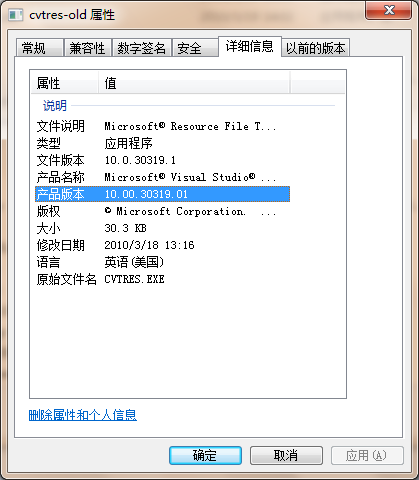
Issue root cause: In a system update or software upgrade, there is more than one version of the Utility: Cvtres.exe
D:\Program Files (x86)\Microsoft Visual Studio 10.0\VC\bin\cvtres.exe
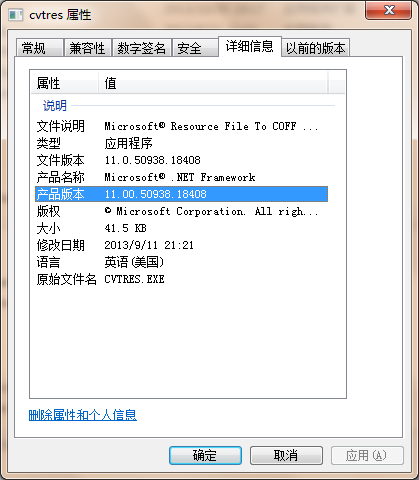
C:\Windows\Microsoft.NET \ Framework \ v4.0.30319 \ cvtres exe


Cvtres. exe in VS directory is not in work due to improper cause of . If the Utinity is in front of the path and linker feels the need to convert a.res file to COFF object format,link will fail, showing error: LNK1123

: delete or rename the old Utility cvtres.exe to cvtres.exe_old for VS. Or rearrange the PATH variable.

reference :

http://stackoverflow.com/questions/10888391/error-link-fatal-error-lnk1123-failure-during-conversion-to-coff-file-inval
-------------------
 
About Error: LNK1123: Failure during conversion to COFF: File invalid or corrupt error solution [Qt] [VS2010]
 
VS2010 Qt development tools have had to be reinstalled due to a new hard drive. There is no problem with the installation process. After installation, I clicked on an example to test it and it did not work well. Then the error message in the title appeared. I had dealt with it once before, but I forgot it after a long time, so I solved it by another search. This time grow a heart eye, write down, lest later forget again (write blog essay of what not stick to, have to despise oneself).


Let's get started. The prompt indicates that the conversion to the COFF file failed because of an error (VS2010 is installed and there would normally be no file invalid).
Cvtres.exe is the program that does the conversion. The root cause of the above error is the presence of multiple versions of CVtres.exe on the system.
\Windows\Microsoft \Framework\v4.0.30319\cvtres.exe

VS directory version :C:\Program Files (x86)\Microsoft Visual Studio 10.0\VC\BIN\cvtres.exe
if it is a 64-bit system, then there is another one in c: \Windows\Microsoft t.net \Framework64\v4.0.30319\cvtres.exe
, however, both versions of the Framework and Framework64 are the same, and are generally newer than the version in the VS directory due to system updates.


The solution here is obviously simple, just rename or delete the old version, but I usually do renames, like adding -old.
Another point to make is that when looking for the cvtres.exe program in the system directory, there is an XML file called Cvtres.exe (the blogger does not show the file extension). So don't make a mistake when you look for it.
Well, that's all for this essay. It's not easy to get into the habit of blogging T T, keep up the good work!

Reproduced in: https://www.cnblogs.com/kungfupanda/p/4121059.html

An error occurred while processing your request

One error occurred while processing your request. One more error occurred while processing your request.

Recently, when I visited the Apple developer’s website, I was frequently prompted to change my password. As one netizen put it, I ran out of passwords… What’s more annoying is that when I log into the Apple developer website with MBP, I will report the following error:
An error occurred while processing your request.
the Reference # 97. A40a4cdb. 1377947415.57 b2224a

opens at certificate findings suggest “a248.e.akamai.net this certificate is invalid (does not match the host name)”

use winxp desktop can normal login.

— — — — — — — — — — — — — — — — — — — — — — —
is the problem for several days, the website can change the host files, but still I tried after an error. I couldn’t log in to Windows all the time, so I continued to look for problems. I spent a lot of time with the key chain and installed Firefox, but I couldn’t solve them. Finally, search to the https://discussions.apple.com/thread/1893170?start=0& Tstart =0
basically means you can add two DNS: 208.67.222.222, 208.67.220.220.

After modification, the login was successful. At least you can log in now. Please pray that there will be no error in the future.

Ms- settings:personalization-background terms of settlement

Preface:
In today’s computer and uninstall the useless software when an error occurred, lead to the computer can not run normally, keyboard and mouse doesn’t work, all the ICONS on the desktop are gone, but the keyboard raised the task manager to transfer out, look up a number of ways that the best way is to reinstall the system, but wanted to think reshipment system is too trouble, and some data backup didn’t afraid of losing, so check a variety of methods, finally to solve, now share with you.
I. Cause of the problem:
At the beginning, I didn’t know what the problem was. By looking up English words, it was “setting personalized background”. After thinking about it, I should turn off the personalized background setting service and just turn it on.
Second, solutions
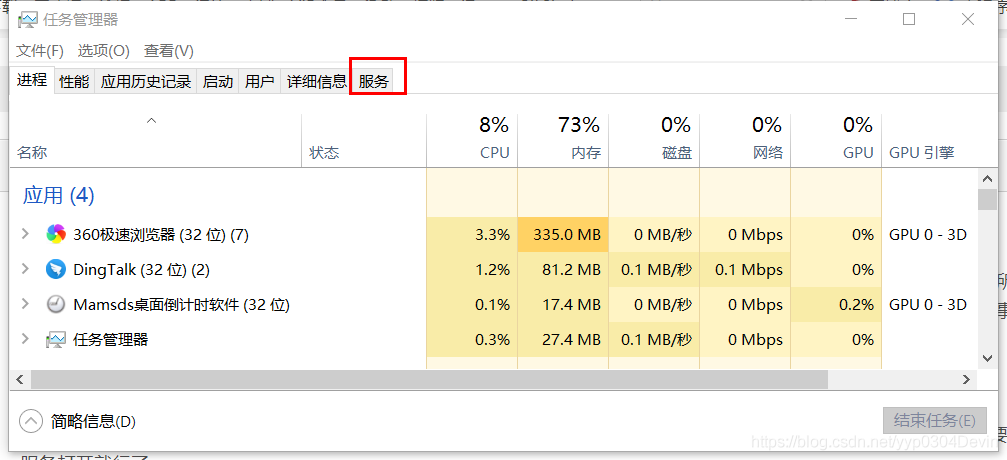
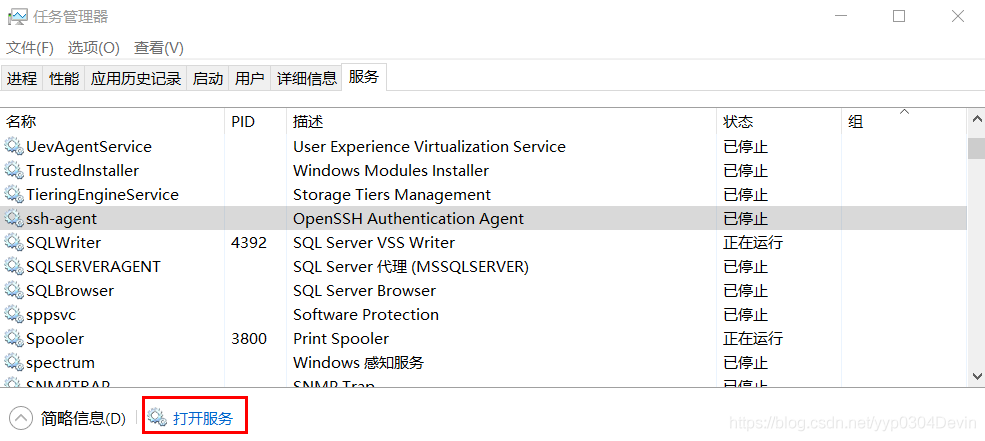
1. Press “Ctrl+Alt+Del” and click “Start Task Manager” — open service
2. Select any option in Services — click Open Services.

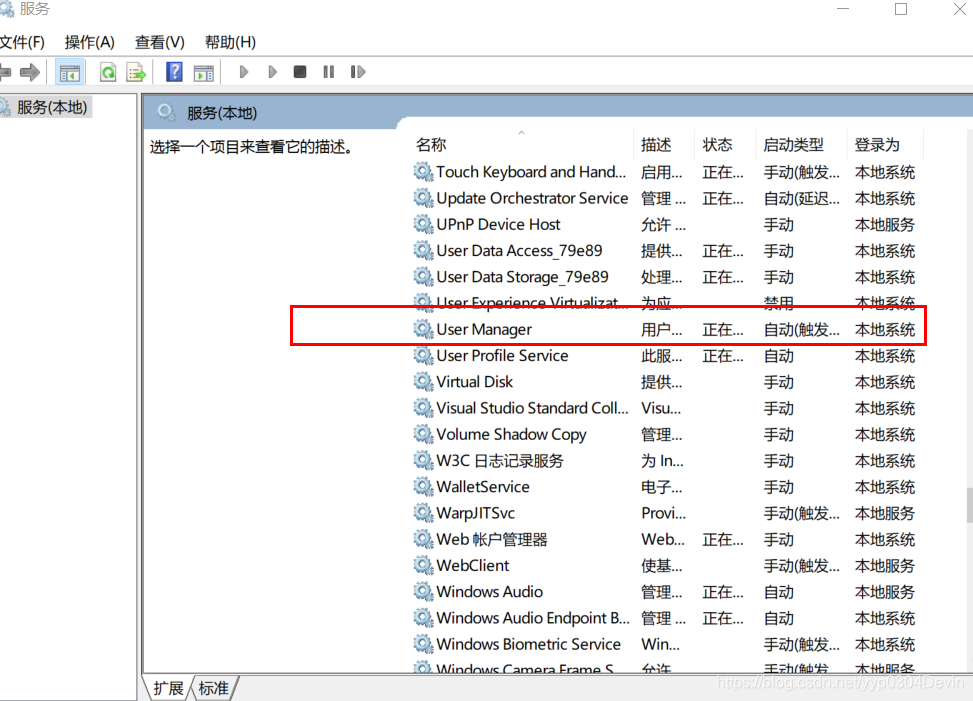
3. Find User Manager in Services (Local) — Change the startup type of the service to Auto, and close the window.

4. Click the “Ctrl+Alt+Del” key combination and choose to log out. The problem will be solved when the computer restarts.
Conclusion:
In the process of finding problems and solving problems, I have a deeper understanding of what I don’t know about computers. Don’t be afraid to encounter problems. I will gain a lot when Solving problems and stand on the shoulders of giants.

Error tips:array type has incomplete element type

error:array type has incomplete element type

This is generally because when a header file USES a custom variable type, the declaration of the variable type does not appear in the header file, that is, it is not declared before it is used. The
solution is to add the header file that declares the variable type to the header file used.

failed: Error during WebSocket handshake: Unexpected response code: 400

Problem description: reference socket. Io in the project, after the project deployment error, local run no error
Reason for the error: You need to configure the information in the configuration file nginx.conf
Solutions:
Add in the location of the nginx file
Proxy_http_version 1.1;
proxy_set_header Upgrade $http_upgrade;
proxy_set_header Connection “upgrade”.
The first line tells Nginx to use HTTP/1.1 when communicating with the Node backend, which is required by WebSockets. The next two lines tell Nginx to respond to the upgrade request, which is started by HTTP when the browser wants to use WebSocket. All three lines must be added.
Such as:

. Default_server;
listen [: :] : 80 default_server.
server_name localhost.
root/usr/share/nginx/HTML;
# Load configuration files for the default server block.
include /etc/nginx/default.d/*.conf;
The location/{
proxy_pass http://localhost:3100;
proxy_http_version 1.1;
proxy_set_header Upgrade $http_upgrade;
proxy_set_header Connection “upgrade”.
proxy_set_header Host $Host;

}}

MacOS Catalina (system): xcrun: error: invalid active developer path(), missing xcrun at / Library

Question why
xcrun: error: invalid active developer path (/Library/Developer/CommandLineTools), missing xcrun at: /Library/Developer/CommandLineTools/usr/bin/xcrun
A scenario
git
SVN is not working properly
Idea suggests that the SVN path is not correct
The solution
Open the command terminal to run

xcode-select --install

After entering, the system will pop up and download the Xcode component. Click “Ok” and the download will be completed.
xcode-select: note: install requested for command line developer tools
Problem analysis
At first, I thought the SVN path was incorrect, but it was correct after repeated confirmation.
If you think SVN is gone, consider the MAC’s own Subversion can’t go wrong.
Finally, In SVN — Version, I was given an error notification prompt:
xcrun: error: invalid active developer path (/Library/Developer/CommandLineTools), missing xcrun at: /Library/Developer/CommandLineTools/usr/bin/xcrun
And Then I Command C, Command V, and I open Baidu, and I do it all at once.
The problem summary
A lot of Mac software relies on xcode’s precursors.

CONDA HTTP error is prompted when Anaconda prompt is installed and updated

When we use the Anaconda Prompt, we often use the conda command for environment management and third-party package management. But what if the following problems arise?Don’t panic. You’ll know after you read it.
Error code:
Could not fetch URL https://pypi.python.org/simple/tensorflow/: There was a problem confirming the ssl certificate: [SSL: CERTIFICATE_VERIFY_FAILED] certificate verify failed (_ssl.c:748) – skipping

(base) C:\Users\genec>conda create --name python36 python=3.6
Solving environment: failed

CondaHTTPError: HTTP 000 CONNECTION FAILED for url <https://repo.anaconda.com/pkgs/r/win-64/repodata.json.bz2>
Elapsed: -

An HTTP error occurred when trying to retrieve this URL.
HTTP errors are often intermittent, and a simple retry will get you on your way.

If your current network has https://www.anaconda.com blocked, please file
a support request with your network engineering team.

SSLError(MaxRetryError('HTTPSConnectionPool(host=\'repo.anaconda.com\', port=443): Max retries exceeded with url: /pkgs/r/win-64/repodata.json.bz2 (Caused by SSLError(SSLError("bad handshake: Error([(\'SSL routines\', \'ssl3_get_server_certificate\', \'certificate verify failed\')])")))'))

Online tutorial prompts to replace the source installation, you can. Below is the result of trying to replace the source…

(base) C:\Users\genec>conda create --name python36 python=3.6
Solving environment: failed

CondaHTTPError: HTTP 000 CONNECTION FAILED for url <https://mirrors.tuna.tsinghua.edu.cn/anaconda/pkgs/free/win-64/repodata.json>
Elapsed: -

An HTTP error occurred when trying to retrieve this URL.
HTTP errors are often intermittent, and a simple retry will get you on your way.
SSLError(MaxRetryError('HTTPSConnectionPool(host=\'mirrors.tuna.tsinghua.edu.cn\', port=443): Max retries exceeded with url: /anaconda/pkgs/free/win-64/repodata.json (Caused by SSLError(SSLError("bad handshake: Error([(\'SSL routines\', \'ssl3_get_server_certificate\', \'certificate verify failed\')])")))'))

The problem remains unresolved. So what to do?
In fact, the main problem is your network SSL authentication, you can try this:
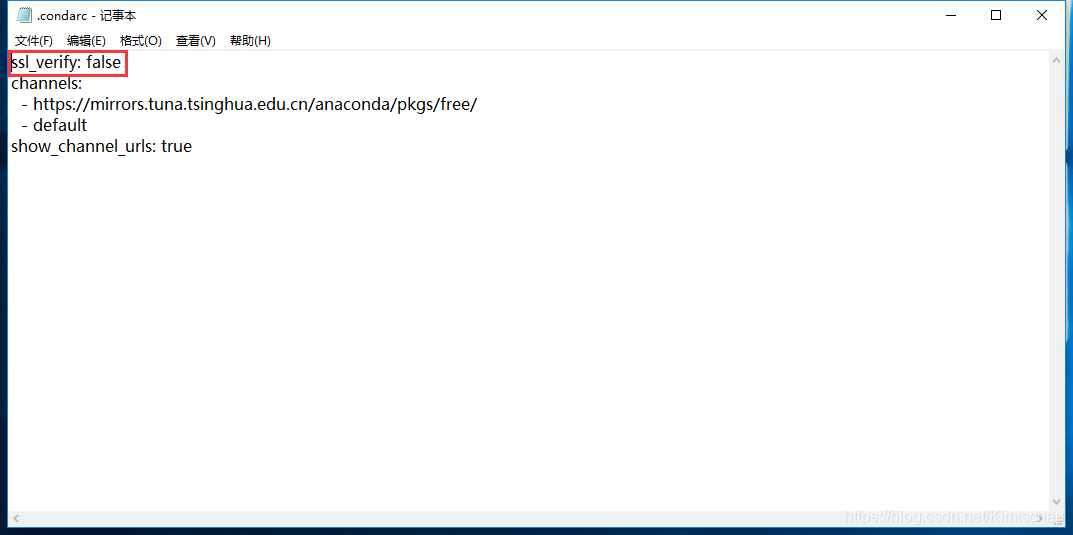
Use notepad or Notepad++ to open C:\Users\.condarc under your username. Change sSL_verify to false.

If you want to change back to the original conda source, enter the Anaconda Prompt:

conda config --remove-key channels


pymongo.errors.DuplicateKeyError: E11000 duplicate key error collection: anjuke.ershoufang index

This bug kept me busy all afternoon and a night, and finally I ko it
Attach a section of crawling to take anjuke second-hand housing information code
Re
import time
import pymongo
import requests
from bson import ObjectId
from LXML import etree
from pprint import pprint
headers = {
“user-agent “: “Mozilla/5.0 (X11; Linux x86_64) AppleWebKit/537.36 (KHTML, like Gecko) Chrome/66.0.3359.139 Safari/537.36”,
“cookie”: “aQQ_ajkguid= 243e5d558-8b13-d7bd-4922-3de583e03855; ctid=11; _ga = GA1.2.1030980732.1530799904; _gid = GA1.2.506397644.1530799904; 58tj_uuid=c606f59a-2fb9-4c91-9815-741fdf9cfe5d; als=0; lps=http%3A%2F%2Fwww.anjuke.com%2F%3Fpi%3DPZ-baidu-pc-all-biaoti%7Chttps%3A%2F%2Fwww.baidu.com%2Fs%3Fie%3Dutf-8%26f%3D8%26rsv_bp%3D0%26rsv_idx%3D1%26tn%3Dbaidu%26wd%3D%25E5%25AE%2589%25E5%25B1%2585%25 E5%25AE%25A2%26rsv_pq%3Dd71198bd000395ca%26rsv_t%3D6172VDlcx2zzRQ%252FLyCdcEidtafr%252BSvVyVXrlZ0lsK3U1MEz8066IF4byz4c%26rqlang%3Dcn%26rsv_enter%3D1%26rsv_sug3%3D5%26rsv_sug1%3D5%26rsv_sug7%3D101; twe=2; sessid=3497C1D2-43A8-6143-B2D7-CFDA33FF0C0E; new_uv=2; __xsptplus8 7 c = 8.2.1530840314.1530840335.2%232%7Cwww.baidu.com % % 7 c % 7 c % 25 e5%25 ae b1%2585% % 2589% % 25 e5 25 25 e5%25 ae % 25 a2%23 z7v3xnqldcxthemliqlxqslhvxrh8k_r 7 c % 23% % 23 “,
“referer” : “https://shanghai.anjuke.com/?PI = pz-bid-pc-all-biaoti “
}

# connect to database
client = pymongo.MongoClient(‘127.0.0.1’, 27017)
# define database name
db = client.anjuke
# define table name
coll = db.ershoufang

def get_info():
count = 0
for I in range(23):

response = Requests. The get (‘ # https://shanghai.anjuke.com/sale/p {}/filtersort ‘. The format (I), headers = headers)

item = response. The text

# print (item)
# use etree. HTML, The string into an HTML document.
HTML = etree HTML (item)
HTMLS = HTML. The xpath (‘// * [@ id = “houselist – mod – new”]/li ‘)
# print (HTMLS)

house = {}
for h in HTMLS:
h_addr = h.x path (‘/div [2]/div [1]/a/text () ‘) [0]. The strip ()
h_type = h.x path (‘/div [2]/div [2]/span [1]/text () ‘) [0]. The strip ()
h_area = H.x path (‘/div [2]/div [2]/span [2]/text () ‘) [0]. The strip ()
h_hight = h.x path (‘/div [2]/div [2]/span [3]/text () ‘) [0]. The strip ()
h_name = H.x path (‘/div [2]/div [2]/span [4]/text () ‘) [0]. The strip ()
try:
h_youshi1 = h.x path (‘/div [2]/div [4]/span [1]/text () ‘) [0]. The strip ()
the except:
H_youshi1 = None
try:
h_youshi2 = h.x path (‘/div [2]/div [4]/span [2]/text () ‘) [0]. The strip ()
the except:
h_youshi2 = None
try:
H_youshi3 = h.x path (‘/div [2]/div [4]/span [3]/text () ‘) [0]. The strip ()
the except:
h_youshi3 = None
h_price = H.x path (‘/div [3]/span [1]/strong/text () ‘) [0]. The strip ()

house [‘ h_addr] = h_addr
house [‘ h_type] = h_type
house [‘ h_area] = h_area
House [‘ h_hight] = h_hight
house [‘ h_name] = h_name
house [‘ h_youshi1] = h_youshi1
house [‘ h_youshi2] = h_youshi2
house [‘ h_youshi3] = h_youshi3
House [‘ h_price] = h_price
# pprint (house)
time. Sleep (0.01)

# coll. Insert (house)
save (house)
Count + = 1
print (count)

def save (house) :

coll. Insert (house)

def main () :
get_info ()

if __name__ = = “__main__ ‘:
The main ()
This code can only run two pieces of data,
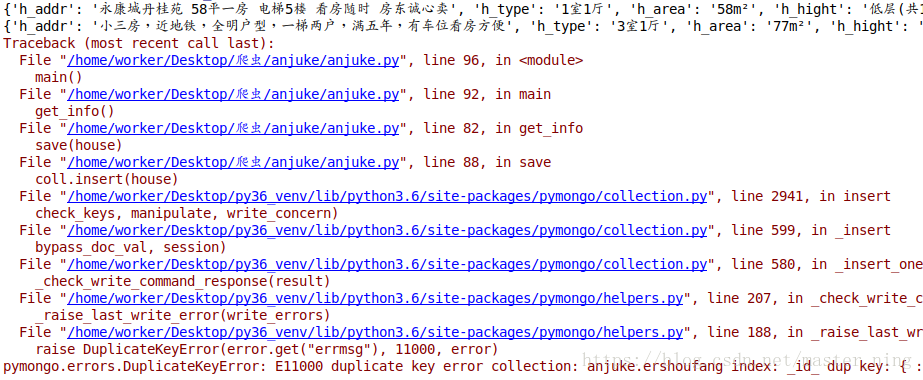
has two data sets, one with ‘_id’ and one without
There are two solutions:
1. Add a ‘_ID’ into the program. Set the _ID field by yourself instead of the system assignment:
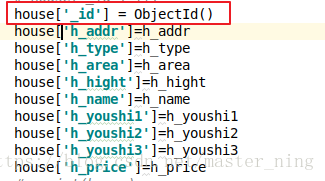
Program no problem:
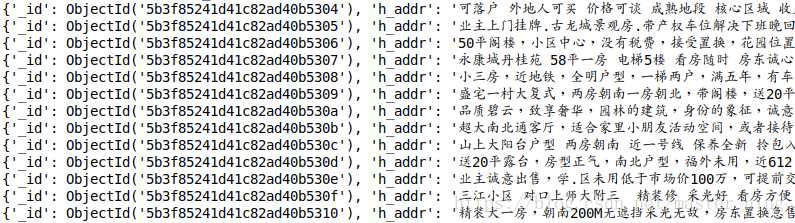
Two: put house={}, the dictionary inside the for loop:
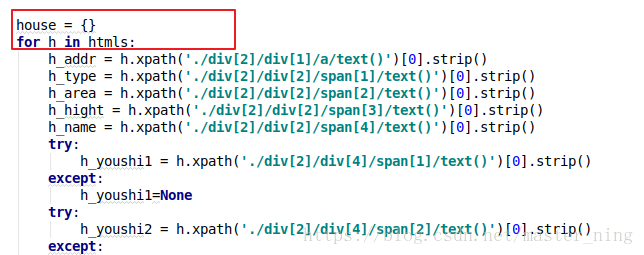
Either of these approaches will solve the problem, and my personal suggestion is that the second approach, code specification, lets the system assign its own ID