Category Archives: How to Fix

VBA “user defined type not defined” MSXML2.DOMDocument

When using a VBA tool written by a colleague in Excle, an error is reported as soon as it is run:
user defined type not defined
The error statement checked is:
Dim newFile As MSXML2 DOMDocument
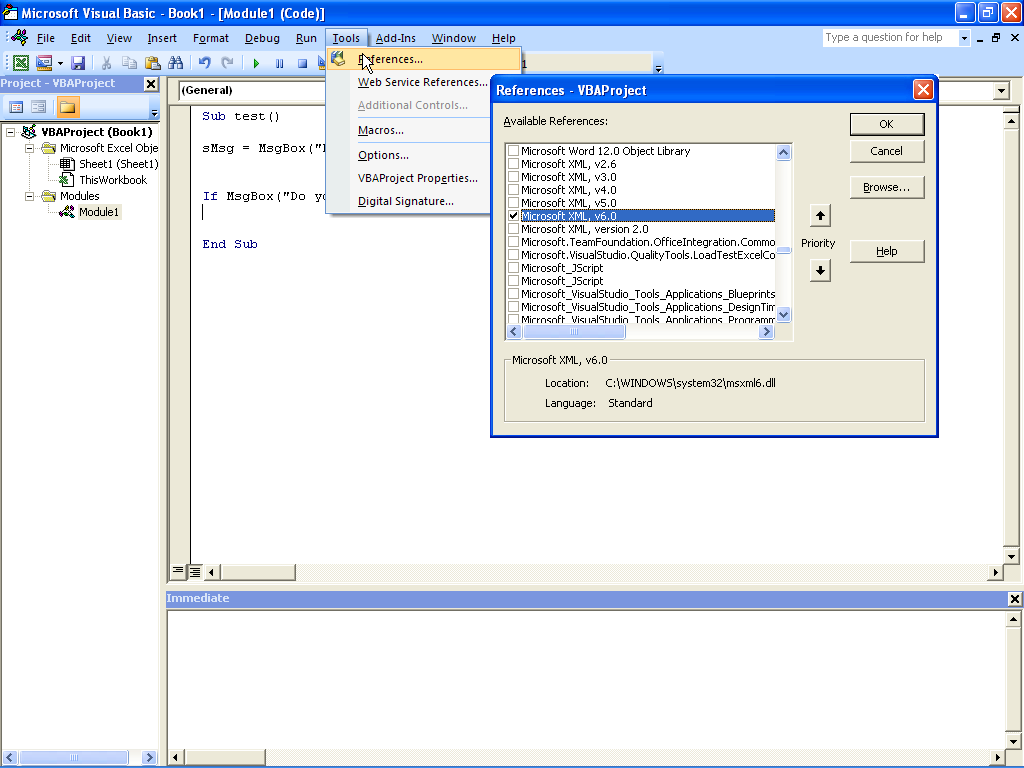
My environment is windows10 + office2016, so I guess he used Microsoft XML V3.0, and I’m using V6.0.
The solution I found online is as follows: If in Tools> References: Microsoft XML V6.0 was selected. When declaring variables, use the following format:
Dim newFile As MSXML2 DOMDocument60

A fatal error occurred while trying to sysprep the computer system

Cause: When you encapsulate the system with SYsprep/generalizing, the system reduces the number of rearm. When REARM is 0, the problem of unencapsulation occurs. The default number of Rearm is 3, which means you can only encapsulate 3 times.
How to resolve this problem:
setup1:
While holding down the Win +R key, enter Regedit to enter the registry;
Setup2:
Route 1: HKEY_LOCAL_MACHINE \ SOFTWARE \ Microsoft \ WindowsNT \ CurrentVersion \ SoftwareProtectionPlatform \ SkipRearm set it from 0 to 1
Path 2: HKEY_LOCAL_MACHINE\SYSTEM\Setup\Status\SysprepStatus\GeneralizationState set it from 3 to 7;
Setup3: just rerun sysprep.

An authentication error occurred in the remote desktop connection

I couldn’t connect to the server remotely this morning. I thought it was down again.
Prompt Message:
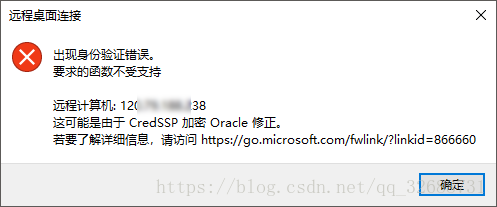
An authentication error has occurred.
The function requested is not supported.
Remote computer: < hostname>
Then I searched it and found it was the pot with the updated patch. Just today when I started up, I found my computer was updating.
OK, uninstall that update. Of course not. I’ll change it with this
 
An authentication error occurred on the remote desktop. The requested function is not supported
An authentication error has occurred. The function requested is not supported.
Windows 7 remote login servers used to be normal, but today remote desktop login is a persistent error.
An authentication error occurred in Windows 10 (Win10) requiring an incorrect function, which could be due to a CredSSP encryption Oracle fix.
 
Uninstall and update KB4103718 (Windows 7 Monthly Security quality Summary for X64 based systems), and restart Windows 7 to log in normally.
Or use Microsoft’s official recommendations to modify the local group policy:
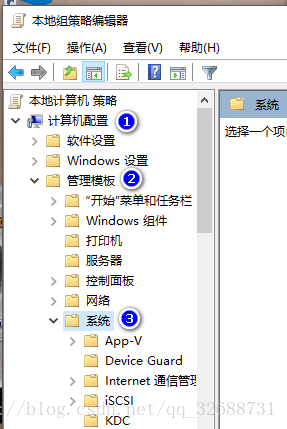
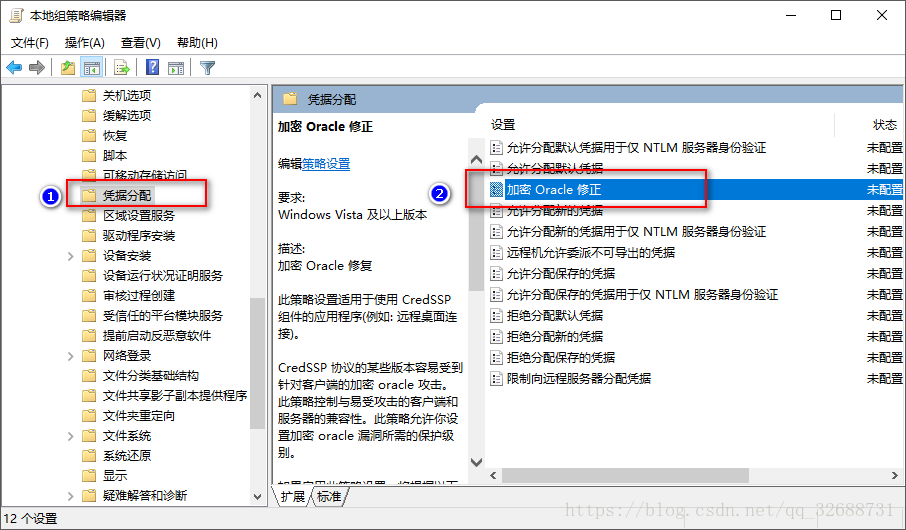
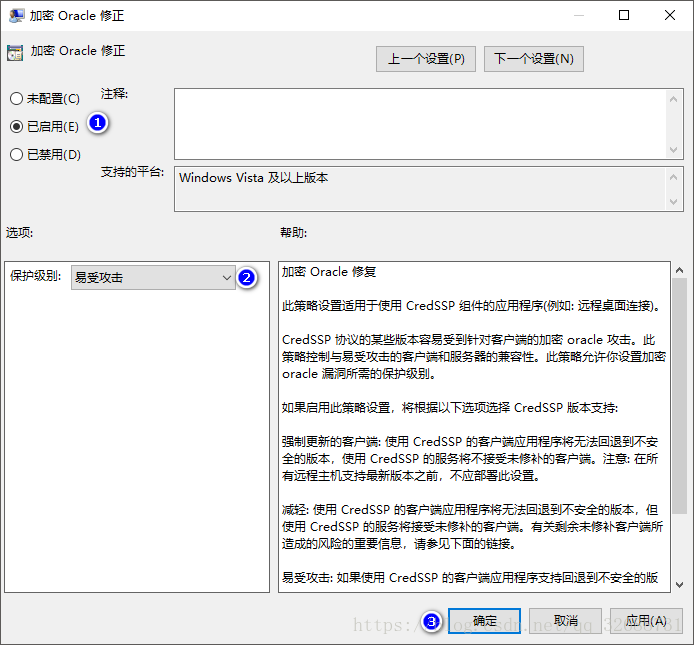
Computer configuration & GT; Management template & GT; System & gt; Credential assignment & GT; Encryption Oracle fix selection enabled and selected vulnerable.
Vulnerable – Client applications using CredSSP will expose remote servers to attack by supporting fallback to an insecure version, but services using CredSSP will accept unpatched clients.
english
Group Policy -> Computer Configuration -> Administrative Templates -> System -> Credentials Delegation> Encrypted Oracle Remediation change to Vulnerable
Vulnerableclient Applications that use CredSSP will expose the remote servers to attacks by supporting Fallback to insecure versions, and services that use CredSSP will accept unpatched clients.
 
https://support.microsoft.com/zh-cn/help/4093492/credssp-updates-for-cve-2018-0886-march-13-2018
https://support.microsoft.com/en-hk/help/4093492/credssp-updates-for-cve-2018-0886-march-13-2018
Take Win10 as an example:
 

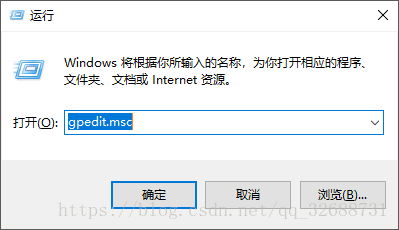
1. Run GPEdit.msc in Win+R

2. Find the following directory

3. Find this

4. Modify the setting to

Then the remote connection to the server will be successful!

【linux】error: stdio.h: No such file or directory

Ubuntu does not have a C and C++ compilation environment by default
By default, Ubuntu does not have C and C++ compiler environment. When newly installed Ubuntu USES GCC, it will report an error and cannot find a certain header file. When compiling a demo such as hello world, an error will be reported:
error: stdio.h: No such file or directory
Install the C and C++ compilation environment

if there is no aptitude installed, use apt-get, e.g.
udo apt-get install build-essential

Error 1045 (28000) access denied for user ‘root’ @’localhost ‘appears in MySQL under Windows system

Error 1045(28000) Access Denied for user ‘root’@’localhost’

From http://zxy5241.spaces.live.com/blog/cns! 7682A3008CFA2BB0! 361.entry
When installing mysql database in Windows operating system, you encounter Error 1045(28000) Access Denied for user ‘root’@’localhost’, you need to reset the password.
the specific method is:
1. First, find my. Ini configuration file in the installation directory, open the configuration file, find the line [mysqld], add skip-gran-tables below and save the file, and restart mysql dynamic service.
2. Then execute mysql -u root mysql
mysql> update user set password=password(‘newpassword’) where user=’root’;
mysql> Flush privileges;
where newpassword is root’s newpassword. 3. Remove the line that added to my. Ini configuration file just now, and finally restart mysql.

After installing mysql or uninstalling the downloaded free version, the default is no my.ini file.
. However, there are several similar files, such as [code] my-small-ini, my-media.ini, my-large. Ini, my-huge. Ini, [/code].
these files are the different configuration information recommended by mysql for different applications; But these configurations will only be applied if you put them in my. Ini.
where:
1, my-small. Ini is designed for small database. This model should not be used for databases that contain common items.
2, my-media.ini is designed for medium-sized databases. If you are using RHEL in the enterprise, you will have significantly more physical memory than the minimum RAM requirements for this operating system (256MB). As you can see, if you have that much RAM memory available, you can naturally run other services on the same machine.
3, my-larg.ini is designed for use exclusively with a SQL database. Since it can use up to 512MB of memory for the database, at least 1GB of RAM will be required on this type of system so that it can handle both operating system and database applications.
4, my-huge. Ini is designed for databases in enterprises. Such a database would require a dedicated server and 1GB or more of RAM. These choices are highly dependent on the amount of memory, the speed of the computer, the size of the database details, the number of users accessing the database, and the number of users loading and accessing data into the database. The performance of the database may change as the number of databases and users increases.

according to their own situation, select a file configuration copy to my. Ini file, of course, you need to create your own, just create a new file, and then copy into the configuration information.

Flex Error #2032 Stream Error

Question:
The machine in CCBN exhibition visited the PAGE of OSS system, Error #2032 Stream Error occurred, and the SWF file could not be viewed.

Environment:
The biggest difference is that the second way of compiling the files that depend on the Flex framework is Merged into the SWF of the source. It is much larger than the first SWF file that is compiled using the RSL.
Compiling with the RSL requires the Flex framework file to be placed in the same directory as the source SWF.
Flex frame files are divided into two types: framework_swz (for example, framework_4.0.0.14159.swz) at compile time and frame_swf (for example, framework_4.0.0.14159.swf) at run time. According to analysis, framework_4.0.0.14159.SWz is priority to load framework_4.0.0.14159.SWz when client machine access, it will be put into the Flash Player’s cache directory after successful loading. Flash Player automatically downloads framework _4.0.0.14159.swF (either of these files can be downloaded and displayed properly).

Problem analysis:
In the flash directory of the OSs_system_web_page project of our current OSS system, there are only Flex framework related SWF files (6 in total), and no related SWZ files. When the machine of the exhibition visited the system, the SWZ file of the frame could not be found, and the SWF file of the frame was not found automatically, so the access error occurred. In our company, the desktop machine automatically finds the SWF file of the frame, so there is no problem.

Solutions:
SWZ, OSMF_flex. 4.0.0.13495.SWz, RPC_4.0.0.14159.SWz, SPARk_4.0.0.14159.SWz, SPARkskins_4.0.0.14159.SWz, SPARkskins_4.0.0.14159.SWz, SPARkskins_4.0.14159.SWz, SPARkskins_4.0.14159.SWz, SPARkskins_4.0.14159.SWz, SPARkskins_4.0.14159.SWz, Textlayout_1.0.0.595.swz) in the FLASH directory of the OSs_system_web_page project, and then configure the web.xml file of the project, so that the Tomcat server can recognize the SWZ file:

<mime-mapping>

  <extension>swz</extension>

  <mime-type>application/octet-stream</mime-type>

</mime-mapping>

This way, when the exhibition machine accesses the system, it will find the Flex frame-related SWZ files and will be able to access the system SWF files correctly. Problem solving.

Refer to http://blog.csdn.net/hanxing0/article/details/5556042
http://www.blogjava.net/aiaiwoo/articles/338454.html

Nodejs exception error: listen eacces 127.0.0.1:8000

This article is reprinted, if you do not want to infringe copyright, please timely inform
The original address to http://blog.csdn.net/y2010081134/article/details/72800812
Exception information

Error: listen EACCES 127.0.0.1:8000
    at Object.exports._errnoException (util.js:1018:11)
    at exports._exceptionWithHostPort (util.js:1041:20)
    at Server._listen2 (net.js:1245:19)
    at listen (net.js:1294:10)
    at net.js:1404:9
    at GetAddrInfoReqWrap.asyncCallback [as callback] (dns.js:62:16)
    at GetAddrInfoReqWrap.onlookup [as oncomplete] (dns.js:81:10)

npm ERR! Windows_NT 10.0.14393
npm ERR! argv "D:\\nodejs\\node.exe" "D:\\nodejs\\node_modules\\npm\\bin\\npm-cli.js" "start"
npm ERR! node v6.10.3
npm ERR! npm  v3.10.10
npm ERR! code ELIFECYCLE
npm ERR! [email protected] start: `http-server ./app -a localhost -p 8000 -c-1`
npm ERR! Exit status 1
npm ERR!
npm ERR! Failed at the [email protected] start script 'http-server ./app -a localhost -p 8000 -c-1'.
npm ERR! Make sure you have the latest version of node.js and npm installed.
npm ERR! If you do, this is most likely a problem with the angular-phonecat package,
npm ERR! not with npm itself.
npm ERR! Tell the author that this fails on your system:
npm ERR!     http-server ./app -a localhost -p 8000 -c-1
npm ERR! You can get information on how to open an issue for this project with:
npm ERR!     npm bugs angular-phonecat
npm ERR! Or if that isn't available, you can get their info via:
npm ERR!     npm owner ls angular-phonecat
npm ERR! There is likely additional logging output above.

npm ERR! Please include the following file with any support request:
npm ERR!     E:\Git\Repository\angular-phonecat\npm-debug.log

The solution


The exception is caused by 8000 port being occupied. Check the 8000 port being occupied under Windows

E:\Git\Repository\angular-phonecat>netstat -ano|findstr "8000"
  TCP    0.0.0.0:8000           0.0.0.0:0              LISTENING       18480
  TCP    127.0.0.1:8000         127.0.0.1:50236        TIME_WAIT       0
  TCP    127.0.0.1:8000         127.0.0.1:50237        TIME_WAIT       0
  TCP    127.0.0.1:8000         127.0.0.1:50238        TIME_WAIT       0
  TCP    127.0.0.1:8000         127.0.0.1:50239        TIME_WAIT       0
  TCP    127.0.0.1:8000         127.0.0.1:50240        TIME_WAIT       0
  TCP    127.0.0.1:8000         127.0.0.1:50286        TIME_WAIT       0
  TCP    127.0.0.1:50285        127.0.0.1:8000         TIME_WAIT       0
  UDP    0.0.0.0:8000           *:*                                    18480

Because process 0 is a system process, executing “Taskkill/PID 0” will not kill it. So, find another way to change the port, as follows:

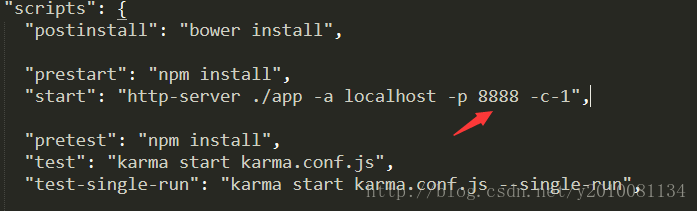
Under node’s installation root, find package.json, search 8000, and replace with 8888


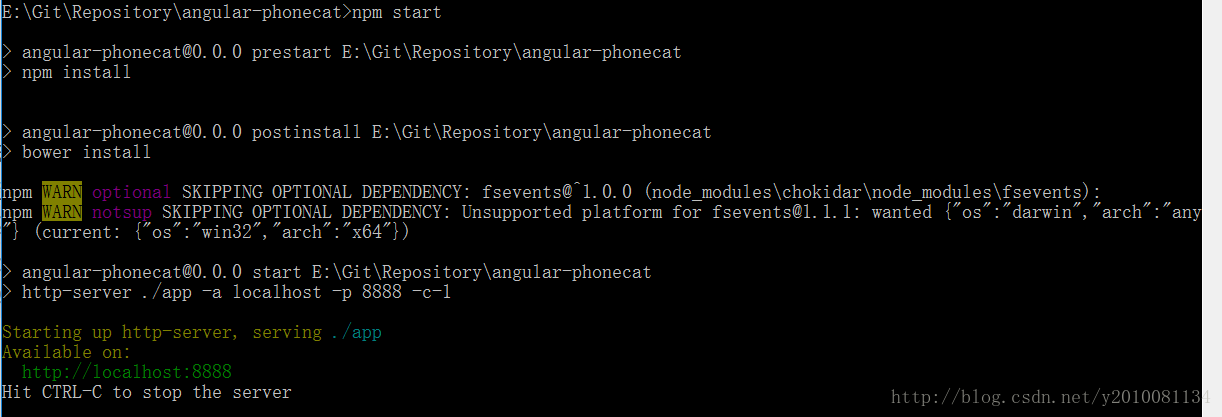
Then execute the command NPM Start from the command line, and it starts successfully

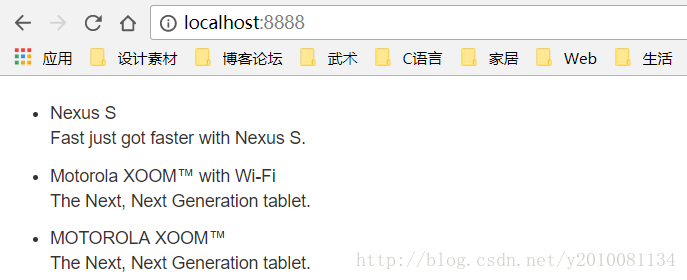
Enter it in the browser
http://localhost:8888
, you can see the successful access

The MySQL load data command parses and handles error 29 (errCode: 13) errors (in the Ubuntu environment)

On the mysql server, you can use the following command:

load data infile 'file_name' into table table_name; 

Stores all data in a text file into the specified table. The crudest form of example:

load data infile 'test.txt' into table test_table;

By default, the Load Data Infile behavior for text is:
A

    row corresponds to a record in the database table separated by the TAB key the value of each field is not enclosed by any characters and the row is not prefixed to ignore

For example, a line of text:
1 test “xx”
reads into the database, and the value of the third field is “xx” instead of xx. Of course these fields can be set, the full Load Data Infile command is:

LOAD DATA [LOW_PRIORITY | CONCURRENT] [LOCAL] INFILE 'file_name.txt'
   [REPLACE | IGNORE]
  INTO TABLE tbl_name
   [FIELDS
    [TERMINATED BY 'string']
   [[OPTIONALLY] ENCLOSED BY 'char']
   [ESCAPED BY 'char' ]
 ]
   [LINES
   [STARTING BY 'string']
  [TERMINATED BY 'string']
  ]
   [IGNORE number LINES]
  [(col_name_or_user_var,...)]
   [SET col_name = expr,...]]

Ignore and replace are used to distinguish between the way in which the text is read and the record in the original table that has a primary key conflict. The terminated by setting field (delimiter) after
fields, enclosed by setting outer enclosing characters, and escape by setting escape characters (this is unclear).
lines, starting by sets the line prefix, will be ignored when reading, and the newline character is set. Refer to the first link for more details.
Then in the process of use, it is easy to have errors:
ERROR 29 (HY000): File ‘test.txt’ not found (Errcode: 13) But it is of no damn use From the command line you can see that errcode 13 refers to the access issue:

xyb@xyb-computer:~$ perror 13
OS error code 13: Permission denied

Even if you change the access to the test.txt file, such as chmod O +r test.txt, the problem will still occur. It involves AppArmor. This is a protection mechanism that restricts each program’s access to specific directories and files. In other words, it is restricted by AppArmor, which provides access to the file for the current mysql program. See link to article 2 about AppArmor (Wikipedia).
can really do is to mysql program reads the file permissions, according to the following steps can be done:
1) open the/etc/apparmor. D/usr. Sbin. Mysqld file
2) can see a lot about mysql can read and write at this time for the directory and file records, such as:

#Other contents
/usr/sbin/mysqld {
    #Other contents
    /var/log/mysql.log rw,
    /var/log/mysql.err rw,

    #Other contents

    #This will be your dir definition
    /tmp/ r,
    /tmp/* rw,

    #Other contents
}

Add the appropriate permissions for the file you want to read and write at the end, save and exit. D/AppArmor reload
. At this point, the problem should be solved. But this can be an unsafe solution and requires caution. Refer to the third link for details.
Reference links:

https://en.wikipedia.org/wiki/AppArmor http://www.2cto.com/database/201108/99655.html https://oldwildissue.wordpress.com/2013/12/11/fixing-mysql-error-29-errcode-13-in-ubuntu/
MySQL data import error 1227, acess denied

Author: Librarian, Tianyi Pavilion
Today, a former colleague in the group has asked MYSQldump for the SQL file which came out, and sent an error error1227 (42000) at line 18: Acess Denied; you need (at least one of) the SUPER privilege(s) for this operation
Set @@session.sql_log_bin=0; set @@session.sql_log_bin=0;
This does not normally happen. This statement simply controls whether the query in the current session writes to the binlog. Everyone in the group thought it was a strange question.
Solution 1:
you can see that this is a permission issue, so say it, or use root. However, the former colleague said that the skip machine passed over, and there was no way to use root, and the right to lift and grant also required root rights. Option 1 was rejected.
Solution 2:
since you can’t use root, you have to do something else, but I wonder why the user can’t control his or her session variable. So I did a search, went to the mysql website, and found this description:
sql_log_bin
This variable controls whether logging to the binary log is done. The default value is 1 (do logging). To change logging for the current session, Change the session value of this variable. The session user must have the [SUPER] (https://dev.mysql.com/doc/refman/5.7/en/privileges-provided.html#priv_super) privilege to set this variable. * Setting this variable to 0 prevents GTIDs from being assigned to transactions in the binary log*. If you are using GTIDs for replication, this means that, Even when binary logging is later enabled once again, the GTIDs written into the log from this point do not account for any transactions that in the Meantime -- in effect, Those transactions are lost.in MySQL5.7, it is not possible to set @session.sql_log_bin within a transaction or subquery. (Bug #53437)
note that the last line says MySQL5.7 has a Bug, Cannot execute set @@session.sql_log_bin in a subquery or transaction. But a book without a book is better than a book without a book. I’ve done it myself in mysql:

mysql> select version();
+-------------------------+
| version()               |
+-------------------------+
| 5.7.16-0ubuntu0.16.04.1 |
+-------------------------+
1 row in set (0.00 sec)

mysql> set @@session.sql_log_bin=0;
Query OK, 0 rows affected (0.03 sec)

Now that this bug has been fixed, is this colleague using the infamous version of mysql5.6?Let him confirm that it is 5.6. Once the root of the problem is found, the solution is there. Simply delete all the set @@session.sql_log_bin statements in the SQL.

An Ajax HTTP error occurred in drupal7 installation occurred.HTTP Result Code

An AJAX HTTP error occurred.HTTP Result Code: 200Debugging information follows.
Path:
http://localhost/drupal/install.php?profile=standard& locale=zh-hans& id=2…

.

There is a solution to drupal7 installation. If you choose Simplified Chinese, there is an error when importing translation due to execution timeout.

Method one:
Modify the php.ini file: memory_limit = 256M (set as actual)
The installation process may be smooth. But there may be an error first… After r the installation is complete, delete these two sentences.

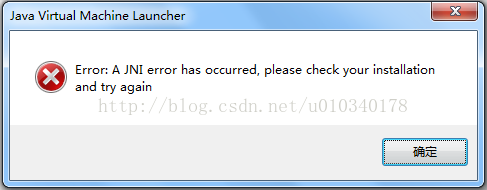
Error: a JNI error has occurred

The first time I ran testNG, I found an Error: Error: A JNI Error has occurred. Please check your installation and try again.

To get to the bottom of this, the JAR package is incomplete. After importing the JCommander -1.48.jar package to run, no more prompt for this error.
Download way: http://download.csdn.net/detail/u010340178/9782044

In addition, in the testNG will often use to another jar package, testNG – 6.8.21. Jar, contains org.testng.Com mandLineArgs, org. TestNG. Annotations. * classes, such as can join together.
Download way: http://download.csdn.net/detail/u010340178/9782050