Category Archives: How to Fix

centos nagios CHECK_NRPE: Error – Could not complete SSL handshake

Whether port 0 and 5666 have been opened
Yum install Telnet
Telnet 172.16.1.1 5666

1. Confirm that OpensSL has been installed
#yum install openssl

2. Modify allowed_hosts of NRPE. CFG
vim /usr/local/nagios/etc/nrpe.cfg
Wildcards are not supported for #allowed_hosts and multiple ips are separated by commas
172.16.1.1 allowed_hosts = 127.0.0.1

3. Modify the IP for xinetd startup configuration (if starting with xinetd)
vim /etc/xinetd.d/nrpe
Only_from = 127.0.0.1 172.16.1.1

4. Restart NRPE service
/usr/local/nagios/bin/nrpe - c /usr/local/nagios/etc/nrpe CFG - d


5. Test and display the version description successfully
#/usr/lib/nagios/plugins/check_nrpe - H 172.16.1.1
# NRPE v2.13

Gles2.0 Chinese API glgeterror

The name of the
GLG Terror – Returns an error message
C specification
GLenum glGetError ( void ) .
describe
GlGetError returns the value of the error flag. Each detectable error is assigned a numeric code and a symbolic name. When an error occurs, the error flag is set to the corresponding error code value. No other errors are recorded before the glGetError (return error code) is called, and the flag is reset to GL_NO_ERROR. If a call to glGetError returns GL_NO_ERROR, there are no detectable errors since the last call to glGetError or since GL was initialized.
To allow a distributed implementation, there may be multiple error flags. If any single error flag records an error, it returns the value of the flag and resets the flag to GL_NO_ERROR when you call glGetError. If more than one flag records an error, glGetError returns and clears any error flag value. Therefore, if you want to reset all error flags, you should always call glGetError in the loop until it returns GL_NO_ERROR.
Initially, all error flags are set to GL_NO_ERROR.
The following errors are currently defined:
GL_NO_ERROR (0)
No errors were recorded. The value of this symbolic constant is guaranteed to be 0.
GL_INVALID_ENUM (1280).
An unacceptable value was specified for the enumeration parameter. Offending commands are ignored and have no side effects other than setting the error flag.
GL_INVALID_VALUE (1281).
The number parameter is out of range. Offending commands are ignored and have no side effects other than setting the error flag.
GL_INVALID_OPERATION (1282).
The specified operation is not allowed in the current state. Offending commands are ignored and have no side effects other than setting the error flag.
GL_INVALID_FRAMEBUFFER_OPERATION (1286).
This command attempts to render to or read from the frame buffer when the currently bound frame buffer is not in the frame buffer complete state (that is, the return value of glCheckFramebufferStatus is not GL_FRAMEBUFFER_COMPLETE). Offending commands are ignored and have no side effects other than setting the error flag.
GL_OUT_OF_MEMORY (1285).
Not enough memory to execute the command. After recording this error, the state of GL is undefined, except for the state of the error flag.
When the error flag is set, the result of a GL operation is undefined only if GL_OUT_OF_MEMORY occurs. In all other cases, the command generating the error is ignored and does not affect GL state or frame buffer content. If the generate command returns a value, it returns 0.
See also
glCheckFramebufferStatus
copyright
https://www.khronos.org/registry/OpenGL-Refpages/es2.0/xhtml/glGetError.xml
https://blog.csdn.net/flycatdeng
Copyright © 1991-2006 Silicon Graphics, Inc. This document is licensed under the SGI Free Software B License. See http://oss.sgi.com/projects/FreeB/.

Android,OpenGL ES, Graphics

When to enter success and error in AJAX

A quick introduction to Ajax:
Simply put, an Ajax request sends a request through an XMLHttpRequest object, which has four states (readyStates) :
0- uninitialized, 1- initializing, 2- sending data, 3- sending data, 4- done.
When XMLHttpRequest. ReadyState is 4, said ajax request has been completed can get the result.
Ajax’s success and Error methods are triggered based on the response status code. Success () is triggered when XMLHttprequest.status is 200, indicating a successful response. Other status codes trigger error().
In addition to the response status code, Ajax can also use an error method in the following situations:

    return data type is not JSON network interrupt background response interrupt

0xc015000f: the activation context being deactivated is not recently activated

While the program was running, this error popped up, calling functions on the stack, and it was very confusing.

After searching on the Internet, I found a prompt to disable the ActivationContext:
afxAmbientActCtx= FALSE in CApp::InitInstance().
this “solves” the problem, but upon closer inspection it turns out to be a hidden problem.
Junfeng Zhang in their blog to the comparatively detailed explanation (http://blogs.msdn.com/b/junfeng/archive/2006/03/19/sxs-activation-context-activate-and-deactivate.aspx). Basically, this error occurred because an exception was thrown in the code, which skipped the Deactivation corresponding to Context Activation, leading to subsequent Deactivation and the discovery that the Context in the stack was incorrect.
the MSDN BBS, net friend MMDev in response to someone else’s post (http://social.msdn.microsoft.com/Forums/en-US/vcgeneral/thread/c3feab0f-601b-4ca6-beb2-8d4d615438cc/) gives a better solution:
in Visual Studio, the choice of the Debug | Exceptions menu items, in the pop-up dialog, check all the Win32 Exceptions to this exception is thrown in Win32, the program will interrupt, so you have the opportunity to () before the exception handling in the first time to see what happened in your own code error exception is thrown, so as to correct errors, eliminate hidden dangers in the program.

WINDOWS 7 : SYSPREP 3.14 : A FATAL ERROR HAS OCCURRED DURING SYSPREP.(ZZ)

WINDOWS 7 : SYSPREP 3.14 : A FATAL ERROR HAS OCCURRED DURING SYSPREP. 
01/29/20148 Comments
 
Firstly, run this command on command prompt  slmgr. vbs /dlv 

Then check the re-arm counter value, if it’s 0 and you sysprep you will receive errors in the setupact.log and setuperr.log files like these:

Error [0x0f00a8] SYSPRP WinMain: Hit failure while processing sysprep generalize providers; hr = 0xc004d307
Error [0x0f0073] SYSPRP RunExternalDlls:Not running DLLs; either the machine is in an invalid state or we couldn’t update the recorded state, dwRet = 31
Error [0x0f0082] SYSPRP LaunchDll: Failure occurred while executing ‘C:\Windows\System32\slc. dll, SLReArmWindows’, returned error code -1073425657
Error [0x0f0070] SYSPRP RunExternalDlls: An error occurred while running registry sysprep DLLs, halting sysprep execution. dwRet = -1073425657

Workaround: 

Open regedit and look for: 

HKEY_LOCAL_MACHINE\SYSTEM\Setup\Status\SysprepStatus\CleanupState

Set to value: 2

HKEY_LOCAL_MACHINE\SYSTEM\Setup\Status\SysprepStatus\GeneralizationState

Set to value: 7

And Run these command on elevated command prompt: 

msdtc -uninstall (wait a few seconds)

msdtc -install (wait a few seconds)

Reboot the system.

If this does not work, then last option is Windows Product Activation (WPA) vulnerability that was introduced in Windows 7

When the WPA registry key is deleted, the status of Windows 7 is re-initiated to the Initial Grace Period as if Windows 7 has just been installed. The deletion of the WPA registry key is achieved via the following method. 

·         Create a .bat file with following text and place it in C:, like C:\Reset.bat

reg load HKLM\MY_SYSTEM “%~dp0Windows\System32\config\system”
reg delete HKLM\MY_SYSTEM\WPA /f
reg unload HKLM\MY_SYSTEM

·         Restart the computer.

·         Press F8 right after the BIOS screen to get to the “Advanced Boot Options” and Select Repair Your Computer.

·         Select your keyboard input method, and click next.

·         Enter user name and password login credentials for local Admin user, and continue

·         In the “System Recovery Options”, open Command Prompt.

·         Run the Reset.bat file from C:

·         Restart the computer.

The system will be moved to grace period after the reboot. 

Android: Web access activity error: error unknown URL scheme

At this time, if our scheme is written in a position other than the first page, an error will appear. This error, I think, is due to the conflict between the previous url and the url of the jump Activity. The method to deal with this situation is as follows:
In WebView, override shouldOverrideUrlLoading method in WebViewClient class, the specific code is as follows

@Override
				public boolean shouldOverrideUrlLoading(WebView view, String httpurl) {
					if (httpurl.startsWith("scheme:") || httpurl.startsWith("scheme:")) {
						Intent intent = new Intent(Intent.ACTION_VIEW, Uri.parse(httpurl));
						startActivity(intent);
					}
					return false;
				}

The
method is, as long as the url starts with scheme, we jump to the url. So we solved…

About the cause of the long-standing ADO error: unspecified error “(error code = 0x80004005) (excerpt from the Internet)

ms-help://MS.MSDNQTR.2005APR.1033/enu_kboledb/oledb/251254.htm
SYMPTOMS
When trying to connect to an Access .mdb file, an ODBC error is returned stating “Disk or Network Error”. The Microsoft OLE DB Provider for the Microsoft Jet database engine may also return an “Unspecified error” (error code = 0x80004005) message.

The problem can occur only when the data source is opened under the Microsoft Internet Information Server (IIS) or a Microsoft Windows NT service but not under a logged-on user account.
CAUSE
Jet creates a temporary file when the engine is started. In doing so, it first checks the TMP environment variable and uses that path to define where the temporary file is created. If it doesn’t see a TMP environment variable, it looks for the TEMP environment variable. If TEMP is not defined, it then uses the Windows folder (/WINDOWS or /WINNT).

If TMP/TEMP is defined but points to a nonexistent folder, the error occurs.

Moreover, when opening the Access database through IIS or a Windows NT service, and when IIS or the service is running under the local system account, the TMP or TEMP system environment variable is used. When the Web services or Windows NT service are started using a user account, the TMP/TEMP user profile environment variables is used.
 
RESOLUTION
Define a TMP or TEMP environment variable and assign the variable to an existing folder. If you are accessing the Access database from IIS, be certain to check the system environment settings rather than environment variables of the logged-on user. Also ensure that the IUSER anonymous IIS account has access to the temporary folder.

You must restart the computer after changing any environment variables.
Environment variables are set under Windows NT 4.0 by going to the Control Panel and clicking System and then selecting the Environment tab.

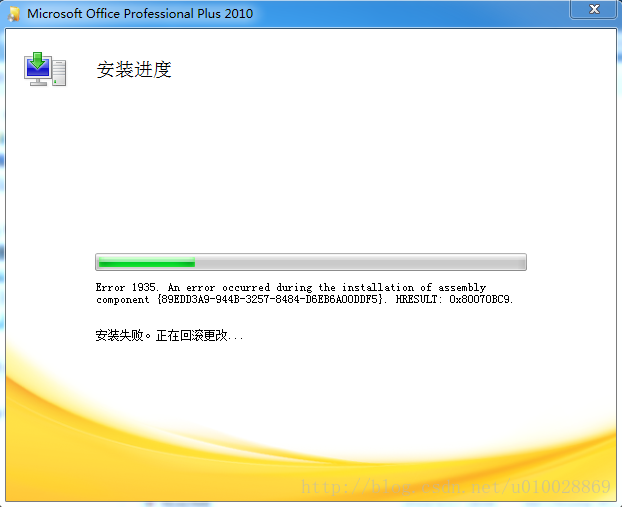
Error installing Microsoft Office 2010 or 2007 error 1935


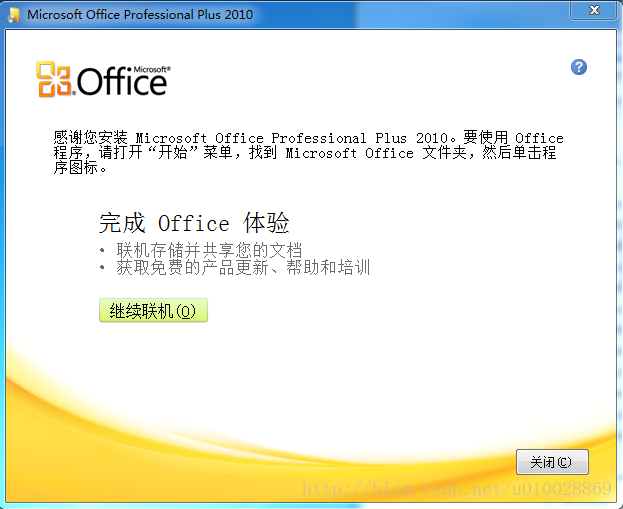
Yesterday, when I installed Office 2010, I had a frustrating problem. The diagram below:


I have never had any problems installing Office before, so I rebooted the computer and tried to run the installation program again, with predictable results.
Then I went online for a solution: It turned out to be a component of the Microsoft.net Framework.
First, go into the computer’s programs and functions, check the installed programs, and see if the latest version of the NET Framework has been installed.
To do this, follow these steps:

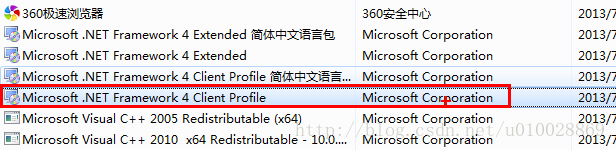
    opens the run window (use the shortcut key “Win+R”). Type Appwiz.cpl, and then press Enter. Find the Microsoft.net Framework 4 Client Profile in the installed programs list. Figure below:


If you find the Microsoft.net Framework 4 Client Profile, you need to fix it,
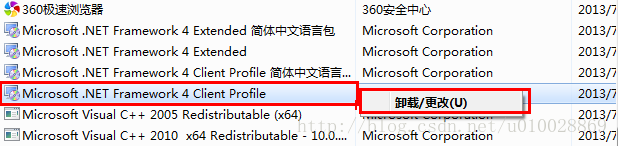
Select it and right-click as shown in the figure:


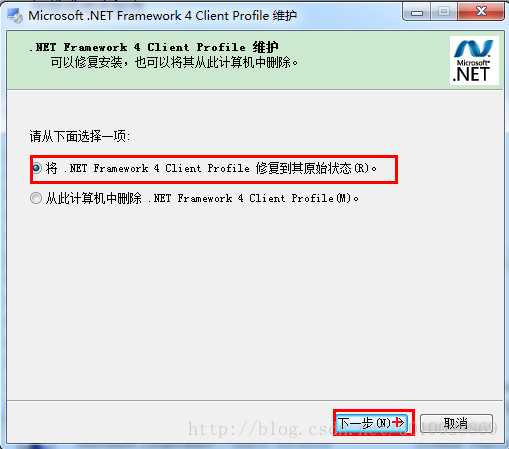
Then select the option to fix the.NET Framework 4 Client Profile to its original state, and then click Next.


When the repair is complete, restart the computer.
Note: If you cannot find the Microsoft.NET Framework 4 Client Profile component, download and install this software, especially for new systems. This is a common problem when installing Office.
 
 
Reinstall Microsoft Office 2010.

Copy node causes NPM execution error: cannot find module ‘/ / lib / utils/ unsupported.js ‘

Copy node causes NPM execution error: Cannot find Module ‘.. /lib/utils/unsupported.js’

    execute NPM –version command times error, as follows
[exec] Error: Cannot find module '../lib/utils/unsupported.js'
[exec] Require stack:
[exec] - /home/jenkins/workspace/324970/eis-product/eis-ui/eis-ui-app-pc/node-exelib/bin/npm
[exec]     at Function.Module._resolveFilename (internal/modules/cjs/loader.js:982:15)
[exec]     at Function.Module._load (internal/modules/cjs/loader.js:864:27)
[exec]     at Module.require (internal/modules/cjs/loader.js:1044:19)
[exec]     at require (internal/modules/cjs/helpers.js:77:18)
[exec]     at /home/jenkins/workspace/324970/eis-product/eis-ui/eis-ui-app-pc/node-exelib/bin/npm:19:21
[exec]     at Object.<anonymous> (/home/jenkins/workspace/324970/eis-product/eis-ui/eis-ui-app-pc/node-exelib/bin/npm:153:3)
[exec]     at Module._compile (internal/modules/cjs/loader.js:1158:30)
[exec]     at Object.Module._extensions..js (internal/modules/cjs/loader.js:1178:10)
[exec]     at Module.load (internal/modules/cjs/loader.js:1002:32)
[exec]     at Function.Module._load (internal/modules/cjs/loader.js:901:14) {
[exec]   code: 'MODULE_NOT_FOUND',
[exec]   requireStack: [
[exec]     '/home/jenkins/workspace/324970/eis-product/eis-ui/eis-ui-app-pc/node-exelib/bin/npm'
[exec]   ]
[exec] }
[exec] Result: 1
    after verification, normally NPM is a soft connection, but through zip packaging, and then decompressed NPM becomes the actual contents of the npm-cli.js file, so no responsive module can be found when executing the script. Solution: You can use the tar command to package.

Normal conditions:

total 45148
-rwxr-xr-x 1 1001 1001 46228688 Feb 18 12:35 node
lrwxrwxrwx 1 1001 1001       38 Feb 18 12:35 npm -> ../lib/node_modules/npm/bin/npm-cli.js
lrwxrwxrwx 1 1001 1001       38 Feb 18 12:35 npx -> ../lib/node_modules/npm/bin/npx-cli.js
lrwxrwxrwx 1 1001 1001       35 Mar  2 17:51 vuepress -> ../lib/node_modules/vuepress/cli.js 

Abnormal conditions (after decompression by ZIP compression) :

total 45164
-rwxr-xr-x 1 root root 46228688 Mar  2 17:53 node
-rwxr-xr-x 1 root root     4615 Mar  2 17:53 npm
-rwxr-xr-x 1 root root      177 Mar  2 17:53 npx
-rwxr-xr-x 1 root root      713 Mar  2 17:53 vuepress

Vs 2015 IIS express debug error: http error 401.2 – unauthorized

Interface was developed using VS2015. After running the back-end API in debug mode, Postman called the interface and sent back an error message:
< title> IIS 10.0 Detailed error-401.2-unauthorized< /title>
< h4> The most likely reason :& Lt; /h4>
& lt; ul>
& lt; li> No authentication protocol (including anonymity) was selected in IIS. < /li>
& lt; li> Only integrated authentication is enabled, and the client browser used does not support integrated authentication. < /li>
& lt; li> Integrated authentication is enabled, and the request is issued through a proxy, but the proxy changes the authentication header before the request reaches the Web server. < /li>
& lt; li> The Web server is not configured for anonymous access and does not receive the required authorization headers. < /li>
& lt; li>” The configuration/system. WebServer/authorization “configuration section may explicitly rejected the user access. < /li>
& lt; /ul>
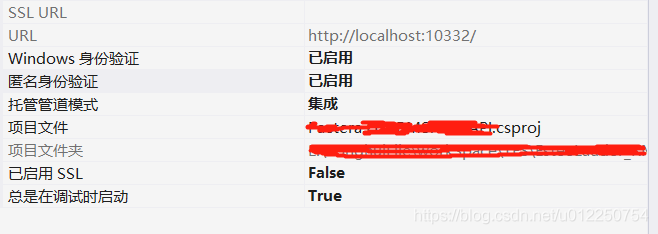
Solution: Project – Properties – Anonymous Authentication – has been enabled

Non system disk or disk error

The cause of
Because there are two systems, I want to delete another useless system, and then Start dead ==
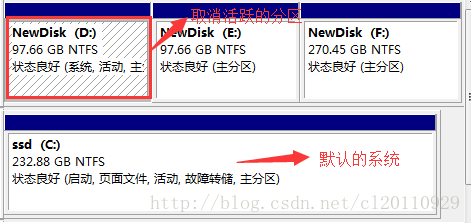
The formatted failure is because disk D is an active partition, so the failure of formatting cancel the disk partition marked as active:

You can only have the command line when you cancel because the Windows TAB has been lightened and can’t be checked. 1. Command line prompt, run DISKPART, run into prompt “DISKPART>” ; 2. Use the “LIST DISK” command to determine the ## of your removable hard drive; 3. Use “Select DISK 0” to set your removable DISK to the current operating DISK; 4. Use “Select PARTITION 1” to set the first PARTITION to the current operation PARTITION;
. Use the “INACTIVE” command to INACTIVE the current partition.

did according to this, and then restarted on non-system disk or disk error
The solution
When the machine guess is the D disk cancel active problem, why?Isn’t disk C the default system?Because the boot data is on disk D?Start with a U disk, enter the PE interface, the last item, called normal into the system?After entering the system normally, open the disk management, D disk mark active, restart the computer, normal

VBA returns “n / a” and other error information

When we use Excel’s built-in functions to return A Value, if the argument is wrong or cannot be found, we often return #N/A or #Value! And so on prompt message.
Can the VBA code we write in the module also return this information?
The answer is yes, because the code in the module itself can be called within the formula, so naturally this information can also be returned.
However, it is important to note that this information is not text, it is a built-in error value!
The following table shows some commonly used error values for reference:

Constant

Error Number

Cell Error value

xlErrDiv0

2007

0 # DIV /!
xlErrNA 2042 #N/A
xlErrName 2029 #NAME?
xlErrNull 2000 #NULL!
xlErrNum 2036 #NUM!
xlErrRef 2023 #REF!
xlErrValue 2015 #VALUE!

returns the value by calling CVErr(error constant), so what you see on the interface is the error value we want to display.
Such as:
CVErr(xlErrValue)