Category Archives: How to Fix

Problems encountered in running OpenGL

Problems running OpenGL with VS
Problem 1. Linker tool error The link2026XXX module is not secure for the SAFESEH image
Solution:

1. Open the Property Pages dialog box for the project.
2. Click the Linker folder.
3. Click the Command Line property page.
4. Type /SAFESEH:NO into the Additional Options box and click Apply.

Reference: http://www.cnblogs.com/hanxi/archive/2012/06/10/2544230.html

Problem 2. The computer is missing GLUT32.DLL
Solution:
1. Check to see if it is in the Windows/System32 folder
2. If it is a 64-bit system, check to see if it is in the Windows/SYSWOW64 folder

Summary of errors in installing texlive2017

Dao niu one afternoon, do not know why oneself can be wrong, sum up the wrong road that oneself have gone through now
From the https://tug.org/texlive/windows.html website to download the exe software first, and then the first error,

Error 1: Double-click to run the EXE file directly, select CustOME Setup — and then select Continue to install the last two items
Then has been installed about 3-5 G, and then the installation of the installation is broken, the network speed is not good, the road is not removed

Mistake 2: So I chose to run the EXE file and unpack the file. But it seems that because it is connected to the network, the unzip file is too little, failed
Method 1: Then success came, I went to download the ISO file,. Then right-click the unzip file, run the install-tl-advanced option, and select the Mini installation from the Setup option


Click Install a Package Install some packages we need. Install a Package>.

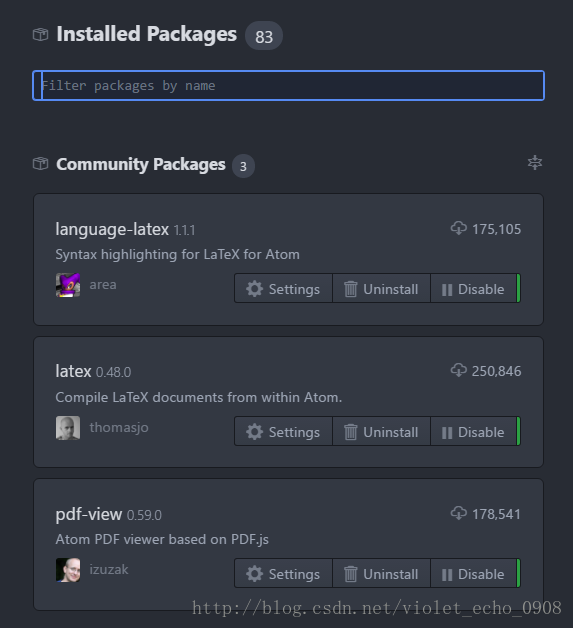
Here we need the following three packages, which can be directly searched by using the search box, as shown in the figure below:
Latexpdf-view (visual display)


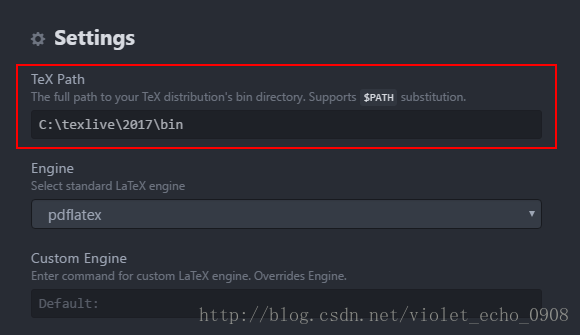
In the latex after where the plug-in by clicking on the Settings , configuration of latex in the Tex Path add their installation latex in the bin directory is ok

After you have written it, press Ctrl+Alt+Bd you will see the following. On the left is the source code and on the right is the generated PDF file. Our simple LaTeX editor is ready. The result is an error,. I don't know why... This is complicated, so use Texstudio instead

Windows 7 system, start to run input CMD, the window flashed by, disappeared

First of all, my system is Windows 7, this is also suitable for other systems, because my computer is Windows 7 of this problem, so I just in Windows 7, my computer is likely to be used with the first of a virus or Trojan and later killed and incomplete, but kill may have this problem, for example I will use the CMD window to view the IP ah, see ping network speed ah of what, don’t have the CMD feel very uncomfortable, but every time I enter CMD, one black car window is a flash is automatically shut down, no time to lose anything, Through checking the information, fumbled to find a solution, if you also have a similar problem, according to the following methods do not prevent to try.

The CMD command window is used in some special cases, such as PING to see if the network is connected. If you run commands such as Disk Format Conversion in the CMD window, enter CMD Enter and the black box of the CMD command will flash out and disappear, please refer to the following solution.

a, first check the C: \ WINDOWS \ SYSTEM32 of CMD EXE exists, the document date is normal;
test result is normal, same as other system file date, should not be this problem.

br>

%SystemRoot%;
view after found (if there is no need to add)

3, it is not in the above two common problems, should be modified is the registry.
registry:
ey_local_machine \Software\Microsoft\Command Processor\AutoRun
HKEY_LOCAL_MACHINE\Software\Microsoft\Command Processor\AutoRun
registry:
HKEY_LOCAL_MACHINE\Software\Microsoft\Command Processor\AutoRun (There is no numerical value, but a flash may be eXist, it can be cleared.)

, if it still doesn’t work, try using CMD /k, for example “CMD /k ipconfig /all” in the “Run” window.

The solution to the flash of. Bat file

Recently, when I was doing a project, I found that the.bat file flashed by after I clicked it. I believe that many friends have also encountered the same problem
The following methods:
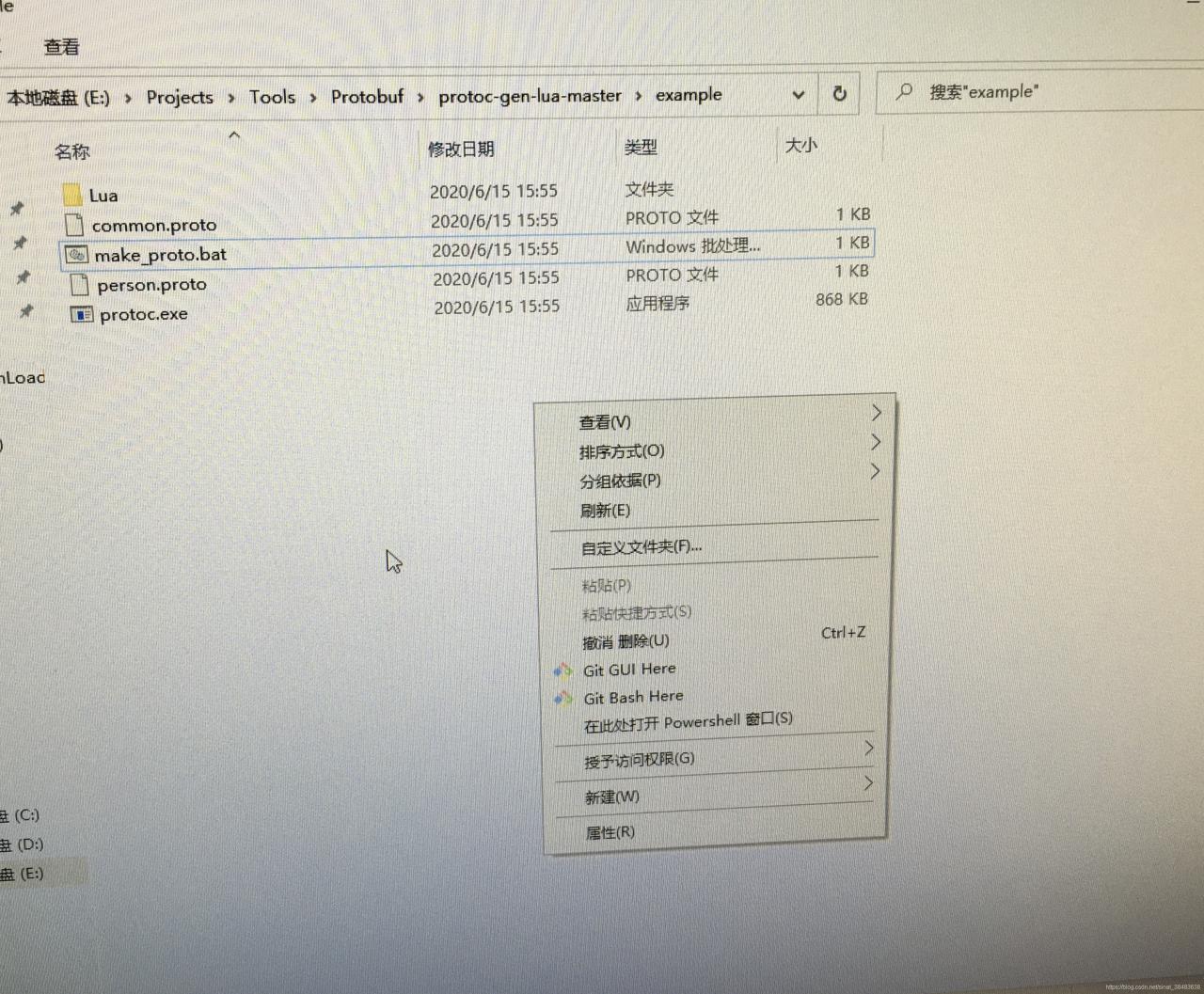
First, hold down the Shift key in the folder where your.bat file is located and click the right mouse button. Select “Open PowerShell Window here” as shown in the picture

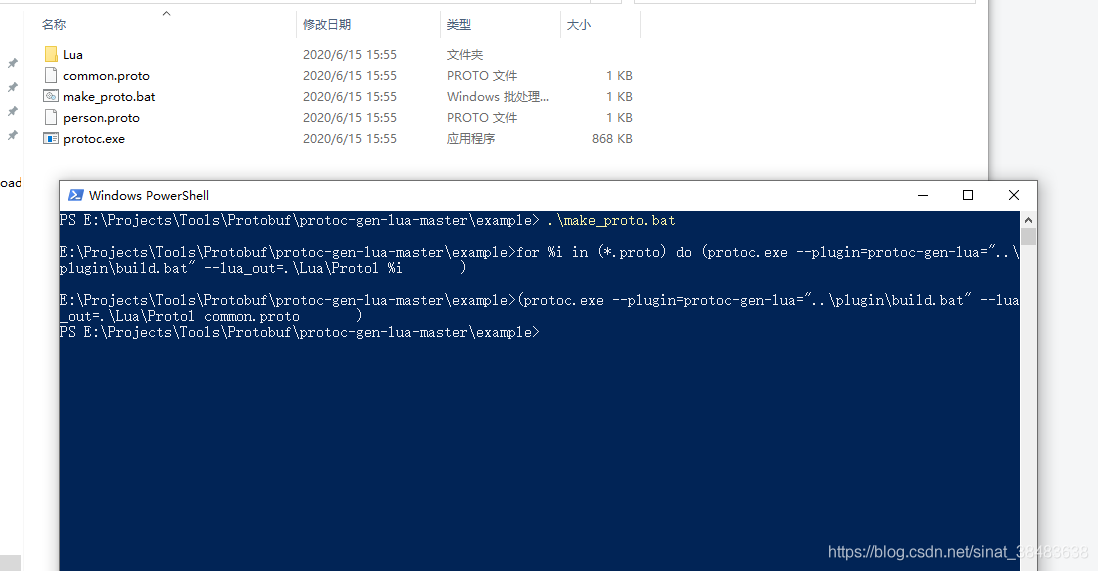
You’ll get a blue command line window and you’ll type.\ the name of your file at the end of the command line and make sure you add a suffix, like mine
.\make_proto.bat

The above methods are effective, of course, there are other methods, friends can choose.


Download and install texlive

Found a download Texlive huazhong university of science and technology of mirror sites, http://mirrors.hust.edu.cn/CTAN/, and then in the systems (directory) find Texlive, click enter, then click enter Images, you can select an image file to download.

The installation process can be found in a blog post

Linux system tools installation, the installation of Ubuntu 16.04 TexLive 2016: https://blog.csdn.net/qq_33429968/article/details/62928742

Installation and problems of texlive2017 in win10 system

2018.1.26
Normally, this would be fine. Texlive2017 installation.
However, when I clicked Install -Tl-Advanced, the installation interface failed to appear, so a pile of them appeared directly in CMD and finally said goodbye to me.
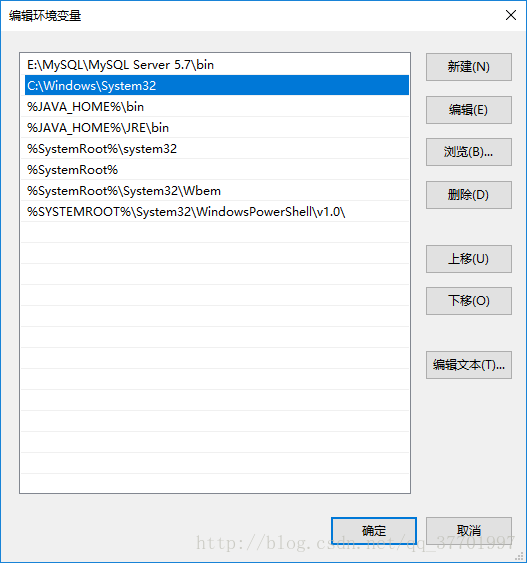
After checking, it is true and effective. System environment variables PATH and PATH are case-insensitive… Maybe it made me delete my my hand is out of control… So you need to add the cmd.exe location to your path, which is: C:\Windows\System32.

Then install it normally.

Running bat file, a flash problem

Since the Web application of the project team is almost done now, JMeter is needed to carry out corresponding stress tests on it. But something strange happened. After matching the environment variables according to the instructions, I clicked on the jmeter.bat file and got a flash of results. Then find various reasons, and finally a successful solution.
In fact, the reason for the problem is very simple, that is, there is a problem with the CMD encoding, which leads to the inability to read the BAT file, thus appearing the phenomenon of flash. Jmeter. bat can be successfully executed by changing the CMD code to GBK through CHCP 936.
From the individual to the general view, if you find a software configuration is fine, but the CMD execution of the corresponding command is not getting any results, then there is a very good chance that there is a CMD coding problem, so you can use it as a breakthrough problem.

GPU hardware acceleration related problems, solve flash screen

In Android development, some models may experience a flash screen problem when using alpha animation with a transparent background. This problem should only be added in the current Activity configuration

android:hardwareAccelerated="true"

This will solve it. Why is that?

In my opinion, the reasons may be as follows:
In general, the frame rate of the GPU should be higher than the refresh rate so that it does not stall or drop frames. If the screen refresh rate is faster than the frame rate, the screen will show the same picture in two frames. When this intermittent situation continues, the user will obviously feel the animation lag or frame drop, and then return to normal, which is often referred to as flash screen, frame skip, lag.

Of course, if you put this code in the application, it will report an error on some Samsung phones

Graphics rendering pipeline diagram of OpenGL

A, an overview of the
The current version of OpenGL is 3.3, which is based on the renderable pipeline to achieve model generation, rendering, image output and other work.
The Render Pipeline is a series of processing of three dimensional vertices into two dimensional discrete pixels. And the user can configure freely in specific shading phases (such as vertex shading and fragment shading phases, which is the biggest difference from fixed pipeline). The brief flow of the renderable pipeline is shown below.
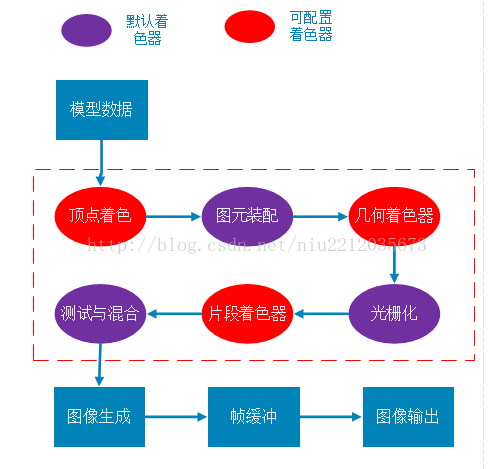
Second, detailed process
The figure above is basically correct, but it’s not very intuitive. How does a three-dimensional vertex transform into a pixel?I’m going to break it down into two big steps, two dimensional vertices, two dimensional vertices discretization.
1. Transformation of three-dimensional coordinates into two-dimensional coordinates
(1) Model vertex construction

Model vertices are built relative to the model’s own coordinates, namely object coordinates. Only the shape of the model can be expressed, and its position and attitude cannot be obtained, so world coordinates must be introduced.
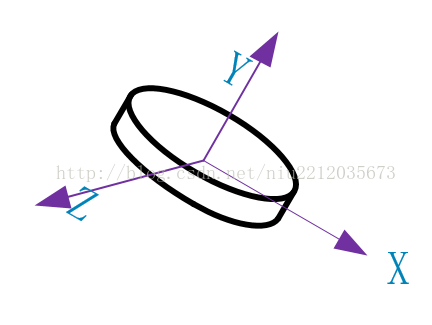
(2) Convert to world coordinates

The world coordinates represent a larger coordinate domain, and each vertex of the model can be represented by the world coordinates. From the object coordinates to the world coordinates, you have to multiply by a world matrix, and you get the model of the relative world coordinates.

(3) World coordinate transformation camera coordinates

The world coordinate transformation of camera coordinates, from object coordinates to world coordinates, is multiplied by an observation matrix, which gives the model relative to the camera coordinates.
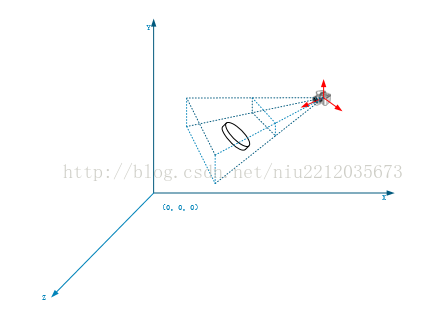
(4) Camera coordinate transformation screen coordinate 1

Camera coordinates transform screen coordinates. Any three – dimensional mode is displayed in two – dimensional form (screen). So a three-dimensional model is usually converted to a two-dimensional model. The first step is to build the cone with the camera as the origin.
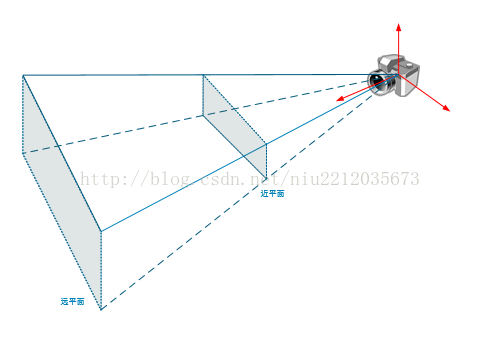
(5) Camera coordinate transformation screen coordinate 2

Next, the 3D coordinates of the model are transformed to 2D coordinates, which are multiplied by the perspective matrix. Finally, a 2D model is projected onto the near plane of the cone.
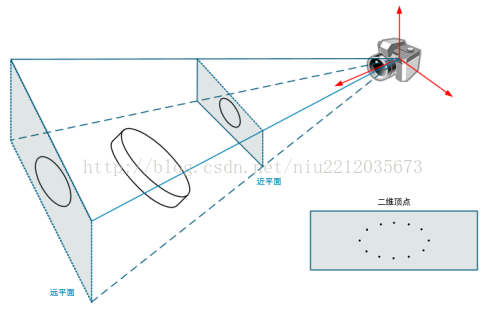
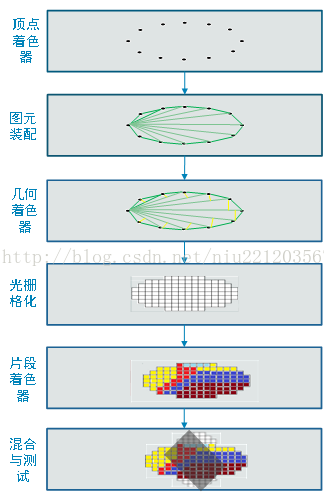
2, 2D vertex pixelation

The vertices obtained by perspective projection are linear and cannot be displayed on the screen. They need to be pixelated, as shown in the following figure:

Solution of OpenGL window flicker in MFC framework

From https://blog.csdn.net/niusiqiang/article/details/43116153
This is because OpenGL has its own function glClear to refresh the background, so Windows should not be allowed to refresh the background of the window. Otherwise, when the window needs to be redrawn, Windows automatically sends WM_ERASEBKGND first, and the default handler uses a white background brush. When the background color used by OpenGL is not white, there is a flicker of white in the drawing. This is especially true when doing animation.
Therefore, the configuration step is missing one step. Activate the message of WM_ERASEBKGND in the MFC program after the configuration step is completed
Message processing of the parent window class is disallowed in the function. It simply returns a TRUE. Return CView::OnEraseBkgnd(PDC)
You should now change this to return TRUE to solve the splash screen problem.

Reproduced in: https://www.cnblogs.com/redips-l/p/9039555.html

MFC flash screen solution

These two days I have been doing UI design, because the company did not use commercial Direct UI and other interface libraries. So the developers had to draw their own controls, so the task of writing the UI fell to me as a new coder. Then the problem I had been avoiding came up against me. Smecta.

problem a, own drawing background is hiding the interface on the original control, in order to solve this problem, but get me hanging silk maxed out.

a, painted a background, and then the area of access to all controls, make it invalid. So the problem was solved, but a new problem came, is the flash screen problem. This problem is caused by overwriting the background and control color. In other words, this scheme is eunuch.

> For this kind of scheme, I just thought, should be OK. But it’s too difficult. I don’t have the ability to do it.

> Set the dialog’s clipChildren property to true. When you draw a window, you cut out the area of the control and copy it back when it is finished. This property is customized for the drawing, so the above problem is solved with just one click. The solution turned out to be so simple.

if draw refresh frequently, this there is no doubt that the splash screen will appear.

Scheme 1, the use of double buffer, no pressure. So every time I draw it, I just paste it on.

2, in painting background brush set for NULL_BRUSH background before you leave. The system could not draw.

3, to draw the background of function (OnEraseBkgnd (pDC) CDC *) content to watch out, with the return true replacement, and then system, there is no way to use the default brush to draw the background. However, the latter two methods solve the flicker, but the interface can be a mess.

using GDI resource summary:

first of all, we all know this law have borrow have also, so when learning c + + so follow this rule, otherwise you will hit a wall.

when using handle with H, for example: the HBITMAP etc, after using DeleteObject remember;

For GDI wrapped classes with C, this is not necessary because the system has already freed them during object destructing. If you leave the system resource handle with the class Detach, then you need to take over the management of the system resource, otherwise the system resource leak will occur.

when using CDC, if the memory DC created after running out also need DeleteDc…..