Recently, I found that I have a virus in my USB flash disk, and the contents of the USB flash disk are hidden. However, when I view the properties, all of them actually occupy the memory. The effect is as shown in the figure. I believe many friends have encountered this kind of problem, so how to solve it?
The figure is as follows:


First of all, check whether the contents of the U disk are cleared or hidden. If it is cleared by a virus, you can only use the recovery tool to recover. But if it’s just hidden, you can use the “tools” button in the menu bar -& gt ; Folder selection -& gt ; see -& gt ; Show hidden folders to show hidden files.

If all the hidden files exist, you can use the following method to remove them.
1. Create a new TXT in the USB flash disk with any name;
2. Enter:
attrib -s -h /s /d3. Change the suffix to. Bat, and then double-click to run.
You can also pay attention to my personal blog
Other English Blogs
The solution of U disk content hidden by virus
Category Archives: How to Fix
Causes and solutions of errors in “insufficient ram for flash algorithms”
The error of “insufficient ram for flash algorithms” usually has a prompt window of “can’t load flash programming algorithm!” as shown in the following figure:
in case of “insufficient ram for flash algorithms” error, there will be a prompt window of “can’t load flash programming algorithm!”
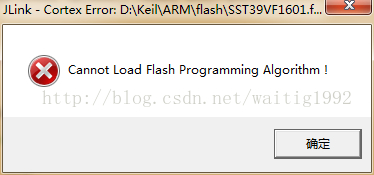
“Insufficient ram for flash algorithms” literally means “insufficient RAM space for loading flash algorithm”.
This error usually occurs after adding a new flash burning algorithm.
Reason: the flash burning algorithm itself is also equivalent to a small program, which is executed by the chip in the process of burning program from JLINK to flash, so the burning algorithm needs to allocate memory space in the burning process. Open the settings of the utilities tab to see its configuration options;
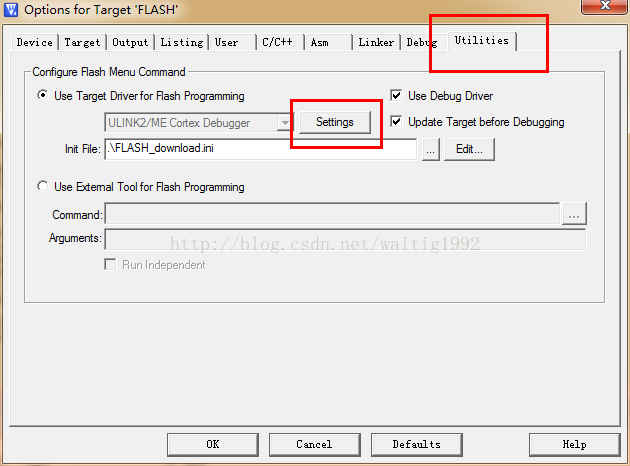
As shown in the figure:
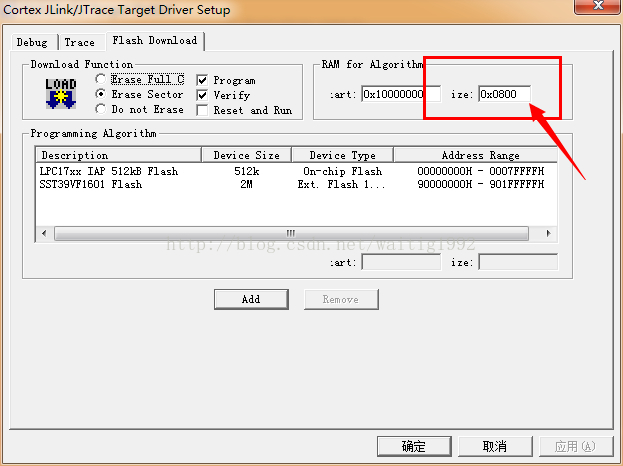
The place indicated by the arrow in the figure is the size of the RAM space for storing the burning algorithm. If the allocation of this place is too small, the above error message will be caused.
The problem can be solved by changing its size to a larger one.
For reference only.
If you want to reprint it, please note: the reasons and solutions for the errors in insufficientram for flash algorithms
A little bug of CSDN blog
Recently, when editing the blog, I found a small flaw in CSDN, which should not be a bug, but if I don’t pay attention, it may also bring a lot of trouble to users.
Hyperlinks are sometimes used when editing blogs. When adding hyperlinks, the interface of CSDN is as follows:
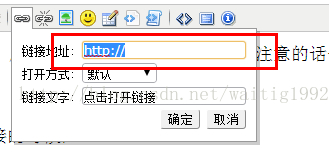
Users can enter their own link address in the link address column, but please note that the “http://” field is selected by default, that is, if you copy a link address and want to paste it into this column, you will erase the “http://” field, leaving only your own pasted address.
And in practice, the probability is very high.
What’s the difference between HTTP and no HTTP?
From the perspective of users, they don’t want to make a difference, but in practice, there is a big difference between HTTP and no http.
There is no HTTP at the beginning. The browser will treat the link as a relative address by default, that is, the address relative to the current address“ blog.csdn.net/waitig1992/article/details/ ”Add the address you entered after this address.
But most users don’t want this result. They just want the browser to jump to the link they input, which leads to the lack of user experience.
Some people will say: those who publish articles on CSDN are all technical giants. They should know these problems and can avoid them by themselves. They can modify them by themselves.
But all things can’t be solved by users themselves. Moreover, with the fierce competition, some small details may determine the success or failure of the enterprise.
And not everyone has noticed.
On the contrary, baidu space noticed this detail, its hyperlink input box does not have “http://”, but automatically detects changes after users edit. As shown in the figure:
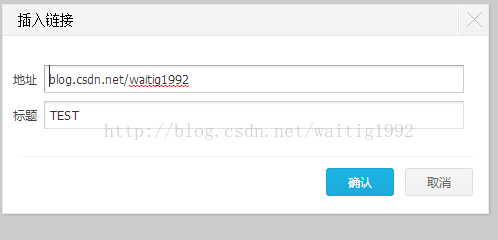
After editing, it will automatically detect and modify, and add “http://”, as shown in the figure:
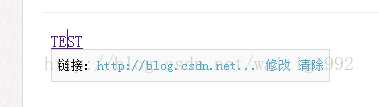
In this way, users don’t have to care whether they write “http://”, but can focus more on their own articles.
That’s the details.
Appendix:
This link has “http://” blog.csdn.net/waitig1992
There is no http:// blog.csdn.net/waitig1992
You can click to see the difference;
I hope CSDN official can pay attention to this problem, and I will also send email feedback.
Finally, I wish CSDN more and more fire, you can all think of it!
docker-compose Error Traceback (most recent call last)
docker-compose problem Traceback (most recent call last) Description.
After executing walle (walle) to automatically deploy the image, execute
docker-compose up -d && docker-compose logs -f
The error is reported as follows.
How to Solve:
pip uninstall requests
pip install –ignore-installed requests
Traceback (most recent call last):
File “/usr/local/lib/python3.9/site-packages/urllib3/connectionpool.py”, line 699, in urlopen
httplib_response = self._make_request(
File “/usr/local/lib/python3.9/site-packages/urllib3/connectionpool.py”, line 394, in _make_request
conn.request(method, url, **httplib_request_kw)
File “/usr/local/Cellar/[email protected]/3.9.2_4/Frameworks/Python.framework/Versions/3.9/lib/python3.9/http/client.py”, line 1255, in request
self._send_request(method, url, body, headers, encode_chunked)
File “/usr/local/Cellar/[email protected]/3.9.2_4/Frameworks/Python.framework/Versions/3.9/lib/python3.9/http/client.py”, line 1301, in _send_request
self.endheaders(body, encode_chunked=encode_chunked)
File “/usr/local/Cellar/[email protected]/3.9.2_4/Frameworks/Python.framework/Versions/3.9/lib/python3.9/http/client.py”, line 1250, in endheaders
self._send_output(message_body, encode_chunked=encode_chunked)
File “/usr/local/Cellar/[email protected]/3.9.2_4/Frameworks/Python.framework/Versions/3.9/lib/python3.9/http/client.py”, line 1010, in _send_output
self.send(msg)
File “/usr/local/Cellar/[email protected]/3.9.2_4/Frameworks/Python.framework/Versions/3.9/lib/python3.9/http/client.py”, line 950, in send
self.connect()
File “/usr/local/lib/python3.9/site-packages/docker/transport/unixconn.py”, line 43, in connect
sock.connect(self.unix_socket)
FileNotFoundError: [Errno 2] No such file or directory
Error (1820) if the password is not changed in time after MySQL installation
The password of MySQL was not changed in time when logging in for the first time
When downloading MySQL for the first time, because the password was not changed in time, it was prompted to change the password first.
ERROR 1820 (HY000): You must reset your password using ALTER USER statement before executing this statement.
When changing the password according to the requirements, the following error occurs when executing SQL command:
mysql> alter user 'root'@'localhost' identified by '123456';
ERROR 1819 (HY000): Your password does not satisfy the current policy requirements
The reason is that the password does not conform to the password rules, which is too simple.
Therefore, it is necessary to modify the password policy in time
set global validate_password_policy=0
set global validate_password_length=1;
validate_ password_ polic =
0 or low verify length only
1 or medium verify length, number, case and special characters
2 or strong verify length, number, case, special character and dictionary file
mysql> ALTER USER 'root'@'localhost' IDENTIFIED BY '123456';
Query OK, 0 rows affected (0.00 sec)
Elememt UI introduces components on demand to report errors
Background: the project based on vue-cli3 introduces error reporting on demand
According to the official documents, introduce components as required, as follows:
1. Install: NPM install Babel plugin component – d
2 babel.config.js Modify configuration in
module.exports = {
  presets: [["es2015", { modules: false }]],
  plugins: [
    [
      "component",
      {
        libraryName: "element-ui",
        styleLibraryName: "theme-chalk",
      },
    ],
  ],
};
3. After running, Babel compiles and reports an error:
cannot find module ‘babel-preset-es2015’
4. Query the document and find the following sentence:
this preset is not recommended. If you want to keep it up to date, please use env preset
5. Solution:
1) install NPM install — save dev @ Babel/preset env
2) modify babel.config.js “Es2015” is “@ Babel/preset env”
3)
Official website link reference: https://babel.docschina.org/docs/en/6.26.3/babel-preset-es2015/
Error report when Hyper-V creates virtual machine
When creating a virtual machine, the following error is reported
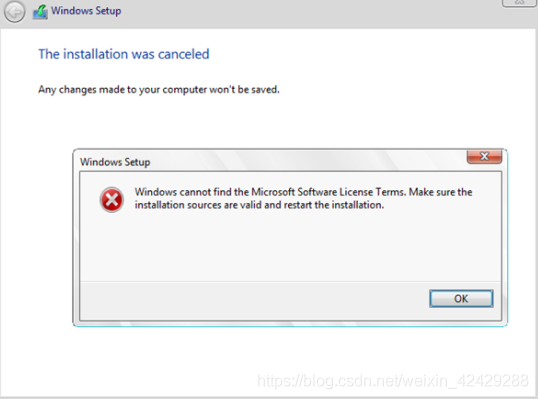
Solution:
First, shut down the current virtual machine and create a new one,
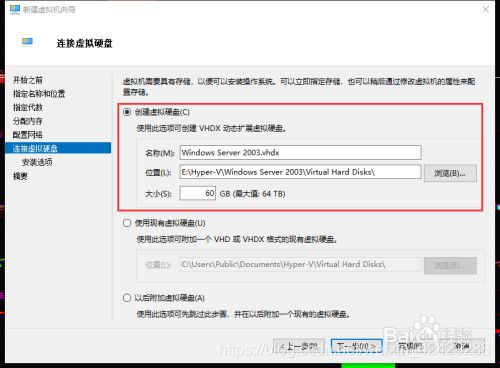
Don’t allocate so much memory. I allocated 512MB instead
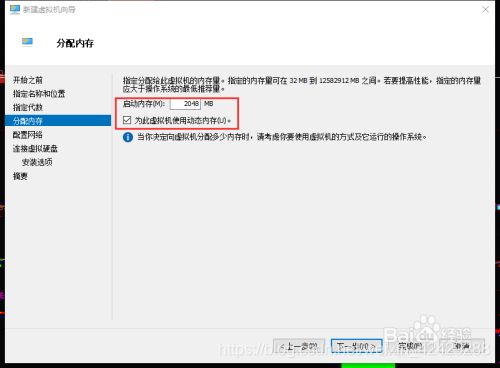
When creating the virtual hard disk, it was a little bigger. I changed it to 60GB
And then there’s no mistake
Reference website
http://woshub.com/windows-cannot-find-microsoft-software-license-terms/
After installing the dual system , Code error
1. After installing the Linux system, the executable code in win10 will report an error. It will display importerror: DLL load failed: this volume does not contain a recognized file system. Make sure that all requested file system drivers are loaded and that the volume is not corrupted
2. Run pychar, do not call the package, for example
print(2+3)If it runs successfully, pychar is OK , Modify other environments to see if they can run successfully . That’s how I solved it .
Error report when installing arpspoof in Kali
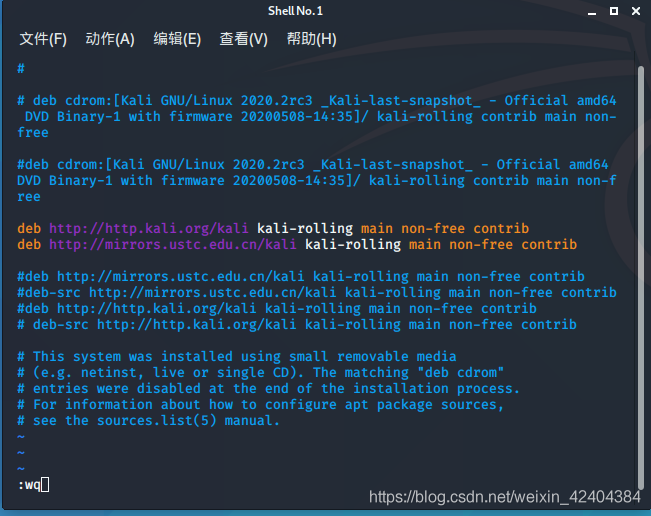
“21040;” 32479;”228411;” sources. (GROANS)
root :$35; cd /
root :/’35; cd etc
root :/etc’35; cd apt
root :/etc/apt’35; vi sources.
“25509;” 30528;”281553deb;” http://www.bing.com/searc….tin-round+rock+texas Kali-rolling main non-free contrib 25110deb http://mirrors.ustc.edu.cn/kali Kali-rolling main non-free contrib -28982;”Esc,”:wq”20445;”23384;”368644;”
egg.js The frame post request reported an error of invalid CSRF token security verification, which has been solved
It has to be said that Alibaba’s egg framework is quite good, with its own security verification.
Problem: get request is normal, post request background will report such an error.
" nodejs.ForbiddenError : invalid csrf token"
There is an official explanation for this problem. Click to jump to the official safety explanation of egg. There is not too much explanation here
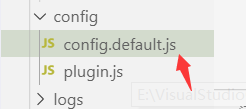
Method 1: in the confit.default.js Add the following code to turn off security verification (not recommended)
config.security = {
    csrf: {
      enable: false,
    },
  };
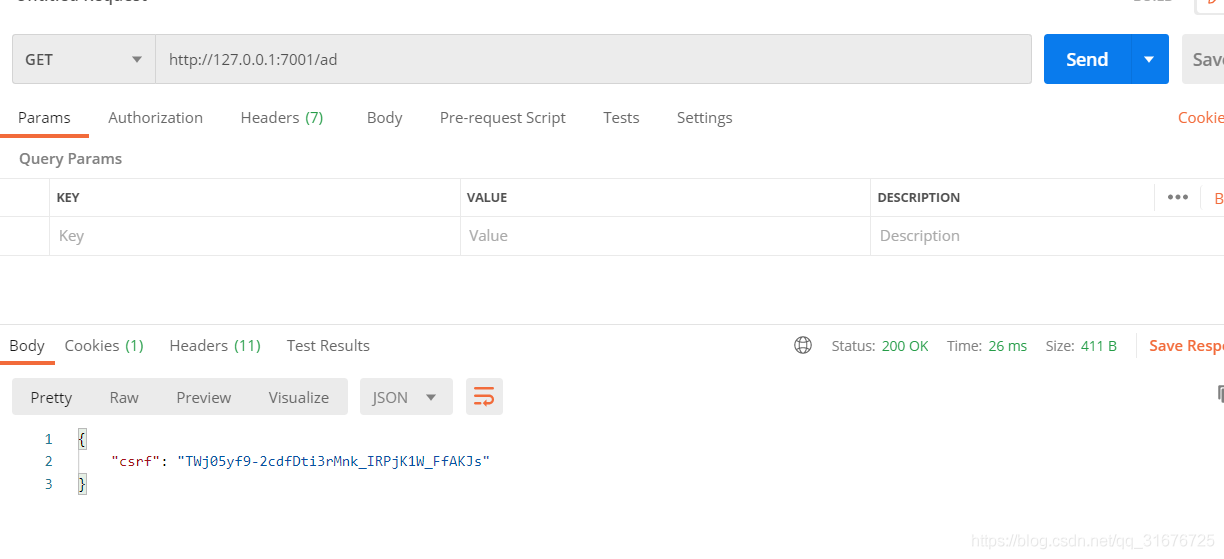
Method 2: when the front-end initializes the interface, let the front-end get to request an interface first, and the background returns a secret key to the front-end. Let the front-end put it in the headers request header when the post request is made, and the egg will automatically verify the secret key, and the request will succeed only if the verification is successful.
1. Egg background code, get interface returns secret key: 2
async index() {
    const { ctx } = this;
    ctx.body = {
      csrf:ctx.csrf
    };
}
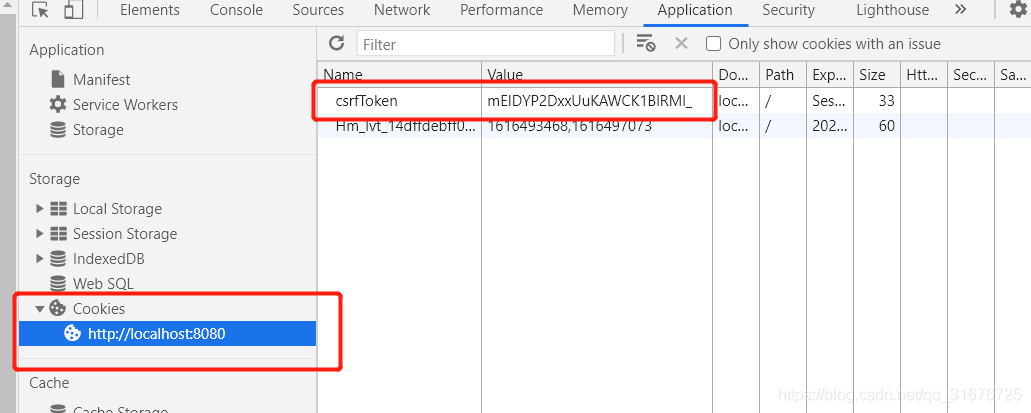
The following two methods are demonstrated. The postman test is as follows. At the same time, if a request is made in the front end, a secret key pair will be generated in the cookies. As shown in the figure below, the secret key will change after each request, so the CSRF obtained in the front end should be put in the headers request header in a global way.
2. Front end secret key request: 2
axios.post('apis/add', data,{headers:{'x-csrf-token': headData}})
The postman test is as follows: directly copy CSRF
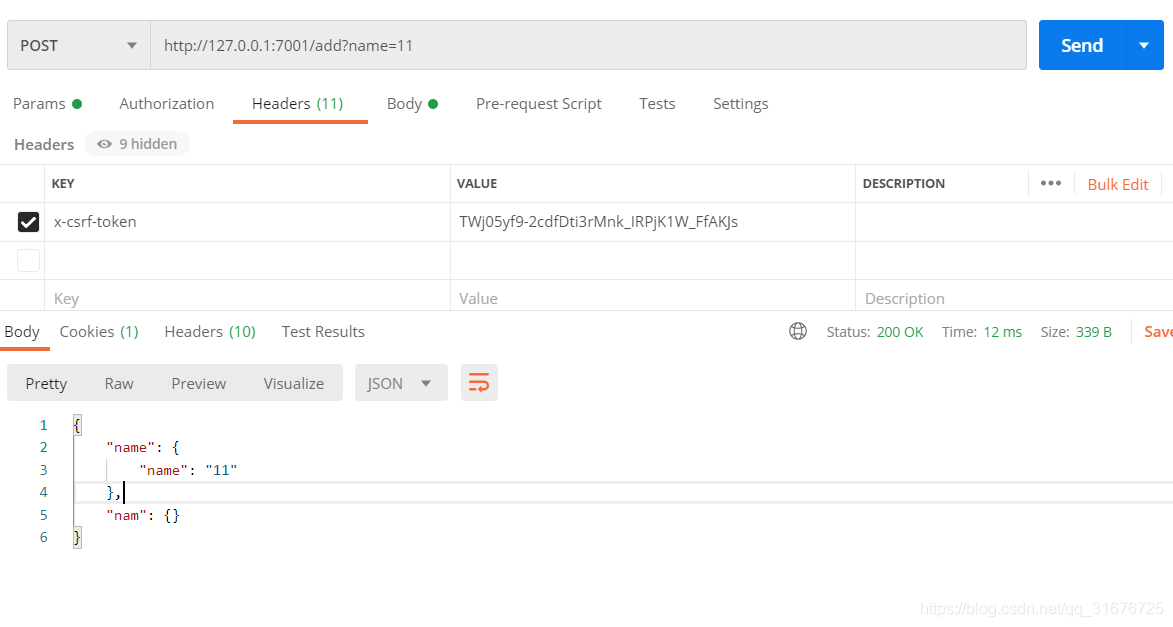
OK, successful request, perfect solution, start moving bricks
Eclipse create servlet file error
When creating a web project in eclipse, an error is reported when creating a JSP or servlet file, as follows:
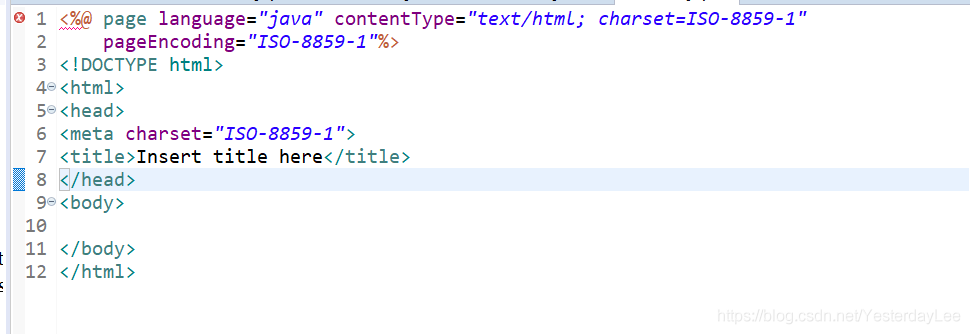
the error is: the superclass“ javax.servlet.http . httpservlet “was not found on the Java build path“ javax.servlet.http The. Httpservlet “class cannot be found in the project’s build path, that is, there is no class to send and receive requests.
If you look at the error reported by the servlet file:
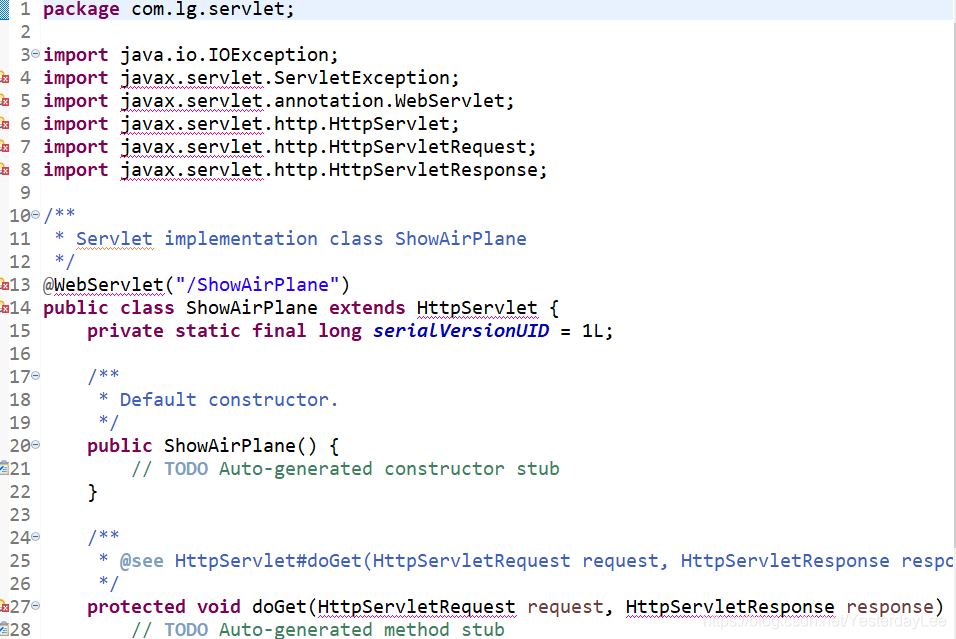
is also the error caused by the lack of servlet related classes.
The specific solution is:
right click on the specific project — & gt; select Properties — & gt; select “Java build path”, and then follow the steps below:
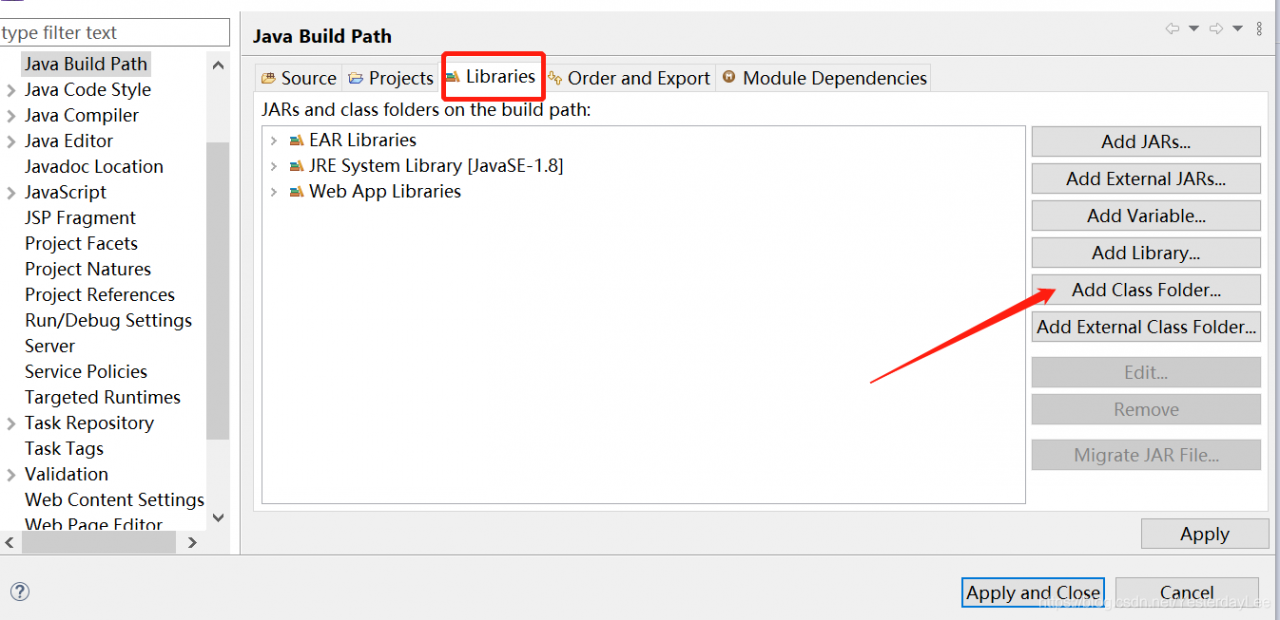
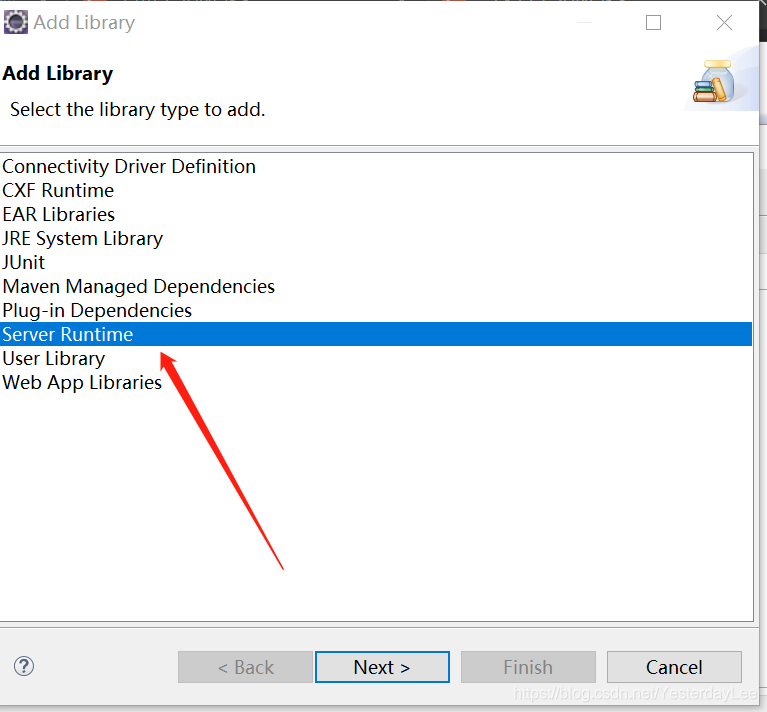
Click next, select the server, click Finish
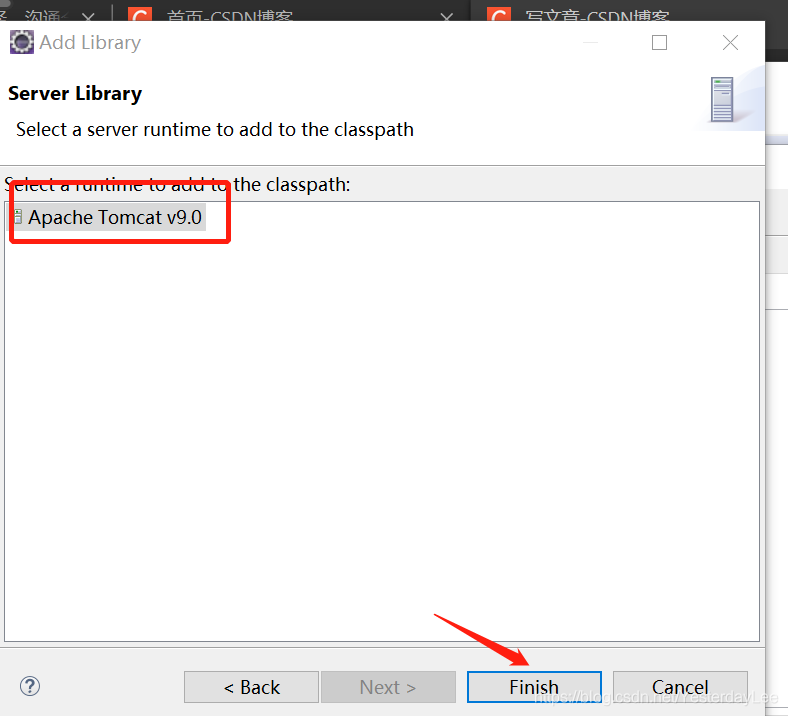
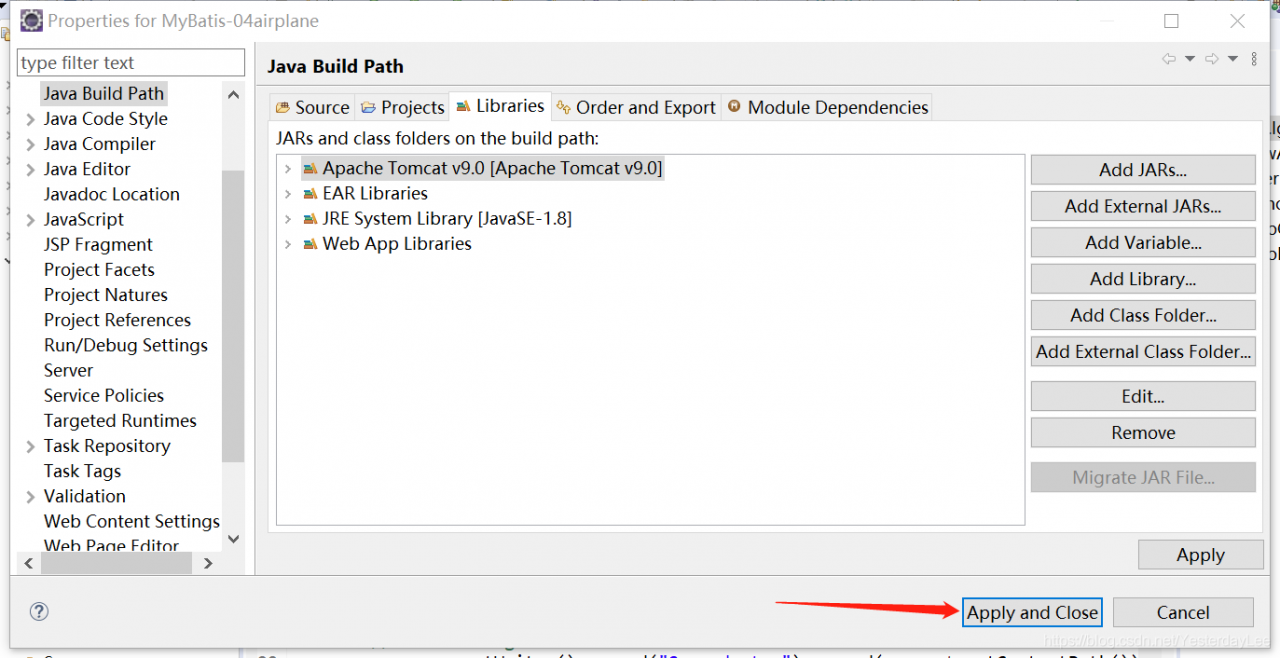
and then click “apply and close”.
Several solutions to HDF5 error reporting in Python environment
Several solutions to the problem of HDF5 error reporting in Python environment (personal test)
the content of error reporting is as follows:
warning! HDF5 library version mismatched error
the HDF5 header files used to compile this application do not match
the version used by the HDF5 library to which this application is linked.
data corruption or segmentation faults may occur if the application continues.
This can happen when an application was compiled by one version of HDF5 but
linked with a different version of static or shared HDF5 library.
You should recompile the application or check your shared library related
settings such as ‘LD_ LIBRARY_ PATH’.
You can, at your own risk, disable this warning by setting the environment
variable ‘HDF5_ DISABLE_ VERSION_ CHECK’ to a value of ‘1’.
Setting it to 2 or higher will suppress the warning messages totally.
Headers are 1.10.4, library is 1.10.5
There are two ways to solve this problem.
first of all, this problem may be the mismatch of HDF5 library, or it may be something similar to warning. I will talk about it in detail below.
The first solution: uninstall HDF5 and then install it again.
The code executed by the terminal is as follows:
CONDA install HDF5
there are many friends on the Internet who use this method to be useful. I personally test that this method is useless to me.
The second solution: check the set path: LD_ LIBRARY_ Path
I personally test: because the system I use is win10, but LD_ LIBRARY_ I couldn’t find the path for a long time. Later, I searched for the path of Linux, so I didn’t use this method.
The third solution: the HDF5_ DISABLE_ VERSION_ Check is set to a higher level, ignoring warnings.
Before import tensorflow, add the following code to the code:
Import OS;
Import OS;
Import OS os.environ [‘HDF5_ DISABLE_ VERSION_ Check ‘] =’2’
my personal test: this method is really useful!